Page 534 of 612

5348-2. Steps to take in an emergency
COROLLA_TMMMS_TMMC_U (OM12F00U)
■Starting the engine when the battery is discharged
The engine cannot be started by push-starting.
■ To prevent battery discharge
●Turn off the headlights and the audio system while the engine is off.
● Turn off any unnecessary electrical components when the vehicle is running
at a low speed for an extended period, such as in heavy traffic.
■ Charging the battery
The electricity stored in the battery will discharge gradually even when the
vehicle is not in use, due to natural discharge and the draining effects of cer-
tain electrical appliances. If the vehicle is left for a long time, the battery may
discharge, and the engine may be unable to start. (The battery recharges
automatically during driving.)
■ When recharging or replacing the battery
●Vehicles with a smart key system: In some cases, it may not be possible to
unlock the doors using the smart key system when the battery is dis-
charged. Use the wireless remote control or the mechanical key to lock or
unlock the doors.
● The engine may not start on the first attempt after the battery has recharged
but will start normally after the second attempt. This is not a malfunction.
● Vehicles with a smart key system: The engine switch mode is memorized by
the vehicle. When the battery is reconnected, the system will return to the
mode it was in before the battery was discharged. Before disconnecting the
battery, turn the engine switch off.
If you are unsure what mode the engine switch was in before the battery dis-
charged, be especially careful when reconnecting the battery.
● Make sure that the key is not inside the vehicle when recharging or replac-
ing the battery. The key may be locked in the vehicle if the alarm is acti-
vated. ( P. 69)
Page 545 of 612
5459-1. Specifications
9
Vehicle specifications
COROLLA_TMMMS_TMMC_U (OM12F00U)
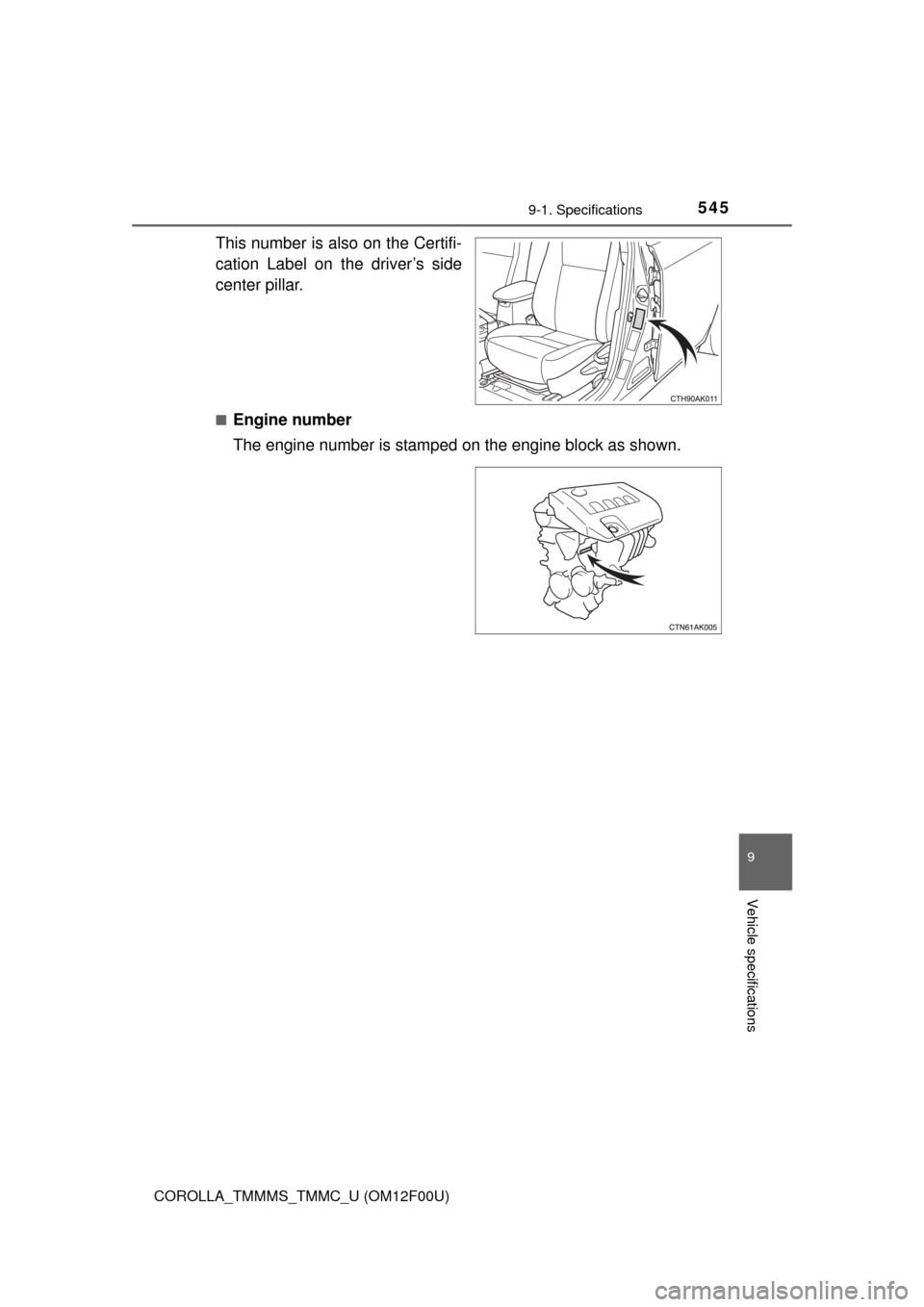
This number is also on the Certifi-
cation Label on the driver’s side
center pillar.
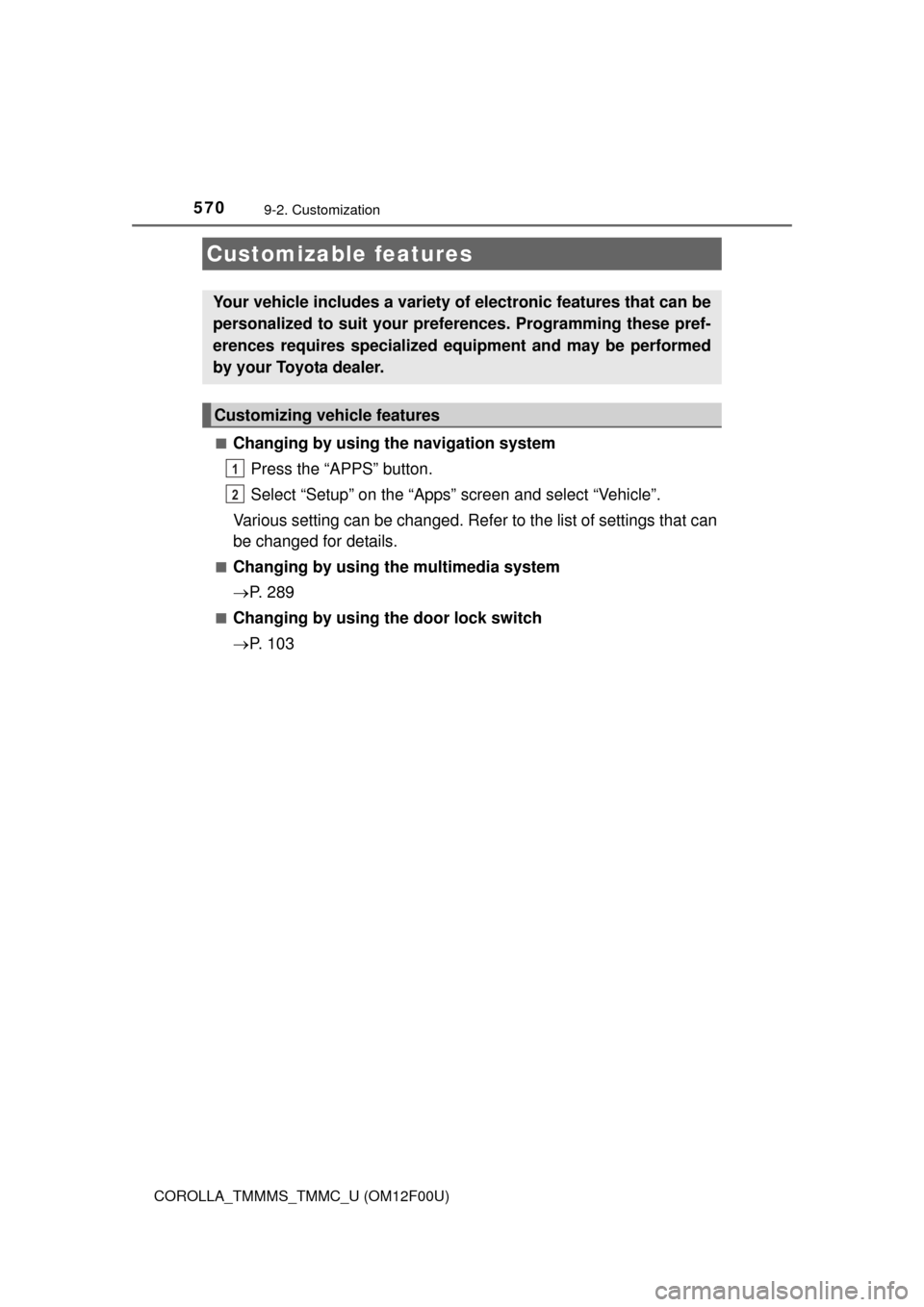
■Engine number
The engine number is stamped on the engine block as shown.
Page 550 of 612
5509-1. Specifications
COROLLA_TMMMS_TMMC_U (OM12F00U)
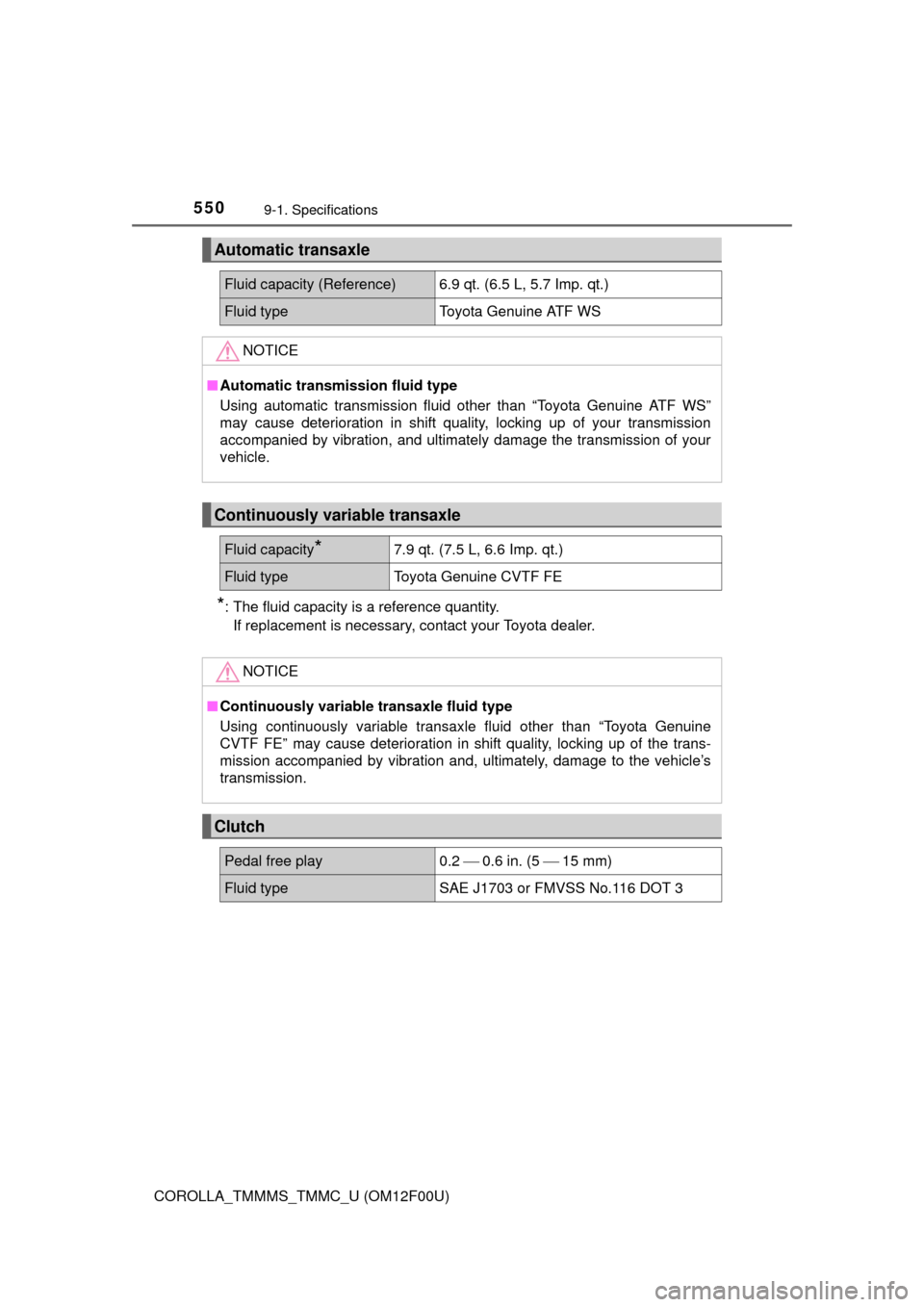
*: The fluid capacity is a reference quantity.If replacement is necessary, contact your Toyota dealer.
Automatic transaxle
Fluid capacity (Reference) 6.9 qt. (6.5 L, 5.7 Imp. qt.)
Fluid type Toyota Genuine ATF WS
NOTICE
■Automatic transmission fluid type
Using automatic transmission fluid other than “Toyota Genuine ATF WS”
may cause deterioration in shift quality, locking up of your transmission
accompanied by vibration, and ultimately damage the transmission of your
vehicle.
Continuously variable transaxle
Fluid capacity*7.9 qt. (7.5 L, 6.6 Imp. qt.)
Fluid typeToyota Genuine CVTF FE
NOTICE
■Continuously variable transaxle fluid type
Using continuously variable transaxle fluid other than “Toyota Genuine
CVTF FE” may cause deterioration in shift quality, locking up of the trans-
mission accompanied by vibration and, ultimately, damage to the vehicle’s
transmission.
Clutch
Pedal free play 0.2 0.6 in. (5 15 mm)
Fluid type SAE J1703 or FMVSS No.116 DOT 3
Page 570 of 612
570
COROLLA_TMMMS_TMMC_U (OM12F00U)
9-2. Customization
■Changing by using the navigation systemPress the “APPS” button.
Select “Setup” on the “Apps” screen and select “Vehicle”.
Various setting can be changed. Refer to the list of settings that can
be changed for details.
■Changing by using the multimedia system
P. 2 8 9
■Changing by using the door lock switch
P. 1 0 3
Customizable features
Your vehicle includes a variety of electronic features that can be
personalized to suit your preferences. Programming these pref-
erences requires specialized e quipment and may be performed
by your Toyota dealer.
Customizing vehicle features
1
2
Page 571 of 612
5719-2. Customization
9
Vehicle specifications
COROLLA_TMMMS_TMMC_U (OM12F00U)
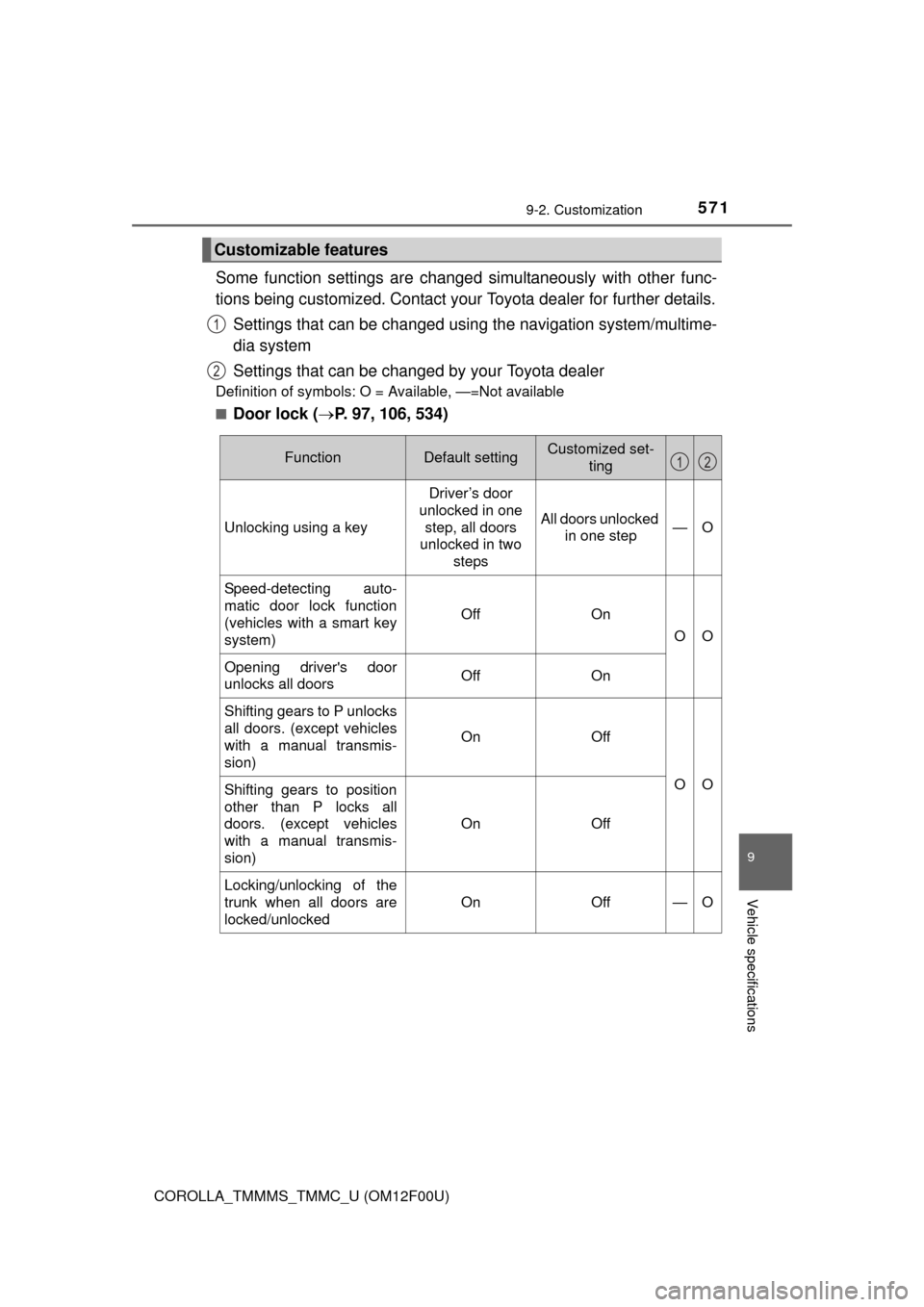
Some function settings are changed simultaneously with other func-
tions being customized. Contact your Toyota dealer for further details.
Settings that can be changed using the navigation system/multime-
dia system
Settings that can be changed by your Toyota dealer
Definition of symbols: O = Available, —=Not available
■
Door lock ( P. 97, 106, 534)
Customizable features
1
2
FunctionDefault settingCustomized set-
ting
Unlocking using a key
Driver’s door
unlocked in one
step, all doors
unlocked in two steps
All doors unlocked in one step—O
Speed-detecting auto-
matic door lock function
(vehicles with a smart key
system)
OffOn
OO
Opening driver's door
unlocks all doorsOffOn
Shifting gears to P unlocks
all doors. (except vehicles
with a manual transmis-
sion)
OnOff
OOShifting gears to position
other than P locks all
doors. (except vehicles
with a manual transmis-
sion)
OnOff
Locking/unlocking of the
trunk when all doors are
locked/unlocked
OnOff—O
12
Page 572 of 612
5729-2. Customization
COROLLA_TMMMS_TMMC_U (OM12F00U)■
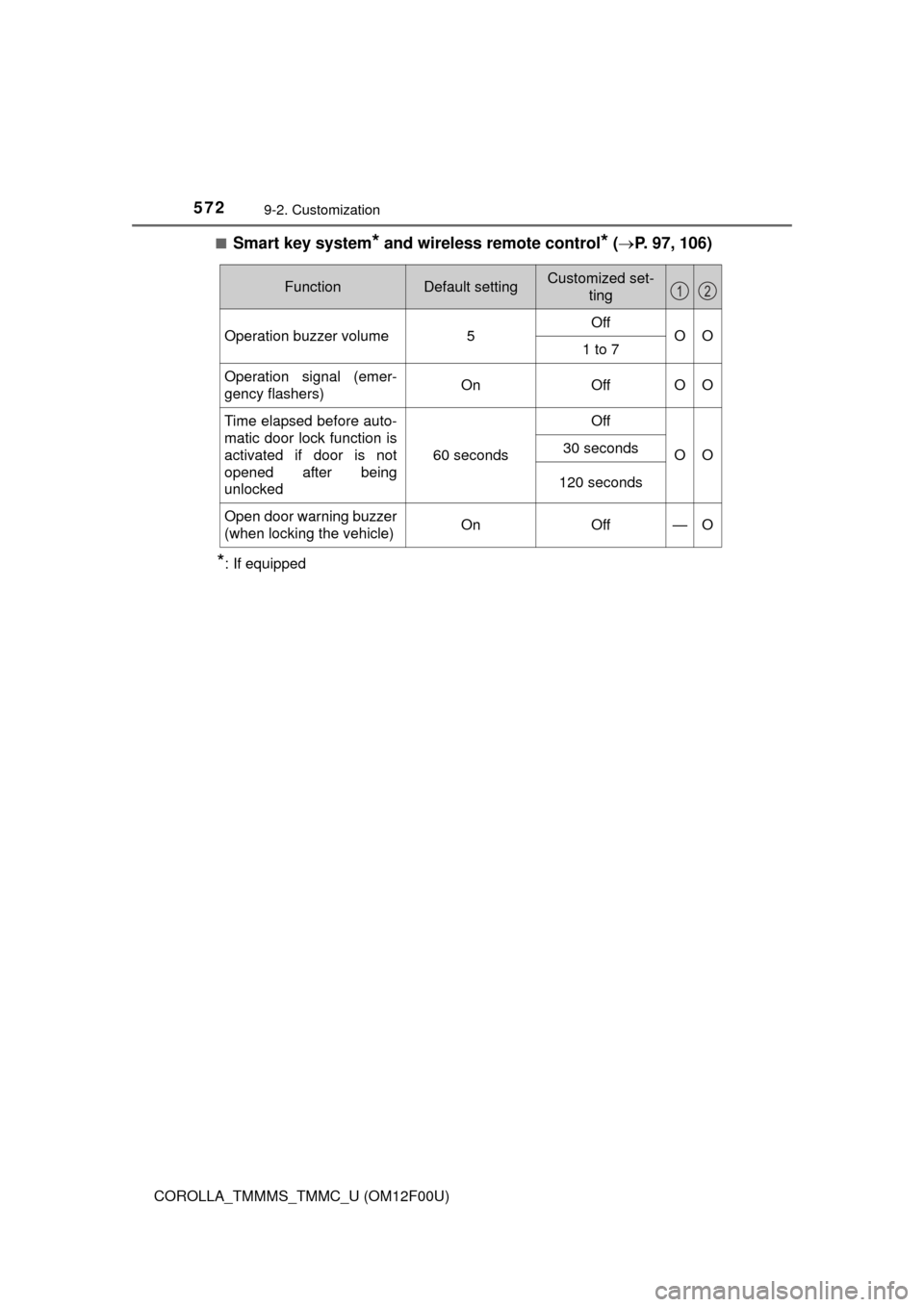
Smart key system* and wireless remote control* (
P. 97, 106)
*: If equipped
FunctionDefault settingCustomized set-
ting
Operation buzzer volume5OffOO1 to 7
Operation signal (emer-
gency flashers)OnOffOO
Time elapsed before auto-
matic door lock function is
activated if door is not
opened after being
unlocked
60 seconds
Off
OO30 seconds
120 seconds
Open door warning buzzer
(when locking the vehicle)OnOff—O
12
Page 573 of 612
5739-2. Customization
9
Vehicle specifications
COROLLA_TMMMS_TMMC_U (OM12F00U)■
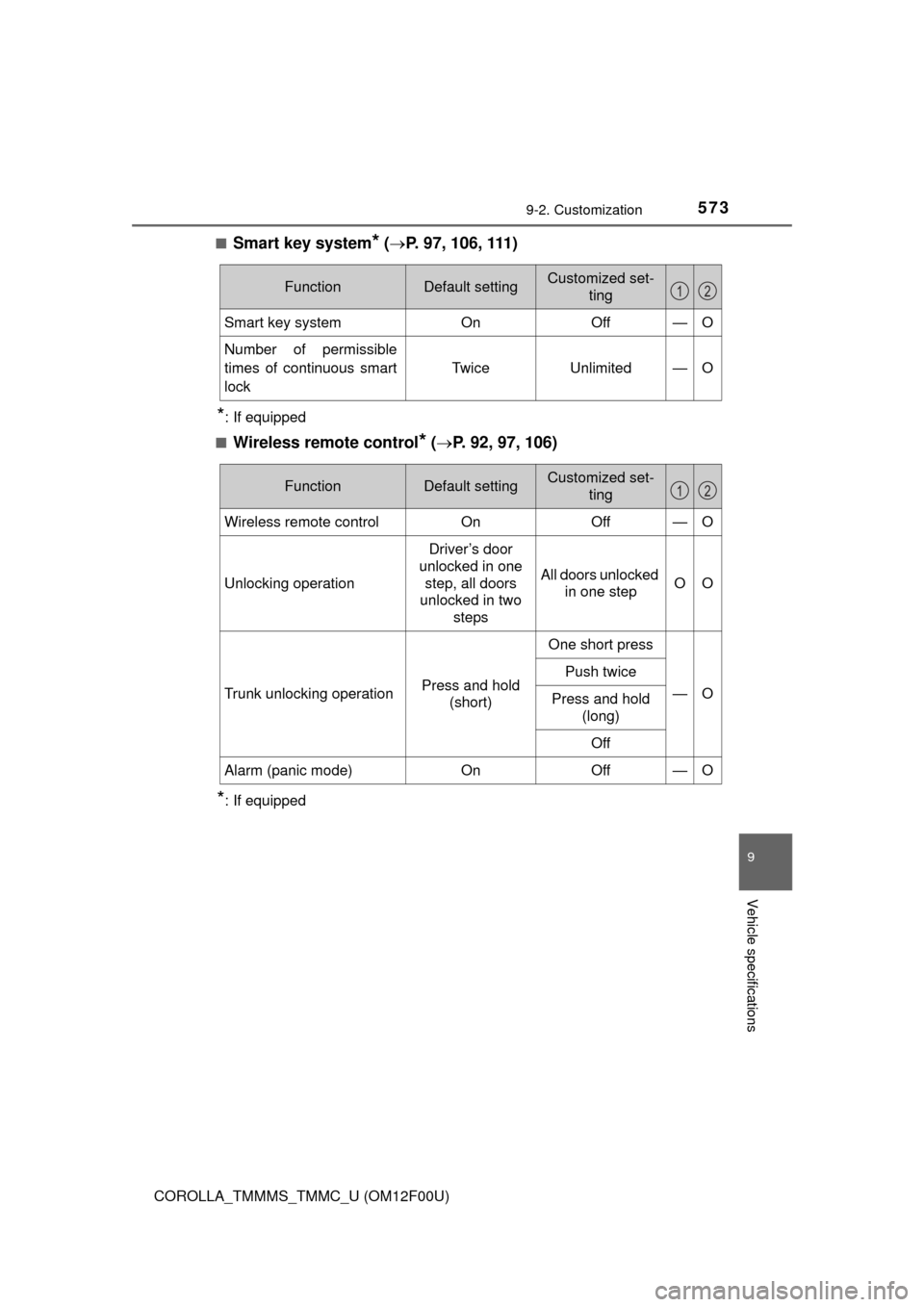
Smart key system* (
P. 97, 106, 111)
*: If equipped
■
Wireless remote control* ( P. 92, 97, 106)
*: If equipped
FunctionDefault settingCustomized set-
ting
Smart key systemOnOff—O
Number of permissible
times of continuous smart
lock Twice Unlimited — O
12
FunctionDefault settingCustomized set-
ting
Wireless remote controlOnOff—O
Unlocking operation
Driver’s door
unlocked in one
step, all doors
unlocked in two steps
All doors unlocked in one stepOO
Trunk unlocking operationPress and hold (short)
One short press
—O
Push twice
Press and hold (long)
Off
Alarm (panic mode)OnOff—O
12
Page 575 of 612
5759-2. Customization
9
Vehicle specifications
COROLLA_TMMMS_TMMC_U (OM12F00U)■
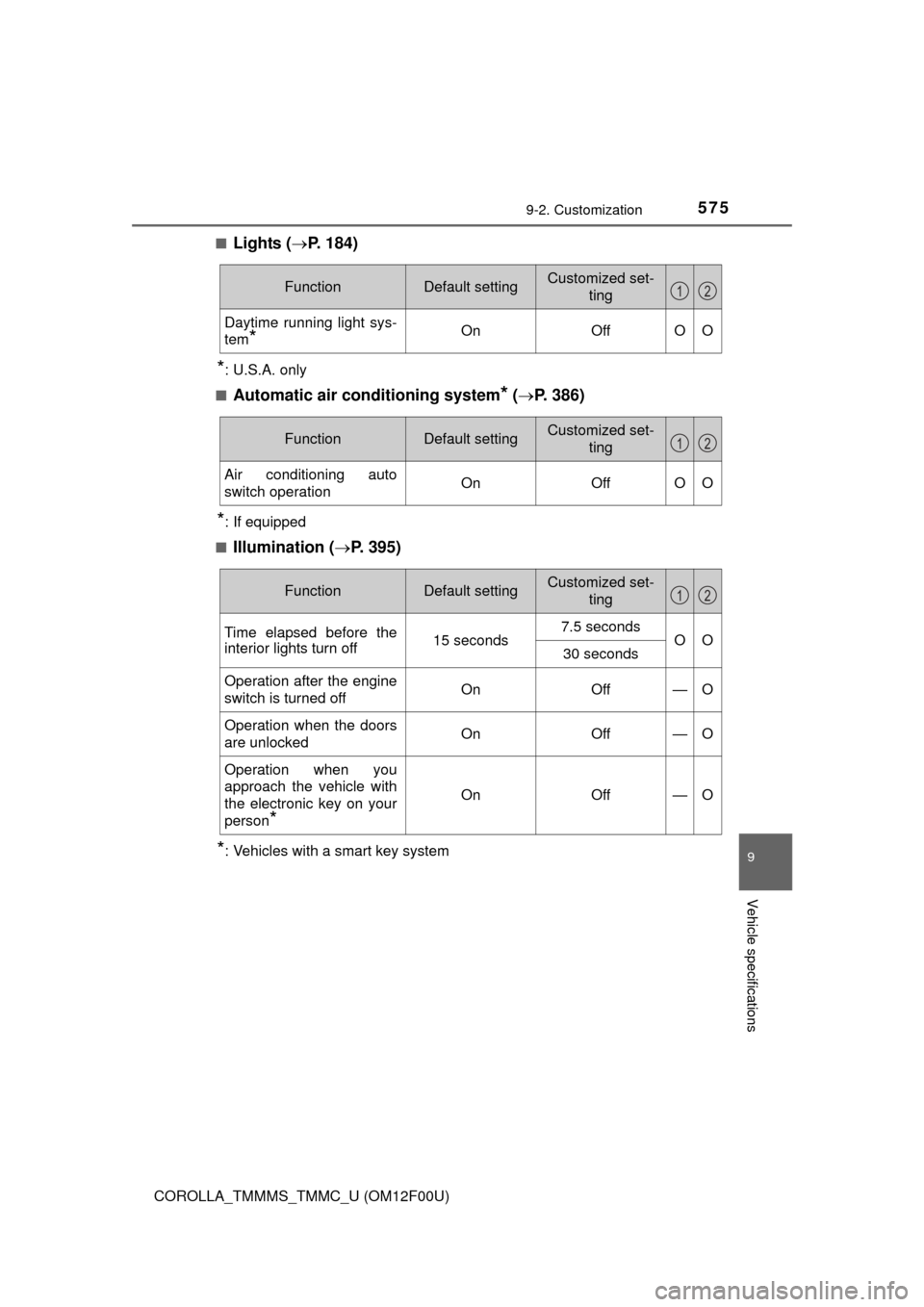
Lights (
P. 184)
*: U.S.A. only
■
Automatic air conditioning system* ( P. 386)
*: If equipped
■
Illumination ( P. 395)
*: Vehicles with a smart key system
FunctionDefault settingCustomized set-
ting
Daytime running light sys-
tem
*OnOffOO
12
FunctionDefault settingCustomized set-ting
Air conditioning auto
switch operationOnOffOO
12
FunctionDefault settingCustomized set-
ting
Time elapsed before the
interior lights turn off15 seconds7.5 secondsOO30 seconds
Operation after the engine
switch is turned offOnOff—O
Operation when the doors
are unlockedOnOff—O
Operation when you
approach the vehicle with
the electronic key on your
person
*
OnOff—O
12