2015 TOYOTA AVENSIS sensor
[x] Cancel search: sensorPage 276 of 648
2764-5. Toyota Safety Sense
AVENSIS_OM_OM20C20E_(EE)
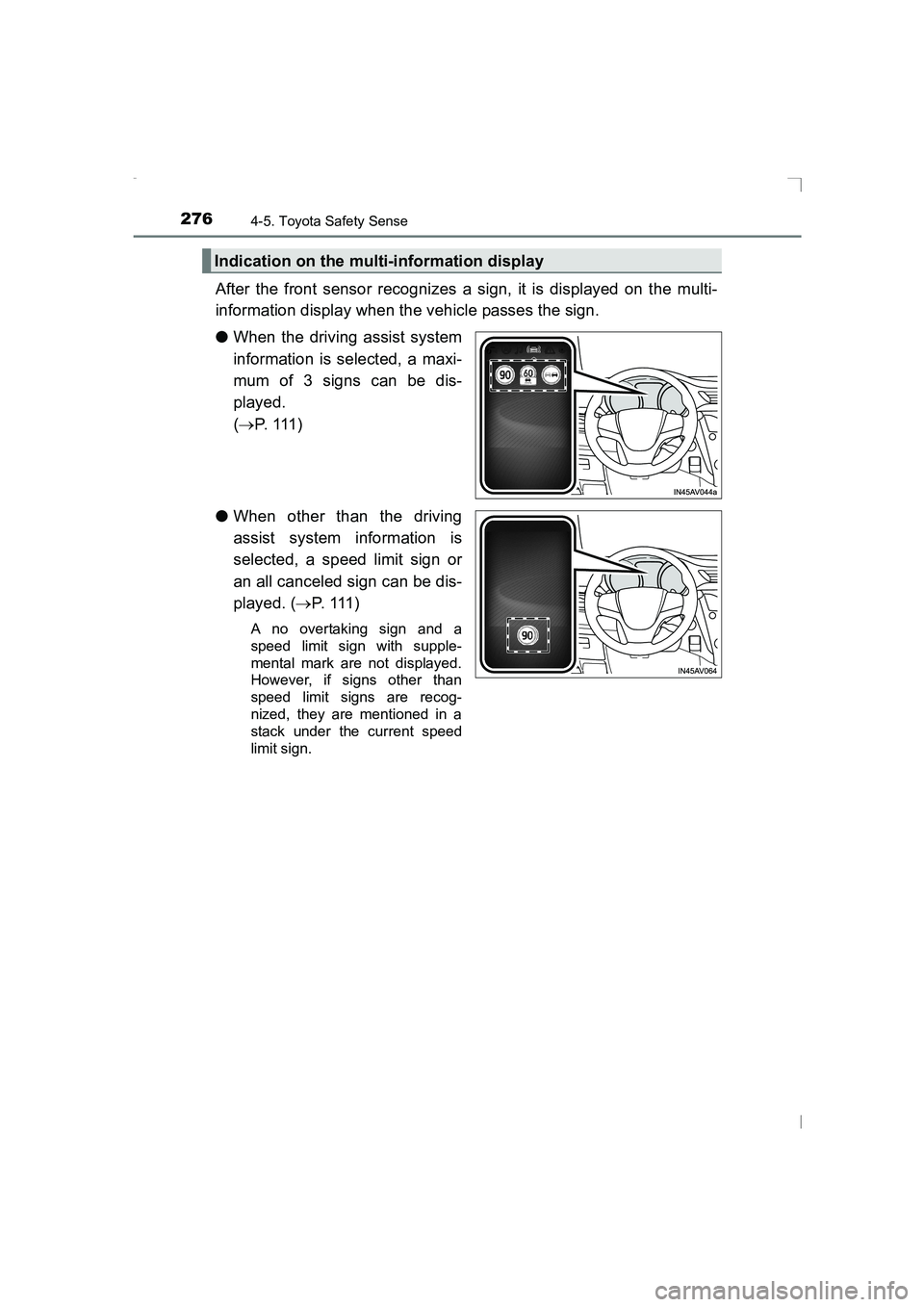
After the front sensor recognizes a sign, it is displayed on the multi-
information display when the vehicle passes the sign.
●When the driving assist system
information is selected, a maxi-
mum of 3 signs can be dis-
played.
(→ P. 111 )
● When other than the driving
assist system information is
selected, a speed limit sign or
an all canceled sign can be dis-
played. ( →P. 111 )
A no overtaking sign and a
speed limit sign with supple-
mental mark are not displayed.
However, if signs other than
speed limit signs are recog-
nized, they are mentioned in a
stack under the current speed
limit sign.
Indication on the multi-information display
AVENSIS_OM_OM20C20E_(EE).book Page 276 Thursday, January 29, 2015 1:47 PM
Page 278 of 648

2784-5. Toyota Safety Sense
AVENSIS_OM_OM20C20E_(EE)
In the following situations, the RSA system alerts the driver using a
warning display.
●When the vehicle speed exceeds the speed warning threshold
applied to the speed limit of the sign displayed on the multi-informa-
tion display, the sign color becomes inverted.
● If it is detected that your vehicle is overtaking when a no overtaking
sign is displayed on the multi-information display, the sign flashes.
■Automatic turn-off of RSA sign display
One or more signs automatically turn off in the following situations.
●A new sign is not recognized for a certain distance.
● The road changes due to a left or right turn, etc.
■ Conditions in which the function may not operate or detect correctly
In the following situations, RSA does not operate normally and may not rec-
ognize signs, display the incorrect sign, etc. However, this does not indicate a
malfunction.
● The front sensor is misaligned due to a strong impact being applied to the
sensor, etc.
● Dirt, snow, stickers, etc., are on the front windshield near the front sensor.
● In inclement weather such as heavy rain, fog, snow or sand storms
● Light from an oncoming vehicle, the sun, etc., enters the front sensor.
● The sign is small, dirty, faded, tilted or bent, and if an electronic sign, the
contrast is poor.
● All or part of the sign is hidden by the leaves of a tree, a pole, etc.
● The sign is only visible to the front sensor for a short amount of time.
● The driving scene (turning, lane change, etc.) is judged incorrectly.
● Even if it is a sign not appropriate for the currently traveled lane, such a sign
exists directly after a freeway branches, or in an adjacent lane just before
merging.
● Stickers are attached to the rear of the preceding vehicle.
● A sign resembling a system compatible sign is recognized.
● The vehicle is driven in a country with a different direction of traffic.
● Side road speed signs may be detected and displayed (if positioned in sight
of the front sensor) while the vehicle is traveling on the main road.
● Roundabout exit road speed signs may be detected and displayed (if posi-
tioned in sight of the front sensor) while traveling on a roundabout.
● The speed information displayed on the meter and that displayed on the
Navigation system (if equipped) may be different due to the Navigation sys-
tem using map data.
Warning display
AVENSIS_OM_OM20C20E_(EE).book Page 278 Thursday, January 29, 2015 1:47 PM
Page 400 of 648
4006-2. Using the interior lights
AVENSIS_OM_OM20C20E_(EE)
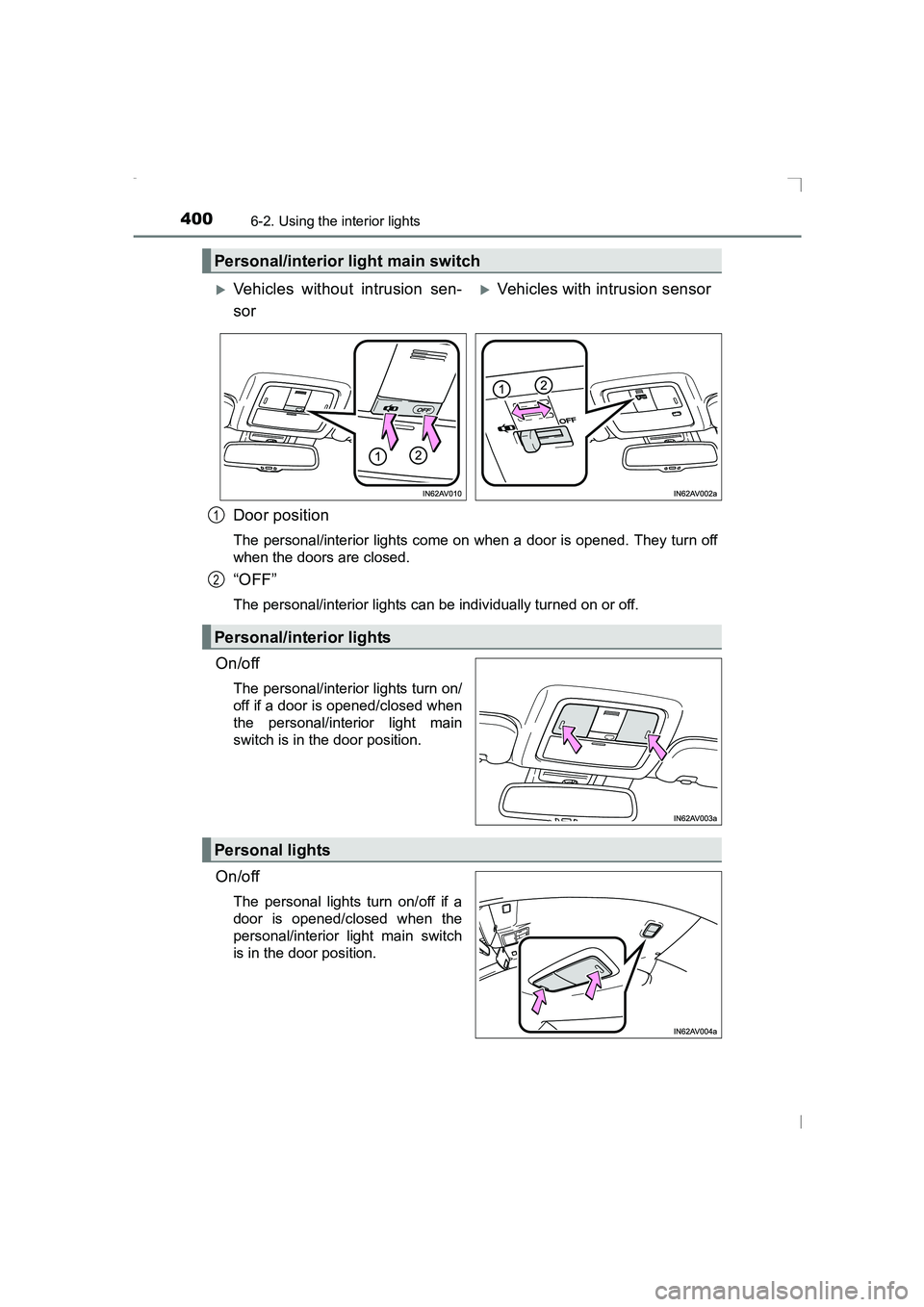
Door position
The personal/interior lights come on when a door is opened. They turn off
when the doors are closed.
“OFF”
The personal/interior lights can be individually turned on or off.
On/off
The personal/interior lights turn on/
off if a door is opened/closed when
the personal/interior light main
switch is in the door position.
On/off
The personal lights turn on/off if a
door is opened/closed when the
personal/interior light main switch
is in the door position.
Personal/interior light main switch
XVehicles without intrusion sen-
sorXVehicles with intrusion sensor
Personal/interior lights
1
2
Personal lights
AVENSIS_OM_OM20C20E_(EE).book Page 400 Thursday, January 29, 2015 1:47 PM
Page 427 of 648
4277-1. Maintenance and care
AVENSIS_OM_OM20C20E_(EE)
7
Maintenance and care
■Aluminum wheels (if equipped)
●Remove any dirt immediately by using a neutral detergent. Do not use hard
brushes or abrasive cleaners. Do not use strong or harsh chemical clean-
ers.
Use the same mild detergent and wax as used on the paint.
● Do not use detergent on the wheels when they are hot, for example after
driving for long distance in the hot weather.
● Wash detergent from the wheels immediately after use.
■ Bumpers and side moldings
Do not scrub with abrasive cleaners.
WARNING
■ When washing the vehicle
Do not apply water to the inside of the engine compartment. Doing so may
cause the electrical components etc. to catch fire.
■ Caution about the exhaust pipe
Exhaust gasses cause the exhaust pipe to become quite hot.
When washing the vehicle, be careful not to touch the pipe until it has
cooled sufficiently, as touching a hot exhaust pipe can cause burns.
■ When cleaning the windshield (vehic les with rain-sensing windshield
wipers)
● When the upper part of the windshield where the raindrop sensor is
located is touched by hand
● When a wet rag or similar is held close to the raindrop sensor
● If something bumps against the windshield
● If you directly touch the raindrop sensor body or if something bumps into
the raindrop sensor
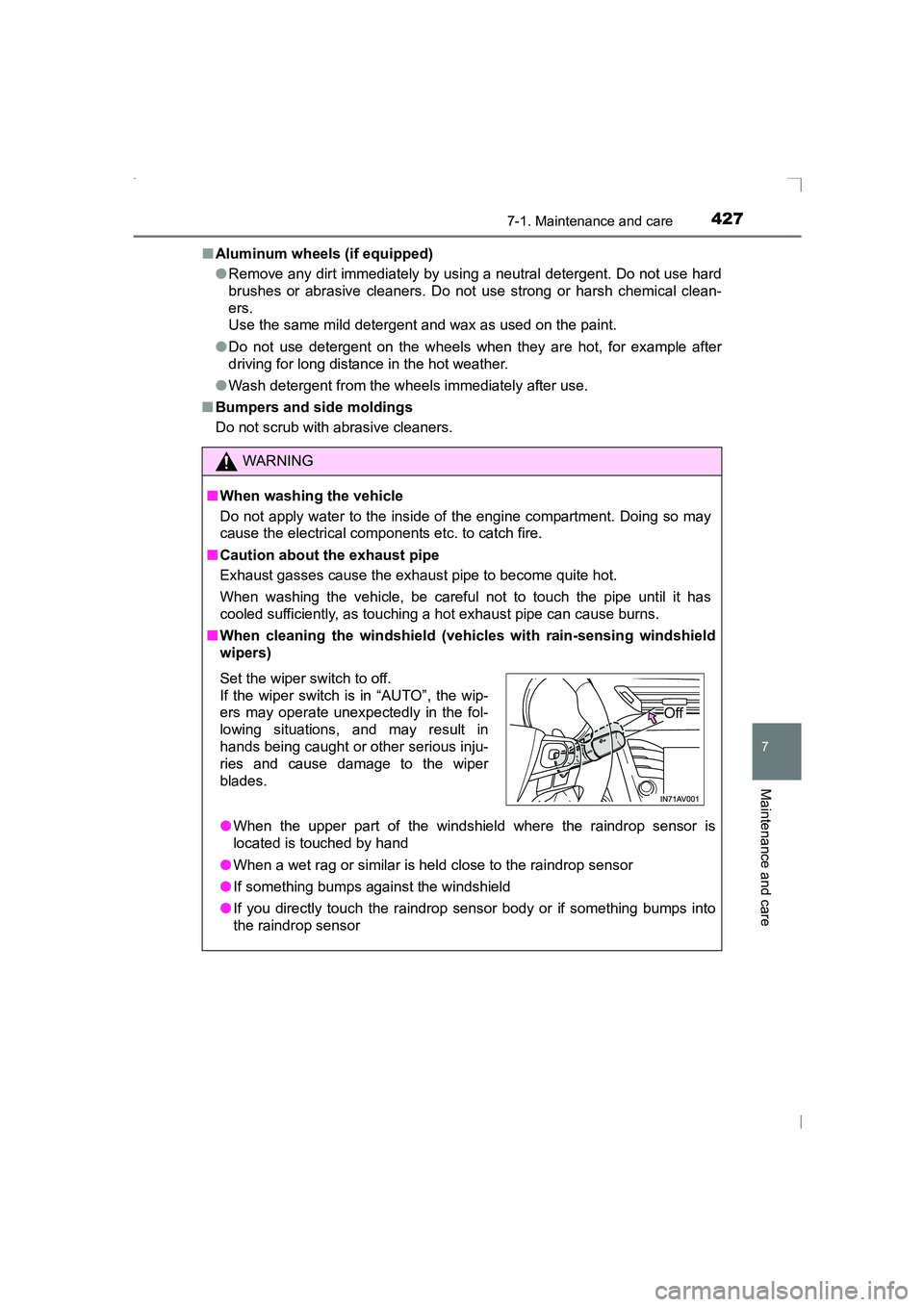
Set the wiper switch to off.
If the wiper switch is in “AUTO”, the wip-
ers may operate unexpectedly in the fol-
lowing situations, and may result in
hands being caught or other serious inju-
ries and cause damage to the wiper
blades.
Off
AVENSIS_OM_OM20C20E_(EE).book Page 427 Thursday, January 29, 2015 1:47 PM
Page 432 of 648
4327-1. Maintenance and care
AVENSIS_OM_OM20C20E_(EE)NOTICE
■
Cleaning detergents
●Do not use the following types of detergent, as they may discolor the vehi-
cle interior or cause streaks or damage to painted surfaces:
• Non-seat portions: Organic substances such as benzene or gasoline,
alkaline or acidic solutions, dye, and bleach
• Seats: Alkaline or acidic solutions, such as thinner, benzene, and alco- hol
● Do not use polish wax or polish cleaner. The instrument panel’s or other
interior part’s painted surface may be damaged.
■ Preventing damage to leather surfaces
Observe the following precautions to avoid damage to and deterioration of
leather surfaces.
●Remove any dust or dirt from leather surfaces immediately.
● Do not expose the vehicle to direct sunlight for extended periods of time.
Park the vehicle in the shade, especially during summer.
● Do not place items made of vinyl, plastic, or containing wax on the uphol-
stery, as they may stick to the leather surface if the vehicle interior heats
up significantly.
■ Water on the floor
Do not wash the vehicle floor with water.
Vehicle systems such as the audio system may be damaged if water comes
into contact with electrical components such as the audio system above or
under the floor of the vehicle. Water may also cause the body to rust.
■ When cleaning the inside of the wi ndshield (vehicles with LDA [Lane
Departure Alert] and Automatic High Beam)
Be careful not to touch the camera sensor ( →P. 263).
If the camera is accidentally scratched or hit, LDA and Automatic High
Beam may not operate properly or may cause a malfunction.
■ Cleaning the inside of the rear wind ow or right-side rear quarter win-
dow
● Do not use glass cleaner to clean the rear window or right-side rear quar-
ter window (wagon), as this may cause damage to the rear window defog-
ger heater wires or antenna. Use a cloth dampened with lukewarm water
to gently wipe the window clean. Wipe the window in strokes running par-
allel to the heater wires or antenna.
● Be careful not to scratch or damage the heater wires or antenna.
AVENSIS_OM_OM20C20E_(EE).book Page 432 Thursday, January 29, 2015 1:47 PM
Page 521 of 648
5218-2. Steps to take in an emergency
AVENSIS_OM_OM20C20E_(EE)
8
When trouble arises
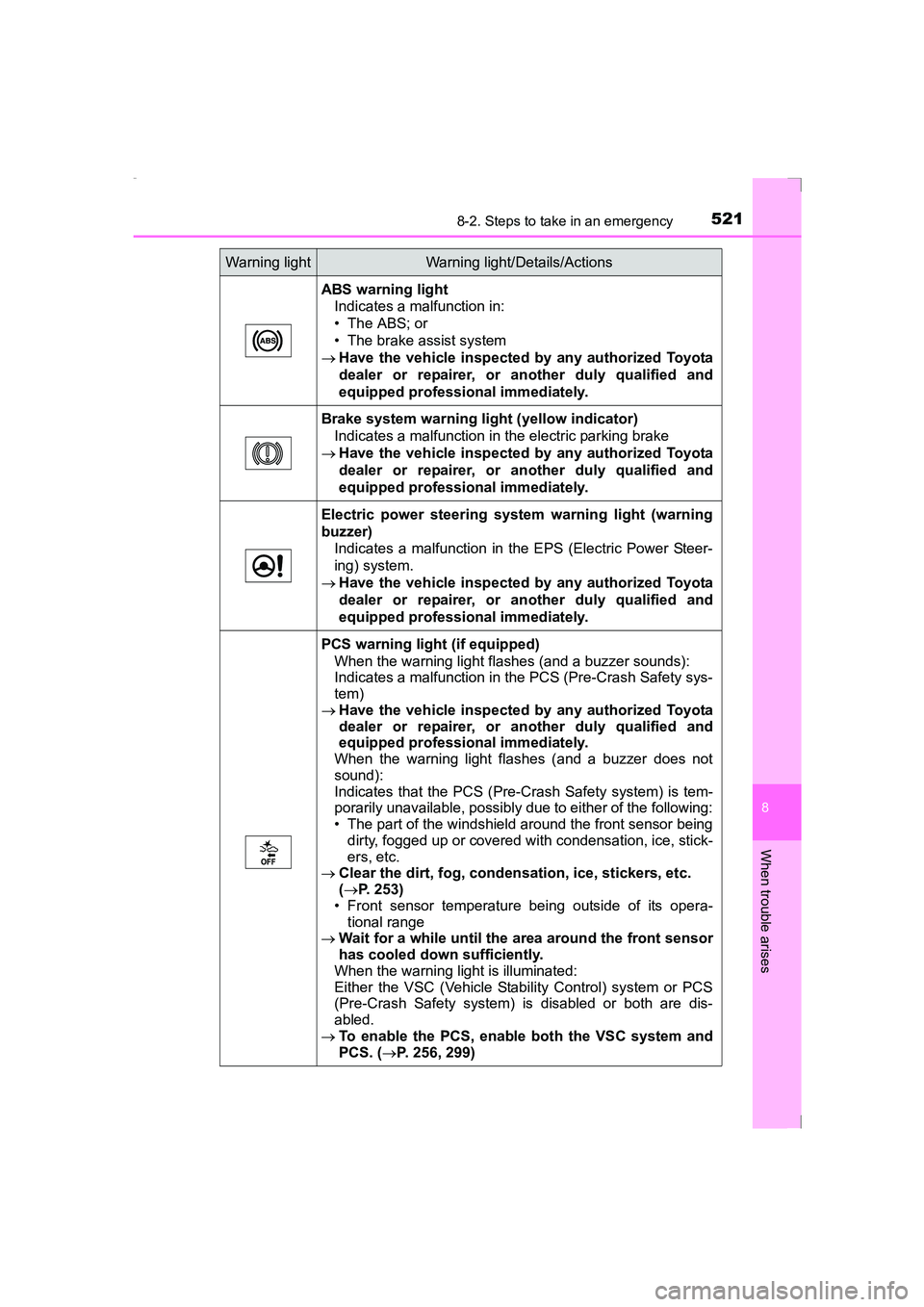
ABS warning lightIndicates a malfunction in:
• The ABS; or
• The brake assist system
→ Have the vehicle inspected by any authorized Toyota
dealer or repairer, or another duly qualified and
equipped professional immediately.
Brake system warning light (yellow indicator) Indicates a malfunction in the electric parking brake
→ Have the vehicle inspected by any authorized Toyota
dealer or repairer, or another duly qualified and
equipped professional immediately.
Electric power steering system warning light (warning
buzzer) Indicates a malfunction in the EPS (Electric Power Steer-
ing) system.
→ Have the vehicle inspected by any authorized Toyota
dealer or repairer, or another duly qualified and
equipped professional immediately.
PCS warning light (if equipped)
When the warning light flashes (and a buzzer sounds):
Indicates a malfunction in the PCS (Pre-Crash Safety sys-
tem)
→ Have the vehicle inspected by any authorized Toyota
dealer or repairer, or another duly qualified and
equipped professional immediately.
When the warning light flashes (and a buzzer does not
sound):
Indicates that the PCS (Pre-Crash Safety system) is tem-
porarily unavailable, possibly due to either of the following:
• The part of the windshield around the front sensor being dirty, fogged up or covered with condensation, ice, stick-
ers, etc.
→ Clear the dirt, fog, condensation, ice, stickers, etc.
(→ P. 253)
• Front sensor temperature being outside of its opera-
tional range
→ Wait for a while until the area around the front sensor
has cooled down sufficiently.
When the warning light is illuminated:
Either the VSC (Vehicle Stability Control) system or PCS
(Pre-Crash Safety system) is disabled or both are dis-
abled.
→ To enable the PCS, enab le both the VSC system and
PCS. ( →P. 256, 299)
Warning lightWarning light/Details/Actions
AVENSIS_OM_OM20C20E_(EE).book Page 521 Thursday, January 29, 2015 1:47 PM
Page 525 of 648
5258-2. Steps to take in an emergency
AVENSIS_OM_OM20C20E_(EE)
8
When trouble arises
■If the tire pressure warning light fre quently comes on after blinking for 1
minute (vehicles with tire pressure warning system)
If the tire pressure warning light frequently comes on after blinking for 1
minute when the engine switch is turned to the “ON” position (vehicles with-
out smart entry & start system) or IGNITION ON mode (vehicles with smart
entry & start system), have it checked by any authorized Toyota dealer or
repairer, or another duly qualified and equipped professional.
If the tire pressure warning light frequently comes on after blinking for 1
minute when you change between registered wheel sets, confirm the correct
wheel set has been selected.
■ If the malfunction indicator lamp comes on while driving
For some models, the malfunction indicator lamp will come on if the fuel tank
becomes completely empty. If the fuel tank is empty, refuel the vehicle imme-
diately. The malfunction indicator lamp will go off after several trips.
If the malfunction indicator lamp does not go off, contact any authorized
Toyota dealer or repairer, or another duly qualified and equipped professional.
■ Front passenger detection sensor, seat belt reminder and warning
buzzer
● If luggage is placed on the front passenger seat, the front passenger detec-
tion sensor may cause the warning light to flash and the warning buzzer to
sound even if a passenger is not sitting in the seat.
● If a cushion is placed on the seat, the sensor may not detect a passenger,
and the warning light may not operate properly.
AVENSIS_OM_OM20C20E_(EE).book Page 525 Thursday, January 29, 2015 1:47 PM
Page 534 of 648
5348-2. Steps to take in an emergency
AVENSIS_OM_OM20C20E_(EE)
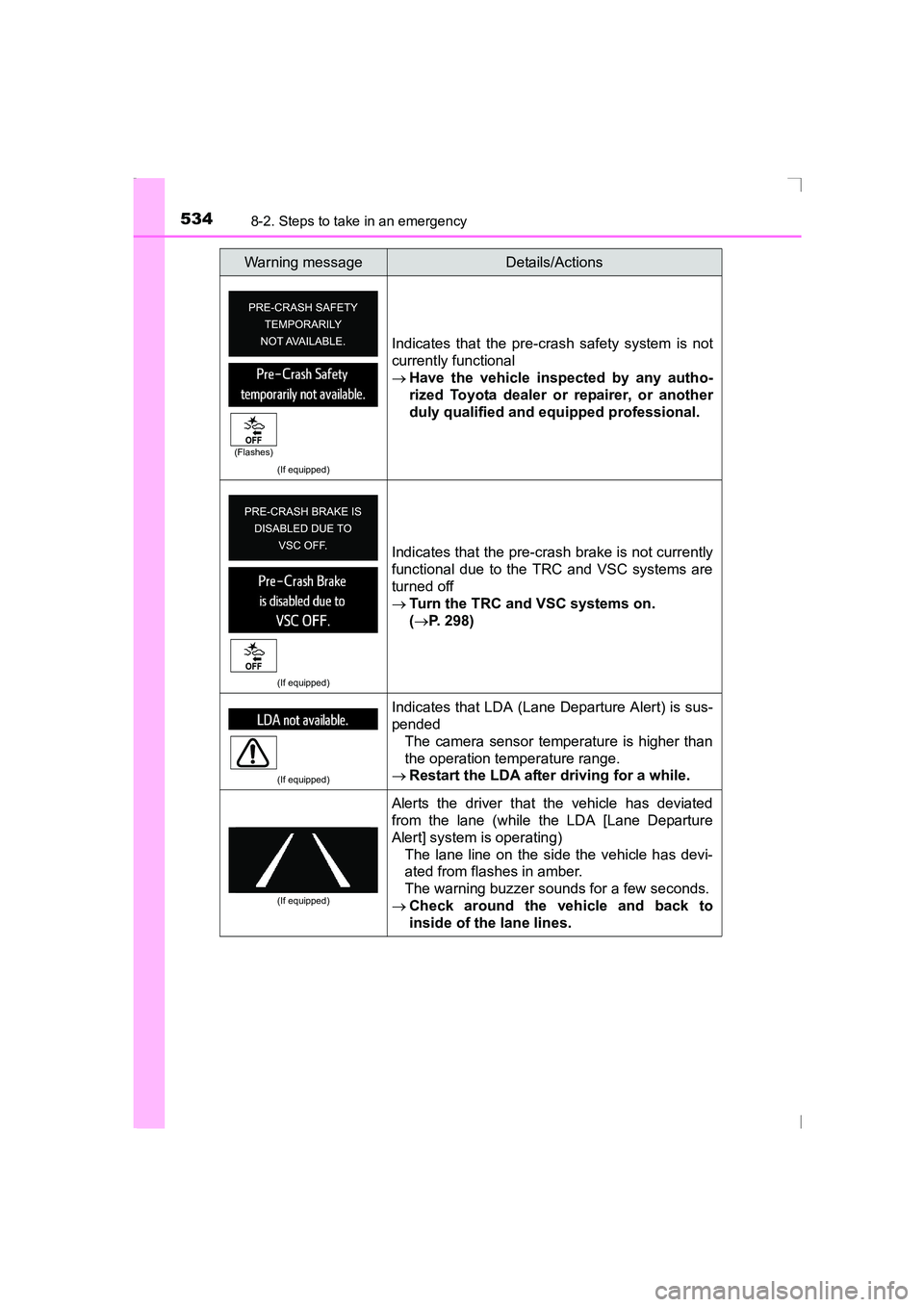
(If equipped)
Indicates that the pre-crash safety system is not
currently functional
→Have the vehicle inspected by any autho-
rized Toyota dealer or repairer, or another
duly qualified and equipped professional.
(If equipped)
Indicates that the pre-crash brake is not currently
functional due to the TRC and VSC systems are
turned off
→Turn the TRC and VSC systems on.
(→ P. 298)
(If equipped)
Indicates that LDA (Lane Departure Alert) is sus-
pended
The camera sensor temperature is higher than
the operation temperature range.
→ Restart the LDA after driving for a while.
(If equipped)
Alerts the driver that the vehicle has deviated
from the lane (while the LDA [Lane Departure
Alert] system is operating)
The lane line on the side the vehicle has devi-
ated from flashes in amber.
The warning buzzer sounds for a few seconds.
→ Check around the vehicle and back to
inside of the lane lines.
Warning messageDetails/Actions
(Flashes)
AVENSIS_OM_OM20C20E_(EE).book Page 534 Thursday, January 29, 2015 1:47 PM