2015 TOYOTA AVENSIS brake light
[x] Cancel search: brake lightPage 523 of 648
5238-2. Steps to take in an emergency
AVENSIS_OM_OM20C20E_(EE)
8
When trouble arises
*1: Seat belt reminders:The seat belts reminder sounds to alert the driver and passengers that
any of the seat belts of the occupied seats is not fastened. The buzzer
sounds for 30 seconds after the vehicle has reached a speed of at least
20 km/h (12 mph). Then, if the seat belt is still unfastened, the buzzer will
sound in a different tone for 90 more seconds.
*2: Parking brake engaged warning buzzer: A buzzer will sound if the vehicle is driven at a speed of approximately
5 km/h (3 mph) or more.
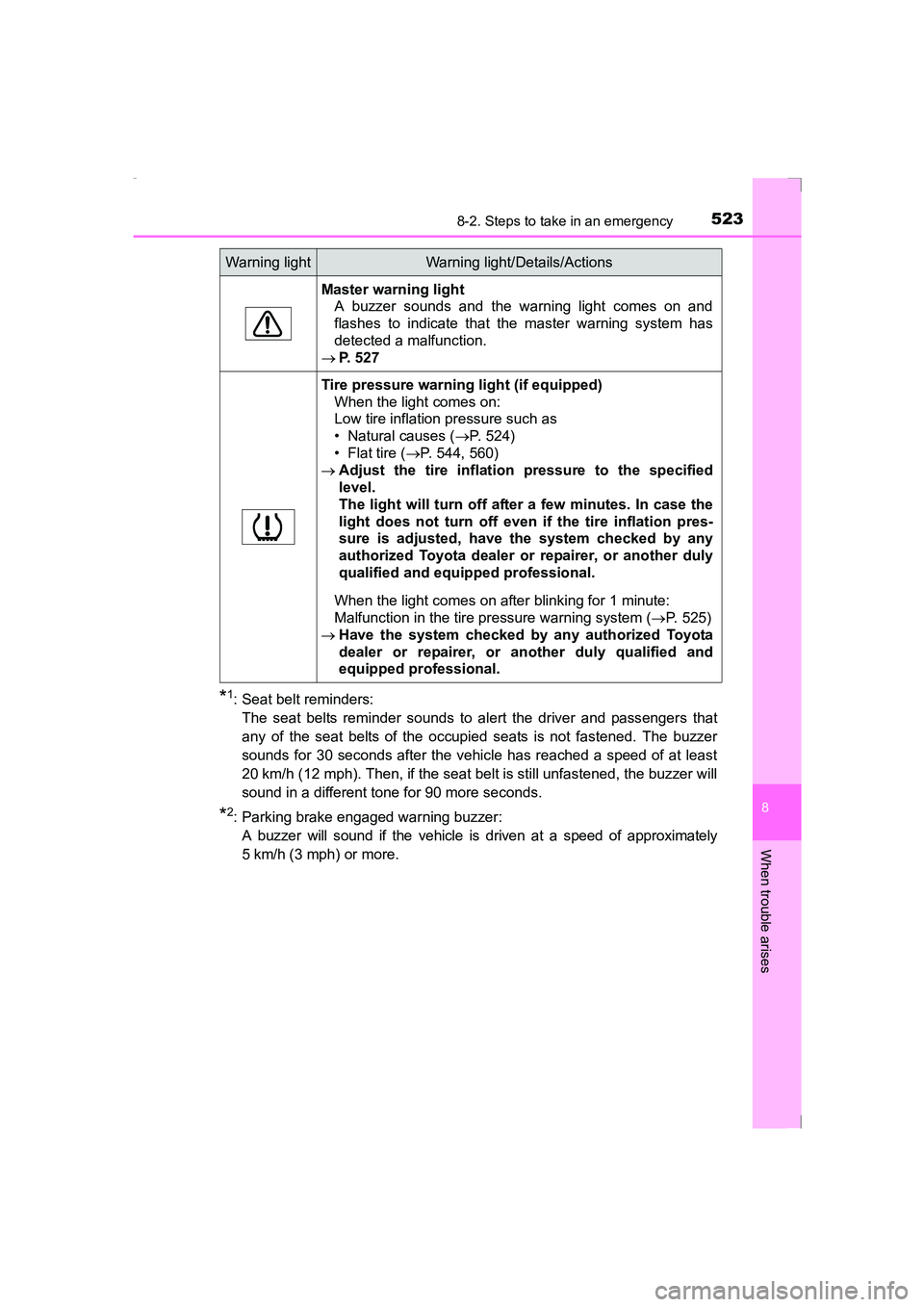
Master warning light A buzzer sounds and the warning light comes on and
flashes to indicate that the master warning system has
detected a malfunction.
→ P. 527
Tire pressure warning light (if equipped)
When the light comes on:
Low tire inflation pressure such as
• Natural causes ( →P. 524)
• Flat tire ( →P. 544, 560)
→ Adjust the tire inflation pressure to the specified
level.
The light will turn off after a few minutes. In case the
light does not turn off even if the tire inflation pres-
sure is adjusted, have the system checked by any
authorized Toyota dealer or repairer, or another duly
qualified and equipped professional.
When the light comes on after blinking for 1 minute:
Malfunction in the tire pressure warning system ( →P. 525)
→ Have the system checked by any authorized Toyota
dealer or repairer, or another duly qualified and
equipped professional.
Warning lightWarning light/Details/Actions
AVENSIS_OM_OM20C20E_(EE).book Page 523 Thursday, January 29, 2015 1:47 PM
Page 526 of 648
5268-2. Steps to take in an emergency
AVENSIS_OM_OM20C20E_(EE)
WARNING
■ When the electric power steering system warning light comes on
The steering wheel may become extremely heavy.
If the steering wheel becomes heavier than usual when operating, firmly
hold and operate it using more force than usual.
■ If the tire pressure warning light comes on (vehicles with tire pressure
warning system)
Be sure to observe the following precautions. Failure to do so could cause a
loss of vehicle control and result in death or serious injury.
●Stop your vehicle in a safe place as soon as possible. Adjust the tire infla-
tion pressure immediately.
● If the tire pressure warning light comes on even after tire inflation pressure
adjustment, it is probable that you have a flat tire. Check the tires. If a tire
is flat, change it with the spare tire and have the flat tire repaired by the
nearest authorized Toyota dealer or repairer, or another duly qualified and
equipped professional.
● Avoid abrupt maneuvering and braking. If the vehicle tires deteriorate, you
could lose control of the steering wheel or the brakes.
■ If a blowout or sudden air leakage should occur (vehicles with tire
pressure warning system)
The tire pressure warning system may not activate immediately.
NOTICE
■To ensure the tire pressure warn ing system operates properly (vehi-
cles with tire pressure warning system)
Do not install tires with different specifications or makers, as the tire pres-
sure warning system may not operate properly.
AVENSIS_OM_OM20C20E_(EE).book Page 526 Thursday, January 29, 2015 1:47 PM
Page 535 of 648
5358-2. Steps to take in an emergency
AVENSIS_OM_OM20C20E_(EE)
8
When trouble arises
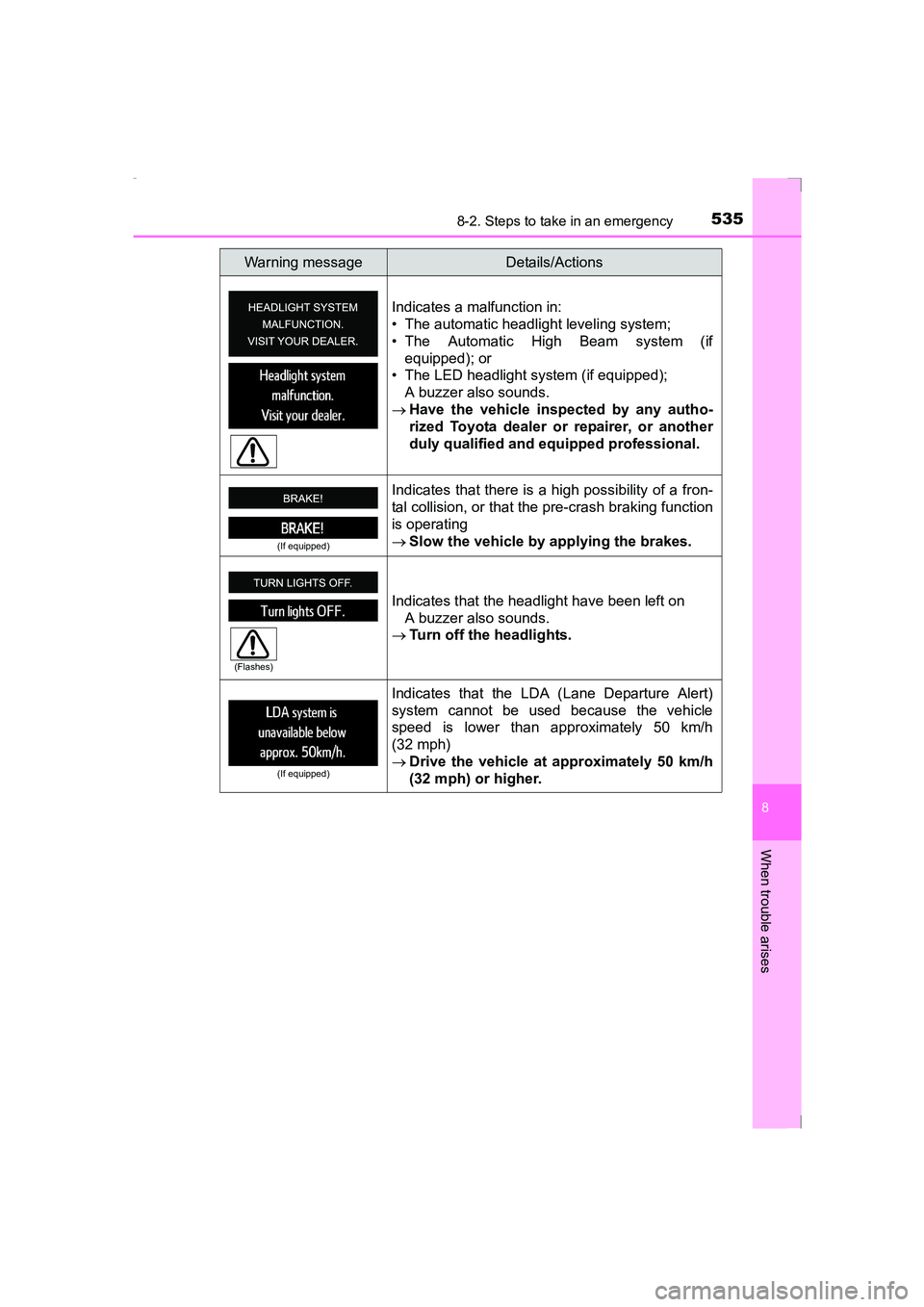
Indicates a malfunction in:
• The automatic headlight leveling system;
• The Automatic High Beam system (ifequipped); or
• The LED headlight system (if equipped);
A buzzer also sounds.
→ Have the vehicle inspected by any autho-
rized Toyota dealer or repairer, or another
duly qualified and equipped professional.
(If equipped)
Indicates that there is a high possibility of a fron-
tal collision, or that the pre-crash braking function
is operating
→Slow the vehicle by applying the brakes.
Indicates that the headlight have been left on A buzzer also sounds.
→ Turn off the headlights.
(If equipped)
Indicates that the LDA (Lane Departure Alert)
system cannot be used because the vehicle
speed is lower than approximately 50 km/h
(32 mph)
→Drive the vehicle at approximately 50 km/h
(32 mph) or higher.
Warning messageDetails/Actions
(Flashes)
AVENSIS_OM_OM20C20E_(EE).book Page 535 Thursday, January 29, 2015 1:47 PM
Page 558 of 648
5588-2. Steps to take in an emergency
AVENSIS_OM_OM20C20E_(EE)
WARNING
■ When using the compact spare tire
●Remember that your compact spare tire is specifically designed for use
with your vehicle. Do not use your compact spare tire on another vehicle.
● Do not use more than one compact spare tire simultaneously.
● Replace the compact spare tire with a standard tire as soon as possible.
● Avoid sudden acceleration, abrupt steering, sudden braking and shifting
operations that cause sudden engine braking.
■ Speed limit when using the compact spare tire
Do not drive at speeds in excess of 80 km/h (50 mph) when a compact
spare tire is installed on the vehicle.
The compact spare tire is not designed for driving at high speeds. Failing to
observe this precaution may lead to an accident causing death or serious
injury.
■ When the compact spare tire is installed
The vehicle speed may not be correctly detected, and the following systems
may not operate correctly:
●ABS & brake assist
● VSC
● TRC
● Navigation system (if equipped)
● Cruise control (if equipped)
● PCS (Pre-Crash Safety system) (if equipped)
● LDA (Lane Departure Alert) (if equipped)
● AFS (Adaptive Front-lighting System) (if equipped)
● EPS (Electric Power Steering)
AVENSIS_OM_OM20C20E_(EE).book Page 558 Thursday, January 29, 2015 1:47 PM
Page 576 of 648
5768-2. Steps to take in an emergency
AVENSIS_OM_OM20C20E_(EE)
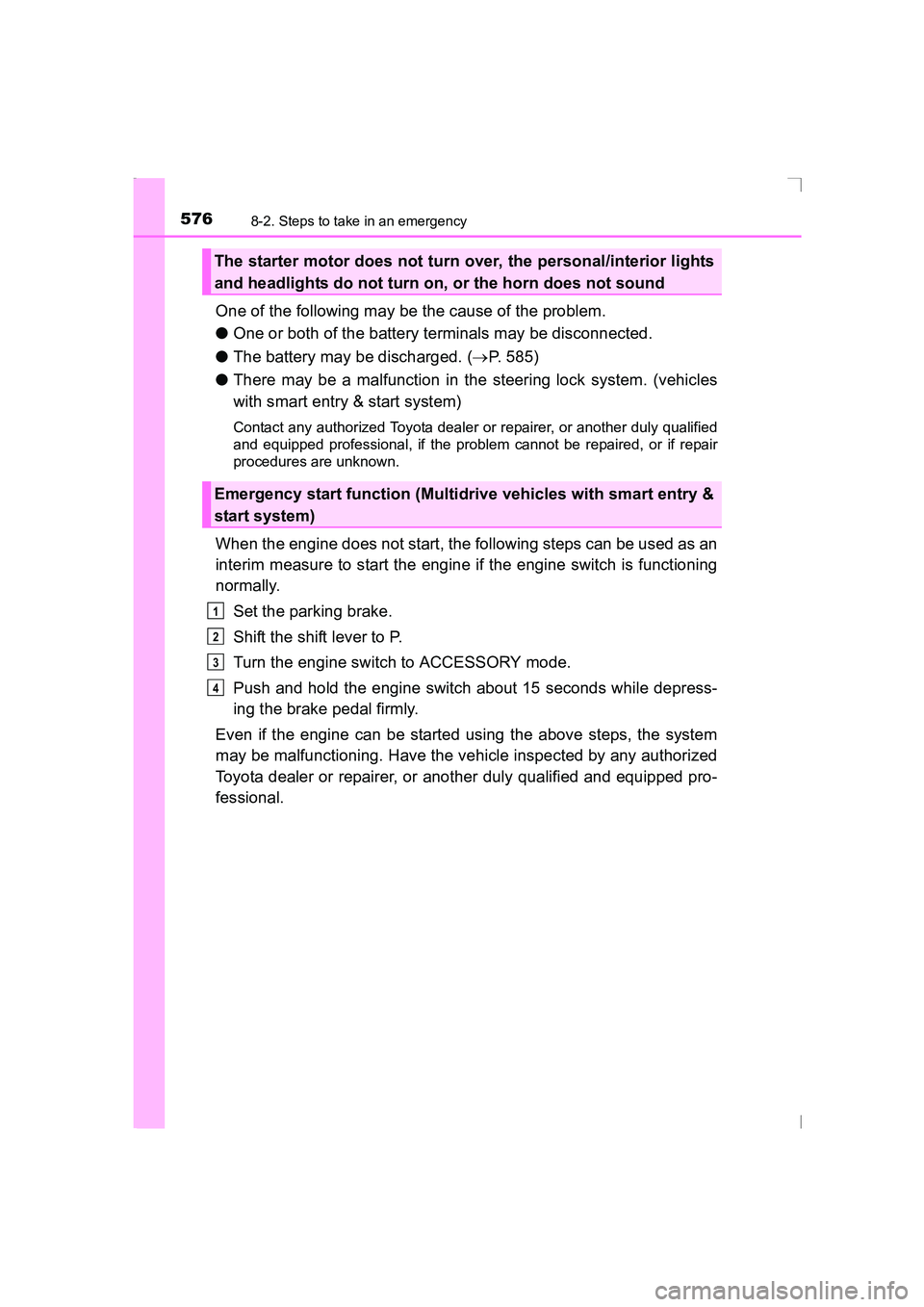
One of the following may be the cause of the problem.
●One or both of the battery terminals may be disconnected.
● The battery may be discharged. ( →P. 585)
● There may be a malfunction in the steering lock system. (vehicles
with smart entry & start system)
Contact any authorized Toyota dealer or repairer, or another duly qualified
and equipped professional, if the problem cannot be repaired, or if repair
procedures are unknown.
When the engine does not start, the following steps can be used as an
interim measure to start the engine if the engine switch is functioning
normally.
Set the parking brake.
Shift the shift lever to P.
Turn the engine switch to ACCESSORY mode.
Push and hold the engine switch about 15 seconds while depress-
ing the brake pedal firmly.
Even if the engine can be started using the above steps, the system
may be malfunctioning. Have the vehicle inspected by any authorized
Toyota dealer or repairer, or another duly qualified and equipped pro-
fessional.
The starter motor does not turn over, the personal/interior lights
and headlights do not turn on, or the horn does not sound
Emergency start function (Multidrive vehicles with smart entry &
start system)
1
2
3
4
AVENSIS_OM_OM20C20E_(EE).book Page 576 Thursday, January 29, 2015 1:47 PM
Page 632 of 648
632What to do if... (Troubleshooting)
AVENSIS_OM_OM20C20E_(EE)
●Vehicles without smart entry & start system
It is locked to prevent theft of the vehicle if the key is removed from the
engine switch. (→P. 210)
●Vehicles with smart entry & start system
It is locked automatically to prevent theft of the vehicle. ( →P. 216)
●Is the window lock switch pressed?
The power window except for the one at the driver’s seat cannot be oper-
ated if the window lock switch is pressed. ( →P. 182)
●The auto power off function will be operated if the vehicle is left in ACCES-
SORY or IGNITION ON mode (the engine is not operating) for a period of
time. ( →P. 216)
●The seat belt reminder light is flashing
Are the driver and the front passenger wearing the seat belts? ( →P. 522)
●The brake system warning light is on
Is the parking brake released? ( →P. 229)
Depending on the situation, other types of warning buzzer may also sound.
( → P. 520, 527)
The steering wheel cannot be turned after the engine is
stopped
The windows do not open or close by operating the power
window switches
The engine switch is turned off automatically
(vehicles with smart entry & start system)
A warning buzzer sounds during driving
AVENSIS_OM_OM20C20E_(EE).book Page 632 Thursday, January 29, 2015 1:47 PM
Page 634 of 648
634Alphabetical index
AVENSIS_OM_OM20C20E_(EE)
Alphabetical index
A/C..................................... 382, 388Air conditioning filter.............. 480
Automatic air conditioning
system ................................ 388
Manual air conditioning system ................................ 382
ABS (Anti-lock Brake System) .................................. 297
Function ................................ 297
Warning light ......................... 521
AFS (Adaptive Front-lighting System) .................................. 234Warning light ......................... 522
Air conditioning filter .............. 480
Air conditioning system ............................ 382, 388Air conditioning filter.............. 480
Automatic air conditioning system ................................ 388
Manual air conditioning system ................................ 382
Airbag manual on-off system ...................................... 52 Airbags ....................................... 39
Airbag manual on-off system .................................. 52
Airbag operating conditions ............................. 46
Airbag precautions for your child ...................................... 41
Airbag warning light .............. 520
Correct driving posture ........... 32
Curtain shield airbag operating conditions ............. 46
Curtain shield airbag
precautions........................... 41
General airbag precautions .... 41
Locations of airbags................ 39
Modification and disposal of airbags.................................. 45
Side airbag operating
conditions ............................. 46
Side airbag precautions .......... 41
Side and curtain shield airbags operating
conditions ............................. 46
Side and curtain shield
airbags precautions .............. 41
SRS airbags............................ 39
Alarm .......................................... 89 Alarm ...................................... 89
Warning buzzer..................... 520
Antenna
Smart entry & start system ... 148
Smart key system ................. 148
Radio ............................ 320, 426
Anti-lock brake system .......... 297 Function ................................ 297
Warning light ......................... 521
Armrest ..................................... 419
Assist grips .............................. 423
Audio input....... 312, 332, 341, 349
A
AVENSIS_OM_OM20C20E_(EE).book Page 634 Thursday, January 29, 2015 1:47 PM
Page 635 of 648
635Alphabetical index
AVENSIS_OM_OM20C20E_(EE)
Audio system*......................... 308
Antenna................................. 320
Audio input ............................ 349
AUX port ............................... 349
Bluetooth
® audio ................... 364
CD player .............................. 321
iPod....................................... 332
MP3/WMA disc ..................... 321
Optimal use........................... 313
Portable music player ........... 312
Radio..................................... 315
Steering wheel audio switch.................................. 311
USB memory......................... 341
Audio system (with navigation system)
*
Automatic air conditioning system
Air conditioning filter.............. 480
Automatic air conditioning system ................................ 388
Automatic headlight leveling system...................... 239
Automatic High Beam ............. 269
Automatic light control
system .................................... 237
AUX port
*................................. 312
Auxiliary box ............................ 411
Back door ................................. 143 Wireless remote control key ...................................... 121
Back-up lights Replacing light bulbs ..... 498, 499
Wattage................................. 615 Battery
Battery checking ................... 453
If the battery is discharged.... 585
Preparing and checking before winter....................... 303
Bluetooth
®*............................. 374
Audio system ........................ 364
Hands-free system (for cellular phone) ............. 350
Registering/removing a Bluetooth
® device............... 357
Selecting a Bluetooth®
device ................................. 358
Wireless communication ....... 350
Bluetooth
® audio*................... 364
Bluetooth® phone*
(audio system) ....................... 350 Deleting the call history......... 361
Making a call ......................... 368
Managing speed dials ........... 361
Managing the contacts.......... 362
Phone settings ...................... 358
Receiving a call..................... 370
Speaking on the phone ......... 371
Bottle holders .......................... 405
Brake Fluid ...................................... 612
Parking brake........................ 229
Warning light ................. 520, 521
Warning message ................. 527
Brake assist ............................. 297
Break-in tips ............................. 189
Brightness control Instrument light control......................... 106, 114
B
*: For vehicles with navigation system or multimedia system, refer to
“Navigation and multimedia system Owner’s manual”.
AVENSIS_OM_OM20C20E_(EE).book Page 635 Thursday, January 29, 2015 1:47 PM