Page 123 of 500
1233-3. Adjusting the seats
3
Operation of each component
AVALON (U)_(OM41456U)
Each electronic key can be registered to recall your preferred driving
position.
■Registering procedure
Record your driving position to button 1 or 2 before performing the
following:
Carrying only the key to which you want to link the driving position,
shift the shift lever to P and then close the driver’s door.
If 2 or more keys are in the vehicle, the driving position cannot be
linked properly.
Turn the engine switch to IGNITION ON mode and recall the
position which you want to link.
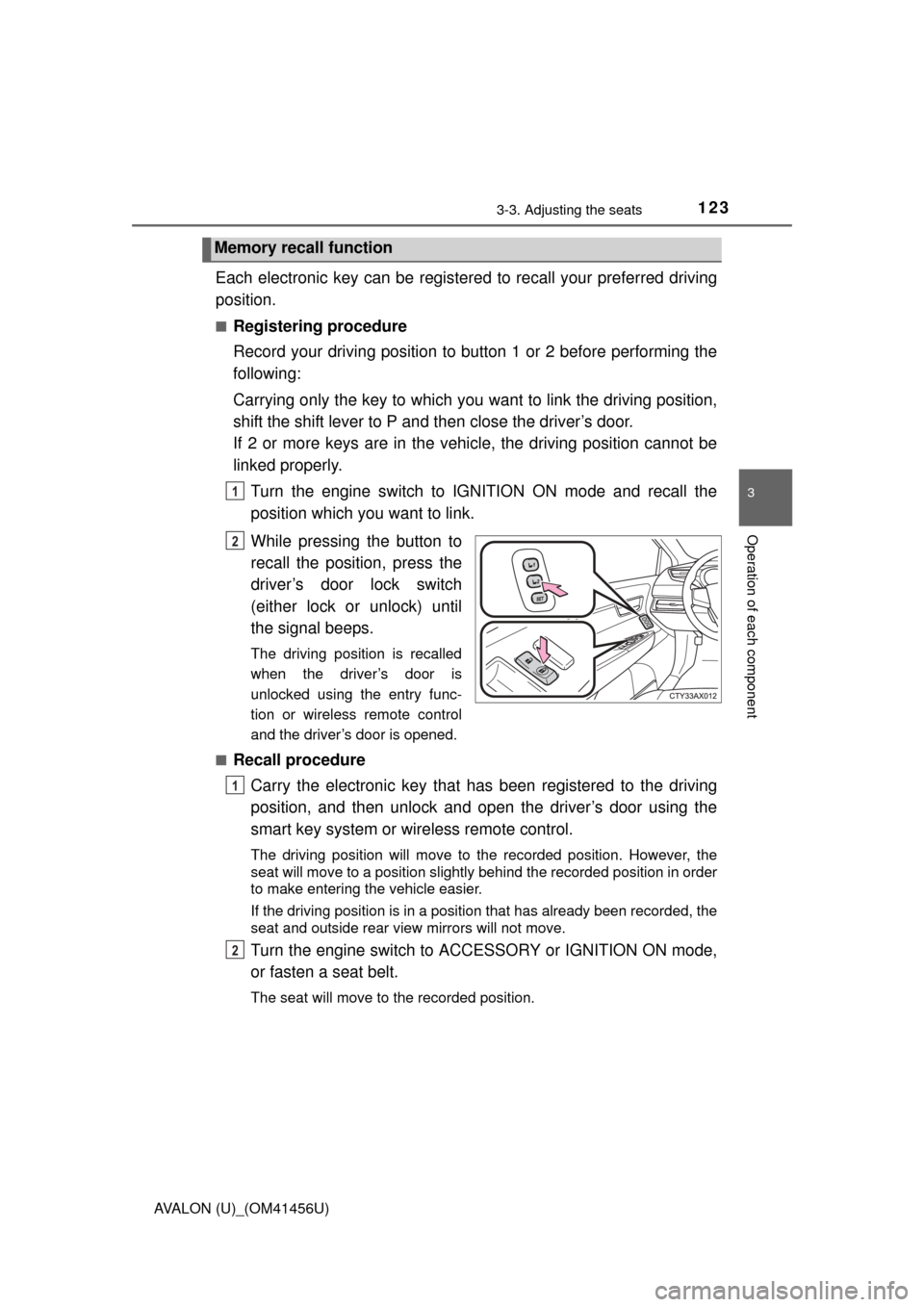
While pressing the button to
recall the position, press the
driver’s door lock switch
(either lock or unlock) until
the signal beeps.
The driving position is recalled
when the driver’s door is
unlocked using the entry func-
tion or wireless remote control
and the driver’s door is opened.
■
Recall procedure Carry the electronic key that has been registered to the driving
position, and then unlock and open the driver’s door using the
smart key system or wi reless remote control.
The driving position will move to the recorded position. However, the
seat will move to a position slightly behind the recorded position in order
to make entering the vehicle easier.
If the driving position is in a position that has already been recorded, the
seat and outside rear view mirrors will not move.
Turn the engine switch to ACCESSORY or IGNITION ON mode,
or fasten a seat belt.
The seat will move to the recorded position.
Memory recall function
1
2
1
2
Page 284 of 500
2845-4. Other interior features
AVALON (U)_(OM41456U)■
Programming the HomeLink
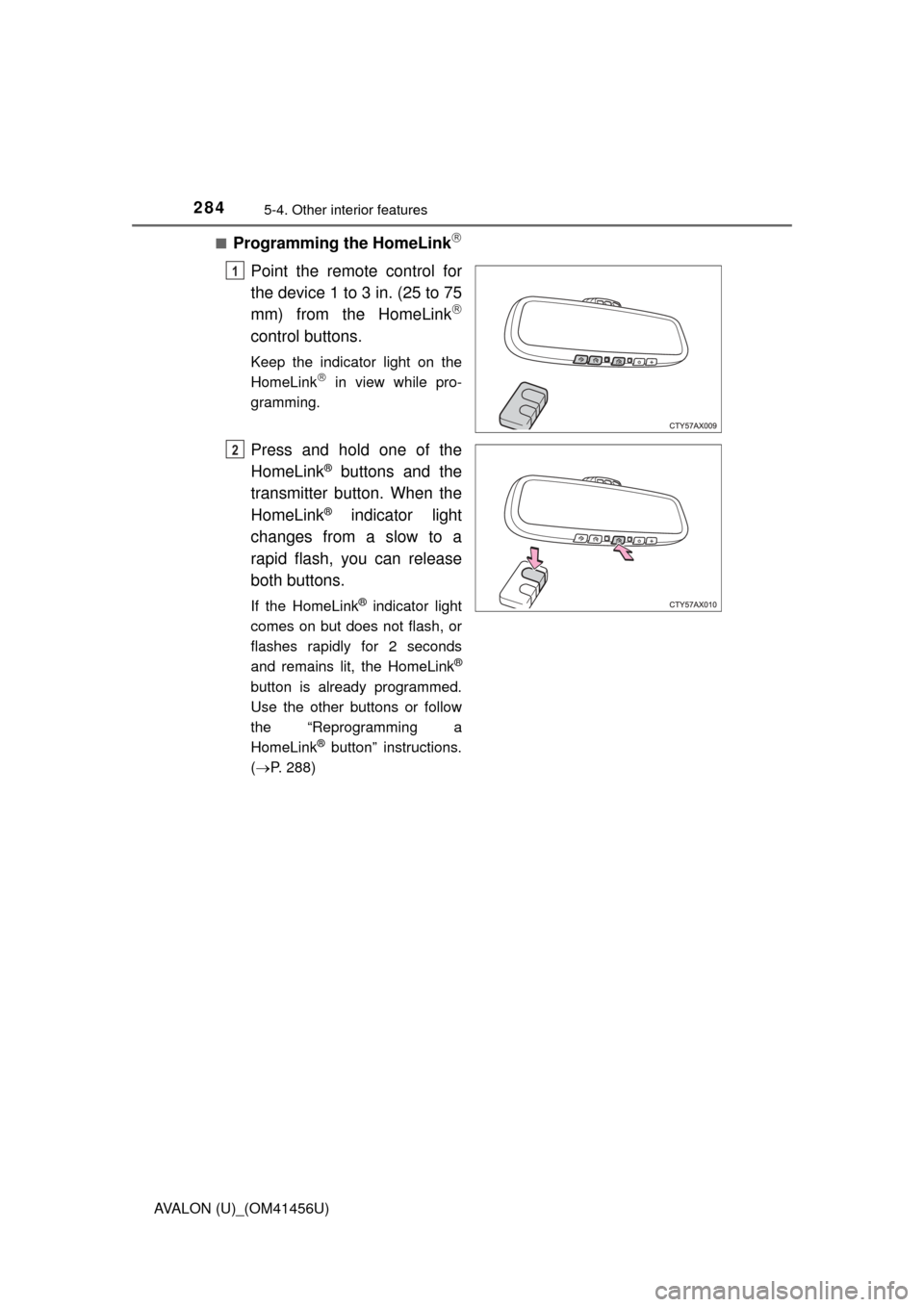
Point the remote control for
the device 1 to 3 in. (25 to 75
mm) from the HomeLink
control buttons.
Keep the indicator light on the
HomeLink in view while pro-
gramming.
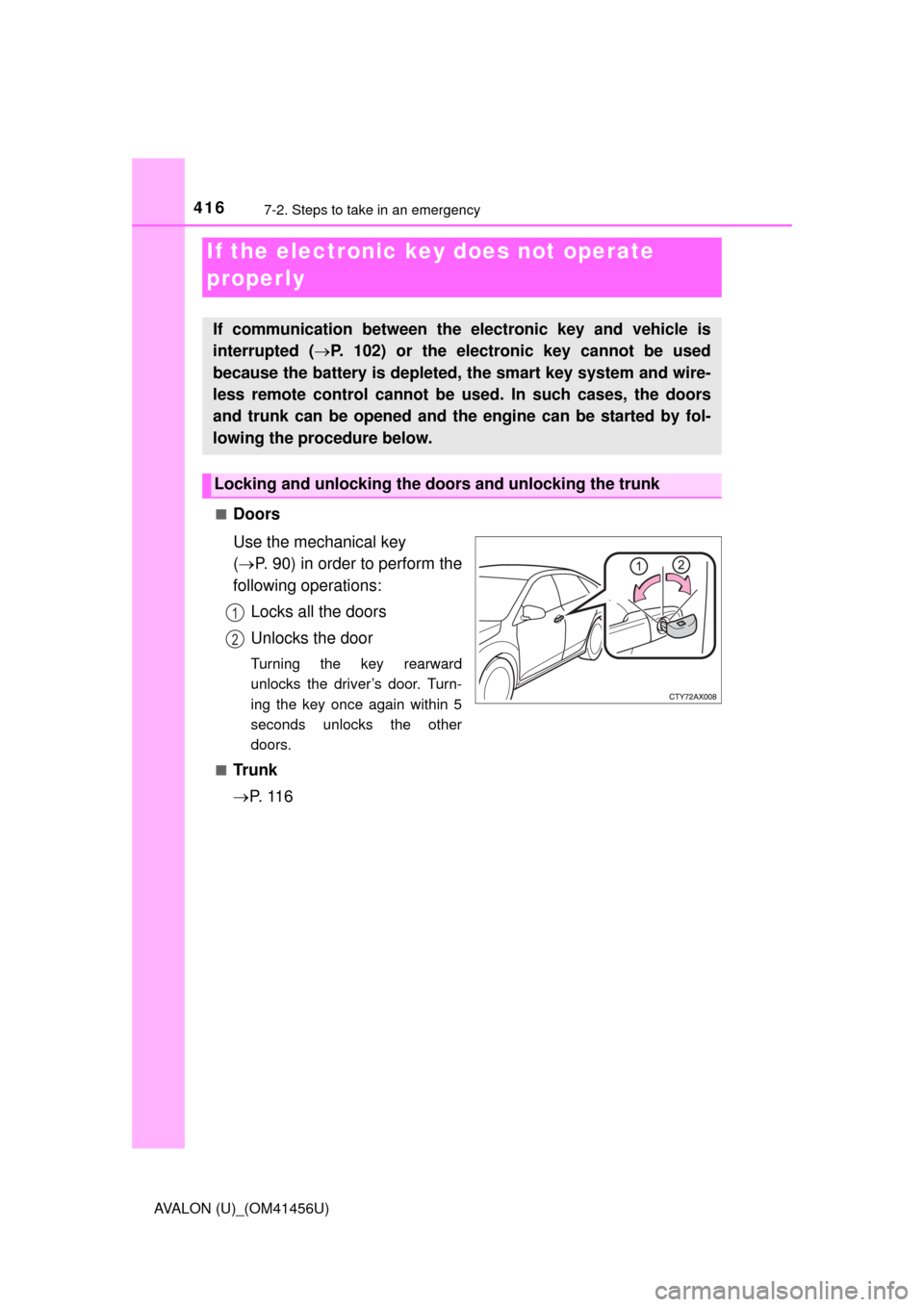
Press and hold one of the
HomeLink
® buttons and the
transmitter button. When the
HomeLink
® indicator light
changes from a slow to a
rapid flash, you can release
both buttons.
If the HomeLink® indicator light
comes on but does not flash, or
flashes rapidly for 2 seconds
and remains lit, the HomeLink
®
button is already programmed.
Use the other buttons or follow
the “Reprogramming a
HomeLink
® button” instructions.
( P. 288)
1
2
Page 287 of 500
2875-4. Other interior features
5
Interior features
AVALON (U)_(OM41456U)■
Programming an entry gate (for U.S.A. owners)/Programming
all devices in the Canadian market
Place your transmitter 1 to 3 in. (25 to 75 mm) away from the sur-
face of the HomeLink
.
Keep the indicator light on the HomeLink in view while programming.
Press and hold the selected HomeLink button.
Repeatedly press and release (cyc le) the device’s remote control
button for two seconds each until step 4 is completed.
When the indicator light on the HomeLink
compatible trans-
ceiver starts to flash rapidly, release the buttons.
Test the operation of the HomeLink
by pressing the newly pro-
grammed button. Check to see if the gate/device operates cor-
rectly.
Repeat the steps above to program another device for each of
the remaining HomeLink
buttons.
■Programming other devices
To program other devices such as home security systems, home
door locks or lighting, contact your authorized Toyota dealer for
assistance.
■Reprogramming a button
The individual HomeLink
buttons cannot be erased but can be
reprogrammed. To reprogram a but ton, follow the “Basic program-
ming” instructions.
1
2
3
4
5
6
Page 289 of 500
2895-4. Other interior features
5
Interior features
AVALON (U)_(OM41456U)
■Before programming
●Install a new battery in the transmitter.
● The battery side of the transmitter must be pointed away from the
HomeLink
.
■ Certification for the garage door opener
For vehicles sold in U.S.A.
FCC ID: NZLWZLHL4
NOTE:
This device complies with Part 15 of the FCC Rules.
Operation is subject to the following two conditions: (1) this device may not
cause harmful interference, and (2) this device must accept any interference
received, including interference that may cause undesired operation.
FCC WARNING:
Changes or modifications not expressly approved by the party responsible for
compliance could void the user’s authority to operate the equipment.
For vehicles sold in Canada
NOTE:
Operation is subject to the following two conditions: (1) this device may not
cause interference, and (2) this device must accept any interference, includ-
ing interference that may cause undesired operation of the device.
■ For additional programming assi stance with your HomeLink
® Universal
Transceiver
Visit on the web at www.homelink.com
or call 1-800-355-3515.
CAUTION
■ When programming a garage door or other remote control device
The garage door may operate, so ensure people and objects are out of dan-
ger to prevent potential harm.
■ Conforming to federal safety standards
Do not use the HomeLink
Compatible Transceiver with any garage door
opener or device that lacks safety stop and reverse features as required by
federal safety standards.
This includes any garage door that cannot detect an obstruction object. A
door or device without these features increases the risk of death or ser\
ious
injury.
Page 331 of 500
3316-3. Do-it-yourself maintenance
6
Maintenance and care
AVALON (U)_(OM41456U)■
After recharging/reconnecting the battery
The engine may not start. Follow the procedure below to initialize the system.
Shift the shift lever to P.
Open and close any of the doors.
Restart the engine.
● Unlocking the doors using the smart key system may not be possible imme-
diately after reconnecting the battery. If this happens, use the wireless
remote control or the mechanical key to lock/unlock the doors.
● Start the engine with the engine switch in ACCESSORY mode. The engine
may not start when the engine switch turned from off. However, the engine
will operate normally from the second attempt.
● The engine switch mode is recorded by the vehicle. If the battery is recon-
nected, the vehicle will return the engine switch mode to the status it was in
before the battery was disconnected. Make sure to turn off the engine
before disconnect the battery. Take extra care when connecting the battery
if the engine switch mode prior to discharge is unknown.
If the system will not start even after multiple attempts, contact your Toyota
dealer.
CAUTION
■ Chemicals in the battery
Batteries contain poisonous and corrosive sulfuric acid and may produce
hydrogen gas which is flammable and explosive. To reduce the risk of death
or serious injury, take the following precautions while working on or near the
battery:
● Do not cause sparks by touching the battery terminals with tools.
● Do not smoke or light a match near the battery.
● Avoid contact with eyes, skin and clothes.
● Never inhale or swallow electrolyte.
● Wear protective safety glasses when working near the battery.
● Keep children away from the battery.
1
2
3
Page 351 of 500
3516-3. Do-it-yourself maintenance
6
Maintenance and care
AVALON (U)_(OM41456U)
■Use a CR2032 lithium battery
●Batteries can be purchased at your Toyota dealer, local electrical appliance
shops or camera stores.
● Replace only with the same or equivalent type recommended by the manu-
facturer.
● Dispose of used batteries according to local laws.
■ If the electronic key battery is depleted
The following symptoms may occur:
●The smart key system and wireless remote control will not function properly.
● The operational range will be reduced.
CAUTION
■Removed battery and other parts
These parts are small and if swallowed by a child, they can cause choking.
Keep away from children. Failure to do so could result in death or serious
injury.
NOTICE
■For normal operation after replacing the battery
Observe the following precautions to prevent accidents:
● Always work with dry hands.
Moisture may cause the battery to rust.
● Do not touch or move any other component inside the remote control.
● Do not bend either of the battery terminals.
Page 359 of 500
3596-3. Do-it-yourself maintenance
6
Maintenance and care
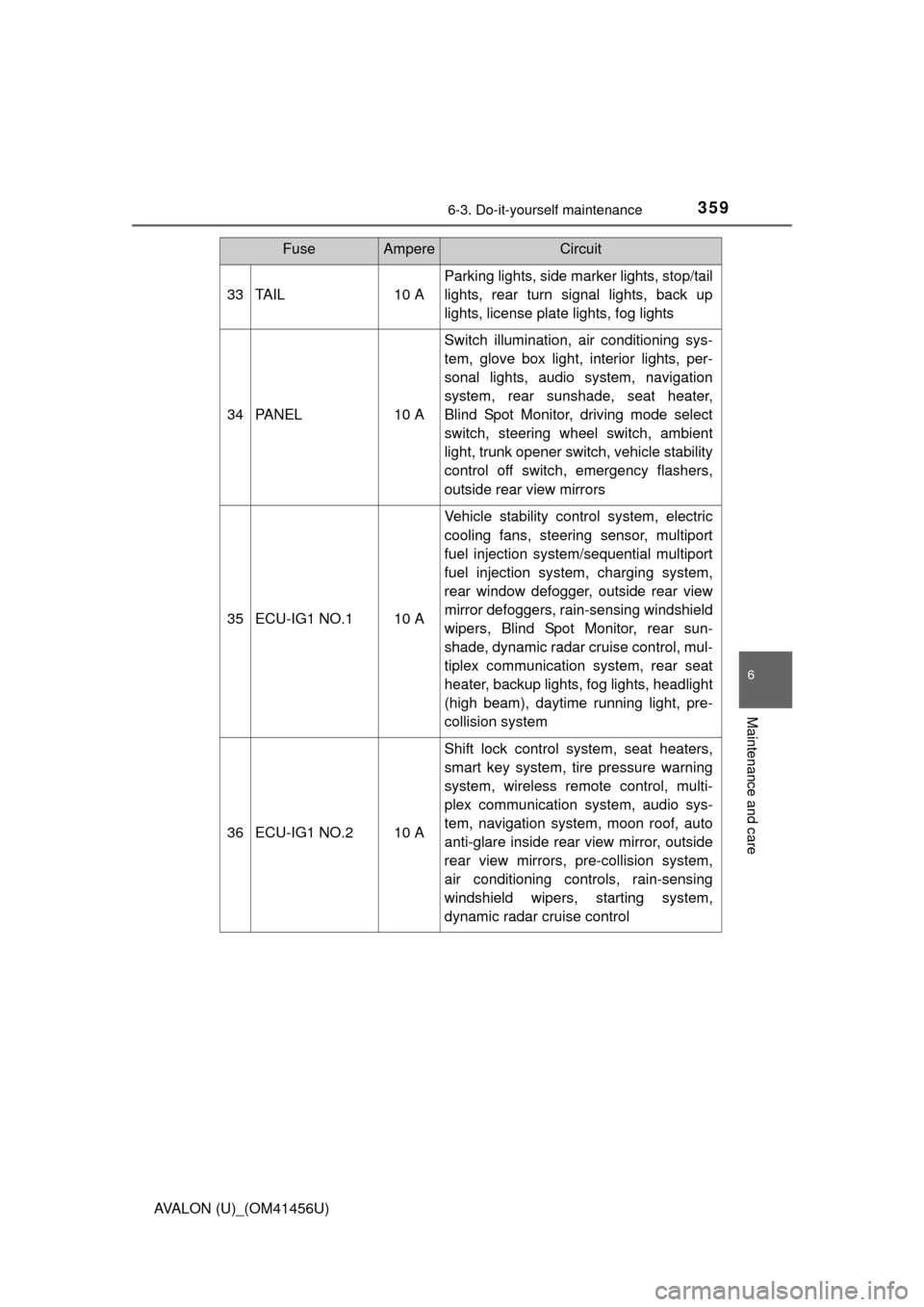
AVALON (U)_(OM41456U)33 TAIL 10 A
Parking lights, side marker lights, stop/tail
lights, rear turn signal lights, back up
lights, license plate lights, fog lights
34 PANEL 10 A Switch illumination, air conditioning sys-
tem, glove box light, interior lights, per-
sonal lights, audio system, navigation
system, rear sunshade, seat heater,
Blind Spot Monitor, driving mode select
switch, steering wheel switch, ambient
light, trunk opener switch, vehicle stability
control off switch, emergency flashers,
outside rear view mirrors
35 ECU-IG1 NO.1 10 A Vehicle stability control system, electric
cooling fans, steering sensor, multiport
fuel injection system/sequential multiport
fuel injection system, charging system,
rear window defogger, outside rear view
mirror defoggers, rain-sensing windshield
wipers, Blind Spot Monitor, rear sun-
shade, dynamic radar cruise control, mul-
tiplex communication system, rear seat
heater, backup lights, fog lights, headlight
(high beam), daytime running light, pre-
collision system
36 ECU-IG1 NO.2 10 A Shift lock control system, seat heaters,
smart key system, tire pressure warning
system, wireless remote control, multi-
plex communication system, audio sys-
tem, navigation system, moon roof, auto
anti-glare inside rear view mirror, outside
rear view mirrors, pre-collision system,
air conditioning controls, rain-sensing
windshield wipers, starting system,
dynamic radar cruise control
FuseAmpereCircuit
Page 416 of 500
4167-2. Steps to take in an emergency
AVALON (U)_(OM41456U)■
Doors
Use the mechanical key
(
P. 90) in order to perform the
following operations:
Locks all the doors
Unlocks the door
Turning the key rearward
unlocks the driver’s door. Turn-
ing the key once again within 5
seconds unlocks the other
doors.
■
Tr u n k
P. 1 1 6
If the electronic key does not operate
properly
If communication between the electronic key and vehicle is
interrupted ( P. 102) or the electronic key cannot be used
because the battery is depleted, the smart key system and wire-
less remote control cannot be used. In such cases, the doors
and trunk can be opened and the engine can be started by fol-
lowing the procedure below.
Locking and unlocking the doors and unlocking the trunk
1
2