Page 87 of 500
872. Instrument cluster
2
Instrument cluster
AVALON (U)_(OM41456U)
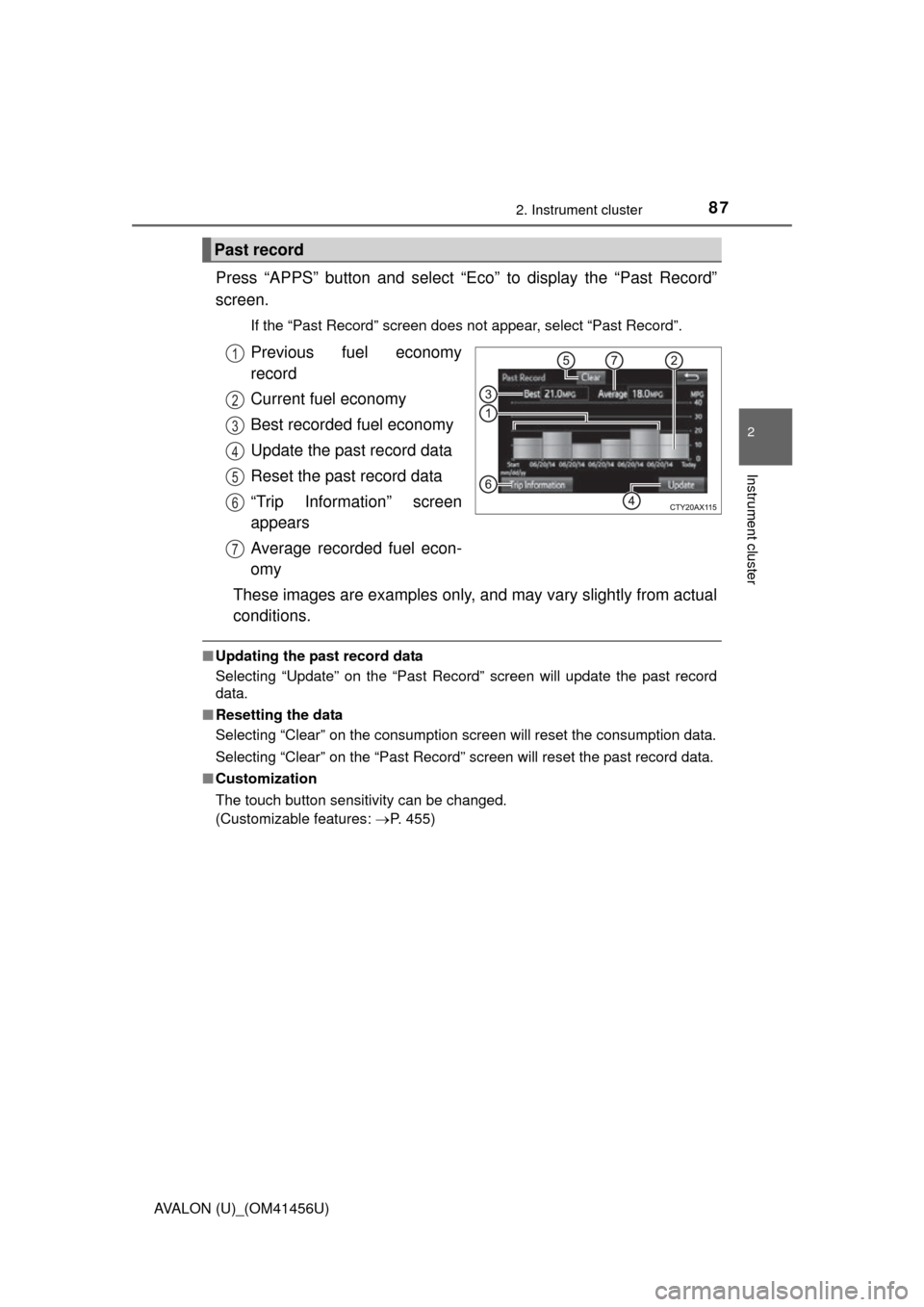
Press “APPS” button and select “Eco” to display the “Past Record”
screen.
If the “Past Record” screen does not appear, select “Past Record”.
Previous fuel economy
record
Current fuel economy
Best recorded fuel economy
Update the past record data
Reset the past record data
“Trip Information” screen
appears
Average recorded fuel econ-
omy
These images are examples only, and may vary slightly from actual
conditions.
■ Updating the past record data
Selecting “Update” on the “Past Record” screen will update t\
he past record
data.
■ Resetting the data
Selecting “Clear” on the consumption screen will reset the consumption data.
Selecting “Clear” on the “Past Record” screen will reset the past record data.
■ Customization
The touch button sensitivity can be changed.
(Customizable features: P. 455)
Past record
1
2
3
4
5
6
7
Page 97 of 500
973-2. Opening, closing and locking the doors
3
Operation of each component
AVALON (U)_(OM41456U)■
Alarms and warning indicators
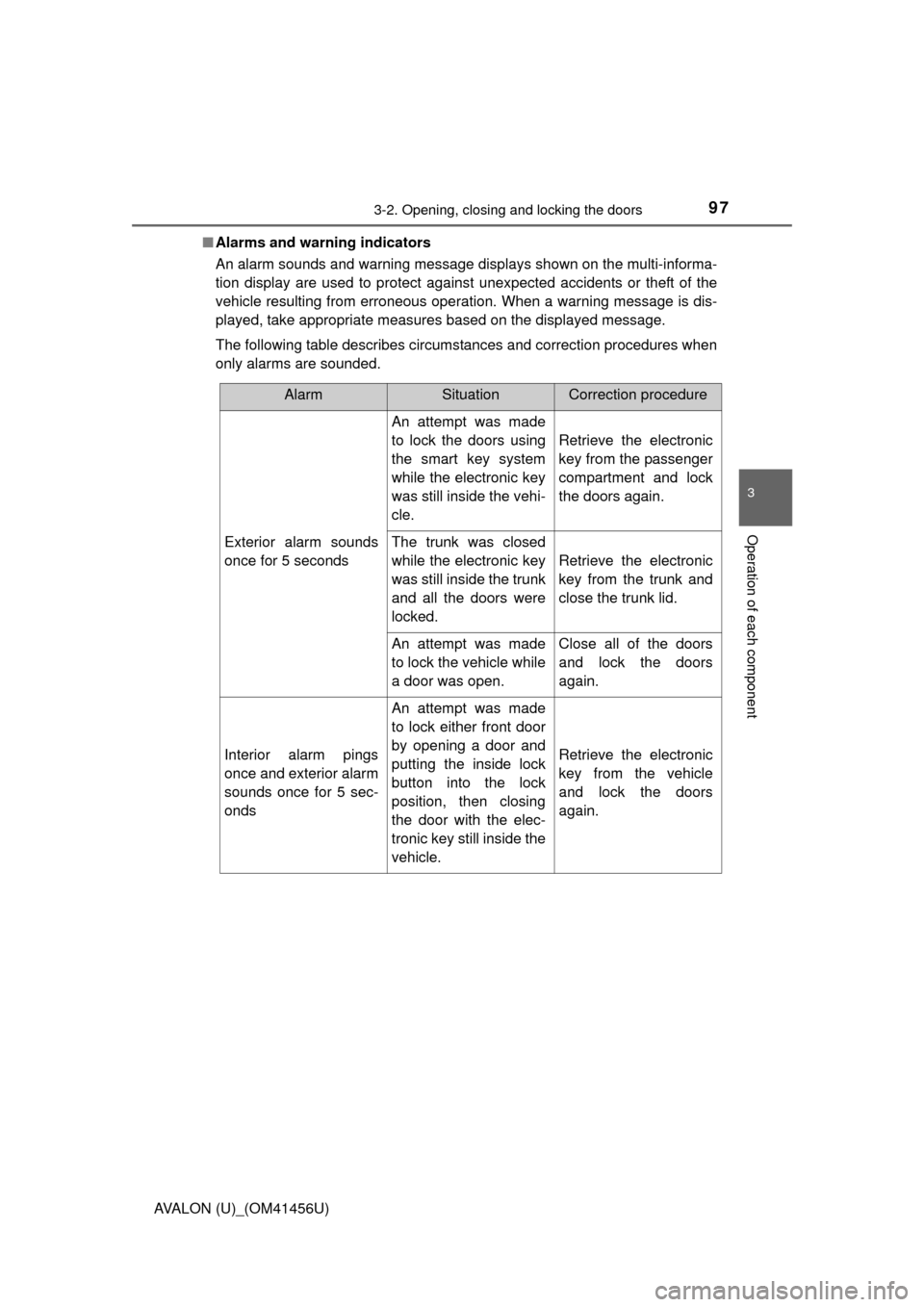
An alarm sounds and warning message displays shown on the multi-informa-
tion display are used to protect against unexpected accidents or theft of the
vehicle resulting from erroneous operation. When a warning message is dis-
played, take appropriate measures based on the displayed message.
The following table describes circumstances and correction procedures when
only alarms are sounded.
AlarmSituationCorrection procedure
Exterior alarm sounds
once for 5 seconds
An attempt was made
to lock the doors using
the smart key system
while the electronic key
was still inside the vehi-
cle.
Retrieve the electronic
key from the passenger
compartment and lock
the doors again.
The trunk was closed
while the electronic key
was still inside the trunk
and all the doors were
locked.
Retrieve the electronic
key from the trunk and
close the trunk lid.
An attempt was made
to lock the vehicle while
a door was open.Close all of the doors
and lock the doors
again.
Interior alarm pings
once and exterior alarm
sounds once for 5 sec-
onds
An attempt was made
to lock either front door
by opening a door and
putting the inside lock
button into the lock
position, then closing
the door with the elec-
tronic key still inside the
vehicle.
Retrieve the electronic
key from the vehicle
and lock the doors
again.
Page 98 of 500
983-2. Opening, closing and locking the doors
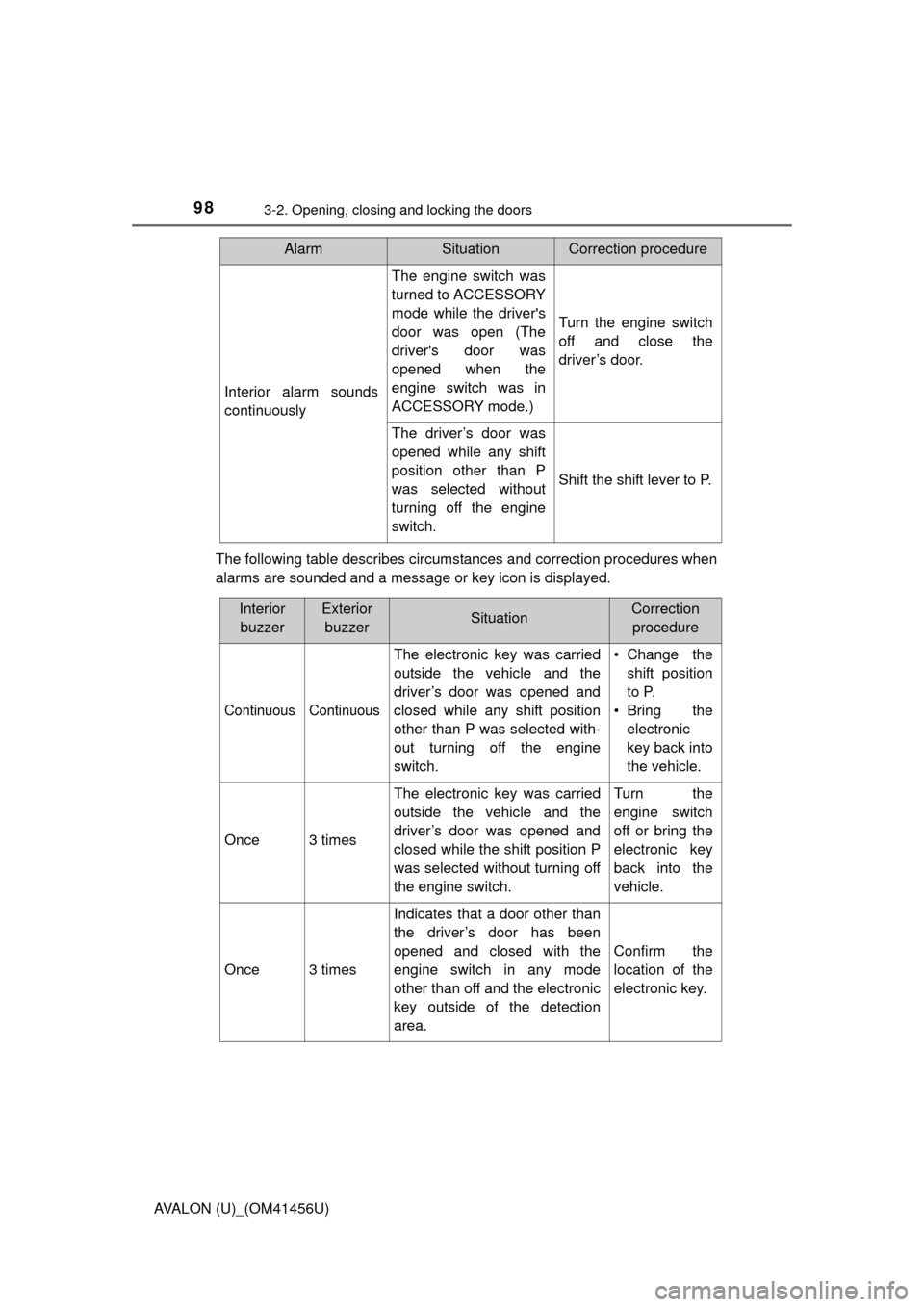
AVALON (U)_(OM41456U)The following table describes circumstances and correction procedures when
alarms are sounded and a message or key icon is displayed.
Interior alarm sounds
continuously
The engine switch was
turned to ACCESSORY
mode while the driver's
door was open (The
driver's door was
opened when the
engine switch was in
ACCESSORY mode.)
Turn the engine switch
off and close the
driver’s door.
The driver’s door was
opened while any shift
position other than P
was selected without
turning off the engine
switch.
Shift the shift lever to P.
AlarmSituationCorrection procedure
Interior
buzzerExterior buzzerSituationCorrection procedure
Continuous Continuous
The electronic key was carried
outside the vehicle and the
driver’s door was opened and
closed while any shift position
other than P was selected with-
out turning off the engine
switch. • Change the
shift position
to P.
• Bring the electronic
key back into
the vehicle.
Once3 times
The electronic key was carried
outside the vehicle and the
driver’s door was opened and
closed while the shift position P
was selected without turning off
the engine switch.Turn the
engine switch
off or bring the
electronic key
back into the
vehicle.
Once3 times
Indicates that a door other than
the driver’s door has been
opened and closed with the
engine switch in any mode
other than off and the electronic
key outside of the detection
area.
Confirm the
location of the
electronic key.
Page 100 of 500
1003-2. Opening, closing and locking the doors
AVALON (U)_(OM41456U)■
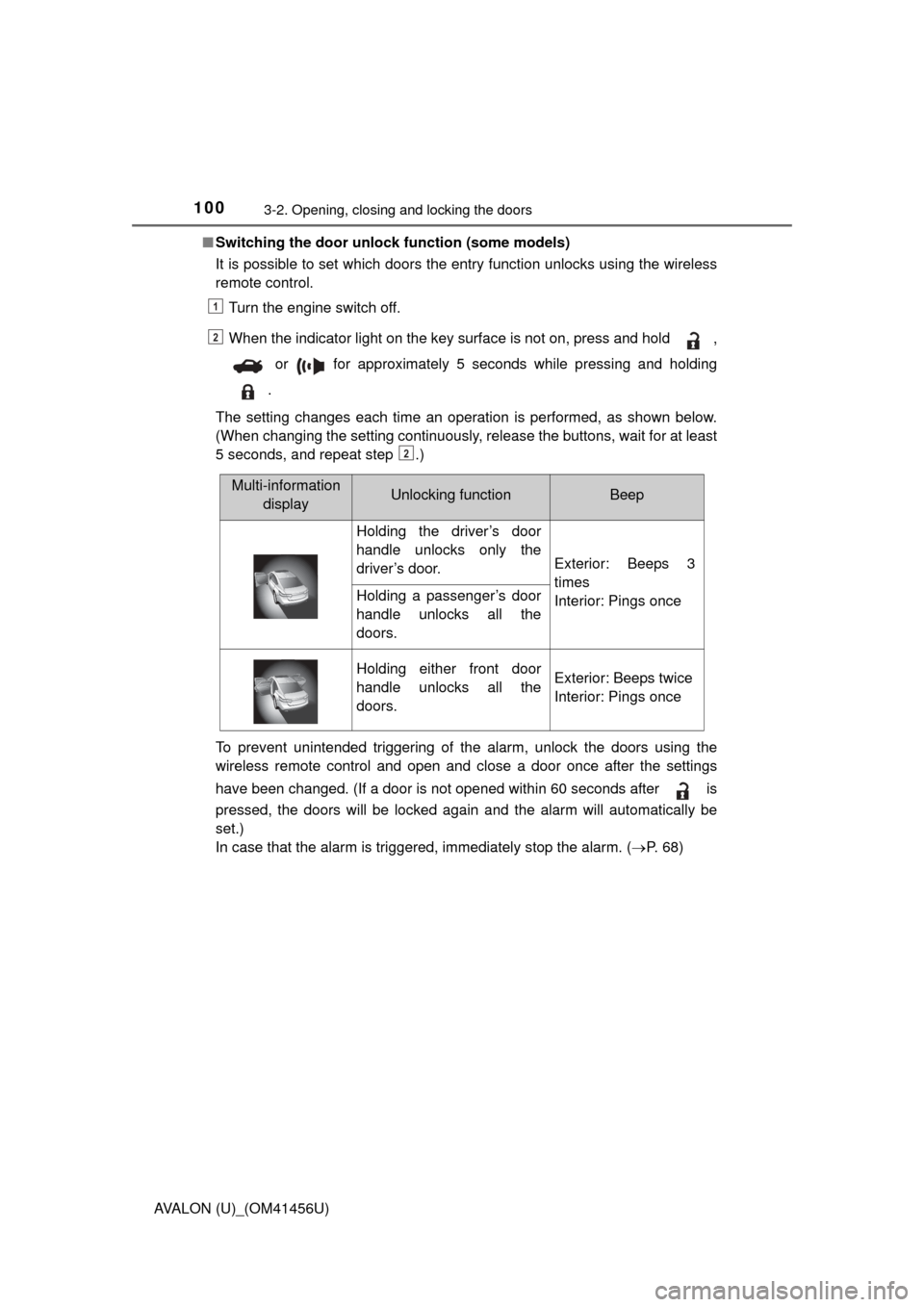
Switching the door unlock function (some models)
It is possible to set which doors the entry function unlocks using the wireless
remote control.
Turn the engine switch off.
When the indicator light on the key surface is not on, press and hold ,
or for approximately 5 seconds while pressing and holding
.
The setting changes each time an operation is performed, as shown below.
(When changing the setting continuously, release the buttons, wait for at least
5 seconds, and repeat step .)
To prevent unintended triggering of the alarm, unlock the doors using the
wireless remote control and open and close a door once after the settings
have been changed. (If a door is not opened within 60 seconds after is
pressed, the doors will be locked again and the alarm will automatically be
set.)
In case that the alarm is triggered, immediately stop the alarm. ( P. 6 8 )
1
2
2
Multi-information
displayUnlocking functionBeep
Holding the driver’s door
handle unlocks only the
driver’s door.
Exterior: Beeps 3
times
Interior: Pings once
Holding a passenger’s door
handle unlocks all the
doors.
Holding either front door
handle unlocks all the
doors.Exterior: Beeps twice
Interior: Pings once
Page 140 of 500

1403-5. Opening, closing the windows and moon roof
AVALON (U)_(OM41456U)■
Moon roof open warning buzzer
The buzzer sounds and a message is shown on the multi-information display
when the engine switch is turned off and the driver’s door is opened with the
moon roof open.
CAUTION
Observe the following precautions.
Failure to do so may cause death or serious injury.
■Opening the moon roof
● Do not allow any passengers to put their hands or heads outside the vehi-
cle while it is moving.
● Do not sit on top of the moon roof.
■ Closing the moon roof
● The driver is responsible for moon roof opening and closing operations.
In order to prevent accidental operation, especially by a child, do not let a
child operate the moon roof. It is possible for children and other passen-
gers to have body parts caught in the moon roof.
● Check to make sure that all passengers do not have any part of their body
in a position where it could be caught when the moon roof is being oper-
ated.
● When exiting the vehicle, turn the engine switch off, carry the key and exit
the vehicle along with the child. There may be accidental operation, due to
mischief, etc., that may possibly lead to an accident.
■ Jam protection function
● Never use any part of your body to intentionally activate the jam protection
function.
● The jam protection function may not work if something gets caught just
before the moon roof fully closes.
Page 159 of 500
159
4
Driving
AVALON (U)_(OM41456U)
4-2. Driving procedures
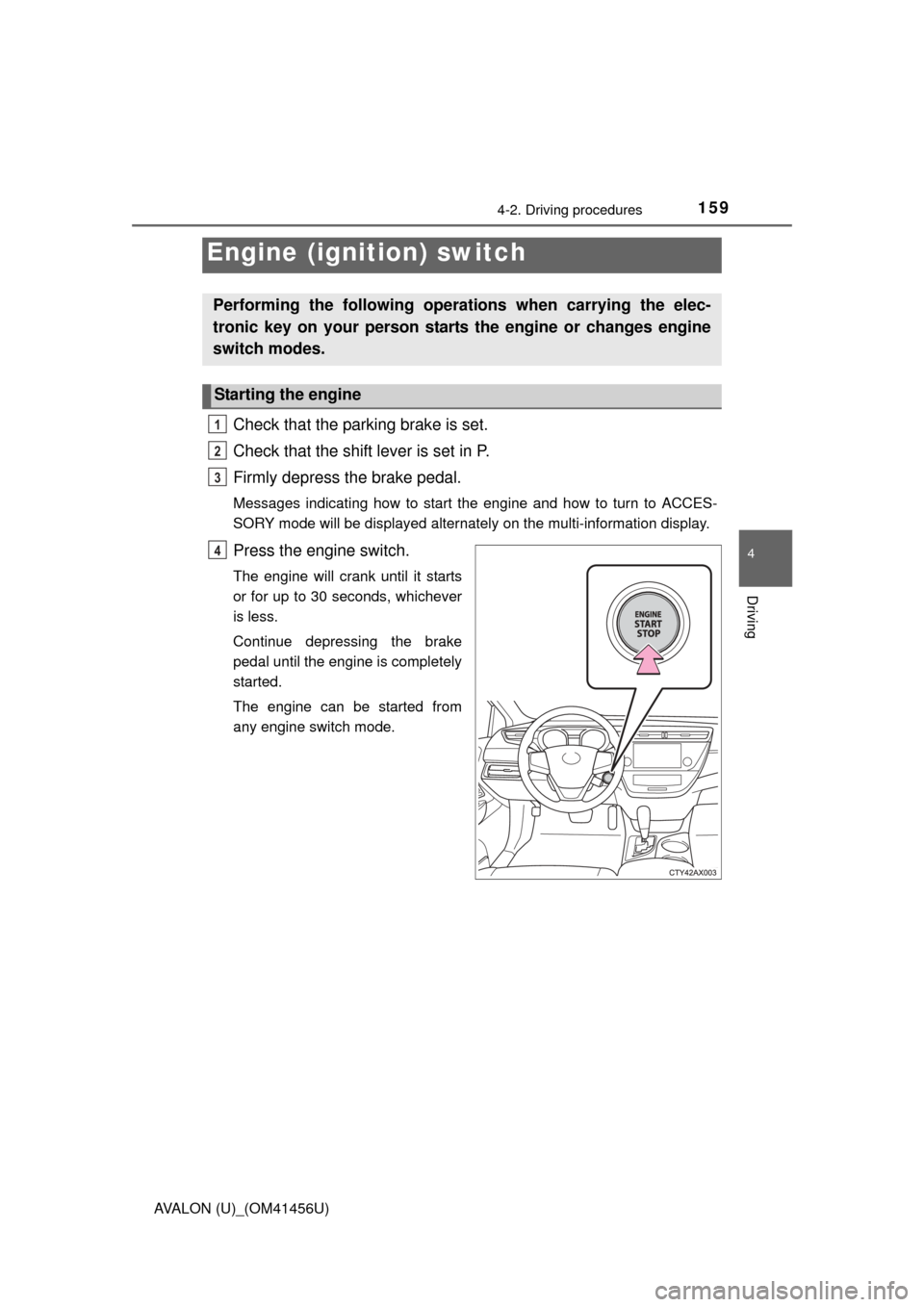
Check that the parking brake is set.
Check that the shift lever is set in P.
Firmly depress the brake pedal.
Messages indicating how to start the engine and how to turn to ACCES-
SORY mode will be displayed alternately on the multi-information display.
Press the engine switch.
The engine will crank until it starts
or for up to 30 seconds, whichever
is less.
Continue depressing the brake
pedal until the engine is completely
started.
The engine can be started from
any engine switch mode.
Engine (ignition) switch
Performing the following operations when carrying the elec-
tronic key on your person starts the engine or changes engine
switch modes.
Starting the engine
1
2
3
4
Page 160 of 500
1604-2. Driving procedures
AVALON (U)_(OM41456U)
Stop the vehicle.
Shift the shift lever to P.
Set the parking brake. (P. 170)
Press the engine switch.
Driving-related data will be displayed on the multi-information display.
( P. 84)
Modes can be changed by pressing the engine switch with brake
pedal released. (The mode changes ea ch time the switch is pressed.)
Off*
The emergency flashers can be
used.
The multi-information display will
not be displayed.
ACCESSORY mode
Some electrical components such
as the audio system can be used.
A message indicating how to start
the engine will be displayed on the
multi-information display.
IGNITION ON mode
All electrical components can be
used.
*: If the shift lever is in a position other than P when turning off the
engine, the engine switch will be
turned to ACCESSORY mode, not
to off.
Stopping the engine
Changing engine switch modes
1
2
3
4
Page 161 of 500
1614-2. Driving procedures
4
Driving
AVALON (U)_(OM41456U)
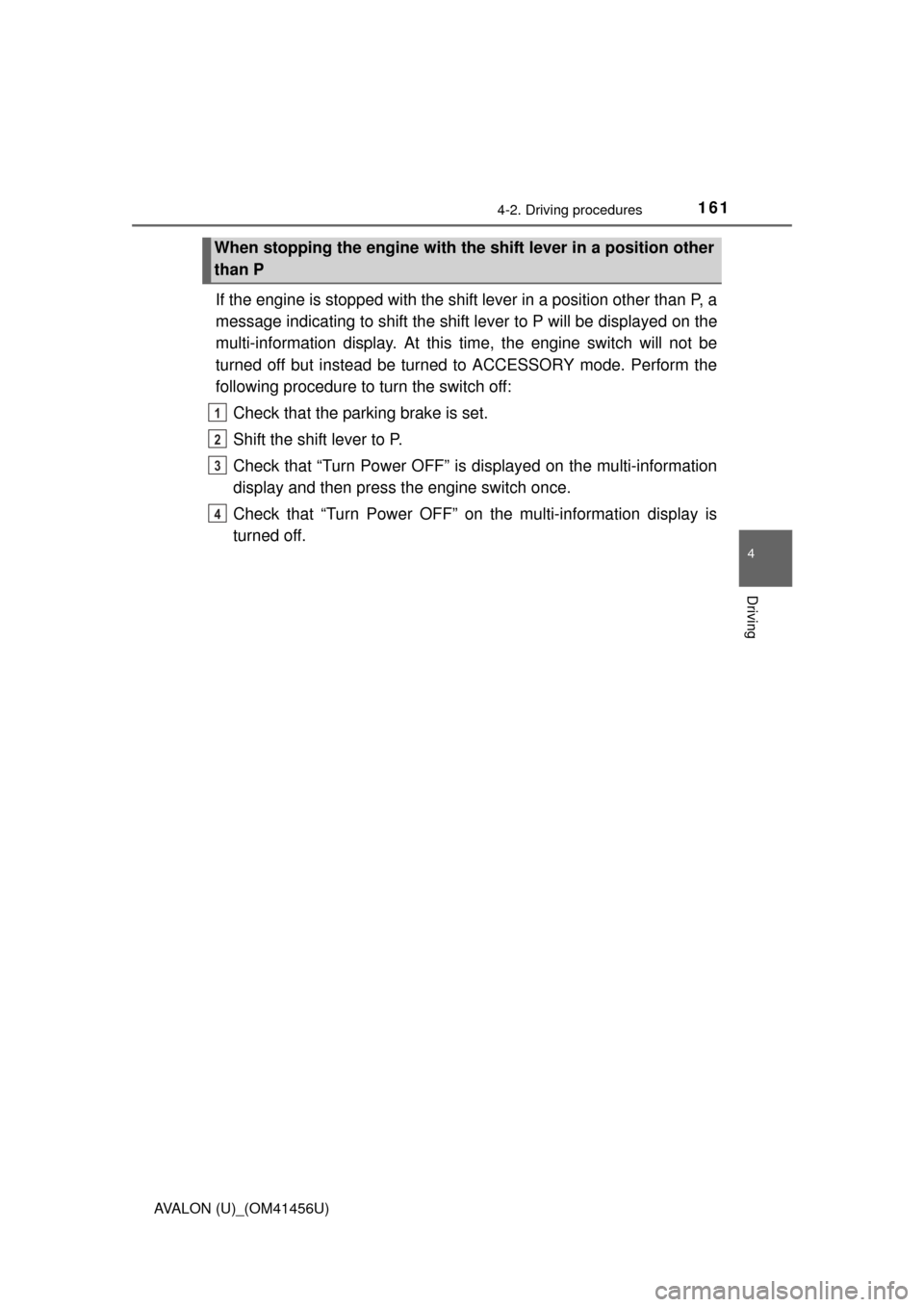
If the engine is stopped with the shift lever in a position other than P, a
message indicating to shift the shift lever to P will be displayed on the
multi-information display. At this time, the engine switch will not be
turned off but instead be turned to ACCESSORY mode. Perform the
following procedure to turn the switch off:
Check that the parking brake is set.
Shift the shift lever to P.
Check that “Turn Power OFF” is displayed on the multi-information
display and then press the engine switch once.
Check that “Turn Power OFF” on the multi-information display is
turned off.
When stopping the engine with the shift lever in a position other
than P
1
2
3
4