2015 TOYOTA 4RUNNER ignition
[x] Cancel search: ignitionPage 329 of 524

3295-4. Other interior features
5
Interior features
4RUNNER (U)_(OM35B18U)
When the engine switch is turned to the “ON” position (vehicles with-
out a smart key system) or the engine switch is turned to IGNITION
ON mode (vehicles with a smart key system), the red indicator light
comes on for 2 seconds then turns off. Afterward, the green indicator
light comes on, indicating that the service is active.
The following indicator light patterns indicate specific system usage
conditions:
● Green indicator light on = Active service
● Green indicator light flashing = Sa fety Connect call in process
● Red indicator light (except at vehi cle start-up) = System malfunction
(contact your Toyota dealer)
● No indicator light (off) = Safety Connect service not active
■Automatic Collision Notification
In case of either airbag deployment or severe rear-end collision, the
system is designed to automatical ly call the response center. The
responding agent receives the vehicle’s location and attempts to
speak with the vehicle occupants to assess the level of emergency.
If the occupants are unable to communicate, the agent automati-
cally treats the call as an emergency, contacts the nearest emer-
gency services provider to descri be the situation, and requests that
assistance be sent to the location.
Safety Connect LE D light Indicators
Safety Connect services
Page 340 of 524

3406-2. Maintenance
4RUNNER (U)_(OM35B18U)■
Reset the maintenance data (U.S.A. only)
After the required maintenance is performed according to the maintenance
schedule, please reset the maintenance data.
To reset the data, follow the procedure described below:
Turn the engine switch off with the trip meter A reading shown. ( P. 84)
Vehicles without a smart key system:
While pressing the display change button ( P. 83), turn the engine switch
to the “ON” position (do not start the engine because reset mode will be
canceled).
Vehicles with a smart key system:
While pressing the display change button ( P. 83), turn the engine switch
to the IGNITION ON mode (do not start the engine because otherwise the
reset mode will be canceled).
Continue to press and hold the button until the trip meter displays “000000”.
■ Allow inspection and repairs to be performed by a Toyota dealer
●Toyota technicians are well-trained specialists and are kept up to date with
the latest service information. They are well informed about the operations
of all systems on your vehicle.
● Keep a copy of the repair order. It proves that the maintenance that has
been performed is under warranty cove rage. If any problem should arise
while your vehicle is under warranty, your Toyota dealer will promptly take
care of it.
CAUTION
■ If your vehicle is not properly maintained
Improper maintenance could result in serious damage to the vehicle and
possible death or serious injury.
■ Handling of the battery
● Engine exhaust, some of its constituents, and a wide variety of automobile
components contain or emit chemicals known to the State of California to
cause cancer and birth defects and other reproductive harm. Work in a
well ventilated area.
● Oils, fuels and fluids contained in vehicles as well as waste produced by
component wear contain or emit chemicals known to the State of Califor-
nia to cause cancer and birth defects or other reproductive harm. Avoid
exposure and wash any affected area immediately.
● Battery posts, terminals and related accessories contain lead and lead
compounds which are known to cause brain damage. Wash your hands
after handling. ( P. 359)
1
2
3
Page 406 of 524
4067-2. Steps to take in an emergency
4RUNNER (U)_(OM35B18U)
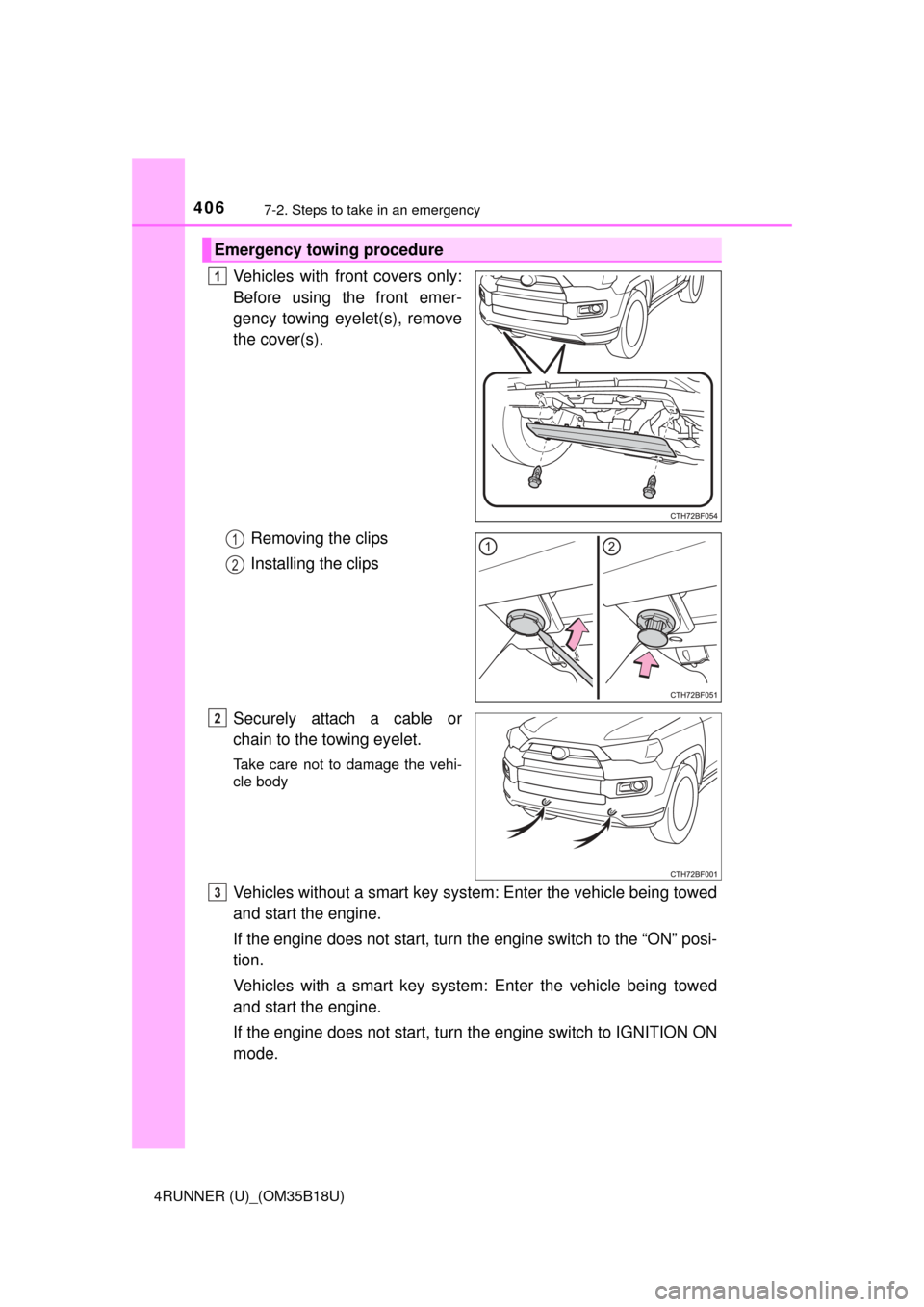
Vehicles with front covers only:
Before using the front emer-
gency towing eyelet(s), remove
the cover(s).Removing the clips
Installing the clips
Securely attach a cable or
chain to the towing eyelet.
Take care not to damage the vehi-
cle body
Vehicles without a smart key system: Enter the vehicle being towed
and start the engine.
If the engine does not start, turn th e engine switch to the “ON” posi-
tion.
Vehicles with a smart key system : Enter the vehicle being towed
and start the engine.
If the engine does not start, turn the engine switch to IGNITION ON
mode.
Emergency towing procedure
1
1
2
2
3
Page 422 of 524

4227-2. Steps to take in an emergency
4RUNNER (U)_(OM35B18U)
Indicates a malfunction in the intuitive parking
assist-sensorThe site of the malfunction flashes and stays
on.
A buzzer will sound for several seconds and
this warning message will disappear after sev-
eral seconds.
If the engine switch is turned to a mode other
than IGNITION ON mode and then back to
IGNITION ON mode, the buzzer will sound and
this message will be displayed again.
Have the vehicle inspected by your Toyota
dealer.
Indicates that one or more of the doors is not fully
closed
If the vehicle reaches a speed of 3 mph (5 km/h), flashes and a buzzer sounds to indicate
that the door(s) are not yet fully closed.
Make sure that all the doors are closed.
Indicates that the back door is not fully closed
If the vehicle reaches a speed of 3 mph (5 km/h), flashes and a buzzer sounds to indicate
that the back door is not yet fully closed.
Close the back door.
Indicates that the moon roof is not fully closed
(with the engine switch off, and the driver's door
open)
A buzzer also sounds.
Close the moon roof.
Indicates that the parking brake is still engaged
If the vehicle reaches a speed of 3 mph (5 km/h),
flashes and a buzzer sounds to indicate
that the parking brake is still engaged.
Release the parking brake.
Indicates that the washer fluid level is low.
Add washer fluid.
Warning messageDetails/Actions
(Flashes)
(Flashes)
(Flashes)
Page 423 of 524

4237-2. Steps to take in an emergency
7
When trouble arises
4RUNNER (U)_(OM35B18U)
*: Refer to the separate “Scheduled Maintenance Guide” or “Owner’s ManualSupplement” for the maintenance interval applicable to your vehicle.
Indicates that an intuitive parking assist-sensor is
dirty or covered with ice The site of the malfunction flashes and stays
on.
A buzzer will sound for several seconds and
this warning message will disappear after sev-
eral seconds.
If the engine switch is turned to a mode other
than IGNITION ON mode and then back to
IGNITION ON mode, the buzzer will sound and
this message will be displayed again.
Clean the sensor.
(U.S.A. only)
Indicates that all maintenance according to the
driven distance on the maintenance schedule
*
should be performed soon.
Comes on approximately 4500 miles (7200 km)
after the maintenance data has been reset.
If necessary, perform maintenance.
(U.S.A. only)
Indicates that all maintenance is required to cor-
respond to the driven distance on the mainte-
nance schedule
*.
Comes on approximately 5000 miles (8000 km)
after the maintenance data has been reset.
(The indicator will not work properly unless the
maintenance data has been reset.)
Perform the necessary maintenance.
Please reset the maintenance data after the
maintenance is performed ( P. 340)
Warning messageDetails/Actions
Page 426 of 524
4267-2. Steps to take in an emergency
4RUNNER (U)_(OM35B18U)
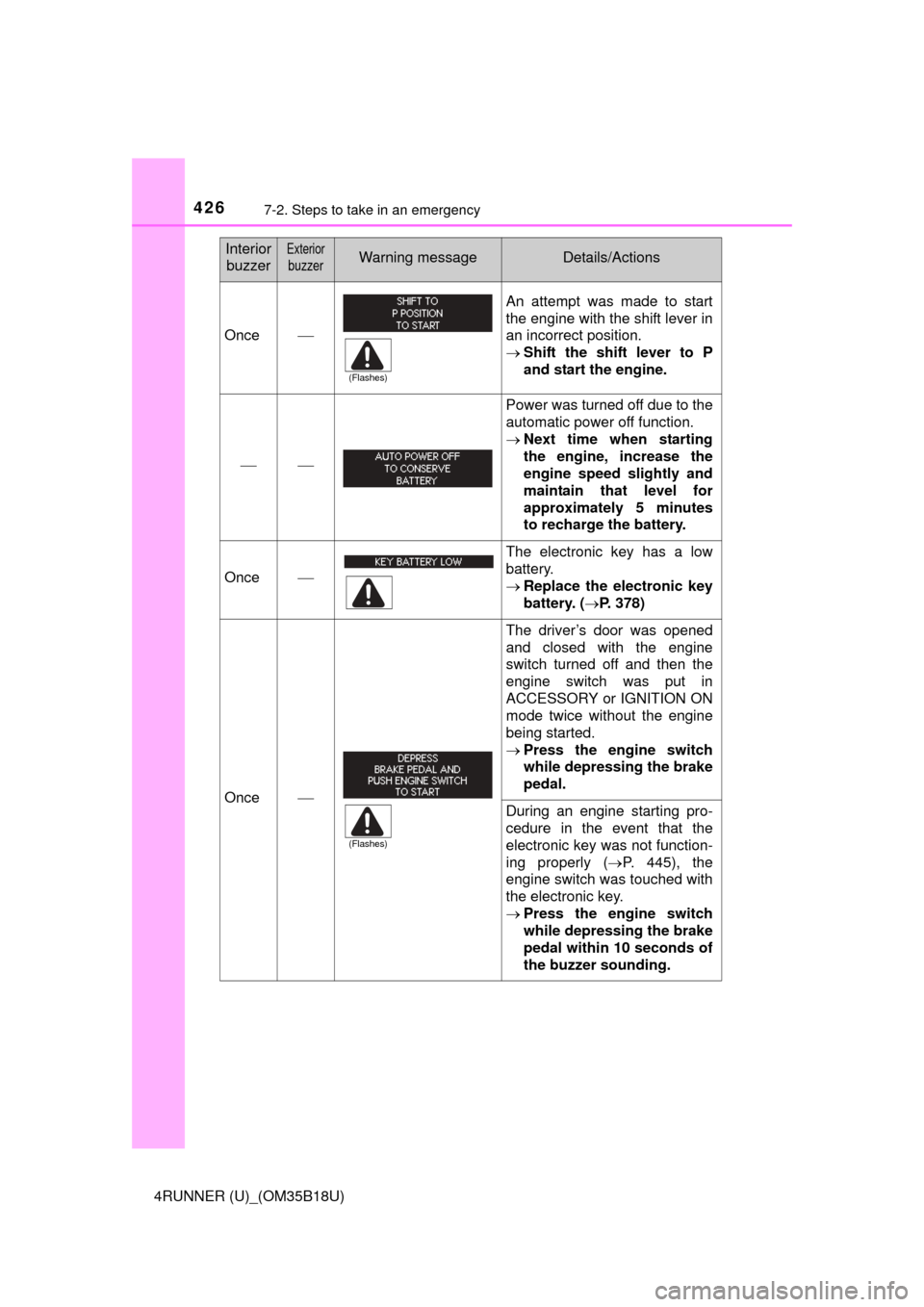
Once
An attempt was made to start
the engine with the shift lever in
an incorrect position.
Shift the shift lever to P
and start the engine.
Power was turned off due to the
automatic power off function.
Next time when starting
the engine, increase the
engine speed slightly and
maintain that level for
approximately 5 minutes
to recharge the battery.
Once
The electronic key has a low
battery.
Replace the electronic key
battery. ( P. 378)
Once
The driver’s door was opened
and closed with the engine
switch turned off and then the
engine switch was put in
ACCESSORY or IGNITION ON
mode twice without the engine
being started.
Press the engine switch
while depressing the brake
pedal.
During an engine starting pro-
cedure in the event that the
electronic key was not function-
ing properly ( P. 445), the
engine switch was touched with
the electronic key.
Press the engine switch
while depressing the brake
pedal within 10 seconds of
the buzzer sounding.
Interior
buzzerExterior
buzzerWarning messageDetails/Actions
(Flashes)
(Flashes)
Page 448 of 524

4487-2. Steps to take in an emergency
4RUNNER (U)_(OM35B18U)
Vehicles with a smart key system only: Open and close any of the
doors of your vehicle with the engine switch off.
Maintain the engine speed of the second vehicle and start the
engine of your vehicle by turni ng the engine switch to the “ON”
position (vehicles without a smart key system) or turning the engine
switch to IGNITION ON mode (v ehicles with a smart key system).
Once the vehicle’s engine has started, remove the jumper cables in
the exact reverse order from which they were connected.
Once the engine starts, have the vehicle inspected at your Toyota
dealer as soon as possible.
■ Starting the engine when the battery is discharged
The engine cannot be started by push-starting.
■ To prevent battery discharge
●Turn off the headlights and the audio system while the engine is off.
● Turn off any unnecessary electrical components when the vehicle is running
at a low speed for an extended period, such as in heavy traffic.
■ Charging the battery
The electricity stored in the battery will discharge gradually even when the
vehicle is not in use, due to natural discharge and the draining effects of cer-
tain electrical appliances. If the vehicle is left for a long time, the battery may
discharge, and the engine may be unable to start. (The battery recharges
automatically during driving.)
■ When recharging or replacing the battery
●Vehicles with a smart key system: In some cases, it may not be possible to
unlock the doors using the smart key system when the battery is dis-
charged. Use the wireless remote control or the mechanical key to lock or
unlock the doors.
● The engine may not start on the first attempt after the battery has recharged
but will start normally after the second attempt. This is not a malfunction.
● Vehicles with a smart key system: The engine switch mode is memorized by
the vehicle. When the battery is reconnected, the system will return to the
mode it was in before the battery was discharged. Before disconnecting the
battery, turn the engine switch off.
If you are unsure what mode the engine switch was in before the battery dis-
charged, be especially careful when reconnecting the battery.
● Make sure that the key is not inside the vehicle when recharging or replac-
ing the battery. The key may be locked in the vehicle if the alarm is acti-
vated. ( P. 73)
4
5
6
Page 460 of 524

4608-1. Specifications
4RUNNER (U)_(OM35B18U)
How to read oil container label:
The International Lubricant Specification Advisory Committee (ILSAC)
Certification Mark is added to some oil containers to help you select
the oil you should use.
CTH61AS018
Cooling system
Capacity11.1 qt. (10.5 L, 9.2 Imp. qt.)
Coolant type
Use either of the following: • “Toyota Super Long Life Coolant”
• A similar high-quality ethylene glycol-
based non-silicate, non-amine, non-
nitrite, and non-borate coolant with
long-life hybrid organic acid technol-
ogy
Do not use plain water alone.
Ignition system
Spark plug
Make
GapDENSO SK16HR11
0.043 in. (1.1 mm)
NOTICE
■ Iridium-tipped spark plugs
Use only iridium-tipped spark plugs. Do not adjust the spark plug gap.