2015 SMART FORTWO COUPE service
[x] Cancel search: servicePage 114 of 222

High-voltage battery
Introduction
The components of the drive system are
indicated by yellow warning labels to make you aware of high voltage.
High-voltage cables are orange-colored. G
WARNING
The drive system is subject to high vol-
tages.
You may be seriously or even fatally injured if you:
R tamper with components or high-voltage
cables in the drive system
R touch components or high-voltage cables
in the drive system on a vehicle which has
been involved in an accident
R touch damaged drive system components
Do not remove any drive system component
covers which are marked with a warning
sticker. Do not tamper with components or
orange high-voltage drive system cables. G
WARNING
The high‑voltage battery of the drive sys-
tem is located under the vehicle’s under-
body. When the pressure inside the
high‑voltage battery exceeds a certain
value, for example in case of a vehicle fire, inflammable gas will escape via a duct. Theinflammable gas escapes to an area under
the vehicle. This prevents the high‑voltage
battery from exploding.
Stay away from this area of the vehicle. The drive system is powered by a high-
voltage battery. The high-voltage battery
stores and releases the energy required for operation of the electric motor.
The electric motor uses the energy that is
stored in the high-voltage battery when
driving off and when accelerating.
When rolling, kinetic energy is converted
into electrical energy by energy recovery
and stored in the high-voltage battery.
The range of the vehicle is reduced when
consumers are switched on, e.g. climate
control.
The high-voltage battery can be charged in
a voltage range from 100 V to 240 V.
The high-voltage battery can be charged
R through energy recovery while the vehi-
cle is rolling or when braking
R Level 1 charging - 110 V / 120 V -
A travel cord will be supplied with the
vehicle. This charging cable can be
plugged into commonly available
110 V / 120 V, 15 A power sources. This
charging method will take longer to
charge your vehicle than a dedicated
level 2 charging source. Therefore it is
not recommended as the primary method
of charging.
R Level 2 charging - 220 V / 240 V -
For the fastest possible charging time, a
dedicated 220 V / 240 V, 20 A circuit is
required. Local electrical code can vary
from town to town. Therefore, it is highly recommended that this service is pro-
fessionally installed. This service
should be installed in a dry area with
easy access to the passenger side of the
vehicle. You will need to obtain a vehicle
charge connector that can be wired
directly to or plugged into the dedicated
220 V / 240 V service. Charge connectors
will be available for purchase through
your authorized electric drive smart
center.
R Level 2 charging - Charging station 112
High-voltage battery>> Operation.
Page 116 of 222

ture range from
Ò4‡(Ò20 ¥) to 104 ‡
(40 ¥) .
When the vehicle is exposed to tempera-
tures below Ò13‡(Ò25 ¥) for longer than
seven days, irreversible damage by frost
can occur.
Terms of use Observe the following notes:
R exclusions of the high-voltage battery
terms of use in the battery rental con-
tract
R exclusions and limitations in the war-
ranty and guarantee documents, as well as
in the Service Booklet
R maintenance notes for the high-voltage
battery in the Service Booklet
Overvoltage protection !
Overvoltage in the on-board powersup-
ply system can damage the vehicle.
The vehicle is therefore equipped with a
protective device against overvoltage in the power supply system. This protective
device can be activated in severe thun-
derstorms, for example, and lead to
security systems being triggered. This
function is used to protect the vehicle.
Once the security system has been reac-
tivated, the charging process continues
automatically.
Reactivate the security system after it has been triggered. Otherwise the charging
process will not continue. The high-volt-
age battery is not being charged, which may result in the vehicle not being ready to
start.
If you have secured other devices using the same security system, they will also be
deactivated after this is triggered. Make
sure that these devices do function after
reactivating the security system. Charging cable and ‑connecter warming Observe the safety notes on (Y
page 112).
Charging cable and ‑connecter can become warmed during charging process when con-
nected to a power source.
This warming is caused by
R high charge currents
R charging time
R transfer resistances at the plug contacts
R resistances of the charging cable
If the infrastructure of the power supply
system and charging cable are in good
order, the charging cable and ‑connecter
will only warm up within admissible
threshold.
Damaged charging cable plug or its con-
tacts may lead to warming above admissi-
ble threshold. In case of this, have the
cable, respectively power socket,
exchanged or disposed by a qualified elec-
trician. Charging at an AC power socket or a
private wallbox
Charging at an AC power socket G
WARNING
If you apply improperly installed power
sockets or adapters, extension cables or
similar to connect the charging cable to
power sockets, this may cause fire or lead
to electric shock. Risk of life!
In order to avoid the risk, please observe
the following:
R Connect the charging cable only to power
sockets which are
- properly installed
- approved by a qualified electrician
R For safety reasons only use charging
cables which have been supplied and
approved for the vehicle.
R Do not use a damaged charging cable. 114
High-voltage battery>> Operation.
Page 123 of 222

of charge service life you can continue to
use the "Vehicle Homepage" with costs.
Further information can be obtained at any
authorized electric drive smart center.
The "Vehicle Homepage" is available in the following languages:
R German
R English
R French
R Italian
R Spanish
R Portuguese
R Dutch
i Further information concerning sup-
ported end devices and available lan-
guages can be found under the following
address: http://vh.smart.com/info.
In order to call up the "Vehicle Homepage", the vehicle must be connected to the Inter-
net.
This is enabled:
R via a mobile service module (if your
vehicle is equipped with it)
(Y page 122)
R via powerline (Y page 122)
Further information can be found here
(Y page 114).
Personal area setup You must first set up your personal access
under http://vh.smart.com in order to
access the "Vehicle Homepage". For this,
you need a valid Email address.
Following registration, you then have
access to your personal area on the "Vehi-
cle Homepage". The vehicle must be regis-
tered in the personal area for you to access the settings of your vehicle. Call up the
corresponding input field within the
"Vehicle Homepage". Enter the vehicle
identification number (VIN) and the vehi-
cle verification code (VVC). This informa- tion can be obtained at your authorized electric drive smart center when you
receive the vehicle.
Notes on data protection Please note that the "Vehicle Homepage"
allows access to your personal data. For
this reason, keep your vehicle verification
code (VVC) and your user data in a secure
place and safe from unauthorized persons.
Each person who has access to the above
information can use the functions on the
"Vehicle Homepage". For this reason, make
sure than no unauthorized persons have
access to your personal area.
After selling the vehicle, you are required to delete the vehicle from your personal
area on the "Vehicle Homepage". You must
also destroy the vehicle verification code
(VVC) documents.
If you have bought a pre-owned vehicle, it
may be possible that the previous owner
still has access to the "Vehicle Homepage". For this reason, have a new vehicle veri-
fication code (VVC) reissued to you at an
authorized electric drive smart center
after purchase. With this new code you can
set up the access to your vehicle as descri- bed in the "Personal area setup" section.
Here you can also deactivate the previous
owner's access, should it still be active.
Calling up the functions of the "Vehicle
Homepage" If the vehicle is registered in your per-
sonal area of the "Vehicle Homepage", you
can, for example, access the following
functions:
R call up the current charge level
R program the departure time
R activate the "Air conditioning before
start" function
When the vehicle is being charged, you can call up the estimated charging time and the
attainable range. Both results are estima- High-voltage battery
121>> Operation. Z
Page 124 of 222

ted values because, for example, they are
influenced by the following factors:
R outside temperature
R active electrical consumers, e.g. air
conditioning, lights
R personal driving style
R traffic conditions
Plan for a sufficient reserve accordingly.
Connecting the vehicle to the Internet Via mobile service module
i This function is only available if the
vehicle is equipped with a mobile ser-
vice module.
You can use the “Vehicle Homepage” when
the vehicle has connected to the Internet
via the mobile service module. The mobile
service module uses GSM (Global System for Mobile Communications) and transfers the
required data via radio transmission. The
vehicle automatically detects if a connec- tion to the Internet via the mobile service module is available or not. No pre-settings
need to be done.
In order to use data transfer via the mobile
service module you do not need a SIM card
and no contract.
i There may be service limitations if the
vehicle is located for example in a
underground garage. Service limita-
tions may also appear in areas with poor
mobile service coverage. In theses cases
you can launch the Internet connection
via powerline (Y page 122).
Via powerline
You can also access the “Vehicle Homepage”
if you do not have GSM reception. This is
possible for example via your DSL router.
This connection is built by the plugged in charging cable with the aid of the power-
line technology.
The vehicle supports powerline communi-
cation according to the "HomePlug AV" standard. Data is transmitted via phase L1
and the neutral conductor of the power line.
In order for the vehicle to access the Inter-net, you require a commercially available
adapter of the "HomePlug AV" standard.
This adapter must also have an encryption
button so that it can be configured to com-
municate with the vehicle. Connect the
adapter to the power supply as well as your Internet connection. If the adapter is con-
nected to different phase than L1, a phase
coupler must be additionally installed.
Only in this way can stable communication
be guaranteed. For questions, consult a
qualified electrician.
i If you already have a powerline network
installed, the vehicle can be integrated
into it.
To establish a connection between the
vehicle and a powerline adapter, carry out
the following:
X Connect the vehicle to a power socket or a
wallbox.
The right #indicator lamp on the
vehicle socket must flash green.
X Insert the powerline adapter into a
neighboring power socket. Observe that
the vehicle and the adapter are connec-
ted via phase L1.
X Switch on the ignition.
X Call up the Charge current
Charge current menu on the
control system (Y page 92).
Carry out the following steps within
30 seconds: X If the value of the charge current is not
set to 8 A:set the value to 8 A and confirm.
X Set the value of the charge current to 12 A
and confirm.
X Set the value of the charge current to 8 A
and confirm. 122
High-voltage battery>> Operation.
Page 125 of 222

X
Set the value of the charge current to 12 A
and confirm.
X Press the encryption button on the pow-
erline adapter within three minutes.
When the powerline adapter shows a con-
nection, the connection process was suc- cessful.
i Observe the separate operating
instructions of the powerline adapter.
i Contact an authorized electric drive
smart center if you have any questions.
X Next, set the value of the charge current
to the desired value once again.
As soon as the vehicle establishes an Inter- net connection, you can also use the "Vehi-
cle Homepage" at home during the charging process. Changes you have made via the
"Vehicle Homepage" are adopted after the
charging process is complete. This data
transmission ends after approximately
three days. Intelligent charging management
If you wish to charge economically and with
minimal damage to the battery, you must set a departure time (Y page 90). This option to
optimize the charging process depends on
your electricity contract and the local
power supplier. Your vehicle detects this
option automatically. Depending on the
departure time which is set, the charging
process of the high-voltage battery may not be started immediately or may be inter-
rupted during the process. Front compartment
Service flap
Remove the service flap to check the bat-
tery coolant level, windshield washer res- ervoir level, and brake fluid level. Insert the service flap on the front of the
vehicle so that it does not get damaged or
dirty.
i
The service flap has a strap on the rear
side that ties it to the vehicle body. G
WARNING
Always turn the key to starter switch posi-
tion 0and remove the key from the starter
switch before opening the service flap.
If the windshield wipers should inadver-
tently be switched on, you could be seri-
ously injured by the wiper washer drive,
which is located just below the service
flap. G
WARNING
Make sure the service flap is locked while
driving. Otherwise, the service flap could
become detached and pose a hazard to you or others.
! Check the fill levels at regular inter-
vals.
! Carefully remove ice, snow, and any
other deposits from the air intake
grilles above the service flap to ensure
air intake at all times.
X Park the vehicle on level ground.
X Switch off the ignition.
X Engage the parking brake. Front compartment
123>> Operation. Z
Page 126 of 222
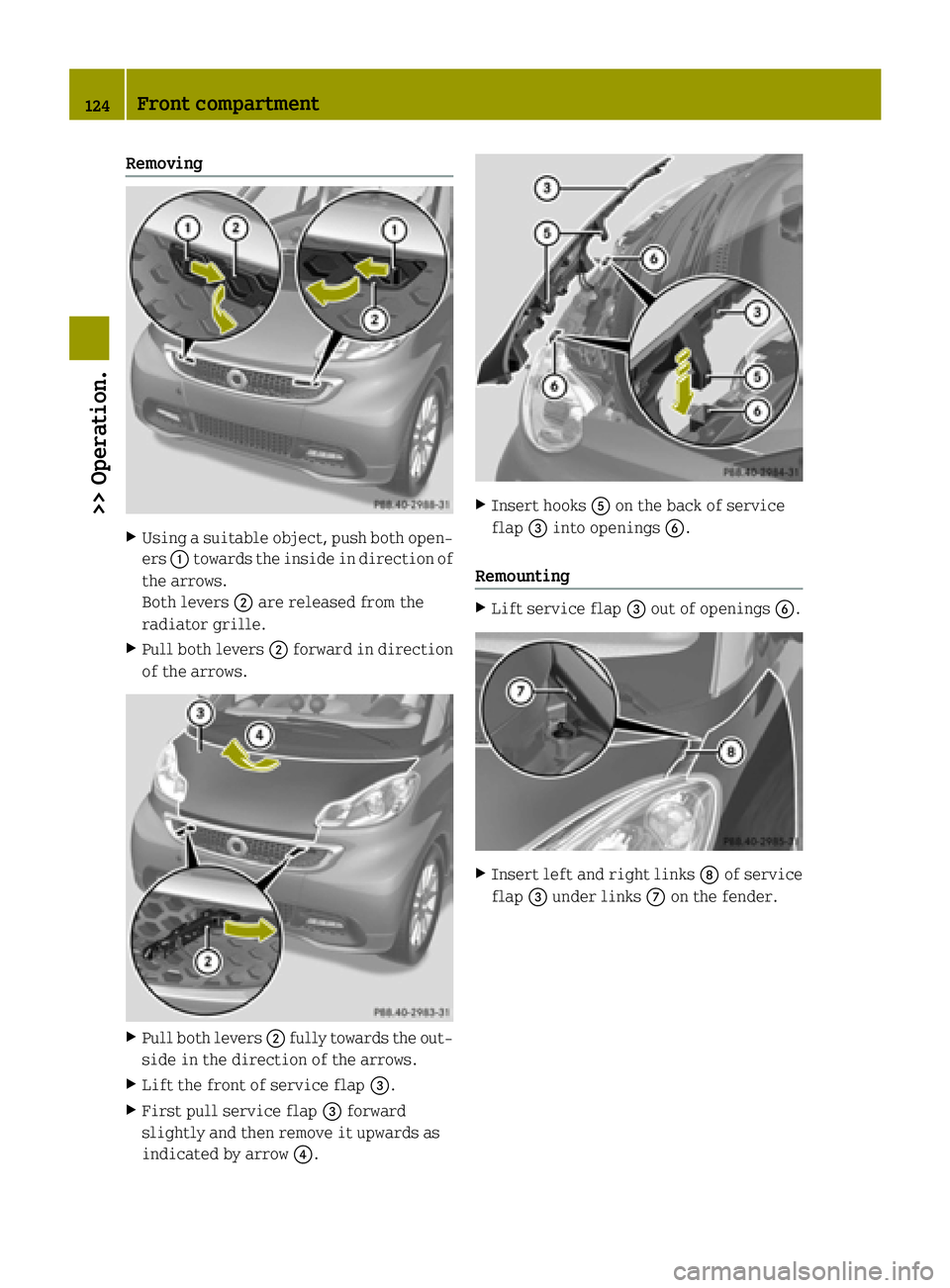
Removing
X
Using a suitable object, push both open-
ers :towards the inside in direction of
the arrows.
Both levers ;are released from the
radiator grille.
X Pull both levers ;forward in direction
of the arrows. X
Pull both levers ;fully towards the out-
side in the direction of the arrows.
X Lift the front of service flap =.
X First pull service flap =forward
slightly and then remove it upwards as
indicated by arrow ?. X
Insert hooks Aon the back of service
flap =into openings B.
Remounting X
Lift service flap =out of openings B. X
Insert left and right links Dof service
flap =under links Con the fender. 124
Front compartment>> Operation.
Page 127 of 222

X
Insert both tabs Eon the back of service
flap =completely into openings F.X
Push service flap =down in direction of
arrow G.
X First push both levers ;inward and then
to the rear. X
Press both levers ;into the radiator
grille until they engage. Coolant
G
WARNING
The cooling system is pressurized. There-
fore, do not unscrew the cap before the
drive system has cooled down. Wait for a
cooling period of at least 30 minutes. Oth- erwise, you could be seriously burned if hot coolant escapes.
The coolant is a mixture of water and anti-
corrosion/antifreeze. To check the coolant
level the vehicle must be parked on level
ground and the drive system must have
cooled down. For more information, see
„Coolants“ (Y page 219).
The battery coolant reservoir is located in the front compartment on the driver’s side.
i The coolant expansion tank for the bat-
tery‑ and drive system cooling is located
in the front compartment on the left-hand
side in the direction of travel. Front compartment
125>> Operation. Z
Page 128 of 222

Checking coolant level
X
Allow the coolant to cool down for at least
30 minutes.
X Remove the service flap and insert it on
the front of the vehicle (Y page 123).
X Perform a visual check of the fluid level
in coolant reservoir ;.
The coolant level must be between the
markings MAX and MIN.
X If necessary, add coolant.
Adding coolant X
Cover pressure cap :with a rag.
X Slowly turn pressure cap :approx-
imately Öturn counterclockwise to
release any excess pressure.
X Continue turning pressure cap :coun-
terclockwise and remove it.
X Add coolant as required. The coolant
level may not exceed the maximum filling level.
X Reinstall and tighten pressure cap :.
X Remount the service flap and close it
(Y page 123). Windshield/rear window washer system
Both the windshield and the rear window 6
washer are supplied from the windshield
washer reservoir. The recommended minimum filling level is
1.06 US qt (1.0 l).
X Remove the service flap and insert it on
the front of the vehicle (Y page 123).
The windshield washer reservoir is located
in the front compartment on the driver’s
side. G
WARNING
Windshield washer concentrate is highly
flammable. Fire, naked flames and smoking
are prohibited when windshield washer
concentrate is being handled.
X Use a windshield washer concentrate
labeled for summer and water for tem-
peratures above freezing point.
X Use a windshield washer concentrate
labeled for winter and water for temper-
atures below freezing point.
! Always use a windshield washer concen-
trate labeled for winter where tempera-
tures may fall below freezing point.
Failure to do so could result in damage to
the washer system/reservoir.
X Premix the windshield washer fluid in a
suitable container.
Observe mixing ratios depending on the
outside temperature (Y page 218).
X Use the tab to pull cap :upwards.
X Refill the windshield washer reservoir.
6 Coupé only. 126
Front compartment>> Operation.