2015 SMART FORTWO COUPE charging
[x] Cancel search: chargingPage 117 of 222
R
Do not use:
- extension chords
- cable reels
- multiple sockets
R Do not use power socket adapters to con-
nect the charging cable to the main
socket. Only exception to charge the
high-voltage battery of an electric vehi- cle would be an adapter which has been
certified and approved by the manufac-
turer.
R Observe the manufacturer’s safety
instructions.
Charging at a private wallbox G
WARNING
If you apply an improperly installed wall-
box or adapter, extension cable or similar to connect the charging cable, this may
cause fire or lead to electric shock. Risk of life!
In order to avoid the risk, please observe
the following:
R Connect the charging cable only to a
wallbox which is
- properly installed
- approved by a qualified electrician
R For safety reasons only use charging
cables which have been certified and
approved for the vehicle.
R Do not use a damaged charging cable.
R Do not extend the charging cable.
R Do not use power socket adapters.
R Observe the manufacturer’s safety
instructions.
Charging cable G
WARNING
The drive system is under high voltage.
Only use the charging cable that is sup-
plied with the vehicle or a wallbox charg-
ing cable . Only use these charging cables to charge the vehicle. Do not extend a
charging cable. Do not use a charging cable
if it is damaged.
You could otherwise suffer an electric
shock and be seriously or even fatally
injured.
When charging at a private wallbox or pub- lic charging station (level 2 charging), the
charging cable is non-detachably connec-
ted to the wallbox or charging station.
Storing the charging cable You can store the charging cable in the
vehicle.
R cabrio:
- in a box which is available as a sepa-
rate accessory (part number A 451 810 00
80).
- in the storage compartment in the
tailgate, if available (Y page 107).
In this case, you can not stow the roof
bars of the roof system there.
R coupé: in the storage compartment in the
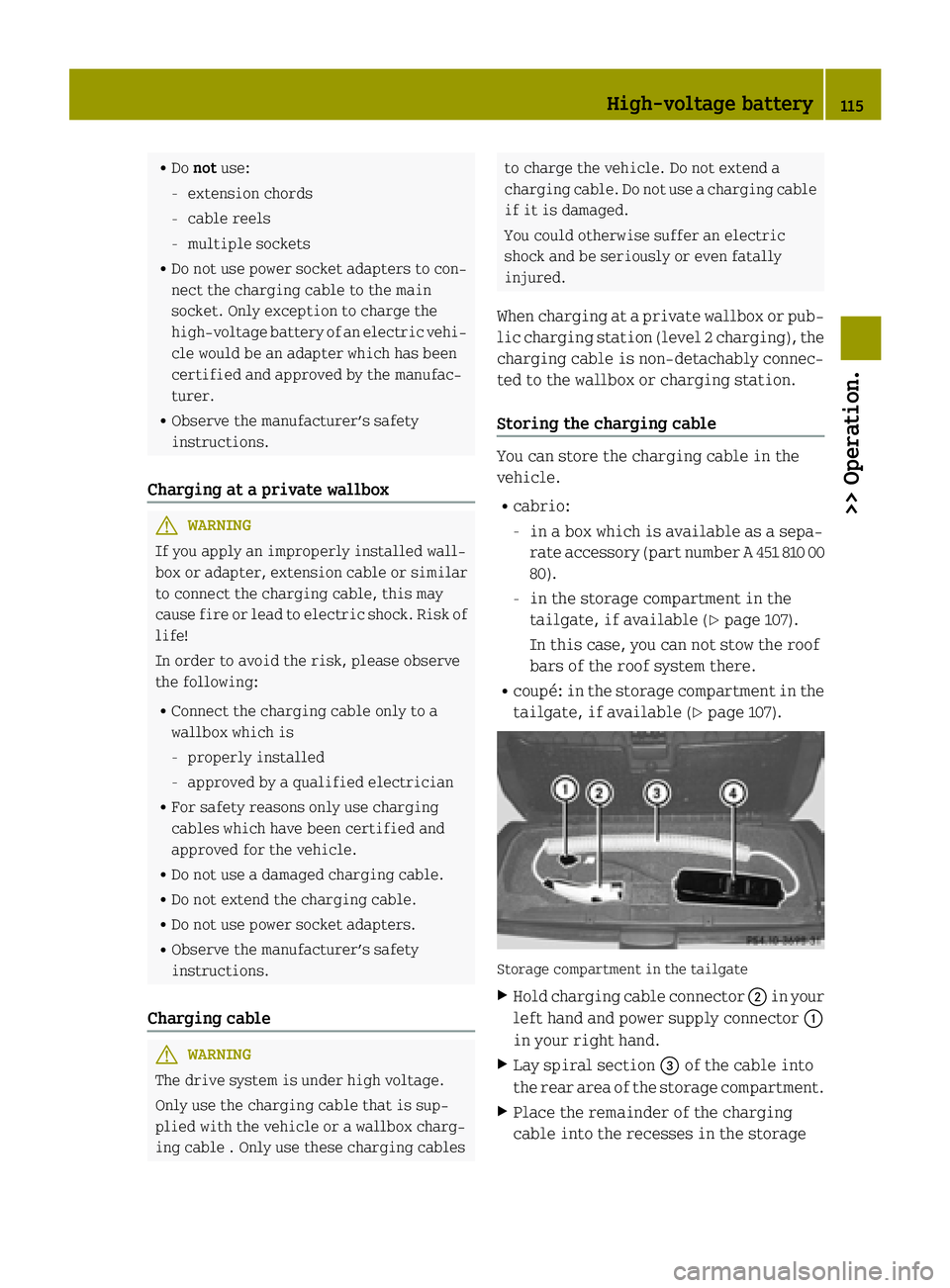
tailgate, if available (Y page 107). Storage compartment in the tailgate
X Hold charging cable connector ;in your
left hand and power supply connector :
in your right hand.
X Lay spiral section =of the cable into
the rear area of the storage compartment.
X Place the remainder of the charging
cable into the recesses in the storage High-voltage battery
115>> Operation. Z
Page 118 of 222

compartment as shown in the illustra-
tion.
When doing so, observe that the display
and buttons on control element ?both
point upwards.
Control element on the charging cable
(Level 1) G
WARNING
When connected to a power supply socket, a
high electrical load during the charging
process can lead to overheating of the
external power supply. There is a risk of
fire.
Check the maximum permissible charge
current on site before you begin the charg-
ing process. Contact an authorized electric drive smart center should you require
assistance. If necessary, adjust the set-
tings of your vehicle.
! An excessive charge current can blow a
fuse or lead to overheating of the exter-
nal power supply. Check whether the
external power supply is compatible
with the set charge current. If necessary, lower the set charge current or use
another power socket. :
AC status display
; Monitoring and safety system display
= Charge current display
? Set charge current button
If the lights on indicator lamps :and ;
light up, it means the following: Indicator lamp
: : lights up
green The connection to the
external power supply is
OK. The high‑voltage bat-
tery can be charged.
flashes red A malfunction is detected
in the external power sup-
ply. The high‑voltage bat- tery will be charged when
the current signal reachesa normal value. lights up
red There is a malfunction.
The charging cable must
be unplugged from the
power socket and plugged
in again.
Indicator lamp
; ; lights up
green There is no malfunction.
The high‑voltage battery
can be charged.
lights up
red The power supply on the
control element is not
permissible. The
high‑voltage battery can-
not be charged.
i
Information on problems during the
charging process can be found on
(Y page 120).
X To set the charge current: press but-
ton ?repeatedly until the desired set-
ting is selected in display =.
R An LED lights up: minimum setting
R All LEDs light up: maximum setting
i Depending on the country, the value of
the maximum setting may vary.
If you leave the charging cable in the power supply socket after charging, the set value
is used for the next charging process. 116
High-voltage battery>> Operation.
Page 119 of 222

If you remove the charging cable from the
power supply socket, the value is reset to
the default value for the next charging
process.
i You can also set the maximum charge
current via the control system
(Y page 92).
If differing values are set on the charg- ing cable and the control system, the
high‑voltage battery is charged using
the lowest value.
Charging the high‑voltage battery X
Engage the parking brake.
X Move the gear selector lever to park
position P.
X Switch off the ignition. X
Open charge socket flap :.
X Remove cover ;from the charge socket.
X Insert the charging cable into the sta-
tionary connection, i.e. an AC power
socket.
X Insert plug Aof the charging cable into
charge socket =to the stop.
The high‑voltage battery is being
charged. i
The vehicle must not be moved during
charging.
The è indicator lamp in the instru-
ment cluster comes on when the ignition
is switched on and the charging cable is connected.
i The drive system and battery cooling
systems may switch on audibly during the
charging process, depending on the tem-
perature.
Removing the charging cable The battery is charged completely when the
indicator in the charge level gauge is at
100% (Y page 81).
! Make sure the charging cable has been
disconnected before driving off. The
vehicle or charging cable may otherwise
be damaged.
X Press release button ?on cable plug A
and disconnect it from charge socket =.
X Disconnect the charging cable from the
stationary connection.
X Slip cover ;on charge socket =.
X Close charge socket flap :. Charging at a public charging station
The payment procedure and charging pro-
cesses may differ between public charging
stations, depending on the provider.
Please make yourself familiar with the
proper procedures of the public charging
station at which you are intending to
charge your vehicle.
Charging station without charging com- munication You must activate charging stations with-
out charging communication before the
charging process. This can be done with an
RFID card or a telephone call, for example. High-voltage battery
117>> Operation. Z
Page 120 of 222

Observe the provider's instructions at the
charging station.
Charging station with charging commu-
nication („Plug&Charge“) You do not have to activate charging sta-
tions with charging communication before
the charging process. This is done by the
vehicle. This function is called "Plug &
Charge". Information is exchanged
between the vehicle and the charging sta-
tion via the charging cable for activation.
This is for:
R mutual authorization of the vehicle and
the charging station
R verification of contract data
R automatic billing of the energy costs
Electronic certificates are used here for
secure exchange of data.
If the verification of contract data is suc-
cessful, the charging process is initiated.
i A preliminary version of the
ISO/IEC 15118 standard is used for com-
munication between the vehicle and the
charging station. If it is necessary to
update your vehicle, consult an author-
ized electric drive smart center.
In order to use "Plug & Charge", you have to
configure the functions of your vehicle on
the "Vehicle Homepage" (Y page 120). For
this you require a "Plug & Charge" certif-
icate which you receive from your power
company after concluding a suitable con-
tract. Consult an authorized electric drive
smart center if you have problems with the
configuration or have no access to the
Internet.
The charging station offers information on the availability of electricity and costs.
This information is processed by the vehi-
cle and is used for an optimum charging of the high‑voltage battery (Y page 123). The
energy costs are automatically calculated
after the charging process is complete. With your existing electricity contract,
you and others who have access to your vehi-
cle can charge the costs to your electricity
bill. For this reason, cancel your existing electricity contract for this vehicle
before you sell it. Delete your "Plug &
Charge" certificate by all means.
i You can delete the certificate from the
vehicle's data on the "Vehicle Home-
page". Please consult an authorized
electric drive smart center if you do not have access to the Internet.
If the charging station allows the connec-
ted vehicle access to the Internet, you can
call up and change information pertaining to the vehicle on the "Vehicle Homepage"
(Y page 120).
Connecting the charging cable X
Engage the parking brake.
X Move the gear selector lever to park
position P.
X Switch off the ignition.
X Open the charge socket flap.
X Remove the cover from the charge socket.
X Insert plug of the charging cable into the
charge socket to the stop.
The high‑voltage battery is being
charged.
i The vehicle must not be moved during
charging.
The è indicator lamp in the multi-
function display comes on when the igni- tion is switched on and the charging
cable is connected.
i The drive system and battery cooling
systems may switch on audibly during the
charging process, depending on the tem- perature. 118
High-voltage battery>> Operation.
Page 121 of 222

Removing the charging cable
The battery is charged completely when the
indicator in the charge level gauge is at
100% (Y page 81).
! Make sure the charging cable has been
disconnected before driving off. The
vehicle or charging cable may otherwise
be damaged.
When the battery is charged: X Disconnect the charging cable plug from
the charge socket on the vehicle.
X Slip the cover on the vehicle’s charge
socket.
X Close the charge socket flap. High-voltage battery
119>> Operation. Z
Page 122 of 222

Problems with the charging process
Problem Possible causes/consequences and
M
MSolutions The charge socket flap
does not open. The charge socket flap is not unlocked.
X Unlock the vehicle (Y page 53). The batteries of the key are discharged.
X Unlock the vehicle with the key manually (Y page 177).The charge socket flap is unlocked but the opening mechanism
is jammed.
X Lock and unlock the vehicle again.
If the opening mechanism is still jammed: X Contact an authorized electric drive smart center. The charging cable
cannot be inserted
into the vehicle power
socket. The vehicle power socket is locked.
X Make sure that the gear selector lever is in position P.The charging cable
plug cannot be
removed from the
vehicle power socket. The charging cable plug is not unlocked.
X Press the %button on the key.
The charging cable plug in the vehicle power socket is
released.
X Remove the charging cable plug from the vehicle power
socket. Online access to the vehicle
General G
WARNING
Observe the legal regulations of the coun-
try in which you are currently located when
using the "Vehicle Homepage". If the oper- ation of communications devices while
driving is permitted by law, use such devi-
ces only when traffic conditions permit you to do so safely. You can be distracted from
traffic events. There is a risk of an acci-
dent.
Only use the "Vehicle Homepage" before
and/or after a journey. With the "Vehicle Homepage", you can call
up remote query or remote configuration
functions of your vehicle. Calling up
remotely is possible with every computer
with Internet access and with many modern smart phones.
You can reach the "Vehicle Homepage" via
your web browser under the following
address:
http://vh.smart.com
i In order to use the "Vehicle Homepage",
you must agree to the general terms and
conditions and data protection provi-
sions.
Access to the "Vehicle Homepage" is free of charge for three years beginning with new
vehicle delivery. After expiry of the free 120
High-voltage battery>> Operation.
Page 123 of 222

of charge service life you can continue to
use the "Vehicle Homepage" with costs.
Further information can be obtained at any
authorized electric drive smart center.
The "Vehicle Homepage" is available in the following languages:
R German
R English
R French
R Italian
R Spanish
R Portuguese
R Dutch
i Further information concerning sup-
ported end devices and available lan-
guages can be found under the following
address: http://vh.smart.com/info.
In order to call up the "Vehicle Homepage", the vehicle must be connected to the Inter-
net.
This is enabled:
R via a mobile service module (if your
vehicle is equipped with it)
(Y page 122)
R via powerline (Y page 122)
Further information can be found here
(Y page 114).
Personal area setup You must first set up your personal access
under http://vh.smart.com in order to
access the "Vehicle Homepage". For this,
you need a valid Email address.
Following registration, you then have
access to your personal area on the "Vehi-
cle Homepage". The vehicle must be regis-
tered in the personal area for you to access the settings of your vehicle. Call up the
corresponding input field within the
"Vehicle Homepage". Enter the vehicle
identification number (VIN) and the vehi-
cle verification code (VVC). This informa- tion can be obtained at your authorized electric drive smart center when you
receive the vehicle.
Notes on data protection Please note that the "Vehicle Homepage"
allows access to your personal data. For
this reason, keep your vehicle verification
code (VVC) and your user data in a secure
place and safe from unauthorized persons.
Each person who has access to the above
information can use the functions on the
"Vehicle Homepage". For this reason, make
sure than no unauthorized persons have
access to your personal area.
After selling the vehicle, you are required to delete the vehicle from your personal
area on the "Vehicle Homepage". You must
also destroy the vehicle verification code
(VVC) documents.
If you have bought a pre-owned vehicle, it
may be possible that the previous owner
still has access to the "Vehicle Homepage". For this reason, have a new vehicle veri-
fication code (VVC) reissued to you at an
authorized electric drive smart center
after purchase. With this new code you can
set up the access to your vehicle as descri- bed in the "Personal area setup" section.
Here you can also deactivate the previous
owner's access, should it still be active.
Calling up the functions of the "Vehicle
Homepage" If the vehicle is registered in your per-
sonal area of the "Vehicle Homepage", you
can, for example, access the following
functions:
R call up the current charge level
R program the departure time
R activate the "Air conditioning before
start" function
When the vehicle is being charged, you can call up the estimated charging time and the
attainable range. Both results are estima- High-voltage battery
121>> Operation. Z
Page 124 of 222

ted values because, for example, they are
influenced by the following factors:
R outside temperature
R active electrical consumers, e.g. air
conditioning, lights
R personal driving style
R traffic conditions
Plan for a sufficient reserve accordingly.
Connecting the vehicle to the Internet Via mobile service module
i This function is only available if the
vehicle is equipped with a mobile ser-
vice module.
You can use the “Vehicle Homepage” when
the vehicle has connected to the Internet
via the mobile service module. The mobile
service module uses GSM (Global System for Mobile Communications) and transfers the
required data via radio transmission. The
vehicle automatically detects if a connec- tion to the Internet via the mobile service module is available or not. No pre-settings
need to be done.
In order to use data transfer via the mobile
service module you do not need a SIM card
and no contract.
i There may be service limitations if the
vehicle is located for example in a
underground garage. Service limita-
tions may also appear in areas with poor
mobile service coverage. In theses cases
you can launch the Internet connection
via powerline (Y page 122).
Via powerline
You can also access the “Vehicle Homepage”
if you do not have GSM reception. This is
possible for example via your DSL router.
This connection is built by the plugged in charging cable with the aid of the power-
line technology.
The vehicle supports powerline communi-
cation according to the "HomePlug AV" standard. Data is transmitted via phase L1
and the neutral conductor of the power line.
In order for the vehicle to access the Inter-net, you require a commercially available
adapter of the "HomePlug AV" standard.
This adapter must also have an encryption
button so that it can be configured to com-
municate with the vehicle. Connect the
adapter to the power supply as well as your Internet connection. If the adapter is con-
nected to different phase than L1, a phase
coupler must be additionally installed.
Only in this way can stable communication
be guaranteed. For questions, consult a
qualified electrician.
i If you already have a powerline network
installed, the vehicle can be integrated
into it.
To establish a connection between the
vehicle and a powerline adapter, carry out
the following:
X Connect the vehicle to a power socket or a
wallbox.
The right #indicator lamp on the
vehicle socket must flash green.
X Insert the powerline adapter into a
neighboring power socket. Observe that
the vehicle and the adapter are connec-
ted via phase L1.
X Switch on the ignition.
X Call up the Charge current
Charge current menu on the
control system (Y page 92).
Carry out the following steps within
30 seconds: X If the value of the charge current is not
set to 8 A:set the value to 8 A and confirm.
X Set the value of the charge current to 12 A
and confirm.
X Set the value of the charge current to 8 A
and confirm. 122
High-voltage battery>> Operation.