2015 SKODA OCTAVIA roof
[x] Cancel search: roofPage 4 of 268

Table of Contents
On-board literature4
Notes
5
Structure and more information about the
Owner's Manual
6
Abbreviations
Safety
Passive Safety
8
General information
8
Correct and safe seated position
8
Seat belts
11
Using seat belts
11
Inertia reel and belt pretensioners
13
Airbag system
14
Description of the airbag system
14
Airbag overview
15
Deactivating airbags
19
Transporting children safely
20
Child seat
20
Fastening elements
23
Using the system
Cockpit
27
Overview
26
Instruments and warning lights
28
Instrument cluster
28
Warning lights
31
Information system
40
Driver information system
40
Driving data (Multifunction display)
41
MAXI DOT display
44Service interval display49SmartGate50
Unlocking and opening
53
Unlocking and locking
53
Anti-theft alarm system
58
Luggage compartment lid
59
Electric boot lid
60
Window operations
61
Panorama sliding/tilting roof
64
Lights and visibility
67
Lights
67
Interior lights
74
Visibility
76
Windscreen wipers and washers
77
Rear mirror
79
Seats and head restraints
81
Seats and head restraints
81
Seat features
85
Transporting and practical equipment
89
Useful equipment
89
Multimedia holder
99
Luggage compartment and transport of
cargo
100
Variable loading floor in the luggage
compartment (Estate)
107
Net partition
109
Roof rack
110
Heating and ventilation
112
Heating, manual air conditioning system,
Climatronic
112
Auxiliary heating (auxiliary heating and
ventilation)
117Driving
Starting-off and Driving120
Starting and stopping the engine using the
key
120
Starting and stopping the engine at the push
of the button
122
START-STOPsystem
124
Brakes and parking
126
Manual shifting of gears and pedals
128
Automatic gearbox
129
Running-in and economical driving
132
Avoiding damage to your vehicle
134
Assist systems
135
General information
135
Braking and stabilisation systems
135
OFF ROAD-mode
138
Parking aid (ParkPilot)
140
Rear View Camera
143
Park Assist
144
Cruise Control System
148
Adaptive Cruise Control (ACC)
150
Front Assist
155
Selection of the driving mode (Driving Mode
Selection)
157
Proactive passenger protection (Crew Protect
Assist)
160
Lane Departure Warning (Lane Assist)
160
Traffic sign recognition
162
Fatigue detection
164
Tyre pressure monitoring
165
Hitch and trailer
167
Hitch
167
Trailer
1722Table of Contents
Page 60 of 268

Failure of the system KESSY
If the following message is displayed in the display of the instrument cluster,
then help is required from a specialist company.Keyless access system faulty.KEYLESS ACCESS SYSTEM FAULTY
Key battery discharged
If the voltage of the key battery is too low, the following message appears in
the display of the instrument cluster.
Change the key battery!KEY BATTERY PLEASE CHANGE
Replace the battery » page 223.
Anti-theft alarm system
Introduction
This chapter contains information on the following subjects:
Interior monitor and towing protection
58
The anti-theft alarm system (hereinafter referred to as alarm system) increa-
ses protection against theft and break-in attempts into the vehicle.
The anti-theft alarm system is activated automatically approximately 30 sec-
onds after the vehicle is locked. This is automatically disabled after release.
The alarm system triggers audible and visual signals if an attempt is made to
break into the vehicle (hereafter referred to as alarm).
Triggering the alarm
The alarm is triggered when the following unauthorized actions are carried out
on the locked vehicle.
▶ Opening the bonnet.
▶ Opening the boot lid.
▶ Opening the doors.
▶ Manipulation of the ignition lock.
▶ Towing the vehicle.
▶ Movement in the vehicle.
▶ Sudden and significant voltage drop of the electrical system.
▶ Uncoupling the trailer.
If the driver's door of a vehicle is unlocked and opened by the lock cylinder,
then the alarm is triggered.
Switching off the alarm
The alarm is turned off by pressing the button on the key or switching on
the ignition.
CAUTION
Before leaving the vehicle, it must be checked that all of the windows, doors
and the sliding/tilting roof are locked in order to ensure the full functionality of
the anti-theft alarm system.
Note
The alarm system has its own power source. The working life of the power
supply source is 5 years.
Interior monitor and towing protection
Fig. 43
Button for interior monitor and
towing protection
Read and observe on page 58 first.
The interior monitor detects movements inside the locked vehicle and then
triggers the alarm.
The anti-towing detects tilts in the locked vehicle and then triggers the alarm.
Deactivate the interior monitor and the towing protection if there is a possibili-
ty of the alarm being triggered by movements (e.g. by children or animals)
within the vehicle interior or if the vehicle has to be transported (e.g. by train
or ship) or towed.
Deactivating
›
Switch off the ignition.
›
Open the driver door.
›
Press the symbol key
on the B column of the driver's side » Fig. 43.
The illumination of the symbol
in the button changes from red to orange.
›
Lock the vehicle within 30 seconds.
58Using the system
Page 62 of 268

Electric boot lid
Introduction
This chapter contains information on the following subjects:
Operating description
60
Set the top position of the lid
61
Malfunctions
61
The boot lid (hereinafter referred to as lid) can be operated electrically and
manually in the event of an emergency » page 61.
If the lid hits an obstacle when opening or closing, it stops and an audible sig-
nal sounds. When closing the flap is lifted additionally.
WARNING■ Ensure that the lock is properly engaged after closing the lid. Otherwise,
the lid might open suddenly while the vehicle is moving, even if the lid was
locked – risk of accident!■
Never drive with the lid open or unlatched, as otherwise exhaust gases
may get into the interior of the vehicle – risk of poisoning!
■
Only open and close the lid when there is no one in the opening/closing
range – risk of injury!
■
Make sure that when closing the lid, no body parts are crushed – risk of
injury!
CAUTION
Do not attempt to close the lid manually during an electrical closing process -
there is a risk of damaging the electric lid operation system.
CAUTION
■ Before opening or closing the lid, check if there are any objects in the open-
ing or closing range which could obstruct the movement (e.g. a load on the
roof rack or on the trailer, etc.) – risk of causing damage to the lid!■
In certain circumstances, if the lid is loaded (e.g by a thick layer of snow), the
opening process of the lid can be interrupted. Remove the snow from the lid to
re-enable the electrical operation.
■
If the lid closes automatically (e.g. under load of snow), you will hear an inter-
mittent beep.
■
Always close the flap before disconnecting the battery.
Operating descriptionFig. 45
Lid operation
Fig. 46
Button for the lid operation / button on the key
Read and observe
and on page 60 first.
Open flap
The lid can be opened by pressing one of the following elements. ▶ Handle
A
» Fig. 45 .
▶ Button
C
» Fig. 46 .
▶ Symbol button on the remote control key (for about 1 s).
Close the flap
The lid can be closed by pressing one of the following elements. ▶ Button
B
» Fig. 45 .
▶ Handle
A
» Fig. 45 .
60Using the system
Page 66 of 268

If the obstacle prevents the window from being closed during the next 10 sec-
onds, the closing process is interrupted once again and the window goes down
by several centimetres.
If you attempt to close the window again within 10 seconds of the window be-
ing moved down for the second time, even though the obstacle was not yet
been removed, the closing process is only stopped. During this time it is not
possible to automatically close the window. The force limiter is still switched
on.
The force limiter is only switched off if you attempt to close the window again
within the next 10 seconds - the window will now close with full force!
If you wait longer than 10 seconds, the force limiter is switched on again.
Window convenience operation
Read and observe
and on page 62 first.
The convenience operation of the windows offers the possibility of opening or
closing all the windows at once.
Settings the window convenience operation » Owner´s Manual Infotainment ,
chapter CAR - vehicle settings .
Convenience operation can take place in one of the following ways.
Opening
›
Press and hold the symbol button on the key.
›
Keep the key in the locking cylinder of the driver's door in the unlock position
until all electrically operated windows are open.
›
Switch off the ignition, open the driver's door and hold the key
A
until it
stops in the open position » Fig. 48 on page 62 .
Closing
›
Press and hold the symbol button on the key.
›
Keep the key in the locking cylinder of the driver's door in the lock position
until all the electrically operated windows are closed.
›
Switch off the ignition, open the driver's door and hold the key
A
until it
stops in the closed position » Fig. 48 on page 62 .
›
In the KESSY system, hold your finger on the sensor on the outside of the
door handle of the front door » Fig. 39 on page 55 .
The prerequisite for ensuring that the convenience operating feature correctly is the automatic opening/closing of all windows is operational.
Convenience opening or closing the window using the key in the driver's door
locking cylinder is only possible within 45 seconds of locking the vehicle.
The movement of the window is stopped immediately when the respective
button is released.
Malfunctions
Read and observe
and on page 62 first.
If the battery has been disconnected and reconnected, it is possible that the
automatic window lifter will not operate. The system must be activated.
Activation sequence
›
Switch on the ignition.
›
Pull the top edge of the button and close the window.
›
Release the button.
›
Pull the relevant button upwards again for approx. 1 second, and keep it
pressed down.
Panorama sliding/tilting roof
Introduction
This chapter contains information on the following subjects:
Operation
65
Power limit
65
Convenience operation of sliding / tilting roof
65
Sliding / tilting roof malfunction
66
Manual operation of sunblind
66
Electrical operation of the sunblind
66
Malfunction of the sun blind
66
The panorama sliding/tilting roof (hereinafter referred to as sliding/tilting roof)
can only be operated when the ignition is turned on and when the outdoor
temperature is no lower than -20 °C.
The sliding/tilting roof can still be operated for approx. 10 minutes after
switching the ignition off. However, as soon as the driver or front passenger's door is opened it is no longer possible to operate the sliding/tilting roof.
CAUTION
Always close the sliding/tilting roof before disconnecting the battery.64Using the system
Page 67 of 268

OperationFig. 50
Operation of the sliding/tilting roof - Version 1
Fig. 51
Operation of the sliding/tilting roof - Version 2
Read and observe
on page 64 first.
The sun roof can be operated with the rotary switch.
Operation of the sliding/tilting roof Open fully
Open partially
Comfort position
Opening (switch in position )
Closing (switch in position )
WARNINGWhen operating the sliding/tilting roof, proceed with caution to avoid caus-
ing crushing injuries – risk of injury!A12CAUTIONDuring the winter it may be necessary to remove any ice and snow in the vicin-
ity of the sliding/tilting roof before opening it to prevent any damage to the
opening mechanism.
Power limit
Read and observe
on page 64 first.
The sliding/tilting roof is fitted with a force limiter.
If there is an obstacle, the closing process is stopped and the window goes
down by several centimetres.
The closing of the sliding/tilting roof without power limitation is only with the
third attempt at closing. The time interval between the individual closing at-
tempts should not exceed 5 s - the sliding/tilting roof closes with full force!
Convenience operation of sliding / tilting roof
Read and observe
on page 64 first.
The convenience operation makes it possible to open or close the sliding/tilt-ing roof using the key or the KESSY system above the sensor in the door han-
dle of the front door.
Tilting roof
The sliding/tilting roof can be opened as follows.
›
Press and hold the symbol button on the key.
›
Hold the key in the unlock position in the driver's door lock.
Closing
The sliding/tilting roof can be closed as follows.
›
Press and hold the symbol button on the key.
›
Hold the key in the lock position in the driver's door lock.
›
In the KESSY system, hold your finger on the sensor on the outside of the
door handle of the front door » Fig. 39 on page 55 .
By interrupting the locking process, the closing operation is interrupted.
WARNINGClose the sliding/tilting roof carefully – risk of injury!65Unlocking and opening
Page 68 of 268

Sliding / tilting roof malfunctionRead and observe
on page 64 first.
If the battery has been disconnected and reconnected, it is possible that thesliding/tilting roof will not operate. The sun roof must be activated.
Activation sequence
›
Switch on the ignition.
›
Set the switch to the position
» Fig. 50 on page 65 or » Fig. 51 on page 65 .
›
Press the switch on the recess E down and pull forwards.
The sliding/tilting roof opens and closes again after around 10 seconds.
›
Release the lever.
Manual operation of sunblind
Fig. 52
Operation of the sun blind
Read and observe on page 64 first.
The Sun blind of the sliding/tilting roof is opened manually by pulling up on the
handle in the direction of the arrow
A
and closed in the direction of the arrow
B
» Fig. 52 .
WARNINGWhen operating the sunshade, proceed with caution to avoid causing
crushing injuries – risk of injury!Electrical operation of the sunblindFig. 53
Operation of the sun blind
Read and observe on page 64 first.
The sliding sun blind (hereinafter referred to as sun blind) can be opened or closed using the buttons.
Operation of the sun blind » Fig. 53
Opening
Closing
By briefly pressing the button, the sun blind is fully opened or closed. The
movement of the sun blind can be stopped by briefly pressing any key.
By pressing and holding the key, the sunblind is opened or closed in the de-
sired position. By releasing the key, the opening or closing process is stopped.
WARNINGWhen operating the sunshade, proceed with caution to avoid causing
crushing injuries – risk of injury!
Malfunction of the sun blind
Read and observe
on page 64 first.
If the battery has been disconnected and reconnected, it is possible that thesun blind will not operate correctly. The sun blind must be activated.
Activation sequence
›
Switch on the ignition.
›
Set the switch to the position
» Fig. 53 on page 66 .
›
Press the button
and hold down.
The sun screen opens and closes again after around 10 seconds.
66Using the system
Page 107 of 268

CAUTION■When closing the boot lid, jamming and damage to the cover or the side trim
panel can occur if handled incorrectly. The following guidelines must be ob-
served. ■ The recesses in the cover B
» Fig. 118 must lock in the holders in the side
trim panel
C
.
■ The items which are transported must not exceed the height of the cover.
■ The cover must not be jammed in the surrounding seal of the luggage com-
partment lid when it is in the raised position. ■ There must be no object in the gap between the cover in the raise position
and the rear backrest.
Roll-up cover
Fig. 120
Roll-up cover: pull out/roll/remove
Fig. 121
Remove the side panels of the luggage compartment/stow the
roll-up luggage compartment cover
Read and observe and on page 101 first.
Extending
›
Grasp the cover on the handle
A
and pull it out in the direction of the arrow
1
until it clicks » Fig. 120.
Retracting
›
Push the cover in the area of handle
A
in the direction of the arrow
2
» Fig. 120 .
The cover rolls up automatically.
Removing/inserting
The fully rolled luggage compartment cover can be removed.
›
Press on the side of the cross bar in the direction of arrow
3
and remove
the cover in the arrow direction
4
» Fig. 120 .
Insertion takes place in reverse order.
Stowage
If the vehicle is equipped with the variable loading floor, then the removable
roll-up luggage compartment cover can be stowed in the recesses of the lug-
gage compartment side trim.
›
Fold the variable loading floor into the upper position » page 108.
›
Remove the side covers of the luggage compartment in the direction of the
arrow
1
» Fig. 121 .
›
Remove the roll-up luggage compartment cover » Fig. 120.
›
Insert the front part of the roll-up luggage compartment cover under a por-
tion of the side trim
D
» Fig. 121 on the left.
›
Fold the rear part of the roll-up luggage compartment cover in the direction
of arrow
2
» .
›
Replace the side trims of the luggage compartment in the opposite direction
of the arrow
1
.
›
Fold out the variable loading floor to the upper position » page 108.
WARNINGNo objects should be placed on the foldable boot cover. This could endan-
ger the vehicle occupants during sudden braking or vehicle impact.
CAUTION
If you want to stow the roll-up luggage compartment cover and the roof rack
at the same time , then it is necessary that the rear part of the roll-up luggage
compartment is covering the rear roof rack.105Transporting and practical equipment
Page 110 of 268
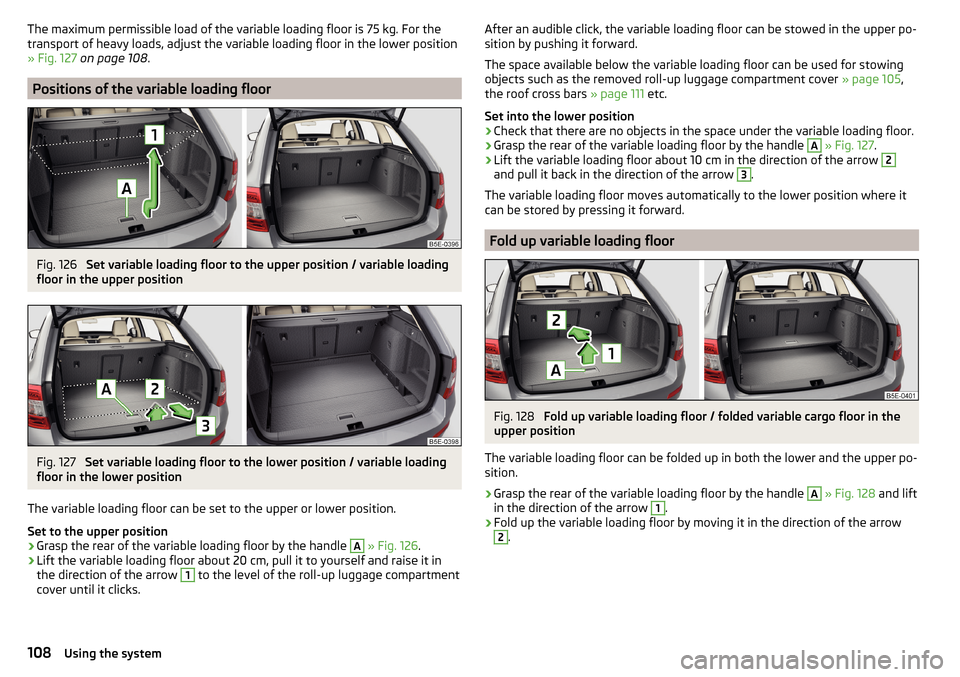
The maximum permissible load of the variable loading floor is 75 kg. For the
transport of heavy loads, adjust the variable loading floor in the lower position
» Fig. 127 on page 108 .
Positions of the variable loading floor
Fig. 126
Set variable loading floor to the upper position / variable loading
floor in the upper position
Fig. 127
Set variable loading floor to the lower position / variable loading
floor in the lower position
The variable loading floor can be set to the upper or lower position.
Set to the upper position
›
Grasp the rear of the variable loading floor by the handle
A
» Fig. 126 .
›
Lift the variable loading floor about 20 cm, pull it to yourself and raise it in
the direction of the arrow
1
to the level of the roll-up luggage compartment
cover until it clicks.
After an audible click, the variable loading floor can be stowed in the upper po-
sition by pushing it forward.
The space available below the variable loading floor can be used for stowing
objects such as the removed roll-up luggage compartment cover » page 105,
the roof cross bars » page 111 etc.
Set into the lower position›
Check that there are no objects in the space under the variable loading floor.
›
Grasp the rear of the variable loading floor by the handle
A
» Fig. 127 .
›
Lift the variable loading floor about 10 cm in the direction of the arrow
2
and pull it back in the direction of the arrow
3
.
The variable loading floor moves automatically to the lower position where it
can be stored by pressing it forward.
Fold up variable loading floor
Fig. 128
Fold up variable loading floor / folded variable cargo floor in the
upper position
The variable loading floor can be folded up in both the lower and the upper po-
sition.
›
Grasp the rear of the variable loading floor by the handle
A
» Fig. 128 and lift
in the direction of the arrow
1
.
›
Fold up the variable loading floor by moving it in the direction of the arrow
2
.
108Using the system