2015 SKODA OCTAVIA ignition
[x] Cancel search: ignitionPage 86 of 268

Memory Function of the electrically adjustable seatFig. 76
Memory buttons and SET button
Read and observe on page 81 first.
The pre-set buttons on the driver's seat make it possible to save the driver's
seat and exterior mirror positions.
Each of the three memory buttons
B
» Fig. 76 can be assigned a set position.
Storing driver's seat and exterior mirror settings for driving forward
›
Switch on the ignition.
›
Adjust the seat and the two mirrors to the desired position.
›
Press the button (Position
A
» Fig. 76 ).
›
Within 10 seconds after pressing the
button, press the desired memory
button
B
.
An acknowledgement sound confirms the storage.
Saving front passenger mirror settings for reversing
The function of lowering the passenger mirror surface when reversing must be
enabled in Infotainment » Owner´s Manual Infotainment , chapter CAR - Vehi-
cle Settings .
›
Switch on the ignition.
›
Press the required memory button
B
» Fig. 76 .
›
Turn the knob for the external mirror control to the position for the passen-
ger side mirror adjustment » page 80.
›
Engage reverse gear.
›
Adjust the front passenger's mirror to the desired position.
›
Disengage reverse gear.
The set position of the exterior mirror is stored.
Retrieving the saved settingIgnitionDriver's doorPress the required memory button B
» Fig. 76Switched offOpenShortClosedLongActivatedOpenLongClosedLong
Stopping the ongoing adjustment ▶ Press any button on the driver's seat or the button on the remote control
key.
Note
Each time new seat and exterior mirror settings for forward travel are saved,
the passenger exterior mirror setting for reverse travel must also be saved
again.
Memory function of the remote control key
Read and observe
on page 81 first.
The automatic storage of the driver's seat position and exterior mirror posi-
tions when locking the vehicle can be turned on in the memory of the remote
control key (hereafter referred to as automatic storage function).
This function can also be enabled or disabled in the Infotainment » Owner´s
Manual Infotainment , chapter CAR - vehicle settings .
Enable automatic storage
›
Unlock the vehicle with the remote control key.
›
Press and hold any memory button
B
» Fig. 76 on page 84 .
›
After the seat has assumed the position stored under this button, at the
same time press the button on the remote control key within 10 seconds.
The successful activation of the automatic storage function for each key is
confirmed by an acoustic signal.
Storing driver's seat and exterior mirror settings for driving forward
›
Enable automatic storage.
When automatic storage is activated, the current positions of the driver's seat
and the external mirrors are saved in the memory of the remote control key
each time the vehicle is locked.
84Using the system
Page 87 of 268

When the vehicle is next unlocked using the same key, the driver's seat and
the external mirrors assume the positions stored in the memory of this key.
Saving front passenger mirror settings for reversing
The function of lowering the passenger mirror surface when reversing must be
enabled in Infotainment » Infotainment Owner´s Manual , chapter CAR - Vehi-
cle Settings .›
Unlock the vehicle with the relevant remote control key.
›
Switch on the ignition.
›
Turn the knob for the external mirror control to the position for the passen-
ger side mirror adjustment » page 80.
›
Engage reverse gear.
›
Adjust the front passenger's mirror to the desired position.
›
Disengage reverse gear.
The adjusted position of the exterior mirror is stored in the remote control key
memory.
Disable the function of automatic storage
›
Unlock the vehicle with the remote control key.
›
Press the button (Position
A
» Fig. 76 on page 84 ) and hold.
›
Press the button on the remote control key within 10 seconds.
The successful deactivation of the automatic storage function for each key is confirmed by an acoustic signal.
Stopping the ongoing adjustment
›
Press any button on the driver's seat or the button on the remote control
key.
Seat features
Introduction
This chapter contains information on the following subjects:
Seat heaters
85
Front armrest setting
86
Rear armrest setting
86
Folding front passenger seat
86
Seat backrests
87
Long cargo channel in the rear seat backrest
88Seat heatersFig. 77
Buttons for heating the front seats/rear seats
The seat backrests and surfaces of the front seats and the outer rear seats
can be heated electrically.
The seat heating can only be switched on when the engine is running.
Buttons for the seat heating » Fig. 77
Left seat heating
Right seat heating
Switching on
›
Press the button or
» Fig. 77 .
Pressing once switches the seat heating on at its maximum level.
With repeated pressing of the switch, the intensity of the heating is reduced
until it is switched off.
The level of the seat heating is indicated by the number of illuminated warning
lights underneath/in the switch.
If the engine is switched off and then turned on again within 10 mins with the
driver seat heating switched, then the driver's seat heating is automatically
turned on again.
85Seats and head restraints
Page 94 of 268

Placement of the cup holders » Fig. 89
In the front centre console
In the rear armrestWARNING■ Do not use any cups or beakers which are made of brittle material (e.g.
glass, porcelain). This could lead to injuries in the event of an accident.■
Never put hot cups in the cup holder. If the vehicle moves, they may spill –
risk of scalding!
■
No objects should be placed in the holders that might endanger the vehi-
cle's occupants if the vehicle brakes suddenly or the vehicle is in collision.
CAUTION
Do not leave open beverage containers in the cup holder during the journey.
There is a risk of spilling e.g. when braking which may cause damage to the
electrical components or seat upholstery.
Cigarette lighter
Fig. 90
Cigarette lighter
Read and observe on page 89 first.
Use
›
Press the igniter in as far as the stop » Fig. 90.
›
Wait until the igniter pops out.
›
Remove the glowing igniter and use immediately.
›
Place the cigarette lighter back into the socket.
ABWARNING■
The cigarette lighter also works if the ignition is switched off. When leav-
ing the vehicle, never leave persons who are not completely independent,
such as children, unattended in the vehicle. These could operate the lighter
and get burned, start a fire or damage the interior.■
Take care when using the cigarette lighter! Improper usage can case
burns.
Note
The cigarette lighter socket can also be used as a 12 volt socket.
Ashtray
Fig. 91
Remove front ashtray / open rear ashtray / remove rear ashtray
insert
Read and observe
on page 89 first.
The ashtray can be used for discarding ash, cigarettes, cigars and the like » .
Removing/inserting the front ash tray
›
When removing, do not hold the ashtray on the cover.
›
Pull out the ashtray in the direction of the arrow » Fig. 91 -
.
Insertion takes place in reverse order.
Removing/inserting the rear ashtray insert
›
Pull the upper part of the well and open the ashtray in the direction of arrow
1
» Fig. 91 -
.
›
Grasp the insert in the area marked with the arrows and remove it in the di-
rection of arrow
2
» Fig. 91 -
.
92Using the system
Page 95 of 268

The insertion of the insert and closing of the ashtray is carried out in reverse
order.WARNINGNever place hot or flammable objects in the ashtray – risk of fire!
12-Volt power outlet
Fig. 92
Cover of the 12 volt power outlet: in the front centre console/ in
the boot
Read and observe
on page 89 first.
Overview of the 12-volt socket » Fig. 92
In the front centre console
In the luggage compartment
Use
›
Remove the socket cover » Fig. 92 -
.
Or
›
Open the socket cover » Fig. 92 -
.
›
Connect the plug for the electrical appliance to the socket.
WARNINGInstructions for devices connected to the sockets.■Safely stow all devices during the journey to prevent them from being
thrown around the interior in the event of a sudden braking manoeuvre or
an accident – risk of death!■
The devices may warm up during operation – risk of injury or fire! If the
device becomes too hot, switch it off and disconnect it from the power sup-
ply immediately.
WARNINGWhen using the 12-volt sockets, the following notes are to be observed.■The socket also works if the ignition is switched off. When leaving the ve-
hicle, never leave persons who are not completely independent, such as
children, unattended in the vehicle.■
Improper use of the power sockets and the electrical accessories can
cause fires, burns and other serious injuries.
CAUTION
■ The sockets can only be used for the connection of approved electrical ac-
cessories with a total power consumption of up to 120 watts, otherwise the
electrical system of the vehicle may be damaged.■
Connecting appliances when the engine is not running will drain the battery
of the vehicle!
■
Switch off the devices connected to the power sockets before you switch
the ignition on or off and before starting the engine, to avoid damage from
voltage fluctuations.
Waste container
Fig. 93
Waste container: inserting and moving/opening
93Transporting and practical equipment
Page 99 of 268

Storage compartment in the rear centre consoleFig. 101
Opening the storage compart-
ment
Read and observe on page 89 first.
Open/close
›
Pull the handle on the upper section of the recess and open out the com-
partment in the direction of the arrow » Fig. 101.
Closing takes place in reverse order.
WARNINGNever use the storage compartment as an ashtray - risk of fire!
230-volt socket
Fig. 102
Open the cover of the 230 volt
power outlet
Read and observe on page 89 first.
The 230-volt socket (hereinafter referred to as a socket) is provided for the
connection of approved electrical accessories with a two-pin 230-volt plug and
a total power consumption of up to 150 watts.
The socket is located in the rear centre console » Fig. 102.
The socket only works if the ignition is switched on.
Use›
Open the cover in the direction of the arrow » Fig. 102.
›
Connect the plug for the electrical appliance to the socket.
When plugging in the connector the child safety lock is unlocked and the out-
let is activated.
Warning light
Display indicator lightMeaningIlluminates greenThe power socket is activated.Flashes redThe power socket is temporarily deac-
tivated.
The socket may be automatically deactivated for the following reasons ▶ Excessive current.
▶ Low battery charge state.
▶ High socket temperature.
If disabling reasons no longer exist, the socket is automatically activated. Then
re-activate connected devices which are switched on »
.
WARNING■
Improper use can lead to serious injury or fire. When leaving the vehicle,
never leave persons who are not completely independent, such as children,
unattended in the vehicle.■
Do not pour liquids into the power socket – risk of death! If fluid does
manage to get into the power socket, completely dry out the socket before
reuse.
■
Safely stow away all connected devices during the journey to prevent
them from being thrown around the interior in the event of a sudden brak-
ing manoeuvre or an accident – risk of death!
■
The connected devices may warm up during operation – risk of injury or
fire! If the device becomes too hot, switch it off and disconnect it from the
power supply immediately.
■
The child lock on the power socket is unlocked when using adapters and
extension cables which carry volts – risk of injury!
■
Do no insert any conductive objects into the contacts of the power sock-
et, e.g. knitting needs – risk of death!
97Transporting and practical equipment
Page 103 of 268

The warning light turns off when the tailgate is closed.
If the boot lid is open and the ignition switched off, the light will extinguish
automatically after around 10 minutes.WARNING■ Never exceed the maximum permissible load of the respective fasteners,
nets, hooks etc. as heavy objects are not e sufficiently secured - there is a
risk of injury!■
If the cargo is tied down with unsuitable or damaged lashing straps, inju-
ries can occur in the event of braking manoeuvres or accidents.
■
Loose cargo can be thrown forward during a sudden manoeuvre or in case
of an accident and can injure the occupants or other road users.
■
Loose cargo could hit a deployed airbag and injure occupants – danger of
death!
CAUTION
■ Never exceed the maximum permissible load of the respective fasteners,
nets, hooks etc. - these could be damaged.■
Make sure that transported objects with sharp edges do not damage the
threads of the following devices. ■Rear window heater.
■ Rear window with an integrated antenna.
■ Integrated antenna in the rear side windows.
Fastening elements
Fig. 109
Fastening elements: Variant 1/variant 2 (G-TEC)
Fig. 110
Fastening elements: Variant 3/variant 4
Read and observe
and on page 101 first.
The fasteners are located on both sides of the luggage compartment.
The maximum permissible static load of the individual lashing eyes
C
and
E
is 350 kg.
The maximum permissible load of the individual lashing eyes is
D
is 150 kg.
Overview of the fastening elements » Fig. 109 and » Fig. 110
Fasteners for securing fastening nets and multifunction pocket
Lashing eyes only for fastening fixing nets
Lashing eyes for fastening of cargo and fastening nets (in variant 1, the
rear and centre eye is additionally provided for securing the multifunction-
al bag)
Lashing eyes for fastening cargo and fastening nets
Lashing eyes for fastening cargo and fastening nets
The lashing eyelet
B
is located behind the folding rear seat backrest .
ABCDE101Transporting and practical equipment
Page 120 of 268
Note■The auxiliary heating only switches the blower on, if it has achieved a coolant
temperature of approx. 50 °C.■
At low outside temperatures, this can result in a formation of water vapour in
the area of the engine compartment. This is quite normal and is not an operat-
ing problem.
■
So that warm air can flow into the vehicle interior after switching on the aux.
heating, you must maintain the comfort temperature normally selected by you,
leave the fan switched on and leave the air outlet vents in open. It is recom-
mended to put the air flow in the position
or
.
Switching on/off
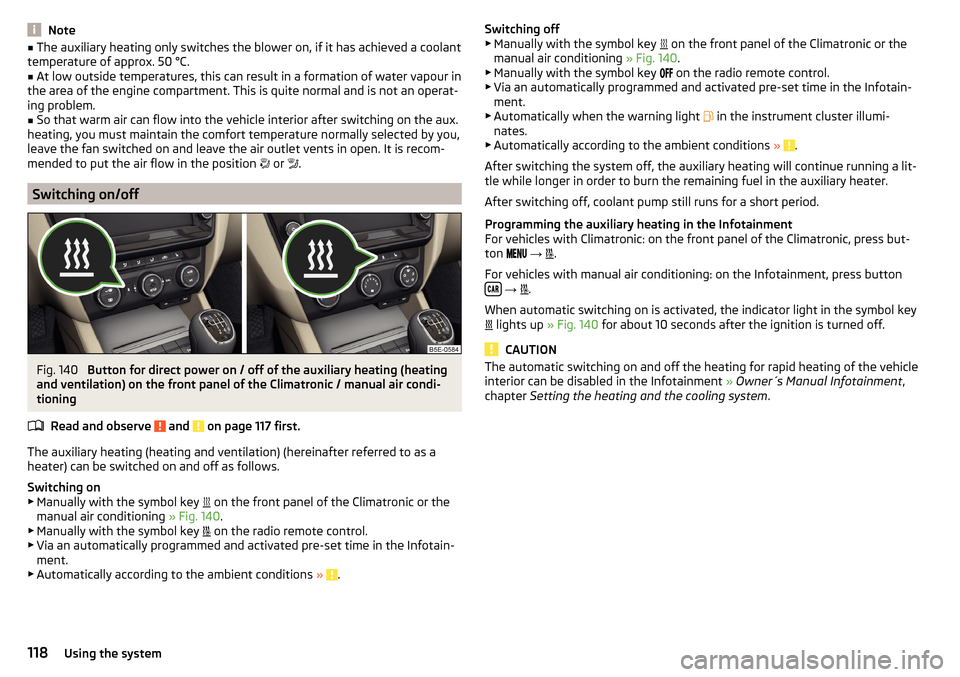
Fig. 140
Button for direct power on / off of the auxiliary heating (heating
and ventilation) on the front panel of the Climatronic / manual air condi-
tioning
Read and observe
and on page 117 first.
The auxiliary heating (heating and ventilation) (hereinafter referred to as a
heater) can be switched on and off as follows.
Switching on
▶ Manually with the symbol key on the front panel of the Climatronic or the
manual air conditioning » Fig. 140.
▶ Manually with the symbol key on the radio remote control.
▶ Via an automatically programmed and activated pre-set time in the Infotain-
ment.
▶ Automatically according to the ambient conditions »
.
Switching off
▶ Manually with the symbol key on the front panel of the Climatronic or the
manual air conditioning » Fig. 140.
▶ Manually with the symbol key
on the radio remote control.
▶ Via an automatically programmed and activated pre-set time in the Infotain-
ment.
▶ Automatically when the warning light
in the instrument cluster illumi-
nates.
▶ Automatically according to the ambient conditions »
.
After switching the system off, the auxiliary heating will continue running a lit-
tle while longer in order to burn the remaining fuel in the auxiliary heater.
After switching off, coolant pump still runs for a short period.
Programming the auxiliary heating in the Infotainment
For vehicles with Climatronic: on the front panel of the Climatronic, press but-
ton
→
.
For vehicles with manual air conditioning: on the Infotainment, press button
→
.
When automatic switching on is activated, the indicator light in the symbol key
lights up
» Fig. 140 for about 10 seconds after the ignition is turned off.
CAUTION
The automatic switching on and off the heating for rapid heating of the vehicle
interior can be disabled in the Infotainment » Owner´s Manual Infotainment ,
chapter Setting the heating and the cooling system .118Using the system
Page 121 of 268

Radio remote controlFig. 141
Radio remote control
Read and observe and on page 117 first.
Using the radio remote control, the aux. heating and ventilation (hereinafterreferred to as heater) can be switched on or off.
Function and description of the radio remote control » Fig. 141
Warning light
Aerial
Switch on the auxiliary heating
Switch off the auxiliary heating
To switch the auxiliary heating on or off, hold the remote control vertically,
with the aerial
B
» Fig. 141 pointing upwards. The antenna must not be cov-
ered with the fingers or the palm of the hand during this process.
The auxiliary heating can only be switched on/off safely using the radio re-
mote control, if the distance between the radio remote control and the vehicle
is at least 2 m.
After pressing the button, the warning light in the remote control gives the
user different kinds of feedback.
Display warning light A » Fig. 141MeaningLights up green for around 2 seconds.The auxiliary heating has been
switched on.Lights up red for around 2 seconds.The auxiliary heating has been
switched off.Slowly flashes green for around 2 sec-
onds.The ignition signal was not received.ABDisplay warning light A » Fig. 141MeaningQuickly flashes green for around 2
seconds.The auxiliary heating is blocked, e. g
because the tank is nearly empty or
there is a fault in the auxiliary heat-
ing.Flashes red for around 2 seconds.The switch off signal was not re-
ceived.Lights up orange for around 2 sec-
onds, then green or red.The battery is weak, however the
switching on or off signal was re-
ceived.Lights up orange for around 2 sec-
onds, then flashes green or red.The battery is weak, however the
switching on or off signal was not re-
ceived.Flashes orange for around 5 seconds.The battery is discharged, however
the switching on or off signal was not
received.
Replace the battery » page 223.
CAUTION
■
The radio remote control comprises electronic components and must there-
fore be protected against water, severe impacts and direct sunlight.■
When the battery is fully charged, the range of the remote control is a few
hundred metres. Obstacles between the radio remote control and the vehicle,
bad weather conditions and a weaker battery can clearly reduce the range.
119Heating and ventilation