2015 SKODA OCTAVIA cruise control
[x] Cancel search: cruise controlPage 151 of 268

Fig. 167
Segment display: Examples of status displays the CCS
Read and observe
on page 148 first.
CCS status displays » Fig. 166 , » Fig. 167
Speed is set, control is inactive (in the colour display the digits of speed
limits is shown in grey).
Control active (in the colour display the digits of the speed limits are high-
lighted).
No speed set.
System fault - seek assistance from a specialist garage immediately.
Basic requirements for start of control The CCS is activated.
On vehicles with manual transmission , second gear or higher is engaged.
On vehicles with an automatic transmission , the selector lever is in the
D/S position or in the Tiptronic position.
The current speed is higher than approx. 20 km/h.
This is only possible within the range which is permitted by the power output
and braking power of the engine.
WARNINGIf the engine power or engine braking effect is insufficient to maintain the
set speed, the driver must take control of vehicle operation.Operating DescriptionFig. 168
Cruise control system controls
Read and observe on page 148 first.
Overview of the control elements of the CCS » Fig. 168ADeactivate CCS (delete set speed) Interrupt control (sprung position) Activate CCS (control deactivated)BTake control again a)
/ Increase speedCLaunch control / reduce speeda)
If no speed is set, the current speed is used.
At the start of the control process, the CCS regulates the vehicle to the current
speed, and this speed is shown on the instrument cluster display. The warning
light illuminates in the instrument cluster.
Automatic control interruption
Automatic control interruption occurs if any of the following conditions are met. ▶ The brake pedal is operated.
▶ When one of the brake assist systems (e.g. ESC) intervenes.
▶ Through an airbag deployment.
WARNING■ Always deactivate the cruise control system after use to prevent uninten-
tional switching on of the system.■
Control may only be resumed if the set speed is not too high for the cur-
rent traffic conditions.
149Assist systems
Page 152 of 268
NoteDuring control, speed can be increased by pressing the accelerator pedal. Re-
leasing the accelerator pedal will cause the speed to drop again to the set
speed.
Adaptive Cruise Control (ACC)
Introduction
This chapter contains information on the following subjects:
Operation
150
Automatic stop-start
151
Operation Overview
152
Start control
152
Stop/resume control
152
Set/change the desired speed
153
Set the clearance level
153
Special driving conditions
154
Information messages
155
The automatic distance control (hereinafter referred to as ACC) maintains the
set speed or the distance to the vehicle ahead without the accelerator or
brake pedal being pressed.
The front of the vehicle and the distance to the vehicle ahead is monitored by
a radar sensor » page 135.
The state in which the ACC maintains the speed or the proximity is described
as control from here on.
WARNING■
The general information relating to the use of assistance systems must
be observed » page 135, in section Introduction .■
The driver must always be ready to take over steering of the vehicle him-
self (accelerate or brake).
■
The ACC does not react when approaching a stationary obstacle, such as
traffic jams, vehicle breakdowns or vehicles waiting at a traffic light.
■
The ACC does not respond to crossing or oncoming objects.
■
If the ACC does not decelerate fast enough, immediately apply the vehi-
cle's foot brake.
WARNINGFor safety reasons, do not use the ACC under the following conditions.■When driving in turning lanes, motorway exits or construction sites, to
avoid an unwanted acceleration to the stored speed.■
When visibility is poor, (e.g. fog, heavy rain, thick snowfall).
■
When road conditions are poor (e.g. ice, slippery road, gravel, dirt road).
■
When driving around “sharp” bends.
■
When riding on a steep gradient / high slope.
■
When driving through places where metal objects (such as metal build-
ings, railroad tracks, etc.) can be found.
■
When driving through very divided and enclosed spaces (such as large-ca-
pacity garages, car ferries, tunnels and the like.).
Note
■ The ACC is designed primarily for use on motorways.■The ACC reduces the speed by automatically releasing the accelerator or by
means of a braking procedure as appropriate. If the brakes are used for an au-
tomatic speed reduction at any moments, then the brake light illuminates.■
In case of failure of more than one brake light on the vehicle or on the con-
nected trailer, the ACC becomes unavailable.
■
The control automatically cancels the engagement of the brake supportive
assistance systems (e.g. ESC) or when the maximum permitted engine speed is
exceeded.
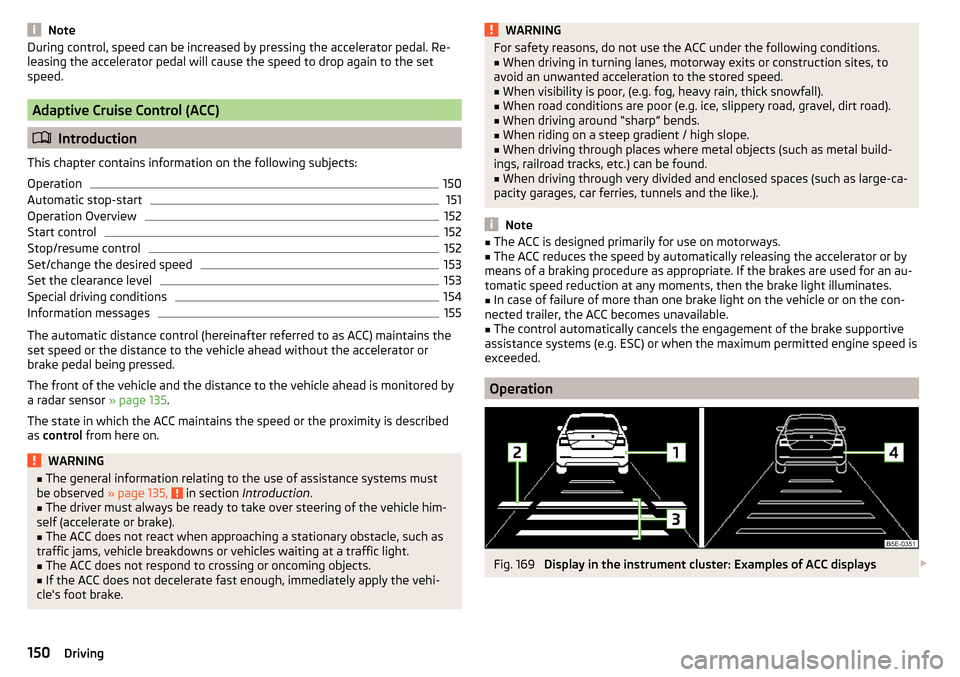
Operation
Fig. 169
Display in the instrument cluster: Examples of ACC displays
150Driving
Page 160 of 268

Engine / drive
The vehicle acceleration is more dynamic than in Normal
mode.
Front axle differential lock
The driving force distribution between the front wheels is adapted to the spor-
ty driving style.
Adaptive Cruise Control (ACC)
The acceleration is quicker than in
Normal
mode with distance control
» page 150 .
Xenon headlight
The headlamps adapt to the driving style more dynamically than in mode
Nor-mal
» page 70 .
ProActive passenger protection
The first level of protection is deactivated » page 160.
Engine noise
The engine noise is noticeable in the interior more intensely than in
Normal
mode.
Eco
mode
Read and observe
on page 157 first.
This mode is suitable for a relaxed style of driving and helps to save fuel.
Selecting this mode primarily affects the function of the following systems.
Engine / drive
Vehicle acceleration is more relaxed than in
Normal
mode.
The recommended gear is controlled such to achieve the lowest possible fuel
consumption » page 41.
When the START-STOP system was deactivated manually » page 124, it is au-
tomatically activated.
The automatic gearbox is set automatically to mode E » page 129 .
Adaptive Cruise Control (ACC)
Acceleration occurs more relaxed than in
Normal
» page 150 mode with distance
control.
Xenon headlight
The system is in economic mode » page 70. The headlamps are in basic setting
and do not adapt to the direction of travel.
Air conditioning (Climatronic)
The air conditioning is controlled so as to save energy. For this reason, for ex-
ample, it may take longer to reach the desired interior temperature in modeNormal
.
Note
■ The mode Eco is not available when towing a trailer or when another acces-
sory is connected to the trailer socket. If the vehicle is in drive mode Eco
and a
trailer is hitched up or another accessory is connected, the vehicle is automati-
cally set to the driving mode
Normal
.
■
The maximum vehicle acceleration (kick down function) is possible also in
driving mode
Eco
.
Individual
mode
Read and observe
on page 157 first.
In the mode
Individual
each system can be set independently » page 159,
Individ-ual
mode settings .
Off-road
mode
Read and observe
on page 157 first.
The mode
Off-road
is suitable for driving outside paved roads.
Further information » page 138, OFF ROAD-mode .
Note
The mode Off-road is deactivated after switching off and switching on the igni-
tion and the mode Normal
is set automatically.158Driving
Page 161 of 268

Mode selection and Infotainment displayFig. 176
Button for selecting the driving mode: Version 1 / version 2
Fig. 177
Shown in the infotainment dis-
play
Read and observe on page 157 first.
Procedure for the selection of the driving mode
›
Press the symbol button or
» Fig. 176 .
In the Infotainment display a running mode menu » Fig. 177 appears.
The mode is changed by repeatedly pressing the symbol key and
or by
pressing the corresponding function key in the Infotainment display.
If a driving mode other than
Normal
is selected, then the symbol lights up on
the button or
.
Function buttons on the display » Fig. 177
Sets the mode
Individual
and information on the setting of the currently se-
lected mode.
Cancel the menu to select driving mode.
Modes (for the selected mode the button is shown in green).
ABCNote■ The currently selected running mode is displayed in the Infotainment in the
status bar of the main menu of the symbol .■
If the driving mode menu is not operated within a few seconds, the Infotain-
ment switches to the last selected menu or switches off.
Individual
mode settings
Read and observe
on page 157 first.
In mode
Individual
the vehicle systems can be set as follows.
■
Steering:
- Sets the power steering characteristics
■
Normal
- Normal
■
Sport
- Sports
■
Engine:
/
Drive:
- Sets the engine characteristic (vehicles with manual transmis-
sion) / drive characteristic (vehicles with automatic transmission)
■
Normal
- Normal
■
Sport
- Sports
■
Eco
- Economical
■
Front differential lock:
- Sets the characteristics of the front axle differential lock
■
Normal
- Normal
■
Sport
- Sports
■
ACC:
- Sets the vehicle acceleration when adaptive cruise control is activated
■
Normal
- Normal
■
Sport
- Sports
■
Eco
- Economical
■
Dynamic cornering light:
- Sets the characteristics of the Xenon headlight
■
Normal
- Normal
■
Sport
- Sports
■
Eco
- Economical
■
Air conditioning:
- Sets the Climatronic characteristics
■
Normal
- Normal
■
Eco
- Economical
■
Engine sound:
- Sets the engine noise in the vehicle
■
Normal
- Normal
■
Sport
- Sports
■
Eco
- Economical
■
Reset mode
- Setting for all menu items in the
Individual
mode to
Normal
■
Cancel
- Keep the current settings
■
Reset
- Set all menu items to
Normal159Assist systems
Page 251 of 268

Index
A
abroad lead-free petrol
190
Abroad Headlights
74
ABS Operation
136
Warning light34
ACC150
Control symbol32
Warning lights40
Acceptance and recycling of used vehicles181
Accessories178
Adaptive cruise control automatic stop-start
151
Information messages155
Operation150
Operation Overview152
Set/change the desired speed.153
special driving conditions154
Start control152
Stop/resume control152
Adaptive Cruise Control150
Radar sensor135
Set the clearance level153
Warning lights40
Adaptive headlight see xenon headlight
70
Adjust Auxiliary heating (auxiliary heating and ventila-tion)
118
Adjusting Exterior mirrors
80
head restraints82
seats82
Steering wheel9
the seats electronically82
Adjusting the seats8
Adjusting the seats electronically82
Adjustment Headlight beam
68
Advance warning/emergency braking Warning light
40
AHL see xenon headlight
70
Air-conditioning system Air outlet vents
116
Airbag14
Deactivating19
Deactivating the front passenger airbag19
Deployment15
Front airbag15
Head airbag18
Knee airbag17
Modifications and damage to the airbag system 180
Side airbag
17
Warning light35
Airbag system14
Air conditioning112
Air distribution control115
Climatronic114
Manual air conditioning113
Air distribution control115
Air outlet vents116
Alarm Enable/disable
58
Switch off58
Trailer177
Triggering58
Alcantara cleaning
187
Anodized parts Refer to vehicle maintenance
184
Anti-lock braking system (ABS)136
Anti-theft alarm system Enable/disable
58
Trailer177
Anti-theft wheel bolts214
Armrest Front
86
Rear86
artificial leather187
Ashtray92
Assembling the bar ball, Step 1
169
bar ball, Step 2169
Assistance systems OFF ROAD-mode
138
Assistance Systems High-beam assistant
71
Assist systems135
Auto-check control40
Automatic driving lamp control70
Automatic gearbox129
Selector lever-emergency unlocking225
Selector lever lock130
Starting-off and driving131
Tiptronic130
Using the selector lever129
Automatic gearbox modes129
Automatic load deactivation204
automatic transmission selector lever lock defect
130
Automatic transmission Kickdown
131
Launch control131
Malfunction37
Selector lever lock130
Warning light37
Warning messages37
AUX99
Auxiliary heating (auxiliary heating and ventila- tion)
117
Adjust118
Switching on/off118
Auxiliary heating (heating and ventilation) Radio remote control
119
249Index
Page 253 of 268

CleanAnodized parts184
Chrome parts184
Cleaning Alcantara
187
and maintaining belts188
artificial leather187
headlight glasses185
materials187
natural leather187
plastic parts184
seats covers of the electrically heated seats188
wheels185
Cleaning safety belt
188
Cleaning seat covers
188
Cleaning the interior artificial leather
187
Seat covers188
Cleaning the vehicle exterior Camera lens
185
Cavity protection185
Decorative films183
Door locking cylinder185
Headlight glasses185
Protective films183
Under-body protection186
wheels185
Windows and external mirrors184
Cleaning vehicle181
Cleaning vehicle exterior182
Anodized parts184
Chrome parts184
Plastic parts184
Rubber seals184
Vehicle paint work183
Wiper blades186
Clean interior Safety belt
188
Climatronic air distribution control115
Automatic operation115
Operating elements114
Clothes hook96
CNG193
Gas leak193
in a traffic accident193
Natural gas reserve display30
refuelling192
Refuelling192
Regular checks193
Sticker193
Warning light37
Cockpit 12-Volt power outlet
93
Ashtray92
Cigarette lighter92
General view27
Lighting74
storage compartments89
useful equipment89
COMING HOME73
compartments89
Component protection180
Components of the puncture repair kit217
Compressed natural gas see CNG
193
Computer see multifunction display
41
Convenience operation sliding / tilting roof
65
Window64
convenience turn signal69
Coolant198
Checking199
Replenishing200
Temperature gauge29
Warning light37
Warning messages37
CORNER see Headlights with CORNER function73
Correct routing of seat belt
12
Correct seated position8
Front passenger10
Rear seats10
Correct seat position Driver
9
Counter for distance driven30
Crew Protect Assist160
cruise control operation
148
operation Description149
Cruise control system Warning light
36
Cruise Control System148
Cup holders91
D
DAY LIGHT see Daylight running lights
68
Daylight running lights68
De-icing windows
184
De-icing the windscreen and rear window76
Deactivating an airbag19
Decorative films183
Delayed locking of the boot lid see boot lid
59
Departure angle243
Diesel refer to Fuel
191
Diesel fuel Operation in winter
191
Diesel particulate filter38
information messages38
Digital Clock31
Dipstick198
251Index