2015 SKODA OCTAVIA lane assist
[x] Cancel search: lane assistPage 4 of 268

Table of Contents
On-board literature4
Notes
5
Structure and more information about the
Owner's Manual
6
Abbreviations
Safety
Passive Safety
8
General information
8
Correct and safe seated position
8
Seat belts
11
Using seat belts
11
Inertia reel and belt pretensioners
13
Airbag system
14
Description of the airbag system
14
Airbag overview
15
Deactivating airbags
19
Transporting children safely
20
Child seat
20
Fastening elements
23
Using the system
Cockpit
27
Overview
26
Instruments and warning lights
28
Instrument cluster
28
Warning lights
31
Information system
40
Driver information system
40
Driving data (Multifunction display)
41
MAXI DOT display
44Service interval display49SmartGate50
Unlocking and opening
53
Unlocking and locking
53
Anti-theft alarm system
58
Luggage compartment lid
59
Electric boot lid
60
Window operations
61
Panorama sliding/tilting roof
64
Lights and visibility
67
Lights
67
Interior lights
74
Visibility
76
Windscreen wipers and washers
77
Rear mirror
79
Seats and head restraints
81
Seats and head restraints
81
Seat features
85
Transporting and practical equipment
89
Useful equipment
89
Multimedia holder
99
Luggage compartment and transport of
cargo
100
Variable loading floor in the luggage
compartment (Estate)
107
Net partition
109
Roof rack
110
Heating and ventilation
112
Heating, manual air conditioning system,
Climatronic
112
Auxiliary heating (auxiliary heating and
ventilation)
117Driving
Starting-off and Driving120
Starting and stopping the engine using the
key
120
Starting and stopping the engine at the push
of the button
122
START-STOPsystem
124
Brakes and parking
126
Manual shifting of gears and pedals
128
Automatic gearbox
129
Running-in and economical driving
132
Avoiding damage to your vehicle
134
Assist systems
135
General information
135
Braking and stabilisation systems
135
OFF ROAD-mode
138
Parking aid (ParkPilot)
140
Rear View Camera
143
Park Assist
144
Cruise Control System
148
Adaptive Cruise Control (ACC)
150
Front Assist
155
Selection of the driving mode (Driving Mode
Selection)
157
Proactive passenger protection (Crew Protect
Assist)
160
Lane Departure Warning (Lane Assist)
160
Traffic sign recognition
162
Fatigue detection
164
Tyre pressure monitoring
165
Hitch and trailer
167
Hitch
167
Trailer
1722Table of Contents
Page 33 of 268

Reset counter for distance travelled (trip)›Press button A » Fig. 28 on page 31 .
Setting the clock
Fig. 28
Button in the instrument cluster
Read and observe on page 28 first.
›
Switch on the ignition.
›
Press and hold the button
A
» Fig. 28 until the
Time
is shown in the display.
›
Release the button
A
and the system switches to the hour setting function.
›
Press the button
A
again and set the hours.
›
Wait around 4 seconds - the system switches to the minutes setting.
›
Press the button
A
again and set the minutes.
›
Wait around 4 seconds - the system switches to the initial setting.
The time can also be set in the Infotainment » Owner´s Manual Infotainment ,
chapter Device settings .
Warning lights
Introduction
This chapter contains information on the following subjects:
Handbrake
32
Brake system
32
Seat belt warning light
32
Adaptive Cruise Control (ACC)
32
Power steering/steering lock (KESSY system)
33
Traction control (TCS)
33
Traction control system (TCS) off
33
Stability Control (ESC)
34
Anti-lock braking system (ABS)34 Rear fog light34
Exhaust inspection system
34
Glow plug system (diesel engine)
34
Engine performance check (petrol engine)
35
Safety systems
35
Tyre pressure
35
Brake linings
36
Fuel reserve
36
Lane following system (Lane Assist)
36
Turn signal system
36
Trailer turn signal lights
36
Fog lights
36
Cruise control system
36
Brake pedal (automatic transmission)
37
Natural gas operation
37
Main beam
37
Automatic transmission
37
Rear seat belt warning light
37
Generator
37
Coolant
37
Engine oil pressure too low
38
Engine oil level
38
Lamp failure
38
Diesel particulate filter (diesel engine)
38
Windscreen washer fluid level
39
High beam assistant
39
START-STOP system
39
Display of a low temperature
39
Water in the fuel filter (diesel engine)
39
Adaptive Cruise Control (ACC)
40
Distance warning (Front Assist)
40
Advance warning/emergency brake (Front Assist)
40
OFF ROADmode
40
Service
40
The warning lights in the instrument cluster indicate certain functions or
faults.
31Instruments and warning lights
Page 38 of 268

Other incidents
The illumination of the warning light can have the following reasons.
▶ The vehicle is loaded on one side. Distribute loads as evenly as possible.
▶ The wheels of one axle are loaded more heavily (e.g. when towing a trailer or
when driving uphill or downhill).
▶ Snow chains are mounted.
▶ A wheel has been changed.
CAUTION
Under certain circumstances (e.g. sporty style of driving, wintry or unpaved
roads) the warning light in the instrument cluster can be delayed or does
not light up at all.
Brake linings
Read and observe
on page 32 first.
illuminates - the brake pads are worn.
Check brake pad!BRAKE PADS PLEASE CHECK
Seek help from a specialist garage.
Fuel reserve
Read and observe
on page 32 first.
illuminates – the fuel level in the fuel tank is at the reserve level (approxi-
mately 6 litres).
Please refuel. Range: ...
kmPLEASE REFUEL RANGE …
km
An audible signal sounds as a warning.
Note
The text in the display goes out after refuelling and driving a short distance.
Lane following system (Lane Assist)
Read and observe
on page 32 first.
The warning lights
indicates the state of the Lane Assist system.
More information about the Lane Assist System » page 160.
Turn signal system
Read and observe
on page 32 first.
flashes – the left turn signal is turned on.
flashes – the right turn signal is turned on.
If there is a fault in the turn signal system, the warning light flashes at twice
its normal rate. This does not apply when towing a trailer.
Switching off the hazard warning light system is switched on will cause all of
the turn signal lights as well as both warning lights to flash.
Trailer turn signal lights
Read and observe
on page 32 first.
flashes – the trailer lights are switched on.
If a trailer is hitched and the warning light is not flashing, one of the trailer
turn signal lights has failed.
An example message in the display of the instrument cluster
Trailer: check left turn signal!TRAILER TURN SIG_ CHECK LEFT
Check the trailer bulbs.
Fog lights
Read and observe
on page 32 first.
illuminates – the fog lights are switched on.
Cruise control system
Read and observe
on page 32 first.
illuminates - the vehicle speed is limited by the speed regulator system
and/or the automatic distance control.
36Using the system
Page 50 of 268

Missed calls (if there are several missed calls, the number of calls is shown
next to the symbol)
Switch-off microphone
Menu item
Assist systems
Read and observe on page 44 first.
Select menu item
Assist systems›
Select and confirm
Assist systems
in the main menu.
or
›
Press the button on the multi-function steering wheel .
In the menu item
Assist systems
, the Front Assist and Lane Departure Warning
(Lane Assist) systems can be enabled/disabled.
Menu item
Lap timer
(Stop watch)
Read and observe
on page 44 first.
Select menu item
Lap timer›
Select and confirm
Lap timer
in the main menu.
The Lap timer function offers the possibility of calculating the lap time, for ex-
ample when driving on a race course. The measured time is shown in the dis-
play.
The calculated times are displayed in minutes, seconds and tenths of seconds.
The following functions are available. ■
Start
- start the timing manually or continue the interrupted measurement
■
Since start
- Start the timer automatically upon start-up
■
Statistics
- Evaluate and reset the measured times
Time measurement
Manually start the measurement
▶ Select the menu item
Lap timer
-
Start
.
Start the measurement automatically ▶ Select the menu item
Lap timer
-
Since start
. Timing will begin automatically
when starting up.
Start timing of next round
▶ Select the menu item
New lap
during timing.
During timing, information about the fastest and the last lap time are also
shown in the display.
Measure split time ▶ During the timing, select the menu item Split time
. The split time data is dis-
played for about 5 seconds in the display.
The split time can be measured repeatedly during a round.
Stop measurement
▶ During the timing, press the menu item
Stop
.
The time measurement is stopped, the following functions are now available.
■
Continue
- Continue measurement of the current lap time
■
New lap
- Start measurement of the next lap time.
■
Abort lap
- Cancel the timer (the aborted lap time is not stored)
■
Hang up
- End timing (the aborted lap time is stored)
Evaluate recorded times ▶ Select the menu item
Lap timer
-
Statistics
.
The following information is displayed.
▶
Fastest:
- The fastest lap
▶
Slowest:
- The slowest lap
▶
Average:
- The average lap time
▶
Overall time:
- The total of all the lap times
Reset measured times ▶ Select the menu item
Lap timer
-
Statistics
-
Reset
.
WARNING■ Concentrate fully at all times on your driving! As the driver, you are fully
responsible for the operation of your vehicle.■
Only use the
Lap timer
when you are in any traffic situation where you have
full control over the vehicle.
Note
■ The system allows the measurement of up to 11 lap times.■Individual lap times are no longer measured after 99 hours, 59 minutes and
59 seconds. After this time has been reached, a new lap time is automatically
measured.■
The measured times cannot be reset individually.
■
If the measured times are not reset, then these are stored even after turning
off the ignition.
48Using the system
Page 71 of 268

Activating/deactivating function on vehicles with Infotainment
The function can be disabled/enabled in the Infotainment » Owner´s Manual
Infotainment , chapter CAR - vehicle settings .
Deactivating on vehicles without Infotainment›
Switch off the ignition.
›
Pull the indicator / main beam lever towards the steering wheel, push down
and hold in this position.
›
Switch on the ignition.
›
Hold the lever in this position for min. 3 seconds after switching on the igni-
tion.
The deactivation of the function is confirmed by an audible signal.
Activating on vehicles without Infotainment
›
Switch off the ignition.
›
Pull the indicator / main beam lever towards the steering wheel, push up and
hold in this position.
›
Switch on the ignition.
›
Hold the lever in this position for min. 3 seconds after switching on the igni-
tion.
The activation of the function is confirmed by an audible signal.
WARNINGAlways switch on the low beam when visibility is poor.
Turn signal and main beam
Fig. 55
Operating lever: Turn signal and
main beam operation
Read and observe on page 67 first.
Lever positions » Fig. 55
When the right turn signal light is switched on, the warning light flashes in
the instrument cluster
When the left turn signal light is switched on, the warning light flashes in
the instrument cluster
Depending on equipment (spring-tensioned position):
▶ Switch on main beam – the warning light illuminates in the instrument
cluster
▶ Switch on main beam assistant » page 71
Depending on equipment (spring-tensioned position): ▶ Switch on main beam or headlight flasher (spring-loaded position)
▶ Switch off main beam assistant/switch on headlight flasher (spring-ten-
sioned position)
The main beam can only be switched on when the low beam lights are on.
The headlight flasher can be operated even if the ignition is switched off.
The turn signal light switches itself off automatically when driving around a
curve or after making a turn.
“Convenience turn signal”
When the control lever is lightly pressed to the pressure point
A
or
B
then
the respective turn-signal lamp flashes three times.
If during the “comfort flashing” the operating lever in the opposite side is
pressed, then the blinking stops.
The “Lane change flash” can be activated/deactivated in the Infotainment
» Owner´s Manual Infotainment , chapter CAR - vehicle settings .
WARNINGOnly turn on the main beam or the headlight flasher if other road users will
not be dazzled.ABCD69Lights and visibility
Page 152 of 268
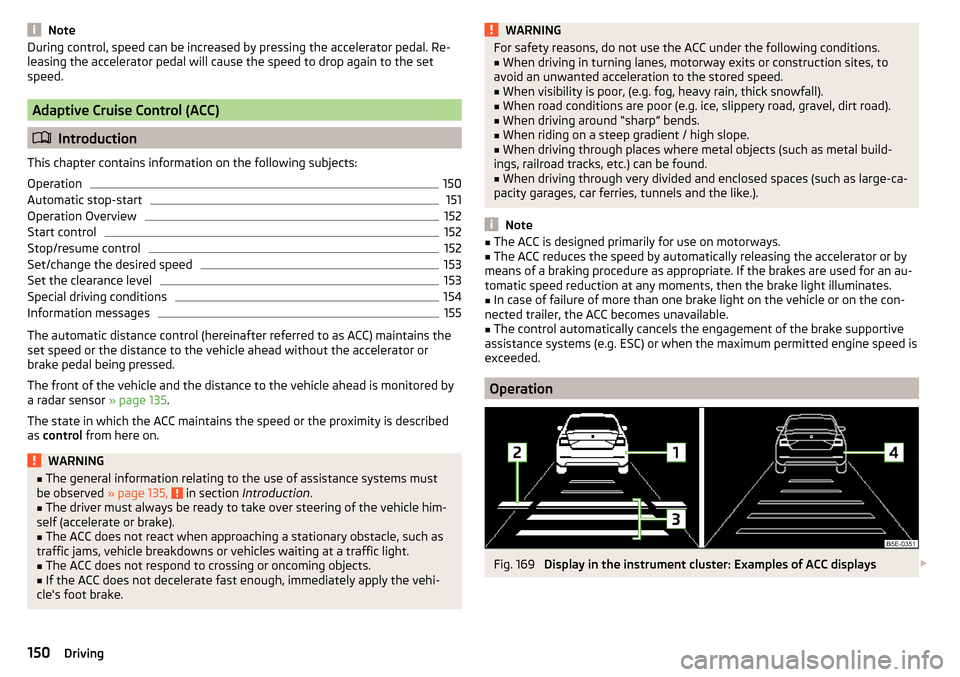
NoteDuring control, speed can be increased by pressing the accelerator pedal. Re-
leasing the accelerator pedal will cause the speed to drop again to the set
speed.
Adaptive Cruise Control (ACC)
Introduction
This chapter contains information on the following subjects:
Operation
150
Automatic stop-start
151
Operation Overview
152
Start control
152
Stop/resume control
152
Set/change the desired speed
153
Set the clearance level
153
Special driving conditions
154
Information messages
155
The automatic distance control (hereinafter referred to as ACC) maintains the
set speed or the distance to the vehicle ahead without the accelerator or
brake pedal being pressed.
The front of the vehicle and the distance to the vehicle ahead is monitored by
a radar sensor » page 135.
The state in which the ACC maintains the speed or the proximity is described
as control from here on.
WARNING■
The general information relating to the use of assistance systems must
be observed » page 135, in section Introduction .■
The driver must always be ready to take over steering of the vehicle him-
self (accelerate or brake).
■
The ACC does not react when approaching a stationary obstacle, such as
traffic jams, vehicle breakdowns or vehicles waiting at a traffic light.
■
The ACC does not respond to crossing or oncoming objects.
■
If the ACC does not decelerate fast enough, immediately apply the vehi-
cle's foot brake.
WARNINGFor safety reasons, do not use the ACC under the following conditions.■When driving in turning lanes, motorway exits or construction sites, to
avoid an unwanted acceleration to the stored speed.■
When visibility is poor, (e.g. fog, heavy rain, thick snowfall).
■
When road conditions are poor (e.g. ice, slippery road, gravel, dirt road).
■
When driving around “sharp” bends.
■
When riding on a steep gradient / high slope.
■
When driving through places where metal objects (such as metal build-
ings, railroad tracks, etc.) can be found.
■
When driving through very divided and enclosed spaces (such as large-ca-
pacity garages, car ferries, tunnels and the like.).
Note
■ The ACC is designed primarily for use on motorways.■The ACC reduces the speed by automatically releasing the accelerator or by
means of a braking procedure as appropriate. If the brakes are used for an au-
tomatic speed reduction at any moments, then the brake light illuminates.■
In case of failure of more than one brake light on the vehicle or on the con-
nected trailer, the ACC becomes unavailable.
■
The control automatically cancels the engagement of the brake supportive
assistance systems (e.g. ESC) or when the maximum permitted engine speed is
exceeded.
Operation
Fig. 169
Display in the instrument cluster: Examples of ACC displays
150Driving
Page 162 of 268

Proactive passenger protection (Crew Protect Assist)
Introduction
This chapter contains information on the following subjects:
Function
160
Proactive passenger protection (hereafter known as system) increases pas-
senger protection in the front seats in situations that could lead to vehicle im-
pact or overturning.
WARNINGThe general information relating to the use of assistance systems must be
observed » page 135, in section Introduction .
Note
The system component service life is monitored electronically. Further infor-
mation » page 35 , Safety systems .
Function
Read and observe
on page 160 first.
In critical driving situations (e.g. during emergency braking or a sudden changein direction), the following steps can be taken separately or combined in order
to reduce the risk of serious injury.
▶ The front passenger's and driver's seatbelts, if worn, are automatically ten-
sioned closely over the body.
▶ The windows in the side doors (if open) are automatically closed up to a gap
of about 5 cm from the edge.
▶ The sliding/tilting roof is closed.
Once the critical driving situation has passed, the tension on the seatbelts will
be released again.
The system operates at two levels of protection.
The first level of protection
The system already intervenes in situations that may occur during dynamic
driving. As a result, this primarily helps to keep the driver and the passenger in
the correct seated position.
The first protection level can be deactivated in one of the following ways.
▶ The system deactivation in the Infotainment » Owner´s Manual Infotain-
ment , chapter CAR - vehicle settings .
▶ Deactivation of TCS » page 136.
▶ Selecting the driving mode Sport
» page 157 .
Provided that the driving mode
Sport
is not selected, the system is activated
over the two levels of protection after switching the ignition off and on again.
The second level of protection
The system intervenes only if the situation is evaluated as critical, such as in
panic braking at high speeds.
This level of protection cannot be deactivated.
Note
If the front passenger front airbag is deactivated » page 19 the belt tensioning
function for the front passenger seat is switched off.
Lane Departure Warning (Lane Assist)
Introduction
Fig. 178
Camera viewing window for Lane
Assist
This chapter contains information on the following subjects:
Operation
161
Activation / deactivation
162
Information messages
162
The lane departure warning (hereinafter known as system) helps to keep the
vehicle between the boundary lines of a lane.
The system detects the boundary lines of a lane using the camera » Fig. 178.
160Driving
Page 163 of 268

When the vehicle approaches a detected line between lanes, the system
makes a light movement of the steering wheel in the opposite direction to the
boundary line. This corrective steering intervention can be manually overrid-
den at any time.WARNING■ The general information relating to the use of assistance systems must
be observed » page 135, in section Introduction .■
Lane Assist can help you keep the vehicle within the lane. However, it
does not steer the vehicle for you. The driver retains full responsibility for
steering at all times.
■
Some objects on the road may be incorrectly detected as lines. As a re-
sult, an incorrect steering intervention may take place.
WARNINGThe detection capability of the camera may be limited by various external
influences. In such cases, the assistant may not detect the line between
two lanes at all or not properly. The detection capability of the camera may
be restricted in the following situations, for example.■
When visibility is poor, (e.g. fog, heavy rain, thick snowfall).
■
When driving around “sharp” bends.
■
The camera is blinded by the sun.
■
The camera is blinded by the oncoming traffic.
■
The viewing range of the camera is impeded by a vehicle travelling ahead.
■
The camera viewing range is obstructed by an obstacle.
CAUTION
Do not attach any stickers or similar objects to the windscreen to avoid impair-
ing the functions of the systems.
Note
■ The system is designed for driving on motorways and roads with adequate
longitudinal markings.■
The system can detect both continuous and broken lines.
OperationFig. 179
Monochromatic display of the instrument cluster: Examples of
system indications
Fig. 180
Colour display of the instrument cluster: Examples of system in-
dications
Read and observe
and on page 161 first.
System displays » Fig. 179 and » Fig. 180
The system is activated, but not ready to intervene.
The system is active and ready to intervene.
The system intervenes when approaching the right-hand boundary lane.
Adaptive lane assist ensues (boundary lines on both sides of the vehicle
detected).
The system can intervene when the following basic conditions are present. The system is activated.
The vehicle speed is no more than about 65 km/h.
161Assist systems