2015 SKODA OCTAVIA abs
[x] Cancel search: absPage 140 of 268

Multi collision brake (MCB)Read and observe
on page 136 first.
The MCB helps to decrease speed after a collision through automatic braking
interventions and to stabilize the vehicle. This reduces the risk of a subse-
quent crash due to uncontrolled vehicle movement.
The automatic brake interventions can take place only if the following condi-
tions are met.
A head-on or side collision occurred.
The impact speed was higher than approx. 10 km/h.
The brakes, the ESC and other required electrical systems remain function-
al after impact.
The accelerator pedal is not actuated.
Trailer stabilization system (TSA)
Read and observe
on page 136 first.
The TSA helps the combination stable in situations where the trailer sways
and then the whole trailer combination.
TSA brakes the individual wheels of the towing vehicle in order to damp the
rocking motion of the entire vehicle combination.
The following conditions are required for the correct TSA function. The trailer was shipped from the factory or purchased from the ŠKODA
genuine accessories.
The trailer is electrically connected to the towing vehicle by means of the
trailer socket.
The parking aid is activated.
The speed is higher than approx. 60 km/h.
Further information » page 167, Hitch and trailer .
OFF ROAD-mode
Introduction
This chapter contains information on the following subjects:
Operation
139
Hill Descent Assistant
139
ESC OFF ROAD
140
TCSOFF ROAD
140
EDS OFF ROAD
140
ABS OFF ROAD
140
The OFF ROAD mode includes several features that help to overcome difficult
navigable routes when travelling on non-paved roads.
But even with OFF ROAD mode activated, your vehicle is never a true SUV.
WARNING■ The general information relating to the use of assistance systems must
be observed » page 135, in section Introduction .■
A lack of fuel can cause irregular engine running or cause the engine to
shut down. This would lead the OFF ROAD mode to lose its effectiveness -
risk of accident!
CAUTION
■ The OFF ROAD mode is not designed for the use on common roads.■All four wheels must be fitted with the same tyres approved by the manufac-
turer to ensure theOFF ROAD mode operates correctly.138Driving
Page 141 of 268

OperationFig. 156
Button for selecting the driving mode / function key in Infotain-
ment display
Read and observe
and on page 138 first.
We recommend that you activate the OFF ROAD mode for every trip on non-paved roads.
Activation
›
Press the symbol button
» Fig. 156 .
In the Infotainment display a running mode menu » Fig. 156 appears.
›
Press the function key
Off-road
in the Infotainment display.
Deactivation
›
Press the symbol button
» Fig. 156 .
›
In the Infotainment display select a driving mode other than
Off-road
.
So that an engagement of the OFF ROAD mode can take place, the following
conditions must be met.
The OFF ROAD mode is enabled.
The vehicle is moving at a speed of less than 30 km/h. The warning light illuminates in the instrument cluster.
The following functions are integrated in the OFF ROAD mode.
▶ Downhill Drive Support » page 139.
▶ ESC OFF ROAD » page 140.
▶ TCS OFF ROAD » page 140.
▶ EDL OFF ROAD » page 140.
▶ ABS OFF ROAD » page 140.
NoteIf the engine stalls while driving and is started again within 30 seconds, then
OFF ROAD mode will be automatically activated.
Hill Descent Assistant
Read and observe
and on page 138 first.
The hill descent assistant (hereinafter referred to as assist system), with its
automatic braking action on all wheels, ensures a constant speed is main-
tained on a steep slope when driving forwards and reversing.
During an intervention of the assistant, the warning light flashes in the in-
strument cluster.
The assistant is automatically engaged under the following conditions. The engine is running.
For vehicles with Manual transmission the shift lever is in the neutral po-
sition and or the 1st, 2nd, 3rd gear, or reverse gear is engaged.
On vehicles with an automatic transmission , the selector lever is in the R,
N, D/S position or in the Tiptronic position.
The downhill gradient is at least 10 % (when driving over sleepers, the lim-
it can briefly drop to 8 %).
Neither the accelerator nor the brake pedal is operated.
Driving speed
Initiate the downhill decent at a reasonable speed up to 30 km / h the hill de-
scent assist maintains this speed when driving downhill constant.
The assistant can maintain constant speed of about 2 - 30 km / h.
If a forwards or reverse gear is engaged for vehicles with Manual transmis-
sion , the speed must be high enough to avoid stalling the engine.
By pressing the accelerator or brake pedal, the speed can be increased or re-
duced. This is true even if the shift lever is in the neutral position and the se-
lector lever in the N position. The engagement of the assistant is resumed af-
ter the pedal is released.
WARNINGFor the correct operation of the assistant the road surface must be suffi-
ciently adherent. The assistant cannot properly fulfil its function on slushy
soil due to physical reasons (e.g. ice or mud). - there is a risk of an accident! 139Assist systems
Page 142 of 268

NoteDuring an active intervention of the assistant, the brake lights do not light up.
ESC OFF ROADRead and observe
and on page 138 first.
The ESC OFF ROAD makes driving on a dirt roads easier, as no ESC interven-
tions occur when the vehicle is over or under steered.
TCSOFF ROAD
Read and observe
and on page 138 first.
The TCS OFF ROAD makes starting and driving on an unpaved surface easier as
it partially allows wheel-spin.
Note
When disabled, the TCS » page 136 OFF ROAD mode works without the sup-
port of the TCS OFF ROAD.
EDS OFF ROAD
Read and observe
and on page 138 first.
The EDS supports OFF ROAD vehicle traction when driving on a surface with
different grip under the drive wheels or when driving over bumps.
A spinning wheel or wheels are braked earlier and with more force than with
the intervention of the standard EDS system.
ABS OFF ROAD
Read and observe
and on page 138 first.
The ABS OFF ROAD supports the driver when braking on an unpaved surface
such as gravel, snow, etc.
The system generated by a controlled locking of the wheels braked wheel be-
fore a “wedge” of piled material, which shortens the braking distance.
The system is only available, if the front wheels are in the straight-ahead posi-
tion.
The system operates at speeds of up to 50 km/h.
Parking aid (ParkPilot)
Introduction
This chapter contains information on the following subjects:
Function
141
Display in the Infotainment display
142
Activation / deactivation
142
Automatic system activation when moving forward
143
The parking aid (hereinafter referred to as system) draws attention via acous-
tic signals or the Infotainment display when manoeuvring around obstacles in
the vicinity of the vehicle.
WARNING■ The general information relating to the use of assistance systems must
be observed » page 135, in section Introduction .■
Moving persons or objects may not be recognized by the system sensors.
■
Under certain circumstances, surfaces of certain objects and types of
clothing cannot reflect the system signals. For this reason, such people or
objects may not be recognised by the system sensors.
■
External noise sources may affect the signals of the system sensors. Un-
der adverse conditions, this may cause objects or people not to be recog-
nised by the system.
■
You should satisfy yourself before reversing that there is no small obsta-
cle, such as a rock, thin post, trailer drawbar etc., in front or behind your ve-
hicle. Such obstacles may not be recognised by the system sensors.
CAUTION
■ Keep the system sensors » Fig. 157 on page 141 clean, and free from snow
and ice, and do not cover with any objects of any kind, otherwise the system
functioning may be limited.■
Under adverse weather conditions (heavy rain, water vapour, very low or
high temperatures, etc.), the system function may be limited - “incorrect recog-
nition of obstacle”.
■
Accessories additionally installed on the vehicle rear, such as bicycle carriers,
can impair the system function.
Note
The display of obstacles in the Infotainment black and white display is descri-
bed in the » Owner´s Manual Infotainment , chapter CAR - vehicle settings .140Driving
Page 147 of 268

The state in which the steering wheel is operated by the system, is referred to
as parking operation.
The Park Assist is an extension of the parking aid » page 140 and operates on
the basis of data collected by the ultrasonic sensors.
For this reason, the chapter on the parking aid is to be read carefully and the safety notes are to be observed.WARNING■ The general information relating to the use of assistance systems must
be observed » page 135, in section Introduction .■
During the parking process, the system automatically performs rapid
steering movements. While it is doing so, do not place your hands between
the steering wheel – risk of injury!
■
During a parking manoeuvre on loose or slippery surfaces (gravel, snow,
ice, etc.) you may stray from the calculated road. Therefore, do not use the
system in such situations.
CAUTION
The correct evaluation of the parking space and the parking procedure de-
pends on the circumference of the wheels on the vehicle.■
The system only works correctly if the vehicle is fitted with the wheel size
approved by the manufacturer.
■
Abstain from using the system when the vehicle is fitted with snow chains or
a temporary spare wheel.
■
If wheels other than those approved by the manufacturer are mounted, the
resulting position of the vehicle in the parking space can differ slightly. This
can be avoided by readjusting the system at a specialist garage.
CAUTION
If other vehicles are parked behind the kerb or on it, the system can also guide
your vehicle beyond the kerb or onto it. Ensure that the wheels or the wheel
rims of your vehicle are not damaged and if necessary intervene in time.
Note
■ We recommend performing the parking at a safe speed to about 5 km / h.■The driver can stop the parking process at any time by pressing the symbol
key
» Fig. 164 on page 146 or by a driver steering intervention.Functioning
Read and observe
and on page 145 first.
The system support is provided in the following manner.▶ While the parking space search is going on, a measurement and evaluation of
the parking space size is completed.
▶ Suitable parking spaces are shown in the display of the instrument cluster
(hereinafter only in the display).
▶ The display shows instructions and information before the start and during
the parking.
▶ The road way is calculated that the vehicle uses during the parking.
▶ The front wheels are automatically rotated during the parking.
Conditions for the system function
The system can look for a parking space only if the following basic conditions
are met.
The system is activated.
The vehicle speed is less than 40 km / h (parallel parking).
The vehicle speed is less than 20 km / h (transverse parking). The distance to a number of parked vehicles is approximately 0.5 - 1.5 m.
The TCS is activated » page 135, Braking and stabilisation systems .
The system can only carry out the parking if the following basic conditions are
met.
The vehicle is travelling less than about 7 km/h.
The parking procedure takes less than 6 minutes.
There is no driver intervention in the automatic steering operation.
Activation/deactivation
The system can be enabled or disabled by pressing the symbol key
» Fig. 164
on page 146 -
.
When the system is activated, the symbol illuminates.
145Assist systems
Page 210 of 268
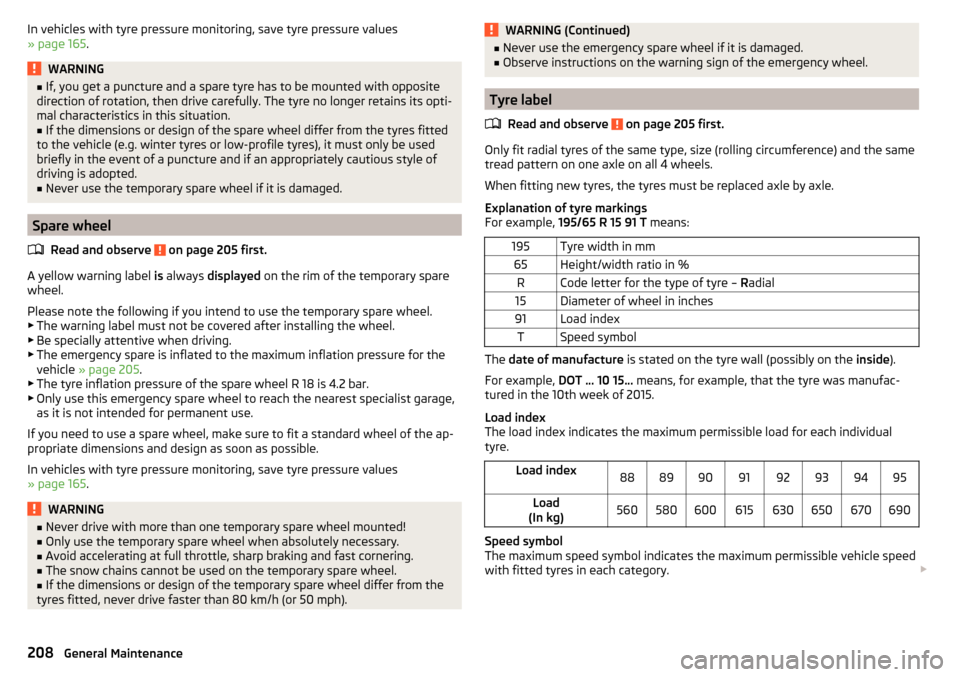
In vehicles with tyre pressure monitoring, save tyre pressure values
» page 165 .WARNING■
If, you get a puncture and a spare tyre has to be mounted with opposite
direction of rotation, then drive carefully. The tyre no longer retains its opti-
mal characteristics in this situation.■
If the dimensions or design of the spare wheel differ from the tyres fitted
to the vehicle (e.g. winter tyres or low-profile tyres), it must only be used
briefly in the event of a puncture and if an appropriately cautious style of
driving is adopted.
■
Never use the temporary spare wheel if it is damaged.
Spare wheel
Read and observe
on page 205 first.
A yellow warning label is always displayed on the rim of the temporary spare
wheel.
Please note the following if you intend to use the temporary spare wheel. ▶ The warning label must not be covered after installing the wheel.
▶ Be specially attentive when driving.
▶ The emergency spare is inflated to the maximum inflation pressure for the
vehicle » page 205 .
▶ The tyre inflation pressure of the spare wheel R 18 is 4.2 bar.
▶ Only use this emergency spare wheel to reach the nearest specialist garage,
as it is not intended for permanent use.
If you need to use a spare wheel, make sure to fit a standard wheel of the ap-
propriate dimensions and design as soon as possible.
In vehicles with tyre pressure monitoring, save tyre pressure values
» page 165 .
WARNING■
Never drive with more than one temporary spare wheel mounted!■Only use the temporary spare wheel when absolutely necessary.■
Avoid accelerating at full throttle, sharp braking and fast cornering.
■
The snow chains cannot be used on the temporary spare wheel.
■
If the dimensions or design of the temporary spare wheel differ from the
tyres fitted, never drive faster than 80 km/h (or 50 mph).
WARNING (Continued)■ Never use the emergency spare wheel if it is damaged.■Observe instructions on the warning sign of the emergency wheel.
Tyre label
Read and observe
on page 205 first.
Only fit radial tyres of the same type, size (rolling circumference) and the same
tread pattern on one axle on all 4 wheels.
When fitting new tyres, the tyres must be replaced axle by axle.
Explanation of tyre markings
For example, 195/65 R 15 91 T means:
195Tyre width in mm65Height/width ratio in %RCode letter for the type of tyre – Radial15Diameter of wheel in inches91Load indexTSpeed symbol
The date of manufacture is stated on the tyre wall (possibly on the inside).
For example, DOT ... 10 15... means, for example, that the tyre was manufac-
tured in the 10th week of 2015.
Load index
The load index indicates the maximum permissible load for each individual
tyre.
Load index8889909192939495Load
(In kg)560580600615630650670690
Speed symbol
The maximum speed symbol indicates the maximum permissible vehicle speed
with fitted tyres in each category.
208General Maintenance
Page 231 of 268

No.Consumer39Central locking front door - right, power windows - front and rear
right4012-Volt power socket41Not assigned42Central locking rear door - left, right, headlight washer system,
windscreen washer system43Visor for gas discharge bulbs, interior lighting44Towing hitch - contact in the socket45Operating the seat adjustment46230-Volt power socket47Rear window wiper48Not assigned49Coil on starter relay, clutch pedal switch50Opening the boot lid51Belt tensioner - front passenger side52Not assigned53Relay for rear window heater
Fuses in the engine compartment
Fig. 241
Removing the fuse box cover/fuses
Fig. 242
Cover for the fuse box in the en-
gine compartment: Plastic clip
for fuses
Read and observe and on page 227 first.
Replacing fuses
›
Press together the interlocks of the cover simultaneously in the direction of
the arrow
1
» Fig. 241 .
›
Remove the cover in the direction of the arrow
2
.
›
Replace the appropriate fuse.
›
Place the cover on top of the fusebox.
›
Push in the interlocks on the cover and lock.
CAUTION
The cover for the fuse box in the engine compartment must always be applied
correctly. Water may get into the fuse box if the cover is not replaced properly
- there is a risk of damage to the vehicle.
Assignment of fuses in the engine compartment
Read and observe
and on page 227 first.
No.Consumer1ESC, ABS2ESC, ABS3Engine control unit4Radiator fan, oil temperature sensor, air volume sensor, control
valve for fuel pressure, relay for electrical auxiliary heating, engine
components5Coil of the relay for the ignition system, coil of the CNG relay, en-
gine components6Brake sensor7Coolant pump, radiator shutter, engine components 229Fuses and light bulbs
Page 232 of 268

No.Consumer8Lambda probe9Ignition, glow plug system, engine components10Fuel pump, ignition11Electrical auxiliary heating system12Electrical auxiliary heating system13Automatic gearbox14Windscreen heater - right15Horn16Ignition, fuel pump17ABS, ESC, motor control unit, relay coil for the heated windscreen18Databus, battery data module19Windscreen wipers20Alarm21Windscreen heater - left22Engine control unit23Starter24Electrical auxiliary heating system31Not assigned32Not assigned33Not assigned34Haldex clutch35Not assigned36Not assigned37Aux. heating38Not assigned
Bulbs
Introduction
This chapter contains information on the following subjects:
Bulb arrangement in the headlights
231
Replacing the low beam bulb
231Change bulb for long-distance, daytime running lights and parking light
switch232
Change bulb for additional parking light
232
Change bulb for fog light switch - Variant 1
232
Change bulb for fog light switch - Variant 2
233
Replacing the bulb for the licence plate light
233
Rear Light
234
Replacing bulbs in the rear light - Variant 1
235
Replacing bulbs in the rear light - Variant 2
235
Some manual skills are required to change a bulb. For this reason, we recom-
mend having bulbs replaced by a specialist garage or seeking other expert help
in the event of any uncertainties.
▶ Switch off the ignition and the relevant lights before replacing a bulb.
▶ Faulty bulbs must only be replaced with the same type of bulbs. The designa-
tion is located on the light socket or the glass bulb.
A stowage compartment for replacement bulbs is located in a plastic box in
the spare wheel or underneath the floor covering in the luggage compartment.
We recommend having the headlight settings checked by a specialist garage
after replacing a bulb in the low, high or fog beam.
In case of failure of a xenon gas discharge lamp or an LED diode, visit a special- ist garage.
WARNING■ Always read and observe the warnings before completing any work in the
engine compartment » page 194.■
Accidents can be caused if the road in front of the vehicle is not suffi-
ciently illuminated and the vehicle cannot or can only be seen with difficul-
ty by other road users.
■
Bulbs H7 H8 and H15 are pressurised and may burst when changing the
bulb - risk of injury! We therefore recommended wearing gloves and safety
glasses when changing a bulb.
■
Do not carry out any work on the Xenon gas discharge lamps - risk of
death!
CAUTION
Do not take hold of the glass bulb with naked fingers (even the smallest
amount of dirt reduces the working life of the light bulb). Use a clean cloth,
napkin, or similar. 230Do-it-yourself
Page 251 of 268

Index
A
abroad lead-free petrol
190
Abroad Headlights
74
ABS Operation
136
Warning light34
ACC150
Control symbol32
Warning lights40
Acceptance and recycling of used vehicles181
Accessories178
Adaptive cruise control automatic stop-start
151
Information messages155
Operation150
Operation Overview152
Set/change the desired speed.153
special driving conditions154
Start control152
Stop/resume control152
Adaptive Cruise Control150
Radar sensor135
Set the clearance level153
Warning lights40
Adaptive headlight see xenon headlight
70
Adjust Auxiliary heating (auxiliary heating and ventila-tion)
118
Adjusting Exterior mirrors
80
head restraints82
seats82
Steering wheel9
the seats electronically82
Adjusting the seats8
Adjusting the seats electronically82
Adjustment Headlight beam
68
Advance warning/emergency braking Warning light
40
AHL see xenon headlight
70
Air-conditioning system Air outlet vents
116
Airbag14
Deactivating19
Deactivating the front passenger airbag19
Deployment15
Front airbag15
Head airbag18
Knee airbag17
Modifications and damage to the airbag system 180
Side airbag
17
Warning light35
Airbag system14
Air conditioning112
Air distribution control115
Climatronic114
Manual air conditioning113
Air distribution control115
Air outlet vents116
Alarm Enable/disable
58
Switch off58
Trailer177
Triggering58
Alcantara cleaning
187
Anodized parts Refer to vehicle maintenance
184
Anti-lock braking system (ABS)136
Anti-theft alarm system Enable/disable
58
Trailer177
Anti-theft wheel bolts214
Armrest Front
86
Rear86
artificial leather187
Ashtray92
Assembling the bar ball, Step 1
169
bar ball, Step 2169
Assistance systems OFF ROAD-mode
138
Assistance Systems High-beam assistant
71
Assist systems135
Auto-check control40
Automatic driving lamp control70
Automatic gearbox129
Selector lever-emergency unlocking225
Selector lever lock130
Starting-off and driving131
Tiptronic130
Using the selector lever129
Automatic gearbox modes129
Automatic load deactivation204
automatic transmission selector lever lock defect
130
Automatic transmission Kickdown
131
Launch control131
Malfunction37
Selector lever lock130
Warning light37
Warning messages37
AUX99
Auxiliary heating (auxiliary heating and ventila- tion)
117
Adjust118
Switching on/off118
Auxiliary heating (heating and ventilation) Radio remote control
119
249Index