2015 SKODA OCTAVIA warning
[x] Cancel search: warningPage 163 of 268

When the vehicle approaches a detected line between lanes, the system
makes a light movement of the steering wheel in the opposite direction to the
boundary line. This corrective steering intervention can be manually overrid-
den at any time.WARNING■ The general information relating to the use of assistance systems must
be observed » page 135, in section Introduction .■
Lane Assist can help you keep the vehicle within the lane. However, it
does not steer the vehicle for you. The driver retains full responsibility for
steering at all times.
■
Some objects on the road may be incorrectly detected as lines. As a re-
sult, an incorrect steering intervention may take place.
WARNINGThe detection capability of the camera may be limited by various external
influences. In such cases, the assistant may not detect the line between
two lanes at all or not properly. The detection capability of the camera may
be restricted in the following situations, for example.■
When visibility is poor, (e.g. fog, heavy rain, thick snowfall).
■
When driving around “sharp” bends.
■
The camera is blinded by the sun.
■
The camera is blinded by the oncoming traffic.
■
The viewing range of the camera is impeded by a vehicle travelling ahead.
■
The camera viewing range is obstructed by an obstacle.
CAUTION
Do not attach any stickers or similar objects to the windscreen to avoid impair-
ing the functions of the systems.
Note
■ The system is designed for driving on motorways and roads with adequate
longitudinal markings.■
The system can detect both continuous and broken lines.
OperationFig. 179
Monochromatic display of the instrument cluster: Examples of
system indications
Fig. 180
Colour display of the instrument cluster: Examples of system in-
dications
Read and observe
and on page 161 first.
System displays » Fig. 179 and » Fig. 180
The system is activated, but not ready to intervene.
The system is active and ready to intervene.
The system intervenes when approaching the right-hand boundary lane.
Adaptive lane assist ensues (boundary lines on both sides of the vehicle
detected).
The system can intervene when the following basic conditions are present. The system is activated.
The vehicle speed is no more than about 65 km/h.
161Assist systems
Page 164 of 268

The boundary lines are clearly visible (appropriate longitudinal markings).
The boundary line of at least one side of the lane is detected.
The driver's hands are on the steering wheel.
The lane is more than 2.5 m in width.
If the turn signal is switched on prior to driving over the boundary line (e.g.
when making a turn), no steering intervention takes place when the vehicle
approaches the boundary line. The system regards the situation as an inten-
ded lane change.
Warning lights in the instrument clusterWarning lightMeaningThe system is active, but not ready to intervene.The system is active and ready to intervene or is currently
intervening.
Adaptive lane assist
Adaptive lane assist helps to keep the vehicle in the position between the
boundary lines selected by the driver, by means of steering intervention.
If the system detects only one boundary line, it will help to maintain the selec-
ted proximity from said boundary line.
If the proximity to the detected boundary line is changed, the system quickly
adapts and maintains the newly-selected position.
WARNINGThe system function may be restricted if, for example there is danger due
to ruts on a downhill road or in a crosswind.
Activation / deactivation
Read and observe
and on page 161 first.
The activation or deactivation of the system can be carried out in one of two
ways. ▶ In the instrument cluster display » page 48, Menu item
Assist systems
.
▶ Infotainment » Owner´s Manual Infotainment , chapter CAR - vehicle set-
tings .
Adaptive tracking can also be enabled or disabled In Infotainment.
After switching off and switching on the ignition, the system setting is re-
tained.
Information messages
Read and observe
and on page 161 first.
The information messages are shown in the instrument cluster display.
Lane Assist currently not available. No sensor view.
The windscreen is dirty, iced over or misted up in the camera viewing range.
Clean the windscreen or remove the obstacles.
Lane Assist currently not available.
The system has limited functionality due to a temporary error. Try to re-acti-
vate the machine.
Error: Lane Assist
A system error has occurred. Seek help from a specialist garage.
Lane Assist: take over steering!
The system has detected that there are no hands on the steering wheel. In
this case the Assist system is not ready to intervene. Place your hands on the
steering wheel.
Traffic sign recognition
Introduction
This chapter contains information on the following subjects:
Function
163
Additional display
164
Information messages
164
The road sign recognition system (hereinafter referred to as system) shows
certain road signs on the instrument cluster display.
162Driving
Page 165 of 268

WARNING■The general information relating to the use of assistance systems must
be observed » page 135, in section Introduction .■
Vertical traffic signs must always take precedence over the traffic signs
shown in the display. The driver is always responsible for correctly assess-
ing the traffic situation.
■
Traffic signs may not be recognised at all by the system, or may be recog-
nised incorrectly. As a result, the traffic signs may not be displayed at all, or
the wrong one may appear.
■
On the system side, only a traffic sign display is undertaken, neither a
warning when limit is exceeded or driving speed adjustment is undertaken!
■
Speed specifications on the displayed road signs refer to the country-spe-
cific speed units. For example, the display
on the display can therefore
refer to km/h or mph depending on the country.
Note
The system is only available in some countries.
Function
Fig. 181
Camera viewing range for traffic
sign recognition
Fig. 182
Display in the instrument cluster: Display examples
Read and observe
on page 163 first.
Description of indications and displayed traffic signs
Display » Fig. 182Display of detected traffic signs in the menu item Driving data → Road signAdditional display (monochromatic display)Additional display (colour display)
The system can display in the display the following recognized traffic sign.
▶ Speed limits.
▶ Overtaking prohibited.
Additional signs, such as 'when wet' or signs which only apply for a limited
time can also be displayed.
The system works on the basis of the data captured by the camera and is only
able to show traffic signs which are in the camera's “viewing range” » Fig. 181.
Data from the camera is supplemented by information from the Infotainment
Navigation. This is the reason why traffic signs with maximum speeds can also
be shown on sections of roads which do not have any traffic signs.
Mode when towing a trailer
For vehicles with a factory-fitted towing device the display for the trailer oper- ation applicable road signs can be enabled or disabled in the Infotainment dis-
play » Owner´s Manual Infotainment , chapter CAR - vehicle Settings .
The system may not be available or may only be available to a limited extent
in the following situations.
▶ Poor visibility conditions, e.g. fog, heavy rain, thick snowfall.
▶ The camera is blinded by the sun.
▶ The camera is blinded by the oncoming traffic.
163Assist systems
Page 166 of 268

▶The camera “viewing range” is obstructed by an obstacle.
▶ Travelling at high speed.
▶ The traffic signs are fully or partially obscured (e.g. by trees, snow, dirt or
other vehicles).
▶ The traffic signs are not standard (round with a red border).
▶ The traffic signs are damaged or bent.
▶ The traffic signs are attached to flashing neon signs.
▶ The traffic signs were changed (the navigation data are out of date).
Additional display
Read and observe
on page 163 first.
If the menu item
Road sign
is currently not shown » Fig. 182 on page 163 -
, the
road sign with the speed limit will appear in the upper display area of the in-
strument cluster » Fig. 182 on page 163 -
,
.
If several traffic signs are detected simultaneously, the next traffic sign will al- so in some cases be displayed in the colour display - . All detected traffic
signs can be displayed in the menu item
Road sign
- .
The additional display can be enabled or disabled in the Infotainment » Owner
´s Manual Infotainment , chapter CAR - vehicle settings .
Information messages
Read and observe
on page 163 first.
The information messages are shown in the instrument cluster display.
No road signs available.
No maximum speeds were recognised (e.g. on German motorways where there
is no speed limit).
Error: Road sign recognition
A system error has occurred. Seek help from a specialist garage.
Road sign recognition: clean the windscreen!
The windscreen is dirty, iced over or misted up in the camera viewing range.
Clean the windscreen or remove the obstacles.
Dynamic Road Sign Display currently restricted.Infotainment Navigation is not currently providing any data. Check whether
the maps are up-to-date or the whether the vehicle is currently in a location
for which no navigation data are available.
Fatigue detection
Introduction
This chapter contains information on the following subjects:
Function
164
Information messages
165
The fatigue detection system (hereinafter referred to as system) recommends
the driver takes a break from driving when driver fatigue can be detected due
to the driver's steering behaviour.
WARNING■ The general information relating to the use of assistance systems must
be observed » page 135, in section Introduction .■
For the driving ability is always the driver's responsibility. Never drive if
you feel tired.
■
The system may not detect all cases where a break is needed.
■
Therefore, take regular, sufficient breaks during long trips.
■
There will be no system warning during the so-called micro-sleep.
Note
■ In some situations, the system may evaluate the driving incorrectly and thus
mistakenly recommend a break (e.g. sporty driving, adverse weather condi-
tions or poor road conditions).■
The system is designed primarily for use on motorways.
Function
Read and observe
on page 164 first.
From the start of the journey, the system evaluates steering behaviour. If,
while driving, there have been changes in the steering behaviours that are
evaluated by the system as indicating possible fatigue, a break recommenda-
tion is issued.
The system evaluates steering behaviour and recommends a break at speeds
of 65-200 km / h.
164Driving
Page 167 of 268

The system detects a break from driving when one of the following condi-
tions is met.
▶ The vehicle is stopped and the ignition is turned off.
▶ The vehicle is stopped, the seat belt is taken off and the driver's door is
opened.
▶ The vehicle is stopped for more than 15 minutes.
If none of these conditions are met or if the driving style is not changed, the system recommends a driving break again after 15 minutes.
The system can be activated or deactivated in the Infotainment » Owner´s
Manual Infotainment , chapter CAR - vehicle settings .
Information messages
Read and observe
on page 164 first.
The icon appears and the following message for a few seconds in the display
of the instrument cluster and the following message.
Driver alert.
Take a break!DRIVER ALERT TAKE A BREAK
An audible signal is also emitted.
Tyre pressure monitoring
Introduction
This chapter contains information on the following subjects:
Saving tyre pressure values
165
Saving tyre pressure values and infotainment display
166
Saving tyre pressure values by pressing a button
166
The tyre pressure monitoring function (hereinafter referred to as the system)
monitors the tyre pressure while driving.
If the tyre inflation pressure changes, the warning light lights up in the in-
strument cluster and an audible signal is heard.
Information on the procedure for the notification of a change in tyre inflation
pressure » page 35 .
The system can only function properly if the tyres have the prescribed inflation
pressure and these pressure values are stored in the system.
WARNING■ The general information relating to the use of assistance systems must
be observed » page 135, in section Introduction .■
Having the correct tyre inflation pressure is always the driver's responsi-
bility. Tyre inflation pressure must be checked regularly » page 205.
■
The system cannot warn in case of very rapid tyre inflation pressure loss,
e.g. in case of sudden tyre damage.
Saving tyre pressure values
Read and observe
on page 165 first.
The tyre pressure values are always stored in the system if one of the follow-
ing events occurs.
▶ Change of tyre inflation pressure.
▶ Change one or more wheels.
▶ Change in position of a wheel on the vehicle.
▶ The warning light lights up in the instrument cluster.
Depending on the vehicle equipment, the tyre pressure values are stored ei-
ther in Infotainment or by pressing a button.
WARNINGBefore storing the pressure values, the tyres must be inflated to the speci-
fied inflation pressure » page 205. If incorrect pressure values are saved,
the system may also not issue a warning even if the tyre inflation pressure
is too low.l
CAUTION
The tyre pressure values must be saved every 10,000 km or once annually in
order to ensure correct system functioning.165Assist systems
Page 168 of 268

Saving tyre pressure values and infotainment displayFig. 183
Button for storing the pressure
values/example of the display:
the system indicates a pressure
change in the front-right tyre
Read and observe on page 165 first.
›
Inflate all tyres to the prescribed pressure.
›
Switch on the ignition.
›
Infotainment switches on.
›
Press the button in the Infotainment and then in the display the function
keys one after the other ,
Vehicle status
.
›
Using the function keys,
select the menu item
Tyre Pressure Loss Indica-
tor .
›
Press the function key
SET
» Fig. 183
button.
Follow the instructions that appear on the display.
A message in the display provides information about the storage of the tyre pressure values.
Note
When warning light lights up in the instrument cluster, the affected tyre can
be displayed in Infotainment » Fig. 183.
Saving tyre pressure values by pressing a button
Fig. 184
Button for storing the pressure
values
Read and observe on page 165 first.›
Inflate all tyres to the prescribed pressure.
›
Switch on the ignition.
›
Press and hold
» Fig. 184 the symbol key.
The warning light
lights up in the instrument cluster.
An acoustic signal sounds and the warning light goes out - this indicates that
the tyre pressure values have been saved.
›
Release the symbol key
.
166Driving
Page 169 of 268
Hitch and trailer
Hitch
Introduction
This chapter contains information on the following subjects:
Description
167
Adjusting the ready position
168
Correctly adjusted ready position
168
Assembling the bar ball – Step 1
169
Assembling the bar ball – Step 2
169
Check proper fitting
170
Removing the bar ball – Step 1
170
Removing the bar ball – Step 2
171
Mount accessories
171
The maximum trailer drawbar load is 75 kg.
For vehicles with all-wheel drive, the maximum trailer nose weight is 80 kg.
With G-TEC-vehicles, the maximum trailer drawbar load is 56 kg .
The draw bar load information on the type plate of the towing device is merely
a test value for the towing device. The vehicle-specific information is detailed
in the vehicle documents.
WARNING■ Before each time you make a journey when using the ball rod, check that
it is seated correctly and is secured in the mounting recess.■
Do not use the ball rod if it is not correctly inserted into the mounting re-
cess and secured.
■
Do not use the towing hitch if it is damaged or if there are parts missing.
■
Do not perform any modifications or changes to the towing device.
■
Keep the mounting recess of the towing device clean at all times. Such
dirt prevents the ball rod from being attached securely!
CAUTION
■ Take care when using the ball rod - there is a risk of paint damage to the
bumper.■
When the ball rod is removed always place the cover onto the mounting re-
cess - there is a danger of soiling the mounting recess.
Note■ Operation and maintenance of the tow hitch » page 186.■The towing vehicle by means of the detachable ball rod » page 222.■
If the towing device is removed completely, it must be replaced with the
original reinforcement of the rear bumper which is part of the mount for the
towing eye.
Description
Fig. 185
Support for the hitch equipment / ball bar / key (Version 1 and 2)
Read and observe
and on page 167 first.
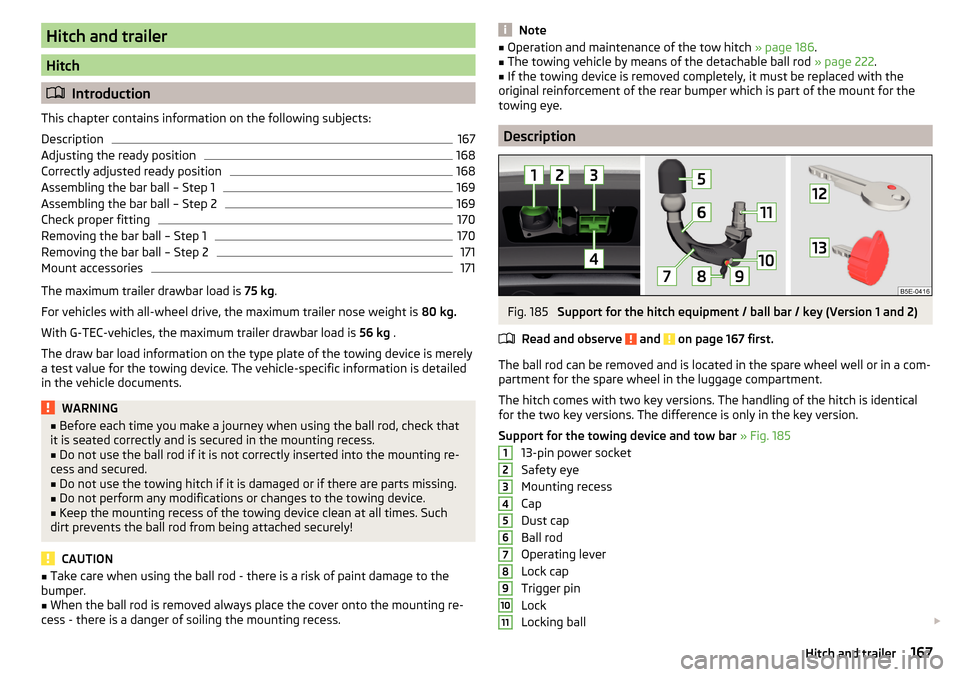
The ball rod can be removed and is located in the spare wheel well or in a com-
partment for the spare wheel in the luggage compartment.
The hitch comes with two key versions. The handling of the hitch is identical
for the two key versions. The difference is only in the key version.
Support for the towing device and tow bar » Fig. 185
13-pin power socket
Safety eye
Mounting recess
Cap
Dust cap
Ball rod
Operating lever
Lock cap
Trigger pin
Lock
Locking ball
1234567891011167Hitch and trailer
Page 171 of 268

CAUTIONIn the ready position, the key cannot be removed nor turned into a different
position.
Assembling the bar ball – Step 1
Fig. 189
Insert ball rod / trigger bolt in the extended state
Read and observe
and on page 167 first.
Insert ball rod - applies to both key versions
›
Remove the cover for the mounting recess
4
» Fig. 185 on page 167 in a
downwards direction.
›
Adjust the ball rod to the ready position » page 168.
›
Grip the tow bar from underneath » Fig. 189 and insert into the mounting re-
cess in arrow direction
1
until you hear it click into place » .
The lever
A
automatically turns upwards in the direction of arrow
2
and the
release pin
B
pops out (both its red and green parts are visible) » .
If lever
A
does not turn automatically, or if the release pin
B
does not pop
out, remove the ball rod from the mounting recess by turning lever
A
down-
wards as far as it can go. Clean the contact surfaces on the ball rod and the
mounting recess.
WARNING■ Keep your hands outside the lever's range of motion when attaching the
ball rod – risk of finger injuries!■
Never attempt to pull the operating lever violently upwards to turn the
key. Doing so would mean the ball rod is not attached correctly!
Assembling the bar ball – Step 2Fig. 190
Lock lock: Key Version 1 / key Version 2
Fig. 191
Place cap on the lock
Read and observe and on page 167 first.
To begin with, follow the first step for the ball rod assembly » page 169.
Applies to the key version 1
›
Turn key
A
in the direction of arrow
1
so that the green marking is pointing
upwards » Fig. 190 .
›
Remove the key in the direction of the arrow
2
.
Applies to key version 2
›
Turn the key
B
in the direction of arrow
3
so that the conclusions release
points down » Fig. 190.
›
Remove the key in the direction of the arrow
4
.
Applies to both key versions
›
Fit and press cap
C
onto the lock in the direction of arrow
5
» Fig. 191 .
›
Check that the ball rod is securely attached » page 170, Check proper fitting .
169Hitch and trailer