2015 SKODA OCTAVIA light
[x] Cancel search: lightPage 152 of 268
NoteDuring control, speed can be increased by pressing the accelerator pedal. Re-
leasing the accelerator pedal will cause the speed to drop again to the set
speed.
Adaptive Cruise Control (ACC)
Introduction
This chapter contains information on the following subjects:
Operation
150
Automatic stop-start
151
Operation Overview
152
Start control
152
Stop/resume control
152
Set/change the desired speed
153
Set the clearance level
153
Special driving conditions
154
Information messages
155
The automatic distance control (hereinafter referred to as ACC) maintains the
set speed or the distance to the vehicle ahead without the accelerator or
brake pedal being pressed.
The front of the vehicle and the distance to the vehicle ahead is monitored by
a radar sensor » page 135.
The state in which the ACC maintains the speed or the proximity is described
as control from here on.
WARNING■
The general information relating to the use of assistance systems must
be observed » page 135, in section Introduction .■
The driver must always be ready to take over steering of the vehicle him-
self (accelerate or brake).
■
The ACC does not react when approaching a stationary obstacle, such as
traffic jams, vehicle breakdowns or vehicles waiting at a traffic light.
■
The ACC does not respond to crossing or oncoming objects.
■
If the ACC does not decelerate fast enough, immediately apply the vehi-
cle's foot brake.
WARNINGFor safety reasons, do not use the ACC under the following conditions.■When driving in turning lanes, motorway exits or construction sites, to
avoid an unwanted acceleration to the stored speed.■
When visibility is poor, (e.g. fog, heavy rain, thick snowfall).
■
When road conditions are poor (e.g. ice, slippery road, gravel, dirt road).
■
When driving around “sharp” bends.
■
When riding on a steep gradient / high slope.
■
When driving through places where metal objects (such as metal build-
ings, railroad tracks, etc.) can be found.
■
When driving through very divided and enclosed spaces (such as large-ca-
pacity garages, car ferries, tunnels and the like.).
Note
■ The ACC is designed primarily for use on motorways.■The ACC reduces the speed by automatically releasing the accelerator or by
means of a braking procedure as appropriate. If the brakes are used for an au-
tomatic speed reduction at any moments, then the brake light illuminates.■
In case of failure of more than one brake light on the vehicle or on the con-
nected trailer, the ACC becomes unavailable.
■
The control automatically cancels the engagement of the brake supportive
assistance systems (e.g. ESC) or when the maximum permitted engine speed is
exceeded.
Operation
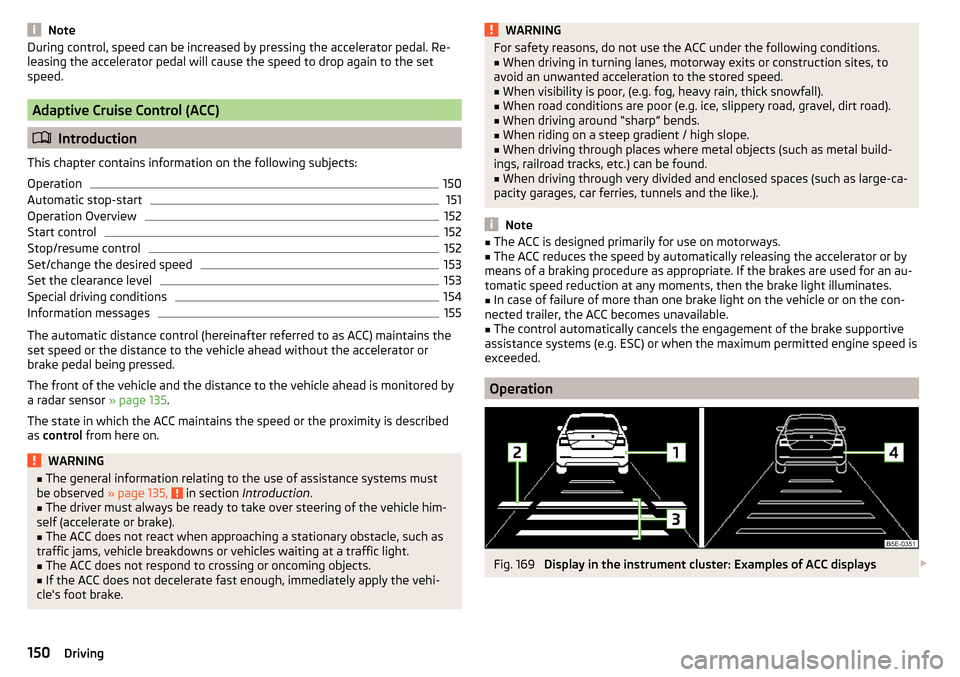
Fig. 169
Display in the instrument cluster: Examples of ACC displays
150Driving
Page 153 of 268

Fig. 170
Instrument cluster display: Examples of ACC status displays
Read and observe
on page 150 first.
The ACC allows a speed of 30 - 160 km/h to be set or a distance to the preced- ing vehicle to be very short of very long to be set.
The ACC adjusts the set speed with respect to the detected vehicle ahead,
thus maintaining the selected proximity.
The ACC can detect a vehicle that is up to approx. 120 m ahead using the radar sensor.
ACC display » Fig. 169
Vehicle detected (control active).
Line showing the displacement of the distance when setting » page 153,
Set the clearance level .
Set distance to the vehicle ahead.
Vehicle detected (control deactivated).
ACC status displays » Fig. 170
Regulation is inactive (in the colour display the digits of speed limits is
shown in grey).
Regulation active - no vehicle detected (in the colour display the digits of
the speed limits are highlighted).
Control deactivated - no speed stored.
Regulation active - vehicle detected (in the colour display the digits of the
speed limits are highlighted).
1234Note to reduce speed
If the delay of the ACC is insufficient in relation to the vehicle in front, in the
instrument cluster, the warning light
lights up and the display shows the
following message.Apply the brake!
Note
Some ACC notifications in the display of the instrument cluster may be hidden
by notifications for other functions. An ACC notification automatically appears
for a brief moment when there is a change in status of the ACC.
Automatic stop-start
Read and observe
on page 150 first.
Vehicles with an automatic transmission can decelerate to a standstill and
start moving again using the ACC.
Decelerate to a standstill
If a vehicle ahead decelerates to a standstill, the ACC will also decelerate your
vehicle to a standstill.
Starting to drive again after a holding period
As soon as the vehicle ahead starts moving again after a holding period, your
vehicle will also move and the speed will continue to be regulated. Control is
automatically disconnected in case of longer holding periods.
Depress the brake pedal.
151Assist systems
Page 154 of 268

Operation OverviewFig. 171
Operating lever
Read and observe
on page 150 first.
Overview of ACC functions operated with the lever » Fig. 1711Activate ACC (control deactivated)2Start control (resume) / increase speed by 1 km/h at a time
(sprung position)3Interrupt control (sprung position)4Deactivate ACC5 Increase speed by 10 km/h at a time6 Decrease speed by 10 km/h at a timeA Set proximity levelBStart control (adopt current speed) / Reduce speed by 1 km/h at
a time
Note
If the lever is set » Fig. 171 from the position directly into the sprung posi-
tion, the current speed is stored and the control process is started.
Start control
Read and observe
on page 150 first.
Basic requirements for start of control ACC is enabled.
TCS is enabled » page 135, Braking and stabilisation systems .
On vehicles with a manual transmission , the second gear or higher must
be engaged.
On vehicles with an automatic transmission , the selector lever must be in
the D/S position or in the Tiptronic position.
On vehicles with a manual transmission , the current speed must be higher
than approx. 25 km/h.
On vehicles with a automatic transmission , the current speed must be
higher than approx. 2 km/h.
The control be started with the key
or by adjusting the lever
» Fig. 171
on page 152 into the sprung position.
Button ›
Press press.
The ACC will adopt the current speed and execute control.
Lever position
›
Set the lever into the sprung position set.
The ACC will adopt the current speed and execute control. Should the speed be stored already, the ACC adopts this speed and executes control.
The warning light illuminates in the instrument cluster when the regulation
is switched on.
Note
■ If control is started at a speed of less than 30 km/h on vehicles with an auto-
matic transmission, the speed of 30 km/h is stored. The speed increases auto-
matically to 30 km/h or is regulated with respect to the speed of the vehicle
ahead.■
When TCS is disabled, it will be activated automatically upon starting control.
■
If the TCS is deactivated during control, control is stopped automatically.
Stop/resume control
Read and observe
on page 150 first.
Stop control
›
Set the lever into the sprung position
» Fig. 171 on page 152 set.
Or
›
Apply the brake.
Control stops, the speed remains stored.
152Driving
Page 157 of 268

Information messagesRead and observe
on page 150 first.
The information messages are shown in the instrument cluster display.
ACC: no sensor view!
The sensor is soiled or covered.
Stop the vehicle, switch off the engine and clean the sensor or remove the
item causing the lack of visibility » Fig. 154 on page 135 .
If the message appears again after starting the engine, the position of the lev- er should be
» Fig. 171 on page 152 adjusted.
ACC not available.
The ACC is not available for an unknown reason.
Stop the vehicle, switch off the engine and then start it again. If the ACC is still
not available, push the lever into position . Seek help from a specialist ga-
rage.
Error: ACC
There is an ACC system error.
Push the lever into position . press. Seek help from a specialist garage.
Speed limit
Increase the speed accordingly and start control
» page 152.
Front Assist
Introduction
This chapter contains information on the following subjects:
Operation
155
Distance warning (dangerous distance)
156
Warning and automatic braking
156
Disable/enable
156
Information messages
157The Front Assist (hereinafter referred to as system) warns you of the danger of
a collision with a vehicle or another obstacle in front of the vehicle, and tries to
avoid a collision or mitigate its consequences by automatically applying the
brakes where necessary.
The area in front of the vehicle is monitored by a radar sensor » page 135.WARNING■
The general information relating to the use of assistance systems must
be observed » page 135, in section Introduction .■
The system does not respond to crossing or oncoming objects.
CAUTION
In case of failure of more than one brake light on the vehicle or on the electri-
cally connected trailer, the system becomes unavailable.
Operation
Read and observe
and on page 155 first.
The system support is provided in the following manner.▶ Alerts you about a dangerous proximity to the vehicle ahead.
▶ Warns you of an impending collision.
▶ Prepares the brakes for emergency braking prior to a detected danger.
▶ Assists with a brake action triggered by the driver.
▶ If the driver fails to respond to a detected danger, automatic braking is per-
formed.
The system can work only if the following basic conditions are met. The system is activated.
TCS is enabled » page 135, Braking and stabilisation systems .
The vehicle is travelling forwards at a speed of more than approx. 5 km/h.
Note
The system can be impaired or may not be available, for example when driving
in “sharp ”curves or with an ESC engagement » page 136.155Assist systems
Page 159 of 268

The system should only be disabled in exceptional cases » .
The system can be activated or deactivated in one of two ways. ▶ In the instrument cluster display » page 48, Menu itemAssist systems
.
▶ Infotainment » Owner´s Manual Infotainment , chapter CAR - vehicle set-
tings .
The following functions can be activated or deactivated separately in infotain-
ment. ▶ Distance warning
▶ Advance warning
f the distance-warning function was deactivated before switching off the igni-
tion, it remains deactivated after switching on the ignition.
WARNINGIn the following situations, Front Assist should be switched off for safety
reasons.■
When the vehicle is being towed away.
■
When the vehicle is on a rolling test bench.
■
If an unfounded warning was issued or a system action carried out.
■
When on a truck, car ferry or similar.
Information messages
Read and observe
and on page 155 first.
The information messages are shown in the instrument cluster display.
Front Assist: no sensor view.
The sensor is soiled or covered.
Stop the vehicle, switch off the engine and clean the sensor or remove the ob-
stacle causing the lack of visibility » page 135, Radar sensor .
If after engine start the message persists, then the help of a professional or-
ganisation is required.
Front Assist not available.
The system is not available for an unknown reason.
Stop the vehicle, switch off the engine and then start it again.
If after engine start the message persists, then the help of a professional or- ganisation is required.
Selection of the driving mode (Driving Mode Selection)
Introduction
This chapter contains information on the following subjects:
Normal157Sport
mode
157Eco
mode
158Individual
mode
158Off-road
mode
158
Mode selection and Infotainment display
159Individual
mode settings
159
By selecting the driving mode, the driving behaviour can be adapted to the de-
sired mode of operation.
The following modes of operation are available
Normal
,
Sport
,
Eco
,
Individual
and
Off-road
.
The mode
Off-road
is only available on the vehicles Octavia SCOUT.
WARNINGThe general information relating to the use of assistance systems must be
observed » page 135, in section Introduction .
Normal
Read and observe on page 157 first.
This mode is suitable for a conventional driving.
Sport
mode
Read and observe
on page 157 first.
This mode is suitable for a sporty driving.
Selecting this mode primarily affects the function of the following systems.
Steering
The power steering is reduced slightly, i.e., the driver needs to exert more
force for steering .
157Assist systems
Page 160 of 268

Engine / drive
The vehicle acceleration is more dynamic than in Normal
mode.
Front axle differential lock
The driving force distribution between the front wheels is adapted to the spor-
ty driving style.
Adaptive Cruise Control (ACC)
The acceleration is quicker than in
Normal
mode with distance control
» page 150 .
Xenon headlight
The headlamps adapt to the driving style more dynamically than in mode
Nor-mal
» page 70 .
ProActive passenger protection
The first level of protection is deactivated » page 160.
Engine noise
The engine noise is noticeable in the interior more intensely than in
Normal
mode.
Eco
mode
Read and observe
on page 157 first.
This mode is suitable for a relaxed style of driving and helps to save fuel.
Selecting this mode primarily affects the function of the following systems.
Engine / drive
Vehicle acceleration is more relaxed than in
Normal
mode.
The recommended gear is controlled such to achieve the lowest possible fuel
consumption » page 41.
When the START-STOP system was deactivated manually » page 124, it is au-
tomatically activated.
The automatic gearbox is set automatically to mode E » page 129 .
Adaptive Cruise Control (ACC)
Acceleration occurs more relaxed than in
Normal
» page 150 mode with distance
control.
Xenon headlight
The system is in economic mode » page 70. The headlamps are in basic setting
and do not adapt to the direction of travel.
Air conditioning (Climatronic)
The air conditioning is controlled so as to save energy. For this reason, for ex-
ample, it may take longer to reach the desired interior temperature in modeNormal
.
Note
■ The mode Eco is not available when towing a trailer or when another acces-
sory is connected to the trailer socket. If the vehicle is in drive mode Eco
and a
trailer is hitched up or another accessory is connected, the vehicle is automati-
cally set to the driving mode
Normal
.
■
The maximum vehicle acceleration (kick down function) is possible also in
driving mode
Eco
.
Individual
mode
Read and observe
on page 157 first.
In the mode
Individual
each system can be set independently » page 159,
Individ-ual
mode settings .
Off-road
mode
Read and observe
on page 157 first.
The mode
Off-road
is suitable for driving outside paved roads.
Further information » page 138, OFF ROAD-mode .
Note
The mode Off-road is deactivated after switching off and switching on the igni-
tion and the mode Normal
is set automatically.158Driving
Page 161 of 268

Mode selection and Infotainment displayFig. 176
Button for selecting the driving mode: Version 1 / version 2
Fig. 177
Shown in the infotainment dis-
play
Read and observe on page 157 first.
Procedure for the selection of the driving mode
›
Press the symbol button or
» Fig. 176 .
In the Infotainment display a running mode menu » Fig. 177 appears.
The mode is changed by repeatedly pressing the symbol key and
or by
pressing the corresponding function key in the Infotainment display.
If a driving mode other than
Normal
is selected, then the symbol lights up on
the button or
.
Function buttons on the display » Fig. 177
Sets the mode
Individual
and information on the setting of the currently se-
lected mode.
Cancel the menu to select driving mode.
Modes (for the selected mode the button is shown in green).
ABCNote■ The currently selected running mode is displayed in the Infotainment in the
status bar of the main menu of the symbol .■
If the driving mode menu is not operated within a few seconds, the Infotain-
ment switches to the last selected menu or switches off.
Individual
mode settings
Read and observe
on page 157 first.
In mode
Individual
the vehicle systems can be set as follows.
■
Steering:
- Sets the power steering characteristics
■
Normal
- Normal
■
Sport
- Sports
■
Engine:
/
Drive:
- Sets the engine characteristic (vehicles with manual transmis-
sion) / drive characteristic (vehicles with automatic transmission)
■
Normal
- Normal
■
Sport
- Sports
■
Eco
- Economical
■
Front differential lock:
- Sets the characteristics of the front axle differential lock
■
Normal
- Normal
■
Sport
- Sports
■
ACC:
- Sets the vehicle acceleration when adaptive cruise control is activated
■
Normal
- Normal
■
Sport
- Sports
■
Eco
- Economical
■
Dynamic cornering light:
- Sets the characteristics of the Xenon headlight
■
Normal
- Normal
■
Sport
- Sports
■
Eco
- Economical
■
Air conditioning:
- Sets the Climatronic characteristics
■
Normal
- Normal
■
Eco
- Economical
■
Engine sound:
- Sets the engine noise in the vehicle
■
Normal
- Normal
■
Sport
- Sports
■
Eco
- Economical
■
Reset mode
- Setting for all menu items in the
Individual
mode to
Normal
■
Cancel
- Keep the current settings
■
Reset
- Set all menu items to
Normal159Assist systems
Page 163 of 268

When the vehicle approaches a detected line between lanes, the system
makes a light movement of the steering wheel in the opposite direction to the
boundary line. This corrective steering intervention can be manually overrid-
den at any time.WARNING■ The general information relating to the use of assistance systems must
be observed » page 135, in section Introduction .■
Lane Assist can help you keep the vehicle within the lane. However, it
does not steer the vehicle for you. The driver retains full responsibility for
steering at all times.
■
Some objects on the road may be incorrectly detected as lines. As a re-
sult, an incorrect steering intervention may take place.
WARNINGThe detection capability of the camera may be limited by various external
influences. In such cases, the assistant may not detect the line between
two lanes at all or not properly. The detection capability of the camera may
be restricted in the following situations, for example.■
When visibility is poor, (e.g. fog, heavy rain, thick snowfall).
■
When driving around “sharp” bends.
■
The camera is blinded by the sun.
■
The camera is blinded by the oncoming traffic.
■
The viewing range of the camera is impeded by a vehicle travelling ahead.
■
The camera viewing range is obstructed by an obstacle.
CAUTION
Do not attach any stickers or similar objects to the windscreen to avoid impair-
ing the functions of the systems.
Note
■ The system is designed for driving on motorways and roads with adequate
longitudinal markings.■
The system can detect both continuous and broken lines.
OperationFig. 179
Monochromatic display of the instrument cluster: Examples of
system indications
Fig. 180
Colour display of the instrument cluster: Examples of system in-
dications
Read and observe
and on page 161 first.
System displays » Fig. 179 and » Fig. 180
The system is activated, but not ready to intervene.
The system is active and ready to intervene.
The system intervenes when approaching the right-hand boundary lane.
Adaptive lane assist ensues (boundary lines on both sides of the vehicle
detected).
The system can intervene when the following basic conditions are present. The system is activated.
The vehicle speed is no more than about 65 km/h.
161Assist systems