2015 Seat Alhambra lock
[x] Cancel search: lockPage 119 of 305

Transport and practical equipment
Side compartments in the luggage
compartment
There are other compartments ››› Fig. 112 1 and
2 in the side of the boot. To open the
compartment 1 , turn the catch clockwise. To
open the compartment 2 , lift the cover.
Compartment 1 houses the factory fitted
CD
changer . The compartment lid 1 can safely
store the tray support covers.
Compartments in the boot floor
More storage compartments can be found in
the boot floor.FunctionNecessary operations
Open the rear com-
partment ››› Fig. 113
4
:
Lift the rear of the boot floor
using the handle.
Keeping the rear com-
partment open: Move the hook at the rear
right of the boot and hook the
boot floor onto it ››› page 100.
Closing the compart-
ment: Push back the hook and
push the rear of the boot floor 4
down. Other storage compartments:
● in the centre console, front and rear.
● in the door trims, front and rear.
● Coat hooks on the central door pillars and
on the rear roof handles. ●
Bag hook in the luggage compartment
› ›
› page 100. WARNING
Clothing hung on the coat hooks could re-
strict the driver's view and lead to serious ac-
cidents.
● Hang the clothes from the hooks so that
driver's view is not restricted.
● The coat hook is suitable for light items of
clothing. Never place heavy, hard or sharp
objects in the bags. CAUTION
Keep the CD changer compartment closed
while the vehicle is in motion to reduce vibra-
tions that could damage the changer. Note
The first aid kit is located in the rear left com-
partment of the luggage compartment. Drink holders
Introduction Bottle holders
There is a bottle holder in the open compart-
ments in the driver and front passenger
doors and in that of the sliding door. WARNING
Improper use of the drink holders can cause
injury.
● Never place hot drinks in the drink holders.
During sudden braking or driving manoeu-
vres, the hot drink could be spilled and lead
to scalding.
● Ensure that no bottles or other object are
dropped in the driver footwell, as they could
get under the pedals and obstruct their work-
ing.
● Never place heavy containers, food or other
heavy objects in the drink holder. In the
event of an accident, these heavy objects
could be “thrown around” the vehicle interior
and cause serious injuries. WARNING
Closed bottles inside the vehicle could ex-
plode or crack due to the heat or the cold.
● Never leave a closed bottle in the vehicle if
the inside temperature is too high or too low. CAUTION
Do not leave open cans in the drink holders
when the vehicle is in motion. They could
spill during braking, for example, and cause
damage to the vehicle and the electrical sys-
tem. » 117
Technical specifications
Advice
Operation
Safety
Page 122 of 305

Operation
●
Unshielded equipment can cause interfer-
ence on the radio equipment and the vehi-
cle's electrical system.
● Interference can occur on the radio's AM
waveband if electrical appliances are used
near the rear window aerial. Vehicle power sockets
Fig. 118
Centre console, rear section: 12 volt
socket Fig. 119
Rear centre console: 230 Volt Euro
power socket Depending on your vehicle version, you may
have a 12-volt power socket and/or a 230
volt power socket.
Maximum power consumptionPower sock-
etMaximum power consumption
12 Volts120 Watts
230 Volts150 Watts (300 Watt peak)
The maximum capacity of each power socket
must not be exceeded. The power consump-
tion is indicated on the rating plate of each
appliance.
Where two or more appliances are connected
at the same time, the total rating of all the
connected devices must never exceed 190
Watts
››› .12 volt power socket
The 12 Volt power socket will only work with
the ignition on.
Using electrical appliances with the engine
stopped and the ignition switched on will
drain the battery. Therefore, electrical devi-
ces connected to the power socket can only
be used when the engine is running.
To prevent voltage variations from causing
damage, switch off the electrical consumer
connected to the 12 Volt power socket before
switching the ignition on or off and before
starting the engine.
12 Volt power sockets can be found in the
following locations in the vehicle:
●
Compartment in the centre of the centre
console.
● Compartment in the front centre console.
● Storage compartment in the front central
armrest.
● Rear centre console ››› Fig. 118 .
● At the r
ear right of the luggage compart-
ment.
230 Volt Euro power socket*
The power socket only works when the en-
gine is running ››› .
Connecting an electrical appliance: plug the
device into the power socket as far as possi-
ble to unlock the built-in childproof lock. The
120
Page 123 of 305

Transport and practical equipment
current only flows when the childproof lock is
unlocked.LED on the power socket ››› Fig. 119
Steady green light:The childproof lock is un-
locked. The power socket can
now be used.
Flashing red light:There is some kind of fault
(e.g. disconnection due to ex-
cess current or temperature). Heat protection
The 230 Volt Euro power connector converter
switches off automatically when a certain
temperature is exceeded. This disconnect
prevents overheating in the event of an in-
crease in power consumption of the connec-
ted appliance and where the atmospheric
temperature is too high. The inverter will
switch on again automatically after it has
cooled down. Appliances that are switched
on and connected to the power socket will
start up again. Therefore, switch off all elec-
trical appliances connected to the power
socket when the current converter switches
off due to overheating.
WARNING
High voltage in the electrical installation!
● Liquids must not be spilt over the power
socket. ●
Do not plug adapters or extension cords in-
to the 230 Volt Euro power connector. Other-
wise, the built-in child safety device will
switch off and the connector will become live.
● Do not plug current conductors such as a
knitting needle into the 230 Volt Euro power
connector. CAUTION
● Always follow the operating instructions for
the appliances to be connected!
● Never exceed the maximum power rating as
this could damage the vehicle's general elec-
trical system.
● 12 volt power socket:
– Only use accessories with approved elec-
tromagnetic compatibility according to
current regulations.
– Never power the socket.
● 230 Volt Euro power socket:
– Do not plug in devices or connectors that
are too heavy (e.g. a transformer) into the
power socket.
– Do not connect lamps which contain a ne-
on tube.
– Only plug appliances with a voltage that
matches the power socket voltage into
the power socket.
– Where devices have with a high start-up
current, surge protection prevents them
from switching on. In this case, unplug the device and try plugging it back in af-
ter around 10 seconds.
Note
● Some appliances may not work properly in
the 230 Volt Euro power connector due to a
lack of power (Watts).
● The 230 Watt Euro power connector can be
modified for 115 Watt appliances and vice
versa. Consult a specialist shop for advice on
accessories to adapt the connector. SEAT rec-
ommends taking your car in for technical
service. 121Technical specifications
Advice
Operation
Safety
Page 127 of 305

Air conditioningCon-
trol
buttonAdditional information. Electronic
manual air conditioning ››› Fig. 120;
Climatronic ››› Fig. 121.
Climatronic: press the
REAR button to adjust
the air conditioner for the rear seats from the
front seats. A lamp is lit on the REAR
button if
the feature is activated. The settings for the
rear seats will be displayed. Press the button
again to switch the function off or do not
touch any other button for around 10 sec-
onds.
Climatronic: Press the
REST button to use the
heat that the engine produces. When the en-
gine is still warm but the ignition switched
off, the heat given off by the engine can be
used to keep the vehicle interior warm. The REST
button will light up when the function is
switched on. The function will switch off after
around 30 minutes and if the battery level is
low.
a)
Switch off.
Electronic manual air conditioning
: turn the
fan switch to setting 0.
Climatronic: press the OFF
button or manual-
ly set the fan to 0. When the device is switch-
ed off the OFF
button will light up.
a)
Depending on the version of the model. Note
● Not all Climatronic buttons are operational
in REAR mode.
● The REAR button is locked in defrost mode. Rear operation
Fig. 122
Centre console: details of the con-
trols in the rear seats
Control
››› Fig. 122Description
ATemperature selector
BAir flow regulator Air conditioner user instructions
The interior cooling system only works when
the engine is running and fan is switched on.
The air conditioner operates most effectively
with the windows and the electric sliding
panoramic roof closed. However, if the vehi-
cle has heated up after standing in the sun
for some time, the air inside can be cooled
more quickly by opening the windows and
the sliding electric panoramic sunroof briefly.Setting for conditions of optimal visibility
When the air conditioning is switched on, the
temperature and the air humidity in the vehi-
cle interior drop. In this way, when the out-
side air humidity is high, the windows do not
mist over and comfort for the vehicle occu-
pants is improved.
Electronic manual air conditioning
● Switch off the air recirculation ››› page 127.
● Set the fan to the required setting.
● Turn the temperature control to the centre
position.
● Open and direct all the air outlets in the
dash panel ››› page 126 .
● Turn the air di
stribution control to the re-
quired position.
With Climatronic
● Press the AUTO button.
● Set the temperature to +22 °C (+72 °F).
● Open and direct all the air outlets in the
dash panel ››› page 126 .
C lim
atronic: Switching the measuring units
for temperature on the radio display or the
navigation system installed with the default
settings
Switching the temperature indication from
Celsius to Fahrenheit on the radio display or »
125
Technical specifications
Advice
Operation
Safety
Page 131 of 305
Air conditioning
burn any fuel remaining in the auxiliary heat-
er. The exhaust gases are also extracted from
the system.
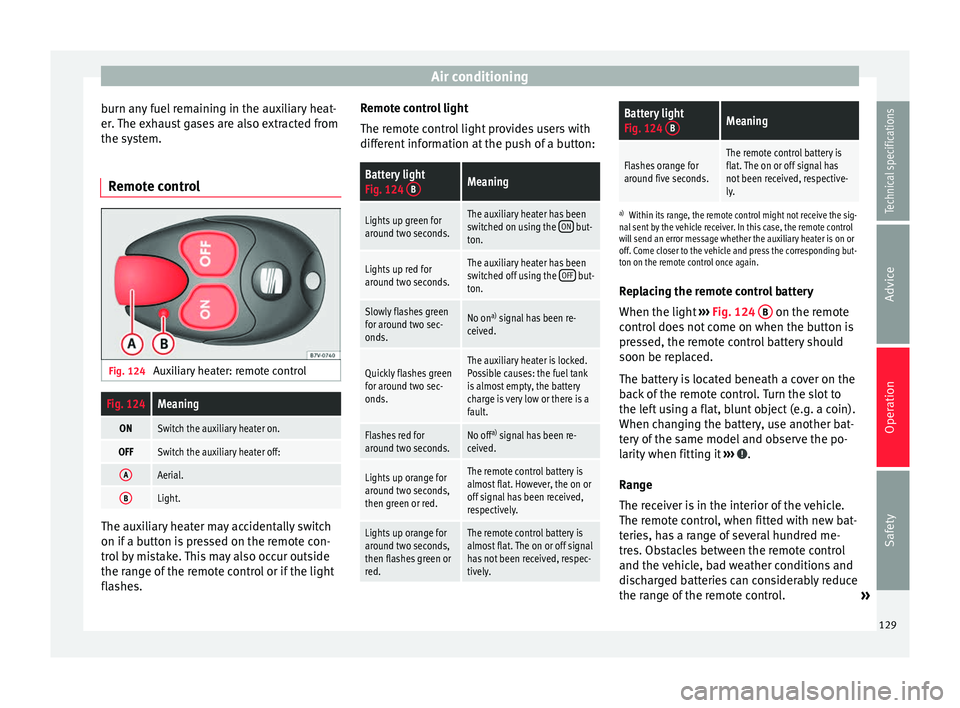
Remote control Fig. 124
Auxiliary heater: remote controlFig. 124Meaning
ONSwitch the auxiliary heater on.
OFFSwitch the auxiliary heater off:
AAerial.
BLight. The auxiliary heater may accidentally switch
on if a button is pressed on the remote con-
trol by mistake. This may also occur outside
the range of the remote control or if the light
flashes. Remote control light
The remote control light provides users with
different information at the push of a button:
Battery light
Fig. 124
BMeaning
Lights up green for
around two seconds.The auxiliary heater has been
switched on using the ON but-
ton.
Lights up red for
around two seconds.The auxiliary heater has been
switched off using the OFF but-
ton.
Slowly flashes green
for around two sec-
onds.No on a)
signal has been re-
ceived.
Quickly flashes green
for around two sec-
onds.The auxiliary heater is locked.
Possible causes: the fuel tank
is almost empty, the battery
charge is very low or there is a
fault.
Flashes red for
around two seconds.No off a)
signal has been re-
ceived.
Lights up orange for
around two seconds,
then green or red.The remote control battery is
almost flat. However, the on or
off signal has been received,
respectively.
Lights up orange for
around two seconds,
then flashes green or
red.The remote control battery is
almost flat. The on or off signal
has not been received, respec-
tively.
Battery light
Fig. 124 BMeaning
Flashes orange for
around five seconds.The remote control battery is
flat. The on or off signal has
not been received, respective-
ly.
a)
Within its range, the remote control might not receive the sig-
nal sent by the vehicle receiver. In this case, the remote control
will send an error message whether the auxiliary heater is on or
off. Come closer to the vehicle and press the corresponding but-
ton on the remote control once again.
Replacing the remote control battery
When the light ›››
Fig. 124 B on the remote
control does not come on when the button is
pressed, the remote control battery should
soon be replaced.
The battery is located beneath a cover on the
back of the remote control. Turn the slot to
the left using a flat, blunt object (e.g. a coin).
When changing the battery, use another bat-
tery of the same model and observe the po-
larity when fitting it ››› .
Range
The receiver is in the interior of the vehicle.
The remote control, when fitted with new bat-
teries, has a range of several hundred me-
tres. Obstacles between the remote control
and the vehicle, bad weather conditions and
discharged batteries can considerably reduce
the range of the remote control. »
129
Technical specifications
Advice
Operation
Safety
Page 134 of 305

Operation
lock and it will not be possible to turn the
steering wheel.
Control and warning lampsIt lights
upPossible causeSolution
(red)Power steering
faulty.
The steering system
should be checked by
a specialised work-
shop as soon as pos-
sible.
(yellow)
Power steering
operation re-
duced.
The steering system
should be checked by
a specialised work-
shop as soon as pos-
sible.
If, after restarting the
engine and driving for
a short distance, the
yellow warning lamp
no longer comes on, it
will
not be necessary
to take the vehicle to
a specialised work-
shop.
The vehicle bat-
tery was discon-
nected and has
been reconnec-
ted.Drive for a short dis-
tance at 15-20 km/h
(9-12 mph).
FlashesPossible causeSolution
(red)
Fault in the steer-
ing column elec-
tronic lock. Do not drive on!
Seek professional ad-
vice.
(yellow)
Steering column
deviation.Gently turn the steer-
ing wheel to and fro.
Steering wheel
not unlocked or
locked.
Remove the key from
the ignition and then
switch the ignition
back on. Check the
messages displayed
on the instrument
panel at the same
time.
Do not drive on, if
the
steering column re-
mains locked after the
ignition has been
switched on. Seek
specialist assistance. Several warning and control lamps light up
for a few seconds when the ignition is switch-
ed on, signalling that the function is being
verified. They will switch off after a few sec-
onds.
WARNING
Observe the safety warnings ››› in Control
and warning lamps on page 47. Information on the steering
Steering column electronic lock
Vehicles with Keyless Access: the steering
column locks when the driver's door is
opened and the ignition is switched off.
Therefore, the vehicle should be at a stand-
still and, where applicable, the selector lever
in position P
.
If
the driver door is opened before the igni-
tion is switched off, the steering column elec-
tronic lock is activated via the ignition key or
the sensor built into the door handle.
Mechanical steering lock
To prevent theft, we recommend you lock the
steering before leaving the vehicle.
Please engage steer-
ing lockUnlocking the steering
Parking the vehicle
››› page 137.Turn the steering wheel
slightly to release the
steering lock.
Remove the key from the
ignition.Insert the key in the igni-
tion lock.
Turn the steering wheel
slightly until you hear the
steering lock.Hold the steering wheel in
this position and switch
on the ignition. 132
Page 136 of 305

Operation
Ignition lock Fig. 125
Vehicle key positions Car keys ››› Fig. 125
No key in the ignition lock: The steering lock may
be activated.
0Ignition off, all electrical devices disconnected.
Key can be removed from the vehicle.
1Ignition is switched on. Pre-heating of diesel en-
gine. The steering lock can be unlocked.
2Switch on the engine. Release the key when the
engine has started. When it is released, the key
returns to position 1
.Key not authorised for the vehicle
If a key which is not authorised for this vehi-
cle is inserted in the ignition lock, it can be
removed as follows:
●
Automatic gearbox: the key cannot be re-
moved from the ignition lock. Press and re- lease the selector lever locking button. Key
can be removed from the vehicle.
●
Manual gearbox: remove the key from the
ignition. WARNING
Unsuitable or careless use of the vehicle key
could result in serious injury.
● Always take all the keys with you whenever
you leave the vehicle. If not, the engine could
accidentally be started and electrical equip-
ment such as the windows could accidentally
be operated which may result in serious in-
jury.
● Never leave children or disabled people
alone in the car. Passengers could be trapped
in the car in an emergency and not be able to
get themselves to safety. For example, de-
pending on the time of the year, tempera-
tures inside a locked and closed vehicle can
be extremely high or extremely low resulting
in serious injuries and illness or even death,
particularly for young children.
● Never remove the key from the ignition if
the vehicle is in motion. The steering may
lock and it will not be possible to turn the
steering wheel. Note
● If the key is left in the ignition lock with the
engine off for long periods, the vehicle bat-
tery will run flat. ●
For automatic gearbox vehicles the key can
only be removed from the ignition lock if the
gear selector lever is in position P. In this
case, press and release the selector lever
locking button. 134
Page 137 of 305

Driving
Starter button Fig. 126
In the centre console: start-up push
button for the Keyless Access lock and start-
up system. The layout in right-hand drive ve-
hicles is symmetrical. Fig. 127
Emergency ignition in vehicles with
KESSY. The start-up button may only be used if there
is a valid key in the vehicle. Opening the driver's door
when exiting the
vehicle activates the electronic lock on the
s t
eering column if the ignition is disabled
››› page 131.
Swit
ching the ignition on/off
● Briefly push the start-up button ››› Fig. 126
without touching the brake or clutch ped-
al ››› .
Emergency starting function
If no valid key is detected inside the vehicle,
an emergency start-up will be required. The
relevant message will appear in the dash
panel display. This may happen when, for ex-
ample, the vehicle key battery is very low or
flat:
● Immediately after pushing the start-up but-
ton, keep the vehicle key next to the steering
column ››› Fig. 127 .
● The ignition c onnects
and the engine starts
automatically.
Emergency disconnection
If the engine does not stop after briefly press-
ing the start-up button, an emergency dis-
connect will be required:
● Press the starter button twice within 1 sec-
ond or press it once for more than 2 seconds
››› .
● The engine turns off automatically. Engine restart feature
If no valid key is detected inside the vehicle
after the engine stops, you will only have 5
seconds to restart it. A warning will display
on the dash panel screen.
After this interval, it will not be possible to
start the engine without a valid key inside
the vehicle.
WARNING
Any accidental movement of the vehicle could
result in serious injury.
● When pressing the start-up button, do not
pr e
ss the brake or clutch pedal, this way the
engine will start immediately. WARNING
If vehicle keys are used negligently or with-
out due care, this may cause accidents and
serious injury.
● Never leave any key inside the vehicle
when exiting. Otherwise, a child or unauthor-
ised person could lock the vehicle, start the
engine or connect the ignition and, in this
way, operate electronic equipment (e.g. the
windows). Note
In diesel vehicles with the Keyless Access
system, there may be a delay in the engine
starting if it requires preheating. 135
Technical specifications
Advice
Operation
Safety