2015 Seat Alhambra ESP
[x] Cancel search: ESPPage 96 of 305

Operation
Seat with position memory* Fig. 82
Memory buttons on the outside of the
driver seat Memory buttons
Individual settings for the driver seat and the
exterior mirror can be assigned to each mem-
ory button.
Storing exterior mirror settings for driving
forwards
● Connect the automatic parking brake.
● Move the gear lever to neutral.
● Switch the ignition on.
● Adjust the front seat and the exterior mir-
rors.
● Keep the SET button held down for more
than one second ››› Fig. 82 .
● Pr e
ss the required memory button for the
following 10 seconds. An audible warning
confirms the settings have been stored. Storing front passenger exterior mirror
settings for driving in reverse gear
●
Connect the automatic parking brake.
● Move the gear lever to neutral.
● Switch the ignition on.
● Press the required memory button.
● Select reverse gear.
● Adjust the front passenger side exterior
mirror so that you can see, for example, the
kerb area.
● The new position of the mirror will be stor-
ed automatically and allocated to the vehicle
key that was used to unlock the vehicle.
Activating exterior mirror settings
● With the driver door open and the ignition
turned off, push the memory button of the
corresponding door briefly.
● OR: with the ignition switched on, hold in
the corr
esponding memory button until the
memorised position is reached.
To activate the memory function of the
vehicle key
Important: a position must be memorised in
the memory.
● Open the driver-side door.
● Press and hold any memory button.
● Within the following three seconds, push
the button to open the vehicle on the vehi-cle key. An audible warning confirms the set-
tings have been activated.
Adjusting the wing mirrors for driving and
assigning driver seat settings to a vehicle
key
● Activate the memory function of the vehicle
key
● Adjust the front seat and the exterior mir-
rors.
● Lock the vehicle. The settings are assigned
to the vehicle key.
To deactivate the memory function of the
vehicle key
Important: a position must be memorised in
the memory.
● Press and hold the SET button.
● Within the following 10 seconds, push the
open button on the vehicle key. An audi-
ble warning confirms the settings have been
deactivated.
Initialising the seat position memory
The position memory system must be restar-
ted if, for example, the driver seat has been
changed.
Restarting deletes all memories and assign-
ments for the seat with position memory. The
memory buttons can then be reprogrammed
and the vehicle keys re-assigned.
94
Page 100 of 305

Operation
WARNING
The centre armrest may limit the freedom of
movement of the driver's arm and cause a se-
rious accident.
● Keep the centre armrest compartments
closed while the vehicle is in motion.
● The centre armrest is not designed for chil-
dren to sit on! Sitting in this incorrect posi-
tion can cause severe injuries. Transport and practical
equipment
Transporting objects Introduction Always transport heavy loads in the luggage
compartment and place the seat backs in a
vertical position. Always use the anchors pro-
vided with suitable rope to secure heavy ob-
jects. Never overload the vehicle. Both the
carrying capacity as well as the distribution
of the load in the vehicle affect driving be-
haviour and braking ability
››› .
WARNING
Unsecured or incorrectly secured objects can
cause serious injury in case of a sudden ma-
noeuvring or breaking or in case of an acci-
dent. This is especially true when objects are
struck by a detonating airbag and fired
through the vehicle interior. To reduce the
risks, please note the following:
● Secure all objects in the vehicle. Always
keep equipment and heavy objects in the lug-
gage compartment.
● Always secure objects with suitable rope or
slings so that they cannot enter the areas
around the front or side airbags in case of
sudden braking or an accident. ●
Always ensure that objects inside the vehi-
cle cannot move into the area of the airbags
while driving.
● While driving, always keep object compart-
ments closed.
● Remove all objects from the front passen-
ger seat when it is folded down. When the
seat backrest is folded down, it presses on
small and light objects and these are detec-
ted by the weight sensor on the seat; this
sends false information to the airbag control
unit.
● While the seat backrest of the front passen-
ger seat is folded, the front airbag must re-
main disabled and the PASSENGER AIRBAG OFF light on.
● Objects secured in the vehicle should never
be placed in such a way as to make passen-
gers sit in an incorrect position.
● If secured objects occupy a seat, this seat
should not be occupied or used by anyone. WARNING
The driving behaviour and braking ability
change when transporting heavy and large
objects.
● Adjust your speed and driving style to visi-
bility, road, traffic and weather conditions.
● Accelerate gently and carefully.
● Avoid sudden braking and manoeuvres.
● Brake early. 98
Page 102 of 305

Operation
● Avoid sudden braking and manoeuvres.
● Brake early.
● If necessary, read the instructions for driv-
ing with a trailer ››› page 179.
● If necessary, read the instructions for driv-
ing with a roof carrier system ››› page 110. WARNING
A sliding load could considerably affect the
stability and safety of the vehicle resulting in
an accident with serious consequences.
● Secure loads correctly so they do not move.
● When transporting heavy objects, use suit-
able ropes or straps.
● Lock the seat backs in vertical position. Loading luggage compartment
Introduction Always transport heavy loads in the luggage
compartment and place the seat backs in a
vertical position. Always use the fastening
rings with suitable rope or straps. Never over-
load the vehicle. Both the carrying capacity
as well as the distribution of the load in the
vehicle have effects on the driving behaviour
and braking ability
››› . WARNING
When the vehicle is not in use or being
watched, always lock the doors and the rear
lid to reduce the risk of serious injury or
death.
● Do not leave children unwatched, especial-
ly when the boot is open. Children could
climb into the luggage compartment, close
the rear lid from inside and be unable to es-
cape themselves. This could lead to serious
injury or death.
● Never allow children to play in or around
the vehicle.
● Never transport people in the luggage com-
partment. WARNING
Unsecured or incorrectly secured objects can
cause serious injury in case of a sudden ma-
noeuvring or breaking or in case of an acci-
dent. This is especially true when objects are
struck by a detonating airbag and fired
through the vehicle interior. To reduce the
risks, please note the following:
● Secure all objects in the vehicle. Always
place equipment and heavy objects in the
boot.
● Always secure objects with suitable ropes
or straps so that they cannot be pushed in-
side the cabin and move around the areas
around the front or side airbags in the event
of sudden braking or an accident. ●
While driving, always keep object compart-
ments closed.
● Do not place hard, heavy or sharp objects
inside the vehicle interior, in open storage
compartments, the rear shelf or on the dash
panel.
● Remove hard, heavy and sharp objects from
clothes and pockets inside the vehicle and
store securely. WARNING
The transport of heavy object changes vehi-
cle handling and increases braking distance.
Heavy loads that have not been stored or se-
cured correctly could cause loss of control
and result in serious injury.
● Vehicle handling changes when transport-
ing heavy objects due to a change in the cen-
tre of gravity.
● Distribute the load as uniformly and as low
down on the vehicle as possible.
● Store heavy objects in the luggage com-
partment as far from the rear axle as possi-
ble. CAUTION
● Hard objects on the rear shelf could chafe
the wires of the heating element and antenna
of the rear window and cause damage.
● The side window antenna could be dam-
aged due to chafing from objects. 100
Page 107 of 305

Transport and practical equipment
● Hook in the net partition on the rear right-
hand side roof support by pressing on the
rod.
● Secure the net partition hooks into the
straps in the front of the boot ››› Fig. 92 then
tight en the belts.
In
stalling the net partition behind the front
seats
● Hook in the net partition on the front left-
hand side roof support ››› Fig. 92. To do this,
guide the rod fr
om up to down.
● Hook in the net partition on the rear right-
hand side roof support by pressing on the
rod.
● Secure the hooks of the net partition to the
attachment rings in the left and right hand
side footwells on the second row of seats
then tighten the straps.
Removing the net partition
● Loosen the net partition straps.
● Release the net partition hooks from the
rings ››› Fig. 92.
● Unhook the net
partition on the right-hand
side roof support ››› Fig. 92 by pressing on
the rod.
● Unhook
the net partition from the left-hand
side roof support. Folding in the net partition
●
Press on the release button ››› Fig. 91 2 and bend the rod
A in the direction of the
arrow with the release button pressed.
● Press on the release button ››› Fig. 91 3 and bend the rod
B in the direction of the
arrow with the release button pressed.
● Store the net partition securely in the vehi-
cle. WARNING
Loose objects in the vehicle interior can be vi-
olently thrown in case of a sudden manoeu-
vre or braking and especially in accidents
causing serious injury.
● Ensure that the rods are correctly locked in
place.
● Even when the net partition is correctly fit-
ted, objects must be secured.
● When driving with the net partition, no pas-
sengers should be behind it. Fastening rings*
Fig. 93
In the luggage compartment: fasten-
ing rings To the front and rear of the luggage compart-
ment, there are fastening rings for securing
objects
››› Fig. 93 (arrows). On some models,
the f a
stening rings are located right at the
the back, in the area of the lock carrier plate.
There are other fastening rings located to the
left and right hand side of the second row
footrests.
Some models of fastening rings must be lif-
ted to use them. WARNING
Unsuitable or damaged ropes or straps may
be released in case of sudden braking or an
accident. As a result, objects may be fired
through the vehicle interior causing serious
injury or death. » 105
Technical specifications
Advice
Operation
Safety
Page 125 of 305

Air conditioning
Controls Fig. 120
Detailed view of the centre console: Electronic manual air condition-
ing controls Fig. 121
Detailed view of the centre console: Climatronic controls To switch a function on or off, press the ap-
propriate button. Press the button again to
switch off the function.
The LED on each control lights up to indicate
that the respective function of a control has
been switched on.
Some Climatronic controls may also be on
the air conditioner control panel located in
the rear centre console. These controls are
used to make the appropriate settings for the
rear seats.
»
123Technical specifications
Advice
Operation
Safety
Page 131 of 305
Air conditioning
burn any fuel remaining in the auxiliary heat-
er. The exhaust gases are also extracted from
the system.
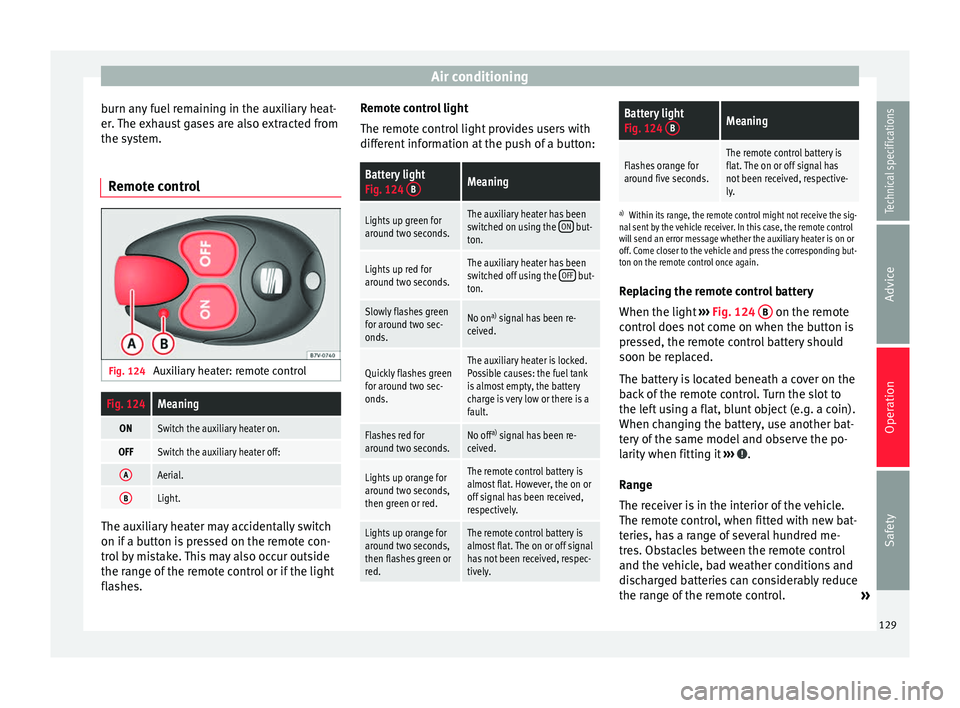
Remote control Fig. 124
Auxiliary heater: remote controlFig. 124Meaning
ONSwitch the auxiliary heater on.
OFFSwitch the auxiliary heater off:
AAerial.
BLight. The auxiliary heater may accidentally switch
on if a button is pressed on the remote con-
trol by mistake. This may also occur outside
the range of the remote control or if the light
flashes. Remote control light
The remote control light provides users with
different information at the push of a button:
Battery light
Fig. 124
BMeaning
Lights up green for
around two seconds.The auxiliary heater has been
switched on using the ON but-
ton.
Lights up red for
around two seconds.The auxiliary heater has been
switched off using the OFF but-
ton.
Slowly flashes green
for around two sec-
onds.No on a)
signal has been re-
ceived.
Quickly flashes green
for around two sec-
onds.The auxiliary heater is locked.
Possible causes: the fuel tank
is almost empty, the battery
charge is very low or there is a
fault.
Flashes red for
around two seconds.No off a)
signal has been re-
ceived.
Lights up orange for
around two seconds,
then green or red.The remote control battery is
almost flat. However, the on or
off signal has been received,
respectively.
Lights up orange for
around two seconds,
then flashes green or
red.The remote control battery is
almost flat. The on or off signal
has not been received, respec-
tively.
Battery light
Fig. 124 BMeaning
Flashes orange for
around five seconds.The remote control battery is
flat. The on or off signal has
not been received, respective-
ly.
a)
Within its range, the remote control might not receive the sig-
nal sent by the vehicle receiver. In this case, the remote control
will send an error message whether the auxiliary heater is on or
off. Come closer to the vehicle and press the corresponding but-
ton on the remote control once again.
Replacing the remote control battery
When the light ›››
Fig. 124 B on the remote
control does not come on when the button is
pressed, the remote control battery should
soon be replaced.
The battery is located beneath a cover on the
back of the remote control. Turn the slot to
the left using a flat, blunt object (e.g. a coin).
When changing the battery, use another bat-
tery of the same model and observe the po-
larity when fitting it ››› .
Range
The receiver is in the interior of the vehicle.
The remote control, when fitted with new bat-
teries, has a range of several hundred me-
tres. Obstacles between the remote control
and the vehicle, bad weather conditions and
discharged batteries can considerably reduce
the range of the remote control. »
129
Technical specifications
Advice
Operation
Safety
Page 134 of 305

Operation
lock and it will not be possible to turn the
steering wheel.
Control and warning lampsIt lights
upPossible causeSolution
(red)Power steering
faulty.
The steering system
should be checked by
a specialised work-
shop as soon as pos-
sible.
(yellow)
Power steering
operation re-
duced.
The steering system
should be checked by
a specialised work-
shop as soon as pos-
sible.
If, after restarting the
engine and driving for
a short distance, the
yellow warning lamp
no longer comes on, it
will
not be necessary
to take the vehicle to
a specialised work-
shop.
The vehicle bat-
tery was discon-
nected and has
been reconnec-
ted.Drive for a short dis-
tance at 15-20 km/h
(9-12 mph).
FlashesPossible causeSolution
(red)
Fault in the steer-
ing column elec-
tronic lock. Do not drive on!
Seek professional ad-
vice.
(yellow)
Steering column
deviation.Gently turn the steer-
ing wheel to and fro.
Steering wheel
not unlocked or
locked.
Remove the key from
the ignition and then
switch the ignition
back on. Check the
messages displayed
on the instrument
panel at the same
time.
Do not drive on, if
the
steering column re-
mains locked after the
ignition has been
switched on. Seek
specialist assistance. Several warning and control lamps light up
for a few seconds when the ignition is switch-
ed on, signalling that the function is being
verified. They will switch off after a few sec-
onds.
WARNING
Observe the safety warnings ››› in Control
and warning lamps on page 47. Information on the steering
Steering column electronic lock
Vehicles with Keyless Access: the steering
column locks when the driver's door is
opened and the ignition is switched off.
Therefore, the vehicle should be at a stand-
still and, where applicable, the selector lever
in position P
.
If
the driver door is opened before the igni-
tion is switched off, the steering column elec-
tronic lock is activated via the ignition key or
the sensor built into the door handle.
Mechanical steering lock
To prevent theft, we recommend you lock the
steering before leaving the vehicle.
Please engage steer-
ing lockUnlocking the steering
Parking the vehicle
››› page 137.Turn the steering wheel
slightly to release the
steering lock.
Remove the key from the
ignition.Insert the key in the igni-
tion lock.
Turn the steering wheel
slightly until you hear the
steering lock.Hold the steering wheel in
this position and switch
on the ignition. 132
Page 138 of 305

Operation
Starting the engine Complete operations only in the sequence
given: Vehicles without
Keyless AccessVehicles with
Keyless Access
1.Press and hold the brake pedal until step 5 is per- formed.
1a.In vehicles with a manual gearbox: press and
hold the clutch down until the engine starts.
2.Put the gearbox lever in neutral or the selector lever in position P or N.
3.
Only in vehicles with
diesel engines: for pre-
heating, turn the key in the ignition lock to po-
sition ››› Fig. 125 1
. A
control lamp lights up
on the dash panel
.
4.
Turn the key in the igni- tion lock to position
››› Fig. 125 2
; do not
press the accelerator.
Press the starter button ››› Fig. 126; do not
press the accelerator. There needs to be a
valid key inside the ve- hicle for the engine to start.
5.Once the engine starts,release the key in the ignition lock.Once the engine starts,release the start-up button.
Vehicles without
Keyless AccessVehicles with
Keyless Access
6.
If the engine does not
start, stop and wait for around 1 minute to try again.If the engine does not
start, stop and wait for around 1 minute to try again. If necessary,
perform an emergency start ››› page 135.
7.Disconnect the electronic parking brake when you
are about to start driving ››› page 137. WARNING
Never leave the vehicle unattended if the en-
gine is running. The vehicle could move off
suddenly, especially if it is in gear, resulting
in an accident and serious injury. WARNING
Cold start sprays could explode or cause a
sudden increase in the engine speed.
● Never use start boosters. CAUTION
● An attempt to start the engine while driving
or starting the engine immediately after turn-
ing it off can cause damage to the engine or
starter motor.
● When the engine is cold, avoid high revs
and heavy acceleration and do not make the
engine work hard. ●
Do not push or tow start the engine. Un-
burnt fuel could damage the catalytic con-
verter. For the sake of the environment
Do not warm the engine at idle speed; start
driving immediately if the visibility is OK.
This helps the engine reach operating tem-
perature faster and reduces emissions. Note
● For example, if the key battery is very worn
or flat, the engine cannot be started with the
starter button. In this case, remove the igni-
tion button from the lock and insert the key.
● Electrical devices with a high power con-
sumption are switched off temporarily when
the engine starts.
● When the engine is started cold, there may
be strong vibrations for a few moments for
technical reasons. This is quite normal, and
no cause for concern.
● At temperatures below +5 °C (+41 °F),
smoke may be given off below the vehicle
when the additional heater is connected. Stopping the engine
Complete operations only in the sequence
given:
136