2015 Seat Alhambra ABS
[x] Cancel search: ABSPage 157 of 305

Driver assistance systems
front wheels are turned, the normal ABS is
activated.
Brake assist system (BAS)
The brake assist system may reduce the re-
quired braking distance. The brake assist
system boosts the braking force if you press
the brake pedal quickly in an emergency. As
a result, the braking pressure increases rap-
idly, the braking force is multiplied and the
braking distance is reduced. This enables the
ABS to be activated more quickly and effec-
tively.
¡Do not lift your foot off the brake pedal!
When the br ak
e pedal is released or when
the brake force is reduced, braking assist au-
tomatically turns off the brake servo.
Traction control when accelerating (ASR)
In the event of wheelspin, the traction control
system reduces the engine torque to match
the amount of grip available. The ASR makes
some situations easier, for example, when
starting, accelerating or going uphill, even in
unfavourable road conditions.
The ASR can be switched on or off manually
››› page 156.
Electr
onic differential lock system (EDL and
XDS)
EDL is available when driving in straight lines
under normal conditions. When the EDL de- tects wheelspin, it brakes the spinning wheel
and directs the power to the other drive
wheels. To prevent the disc brake of the
braked wheel from overheating, the EDL cuts
out automatically if subjected to excessive
loads. The EDL will switch on again automati-
cally when the brake has cooled down.
The XDS function is an extension of the elec-
tronic differential lock. The XDS does not re-
act to the traction of the driving wheels, but
to the adherence of the front wheel on the in-
side of the curve whilst gripping rapidly in
corners. The XDS gives pressure to the brakes
of the wheel on the interior of the corner to
prevent skidding. This improves traction,
which assists the vehicle in continuing the
required line.
WARNING
Driving at high speed on icy, slippery wet
ground can result in loss of vehicle control
and serious injury to the driver and passen-
gers.
● Adjust your speed and driving style to visi-
bility, road, traffic and weather conditions.
Even though the brake assist systems, ABS,
BAS, EDL, ASR and ESC, provide more securi-
ty, do not take unnecessary risks while driv-
ing.
● Brake assist systems can not overcome the
laws of physics. Even with ESC and other sys-
tems, slippery and wet roads will always be
dangerous. ●
Driving to quickly on wet ground can result
in the wheels losing contact with the ground
in an effect known as “aquaplaning”. Without
adherence, it is impossible to brake, steer or
control the vehicle.
● Brake assist systems cannot avoid acci-
dents if, for example, the driver does not re-
spect safety distances or drives to quickly in
difficult conditions.
● Even though brake assist systems are ex-
tremely effective and help control the vehicle
in difficult situations, remember that the ve-
hicle stability depends on tyre grip.
● When accelerating on a slippery surface,
for example on ice or snow, press the acceler-
ator carefully. The wheels can still slip even
with brake assist systems resulting in loss of
vehicle control. WARNING
The effectiveness of the ESC can be consider-
ably reduced if other components and sys-
tems affecting driving dynamics are not main-
tained or are not functioning correctly. This
includes, among others, brakes, tyres and
other systems already mentioned.
● Remember that changing and fitting other
components to the vehicle can affect opera-
tion of the ABS, BAS, ASL EDL and ESC.
● Changes to the vehicle suspension or using
unapproved wheel/tyre combinations can af-
fect operation of the ABS, BAS, ASL EDL and
ESC, as well as their effectiveness. » 155
Technical specifications
Advice
Operation
Safety
Page 158 of 305

Operation
●
Likewise, the effectiveness of ESC depends
on the use of suitable tyres ››› page 231. Note
● To ensure that the ESC and ASR work prop-
erly, all four wheels must be fitted with iden-
tical tyres. Any differences in the rolling radi-
us of the tyres can cause the system to re-
duce engine power when this is not desired.
● If a malfunction should occur in the ABS,
the ESC, EDL and ASR will also be out of ac-
tion.
● Noises may be heard while any of the
above systems are operating. Turning on and off the ASR
Fig. 134
Detailed view of the centre console:
button used to switch ASR on and off (vehi-
cles with ESC) The electronic stability control ESC consists
of ABS, EDL and ASR and only works when
the engine is running.
The ASR can be switched off while the engine
is running by pressing the
OFF
››› Fig. 134
button. The ASR (and similar) is only switch-
ed off when the required traction is not ob-
tained:
● When driving through deep snow or on
loose ground (gravel, etc.).
● When “freeing” a trapped vehicle.
Turn the ASR back on by pressing the but-
ton OFF
››› Fig. 134 .
St ar
t assist systems
Introduction WARNING
The intelligent technology in the start assist
systems cannot change the laws of physics.
The improved comfort provided by start as-
sist systems should not prompt you to take
risks.
● Unintentional movements of the vehicle
could cause serious injury.
● The start assist systems are not a replace-
ment for driver awareness. ●
Always try to adapt the speed of the vehi-
cle and your style of driving to the condition
of the ground or the road and to weather and
traffic conditions.
● The start assist system cannot keep the ve-
hicle stationary in all conditions on a gradi-
ent or cause it to brake on steep downhill
gradients, e.g. if the road is slippery or icy. Auto Hold function*
Fig. 135
Detailed view of the centre console:
Auto Hold button The control lamp on the button switches on
when the Auto Hold function is on.
When the Auto Hold function is on, this helps
the driver if they must regularly stop the vehi-
cle or if they must stop with the engine run-
ning for prolonged periods, for example, on
hills, before a traffic light or in traffic jams
with continuous stopping and starting.
156
Page 179 of 305

Driver assistance systems
● when a sporty driving style is employed,
● in the event of a major distraction for the
driver,
The tiredness detection function switches off
when the ignition is switched off or when the
driver unbuckles their seat belt and opens
the door. If driving for a long time under 65
km/h (40 mph), the system ceases to assess
tiredness automatically. If driving speed is
then increased, the behaviour at the wheel
will again be evaluated.
Tyre monitoring systems
Introduction The tyre monitor indicator monitors the tyre
pressure of each wheel during driving using
the ABS sensors. The ABS sensors monitor
the tyre tread perimeter and vibrations of
each tire. The tyre monitor indicator warns
the driver if it detects a considerable drop in
tyre pressure of one or several tyres while
driving. Loss of tyre pressure will be indica-
ted by the indicator
as well as an audible
warning and sometimes a text message on
the dash panel display. When you open the
driver door, you will find a label indicating
the tyre pressure recommended by the manu-
facturer for the maximum vehicle load for
each tyre approved for the vehicle in ques-
tion. By pressing the adjustment button on the tyre monitoring indicator, you may
change the reference pressure for the tyres
so that the tyre pressure coincides with ac-
tual pressure
››› page 179 .
S uit
able use of the adjustment button
››› page 179. WARNING
Unsuitable handling of the wheels and tyres
may lead to sudden tyre pressure losses, to
tread separation or even to a blow-out.
● Check tyre pressures regularly and ensure
they are maintained at the pressures indica-
ted. If the tyre pressure is too low, the tyres
could overheat, resulting in tread detachment
or even burst tyres.
● Tyre pressure should be that indicated on
the label when the tyres are cold at all times
››› page 235.
● Re
gularly check the cold inflation pressure
of the tyres. If necessary, change the tyre
pressure of the vehicle tyres while they are
cold.
● Regularly check your tyres for damage and
wear.
● Never exceed the maximum permitted
speed or loads specified for the type of tyre
fitted on your vehicle. WARNING
Incorrect use of the tyre monitoring indicator
button could result in the indicator giving er- roneous messages or prevented from indicat-
ing the danger caused by a defective tyre
››› page 179. CAUTION
● The tyre valves may be damaged if the cap
is not in place. Check that the caps are identi-
cal to the standard caps and have been cor-
rectly tightened. Do not use metal caps
››› page 179.
● Do not damage the valves when changing
the tyres ››› page 179
. For the sake of the environment
Under-inflated tyres lead to increased fuel
consumption and tyre wear. Note
● Do not only rely on the tyre monitoring sys-
tem. Regularly check your tyres to ensure
that the tyre pressure is correct and that the
tyres are not damaged due to puncture, cuts,
tears and impacts/dents. Remove objects
from the tyres only when the tyres have not
been pierced by these.
● The tyre monitoring system is set to the
tyre pressure recommended by the manufac-
turer and indicated on the label ››› Fig. 175. 177
Technical specifications
Advice
Operation
Safety
Page 180 of 305

Operation
Elements of the tyre monitoring
indicatorTyre monitoring indicator with button.
See ››› page 179.
Control lamp on the instrument panel.
SET button on the centre console.
Monitoring the tread of all tyres using ABS sensors
(indirect measurement).
Adjustable medium and full-load tyre pressures.
Button to update the system when the tyre pressure is
changed. Control lamp
Lights
up or
flashesPossible causeSolution
The tyre pressure
of a wheel has
dropped consider-
ably in relation to
the pressure set
by the driver
››› page 179.
Stop the vehicle!
Reduce your speed im-
mediately! Stop the ve-
hicle safely as soon as
possible. Avoid sud-
den manoeuvres and
braking!
Check all tyres and
pressures. Replace any
damaged tyres.
Lights
up or
flashesPossible causeSolution
System malfunc-
tion.
Consult a specialised
workshop if the tyre
pressure is correct and
the lamp remains lit af-
ter switching the igni-
tion off and back on
again. Have the sys-
tem checked there.
Several warning and control lamps light up
for a few seconds when the ignition is switch-
ed on, signalling that the function is being
verified. They will switch off after a few sec-
onds.
WARNING
Observe the safety warnings ››› in Control
and warning lamps on page 47. WARNING
When the tyres are inflated at different pres-
sures or at a pressure that is too low then a
tyre may be damaged resulting in a loss of
control of the vehicle and a serious or fatal
accident.
● If the warning lamp lights up, stop im-
mediately and check the tyres.
● If the tyres are inflated at different pres-
sures or if a tyre pressure is too low, this will
increase tyre wear, negatively affecting vehi- cle stability and increasing braking distan-
ces.
●
If tyres are inflated at different pressures or
a tyre pressure is too low, a tyre may be dam-
aged and burst resulting in a loss of control
of the vehicle.
● The driver is responsible for ensuring that
all of the vehicle tyres are correctly inflated
to the right pressure. The recommended tyre
pressure is indicated on the label ››› Fig. 175.
● The ty r
e monitoring system can only oper-
ate correctly if all of the tyres are inflated to
the correct pressure when cold.
● Driving with tyres at the wrong pressure
can damage them and result in an accident.
Ensure that the tyre pressures of all the tyres
correspond to the vehicle load.
● Before starting a journey, always inflate
tyres to the correct pressure.
● If tyre pressure is too low then the tyre is
subject to greater forces and it may be heated
to such an extent that the tread can rupture
and the tyre will burst.
● With an overloaded vehicle at high speed,
the tyres can overheat and burst resulting in
a loss of vehicle control.
● Tyre pressures which are too high or too
low reduce the useful life of the tyre, affect-
ing vehicle performance.
● If a tyre has not been “punctured” and does
not have to be changed immediately, drive to
the nearest specialised workshop at a moder-
ate speed and have the tyre checked and in-
flated to the correct pressure. 178
Page 181 of 305

Towing bracket device
Tyre monitoring indicator Fig. 152
Detailed view of the centre console:
button for the tyre pressure monitoring indi-
cator The tyre monitor indicator compares wheel
revolutions and, with this information, the
tread of each wheel using the ABS sensors. If
the tread of a wheel is changed, the tyre
monitoring indicator will indicate as such on
the instrument panel. The wheel tread
changes when:
● Tyre pressure is insufficient
● Tyre structure is damaged
● The vehicle is unbalanced because of a
load
● If the wheels on an axle are subject to a
heavier load (e.g. when towing a trailer).
● The vehicle is fitted with snow chains
● The wheel on one axle is changed There may be a delay in the reaction of the
tyre monitoring indicator
or it may not in-
dic
ate anything under certain circumstances
(e.g. sports driving, snow-covered or un-
paved roads).
Adaptation of the tyre monitoring indicator
On adjusting tyre pressure or changing one
or more wheels, the ››› Fig. 152
button on the
tyre monitoring indicator must be kept press-
ed down, with the ignition on, until an audi-
ble warning is heard. Do the same, for exam-
ple, when the front and rear wheels are swap-
ped ››› Fig. 174
.
If the wheels are subjected to an excessive
load (towing a trailer, heavy load), the tyre
pressure must be increased to the maximum
recommended pressure ››› page 231. Press
the tyre monitoring indicator button to con-
firm the new pressure value. Note
An incorrect warning may be given when
snow chains are in use because the chains in-
crease the tread of the wheel. Towing bracket device
Driving with a trailer Introduction Always be aware of the legal requirements for
each country to drive with a trailer and to use
a tow hitch.
Your car is intended mainly for transporting
passengers however, it can also be used to
tow a trailer provided that it is fitted with the
necessary equipment. The additional load
has an effect on the useful life, fuel con-
sumption and the vehicle performance and,
in some cases, reduce the service intervals.
Driving with a trailer requires more force from
the vehicle and, thus, more concentration
from the driver.
For wintertime temperatures, fit winter tyres
to the vehicle
and
the trailer.
Dr a
wbar load
The
maximum permitted Drawbar load exer-
ted by the trailer drawbar on the ball joint of
the tow hitch must not exceed 100 kg (ap-
proximately 220 lbs).
Vehicles with the Start-Stop function
With a SEAT factory fitted or retrofitted tow
hitch, the Start-Stop function is automatically »
179
Technical specifications
Advice
Operation
Safety
Page 183 of 305
Towing bracket device
Bumper mounted tow hitch
Never fit a tow hitch or its attachments to the
bumper. A tow hitch should never interfere
with the bumper performance. Do not modify
the exhaust system and brake system. Regu-
larly check the tow hitch to ensure it is firmly
fitted.
Engine cooling system
Driving with a trailer increases the load on
the engine and cooling system. The cooling
system should always have sufficient coolant
and to be able to cope with the vehicle and
trailer.
Electric trailer brake
If the trailer has its own braking system,
please note the relevant legal requirements.
The trailer braking system should never be
connected to the vehicle braking system.
Trailer cable
Always use a cable between the vehicle and
the trailer ››› page 183 .
T r
ailer rear lights
The rear lights of a trailer must fulfil the cor-
responding standards ››› page 183.
Never connect the trailer's rear lights directly
to the vehicle electric system. In case of any
doubt about the electrical connection of the trailer, ask a specialised workshop. SEAT rec-
ommends visiting a technical service.
Wing mirrors
When the field of vision behind the trailer
cannot be seen using the standard wing mir-
rors of the towing vehicle, additional wing
mirrors are required according to the legal re-
quirements of each country. The wing mirrors
must be fitted before driving and must pro-
vide a sufficient field of vision behind.
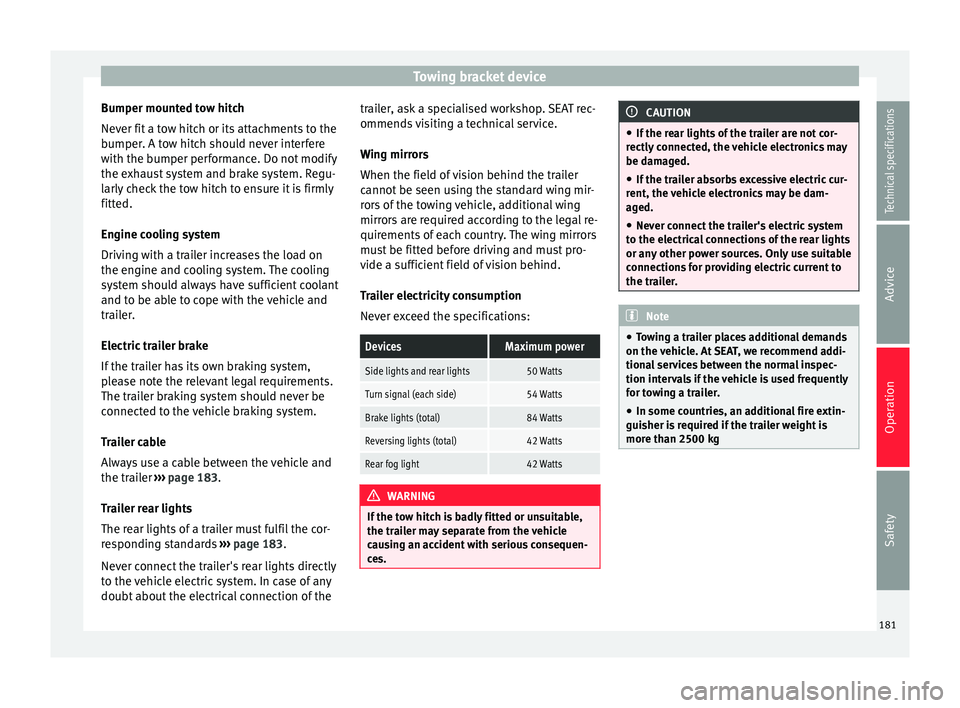
Trailer electricity consumption
Never exceed the specifications:
DevicesMaximum power
Side lights and rear lights50 Watts
Turn signal (each side)54 Watts
Brake lights (total)84 Watts
Reversing lights (total)42 Watts
Rear fog light42 Watts
WARNING
If the tow hitch is badly fitted or unsuitable,
the trailer may separate from the vehicle
causing an accident with serious consequen-
ces. CAUTION
● If the rear lights of the trailer are not cor-
rectly connected, the vehicle electronics may
be damaged.
● If the trailer absorbs excessive electric cur-
rent, the vehicle electronics may be dam-
aged.
● Never connect the trailer's electric system
to the electrical connections of the rear lights
or any other power sources. Only use suitable
connections for providing electric current to
the trailer. Note
● Towing a trailer places additional demands
on the vehicle. At SEAT, we recommend addi-
tional services between the normal inspec-
tion intervals if the vehicle is used frequently
for towing a trailer.
● In some countries, an additional fire extin-
guisher is required if the trailer weight is
more than 2500 kg 181
Technical specifications
Advice
Operation
Safety
Page 188 of 305

Operation
slow down the vehicle. Otherwise, the brak-
ing system could overheat and fail.
● The vehicle centre of gravity and handling
change because of the trailer load and be-
cause of the increased combined mass of the
vehicle and trailer.
● If the towing vehicle is empty and the trail-
er loaded then the load distribution is incor-
rect. If you must travel in these conditions,
drive carefully and reduce your speed accord-
ingly.
Hill starts with a trailer
Depending on the hill and the gross com-
bined weight, it is possible that the com-
bined vehicle and trailer move backwards
slightly when starting.
For a hill start with a trailer, proceed as fol-
lows:
● Press and hold the brake pedal.
● Press the button once to turn off the
electric parking brake ››› page 137.
● Press and hold the button to hold the
vehicle and trailer combination using the
parking brake.
● With a manual gearbox: press the clutch
pedal to the floor.
● Engage first gear or the gear range D
››› page 143, Changing gear .
● Rel
ease the brake pedal. ●
Move off slowly. To do this, gently release
the clutch pedal (for manual gearbox).
● Release the button only when the en-
gine provides sufficient power to move the
vehicle and trailer combination. WARNING
Jerking the trailer in an unsuitable manner
could cause loss of vehicle control with the
subsequent serious consequences.
● Driving with a trailer and transporting
heavy or a large objects will change the vehi-
cle handling and braking distances.
● Anticipate traffic and be extremely cau-
tious. Brake early.
● Adjust your speed and driving style to visi-
bility, road, traffic and weather conditions.
Reduce your speed, especially on steep hills.
● Accelerate gently and carefully. Avoid brus-
que manoeuvres and sudden braking.
● Always take the following precautions seri-
ously. Reduce your speed immediately if you
observe the trailer rocking from side to side.
● Never try to stop the “snaking” by increas-
ing speed.
● Always take the speed limits for vehicles
with and without trailers in each country into
account. Stabilising the vehicle and trailer
combination
Stabilisation of the vehicle and trailer combi-
nation is an extension of the electronic sta-
bility control (ESC) and helps, with the assis-
tance of the trajectory control, to reduce trail-
er “snaking”.
Stabilisation of the vehicle and trailer combi-
nation is active when the ESC
indicator on
the d a
sh panel remains lit for about two sec-
onds more than the ABS indicator.
Requirements for stabilising the
vehicle/trailer combination
● An original tow hitch is fitted by the manu-
facturer or a compatible model is retrofitted.
● The ECS is switched on. The warning lamp
on the dash panel is not lit.
● The trailer is connected to the vehicle using
the power socket.
● It travels faster than 60 km/h (37 mph).
● The maximum drawbar load is used.
● The trailer must have a fixed drawbar.
● Trailers with brakes must be equipped with
a mechanical inertia brake. WARNING
Do not let the extra safety afforded by the
stabilisation system tempt you into taking
any risks when driving. 186
Page 205 of 305

Care and maintenance
CAUTION
● Do not let water soak into Alcantara ®
under
any circumstances.
● Do not use leather cleaning products, sol-
vents, wax polish, shoe cream, stain remov-
ers or similar products on Alcantara ®
.
● Never use brushes for cleaning damp mate-
rial as they could damage the surface. Cleaning and maintenance of natural
leather upholstery
Consult a professional cleaning workshop if
you have any doubts on cleaning and main-
taining the leather equipment in your vehicle.
Maintenance and treatment
Nappa natural leather is delicate because it
has no additional protective layer.
● After cleaning, regularly apply a condition-
er with sun-screen and impregnating action.
These products nourish the leather, soften it
and make it more breathable, as well as re-
hydrating it. They also provide it with a pro-
tective film.
● Clean the leather every 2 or 3 months and
remove stains as they appear.
● Treat the leather every 6 months with a
suitable maintenance product. ●
Apply as few cleaning and maintenance
products as possible, always using a dry, lint-
free cotton or woollen cloth. Do not apply
cleaning and maintenance products directly
to the leather.
● Remove recent ball-point pen and ink
stains, lipstick, shoe cream and similar
stains as soon as possible.
● Maintain the colour of the leather. To do
this, use a special cream especially coloured
for leather to achieve the same overall colour,
if necessary.
● Afterwards, go over it with a soft cloth.
Cleaning the vehicle
SEAT recommends using a slightly damp cot-
ton or woollen cloth for general cleaning pur-
poses.
Generally, the leather should never be
soaked at any point, nor should water pene-
trate the seams.
Before cleaning the leather upholstery, bear
in mind the f o
llowing recommendations
››› page 201, Cleaning the fabric on heated
seats and electrically adjustable seats or
seats with airbag components . CAUTION
● On no account use solvents, wax polish,
shoe cream, stain removers or similar materi-
als on leather. ●
If the stain remains on the leather for long,
it will soak in and be impossible to remove.
● In the event of spilt liquids, dry immediate-
ly with an absorbent cloth to prevent the liq-
uid penetrating through the leather or seams.
● If the vehicle is left standing in the sun for
long periods, the leather should be protected
against direct sunlight to prevent it from fad-
ing. Note
The leather will usually change colour slight-
ly with use. Cleaning synthetic leather upholstery
Before cleaning synthetic leather upholstery,
bear in mind the following recommendations
››› page 201, Cleaning the fabric on heated
seats and electrically adjustable seats or
seats with airbag components
Only use water and neutral cleaning products
to clean synthetic leather upholstery. CAUTION
Do not use solvents, floor wax, shoe cream,
stain removers or similar products on syn-
thetic leather. These will stiffen the material,
causing it to crack prematurely. 203
Technical specifications
Advice
Operation
Safety