Page 109 of 216

2.35
AUTOMATIC TRANSMISSION (1/3)
Operation
With the gear lever 1 in position P or N,
start the engine.
To move forward, you must depress the
brake pedal before pressing the unlock-
ing button 2.
With your foot on the brake pedal
(warning light
c in display 4 goes
out), move the lever out of position P.
Only engage D or R when the vehi-
cle is stopped, with your foot on the
brake and the accelerator pedal re-
leased.
2
1
Selector lever 1
P: park
R: reverse
N: neutral
D: automatic mode
M: manual mode
3 : zone displaying gearbox mode or
gear engaged in manual mode
43
Driving in automatic mode
Select position D . In most traffic con-
ditions, you will not have to touch the
gear selector lever again: the gears will
change automatically at the right time
and at the most suitable engine speed
because the automatic system takes
into account the vehicle load and road
contour and adjusts itself to the particu-
lar driving style you have chosen.
Economical driving
When driving, always leave the lever
in position D, keeping the accelerator
pedal lightly depressed to ensure auto-
matic gear changes at a lower engine
speed.
Accelerating and overtaking
Depress the accelerator pedal firmly
and fully (so that it goes beyond the
kickdown point).
This will enable you to change down
to the optimum gear within the
engine range.
Page 111 of 216
2.37
Breakdown of a vehicle with an
automatic gearbox
Please refer to the information on
“Towing” in Section 5.
When setting off, if the lever is locked
in position P, even though you are de-
pressing the brake pedal and pressing
the unlocking button 2, the lever can
still be released manually.
AUTOMATIC TRANSMISSION (3/3)
Operating faults
When three horizontal bars on the dis-
play 3 come on accompanied by the
warning light
© or ®, this in-
dicates a gearbox fault. Contact an au-
thorised dealer as soon as possible. To do this, unclip the base of the gear
lever
5 starting on the side below the
air conditioning controls. Then raise the
button 6 and simultaneously press the
unlock button 2 on the lever.
For safety reasons, do not
switch off the ignition before
the vehicle has come to a
complete standstill.
5
2
3
6
6
3
Warning light ® re-
quires you to stop immedi-
ately, for your own safety,
as soon as traffic conditions allow.
Page 113 of 216

3.1
Section 3: Your comfort
Air Vents . . . . . . . . . . . . . . . . . . . . . . . . . . . . . . . . . . . .\
. . . . . . . . . . . . . . . . . . . . . . . . . . . . . . . . . . 3.2
Manual air conditioning, heating system . . . . . . . . . . . . . . . . . . . . . . . . . . . . . . . . . . . . \
. . . . . . . . . . 3.4
Automatic climate control . . . . . . . . . . . . . . . . . . . . . . . . . . . . . . . . . . . .\
. . . . . . . . . . . . . . . . . . . . . 3.7
Air conditioning: information and advice on use . . . . . . . . . . . . . . . . . . . . . . . . . . . . . . . . . . . .\
. . . . 3.11
Electric windows . . . . . . . . . . . . . . . . . . . . . . . . . . . . . . . . . . . .\
. . . . . . . . . . . . . . . . . . . . . . . . . . . . 3.12
Sunroof . . . . . . . . . . . . . . . . . . . . . . . . . . . . . . . . . . . .\
. . . . . . . . . . . . . . . . . . . . . . . . . . . . . . . . . . . 3.14
Interior lighting . . . . . . . . . . . . . . . . . . . . . . . . . . . . . . . . . . . . \
. . . . . . . . . . . . . . . . . . . . . . . . . . . . . . 3.15
Passenger compartment storage/fittings . . . . . . . . . . . . . . . . . . . . . . . . . . . . . . . . . . . . \
. . . . . . . . . . 3.16
Ashtray, cigarette lighter, accessories socket . . . . . . . . . . . . . . . . . . . . . . . . . . . . . . . . . . . .\
. . . . . . 3.20
Rear headrests . . . . . . . . . . . . . . . . . . . . . . . . . . . . . . . . . . . .\
. . . . . . . . . . . . . . . . . . . . . . . . . . . . . 3.21
Rear bench seat . . . . . . . . . . . . . . . . . . . . . . . . . . . . . . . . . . . .\
. . . . . . . . . . . . . . . . . . . . . . . . . . . . 3.22
Luggage compartment. . . . . . . . . . . . . . . . . . . . . . . . . . .\
. . . . . . . . . . . . . . . . . . . . . . . . . . . . . . . . . 3.23
Luggage cover . . . . . . . . . . . . . . . . . . . . . . . . . . . . . . . . . . . . \
. . . . . . . . . . . . . . . . . . . . . . . . . . . . . . 3.24
Boot storage . . . . . . . . . . . . . . . . . . . . . . . . . . . . . . . . . . . .\
. . . . . . . . . . . . . . . . . . . . . . . . . . . . . . . 3.25
Transporting objects in the luggage compartment . . . . . . . . . . . . . . . . . . . . . . . . . . . . . . . . . . . .\
. . 3.26
Roof bars . . . . . . . . . . . . . . . . . . . . . . . . . . . . . . . . . . . . \
. . . . . . . . . . . . . . . . . . . . . . . . . . . . . . . . . . 3.27
Spoiler . . . . . . . . . . . . . . . . . . . . . . . . . . . . . . . . . . . . \
. . . . . . . . . . . . . . . . . . . . . . . . . . . . . . . . . . . . 3.27
Multimedia equipment . . . . . . . . . . . . . . . . . . . . . . . . . . . . . . . . . . . . \
. . . . . . . . . . . . . . . . . . . . . . . . 3.28
Page 116 of 216
3.4
Switching air conditioning on
or off
The air conditioning is switched on
(warning light on) or off (warning light
off) using button 2.
The system cannot be switched on if
the control 3 is set to “0”.
The air conditioning system is used
for:
– lowering the temperature inside the
passenger compartment;
– eliminating condensation more quickly.
The controls(depending on vehicle)
1 Distribution of air in the passenger compartment.
2 Air conditioning.
3 Adjusting the ventilation speed.
4 De-icing/demisting of the rear screen and, depending on the vehicle, the
door mirrors.
5 Adjusting the air temperature.
6 Air recirculation.
MANUAL AIR CONDITIONING, HEATING SYSTEM (1/3)
53142
6
7
Vehicles fitted with the ECO
mode (switch 7): when activated,
ECO mode can reduce the perform-
ance of the heating and/or air condi-
tioning. Please refer to the informa-
tion on “Driving advice, Eco-driving”
in Section 2.
Page 118 of 216

3.6
If you want to shut off the flow of air, set
the control 3 to “0”.
The system is deactivated: the ventila-
tion speed is zero (vehicle stationary).
You can, however, still feel a slight flow
of air when the vehicle is moving.Adjusting the amount of air
blown into the passenger
compartment
Move control 3. The further the control is positioned to the right, the greater the
amount of air blown into the passenger
compartment.
Rapid demisting
Turn controls 1 and 3 to positions
W
and control 5 to the maximum tempera-
ture position.
4
5
MANUAL AIR CONDITIONING, HEATING SYSTEM (3/3)
5314Adjusting the air temperatureTurn the control 5 to obtain the desired
temperature. The further towards the
red the slide is, the higher the tempera-
ture will be.
When the air conditioning system is
used for long periods, it may begin to
feel cold. To increase the temperature,
turn the control 5 to the right.
Rear screen de-icing/
demisting
With the engine running, press
button 5. The integrated indicator light
comes on.
This function permits rapid demisting/
de-icing of the rear screen and de-icing
of the door mirrors (on equipped vehi-
cles).
To exit this function, press button 4
again.
Demisting automatically stops.
2
6
Prolonged use of position “0” can
lead to condensation forming on the
side windows and windscreen and
problems due to the use of non-re-
newed air in the passenger com-
partment.
Page 120 of 216
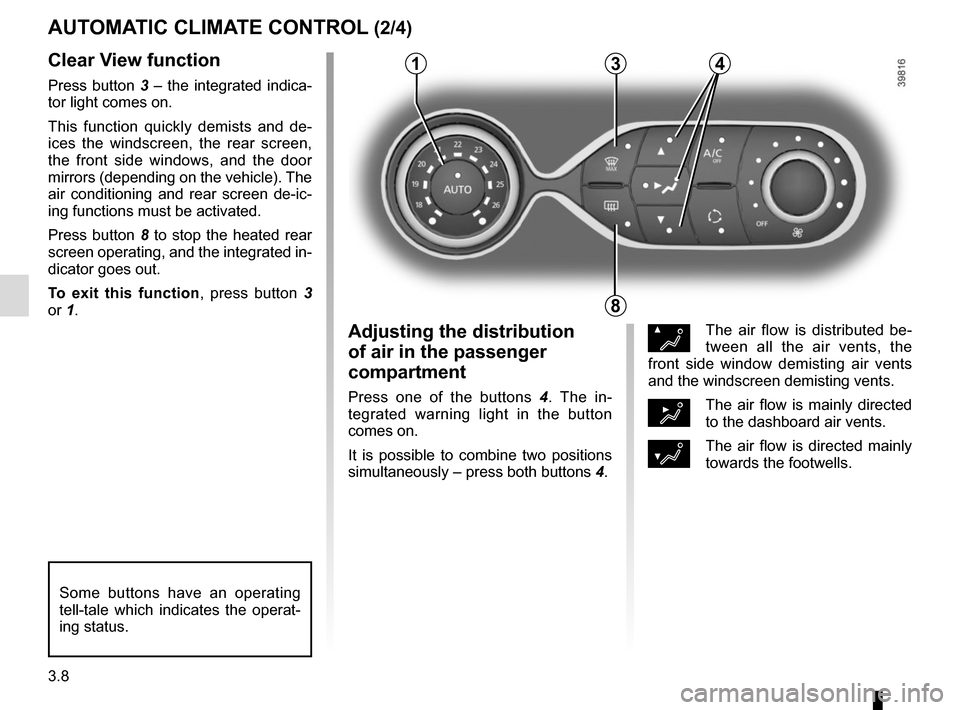
3.8
Clear View function
Press button 3 – the integrated indica-
tor light comes on.
This function quickly demists and de-
ices the windscreen, the rear screen,
the front side windows, and the door
mirrors (depending on the vehicle). The
air conditioning and rear screen de-ic-
ing functions must be activated.
Press button 8 to stop the heated rear
screen operating, and the integrated in-
dicator goes out.
To exit this function, press button 3
or 1.
AUTOMATIC CLIMATE CONTROL (2/4)
ØThe air flow is distributed be-
tween all the air vents, the
front side window demisting air vents
and the windscreen demisting vents.
½The air flow is mainly directed
to the dashboard air vents.
¿The air flow is directed mainly
towards the footwells.
Adjusting the distribution
of air in the passenger
compartment
Press one of the buttons 4 . The in-
tegrated warning light in the button
comes on.
It is possible to combine two positions
simultaneously – press both buttons 4.
8
3
Some buttons have an operating
tell-tale which indicates the operat-
ing status.
14
Page 121 of 216
3.9
Rear screen de-icing/
demisting
Press button 8 – the integrated indica-
tor light comes on. This function en-
ables rapid demisting or de-icing of the
rear screen and de-icing of the door
mirrors (on equipped vehicles).
To exit this function, press button 8
again. Demisting automatically stops.
AUTOMATIC CLIMATE CONTROL (3/4)
8
Switching air conditioning on
or off
In automatic mode, the system switches
the air conditioning system on or off,
depending on the climate conditions.
Press button 5 to switch off the air
conditioning; the integrated indicator
comes on.
5
Vehicles fitted with the ECO
mode (switch 9): once activated,
ECO mode can reduce the perform-
ance of the automatic air condition-
ing. Please refer to the information
on “Eco-driving” in Section 2.
9
Page 122 of 216

3.10
AUTOMATIC CLIMATE CONTROL (4/4)
76
Air recirculation (isolation of
the passenger compartment)
K
This function is managed automatically
(operation is confirmed by a warning
light on button 7), but you can also acti-
vate it manually.
NB:
– during recirculation, air is taken from the passenger compartment and
is recycled, with no air being taken
from outside the vehicle;
– air recirculation allows the external atmosphere to be cut off (when driv-
ing in polluted areas, etc.);
– the recirculation of air makes it pos- sible to reach the desired passenger
compartment temperature quicker.
1
The demisting/de-icing will still take
priority over the air recirculation.
Manual use
Press button 7 – the integrated indica-
tor light comes on.
Prolonged use of this position may lead
to odours, caused by non-renewal of
air, and the formation of condensation
on the windows.
We therefore advise you to return to au-
tomatic mode as soon as air recircula-
tion is no longer needed, by pressing
button 7.
To exit this function, press button 7
again. Stopping the system
Turn the control 6 to “OFF” to stop the
system. To start it, turn the control
6
again, then adjust the fan speed or
press the button 1.


