Page 102 of 292
1.96
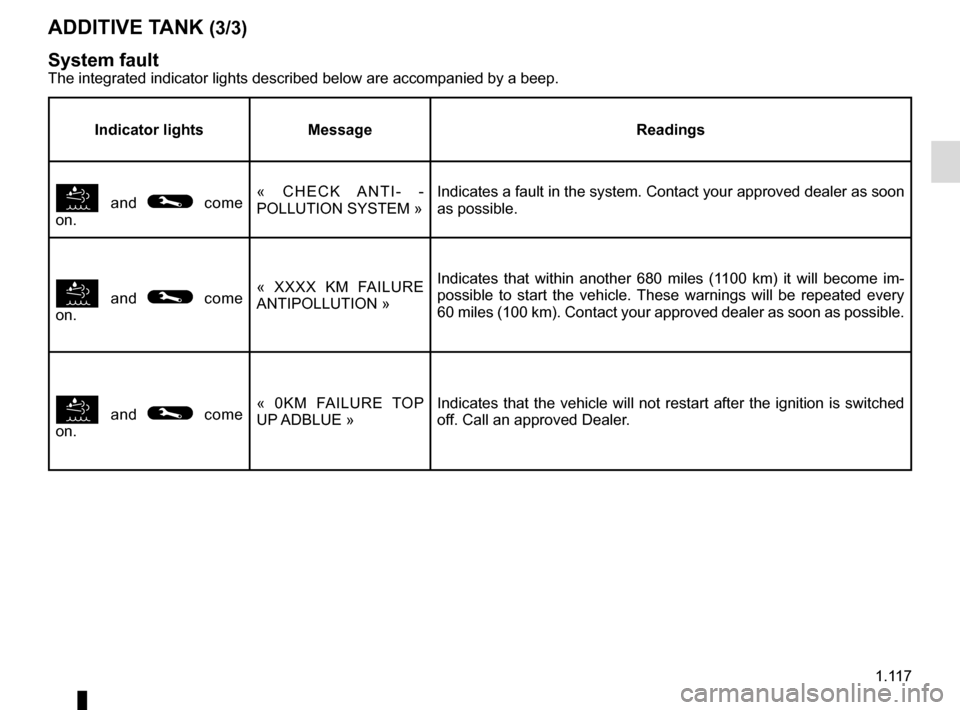
TRIP COMPUTER AND WARNING SYSTEM: information messages
Examples of messagesInterpreting the display selected
« PARKING BRAKE ON » Indicates that the parking brake has been applied.
« BATTERY LOW
START ENGINE » Indicates that the vehicle must be started to recharge the battery (e.g\
. after the engine has been
switched off for some time whilst listening to the radio).
« TOP UP OIL LEVEL » Indicates that the oil level needs adjusting.
« AUTO DOOR LOCK OFF » Indicates that the automatic door locking while driving is deactivated.
« STEERING WHEEL NOT LOCKED » Indicates that the steering column has not been locked.
These can help in the vehicle starting phase, or give information about \
a selection or a driving status.
Examples of information messages are given in the following pages.
Page 103 of 292

1.97
TRIP COMPUTER AND WARNING SYSTEM: operating fault messages
These appear with the © warning light and mean that you should drive very carefully to an author\
ised dealer as
soon as possible. If you fail to follow this recommendation, you risk da\
maging your vehicle.
They disappear when the display selection key is pressed or after severa\
l seconds and are stored in the computer log. The
© warning light stays on. Examples of operating fault messages are given \
in the following pages.
Examples of messages Interpreting the display selected
« CLEAN DIESEL FILTER » Indicates the presence of water in the diesel filter; contact an approve\
d Dealer
as soon as possible.
« CHECK VEHICLE » Indicates a fault in one of the pedal sensors, battery management system\
or oil
level sensor.
« CHECK AIRBAG » Indicates a fault in the restraint system in addition to the seat belts.\
In the event
of an accident, it is possible that they may not be triggered.
« Check antipollution system » – Indicates a fault in the vehicle’s emission control system.
– Indicates a fault in the emissions reduction system when it is accompani\
ed
by the
� warning light. Refer to the information on «Additive tank» in
Section 1.
Page 104 of 292
1.98
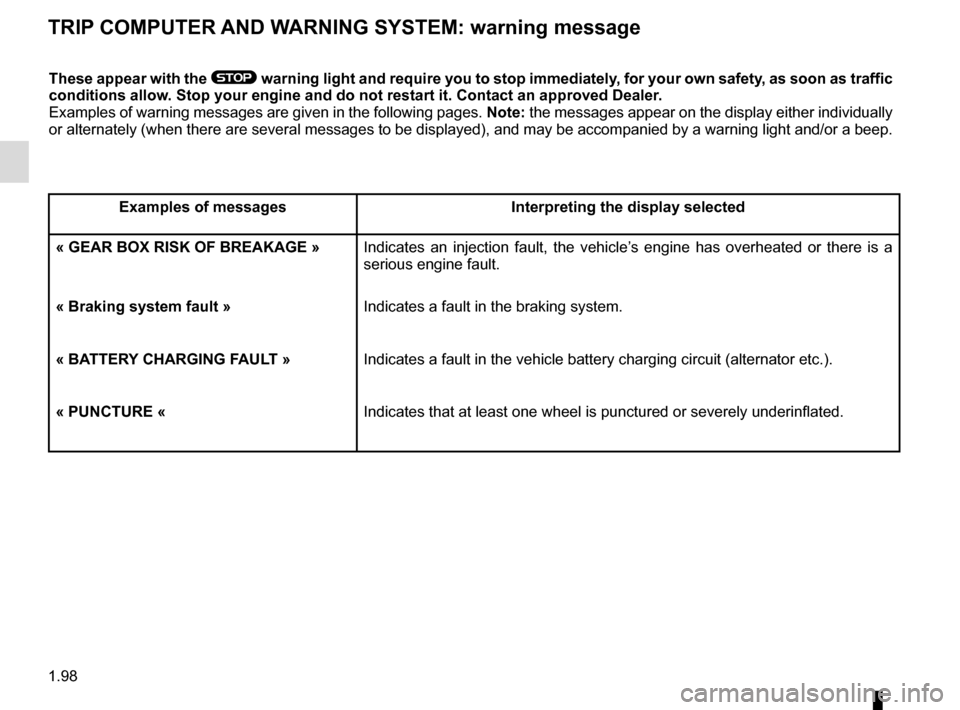
TRIP COMPUTER AND WARNING SYSTEM: warning message
These appear with the ® warning light and require you to stop immediately, for your own safety, as soon as traffic
conditions allow. Stop your engine and do not restart it. Contact an approved Dealer.
Examples of warning messages are given in the following pages. Note: the messages appear on the display either individually
or alternately (when there are several messages to be displayed), and \
may be accompanied by a warning light and/or a beep.
Examples of messages Interpreting the display selected
« GEAR BOX RISK OF BREAKAGE » Indicates an injection fault, the vehicle’s engine has overheated or there is a serious engine fault.
« Braking system fault » Indicates a fault in the braking system.
« BATTERY CHARGING FAULT » Indicates a fault in the vehicle battery charging circuit (alternator e\
tc.).
« PUNCTURE « Indicates that at least one wheel is punctured or severely underinflated\
.
Page 122 of 292
1.116
ADDITIVE TANK (2/3)
Maintenance/Range
Warning lights and messages on the instrument panel
The integrated indicator lights described below are accompanied by a bee\
p.
Indicator lights Message What to do?
� comes on each
time the vehicle is started. « ADBLUE LEVEL
LOW »
Have an Approved Dealer fill or top up the additive tank.
� comes on.« ADBLUE TO FILL »
� comes on.« XXXX KM FAILURE
TOP UP ADBLUE »
Have an Approved Dealer fill or top up the additive tank as soon as pos-
sible.
� comes on.« 0KM FAILURE TOP
UP ADBLUE » The engine will not start.
To get the engine started you can top up the tank with 10 litres of addit\
ive
yourself.
Page 123 of 292
1.117
ADDITIVE TANK (3/3)
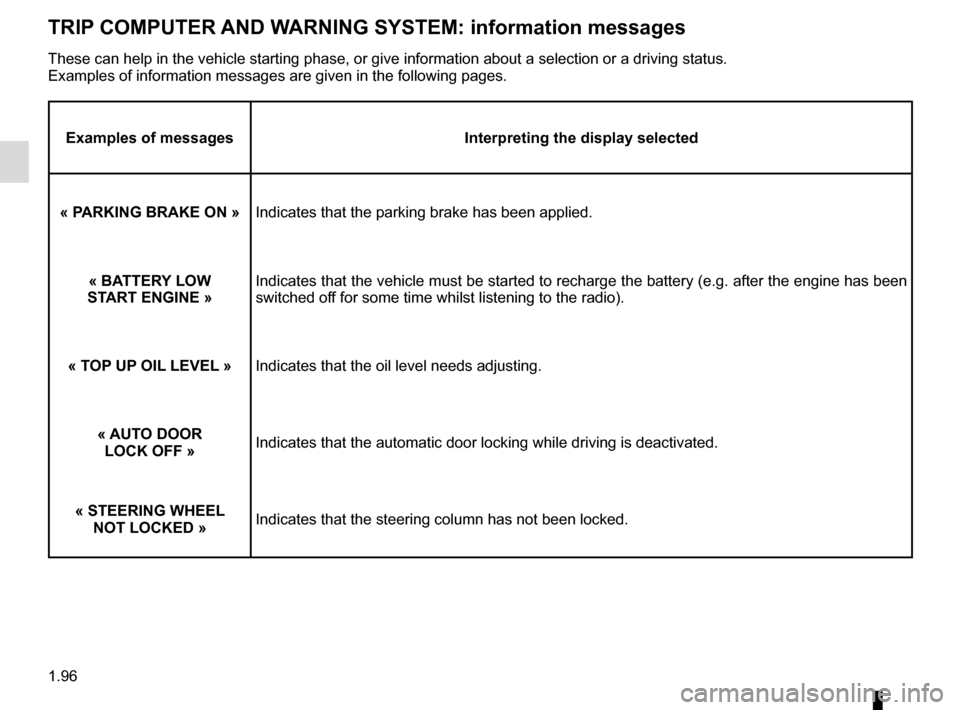
System fault
The integrated indicator lights described below are accompanied by a bee\
p.
Indicator lights Message Readings
� and © come
on. « CHECK ANTI- -
POLLUTION SYSTEM »
Indicates a fault in the system. Contact your approved dealer as soon
as possible.
� and © come
on. « XXXX KM FAILURE
ANTIPOLLUTION »
Indicates that within another 680 miles (1100 km) it will become im-
possible to start the vehicle. These warnings will be repeated every
60 miles (100 km). Contact your approved dealer as soon as possible.
� and © come
on. « 0KM FAILURE TOP
UP ADBLUE »
Indicates that the vehicle will not restart after the ignition is switch\
ed
off. Call an approved Dealer.
Page 129 of 292
2.5
STARTING, STOPPING THE ENGINE: vehicle with RENAULT CARD (2/3)
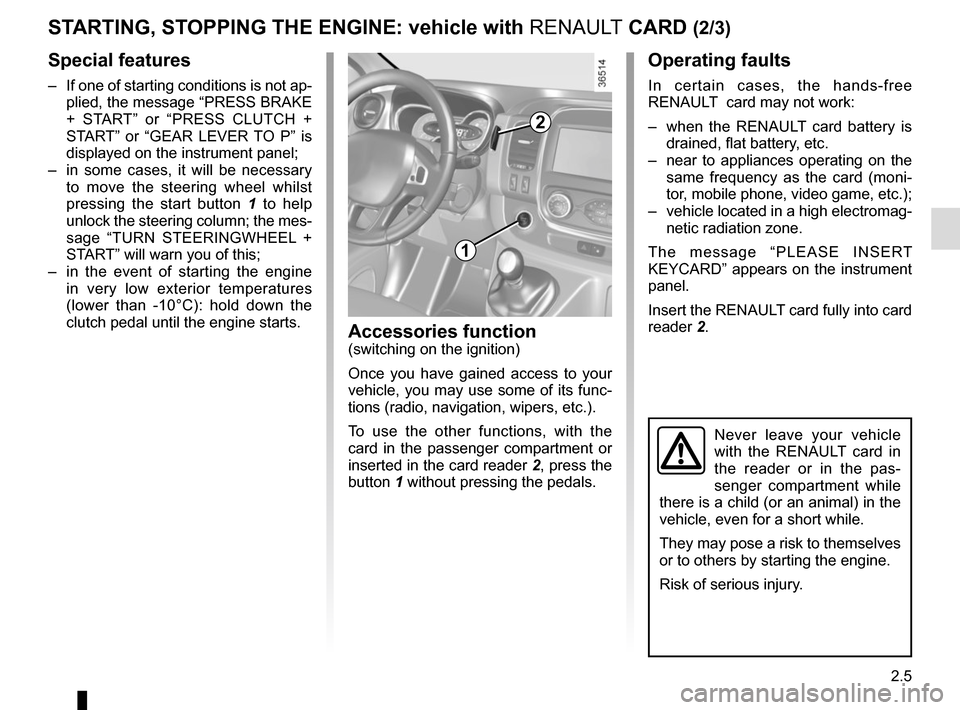
Operating faults
In certain cases, the hands-free
RENAULT card may not work:
– when the RENAULT card battery is drained, flat battery, etc.
– near to appliances operating on the same frequency as the card (moni-
tor, mobile phone, video game, etc.);
– vehicle located in a high electromag- netic radiation zone.
The message “PLEASE INSERT
KEYCARD” appears on the instrument
panel.
Insert the RENAULT card fully into card
reader 2.
Accessories function(switching on the ignition)
Once you have gained access to your
vehicle, you may use some of its func-
tions (radio, navigation, wipers, etc.).
To use the other functions, with the
card in the passenger compartment or
inserted in the card reader 2, press the
button 1 without pressing the pedals.
Never leave your vehicle
with the RENAULT card in
the reader or in the pas-
senger compartment while
there is a child (or an animal) in the
vehicle, even for a short while.
They may pose a risk to themselves
or to others by starting the engine.
Risk of serious injury.
1
2
Special features
– If one of starting conditions is not ap- plied, the message “PRESS BRAKE
+ START” or “PRESS CLUTCH +
START” or “GEAR LEVER TO P” is
displayed on the instrument panel;
– in some cases, it will be necessary to move the steering wheel whilst
pressing the start button 1 to help
unlock the steering column; the mes-
sage “TURN STEERINGWHEEL +
START” will warn you of this;
– in the event of starting the engine in very low exterior temperatures
(lower than -10°C): hold down the
clutch pedal until the engine starts.
Page 130 of 292

2.6
When you leave your vehi-
cle, especially if you have
your RENAULT card with
you, check that the engine
is completely switched off.
If the card is no longer in the pas-
senger compartment when you try to
switch the engine off, the message “NO
KEYCARD PRESS AND HOLD” ap-
pears on the instrument panel: press
the button 1 for longer than two sec-
onds.
With the engine switched off, any ac-
cessories being used (radio, etc.) will
continue to function for approximately
10 minutes.
When the driver’s door is opened, the
accessories stop working.Conditions for stopping the
engine
The vehicle must be at a standstill.
With the 2 card in the card reader or
in the detection zone 3, press button 1:
the engine stops. The steering column
is locked when the driver’s door is
opened or the vehicle is locked.
STARTING, STOPPING THE ENGINE: vehicle with RENAULT CARD (3/3)
Never leave your vehicle
with the RENAULT card
inside and never leave a
child (or a pet) unsuper-
vised, even for a short while.
There is a risk that they could start
the engine or operate electrical
equipment (electric windows etc.)
and trap part of their body (neck,
arms, hands, etc.).
Risk of serious injury.
Never switch off the ignition before
the vehicle has stopped completely.
Once the engine has stopped, the
brake servo, power-assisted steer-
ing, etc. and the passive safety de-
vices such as air bags and preten-
sioners will no longer operate.
3
1
2
Page 131 of 292

2.7
Warning light � is displayed on the
instrument panel. This notifies you that
the engine is on standby.
The vehicle equipment remain opera-
tional while the engine is stopped.
The engine will restart when you press
the clutch pedal and move into gear.
STOP AND START function (1/3)
This system enables a reduced fuel
consumption and lower greenhouse
gas emissions.
The system is activated automatically
when the vehicle is started.
While driving, the system stops the
engine (standby) when the vehicle is
at a standstill (traffic jam, traffic lights,
etc).
System operating conditionsEngine standby is activated if:
– the vehicle has been driven since its last stop;
– the gearbox is in neutral;
– the clutch pedal is released;
and
– the vehicle is travelling at less than 3 km/h. Special feature of the automatic
engine re-start
Under certain conditions, the engine
can restart on its own in order to gua-
rantee your safety and comfort.
This can occur especially when:
– the outdoor temperature is too low or
too high (less than around 0 °C or
higher than around 30 °C);
– the “Clear View” function is activated (please see the information on “Air
conditioning” in Section 3);
– the battery is not sufficiently char- ged;
– the vehicle speed is above 3 mph (5 km/h) (downhill slope, etc.);
– repeated pressing on the brake pedal or braking system require-
ment;
– ...
Special features of vehicles with
remote control
Some of these conditions prevent the
engine from automatically restarting
upon opening:
– one of the doors for vehicles using a key;
– the passenger side door for vehicles using a RENAULT card.
Engine on standby - braking
assistance is no longer ope-
rational.
Before getting out of the
vehicle, you must switch
off the ignition (please see
section on “Starting, stop-
ping the engine”).Do not drive off when the
engine is on standby (war-
ning light
� is dis-
played on the instrument panel).
If you get out of the vehicle, a beep
and the message “IGNITION OFF”
notifies you that the engine is on
standby and has not been switched
off.

Maintenance/Range
Warning lights and messages on the instrument panel
The integrated indicator lights described below are accompanied by a bee\
p.
Indicator lights Message Wh")