2015 RENAULT KOLEOS door lock
[x] Cancel search: door lockPage 81 of 232

JauneNoir Noir texte
81
ENG_UD27287_4
Arr t du moteur (X45 - H45 - Renault) ENG_NU_1057-1_H45_Ph3_Renault_2
STOPPING THE ENGINE
Special note
If the card is no longer in the reader
when you try to switch the engine
off, the message “No keycard Press
and hold” appears on the instrument
panel A: press button 1 for over two
seconds.
Hands-free RENAULT card:
With the card in the vehicle, press
button 1: the engine will stop. The steer-
ing column is locked when the driver’s
door is opened or the vehicle is locked.
If the card is no longer in the passenger
compartment when you try to switch the
engine off, the message “No keycard
Press and hold” appears on the instru-
ment panel: press button 1 for over two
seconds.
With the engine switched off, any ac-
cessories being used (radio, etc.) will
continue to function for approximately
10 minutes.
When the driver’s door is opened, the
accessories stop working.
Conditions for stopping the
engine
The vehicle must be stationary, with the
lever positioned in N or P for vehicles
with an automatic transmission.
Remote control RENAULT
card
With the card in reader 2, press
button 1: the engine will stop. Removing
the card from the reader locks the steer-
ing column.
Never leave your vehicle
with the RENAULT card
inside and never leave a
child (or a pet) unsuper-
vised, even for a short while.
There is a risk that they could start
the engine or operate electrical
equipment (electric windows etc.)
and trap part of their body (neck,
arms, hands, etc.).
Risk of serious injury.
Never switch off the ignition before
the vehicle has come to a complete
stop. Switching off the engine dis-
ables the assistance equipment:
brakes, steering, etc., and passive
safety equipment such as airbags
and pretensioners.
When leaving your vehi-
cle, in particular with the
RENAULT card, check that
the engine has completely
stopped.
1
2
A
Page 87 of 232

JauneNoir Noir texte
87
ENG_UD31463_9
Frein de parking assist (X45 - H45 - Renault) ENG_NU_1057-1_H45_Ph3_Renault_2
ASSISTED PARKING BRAKE (2/4)
Special cases
When the vehicle is on an incline or
when towing a trailer, pull handle 2 for
approximately 3 seconds to fully apply
the parking brake.
Note: if the vehicle is not immobilised
despite fully applying the parking brake,
due to the steepness of the incline, the
message “Stop vehicle” is displayed on
the instrument panel. The vehicle must
be parked elsewhere.Parking without applying the
parking brake
(if there is a risk of ice etc.):
– Stop the engine by pressing the
engine on/off button 1;
– engage a gear (on vehicles with
manual gearboxes) or shift the gear
lever into position P (on vehicles with
automatic transmissions);
– simultaneously depress the brake
pedal and press switch 2 until indica-
tor light 3 goes out.
When the driver’s door is opened, a
warning message will be displayed and
a beep sounds for around 5 seconds to
indicate that the parking brake has not
been applied.
Note: it is still possible to release the
parking brake as long as no door is
opened or closed and the vehicle is not
locked.
1
2
3
Brief stopTo manually activate the electronic
parking brake, (when stopping at a red
light, or stopping when the engine is
running, etc.): pull and release switch 2.
The brake is released as soon as the
vehicle is started up again.
Page 134 of 232
JauneNoir Noir texte
134
ENG_UD31661_4
L ves-vitres lectriques (X45 - H45 - Renault) ENG_NU_1057-1_H45_Ph3_Renault_3
ELECTRIC WINDOWS (1/2)
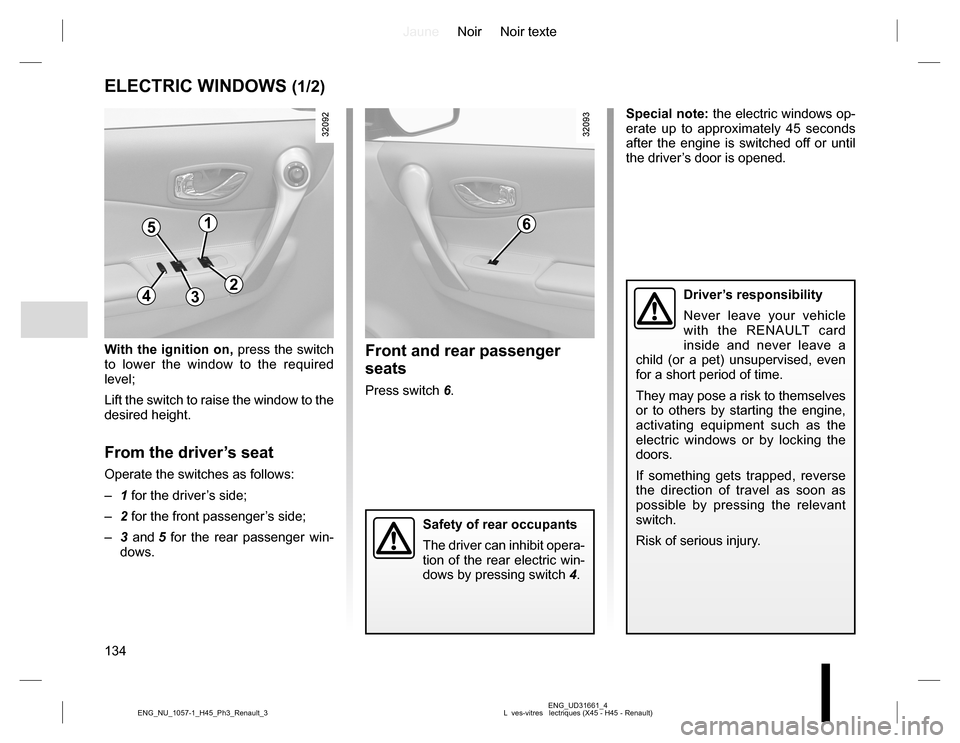
With the ignition on, press the switch
to lower the window to the required
level;
Lift the switch to raise the window to the
desired height.
From the driver’s seat
Operate the switches as follows:
– 1 for the driver’s side;
– 2 for the front passenger’s side;
– 3 and 5 for the rear passenger win-
dows.
Front and rear passenger
seats
Press switch 6.Special note: the electric windows op-
erate up to approximately 45 seconds
after the engine is switched off or until
the driver’s door is opened.
Driver’s responsibility
Never leave your vehicle
with the RENAULT card
inside and never leave a
child (or a pet) unsupervised, even
for a short period of time.
They may pose a risk to themselves
or to others by starting the engine,
activating equipment such as the
electric windows or by locking the
doors.
If something gets trapped, reverse
the direction of travel as soon as
possible by pressing the relevant
switch.
Risk of serious injury.
Safety of rear occupants
The driver can inhibit opera-
tion of the rear electric win-
dows by pressing switch 4.
51
432
6
Page 136 of 232

JauneNoir Noir texte
136
ENG_UD31692_4
Toit ouvrant lectrique (X45 - H45 - Renault) ENG_NU_1057-1_H45_Ph3_Renault_3
ELECTRIC SUNROOF (1/2)
The system operates:
– when the ignition is switched on,
– when the ignition is switched off until
the driver’s door is opened/closed
(limited to approximately 45 sec-
onds).
Tilting the sunroofOpening: open the sunroof blind, then
press button 2 (side A): the sunroof tilts
open.
Closing: press 2 (side B).
Sliding the sunroofOpening: open the sunroof blind then
briefly press button 2 (side A)
Using button 2 stops the sunroof
moving.
Closing: briefly press 2 (side B).
Sunroof blind
Move handles 1 forwards or backwards
to open the blind as required.
– Never operate the sunroof with
the blind closed.
– Never drive with the sunroof open
and the sun blind closed.
2
A
B
Driver’s responsibility
Never leave your vehicle
with the RENAULT card
inside and never leave a
child (or a pet) unsupervised, even
for a short period of time.
They may pose a risk to themselves
or to others by starting the engine,
activating equipment such as the
electric windows or by locking the
doors.
If something gets trapped, reverse
the direction of travel as soon as
possible by pressing the rear of
button 2 (on the side marked A).
Risk of serious injury.
1
Page 139 of 232
JauneNoir Noir texte
139
ENG_UD23659_3
Eclairage intérieur (X45 - H45 - Renault) ENG_NU_1057-1_H45_Ph3_Renault_3
INTERIOR LIGHTING (1/2)
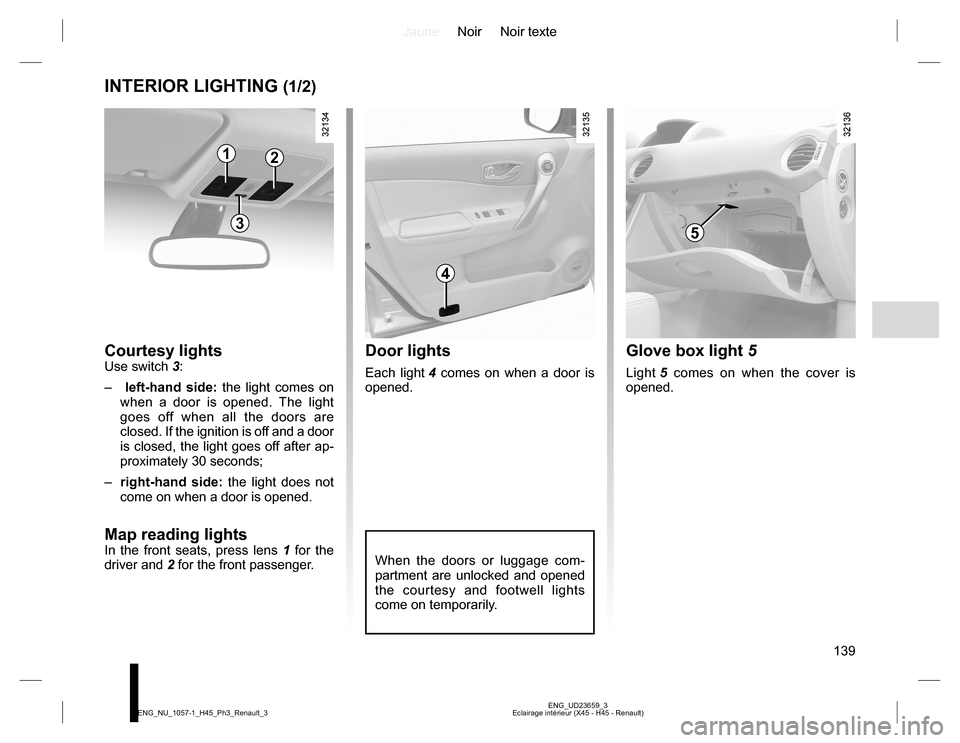
Courtesy lightsUse switch 3:
– left-hand side: the light comes on
when a door is opened. The light
goes off when all the doors are
closed. If the ignition is off and a door
is closed, the light goes off after ap-
proximately 30 seconds;
– right-hand side: the light does not
come on when a door is opened.
Map reading lights
In the front seats, press lens 1 for the
driver and 2 for the front passenger.
Door lights
Each light 4 comes on when a door is
opened.
Glove box light 5
Light 5 comes on when the cover is
opened.
When the doors or luggage com-
partment are unlocked and opened
the courtesy and footwell lights
come on temporarily.
12
3
4
5
Page 172 of 232

JauneNoir Noir texte
172
ENG_UD22866_8
Entretien des garnitures intérieures (X35 - X45 - X65 - J77 - X81 - J81 - X85 - X91 - B91 - K91 - D91 - X83 - X61 - X77 ph2 - X95 - B95 - D95 - E95 - K95 - J95 - R95 - ENG_NU_1057-1_H45_Ph3_Renault_4
Glass instrument panel(e.g. instrument panel, clock, exterior
temperature display, radio display, etc.)
Use a soft cloth (or cotton wool).
If this does not clean it properly, use a
soft cloth (or cotton wool) slightly mois-
tened with soapy water and then wipe
clean with a soft damp cloth or cotton
wool.
Finally, carefully dry off with a soft dry
cloth.
Cleaning products containing alco-
hol must not be used under any cir-
cumstances.
Seat belts
These must be kept clean.
Use products selected by our Technical
Department (Approved outlets) or
warm, soapy water and a sponge and
wipe with a dry cloth.
Detergents or dyes must not be used
under any circumstances.
INTERIOR TRIM MAINTENANCE (1/2)
Textiles (seats, door trim, etc)
Vacuum-clean the textiles regularly.
Liquid stain
Use soapy water.
Dab lightly (never rub) with a soft cloth,
rinse and remove the excess.
Solid or pasty stain
Carefully remove the excess solid or
pasty material immediately with a
spatula (working from the edges to the
centre to avoid spreading the stain).
Clean as for a liquid stain.
Special instructions for sweets or
chewing gum
Put an ice cube on the stain to solidify
it, then proceed as for a solid stain. A well-maintained vehicle will last
longer. It is therefore recommended to
maintain the interior of the vehicle regu-
larly.
A stain should always be dealt with
swiftly.
Whatever type of stain is on the trim,
use cold (or warm) soapy water with
natural soap.
Detergents (washing-up liquid, pow-
dered products, alcohol-based prod-
ucts) should not be used.
Use a soft cloth.
Rinse and soak up the excess.
For further recommendations for
maintaining the interior, and/or for
any unsatisfactory results, please
see an authorised dealer.
Page 196 of 232
JauneNoir Noir texte
196
ENG_UD30291_8
Carte RENAULT : pile (X45 - H45 - X91 - B91 - K91 - X95 - B95 - D95 - E95 - K95 - J95 - R95 - L38 - X38 - X32 - B32 - X98 - Renault) ENG_NU_1057-1_H45_Ph3_Renault_5
Operating faultsIf the battery is too weak to ensure cor-
rect operation, you may start (insert the
RENAULT card in the card reader) and
lock/unlock the vehicle (refer to the in-
formation on “Locking/unlocking the
doors” in Section 1).
RENAULT CARD: battery
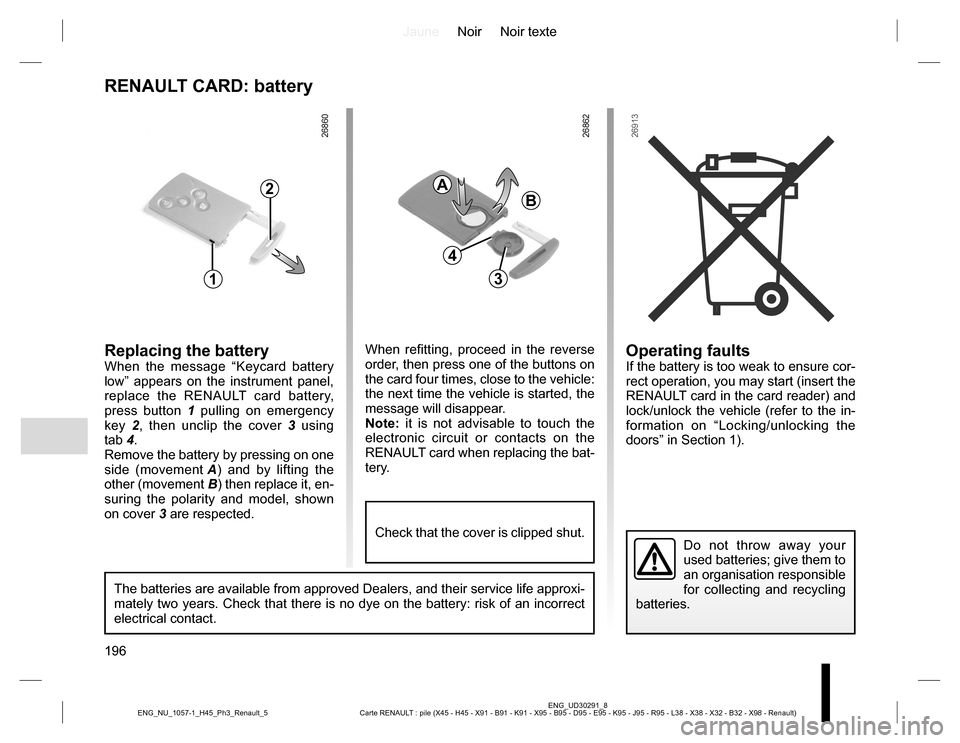
Replacing the batteryWhen the message “Keycard battery
low” appears on the instrument panel,
replace the RENAULT card battery,
press button 1 pulling on emergency
key 2, then unclip the cover 3 using
tab 4.
Remove the battery by pressing on one
side (movement A) and by lifting the
other (movement B) then replace it, en-
suring the polarity and model, shown
on cover 3 are respected.
Do not throw away your
used batteries; give them to
an organisation responsible
for collecting and recycling
batteries.
1
2
When refitting, proceed in the reverse
order, then press one of the buttons on
the card four times, close to the vehicle:
the next time the vehicle is started, the
message will disappear.
Note: it is not advisable to touch the
electronic circuit or contacts on the
RENAULT card when replacing the bat-
tery.
A
B
3
The batteries are available from approved Dealers, and their service life approxi-
mately two years. Check that there is no dye on the battery: risk of an incorrect
electrical contact.
4
Check that the cover is clipped shut.
Page 203 of 232

JauneNoir Noir texte
203
ENG_UD21017_3
Anomalies de fonctionnement (X45 - H45 - X95 - J95 - R95 - Renault) ENG_NU_1057-1_H45_Ph3_Renault_5
OPERATING FAULTS (1/5)
The following advice will enable you to carry out quick, temporary repairs. For safety reasons you should always contact
an approved Dealer as soon as possible.
Using the RENAULT card POSSIBLE CAUSES WHAT TO DO
The RENAULT card does not lock or
unlock the doors.Card battery is flat.Replace the battery. You can still lock/
unlock and start your vehicle (refer to the
information on “Locking/unlocking the
doors” in Section 1 and “Starting/Stopping
the engine” in Section 2).
Use of appliances operating on the
same frequency as the card (mobile
phone, etc.).Stop using the equipment or use the
emergency key (refer to the informa-
tion on “Locking/unlocking the doors” in
Section 1).
Vehicle located in a high electromag-
netic radiation zone.
Vehicle battery flat.Use the emergency key integrated in the
card (refer to the information on “Locking/
unlocking the doors” in Section 1).