2015 RENAULT ESPACE Door
[x] Cancel search: DoorPage 190 of 316

2.78
AUTOMATIC GEARBOX (5/6)
Special cases
As position P is automatically en-
gaged when the engine is stopped, it is
sometimes necessary to place the vehi-
cle in position N for some car washes,
for example.
Position N can be engaged before
opening the driver’s door, and a maxi-
mum of around 25 seconds after the
engine is stopped.
After this time or after opening the
driver’s door, it will be necessary to turn
on the ignition again to disengage posi-
tion P.
In the event of a loss of in-
formation on the instrument
panel, stop and immobilise
the vehicle using the elec-
tronic parking brake or button P.
Special cases
In certain driving cases (eg: protect-
ing the engine), a gear change can be
performed automatically in the event of
over-revving or approaching under-rev-
ving. Permanent manual mode remains
activated. Similarly, to avoid making the
"wrong move", a gear change may be
refused by the gearbox. In this case,
the display for the requested gear + or –
flashes for a few seconds to warn you.
Parking the vehicleUpon stopping the engine by press-
ing the engine stop button, position P
is automatically engaged, along with
the electronic parking brake for vehi-
cles equipped with this device. P is dis-
played on the instrument panel and the
warning light on button P comes on.
Never leave the vehicle with
the engine running without
previously engaging the
Park position P.
With the engine running, the automatic
gearbox in D or R or N or M and with-
out your foot on the brake, messages
“P not engaged” and “Select P” are dis-
played on the instrument panel as soon
as the driver’s door is open.
With the engine stopped, the automatic
gearbox in N (neutral), the message “P
not engaged” is displayed on the instru-
ment panel.
Special feature related to the Stop and Start function: if you are going\
to unfasten the driver's seat belt before the
engine goes into standby due to the Stop and Start function, make sure t\
he gearbox is in position P. The P warning
light will light up on the instrument panel to confirm this. Risk of loss of immobilisation.
Page 199 of 316
3.7
10
AUTOMATIC CLIMATE CONTROL (1/5)
15
6543
9
1216
17
18
19
11
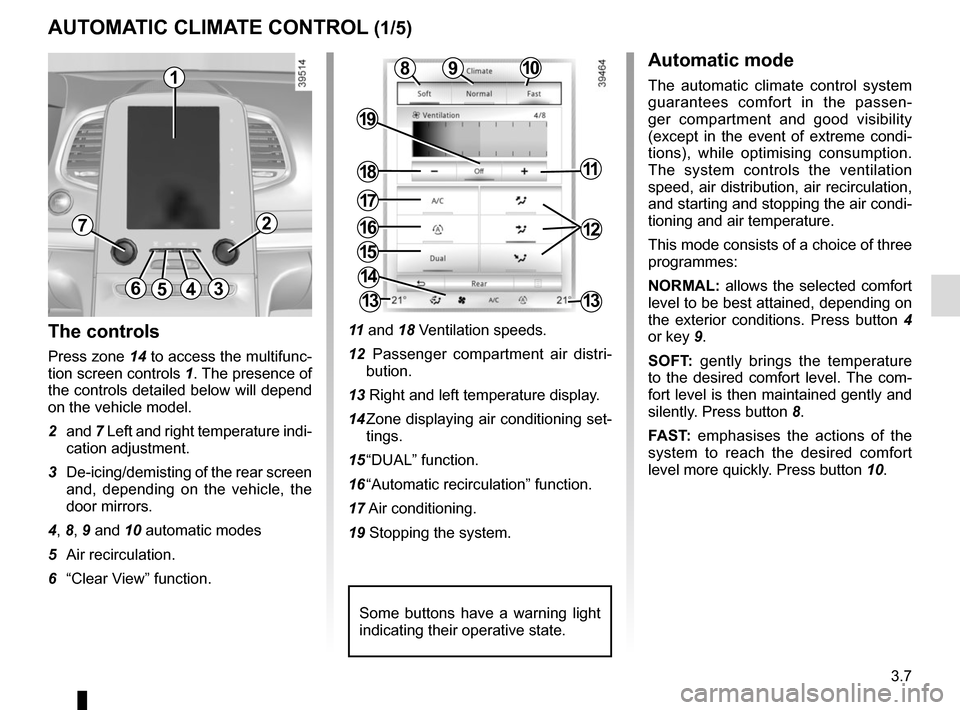
The controls
Press zone 14 to access the multifunc-
tion screen controls 1. The presence of
the controls detailed below will depend
on the vehicle model.
2 and 7 Left and right temperature indi-
cation adjustment.
3 De-icing/demisting of the rear screen and, depending on the vehicle, the
door mirrors.
4, 8, 9 and 10 automatic modes
5 Air recirculation.
6 “Clear View” function. 11
and 18 Ventilation speeds.
12 Passenger compartment air distri- bution.
13 Right and left temperature display.
14 Zone displaying air conditioning set- tings.
15 “DUAL” function.
16 “Automatic recirculation” function.
17 Air conditioning.
19 Stopping the system.
Automatic mode
The automatic climate control system
guarantees comfort in the passen-
ger compartment and good visibility
(except in the event of extreme condi-
tions), while optimising consumption.
The system controls the ventilation
speed, air distribution, air recirculation,
and starting and stopping the air condi-
tioning and air temperature.
This mode consists of a choice of three
programmes:
NORMAL: allows the selected comfort
level to be best attained, depending on
the exterior conditions. Press button 4
or key 9.
SOFT: gently brings the temperature
to the desired comfort level. The com-
fort level is then maintained gently and
silently. Press button 8.
FAST: emphasises the actions of the
system to reach the desired comfort
level more quickly. Press button 10.8
14
13
72
13
1
Some buttons have a warning light
indicating their operative state.
Page 201 of 316

3.9
AUTOMATIC CLIMATE CONTROL (3/5)
Press button 6 – the integrated indica-
tor light comes on.
Press button 3 to stop the heated rear
screen operating, and the integrated in-
dicator goes out.
To adjust the ventilation speed: press
buttons 11 or 18 or slide your finger in
zone A.Clear View function
This function quickly demists and de-
ices the windscreen, the rear screen,
the front side windows, and the door
mirrors (depending on the vehicle). It
imposes automatic operation of the
air conditioning and rear screen de-ic-
ing and, depending on the vehicle, the
windscreen electric de-icer.
643
109
1811
8
A
To exit this function, press:
– button 4;
– again button 6;
– on button 8, 9 or 10.
Page 202 of 316

3.10
AUTOMATIC CLIMATE CONTROL (4/5)
Switching air conditioning on
or off
In automatic mode, the system switches
the air conditioning system on or off,
depending on the climate conditions.
Press button 17 to:
– activate the air conditioning (a warn- ing light in zone 14 comes on).
– deactivate the air conditioning (the warning light in zone 14 goes out)
4
17
19
14
Stopping the system
Press button 19 to activate or deacti-
vate the system (the operating warn-
ing light on button 19 notifies you of the
system status).
It is preferable to use one of the automatic programmes NORMAL, SOFT or
FAST.
In automatic mode (4 warning light is lit), all air conditioning functions are control-
led by the system.
You can still change the system selection. In this case, the warning ligh\
t on the
button 4 will go out and the changed function, which is no longer controlled by \
the
system, will be shown on the display.
To return to automatic mode, press one of programmes NORMAL, SOFT, or
FAST, or button 4.
Rear screen de-icing/
demisting
Press button 3 – the integrated indica-
tor light comes on. This function en-
ables rapid demisting or de-icing of the
rear screen and de-icing of the door
mirrors (on equipped vehicles).
To exit this function, press button 3
again. Demisting automatically stops.
3
Page 206 of 316
3.14
AIR CONDITIONING: information and advice on use
Do not add anything to the
vehicle’s ventilation circuit
(for example, to remove
bad odours).
There is a risk of damage or of
fire.
Do not open the refriger-
ant fluid circuit. The fluid
may damage eyes or skin.
Fuel consumption
You will normally notice an increase in
fuel consumption (especially in town)
when the air conditioning is operating.
For vehicles fitted with air conditioning
with no automatic mode, switch off the
system when it is not required.
Advice for reducing consumption
and helping to preserve the environ-
ment
Drive with the air vents open and the
windows closed.
If the vehicle has been parked in the
sun, open the doors for a few moments
to let the hot air escape before starting
the engine.
Maintenance
Refer to the Maintenance Document
for your vehicle for the inspection fre-
quency.
Operating faults
As a general rule, contact your ap-
proved dealer in the event of an oper-
ating fault.
– Reduction in de-icing, demisting or air conditioning performance.
This may be caused by the passen-
ger compartment filter cartridge be-
coming clogged.
– No cold air is being produced .
Check that the controls are set cor-
rectly and that the fuses are sound.
Otherwise, switch off the system.
Presence of water under the
vehicle
After prolonged use of the air condi-
tioning system, it is normal for water
to be present under the vehicle. This is
caused by condensation.
Advice on use
In some situations, (air conditioning
off, air recirculation activated, ventila-
tion speed at zero or low, etc.) you may
notice that condensation starts to form
on the windows and windscreen.
If there is condensation, use the “Clear
View” function to remove it, then use
the air conditioning in automatic mode
to stop it forming again.
Vehicles equipped with the
ECOmode: once activated, ECO
mode can reduce the perform-
ance of the automatic air condition-
ing. Please refer to the information
on “Driving advice, Eco-driving” in
Section 2.
Page 207 of 316

3.15
ELECTRIC WINDOWS (1/2)
1
2
34
5
6
These systems operate:
– with the engine running;
– with the ignition off until one of the front doors is opened (limited to ap-
proximately 12 minutes).
– before starting, with the front doors closed, after pressing the start
button.
Press the window switch down or pull it
up to lower or raise the window to the
desired height: the rear windows do not
open fully.
Safety of rear occupants
The driver can disable operation of the rear electric windows and doors \
by pressing switch 4. A confirmation message is displayed on the instru-
ment panel.
Driver’s responsibility
Never leave your vehicle with the RENAULT card inside and never leave a child
(or a pet) unsupervised, even for a short while. They may pose a risk to them-
selves or to others by starting the engine, activating equipment such as\
the elec-
tric windows or by locking the doors. If a body part gets trapped, rever\
se the direc-
tion of travel of the window as soon as possible by pressing the relevan\
t switch.
Risk of serious injury.
Avoid resting any objects against
a half-open window: there is a risk
that the electric window could be
damaged.
From the driver’s seat, use switch:
1 for the driver’s side;
2 for the front passenger side;
3 and 5 for the rear passenger win-
dows.
From the passenger seats, use
switch 6.
Note: if the window detects resistance
when closing (e.g.: fingers, branch of
a tree, etc.) it stops and then lowers
again by a few centimetres.
Page 208 of 316

3.16
Operating faults
In case of a fault when closing a
window, the system reverts to normal
mode: pull the switch as many times as
necessary until the window closes com-
pletely, hold the switch (still on the clo-
sing side) for around one second, then
completely lower then raise the window
to reset the system.
If necessary, contact an approved
Dealer.
ELECTRIC WINDOWS (2/2)Remote control window
closing
(vehicles with 4 one-touch electric win-
dows).
When you lock the doors from the out-
side, press the locking button on the
RENAULTcard twice in quick suc-
cession, or on the driver’s door in
hands-free mode, and all the windows
will close automatically (and, depen-
ding on the vehicle, the sunroof).
It is recommended that the user only
operates the system when the vehi-
cle can be seen clearly and no one is
inside.
Closing windows can cause
serious injury.
One-touch mode
This mode works in addition to the ope-
ration of the electric windows described
previously.
Briefly press or pull the window switch
fully: the window is fully lowered or
raised. Pressing the switch again stops
the window moving.
Page 209 of 316

3.17
ELECTRIC SUNROOF (1/3)
To slide the curtain 1
With the ignition on:
– Full opening: move marker 3 on
button 2 to position A. The points in
between correspond to the progres-
sive opening positions of the curtain;
– to close: move mark 3 on button 2
to position 0.
To slide the sunroof
With the ignition on:
– to open: move mark 3 on button 2
to position B, depending how far
you wish it to open. The points in be-
tween correspond to the progressive
opening positions;
– To close: move the marker 3 on
button 2 to position A.
1
2
0
A
B
Moving the position 0 directly to po-
sition B causes the simultaneous
opening of the curtain and the roof.
Driver’s responsibility
Never leave your vehicle
with the RENAULT card
inside and never leave a
child (or a pet) unsupervised, even
for a short while.
They may pose a risk to themselves
or to others by starting the engine,
activating equipment such as the
electric windows or by locking the
doors.
If something gets trapped, reverse
the direction of travel as soon as
possible by turning button 2 fully to
the right (position B).
Risk of serious injury.
Special features
Pressing button 2 allows the curtain to
be automatically positioned depending
on the position of the sunroof.
Pressing button 2 when the roof and
the curtain are in the same opening po-
sition enables the curtain to be opened
fully.
2
3