Page 247 of 347
Truck models with manual transmission are equipped
with a clutch interlocking ignition system. The clutch
pedal must be fully pressed to start the vehicle.
Fully press the clutch pedal before shifting gears. As you
release the clutch pedal, lightly press the accelerator
pedal.
This transmission has a “creeper” first gear which should
be used to start from a standing position when carrying a
payload or towing a trailer. Damage to the clutch can result
from starting in second or third gear with a loaded vehicle.
An unloaded vehicle may be launched in second gear. Use
each gear in numerical order – do not skip a gear.
NOTE:When loaded, pulling a trailer or on a grade, the
truck should always start in first gear and not skip gears.
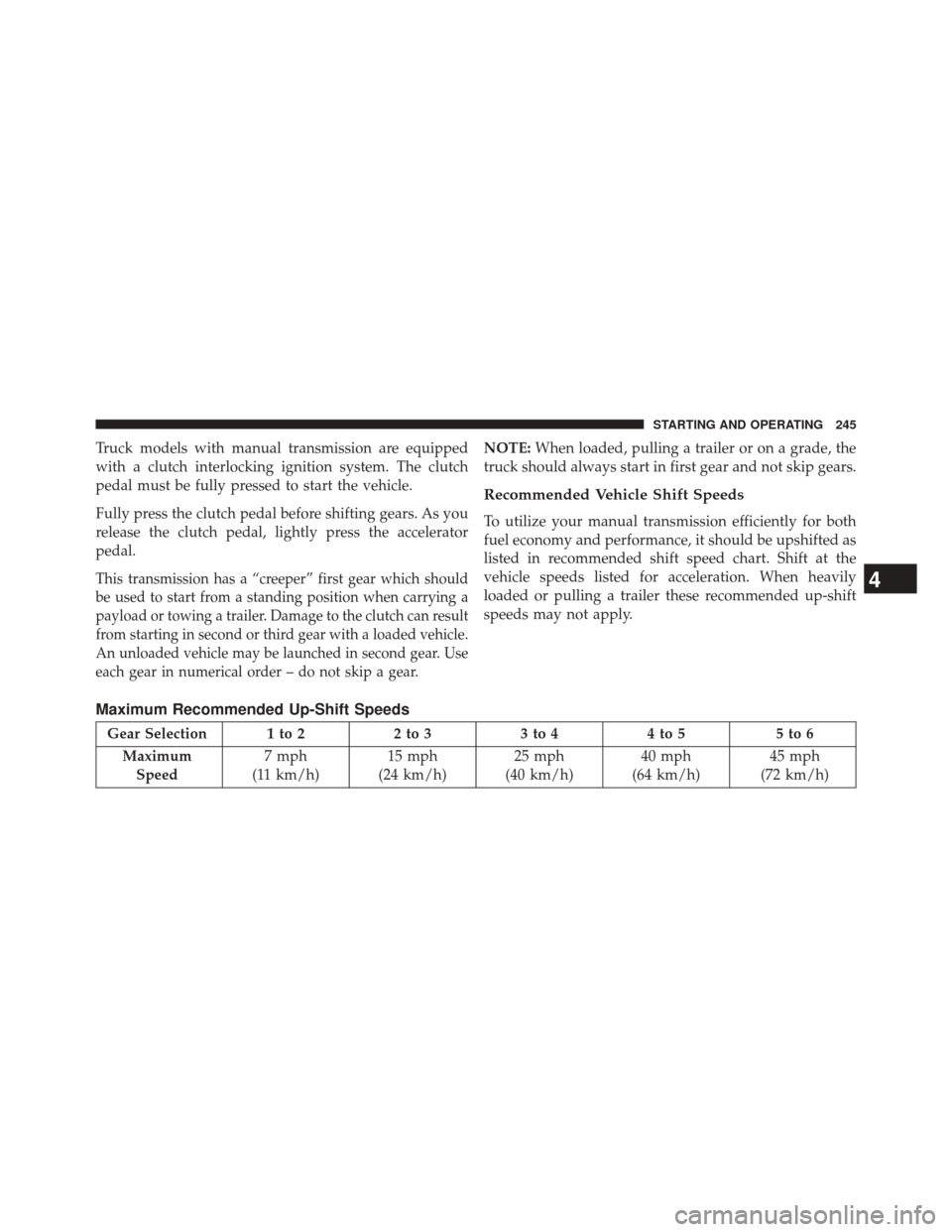
Recommended Vehicle Shift Speeds
To utilize your manual transmission efficiently for both
fuel economy and performance, it should be upshifted as
listed in recommended shift speed chart. Shift at the
vehicle speeds listed for acceleration. When heavily
loaded or pulling a trailer these recommended up-shift
speeds may not apply.
Maximum Recommended Up-Shift Speeds
Gear Selection 1 to 2 2 to 33 to 44 to 5 5 to 6
Maximum Speed 7 mph
(11 km/h) 15 mph
(24 km/h) 25 mph
(40 km/h) 40 mph
(64 km/h) 45 mph
(72 km/h)
4
STARTING AND OPERATING 245
Page 249 of 347
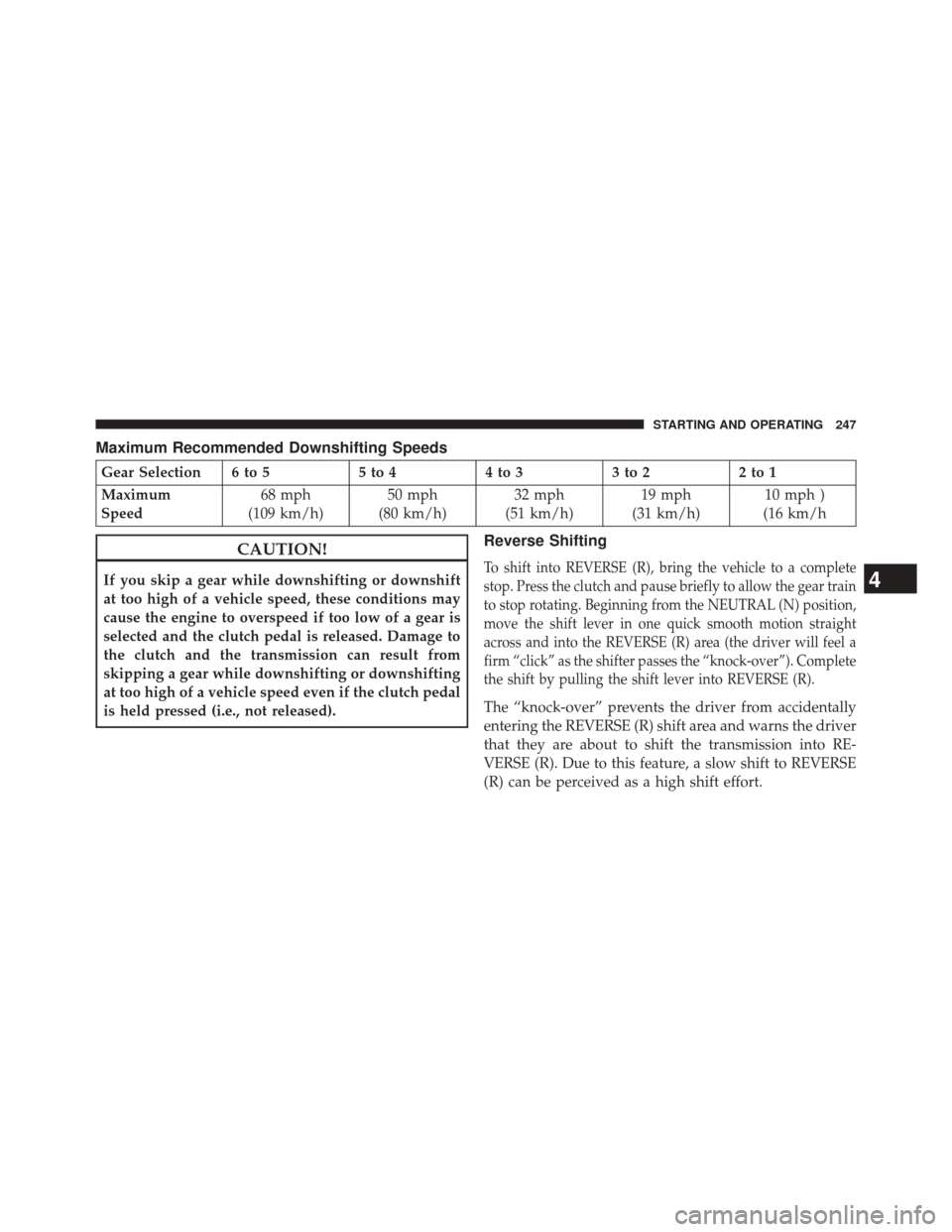
Maximum Recommended Downshifting Speeds
Gear Selection 6 to 55 to 44 to 33 to 22 to 1
Maximum
Speed 68 mph
(109 km/h) 50 mph
(80 km/h) 32 mph
(51 km/h) 19 mph
(31 km/h) 10 mph )
(16 km/h
CAUTION!
If you skip a gear while downshifting or downshift
at too high of a vehicle speed, these conditions may
cause the engine to overspeed if too low of a gear is
selected and the clutch pedal is released. Damage to
the clutch and the transmission can result from
skipping a gear while downshifting or downshifting
at too high of a vehicle speed even if the clutch pedal
is held pressed (i.e., not released).
Reverse Shifting
To shift into REVERSE (R), bring the vehicle to a complete
stop. Press the clutch and pause briefly to allow the gear train
to stop rotating. Beginning from the NEUTRAL (N) position,
move the shift lever in one quick smooth motion straight
across and into the REVERSE (R) area (the driver will feel a
firm “click” as the shifter passes the “knock-over”). Complete
the shift by pulling the shift lever into REVERSE (R).
The “knock-over” prevents the driver from accidentally
entering the REVERSE (R) shift area and warns the driver
that they are about to shift the transmission into RE-
VERSE (R). Due to this feature, a slow shift to REVERSE
(R) can be perceived as a high shift effort.
4
STARTING AND OPERATING 247
Page 250 of 347
To shift out of REVERSE bring the vehicle to a complete
stop and press the clutch. Shifting out of REVERSE prior
to a complete stop may cause high shift effort.
AUXILIARY SWITCHES — IF EQUIPPED
There can be up to five auxiliary switches located in the
lower switch bank of the instrument panel which can be
used to power various electronic devices and PTO
(Power Take Off) – If Equipped. Connections to the
switches are found under the hood in the connectors
attached to the auxiliary Power Distribution Center.
You have the ability to configure the functionality of the
auxiliary switches via the Electronic Vehicle Information
Center (EVIC) or Driver Information Display (DID). All
switches can now be configured for ignition or battery
power, saving or not saving state across a key cycle, and
momentary or latching switch operation.For further information on using the auxiliary switches,
please refer to the Ram Body Builders Guide by accessing
www.rambodybuilder.comand choosing the appropri-
ate links.
POWER TAKE OFF OPERATION — IF EQUIPPED
(CHASSIS CAB ONLY)
This vehicle when equipped with PTO Prep and either
the AS69RC automatic six-speed or G-56 manual six-
speed transmissions, will allow for an aftermarket upfit
with a transmission driven PTO (power take off). The
customer will have the ability to operate the PTO in
either a “stationary” or “mobile” mode. The vehicles will
be factory set to the “stationary” mode. To select ’mobile
mode’ You will need to enter the commercial vehicle
menu on the EVIC/DID screen and select mobile PTO
mode. Details of the PTO selection modes and further
PTO information is available at the Ram Truck Body-
builders web site. www.rambodybuilder.com
248 STARTING AND OPERATING
Page 251 of 347
AS69RC Six-Speed Automatic Transmission Only
The PTO drive gear (part of the AS69RC) operates at
torque converter turbine speed. The turbine speed will be
less than engine speed when the torque converter clutch
is not engaged and will be same as engine speed when
the torque converter clutch is engaged.
Stationary Mode
To operate the PTO in this mode the vehicle must meet
the following conditions:
•Be in PARK position (vehicles equipped with auto-
matic transmission.)
• PTO switch has been activated.
• Parking brake applied (vehicles equipped with
manual transmission).
• Brake pedal must not be applied.
• Vehicle engine must be running. •
No vehicle, brake or clutch switch faults present.
• PTO must be correctly installed using the vehicle
provided circuits.
The Electronic Vehicle Information Center (EVIC) or
Driver Information Display (DID) will display a �PTO
On� message for five seconds if the above conditions are
met. Otherwise, the EVIC/DID will display a message
�To Operate PTO Shift To Park� indicating what operator
action should be taken to engage the PTO mode.
The customer has the choice to operate the PTO by
utilizing the cruise control switches or by utilizing a
remote control (provided by the PTO supplier). To oper-
ate the feature using the cruise control switches, the
customer must first activate the PTO switch which will
turn on the PTO. In order to increase or decrease the
engine idle speed, to optimize the PTO function, the
“RESUME/ACCEL” and “DECEL” cruise switches can
4
STARTING AND OPERATING 249
Page 252 of 347
be used respectively. To disengage PTO operation and
return to “standard vehicle operation” simply toggle the
PTO switch to the OFF position.
The torque converter clutch (TCC) will automatically
engage at engine speeds above 1,200 RPM (engine speed)
in PTO stationary mode. Once engaged, the TCC will
remain applied and will not disengage until the engine
speed falls below 1,000 RPM. TCC engagement is desir-
able for certain types of PTO applications (Automatic
Transmission Only).
To operate the PTO via a remote switch, the customer
must make sure the above conditions are met. It is vital
for proper operation that the PTO and remote have been
installed correctly, paying special attention to ensure the
vehicle provided wiring has been connected properly.
This is the responsibility of the installer of the PTO and
switches/remote system. It is the responsibility of the
PTO manufacturer to ensure that their electrical (switchesand remote) system is compatible with the vehicle’s
electrical architecture and software functionality.
NOTE:
Single set speed can be programmed via the PTO
menu on the EVIC/DID screen. Further details are avail-
able at the Ram Truck Bodybuilders web site.
www.rambodybuilder.com www.ramtrucks.com.
Mobile Mode
To operate the PTO in this mode the vehicle must meet
the following conditions:
•Mobile mode is activated via the menu on the EVIC/
DID screen.
• (ON/OFF) switch has been activated.
• Vehicles with automatic transmission must be in PARK
or DRIVE.
• Parking brake must not be applied.
250 STARTING AND OPERATING
Page 272 of 347
JUMP STARTING
WARNING!
•To prevent personal injury or damage to clothing,
do not allow battery fluid to contact eyes, skin or
fabrics. Do not lean over a battery when connecting
jumper cables or allow cable clamps to touch each
other. Keep open flames or sparks away from
battery vent holes. Always wear eye protection
when working with batteries.
• Do not use a booster battery or any other booster
source that has a greater than 12 Volt system, i.e., do
not use a 24 Volt power source.
NOTE: Replacement batteries should both be of equal
size to prevent damage to the vehicle’s charging system.
Your vehicle is equipped with two 12 Volt batteries. If it
becomes necessary to use a booster battery with jumper cables to start a vehicle’s engine because its batteries are
discharged, the following procedure should be used:
Set the parking brake and place an automatic transmis-
sion in PARK (or NEUTRAL for a manual transmission).
Turn off lights, heater and other electrical loads. Observe
charge indicator (if equipped) in both batteries. If the
indicator (if equipped) is light or yellow on either battery,
replace that battery.
CAUTION!
Use the jump start procedure only when the charge
indicator (if equipped) in both batteries is dark in the
center. Do not attempt jump starting when either
battery charge indicator (if equipped) is bright or
yellow. If the charge indicator (if equipped) has a
green dot in the center, failure to start is not due to a
discharged battery and cranking system should be
checked.
270 WHAT TO DO IN EMERGENCIES
Page 278 of 347
▫Manual Transmission — If Equipped ........306
▫ Automatic Transmission — If Equipped ......306
▫ Noise Control System Required Maintenance &
Warranty .......................... .310
� FLUID CAPACITIES ....................315 �
FLUIDS, LUBRICANTS AND GENUINE
PARTS ............................. .316
▫ Engine ............................ .316
▫ Chassis ........................... .318
276 MAINTAINING YOUR VEHICLE
Page 279 of 347
ENGINE COMPARTMENT — 6.7L DIESEL — SIX-SPEED 68RFE (2500/3500 Models)
1 — Battery7 — Washer Fluid Reservoir
2 — Engine Coolant Reservoir 8 — Power Steering Fluid Reservoir
3 — Automatic Transmission Dipstick 9 — Power Distribution Center
4 — Brake Fluid Reservoir 10 — Engine Oil Dipstick
5 — Battery 11 — Engine Oil Fill
6 — Aux Power Distribution Center 12 — Air Cleaner Filter
6
MAINTAINING YOUR VEHICLE 277