2015 Peugeot 308 navigation
[x] Cancel search: navigationPage 345 of 416
05
343
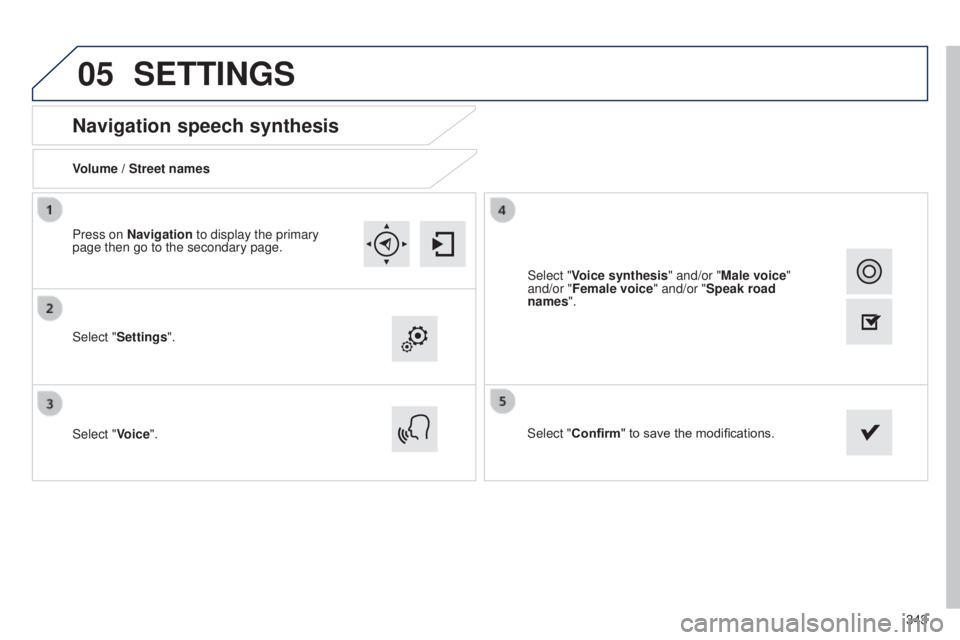
Navigation speech synthesis
Volume / Street names
Select "Settings".
Select "Voice".Select "Confirm" to save the modifications.
Press on Navigation to display the primary
page then go to the secondary page.
SETTINGS
Select "Voice synthesis" and/or "Male voice"
and/or "Female voice" and/or "Speak road
names".
Page 347 of 416
345
308_en_Chap10c_SMegplus_ed01-2015
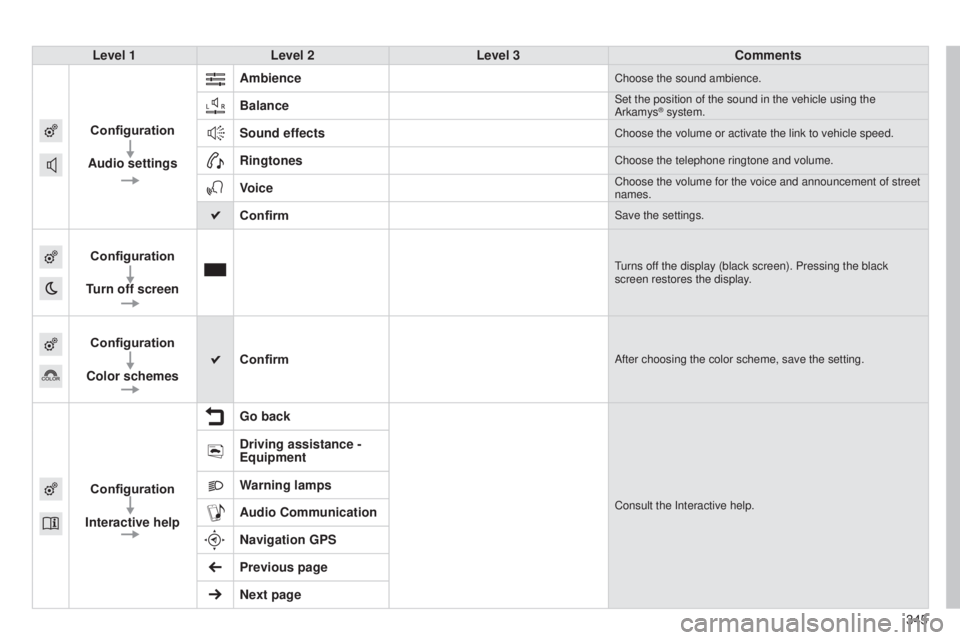
Level 1Level 2 Level 3 Comments
Configuration
Audio settings Ambience
Choose the sound ambience.
BalanceSet the position of the sound in the vehicle using the
Arkamys® system.
Sound effectsChoose the volume or activate the link to vehicle speed.
RingtonesChoose the telephone ringtone and volume.
VoiceChoose the volume for the voice and announcement of street
names.
ConfirmSave the settings.
Configuration
Turn off screenturns off the display (black screen). Pressing the black
screen restores the display.
Configuration
Color schemes ConfirmAfter choosing the color scheme, save the setting.
Configuration
Interactive help Go backConsult the Interactive help.
Driving assistance -
Equipment
Warning lamps
Audio Communication
Navigation GPS
Previous page
Next page
Page 356 of 416

07
354
CONNECTED SERVICES
Level 1Level 2
"Connected services"
Primary page
Driving assistance
applications, see following
page on "P
euge O t
CONN
e C t
APPS"*. Identification
DUN connection settings T
ransfer rateIt may be that certain new
generation smartphones
are not compatible with this
standard.
Secondary page
Internet navigation via
Bluetooth telephone Dial-
u p
Networking (D
u N).
* Depending on country.
Page 368 of 416

the following table groups together the answers to the most frequently as\
ked questions concerning your audio system.
FREqUENTLY ASKED q UESTIONS
qUESTION ANSWER SOLUTION
Navigation, guidance
t
he route calculation is
not successful. The guidance criteria may conflict with the current location (exclusion of
toll roads on a toll motorway). Check the guidance criteria on the Navigation
Menu, "Guidance options"\ "Define calculation
criteria".
I am unable to enter my
post code.
t
he system only accepts post codes of up to 5 characters.
t
he POIs do not appear.
t
he POIs have not been selected. Select the POIs in the list of POIs.
t
he risk areas audible
warning does not work.
t
he audible warning is not active. Activate audible warnings in the
g uidance options
menu, "Navigation - guidance", "Set parameters
for risk areas".
t
he system does not
suggest a detour around
an incident on the route.
t
he guidance criteria do not take account of
t
MC messages.Select the "Traffic info" function in the list of
guidance criteria.
I receive a Risk area alert
which is not on my route. Other than guidance, the system announces all Risk areas positioned in a\
cone located in front of the vehicle. It may provide an alert for a Risk\
area
located on nearby or parallel roads. Zoom in on the map to view the exact position of
the Risk area. Select "On the route" to no longer
receive alerts other than guidance or to reduce the
time for the announcement.
366
Page 384 of 416

05
382
PEUGEOT CONNECT USB
the system puts together playlists (temporary memory) created
over a period which depends on the capacity of the u SB device.
t
he other sources are available during this time.
t
he playlists are updated each time the ignition is switched off or
each time a
u SB memory stick is connected.
When connecting for the first time, the classification suggested
is by folder. When you reconnect, the classification selected
previously is retained. Connect the memory stick to the port, directly or
using a lead. If the audio equipment is switched
on, the
u SB source is detected as soon as it
is connected. Play begins automatically after a
delay which depends on the capacity of the u SB
memory stick.
The file formats supported are .mp3 (mpeg1
layer 3 only) and .wma (standard 9 only,
128 kbits/sec compression).
Certain playlist formats are supported (.m3u, ...)
On reconnection of the previous memory stick
used, play is resumed automatically with the last
track played.
t
his unit consists of a
u
SB
port and an auxiliary Jack
socket*. The audio files are
transmitted from a portable
device - digital player or a
u
SB memory stick - to your
P
euge
O
t
Connect Sound
(RD5) and heard via the
vehicle's speakers.
u
SB memory stick or Apple
® player of generation 5 or later:
-
u
se only
u
SB memory sticks formatted FA
t
32 (File
Allocation
table),
-
the Apple® player lead is essential,
-
navigation through the file database is also possible by
means of the steering mounted controls.
Using the PEUGEOT CONNECT USB
Connecting a USB memory stick
Other Apple
® players of earlier generations and players using the
M
t
P protocol*:
-
play via Jack-Jack lead only (not supplied),
-
navigation through the file database is from the portable
device. * Depending on vehicle.
Page 385 of 416
05
LIST
LIST
383
Using the PEUGEOT CONNECT USB
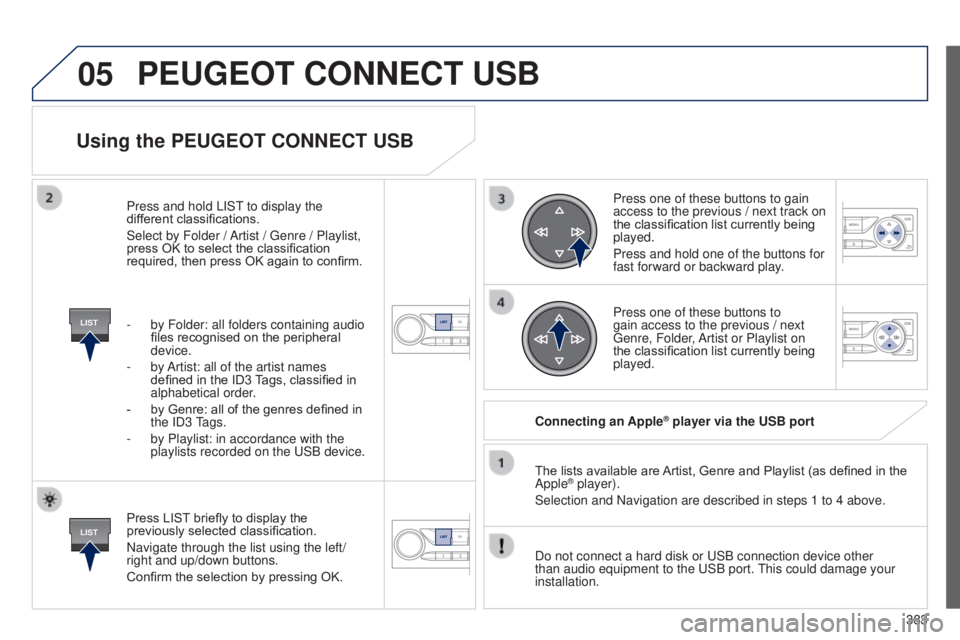
Press LIST briefly to display the
previously selected classification.
Navigate through the list using the left/
right and up/down buttons.
Confirm the selection by pressing OK.The lists available are Artist, Genre and Playlist (as defined in the
Apple
® player).
Selection and Navigation are described in steps 1 to 4 above.
Do not connect a hard disk or
u SB connection device other
than audio equipment to the
u SB port.
t
his could damage your
installation. Connecting an Apple
® player via the USB port
Press one of these buttons to gain
access to the previous / next track on
the classification list currently being
played.
Press and hold one of the buttons for
fast forward or backward play.
Press one of these buttons to
gain access to the previous / next
g
enre, Folder, Artist or Playlist on
the classification list currently being
played.
Press and hold LIS
t
to display the
dif
ferent classifications.
Select by Folder / Artist /
g
enre / Playlist,
press OK to select the classification
required, then press OK again to confirm.
-
by Folder: all folders containing audio
files recognised on the peripheral
device.
-
by
Artist: all of the artist names
defined in the ID3 Tags, classified in
alphabetical order.
-
by Genre: all of the genres defined in
the
ID3
tags.
-
by Playlist: in accordance with the
playlists recorded on the
u
SB device.
PEUGEOT CONNECT USB
Page 399 of 416

397
Ignition on...................................................... 117
Indicators, direction .....................195, 243, 250
Indicator lamps, status
.............................. 15
, 20
Inflating accessories (using the kit)
..............234
Inflating tyres
.......................................... 10, 29 6
Inputs for audio system
...91, 318, 322, 382, 384
Instrument panel
...............................
..............12
Instrument panel screen
................... 1
2, 35, 130
Intelligent
t
ra
ction Control
............................ 2
02
Interactive help
................................................ 44
Interior fittings
................................................. 88
Interior mood lighting
.................................... 19 4
Inter-vehicle time
........................................... 15
4
ISOFIX mountings ................................. 221, 222
Keeping children safe
............ 20
6, 208, 212-228
Key
............................................................ 50- 67
Key in ignition warning
..................................115Keyless
en try and
Starting ....................................5 9 - 6 4 , 11 6 , 11 9
Key with remote control
.....................5 2 - 5 4 , 11 9
Jack
........
....................................................... 235
Jack cable
..................................................... 322
JACK socket
..................... 88, 91, 322, 382, 384
Jukebox (playing)
.......................................... 323Labels, identification
.....................................
29
6
Lamps, warning and indicator
..................................................13 -27
L
e
D
daytime running
lamps
......................... 1
85, 243, 244, 246, 247
L
eD
s - light-emitting
diodes
........................................243, 248, 250
Level, AdBlue
® additive ................................. 279
Level, brake fluid ........................................... 28
9
Level, headlamp wash
.......................... 191, 29 0
Levels and checks
................ 276, 277, 288 -290
Light-emitting diodes - L
e
Ds
.......................................... 2
43, 248, 250
Lighting
................
.......................................... 19 4
Lighting bulbs (replacement)
...................................... 243-252
Lighting control stalk
..................................... 181
Lighting dimmer
..............................
................34
Lighting, guide-me home
...................... 185, 18 6
Lighting, interior
.................................... 193, 19 4
Lighting on reminder
..................................... 18 4
Loading
................................................... 10, 270
Load reduction mode
.................................... 263
Load space cover
...............................
.............96
Locating your vehicle
................................ 5
4, 58
Long objects, transporting
.............................. 93
L
ow fuel level
............................................ 22, 77
Lumbar adjustment
................................... 8
0, 84
J
K
L
Main beam ............................ 181, 243, 245, 247
Maintenance ................................................... 10
Map reading lamps
....................................... 193
Markings, identification
.................................296
Massage function
........................................... 84
Mat
.................................................................. 89
Memorising a speed
..................................... 13 9
Menu
........................... 306, 308, 310, 324, 326,
328, 344, 356, 358
Menu, main
................................................... 376
Menus (
tou
ch screen)
.................................. 3
02
Mini fuel level
.................................................. 22
Mirror, rear view
............................................ 180
Mirrors, door .......................................... 16 3 , 178
Mountings for ISOFIX seats
.................221, 222
MP3 CD
................................................. 318, 379
M
Navigation ..................................................... 324
Number plate lamps ...................................... 2
52
N
Oil filter .......................................................... 291
Oil level .................................................... 32, 288
Opening the bonnet
...................................... 2
75
Opening the boot
.......................... 5
7, 59, 61, 62
Opening the doors
.............................. 5
1, 57, 59
Operation indicator lamps
........................13 -27O
.
Alphabetical index