2015 Peugeot 308 setting time
[x] Cancel search: setting timePage 137 of 416

135
308_en_Chap04_conduite_ed01-2015
Dynamic pack
this pack conditions:
- t he visual ambience, with specific back-
lighting for the instrument panel,
-
t
he acoustic ambience of the engine,
-
t
he power assistance for the steering,
-
acceleration,
-
i
nformation to the driver in the instrument
panel on dynamic settings.
th
is function is only available when
Park Assist is not selected and snow
mode in the automatic gearbox is not
selected.
If Park Assist
is switched on, this
automatically deactivates the function.
Activation
F Press the end of the wiper control stalk to display in the instrument panel the different
information on dynamic settings.
th
e telemetry data (longitudinal and
lateral acceleration, power produced,
turbocharger pressure, ...) are given as
an indication only.
F
P
ress nd hold the button until the back-
lighting in the instrument panel changes.
th
e L
eD i
n the button stays on.
Display
F Press repeatedly to go from one screen to another.
If the L
eD f
lashes, activation is not
possible (for example if Park Assist or
snow mode is selected) and so the back-
lighting returns to its normal mode.
If the L
eD c
ontinues flashing for a long
time, contact a P
e
uge
Ot
dealer or a
qualified workshop.
With an automatic gearbox, gear
changes are faster.
4
Driving
Page 145 of 416
143
308_en_Chap04_conduite_ed01-2015
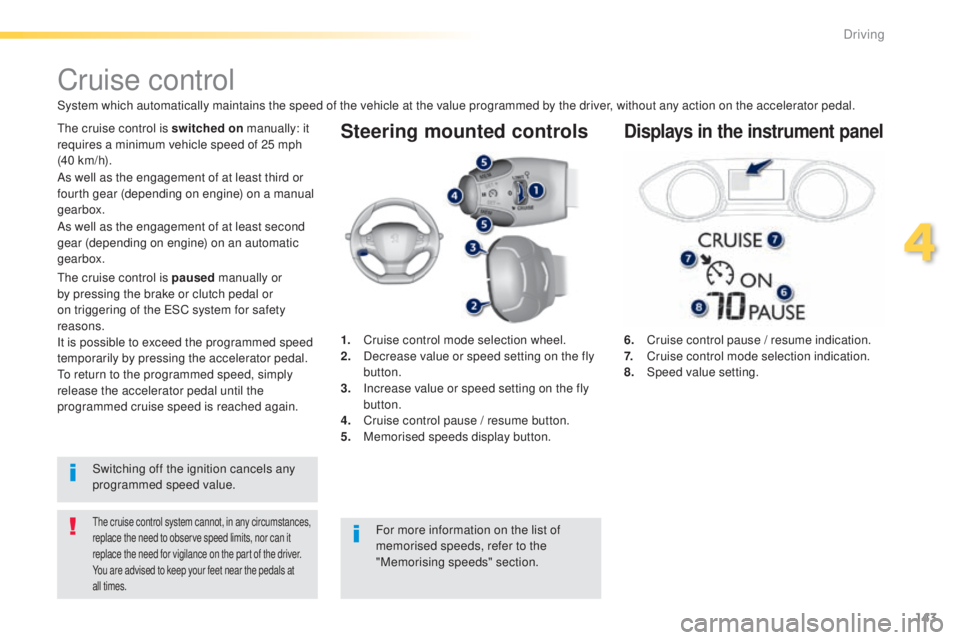
Steering mounted controls
6. Cruise control pause / resume indication.
7. Cruise control mode selection indication.
8.
Spe
ed value setting.
Cruise control
System which automatically maintains the speed of the vehicle at the value programmed by the driver, without any action on the accelerator pedal.
the cruise control system cannot, in any circumstances,
replace the need to observe speed limits, nor can it
replace the need for vigilance on the part of the driver.
You are advised to keep your feet near the pedals at
all times.
the cruise control is switched on manually: it
requires a minimum vehicle speed of 25 mph
(40 km/h).
1.
C
ruise control mode selection wheel.
2.
D
ecrease value or speed setting on the fly
button.
3.
I
ncrease value or speed setting on the fly
button.
4.
C
ruise control pause / resume button.
5.
M
emorised speeds display button.Displays in the instrument panel
Switching off the ignition cancels any
programmed speed value.
th
e cruise control is paused
manually or
by pressing the brake or clutch pedal or
on triggering of the e SC system for safety
reasons.
It is possible to exceed the programmed speed
temporarily by pressing the accelerator pedal.
to r
eturn to the programmed speed, simply
release the accelerator pedal until the
programmed cruise speed is reached again. As well as the engagement of at least third or
fourth gear (depending on engine) on a manual
gearbox.
For more information on the list of
memorised speeds, refer to the
"Memorising speeds" section.
As well as the engagement of at least second
gear (depending on engine) on an automatic
gearbox.
4
Driving
Page 146 of 416
144
308_en_Chap04_conduite_ed01-2015
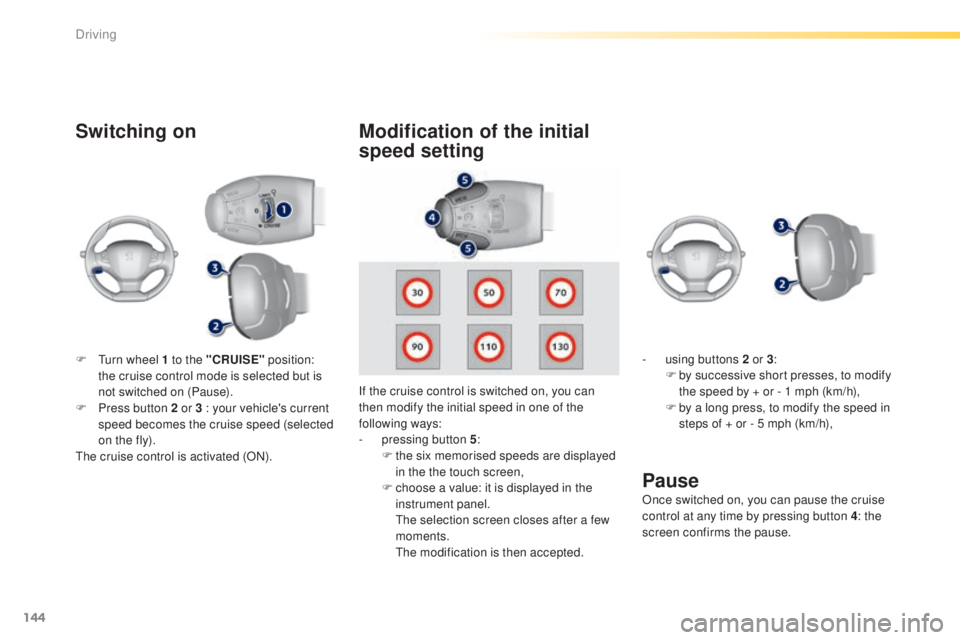
Switching on
If the cruise control is switched on, you can
then modify the initial speed in one of the
following ways:
-
p
ressing button 5 :
F
t
he six memorised speeds are displayed
in the the touch screen,
F
c
hoose a value: it is displayed in the
instrument panel.
t
h
e selection screen closes after a few
moments.
t
he
modification is then accepted.
Pause
F turn wheel 1 to the "CRUISE" position:
the cruise control mode is selected but is
not switched on (Pause).
F
P
ress button 2 or 3 : your vehicle's current
speed becomes the cruise speed (selected
on the fly).
th
e cruise control is activated (ON).
Modification of the initial
speed setting
- using buttons 2 or 3 :
F b y successive short presses, to modify
the speed by + or - 1 mph (km/h),
F
b
y a long press, to modify the speed in
steps of + or - 5 mph (km/h),
Once switched on, you can pause the cruise
control at any time by pressing button 4: the
screen confirms the pause.
Driving
Page 149 of 416
147
308_en_Chap04_conduite_ed01-2015
the active cruise control operates by
day and at night, in fog or moderate
rainfall.
the system does not act on the braking
system, but works only with engine braking.
the regulation range is limited: there
will no longer be any adjustment of
speed if the difference between the
programmed speed setting and the
speed of the vehicle in front becomes
too high.
th
e selection of this system deactivates
the display of inter-vehicle time.
If the difference between the
programmed speed setting and the
speed of the vehicle in front is too
great, the speed cannot be adjusted:
the cruise control is automatically
deactivated.
th
e active cruise control is switched on
manually,
it requires that the speed of the vehicle be between
25 mph (40 km/h) and 90 mph (150 km/h).
General points
the active cruise control can be paused
manually with the control, or automatically:
-
b
y pressing the brake or clutch pedal,
-
i
n the event of operation of the e SP, for
safety reasons,
-
i
n the event of an action of the electric
parking brake control,
-
w
hen an inter-vehicle time threshold is
reached (calculated according to the
relative speeds of your vehicle and the
vehicle in front and the inter-vehicle time
setting chosen),
-
w
hen the distance between your vehicle
and the one in front becomes to small,
-
w
hen the speed of the vehicle in front is to
low,
-
w
hen the speed of your vehicle becomes
too low.
th
e active cruise control cannot in any
circumstances replace the observation
of speed limits, nor the need for the
vigilance on the part of the driver.
It is recommended that you always keep
your feet close to the pedals.
the
inter-vehicle time setting is
memorised when switching off the
ignition.
As well as the engagement of at least third or
fourth gear (depending on engine) on a manual
gearbox.
As well as the engagement of at least second
gear (depending on engine) on an automatic
gearbox.
If the cruise speed setting is above 90 mph
(150 km/h), the active cruise control switches to
normal cruise control mode (without automatic
adjustment of the safety inter-vehicle distance).
4
Driving
Page 150 of 416
148
308_en_Chap04_conduite_ed01-2015
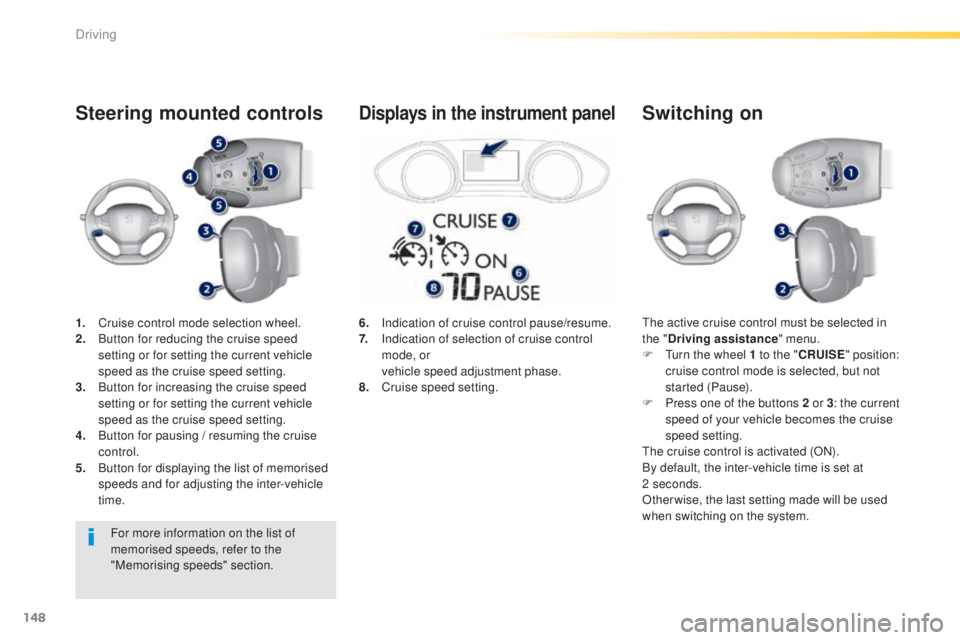
1. Cruise control mode selection wheel.
2. Button for reducing the cruise speed
setting or for setting the current vehicle
speed as the cruise speed setting.
3.
B
utton for increasing the cruise speed
setting or for setting the current vehicle
speed as the cruise speed setting.
4.
B
utton for pausing / resuming the cruise
control.
5.
B
utton for displaying the list of memorised
speeds and for adjusting the inter-vehicle
time.
Steering mounted controls
the active cruise control must be selected in
the " Driving assistance " menu.
F
t
u
rn the wheel 1 to the " CRUISE" position:
cruise control mode is selected, but not
started (Pause).
F
P
ress one of the buttons 2 or 3 : the current
speed of your vehicle becomes the cruise
speed setting.
th
e cruise control is activated (ON).
By default, the inter-vehicle time is set at
2
seconds.
Otherwise, the last setting made will be used
when switching on the system.
Switching on
6. Indication of cruise control pause/resume.
7. I ndication of selection of cruise control
mode, or
v
ehicle speed adjustment phase.
8.
C
ruise speed setting.
Displays in the instrument panel
For more information on the list of
memorised speeds, refer to the
"Memorising speeds" section.
Driving
Page 151 of 416
149
308_en_Chap04_conduite_ed01-2015
Modification of the cruise
control speed and/or
the inter-vehicle time
Modification of the cruise
control speed only
Buttons 2 (SET+) and 3 (SET-)
If the cruise control is on, you can modify the
speed:
F
b
y successive short presses, to modify by
steps of + or -
1 mph (km/h),
F
b
y a maintained press, to modify in steps
of
+ or - 5 mph (km/h).
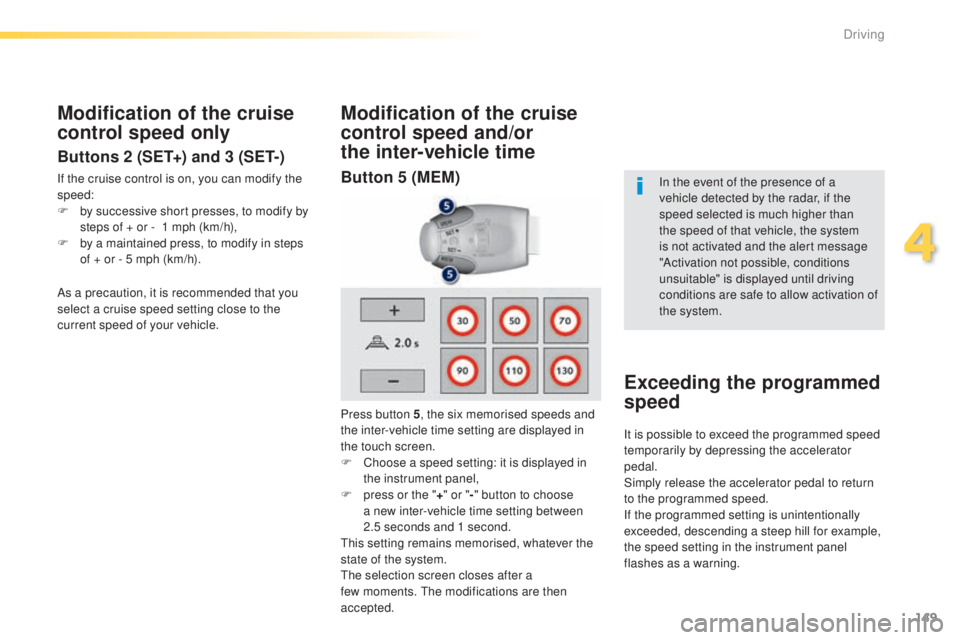
Press button 5, the six memorised speeds and
the inter-vehicle time setting are displayed in
the touch screen.
F
C
hoose a speed setting: it is displayed in
the instrument panel,
F
p
ress or the "+" or " -" button to choose
a new inter-vehicle time setting between
2.5
seconds and 1 second.
th
is setting remains memorised, whatever the
state of the system.
th
e selection screen closes after a
few
moments. t
h
e modifications are then
accepted. In the event of the presence of a
vehicle detected by the radar, if the
speed selected is much higher than
the speed of that vehicle, the system
is not activated and the alert message
"Activation not possible, conditions
unsuitable" is displayed until driving
conditions are safe to allow activation of
the system.
Exceeding the programmed
speed
As a precaution, it is recommended that you
select a cruise speed setting close to the
current speed of your vehicle.
It is possible to exceed the programmed speed
temporarily by depressing the accelerator
pedal.
Simply release the accelerator pedal to return
to the programmed speed.
If the programmed setting is unintentionally
exceeded, descending a steep hill for example,
the speed setting in the instrument panel
flashes as a warning.
Button 5 (MEM)
4
Driving
Page 152 of 416
150
308_en_Chap04_conduite_ed01-2015
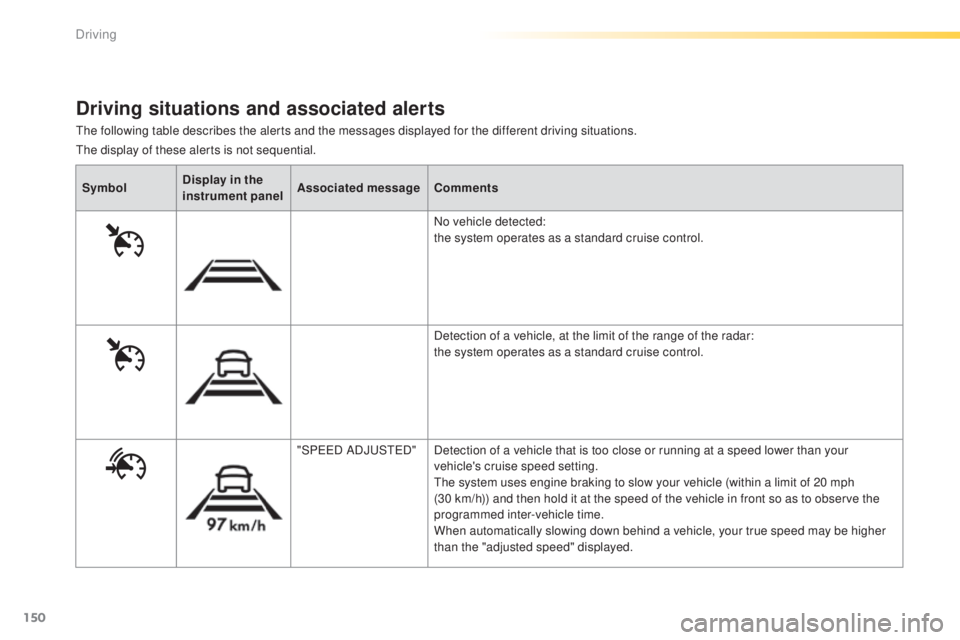
the following table describes the alerts and the messages displayed for the different driving situations.
Driving situations and associated alerts
SymbolDisplay in the
instrument panel Associated message
Comments
No vehicle detected:
the system operates as a standard cruise control.
Detection of a vehicle, at the limit of the range of the radar:
the system operates as a standard cruise control.
"SP
ee
D
ADJ
uSt
e
D
"Detection of a vehicle that is too close or running at a speed lower than your
vehicle's cruise speed setting.
th
e system uses engine braking to slow your vehicle (within a limit of 20 mph
(30
km/h)) and then hold it at the speed of the vehicle in front so as to observe the
programmed inter-vehicle time.
When automatically slowing down behind a vehicle, your true speed may be higher
than the "adjusted speed" displayed.
the
display of these alerts is not sequential.
Driving
Page 188 of 416

186
308_en_Chap05_visibilite_ed01-2015
Automatic illumination of
headlamps
Activation
F turn the ring to the "AUTO" position. th e
activation of the function is accompanied
by the display of a message.
When a low level of ambient light is detected
by a sunshine sensor, the number plate
lamps,
s
idelamps and dipped beam headlamps
are switched on automatically, without any
action on the part of the driver. t
h
ey can also
come on if rain is detected, at the same time as
automatic operation of the windscreen wipers.
As soon as the brightness returns to a
sufficient level or after the windscreen wipers
are switched off, the lamps are switched off
automatically.
Deactivation
F turn the ring to another position. Deactivation of the function is
accompanied by the display of a message.
Operating fault
In the event of a malfunction of the
sunshine sensor, the lighting comes
on, this warning lamp is displayed
In fog or snow, the sunshine sensor
may detect sufficient light. In this
case, the lighting will not come on
automatically.
Do not cover the sunshine sensor,
coupled with the rain sensor and
located in the centre of the windscreen
behind the rear view mirror; the
associated functions would no longer
be controlled.
Automatic "guide-me-
home" lighting
When the automatic illumination of headlamps
function is activated, under low ambient
light the dipped beams headlamps come on
automatically when the ignition is switched off.
Activation or deactivation, as well as the
duration of the guide-me-home lighting, is
set in the " Driving assistance " menu, then
" Vehicle settings " in the secondary page.
Contact a P
e
uge
Ot
dealer or a qualified
workshop. in the instrument panel accompanied by an
audible signal and/or a message.
Visibility