Page 191 of 285
04
VOL+
VOL-
189
301_en_Chap12a_RD5(RD45)_ed01-2014
AUDIO
Auxiliary socket (AUX)
Auxiliary JACK socket
Do not connect a device to the USB port and to the auxiliary Jack
socket at the same time.The auxiliary Jack socket permits the connection of a
portable non-mass storage device or an Apple
® player if
not recognised by the USB port.
Connect the portable device to the auxiliary Jack socket using a
suitable cable (not supplied). Press the
SRC/TEL button several times
in succession and select " AUX".
First adjust the volume on your portable device.
Then adjust the volume of the audio
system.
The display and management of controls is on the
portable device.
Page 192 of 285

04
190
301_en_Chap12a_RD5(RD45)_ed01-2014
AUDIO
Streaming - Playing audio files via
Bluetooth
Depending on the compatibility of the phonePair/connect the telephone: see the "USING THE
TELEPHONE" section.
Streaming allows music files on a telephone to be heard via the
vehicle's speakers.
The telephone must support the appropriate bluetooth profiles
(Profiles A2DP / AVRCP).
Activate the streaming source by pressing SRC/
TEL. Control of playback is via the audio system. The
contextual information can be displayed in the screen.
In certain cases, playing of the audio files must be initiated from the
telephone.
The audio quality depends on the quality of the transmission from
the telephone.
Play mode
The play modes available are:
-
Normal: the tracks are played in order
, depending on the
classification of the selected files.
-
Random: the tracks in an album or folder are played in a random
order
.
-
Random all: all of the tracks saved in the media are played in
random order
.
-
Repeat: the tracks played are only those from the current album
or folder
.Press the control knob for access to
the contextual menu.
or
Press MENU.
Select "Multimedia" and confirm.
Select "Media parameters " and
confirm.
Select "Playback mode" and
confirm.
Select the desired play mode then
press the control knob to confirm and
save the modifications.
Page 193 of 285
_ed01-2014
USING THE TELEPHONE
Pairing a telephone
First connection
The services offered depend on the network, the SIM card and the compatibility of the B\
luetooth tel")
05
191
301_en_Chap12a_RD5(RD45)_ed01-2014
USING THE TELEPHONE
Pairing a telephone
First connection
The services offered depend on the network, the SIM card and the compatibility of the B\
luetooth telephone used.
Consult your telephone's manual and your operator to find out which services are available to you.
Activate the telephone's Bluetooth function and
ensure that it is "visible to all" (refer to the telephone
user guide). Press MENU. A window is displayed "
Search in progress…".
Select the telephone to be connected
from the list. Only one telephone can
be connected at a time. Select "Search for a device".
For safety reasons and because they require prolonged attention on the p\
art of the driver, the operations for pairing of the Bluetooth mobile
telephone with the Bluetooth hands-free system of your audio system must\
be carried out with the
vehicle stationary and the ignition on.
Visit www.peugeot.co.uk for more information (compatibility, additional help, ...).
Select "Bluetooth connection " and
confirm.
Page 194 of 285

05
192
301_en_Chap12a_RD5(RD45)_ed01-2014
USING THE TELEPHONE
A virtual keypad is displayed on the
screen: enter a code of at least 4 digits
then press the control knob to confirm.
A message is displayed on the screen of the
telephone: enter the same code and confirm. A message appears in the screen to confirm the result of the
connection.
Pairing can also be initiated from the telephone by searching for
detected Bluetooth devices. Accept the connection to the telephone.
If pairing fails, try again; the number of attempts is not limited. The directory and the calls list can be accessed after the
synchronisation period (if the telephone is compatible).
Automatic connection must be configured in the telephone to allow
the connection each time the vehicle is started.
In some cases, the reference number of the telephone or the
Bluetooth address may appear instead of the name of the telephone.
Pair/connect the telephone then listen: see the AUDIO section.
Streaming - Playing audio files via
Bluetooth
Page 196 of 285

05
194
301_en_Chap12a_RD5(RD45)_ed01-2014
USING THE TELEPHONE
The telephone connection automatically includes hands free operation
and audio streaming.
The ability of the system to connect to just one profile depends on the
telephone. Both profiles may connect by default. Press MENU.
Select "Bluetooth connection " and
confirm. Indicates connection of the audio steaming profile.
Managing connections
Select "Connections management"
and confirm. The list of paired
telephones is displayed. Select a telephone and confirm.
Indicates connection of the hands-free profile.
Then select and confirm:
- "Connect telephone
" / "Disconnect
telephone": to connect / disconnect
the telephone or the hands-free
connection only.
- "Connect media player" /
"Disconnect media player": to
connect / disconnect only streaming.
- "Connect telephone + media
player" / "Disconnect telephone +
media player": to connect /
disconnect the telephone (hands-free
and streaming).
-
"Delete connection": to delete the
pairing.
Indicates that a device is connected.
Page 201 of 285
05
199
301_en_Chap12a_RD5(RD45)_ed01-2014
USING THE TELEPHONE
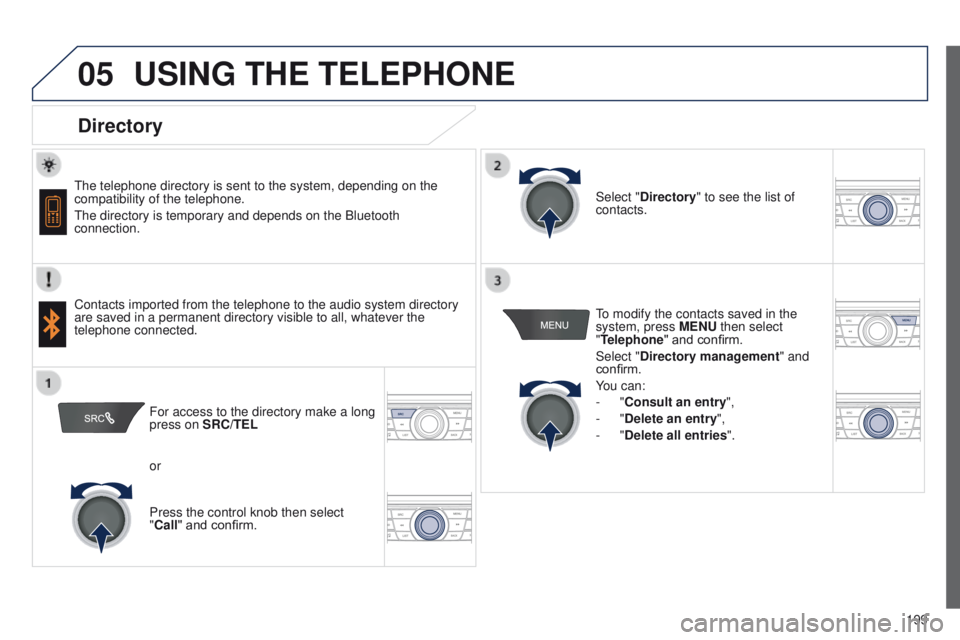
Directory
The telephone directory is sent to the system, depending on the
compatibility of the telephone.
The directory is temporary and depends on the Bluetooth
connection.
Contacts imported from the telephone to the audio system directory
are saved in a permanent directory visible to all, whatever the
telephone connected.To modify the contacts saved in the
system, press MENU then select
"Telephone" and confirm.
Select "Directory management
" and
confirm.
You can:
-
"Consult an entry",
-
"Delete an entry",
-
"Delete all entries".
Select "Directory
" to see the list of
contacts.
For access to the directory make a long
press on SRC/TEL
or
Press the control knob then select
"Call" and confirm.
Page 202 of 285

06
200
301_en_Chap12a_RD5(RD45)_ed01-2014
Press ¯ to display the audio settings
menu.
The settings available are:
-
Ambience,
-
Bass,
-
Treble,
-
Loudness,
-
Distribution: Personalised or Driver
,
-
Left / right balance,
-
Fader (front / rear balance),
-
Auto. volume.
Screen C
The distribution (or spatialisation using the Arkamys© system), is
an audio process which allows the sound quality to be improved
according to the setting chosen, corresponding to the position of the
listeners in the vehicle.
AUDIO SETTINGS
Select and confirm " Other settings…"
to display the next setting in the list. The Ambience, Treble and Bass
audio settings are different and
independent for each sound source.
On-board audio: Arkamys
© Sound Staging.
With Sound Staging, the driver and passengers are immersed in an
"audio scene" recreating the natural atmosphere of an auditorium:
truly a part of the scene and its surroundings.
This new sensation is made possible by software in the audio
system which processes the digital signals from the media players
(radio, CD, MP3…) without changing the audio settings. This
processing takes account of the characteristics of the passenger
compartment to produce optimum results.
The Arkamys
© software installed in your audio system processes
the digital signal from the media players (radio, CD, MP3, ...) and
recreates a natural musical scene, with harmonious placement of
instruments and voices in the space in front of passengers, level
with the windscreen.
Page 205 of 285
_ed01-2014
FREqUENTLY ASKED q UESTIONS
The following tables contain answers to the most frequently asked questi\
ons.
q
UESTION ANSWER SOLUTION
There is a difference in")
203
301_en_Chap12a_RD5(RD45)_ed01-2014
FREqUENTLY ASKED q UESTIONS
The following tables contain answers to the most frequently asked questi\
ons.
q
UESTION ANSWER SOLUTION
There is a difference in
sound quality between
the different audio
sources (radio, CD...). For optimum sound quality, the audio settings (Volume, Bass, Treble,
Ambience, Loudness) can be adapted to the different sound sources,
which may result in audible differences when changing source (radio,
CD...). Check that the audio settings (Volume, Bass,
Treble, Ambience, Loudness) are adapted to
the sources listened to. It is advisable to set
the AUDIO functions (Bass, Treble, Front-Rear
Fader, Left-Right Balance) to the middle position,
select the musical ambience "None" and set the
loudness correction to the "Active" position in CD
mode or to the "Inactive" position in radio mode.
When changing the
settings for treble and
bass, the ambience
setting is deselected.
When changing the
ambience setting, treble
and bass are reset to
zero. Choosing an ambience imposes settings for treble and bass. Modifying
one without the other is not possible.
Modify the treble and bass settings or the
ambience setting to obtain the desired sound
quality.
When changing the
balance setting,
distribution is deselected. Choosing a distribution setting imposes a balance setting. Modifying one\
without the other is not possible.
Modify the balance setting or the distribution
setting to obtain the desired sound quality.