Page 315 of 340
313
2008_en_Chap12c_RDE2_ed01-2015
QUESTIONANSWER SOLUTION
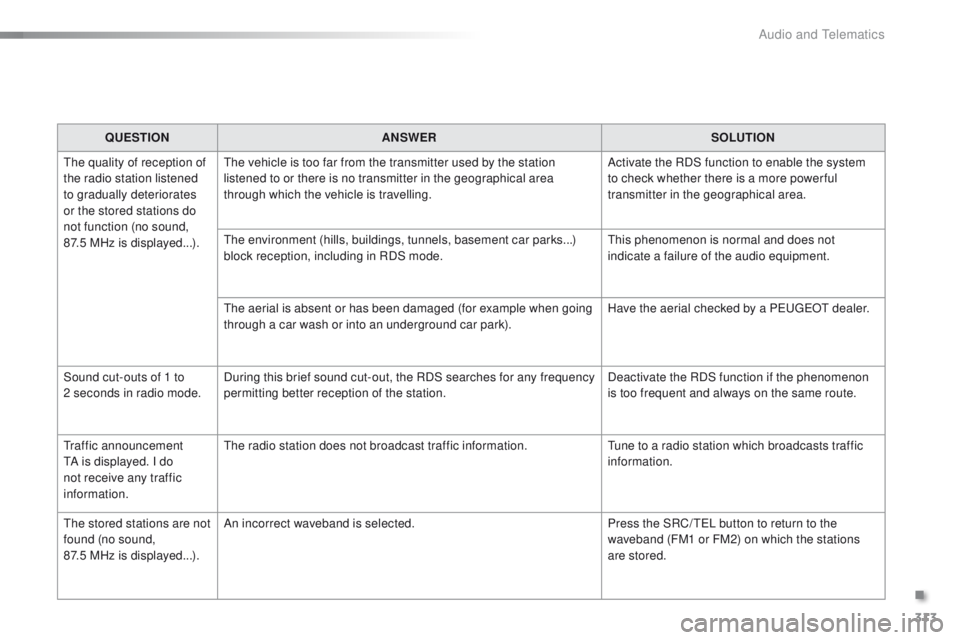
The quality of reception of
the radio station listened
to gradually deteriorates
or the stored stations do
not function (no sound,
87.5
MHz is displayed...). The vehicle is too far from the transmitter used by the station
listened to or there is no transmitter in the geographical area
through which the vehicle is travelling.
Activate the RDS function to enable the system
to check whether there is a more power ful
transmitter in the geographical area.
The environment (hills, buildings, tunnels, basement car parks...)
block reception, including in RDS mode. This phenomenon is normal and does not
indicate a failure of the audio equipment.
The aerial is absent or has been damaged (for example when going
through a car wash or into an underground car park). Have the aerial checked by a PEUGEOT dealer.
Sound cut-outs of 1 to
2
seconds in radio mode. During this brief sound cut-out, the RDS searches for any frequency
permitting better reception of the station. Deactivate the RDS function if the phenomenon
is too frequent and always on the same route.
Traffic announcement
TA is displayed. I do
not receive any traffic
information. The radio station does not broadcast traffic information.
Tune to a radio station which broadcasts traffic
information.
The stored stations are not
found (no sound,
87.5 MHz is displayed...). An incorrect waveband is selected.
Press the SRC/ TEL button to return to the
waveband (FM1 or FM2) on which the stations
are stored.
.
Audio and Telematics
Page 319 of 340
317
2008_en_Chap12d_RDE1_ed01-2015
Audio system
Contents
First steps
3 18
Steering mounted controls
3
19
Radio
320
Media
322
Audio settings
3
24
Screen menu map(s)
3
25
Frequently asked questions
3
26
As a safety measure, the driver must only carry out operations
which require prolonged attention while the vehicle is stationary.
When the engine is switched off and to prevent discharging of
the battery, the system switches off after activation of economy
mode.
.
Audio and Telematics
Page 320 of 340
318
2008_en_Chap12d_RDE1_ed01-2015
First steps
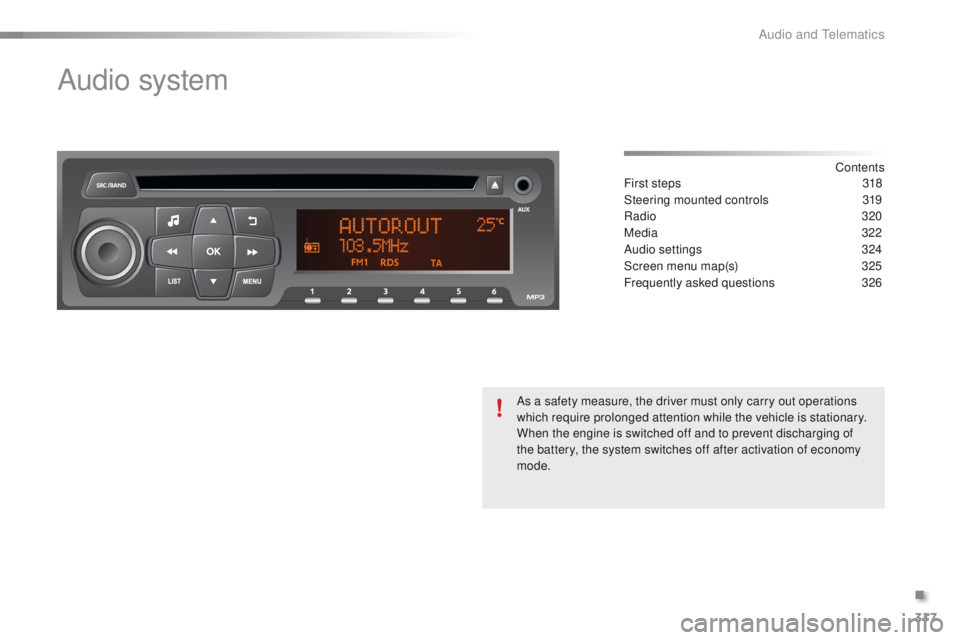
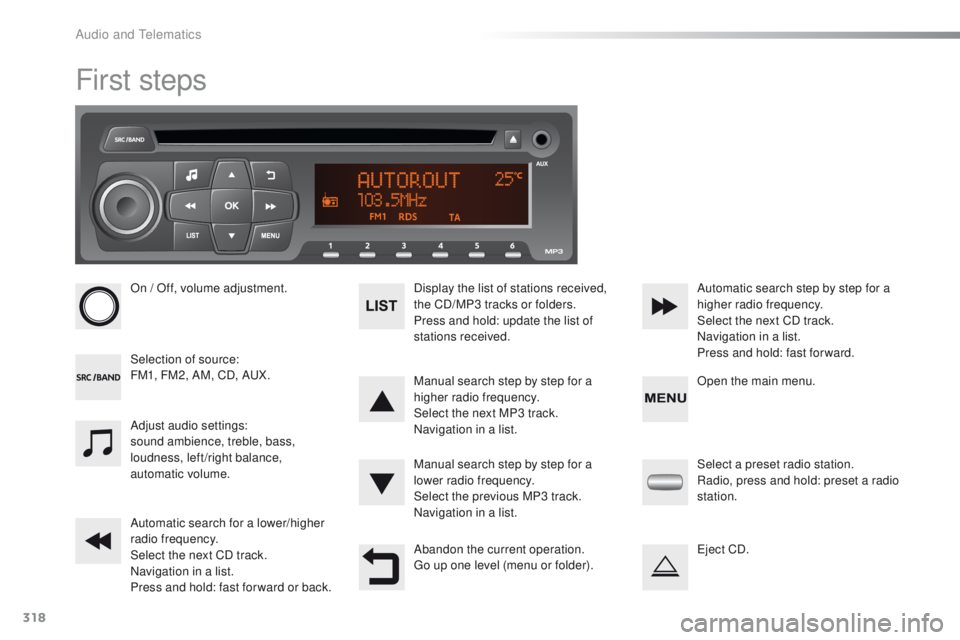
On / Off, volume adjustment.
Selection of source:
FM1, FM2, AM, CD, AUX.Display the list of stations received,
the CD/MP3 tracks or folders.
Press and hold: update the list of
stations received.
Manual search step by step for a
higher radio frequency.
Select the next MP3 track.
Navigation in a list.
Manual search step by step for a
lower radio frequency.
Select the previous MP3 track.
Navigation in a list.
Automatic search for a lower/higher
radio frequency.
Select the next CD track.
Navigation in a list.
Press and hold: fast for ward or back. Automatic search step by step for a
higher radio frequency.
Select the next CD track.
Navigation in a list.
Press and hold: fast for ward.
Adjust audio settings:
sound ambience, treble, bass,
loudness, left/right balance,
automatic volume.
Abandon the current operation.
Go up one level (menu or folder).Select a preset radio station.
Radio, press and hold: preset a radio
station.
Eject CD. Open the main menu.
Audio and Telematics
Page 321 of 340
319
2008_en_Chap12d_RDE1_ed01-2015
Steering mounted controls
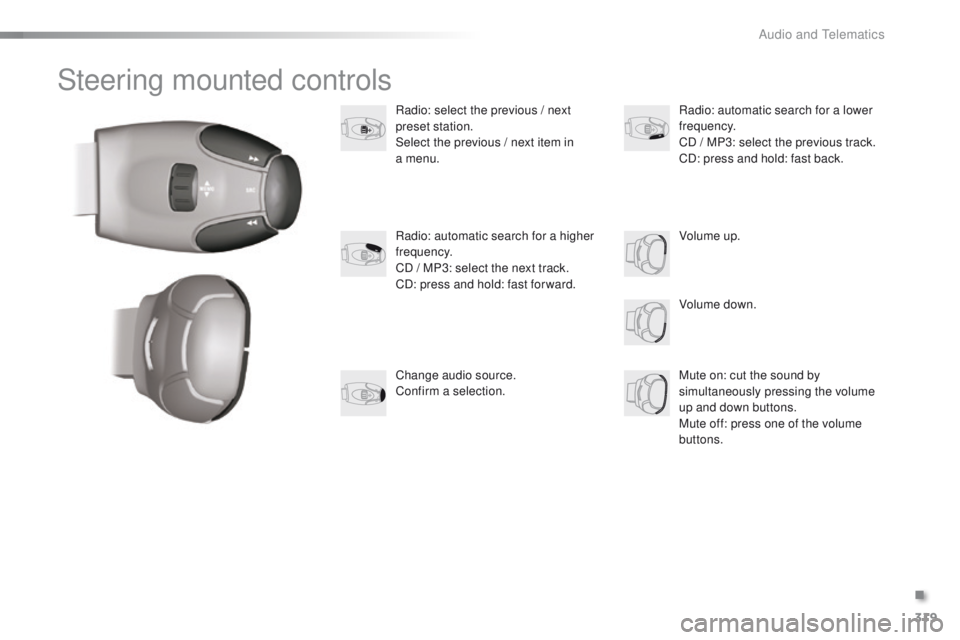
Radio: select the previous / next
preset station.
Select the previous / next item in
a menu.
Volume down.
Radio: automatic search for a higher
frequency.
CD / MP3: select the next track.
CD: press and hold: fast for ward.
Mute on: cut the sound by
simultaneously pressing the volume
up and down buttons.
Mute off: press one of the volume
buttons. Radio: automatic search for a lower
frequency.
CD / MP3: select the previous track.
CD: press and hold: fast back.
Change audio source.
Confirm a selection. Volume up.
.
Audio and Telematics
Page 322 of 340
320
2008_en_Chap12d_RDE1_ed01-2015
Radio
Presetting a station
Selecting a stationManaging the list
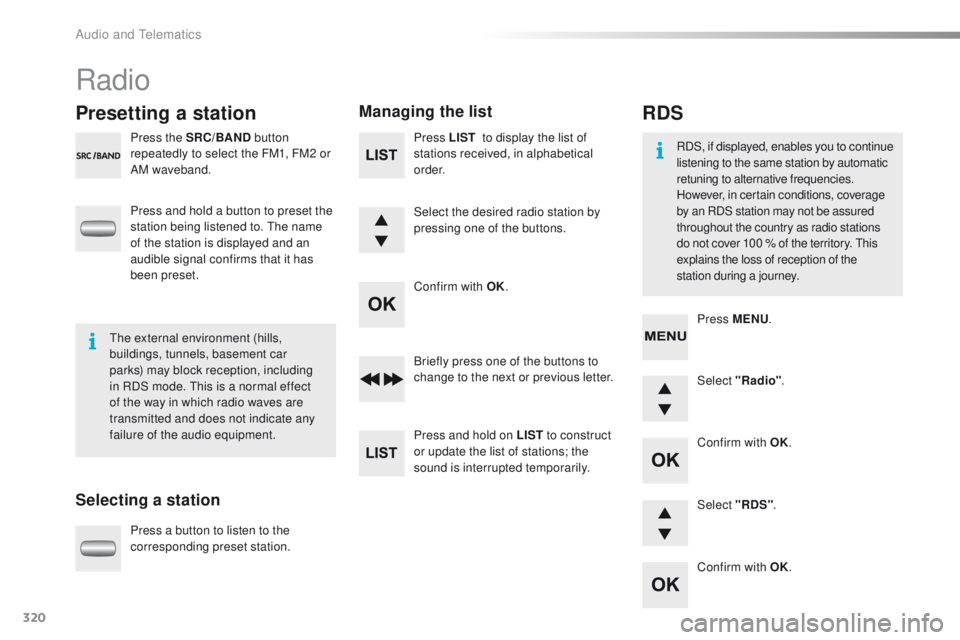
Press the SRC/BAND
button
repeatedly to select the FM1, FM2 or
AM waveband.
Press and hold a button to preset the
station being listened to. The name
of the station is displayed and an
audible signal confirms that it has
been preset.
Press a button to listen to the
corresponding preset station. Select "Radio"
.
Select "RDS" .
RDS
RDS, if displayed, enables you to continue
listening to the same station by automatic
retuning to alternative frequencies.
However, in certain conditions, coverage
by an RDS station may not be assured
throughout the country as radio stations
do not cover 100 % of the territory. This
explains the loss of reception of the
station during a journey.
The external environment (hills,
buildings, tunnels, basement car
parks) may block reception, including
in RDS mode. This is a normal effect
of the way in which radio waves are
transmitted and does not indicate any
failure of the audio equipment. Press MENU
.
Briefly press one of the buttons to
change to the next or previous letter.
Press and hold on LIST to construct
or update the list of stations; the
sound is interrupted temporarily. Press LIST
to display the list of
stations received, in alphabetical
o r d e r.
Select the desired radio station by
pressing one of the buttons.
Confirm with OK.
Confirm with OK.
Confirm with OK.
Audio and Telematics
Page 323 of 340
321
2008_en_Chap12d_RDE1_ed01-2015
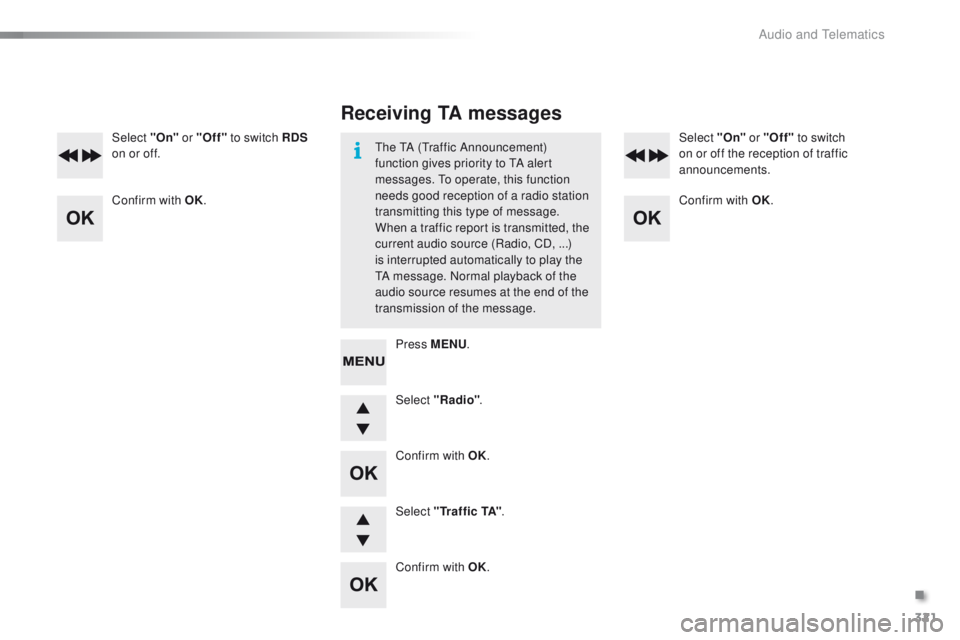
Select "Radio".
Select "On"
or "Off" to switch RDS
on or off. Select "On" or "Off"
to switch
on or off the reception of traffic
announcements.
Select " Tr a f f i c TA" .
Receiving TA messages
The TA (Traffic Announcement)
function gives priority to TA alert
messages. To operate, this function
needs good reception of a radio station
transmitting this type of message.
When a traffic report is transmitted, the
current audio source (Radio, CD, ...)
is interrupted automatically to play the
TA message. Normal playback of the
audio source resumes at the end of the
transmission of the message.
Press MENU .
Confirm with OK.
Confirm with OK.
Confirm with OK.
Confirm with OK.
.
Audio and Telematics
Page 324 of 340
322
2008_en_Chap12d_RDE1_ed01-2015
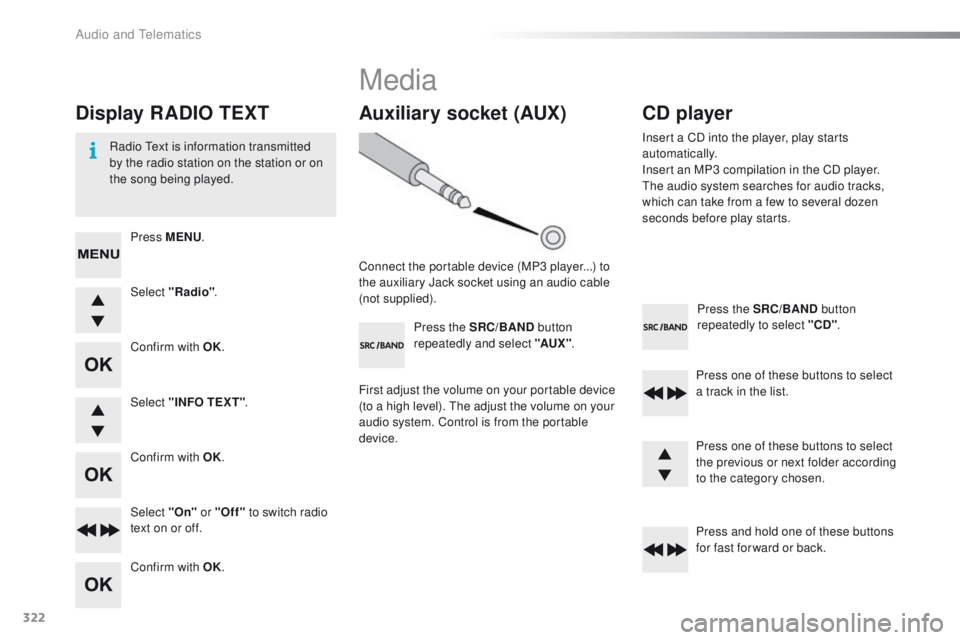
Press the SRC/BAND button
repeatedly to select "CD" .
Press one of these buttons to select
a track in the list.
Press and hold one of these buttons
for fast for ward or back.
Auxiliary socket (AUX)
Connect the portable device (MP3 player...) to
the auxiliary Jack socket using an audio cable
(not supplied). Press the SRC/BAND button
repeatedly and select "AUX " .
First adjust the volume on your portable device
(to a high level). The adjust the volume on your
audio system. Control is from the portable
device.
CD player
Insert a CD into the player, play starts
automatically.
Insert an MP3 compilation in the CD player.
The audio system searches for audio tracks,
which can take from a few to several dozen
seconds before play starts.
Press one of these buttons to select
the previous or next folder according
to the category chosen.
Display RADIO TEXT
Radio Text is information transmitted
by the radio station on the station or on
the song being played.Select "Radio" .
Select "On" or "Off" to switch radio
text on or off. Select "INFO TEXT" .
Press MENU
.
Confirm with OK.
Confirm with OK.
Confirm with OK.
Media
Audio and Telematics
Page 327 of 340
325
2008_en_Chap12d_RDE1_ed01-2015
Screen menu map(s)
3
3
3
3
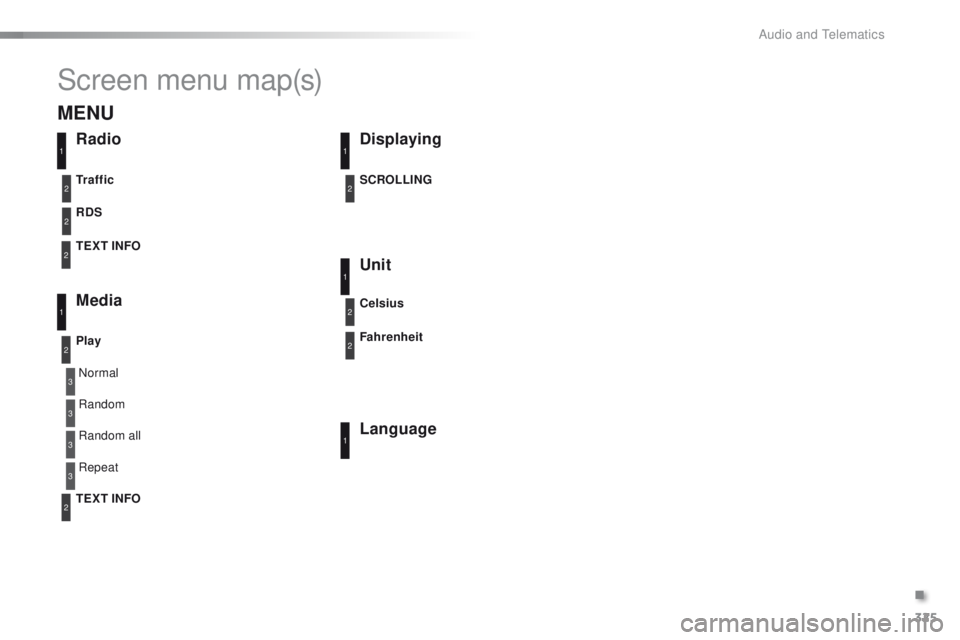
Normal
Random all Random
Repeat
RadioDisplaying
Unit
Language
RDS
Media
Play TEXT INFO Tr a f f i c SCROLLING
Celsius
Fahrenheit
11
1
1
22
2
2
2
1
2
2
MENU
TEXT INFO2
.
Audio and Telematics