2015 PEUGEOT 2008 reset
[x] Cancel search: resetPage 302 of 340
300
2008_en_Chap12c_RDE2_ed01-2015
Radio
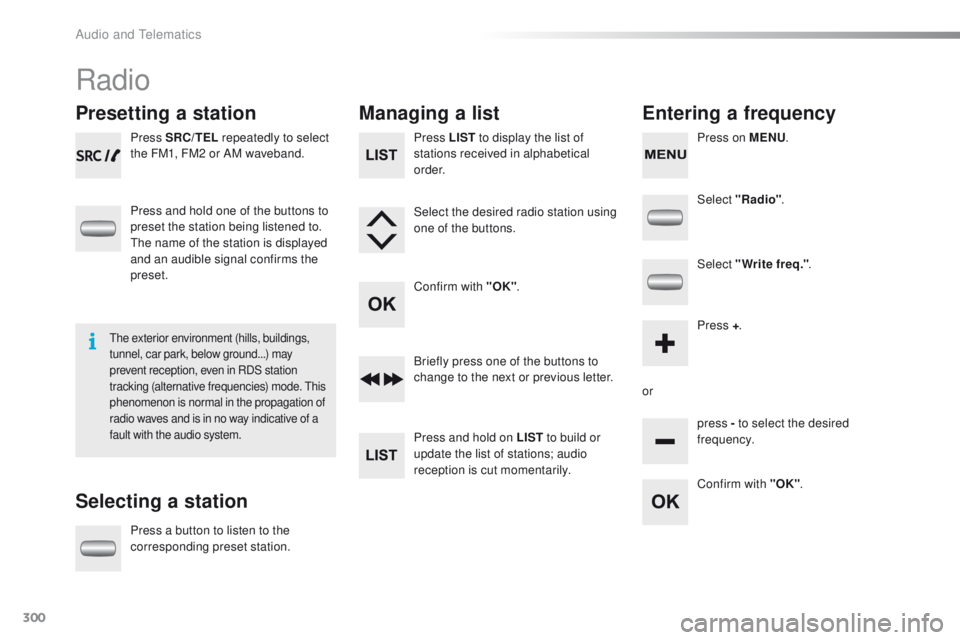
Presetting a station
Selecting a stationManaging a list
Entering a frequency
Press SRC/TEL repeatedly to select
the FM1, FM2 or AM waveband.
Press and hold one of the buttons to
preset the station being listened to.
The name of the station is displayed
and an audible signal confirms the
preset.
Press a button to listen to the
corresponding preset station. Select "Radio"
.
Select "Write freq." .
Press + .
or press - to select the desired
frequency.
Briefly press one of the buttons to
change to the next or previous letter.
Press and hold on LIST
to build or
update the list of stations; audio
reception is cut momentarily. Press LIST to display the list of
stations received in alphabetical
o r d e r.
Select the desired radio station using
one of the buttons.
Confirm with "OK" .
Confirm with "OK".
The exterior environment (hills, buildings,
tunnel, car park, below ground...) may
prevent reception, even in RDS station
tracking (alternative frequencies) mode. This
phenomenon is normal in the propagation of
radio waves and is in no way indicative of a
fault with the audio system.
Press on MENU.
Audio and Telematics
Page 314 of 340
312
2008_en_Chap12c_RDE2_ed01-2015
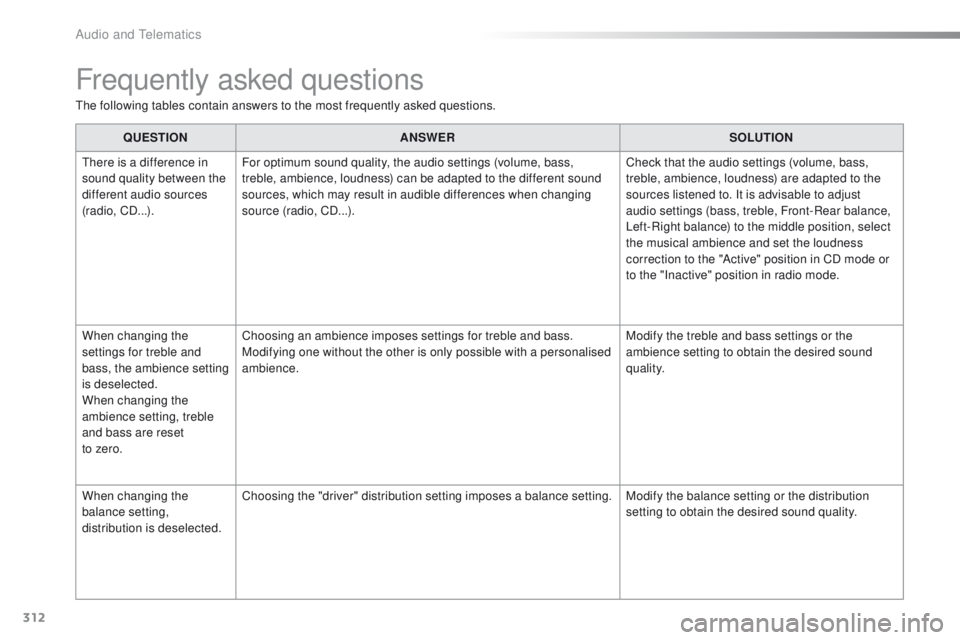
Frequently asked questions
The following tables contain answers to the most frequently asked questions.QUESTION ANSWER SOLUTION
There is a difference in
sound quality between the
different audio sources
(radio, CD...). For optimum sound quality, the audio settings (volume, bass,
treble, ambience, loudness) can be adapted to the different sound
sources, which may result in audible differences when changing
source (radio, CD...). Check that the audio settings (volume, bass,
treble, ambience, loudness) are adapted to the
sources listened to. It is advisable to adjust
audio settings (bass, treble, Front-Rear balance,
Left-Right balance) to the middle position, select
the musical ambience and set the loudness
correction to the "Active" position in CD mode or
to the "Inactive" position in radio mode.
When changing the
settings for treble and
bass, the ambience setting
is deselected.
When changing the
ambience setting, treble
and bass are reset
to zero. Choosing an ambience imposes settings for treble and bass.
Modifying one without the other is only possible with a personalised
ambience.
Modify the treble and bass settings or the
ambience setting to obtain the desired sound
quality.
When changing the
balance setting,
distribution is deselected. Choosing the "driver" distribution setting imposes a balance setting.
Modify the balance setting or the distribution
setting to obtain the desired sound quality.
Audio and Telematics
Page 320 of 340
318
2008_en_Chap12d_RDE1_ed01-2015
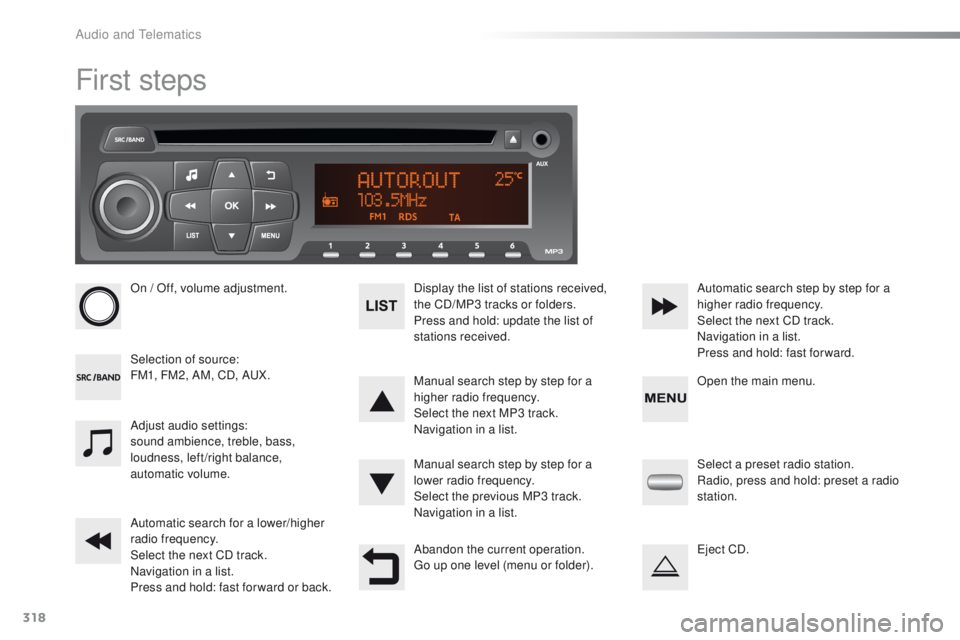
First steps
On / Off, volume adjustment.
Selection of source:
FM1, FM2, AM, CD, AUX.Display the list of stations received,
the CD/MP3 tracks or folders.
Press and hold: update the list of
stations received.
Manual search step by step for a
higher radio frequency.
Select the next MP3 track.
Navigation in a list.
Manual search step by step for a
lower radio frequency.
Select the previous MP3 track.
Navigation in a list.
Automatic search for a lower/higher
radio frequency.
Select the next CD track.
Navigation in a list.
Press and hold: fast for ward or back. Automatic search step by step for a
higher radio frequency.
Select the next CD track.
Navigation in a list.
Press and hold: fast for ward.
Adjust audio settings:
sound ambience, treble, bass,
loudness, left/right balance,
automatic volume.
Abandon the current operation.
Go up one level (menu or folder).Select a preset radio station.
Radio, press and hold: preset a radio
station.
Eject CD. Open the main menu.
Audio and Telematics
Page 321 of 340
319
2008_en_Chap12d_RDE1_ed01-2015
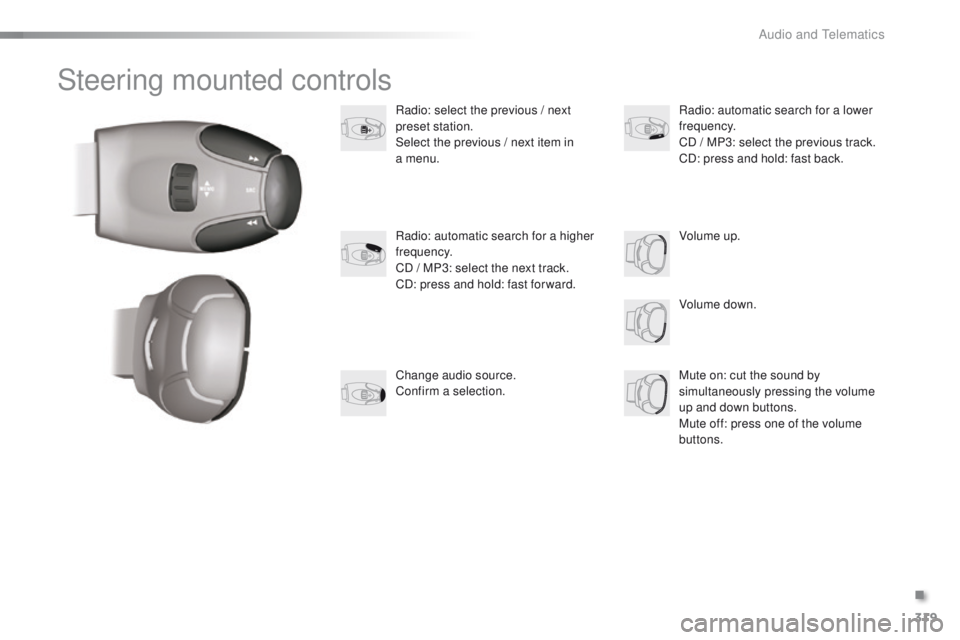
Steering mounted controls
Radio: select the previous / next
preset station.
Select the previous / next item in
a menu.
Volume down.
Radio: automatic search for a higher
frequency.
CD / MP3: select the next track.
CD: press and hold: fast for ward.
Mute on: cut the sound by
simultaneously pressing the volume
up and down buttons.
Mute off: press one of the volume
buttons. Radio: automatic search for a lower
frequency.
CD / MP3: select the previous track.
CD: press and hold: fast back.
Change audio source.
Confirm a selection. Volume up.
.
Audio and Telematics
Page 322 of 340
320
2008_en_Chap12d_RDE1_ed01-2015
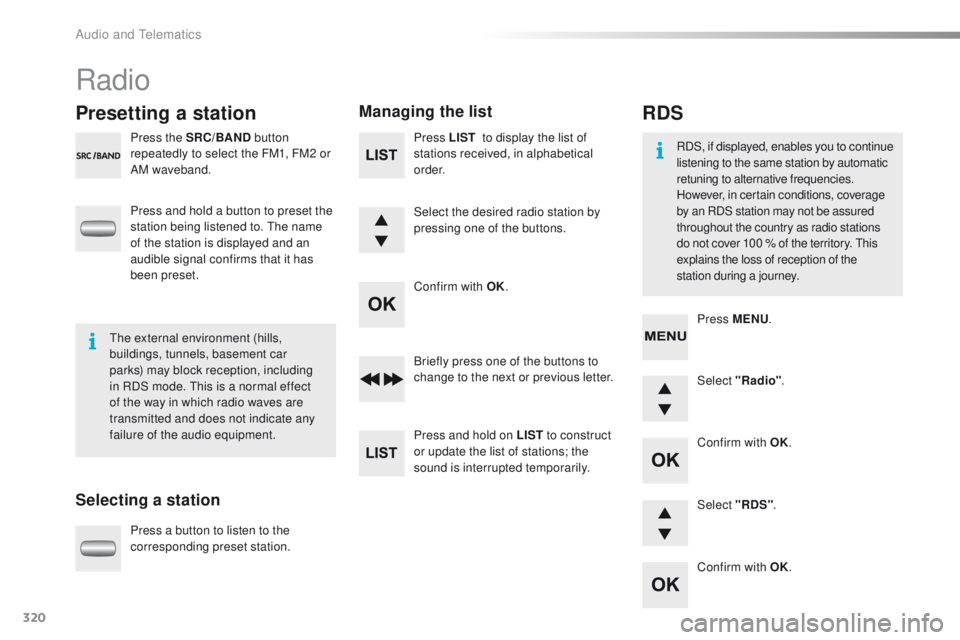
Radio
Presetting a station
Selecting a stationManaging the list
Press the SRC/BAND
button
repeatedly to select the FM1, FM2 or
AM waveband.
Press and hold a button to preset the
station being listened to. The name
of the station is displayed and an
audible signal confirms that it has
been preset.
Press a button to listen to the
corresponding preset station. Select "Radio"
.
Select "RDS" .
RDS
RDS, if displayed, enables you to continue
listening to the same station by automatic
retuning to alternative frequencies.
However, in certain conditions, coverage
by an RDS station may not be assured
throughout the country as radio stations
do not cover 100 % of the territory. This
explains the loss of reception of the
station during a journey.
The external environment (hills,
buildings, tunnels, basement car
parks) may block reception, including
in RDS mode. This is a normal effect
of the way in which radio waves are
transmitted and does not indicate any
failure of the audio equipment. Press MENU
.
Briefly press one of the buttons to
change to the next or previous letter.
Press and hold on LIST to construct
or update the list of stations; the
sound is interrupted temporarily. Press LIST
to display the list of
stations received, in alphabetical
o r d e r.
Select the desired radio station by
pressing one of the buttons.
Confirm with OK.
Confirm with OK.
Confirm with OK.
Audio and Telematics
Page 328 of 340
326
2008_en_Chap12d_RDE1_ed01-2015
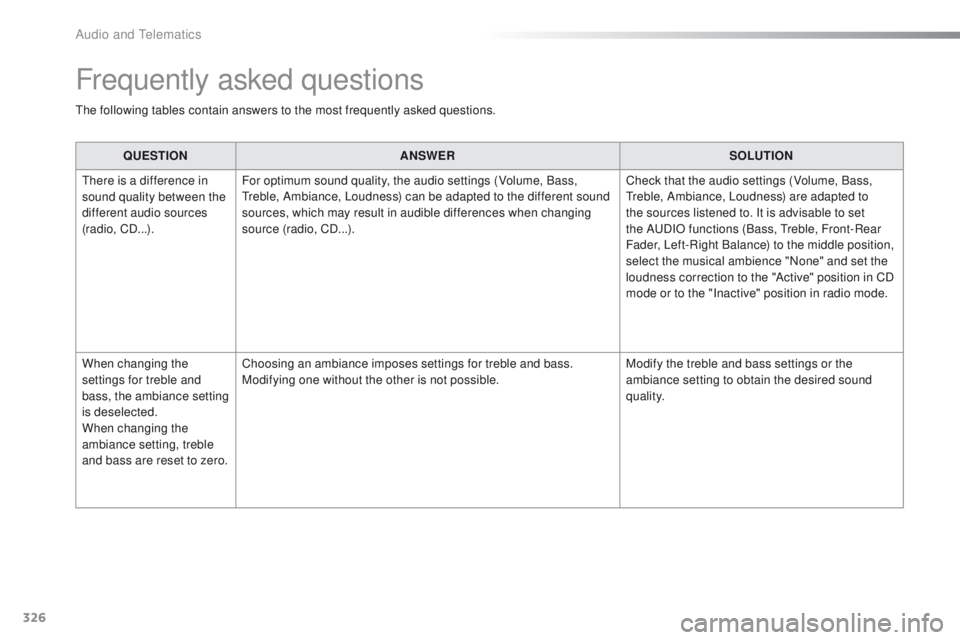
Frequently asked questions
The following tables contain answers to the most frequently asked questions.QUESTION ANSWER SOLUTION
There is a difference in
sound quality between the
different audio sources
(radio, CD...). For optimum sound quality, the audio settings (Volume, Bass,
Treble, Ambiance, Loudness) can be adapted to the different sound
sources, which may result in audible differences when changing
source (radio, CD...). Check that the audio settings (Volume, Bass,
Treble, Ambiance, Loudness) are adapted to
the sources listened to. It is advisable to set
the AUDIO functions (Bass, Treble, Front-Rear
Fader, Left-Right Balance) to the middle position,
select the musical ambience "None" and set the
loudness correction to the "Active" position in CD
mode or to the "Inactive" position in radio mode.
When changing the
settings for treble and
bass, the ambiance setting
is deselected.
When changing the
ambiance setting, treble
and bass are reset to zero. Choosing an ambiance imposes settings for treble and bass.
Modifying one without the other is not possible.
Modify the treble and bass settings or the
ambiance setting to obtain the desired sound
quality.
Audio and Telematics
Page 334 of 340

332
2008_en_Chap13_index-alpha_ed01-2015
Seats, front ......................................................55
Seats, heated .................................................. 56
Seats, rear
....................................................... 57
Selector lever, electronic gearbox system
.............................. 83, 86, 218
Serial number, vehicle
.................................. 23
0
Service indicator
............................................. 28
Servicing
...............................
..........................12
Settings (Menus)
........................................... 268
Settings, system
............................................ 276
Sidelamps
...................... 111, 115, 116, 187, 189
Side repeater
..............................
..................188
Snow chains
.................................................. 18
4
Socket, 12 V accessory
..................................71
S
ocket, auxiliary
............................................ 264
Socket, JACK
..........................................72, 264
Sockets, audio
........................................ 72, 322
Sockets, auxiliary
.......................................... 322
Speed limiter
........................................... 99, 103
Starting the engine
......................................... 79
Starting the vehicle
............................83, 86, 90
Starting using another battery
......................................................... 19
9
Station, radio
......................................... 26
0, 261
Stay, bonnet
.................................................. 2 11
Steering mounted controls, audio
........................................................... 238
Steering wheel, adjustment
.................................................... 58
S
topping the vehicle
..........................83, 86, 90
Stop & Start
................................ 39, 69, 95, 107,
159, 198, 211, 217
Storage
...................................................... 70, 71
Stowing rings
.................................................. 74
Switching off the engine
..................................................... 79
Synchronising the remote control
........................................................... 45
R
emote control ....................................
4
2, 43, 46
Removing a wheel
........................................ 180
Removing the mat
........................................... 73
Replacing bulbs
............................ 185, 189, 19 0
Replacing fuses
..............................
.............. 192
Replacing the air filter
................................... 217
Replacing the oil filter
................................... 2
17
Replacing the passenger compartment filter
...................................... 217
Replacing wiper blades .................................123
Resetting the service indicator
....................... 30
Resetting the trip recorder
.............................. 40
Reversing lamp
..................................... 18
9, 191
Risk areas (update)
....................................... 2 51
Roof bars
....................................................... 2
07
Routine checks
..................................... 217, 218
Running out of fuel (Diesel)
.......................... 16
3
Radio
.................................... 260, 261, 264, 300
Radio, digital (Digital Audio Broadcasting - DAB)
........................... 262, 263
RDS
............................................................... 261
Rear foglamp ................................................. 113
Rear screen, demisting
................................... 69
Recharging the battery
................................. 20
0
Recirculation, air
............................................. 66
Reduction of electrical load
.......................... 201
Regeneration of the particle emissions filter
............................................ 217
Reinitialising the remote control
..................... 45
R
Park Assist .................................................... 10 7
Parking brake .......................................... 81, 218
Parking lamps
............................................... 11 6
Parking sensors, front
...................................10 6
Parking sensors, rear .................................... 105
Particle emission filter
..........................216, 217
Passenger compartment filter
......................217
PEUGEOT Connect Apps
.............................279
P
E
UGEOT
C
onnect Assistance
...................233
P
E
UGEOT
C
onnect Packs
...........................233
P
E
UGEOT
C
onnect SOS
............................. 2
32
Player, Apple
® .............................. .................266
Player, MP3 CD ............................. 264, 302-304
Player, USB
................................................... 264
Port, USB
....................................... 7
2, 264, 303
Pressures, tyres
............................................ 176
Priming the fuel system
................................ 163
Protecting children
................ 141, 145, 146, 151, 154-157
Puncture
........................................................ 172
Safety, children
............................................. 15
6
Safety for children
.........................................15 8
Screen, instrument panel
..........................3 7, 3 8
Screen menu
........................240, 242, 246, 254,
256, 258, 268, 280, 282
Screen menu map
.......240, 242, 246, 254, 256,
258, 268, 280, 282, 311, 325
Screenwash
..................................................120
Screenwash fluid level
..................................215
Screenwash, rear
..........................................121
Screen-wash reservoir
.................................215
SCR (Selective Catalytic Reduction)
.................................................. 16
4
SCR system
..................................................16 4
Seat belts
....................................... 1
3 8 -14 0, 15 0
S
Alphabetical index