2015 PEUGEOT 2008 buttons
[x] Cancel search: buttonsPage 239 of 340
237
2008_en_Chap12b_SMEGplus_ed01-2015
Volume adjustment (each source is
independent, including traffic announcements
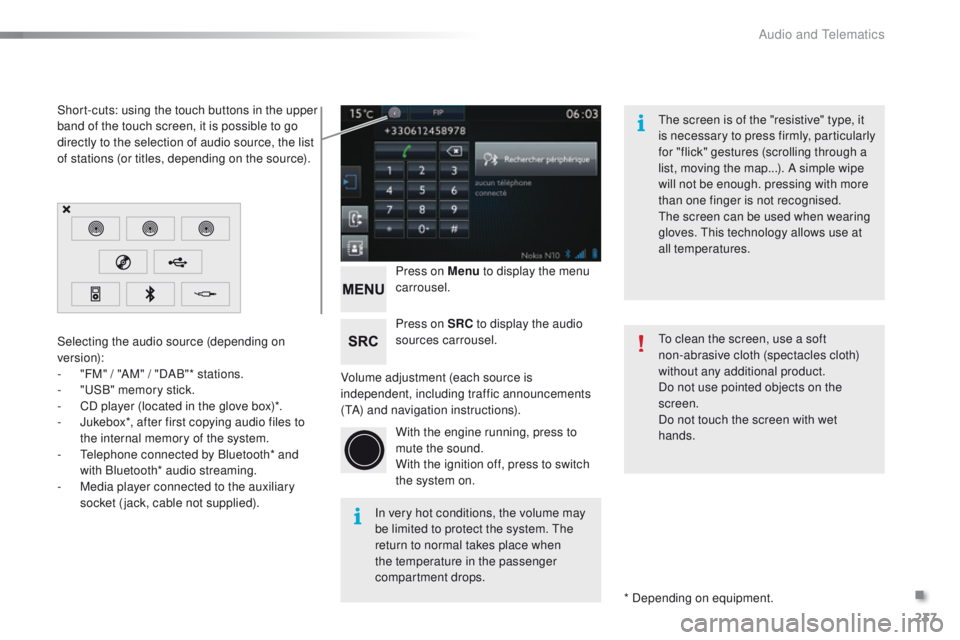
(TA) and navigation instructions).Press on Menu
to display the menu
carrousel.
Press on SRC to display the audio
sources carrousel.
With the engine running, press to
mute the sound.
With the ignition off, press to switch
the system on.
Selecting the audio source (depending on
version):
-
"
FM" / "AM" / "DAB"* stations.
-
"
USB" memory stick.
-
C
D player (located in the glove box)*.
-
J
ukebox*, after first copying audio files to
the internal memory of the system.
-
T
elephone connected by Bluetooth* and
with Bluetooth* audio streaming.
-
M
edia player connected to the auxiliary
socket (jack, cable not supplied).
* Depending on equipment.
Short-cuts: using the touch buttons in the upper
band of the touch screen, it is possible to go
directly to the selection of audio source, the list
of stations (or titles, depending on the source).
The screen is of the "resistive" type, it
is necessary to press firmly, particularly
for "flick" gestures (scrolling through a
list, moving the map...). A simple wipe
will not be enough. pressing with more
than one finger is not recognised.
The screen can be used when wearing
gloves. This technology allows use at
all temperatures.
In very hot conditions, the volume may
be limited to protect the system. The
return to normal takes place when
the temperature in the passenger
compartment drops. To clean the screen, use a soft
non-abrasive cloth (spectacles cloth)
without any additional product.
Do not use pointed objects on the
screen.
Do not touch the screen with wet
hands.
.
Audio and Telematics
Page 264 of 340
262
2008_en_Chap12b_SMEGplus_ed01-2015
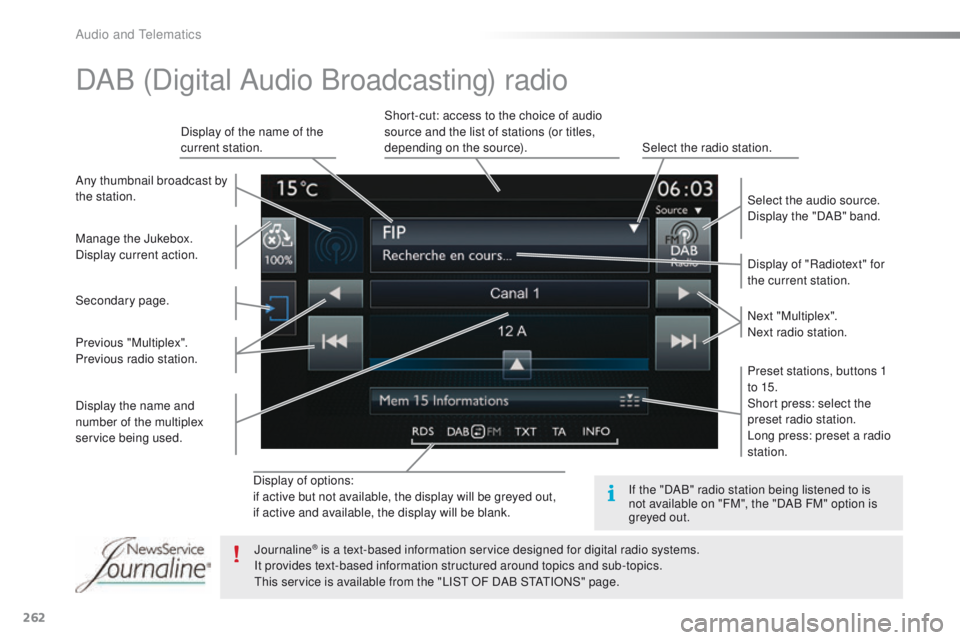
Display of options:
if active but not available, the display will be greyed out,
if active and available, the display will be blank.Display of "Radiotext" for
the current station.
Manage the Jukebox.
Display current action. Select the audio source.
Display the "DAB" band.
Display of the name of the
current station.
Short-cut: access to the choice of audio
source and the list of stations (or titles,
depending on the source).
Select the radio station.
Any thumbnail broadcast by
the station.
Preset stations, buttons 1
to 15.
Short press: select the
preset radio station.
Long press: preset a radio
station. Next "Multiplex".
Next radio station.
Secondary page.
Display the name and
number of the multiplex
service being used. Previous "Multiplex".
Previous radio station.
DAB (Digital Audio Broadcasting) radio
If the "DAB" radio station being listened to is
not available on "FM", the "DAB FM" option is
greyed out.
Journaline
® is a text-based information service designed for digital radio systems.
I
t provides text-based information structured around topics and sub-topics.
This service is available from the "LIST OF DAB STATIONS" page.
Audio and Telematics
Page 268 of 340
266
2008_en_Chap12b_SMEGplus_ed01-2015
Bluetooth® audio streaming
Streaming allows audio files on your telephone
to be played through the vehicle's speakers.
Connect the telephone: see the "Telephone"
section, then " Bluetooth".
Choose the " Audio" or "All" profile.
If play does not start automatically, it may be
necessary to start the audio playback from
the
telephone.
Control is from the peripheral device or by
using the audio system buttons.
Once connected in streaming mode,
the telephone is considered to be a
media source.
It is recommended that you activate
"Repeat " on the Bluetooth peripheral.
Connecting Apple® players
Connect the Apple® player to the USB port
using a suitable cable (not supplied).
Play starts automatically.
Control is via the audio system. The classifications available are those
of the portable device connected
(artists / albums / genres / playlists /
audiobooks / podcasts).
The default classification used is by
artist. To modify the classification used,
return to the first level of the menu
then select the desired classification
(playlists for example) and confirm
to go down through the menu to the
desired track.
The version of software in the audio system
may not be compatible with the generation of
your Apple
® p l aye r.
Audio and Telematics
Page 301 of 340
299
2008_en_Chap12c_RDE2_ed01-2015
Steering mounted controls
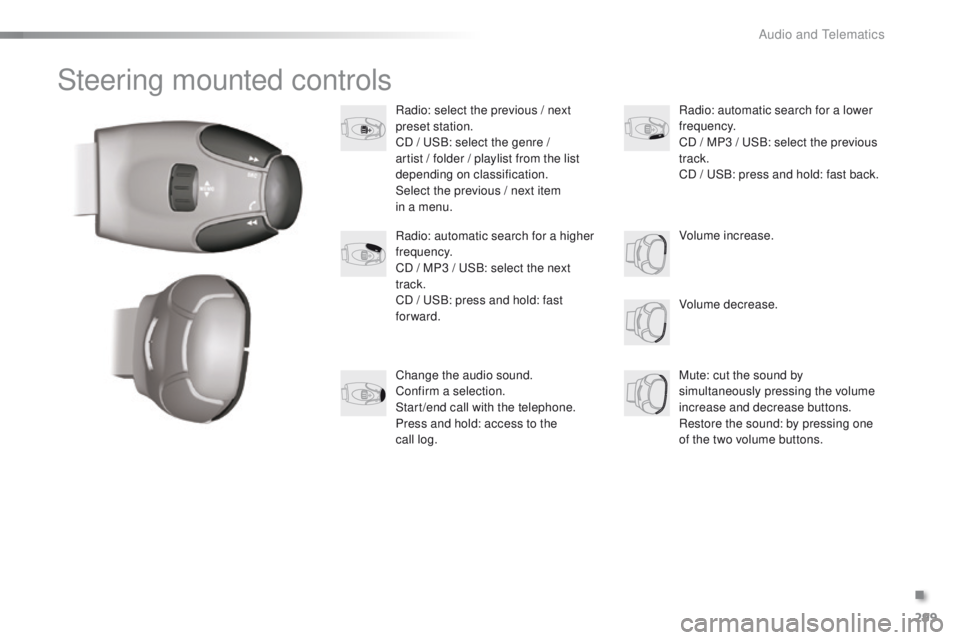
Radio: select the previous / next
preset station.
CD / USB: select the genre /
artist / folder / playlist from the list
depending on classification.
Select the previous / next item
in a menu.Volume decrease.
Radio: automatic search for a higher
frequency.
CD / MP3 / USB: select the next
track.
CD / USB: press and hold: fast
forward.
Mute: cut the sound by
simultaneously pressing the volume
increase and decrease buttons.
Restore the sound: by pressing one
of the two volume buttons. Radio: automatic search for a lower
frequency.
CD / MP3 / USB: select the previous
track.
CD / USB: press and hold: fast back.
Change the audio sound.
Confirm a selection.
Start /end call with the telephone.
Press and hold: access to the
call
log. Volume increase.
.
Audio and Telematics
Page 302 of 340
300
2008_en_Chap12c_RDE2_ed01-2015
Radio
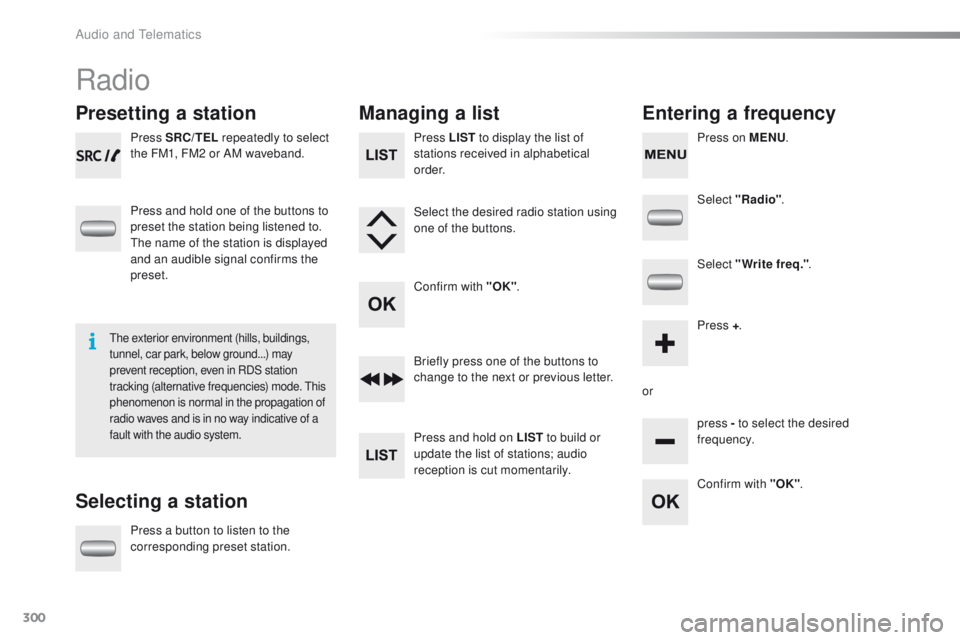
Presetting a station
Selecting a stationManaging a list
Entering a frequency
Press SRC/TEL repeatedly to select
the FM1, FM2 or AM waveband.
Press and hold one of the buttons to
preset the station being listened to.
The name of the station is displayed
and an audible signal confirms the
preset.
Press a button to listen to the
corresponding preset station. Select "Radio"
.
Select "Write freq." .
Press + .
or press - to select the desired
frequency.
Briefly press one of the buttons to
change to the next or previous letter.
Press and hold on LIST
to build or
update the list of stations; audio
reception is cut momentarily. Press LIST to display the list of
stations received in alphabetical
o r d e r.
Select the desired radio station using
one of the buttons.
Confirm with "OK" .
Confirm with "OK".
The exterior environment (hills, buildings,
tunnel, car park, below ground...) may
prevent reception, even in RDS station
tracking (alternative frequencies) mode. This
phenomenon is normal in the propagation of
radio waves and is in no way indicative of a
fault with the audio system.
Press on MENU.
Audio and Telematics
Page 304 of 340
302
2008_en_Chap12c_RDE2_ed01-2015
Media
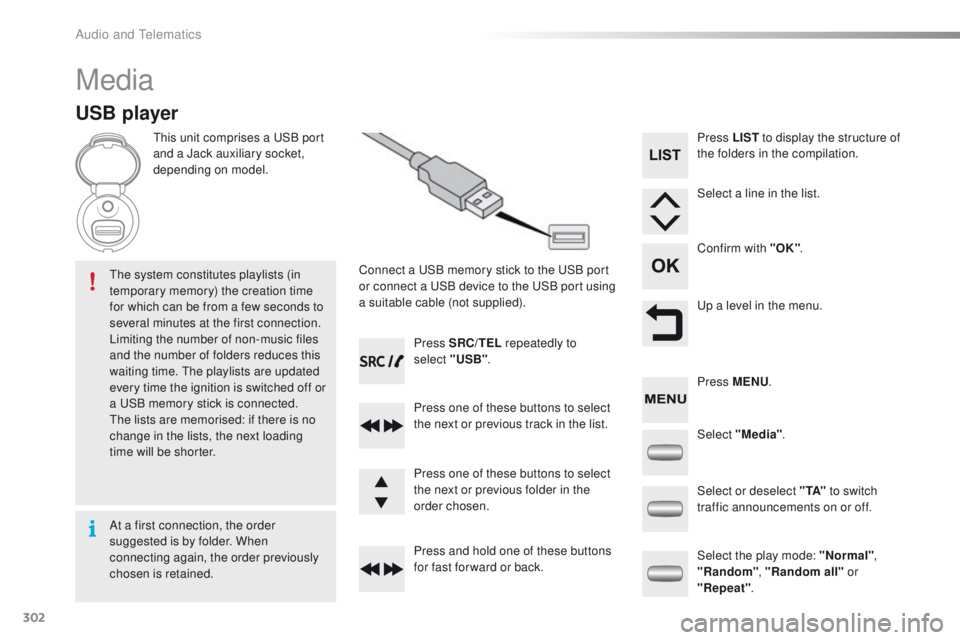
USB player
This unit comprises a USB port
and a Jack auxiliary socket,
depending on model.Connect a USB memory stick to the USB port
or connect a USB device to the USB port using
a suitable cable (not supplied).
The system constitutes playlists (in
temporary memory) the creation time
for which can be from a few seconds to
several minutes at the first connection.
Limiting the number of non-music files
and the number of folders reduces this
waiting time. The playlists are updated
every time the ignition is switched off or
a USB memory stick is connected.
The lists are memorised: if there is no
change in the lists, the next loading
time will be shorter. Press SRC/TEL
repeatedly to
select "USB" .
Press one of these buttons to select
the next or previous track in the list.
Press and hold one of these buttons
for fast for ward or back. Press one of these buttons to select
the next or previous folder in the
order chosen. Press LIST
to display the structure of
the folders in the compilation.
Select a line in the list.
Confirm with "OK" .
Up a level in the menu.
Select "Media" .
Select the play mode: "Normal" ,
"Random" , "Random all" or
"Repeat" .
Select or deselect " TA"
to switch
traffic announcements on or off. Press MENU .
At a first connection, the order
suggested is by folder. When
connecting again, the order previously
chosen is retained.
Audio and Telematics
Page 305 of 340
303
2008_en_Chap12c_RDE2_ed01-2015
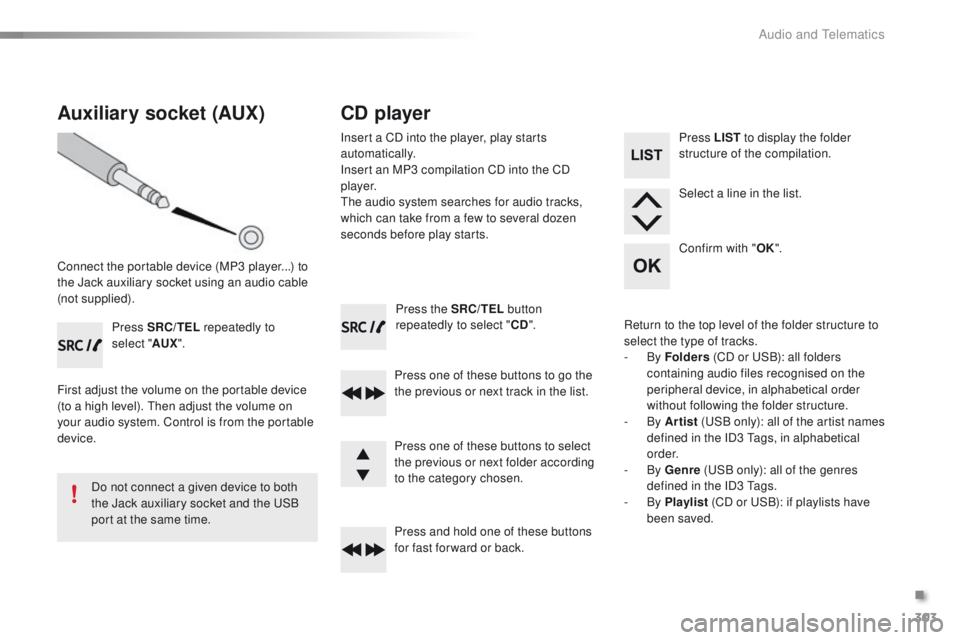
Press the SRC/TEL button
repeatedly to select " CD".
Press one of these buttons to go the
the previous or next track in the list.
Press and hold one of these buttons
for fast for ward or back.
Auxiliary socket (AUX)
Connect the portable device (MP3 player...) to
the Jack auxiliary socket using an audio cable
(not supplied). Press SRC/TEL repeatedly to
select " AUX".
First adjust the volume on the portable device
(to a high level). Then adjust the volume on
your audio system. Control is from the portable
device.
Do not connect a given device to both
the Jack auxiliary socket and the USB
port at the same time.
CD player
Insert a CD into the player, play starts
automatically.
Insert an MP3 compilation CD into the CD
p l aye r.
The audio system searches for audio tracks,
which can take from a few to several dozen
seconds before play starts.
Press one of these buttons to select
the previous or next folder according
to the category chosen. Press LIST
to display the folder
structure of the compilation.
Select a line in the list.
Confirm with " OK".
Return to the top level of the folder structure to
select the type of tracks.
-
By Folders (CD or USB): all folders
containing audio files recognised on the
peripheral device, in alphabetical order
without following the folder structure.
-
By Artist (USB only): all of the artist names
defined in the ID3 Tags, in alphabetical
o r d e r.
-
By Genre (USB only): all of the genres
defined in the ID3 Tags.
-
By Playlist (CD or USB): if playlists have
been saved.
.
Audio and Telematics
Page 307 of 340
305
2008_en_Chap12c_RDE2_ed01-2015
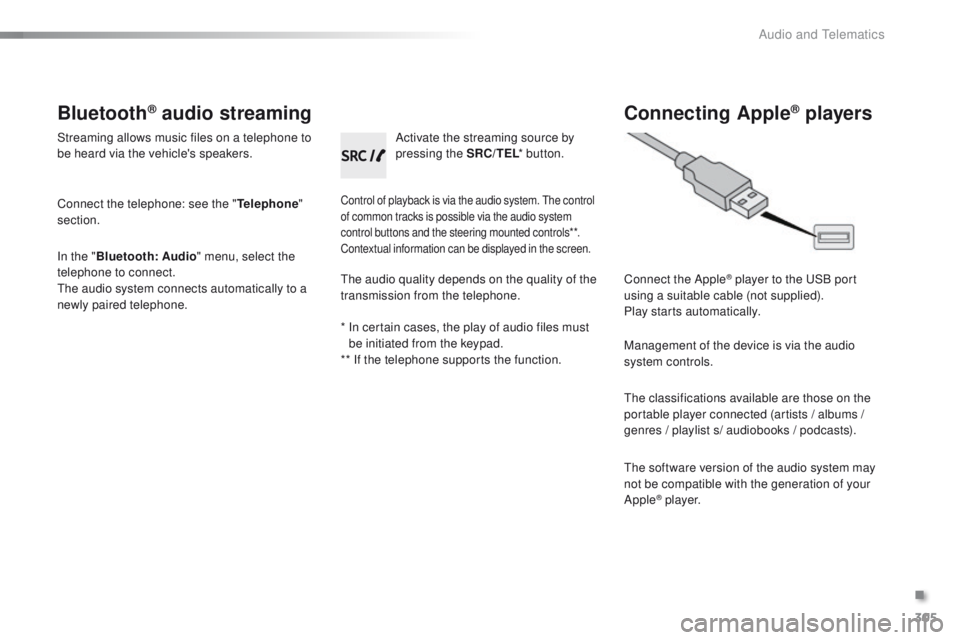
Bluetooth® audio streaming
Streaming allows music files on a telephone to
be heard via the vehicle's speakers.
Connect the telephone: see the "Telephone"
section.
In the " Bluetooth : Audio" menu, select the
telephone to connect.
The audio system connects automatically to a
newly paired telephone.
Control of playback is via the audio system. The control
of common tracks is possible via the audio system
control buttons and the steering mounted controls**.
Contextual information can be displayed in the screen.
Activate the streaming source by
pressing the SRC/TEL * button.
Connecting Apple® players
Connect the Apple® player to the USB port
using a suitable cable (not supplied).
Play starts automatically.
Management of the device is via the audio
system controls.
The classifications available are those on the
portable player connected (artists / albums /
genres / playlist s/ audiobooks / podcasts).
The software version of the audio system may
not be compatible with the generation of your
Apple
® p l aye r.
The audio quality depends on the quality of the
transmission from the telephone.
*
I
n certain cases, the play of audio files must
be initiated from the keypad.
** If the telephone supports the function.
.
Audio and Telematics