2015 PEUGEOT 108 display
[x] Cancel search: displayPage 239 of 271
237
108_en_Chap12b_Autoradio-toyota-2_ed01-2015
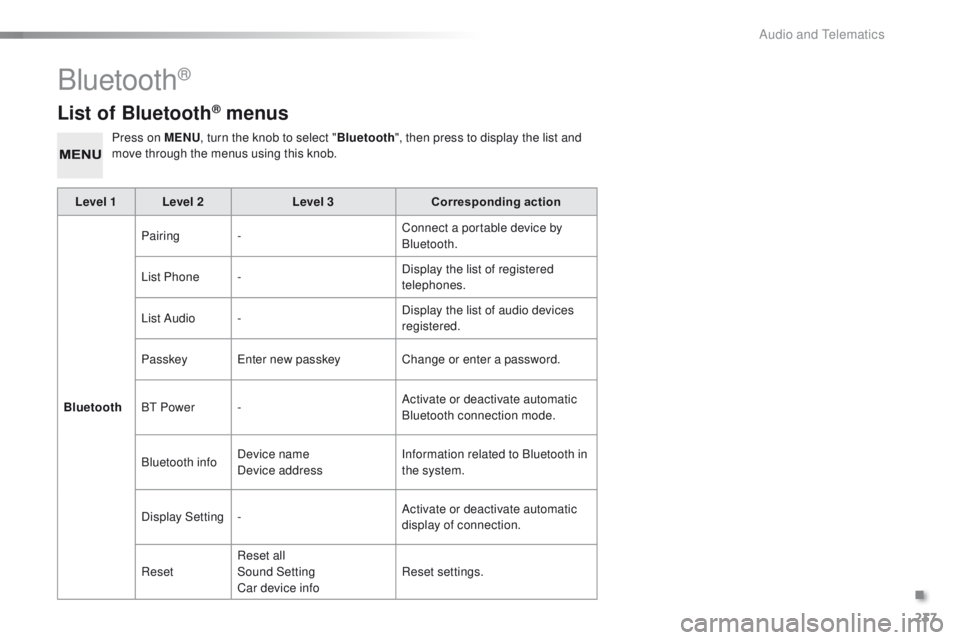
List of Bluetooth® menus
Press on MENU, turn the knob to select " Bluetooth", then press to display the list and
move through the menus using this knob.
Level 1 Level 2 Level 3Corresponding action
Bluetooth Pairing
- Connect a portable device by
Bluetooth.
List Phone - Display the list of registered
telephones.
List Audio - Display the list of audio devices
registered.
Passkey
en
ter new passkey Change or enter a password.
B
t
Power - Activate or deactivate automatic
Bluetooth connection mode.
Bluetooth info Device name
Device address Information related to Bluetooth in
the system.
Display Setting - Activate or deactivate automatic
display of connection.
Reset Reset all
Sound Setting
Car device info Reset settings.
Bluetooth®
.
Audio and telematics
Page 240 of 271
238
108_en_Chap12b_Autoradio-toyota-2_ed01-2015
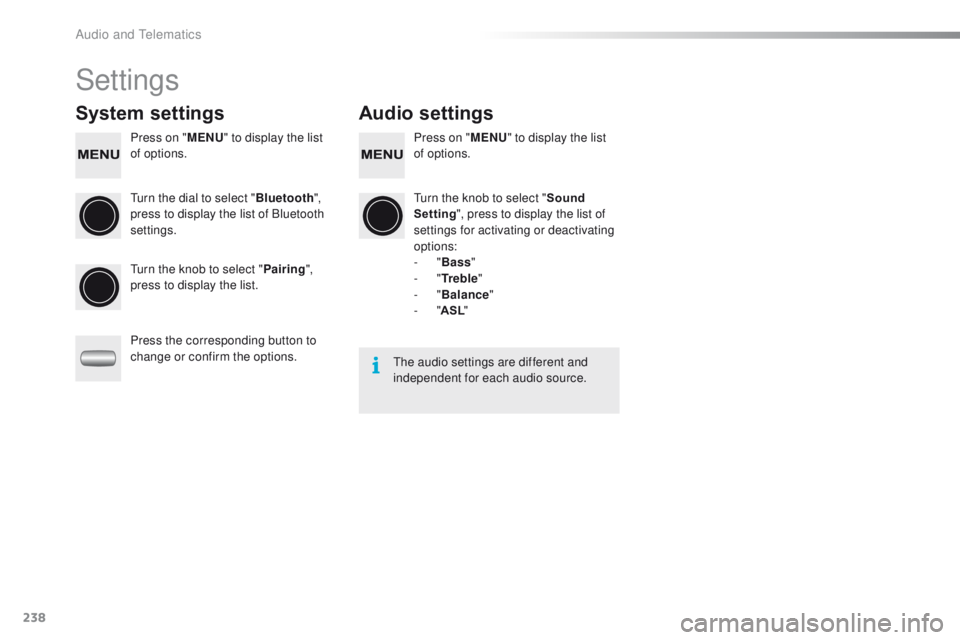
Settings
System settings Audio settings
Press on "MENU" to display the list
of options. Press on "
MENU" to display the list
of options.
tu
rn the dial to select " Bluetooth",
press to display the list of Bluetooth
settings.
tu
rn the knob to select "Sound
Setting ", press to display the list of
settings for activating or deactivating
options:
-
"Bass "
-
"Tr e b l e "
-
"Balance "
-
"ASL "
tu
rn the knob to select " Pairing",
press to display the list.
Press the corresponding button to
change or confirm the options.
the
audio settings are different and
independent for each audio source.
Audio and telematics
Page 241 of 271
239
108_en_Chap12b_Autoradio-toyota-2_ed01-2015
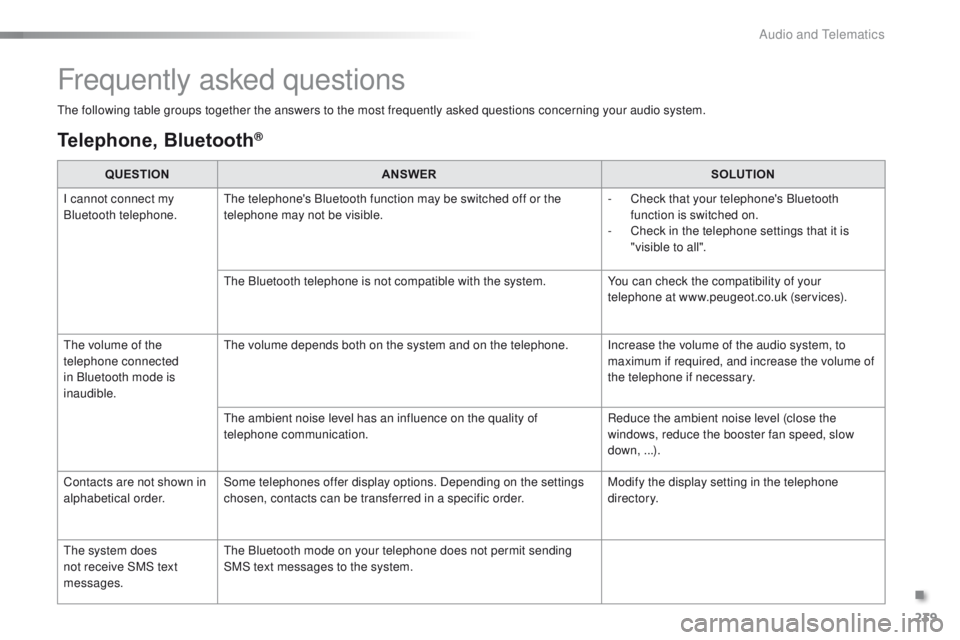
the following table groups together the answers to the most frequently asked questions concerning your audio system.
Frequently asked questions
Telephone, Bluetooth®
QUESTION ANSWER SOLUTION
I cannot connect my
Bluetooth telephone.
th
e telephone's Bluetooth function may be switched off or the
telephone may not be visible. -
C
heck that your telephone's Bluetooth
function is switched on.
-
C
heck in the telephone settings that it is
"visible to all".
th
e Bluetooth telephone is not compatible with the system. You can check the compatibility of your
telephone at www.peugeot.co.uk (services).
th
e volume of the
telephone connected
in Bluetooth mode is
inaudible.
th
e volume depends both on the system and on the telephone. Increase the volume of the audio system, to maximum if required, and increase the volume of
the telephone if necessary.
th
e ambient noise level has an influence on the quality of
telephone communication. Reduce the ambient noise level (close the
windows, reduce the booster fan speed, slow
down, ...).
Contacts are not shown in
alphabetical order. Some telephones offer display options. Depending on the settings
chosen, contacts can be transferred in a specific order. Modify the display setting in the telephone
di r e c to r y.
th
e system does
not receive SMS text
messages.
th
e Bluetooth mode on your telephone does not permit sending
SMS text messages to the system.
.
Audio and telematics
Page 242 of 271
240
108_en_Chap12b_Autoradio-toyota-2_ed01-2015
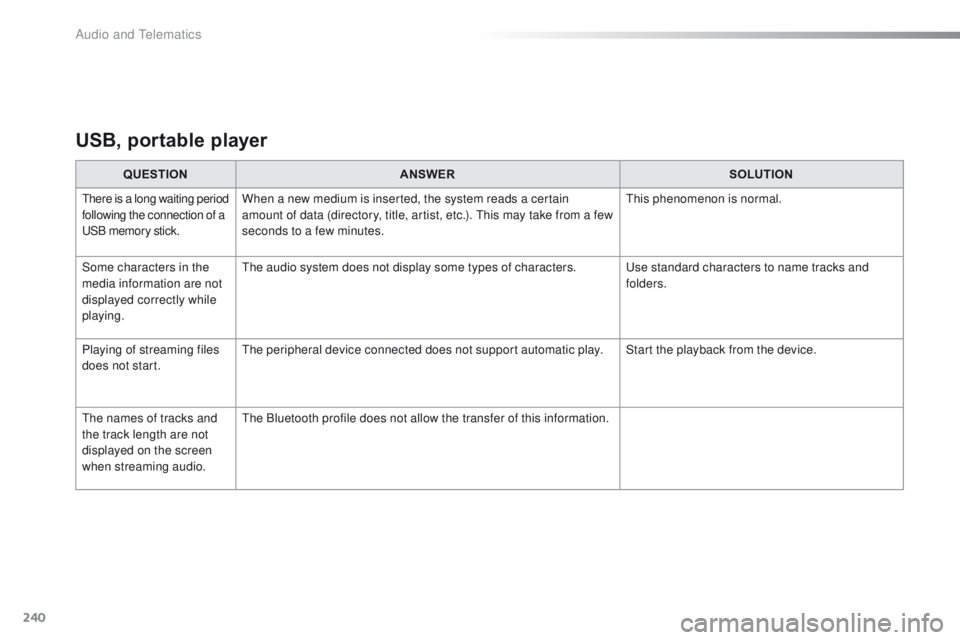
USB, portable player
QUESTION ANSWER SOLUTION
there is a long waiting period
following the connection of a
uS
B memory stick.When a new medium is inserted, the system reads a certain
amount of data (directory, title, artist, etc.). th is may take from a few
seconds to a few minutes.th is phenomenon is normal.
Some characters in the
media information are not
displayed correctly while
playing.
th
e audio system does not display some types of characters.
u
se standard characters to name tracks and
folders.
Playing of streaming files
does not start.
th
e peripheral device connected does not support automatic play. Start the playback from the device.
th
e names of tracks and
the track length are not
displayed on the screen
when streaming audio.
th
e Bluetooth profile does not allow the transfer of this information.
Audio and telematics
Page 243 of 271
241
108_en_Chap12b_Autoradio-toyota-2_ed01-2015
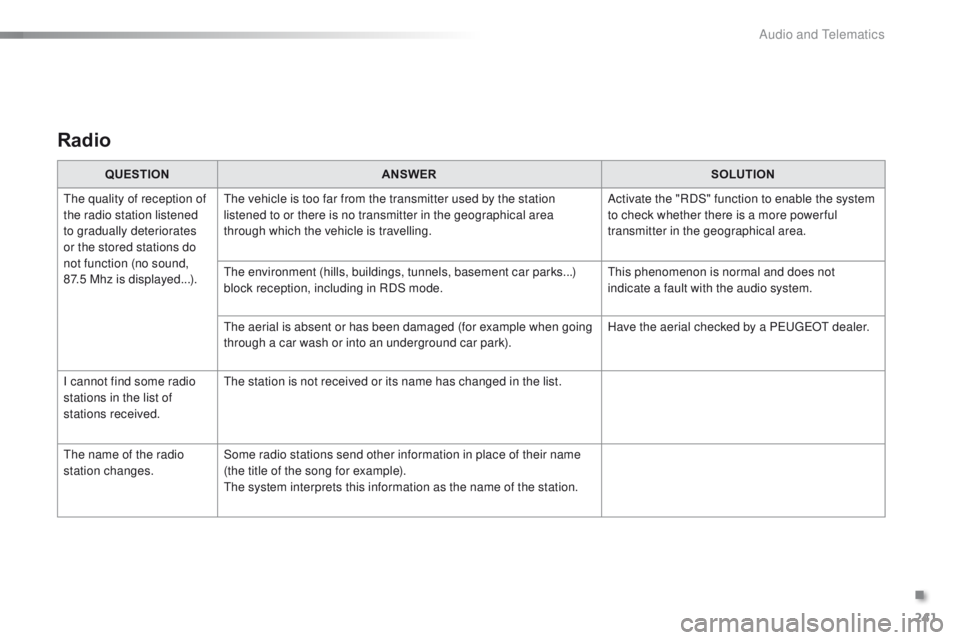
Radio
QUESTION ANSWER SOLUTION
th
e quality of reception of
the radio station listened
to gradually deteriorates
or the stored stations do
not function (no sound,
87.5
Mhz is displayed...).
th
e vehicle is too far from the transmitter used by the station
listened to or there is no transmitter in the geographical area
through which the vehicle is travelling. Activate the "RDS" function to enable the system
to check whether there is a more power ful
transmitter in the geographical area.
th
e environment (hills, buildings, tunnels, basement car parks...)
block reception, including in RDS mode.
th
is phenomenon is normal and does not
indicate a fault with the audio system.
th
e aerial is absent or has been damaged (for example when going
through a car wash or into an underground car park). Have the aerial checked by a P
e
uge
Ot
dealer.
I cannot find some radio
stations in the list of
stations received.
th
e station is not received or its name has changed in the list.
th
e name of the radio
station changes. Some radio stations send other information in place of their name
(the title of the song for example).
th
e system interprets this information as the name of the station.
.
Audio and telematics
Page 250 of 271

248
108_en_Chap14_index-alpha_ed01-2015
ABS .......................................................105, 10 6
Accessories .................................................. 169
Accessory socket, 12V
.............................61, 62
Access to rear seats (3 -door)
.........................46
Active City Brake
.................................... 1
0 8 -112
Adjusting headlamps
...................................... 98
Adjusting the steering wheel
..........................50
Advice on driving
............................................ 68
Airbags
..................................................... 17, 11 6
Airbags, curtain
..................................... 11
9 , 12 0
Airbags, front .......................................... 117, 1 2 0
Airbags, lateral
...................................... 118, 120
Air conditioning
..................................... 8, 55, 58
Air conditioning, automatic
.............................56
Air conditioning, manual
.................................54
Air distribution adjustment
.................53, 54, 57
Air filter
.......................................................... 17 7
Air flow adjustment
............................53, 54, 57
Air intake
................................................... 55-57
Air recirculation
......................................... 55, 57
Air vents
.......................................................... 51
Anti-lock braking system (ABS)
............105, 10 6
Audible warning
............................................ 101
Audio cable
........................................... 19 6, 233
Audio streaming (Bluetooth)
................. 19
9, 23 4
Audio system
................................................. 223
Automatic illumination of headlamps
........94, 96
Auxiliary
......................................... 63, 196, 233Capacity, fuel tank
..............................
..........13 6
Central locking
..........................................31, 3 4
Changing a bulb
.....................................14 9 -15 3
Changing a fuse
.....................................15 4 -16 2
Changing a wheel
..................................143 -147
Changing a wiper blade
................................166
Changing the electronic key battery
...............36
Changing the remote control battery
..............32
Changing the time
.....................................28, 29
Checking levels
...................................... 17
4 -176
Checking tyre pressures (using the kit)
..............................
................141
Checks
...............
....................................173 -178
Child lock
...............................
........................13 5
Children
...............................
....115 , 117, 12 1 -13 5
Child seats
.....................12
1-123, 127, 131, 13 4
Child seats, conventional
..............................127
Child seats, ISOFIX
...............................13
1-13 3
Closing the boot
..............................................38
Closing the doors
............................................34
Clutch
............................................................17 7
Colour screen
...............................
.................183
A
C
Connectors, audio .......................... 6 3, 196, 233
Coolant level ................................................. 176
Cup holder
...............................
........................61
Battery, remote control ...................................
32
B
luetooth (hands-free) .......................... 20
2, 235
Bluetooth (telephone)
............................ 202, 235
Bonnet
........................................................... 172
Boot
................................................................. 38
Boot lamp
........................................................ 98
Brake discs
.................................................... 17
8
Brake lamps
...............................
................... 152
Brake pads
.................................................... 178
Battery
............................................ 163 -165, 177
Battery, charging
........................................... 165
Battery for electronic key
................................ 36
ea
sy mode (automatic mode) .........................75
eBA
(
em
ergency braking
assistance)
.................................................. 105
BE
DAB (Digital Audio Broadcasting) ........19 4, 231
Daytime running lamps ...................................94
Deactivating the passenger airbag
...............117
Demisting/defrosting front
.............................. 59
D
emisting, defrosting, rear
............................. 60
D
igital Audio Broadcasting (DAB)
........ 1
9 4, 231
Dimensions
................................................... 181
Dipped beam
...............................
............93, 150
Dipstick
................
.......................................... 174
Direction indicators
.......................101, 150, 152
Display screen
.................................... 12, 13, 25
Doors
............................................................... 37
Door pockets
................................................... 61
D
riving economically ........................................ 8
Driving mode
................................................... 75
Dynamic stability control (DSC)
...................................... 16, 23 , 105 -107
D
Alphabetical index
Page 262 of 271
.
Audio and Telematics 3
c1-108-post-it-web_en_chap12a_complementnav_toyota_tactile-1_ed01-2015
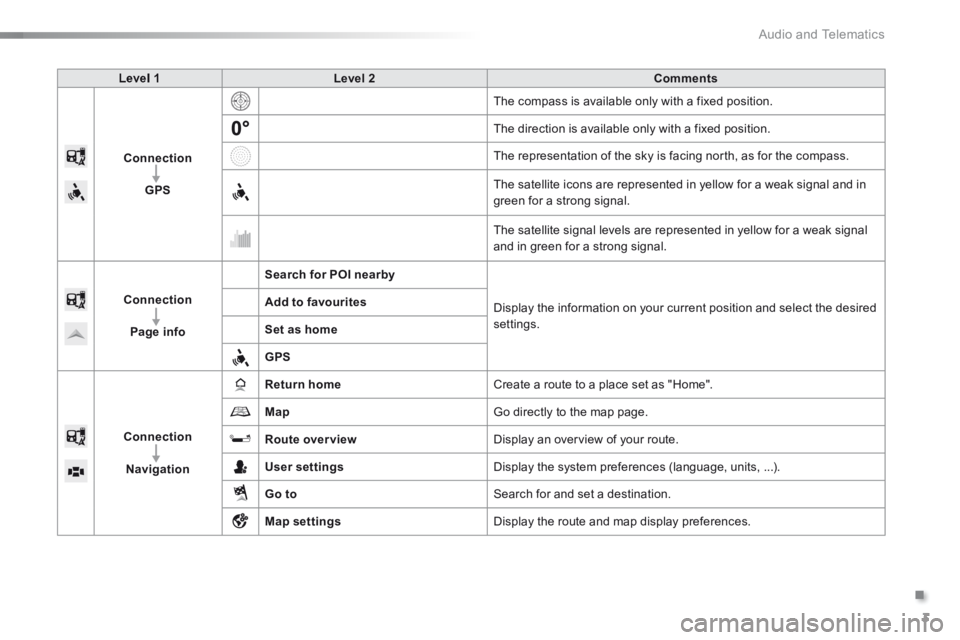
Level 1Level 2Comments
Connection
GPS
The compass is available only with a fixed position.
The direction is available only with a fixed position.
The representation of the sky is facing north, as for the compass.
The satellite icons are represented in yellow for a weak signal and in green for a strong signal.
The satellite signal levels are represented in yellow for a weak signal and in green for a strong signal.
Connection
Page info
Search for POI nearby
Display the information on your current position and select the desired settings.
Add to favourites
Set as home
GPS
Connection
Navigation
Return home Create a route to a place set as "Home".
Map Go directly to the map page.
Route overview Display an overview of your route.
User settings Display the system preferences (language, units, ...).
Go to Search for and set a destination.
Map settings Display the route and map display preferences.
Page 264 of 271
.
Audio and Telematics 5
c1-108-post-it-web_en_chap12a_complementnav_toyota_tactile-1_ed01-2015
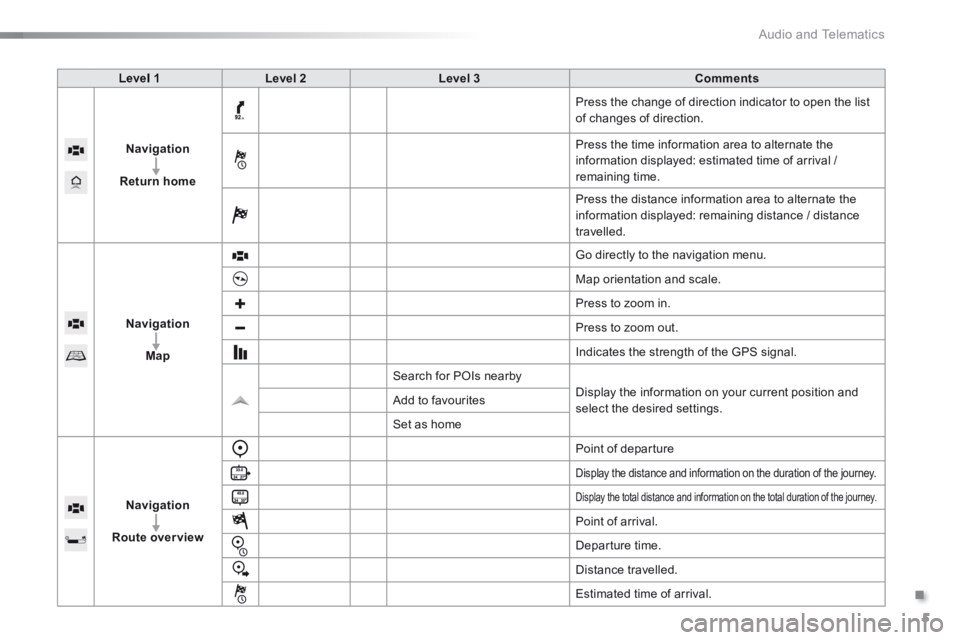
Level 1Level 2Level 3Comments
Navigation
Return home
Press the change of direction indicator to open the list of changes of direction.
Press the time information area to alternate the information displayed: estimated time of arrival / remaining time.
Press the distance information area to alternate the information displayed: remaining distance / distance travelled.
Navigation
Map
Go directly to the navigation menu.
Map orientation and scale.
Press to zoom in.
Press to zoom out.
Indicates the strength of the GPS signal.
Search for POIs nearby
Display the information on your current position and select the desired settings. Add to favourites
Set as home
Navigation
Route overview
Point of departure
Display the distance and information on the duration of the journey.
Display the total distance and information on the total duration of the journey.
Point of arrival.
Departure time.
Distance travelled.
Estimated time of arrival.