2015 NISSAN TITAN ad blue
[x] Cancel search: ad bluePage 10 of 457
BLUETOOTH® is a
trademark owned by
Bluetooth SIG, Inc.
and licensed to
Visteon and Bosch.
SiriusXM® services
require a subscription
after trial period and
are sold separately or
as a package. The
satellite service is
available only in the
48 contiguous USA
and DC. SiriusXM
satellite service is
also available in
Canada; see
www.siriusxm.ca.
© 2014 NISSAN NORTH AMERICA, INC.
All rights reserved. No part of this Owner’s
Manual may be reproduced or stored in a retrieval
system, or transmitted in any form, or by any
means, electronic, mechanical, photocopying,
recording or otherwise, without the prior written
permission of Nissan North America, Inc.
Page 20 of 457
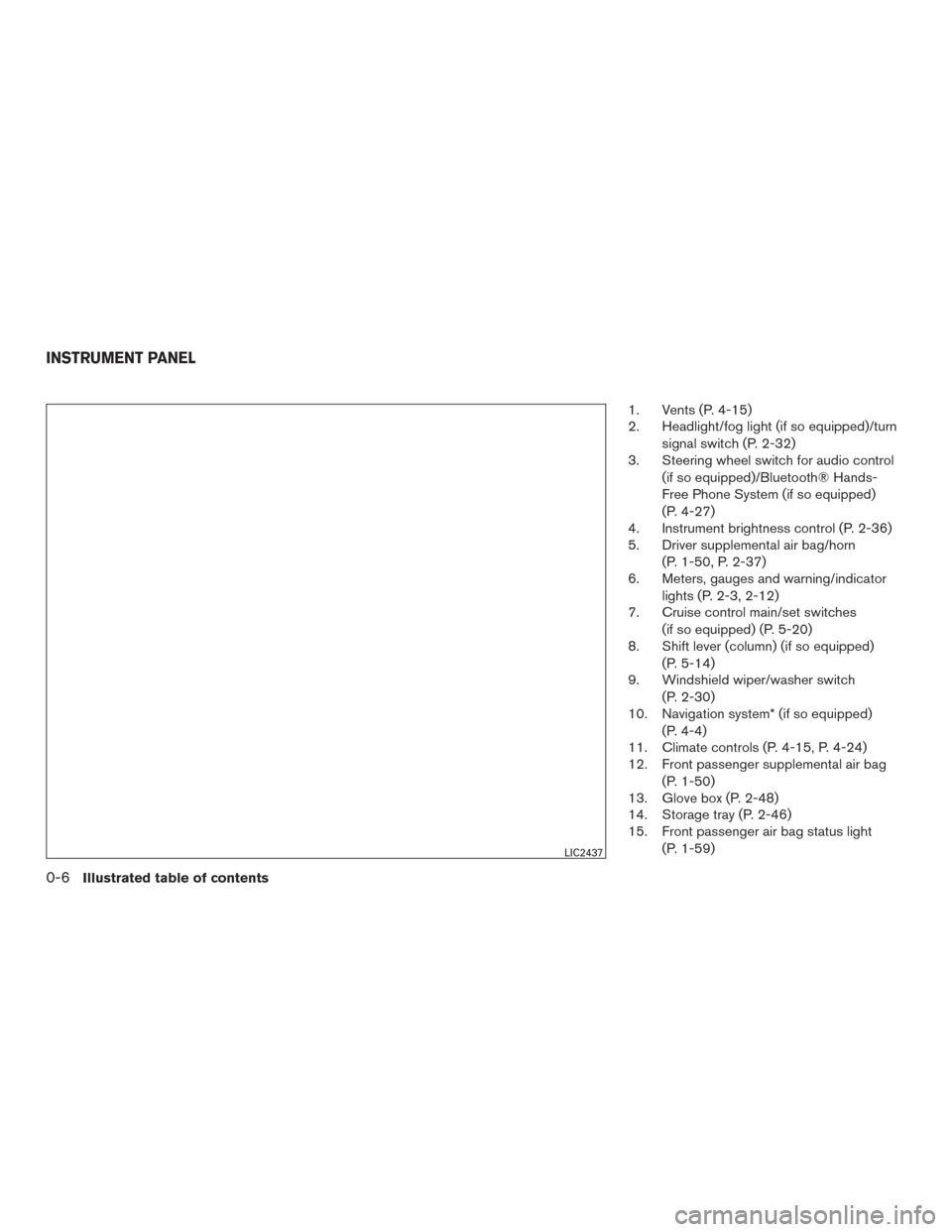
1. Vents (P. 4-15)
2. Headlight/fog light (if so equipped)/turnsignal switch (P. 2-32)
3. Steering wheel switch for audio control
(if so equipped)/Bluetooth® Hands-
Free Phone System (if so equipped)
(P. 4-27)
4. Instrument brightness control (P. 2-36)
5. Driver supplemental air bag/horn
(P. 1-50, P. 2-37)
6. Meters, gauges and warning/indicator
lights (P. 2-3, 2-12)
7. Cruise control main/set switches
(if so equipped) (P. 5-20)
8. Shift lever (column) (if so equipped)
(P. 5-14)
9. Windshield wiper/washer switch
(P. 2-30)
10. Navigation system* (if so equipped)
(P. 4-4)
11. Climate controls (P. 4-15, P. 4-24)
12. Front passenger supplemental air bag
(P. 1-50)
13. Glove box (P. 2-48)
14. Storage tray (P. 2-46)
15. Front passenger air bag status light
(P. 1-59)
LIC2437
INSTRUMENT PANEL
0-6Illustrated table of contents
Page 23 of 457
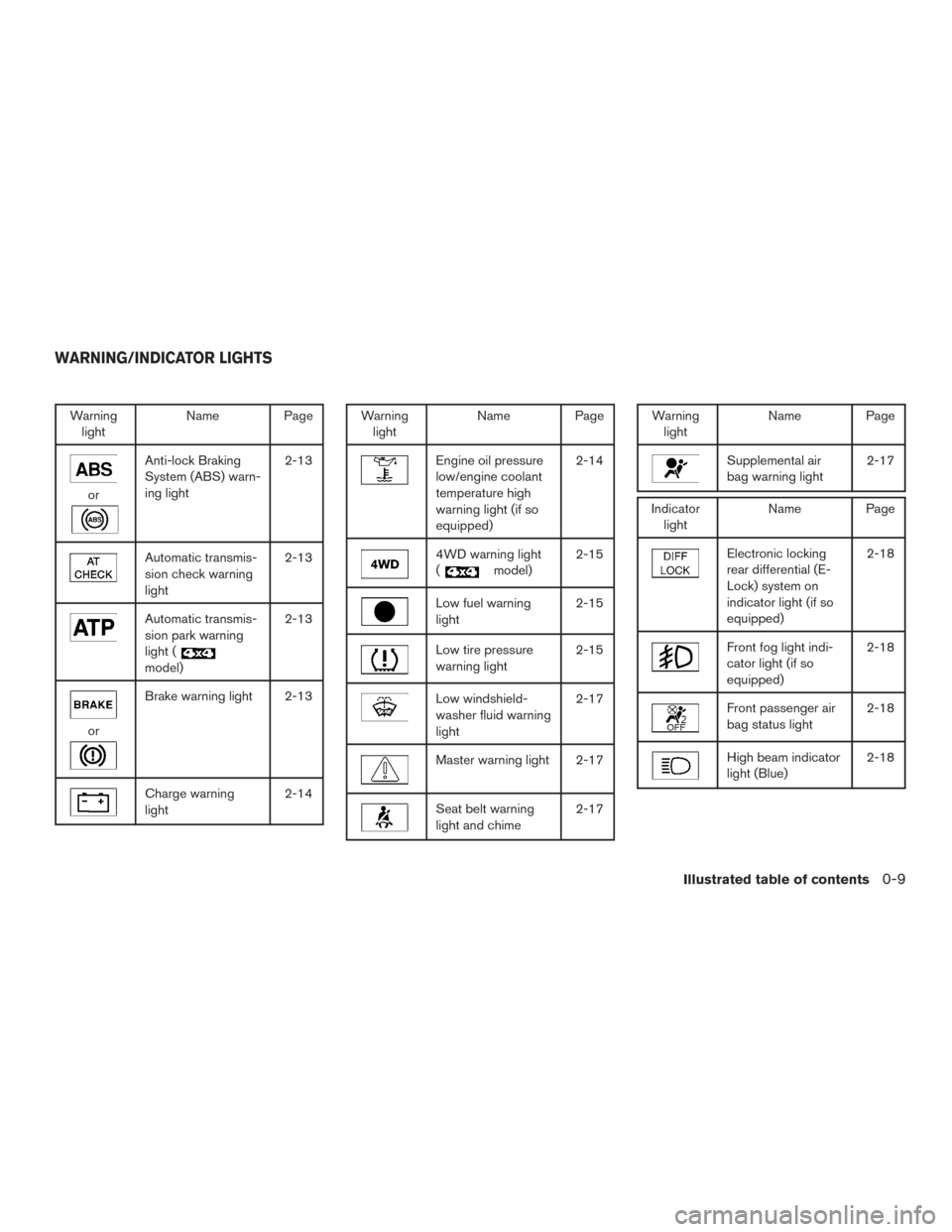
Warninglight Name Page
or
Anti-lock Braking
System (ABS) warn-
ing light 2-13
Automatic transmis-
sion check warning
light2-13
Automatic transmis-
sion park warning
light (
model)2-13
or
Brake warning light 2-13
Charge warning
light
2-14
Warning
light Name Page
Engine oil pressure
low/engine coolant
temperature high
warning light (if so
equipped) 2-14
4WD warning light
(
model)
2-15
Low fuel warning
light 2-15
Low tire pressure
warning light2-15
Low windshield-
washer fluid warning
light2-17
Master warning light 2-17
Seat belt warning
light and chime
2-17
Warning
light Name Page
Supplemental air
bag warning light 2-17
Indicator
light Name Page
Electronic locking
rear differential (E-
Lock) system on
indicator light (if so
equipped) 2-18
Front fog light indi-
cator light (if so
equipped)
2-18
Front passenger air
bag status light
2-18
High beam indicator
light (Blue)2-18
WARNING/INDICATOR LIGHTS
Illustrated table of contents0-9
Page 96 of 457
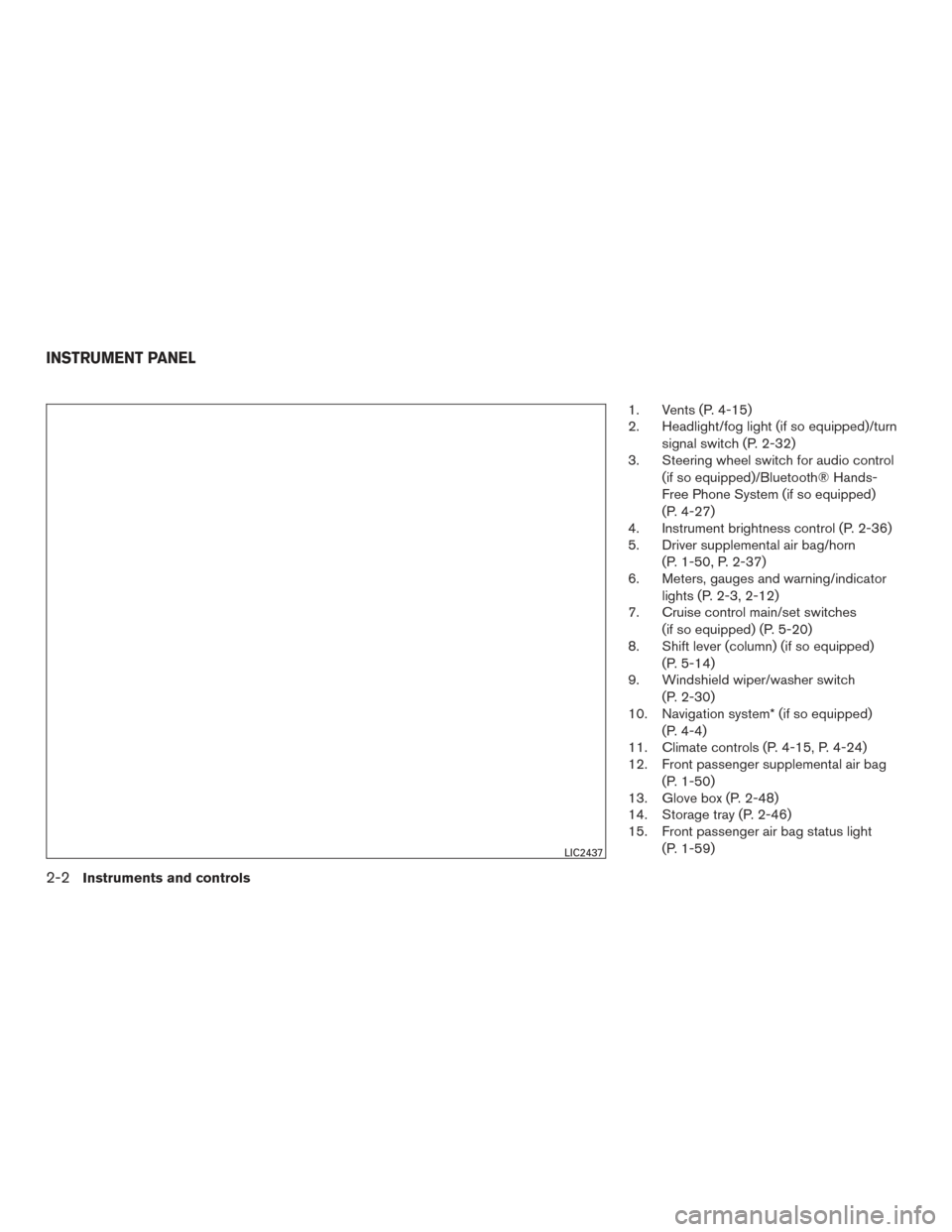
1. Vents (P. 4-15)
2. Headlight/fog light (if so equipped)/turnsignal switch (P. 2-32)
3. Steering wheel switch for audio control
(if so equipped)/Bluetooth® Hands-
Free Phone System (if so equipped)
(P. 4-27)
4. Instrument brightness control (P. 2-36)
5. Driver supplemental air bag/horn
(P. 1-50, P. 2-37)
6. Meters, gauges and warning/indicator
lights (P. 2-3, 2-12)
7. Cruise control main/set switches
(if so equipped) (P. 5-20)
8. Shift lever (column) (if so equipped)
(P. 5-14)
9. Windshield wiper/washer switch
(P. 2-30)
10. Navigation system* (if so equipped)
(P. 4-4)
11. Climate controls (P. 4-15, P. 4-24)
12. Front passenger supplemental air bag
(P. 1-50)
13. Glove box (P. 2-48)
14. Storage tray (P. 2-46)
15. Front passenger air bag status light
(P. 1-59)
LIC2437
INSTRUMENT PANEL
2-2Instruments and controls
Page 106 of 457
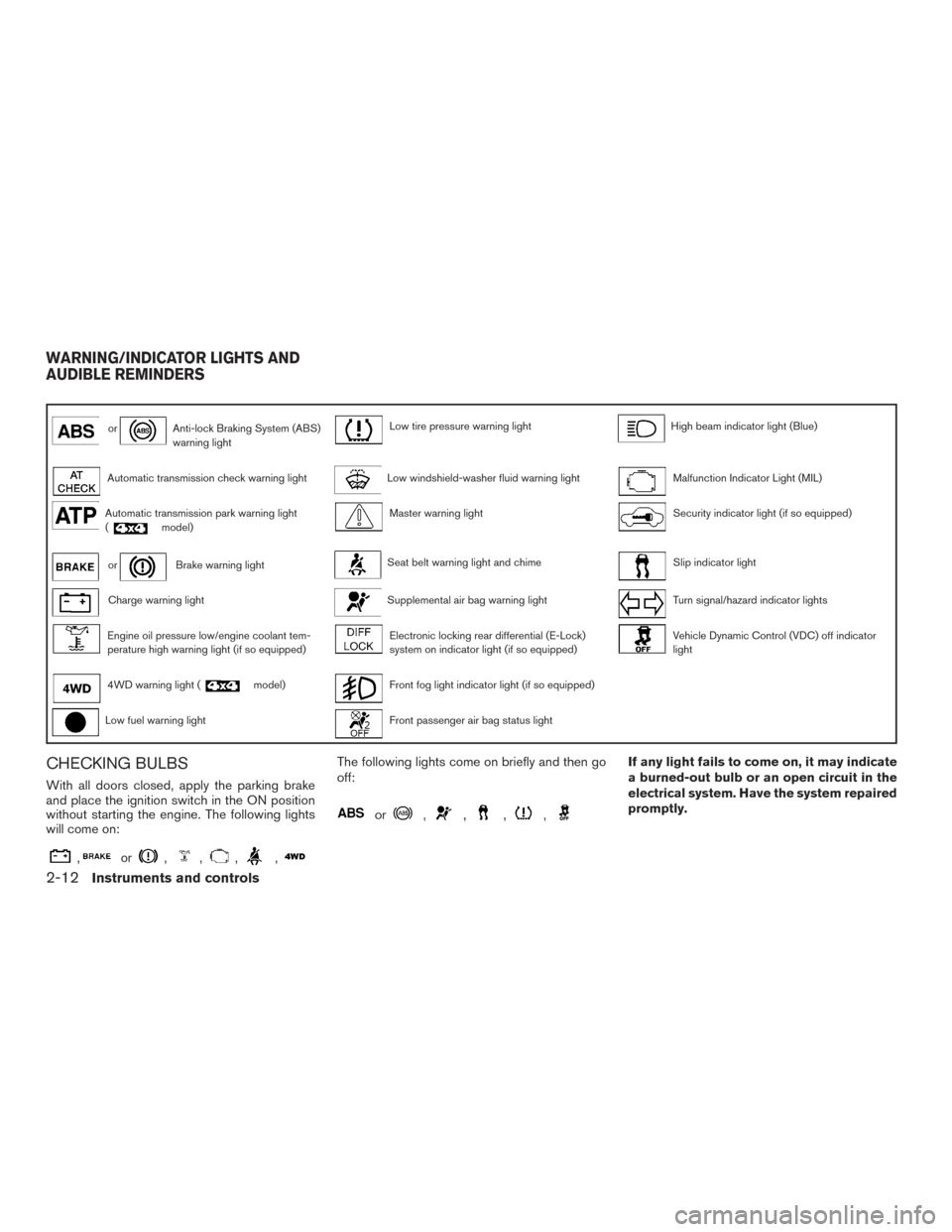
orAnti-lock Braking System (ABS)
warning lightLow tire pressure warning lightHigh beam indicator light (Blue)
Automatic transmission check warning lightLow windshield-washer fluid warning lightMalfunction Indicator Light (MIL)
Automatic transmission park warning light
(model)Master warning lightSecurity indicator light (if so equipped)
orBrake warning lightSeat belt warning light and chimeSlip indicator light
Charge warning lightSupplemental air bag warning lightTurn signal/hazard indicator lights
Engine oil pressure low/engine coolant tem-
perature high warning light (if so equipped)Electronic locking rear differential (E-Lock)
system on indicator light (if so equipped)Vehicle Dynamic Control (VDC) off indicator
light
4WD warning light (model)Front fog light indicator light (if so equipped)
Low fuel warning lightFront passenger air bag status light
CHECKING BULBS
With all doors closed, apply the parking brake
and place the ignition switch in the ON position
without starting the engine. The following lights
will come on:
,or,,,,
The following lights come on briefly and then go
off:
or,,,,
If any light fails to come on, it may indicate
a burned-out bulb or an open circuit in the
electrical system. Have the system repaired
promptly.
WARNING/INDICATOR LIGHTS AND
AUDIBLE REMINDERS
2-12Instruments and controls
Page 112 of 457
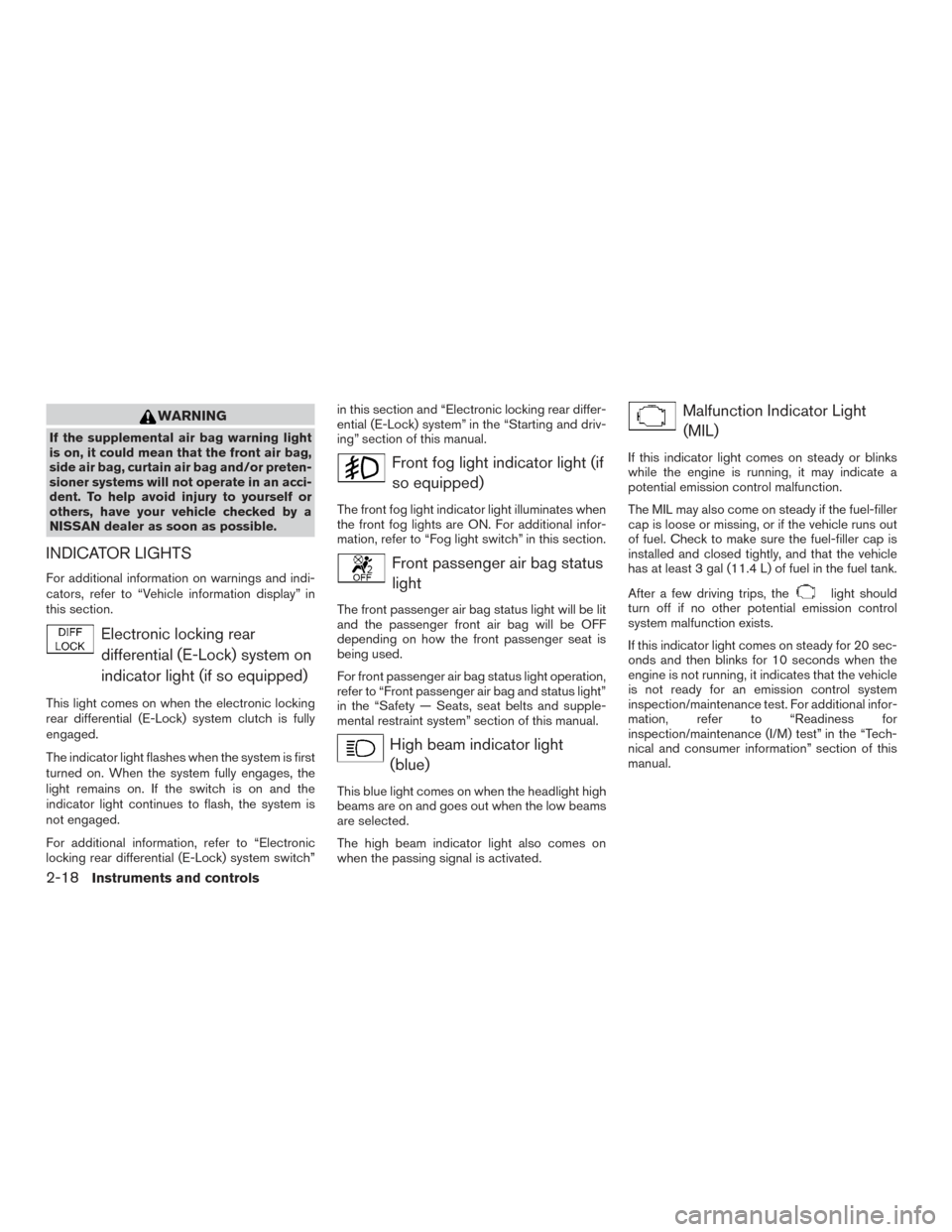
WARNING
If the supplemental air bag warning light
is on, it could mean that the front air bag,
side air bag, curtain air bag and/or preten-
sioner systems will not operate in an acci-
dent. To help avoid injury to yourself or
others, have your vehicle checked by a
NISSAN dealer as soon as possible.
INDICATOR LIGHTS
For additional information on warnings and indi-
cators, refer to “Vehicle information display” in
this section.
Electronic locking reardifferential (E-Lock) system on
indicator light (if so equipped)
This light comes on when the electronic locking
rear differential (E-Lock) system clutch is fully
engaged.
The indicator light flashes when the system is first
turned on. When the system fully engages, the
light remains on. If the switch is on and the
indicator light continues to flash, the system is
not engaged.
For additional information, refer to “Electronic
locking rear differential (E-Lock) system switch” in this section and “Electronic locking rear differ-
ential (E-Lock) system” in the “Starting and driv-
ing” section of this manual.
Front fog light indicator light (if
so equipped)
The front fog light indicator light illuminates when
the front fog lights are ON. For additional infor-
mation, refer to “Fog light switch” in this section.
Front passenger air bag statuslight
The front passenger air bag status light will be lit
and the passenger front air bag will be OFF
depending on how the front passenger seat is
being used.
For front passenger air bag status light operation,
refer to “Front passenger air bag and status light”
in the “Safety — Seats, seat belts and supple-
mental restraint system” section of this manual.
High beam indicator light(blue)
This blue light comes on when the headlight high
beams are on and goes out when the low beams
are selected.
The high beam indicator light also comes on
when the passing signal is activated.
Malfunction Indicator Light(MIL)
If this indicator light comes on steady or blinks
while the engine is running, it may indicate a
potential emission control malfunction.
The MIL may also come on steady if the fuel-filler
cap is loose or missing, or if the vehicle runs out
of fuel. Check to make sure the fuel-filler cap is
installed and closed tightly, and that the vehicle
has at least 3 gal (11.4 L) of fuel in the fuel tank.
After a few driving trips, the
light should
turn off if no other potential emission control
system malfunction exists.
If this indicator light comes on steady for 20 sec-
onds and then blinks for 10 seconds when the
engine is not running, it indicates that the vehicle
is not ready for an emission control system
inspection/maintenance test. For additional infor-
mation, refer to “Readiness for
inspection/maintenance (I/M) test” in the “Tech-
nical and consumer information” section of this
manual.
2-18Instruments and controls
Page 190 of 457
FM/AM radio with compact disc (CD) player
(Type A) (if so equipped).......................4-35
FM/AM radio with compact disc (CD) player
(Type B) (if so equipped) .......................4-39
FM/AM/SAT radio with compact disc (CD)
player (Type A) (if so equipped) .................4-43
FM/AM/SAT radio with compact disc (CD)
player (Type B) (if so equipped) .................4-48
USB (Universal Serial Bus) Connection Port
(models without Navigation System)
(if so equipped) ............................... 4-54
USB (Universal Serial Bus) Connection Port
(models with Navigation System) ................4-56
iPod®* player operation without Navigation
System (if so equipped) ........................ 4-58
iPod®* player operation with Navigation
System (if so equipped) ........................ 4-61
Bluetooth® streaming audio without
Navigation System (if so equipped) ..............4-64
Bluetooth® streaming audio with Navigation
System ....................................... 4-65
CD care and cleaning .......................... 4-66
Steering wheel switch for audio control
(if so equipped) ............................... 4-67Antenna
...................................... 4-68
NissanConnectSMwith Mobile Apps
(if so equipped) .................................. 4-68
Registering with NissanConnect
SMwith
Mobile Apps . ................................. 4-68
Connect Phone ............................... 4-68
Application Download .......................... 4-69
NISSAN mobile entertainment system (MES)
(if so equipped) .................................. 4-69
Digital video disc (DVD) player controls ..........4-70
Remote control ................................ 4-71
Flip-down screen .............................. 4-71
Playing a digital video disc (DVD) ...............4-72
Care and maintenance ......................... 4-76
How to handle the DVD ........................ 4-76
Car phone or CB radio ............................ 4-79
Bluetooth® Hands-Free Phone System without
Navigation System (if so equipped) .................4-79
Regulatory Information ......................... 4-81
Using the system .............................. 4-81
Control buttons ............................... 4-83
Connecting procedure ......................... 4-83
Voice commands .............................. 4-85
Making a call . ................................. 4-86
Page 191 of 457
Receiving a call............................... 4-87
During a call .................................. 4-87
Ending a call .................................. 4-87
Text messaging ................................ 4-88
Bluetooth® settings ........................... 4-89
Manual control ................................ 4-90
Bluetooth® Hands-Free Phone System with
Navigation System (if so equipped) .................4-90
Regulatory Information ......................... 4-92
Voice commands .............................. 4-93
Connecting Procedure ......................... 4-93
Vehicle phonebook ............................ 4-93
Making a call .................................. 4-94
Receiving a call ............................... 4-94
During a call .................................. 4-94
Ending a call .................................. 4-94Text messaging. .
.............................. 4-94
Bluetooth® settings ........................... 4-96
Phone settings ................................ 4-97
NISSAN Voice Recognition System
(if so equipped) .................................. 4-98
Using the system .............................. 4-98
System features ............................... 4-99
Bluetooth® Hands-Free Phone System
voice commands ............................. 4-100
Navigation System voice commands ............4-101
Audio system voice commands .................4-101
Information voice commands ...................4-101
My Apps Voice Commands ....................4-101
Help voice commands ........................ 4-102
Troubleshooting guide ........................ 4-102