2015 NISSAN ROGUE SELECT lock
[x] Cancel search: lockPage 165 of 322
4-30Heater, air conditioner, audio, phone and voice recognition systems
Audio main operation
Head unit:
The auto loudness circuit enhances the low and
high frequency ranges automatically in both
radio reception and CD playback.
PWR/Volume control:
Place the ignition switch in the ACC or ON
position, and then push the PWR button while
the system is off to turn on the last audio source,
which was playing immediately before the
system was turned off. While the system is on,
pushing the PWR button turns the system off.
Turn the VOL control knob to adjust the volume.
ENTER/SETTING button:
The settings screen will appear when pushing
the ENTER/SETTING button.
The following items are available in the settings
screen.
.Bass, Treble, Balance and Fade
Controls the sound of the audio system.
Balance adjusts the sound between the left
and right speakers. Fade adjusts the sound
between the front and rear speakers.
Select the “Bass”, “Treble”, “Balance” or
“Fade” using the TUNE·SCROLL control
knob and then push the ENTER/SETTING
button. Turn the TUNE·SCROLL control knob to adjust the Bass, Treble, Balance
and Fade of the screen to the preferred
level.
. Speed Sens Vol.
To change the Speed Sensitive Volume
(Speed Sens Vol.) level from off (0) to 5,
turn the TUNE·SCROLL control knob.
. AUX Vol.
Controls the volume level of incoming sound
when an auxiliary device is connected to the
system. To change the AUX Vol. level from 0
(off) to 3, turn the TUNE·SCROLL control
knob.
. Brightness and Contrast
Adjust the brightness and contrast of the
screen.
Select the “Brightness” or “Contrast” using
the TUNE·SCROLL control knob and then
push the ENTER/SETTING button. Turn the
TUNE·SCROLL control knob to adjust the
brightness and contrast of the screen to the
preferred level.
. Clock Adjust
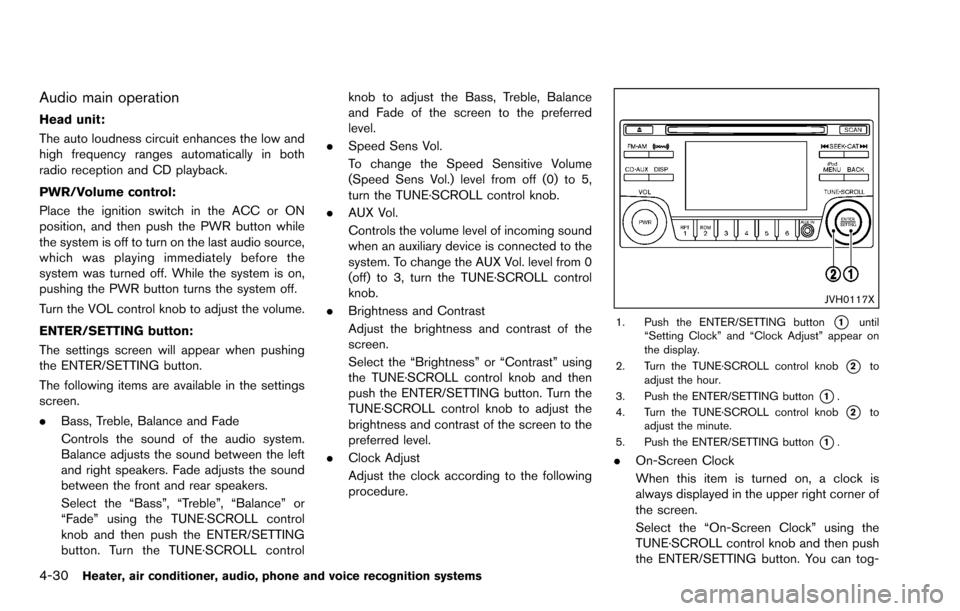
Adjust the clock according to the following
procedure.
JVH0117X
1. Push the ENTER/SETTING button*1until
“Setting Clock” and “Clock Adjust” appear on
the display.
2. Turn the TUNE·SCROLL control knob
*2to
adjust the hour.
3. Push the ENTER/SETTING button
*1.
4. Turn the TUNE·SCROLL control knob
*2to
adjust the minute.
5. Push the ENTER/SETTING button
*1.
. On-Screen Clock
When this item is turned on, a clock is
always displayed in the upper right corner of
the screen.
Select the “On-Screen Clock” using the
TUNE·SCROLL control knob and then push
the ENTER/SETTING button. You can tog-
Page 173 of 322
4-38Heater, air conditioner, audio, phone and voice recognition systems
VOLUME control switch
Push up or down the VOLUME control switch to
increase or decrease the volume.
Tuning switch
Memory change (radio):
Push up or down the tuning switch for less than
1.5 seconds to change the next or previous
radio preset.
SEEK tuning (radio):
Push up or down the tuning switch for more than
1.5 seconds to seek the next or previous radio
station.
APS (Automatic Program Search) FF, APS
REW (CD):
Push up or down the tuning switch for less than
1.5 seconds to return to the beginning of the
present program or skip to the next program.
Push several times to skip back or skip through
programs.
This system searches for the blank intervals
between selections. If there is a blank interval
within one program or there is no interval
between programs, the system may not stop in
the desired or expected location.FOLDER change (CD with MP3 or WMA):
Push up or down the tuning switch for more than
1.5 seconds to change the folders (if there are
any folders) .
iPod
Š:
. Push up or down for less than 1.5 seconds
will increase or decrease the track number.
USB:
. Push up or down for less than 1.5 seconds
will increase or decrease the track number.
. Push up or down for more than 1.5 seconds
will increase/decrease the folder number
SAA2102
ANTENNA
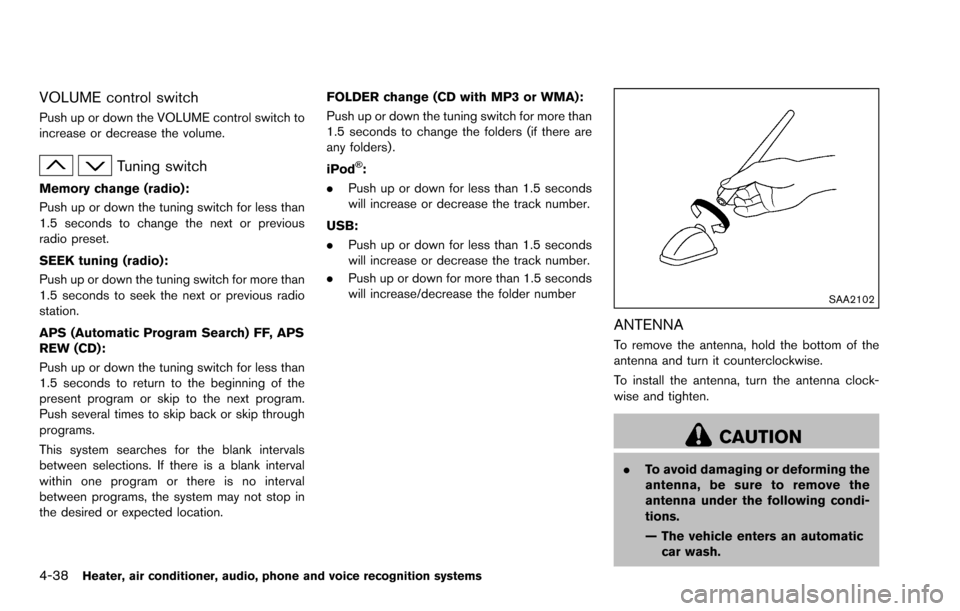
To remove the antenna, hold the bottom of the
antenna and turn it counterclockwise.
To install the antenna, turn the antenna clock-
wise and tighten.
CAUTION
.To avoid damaging or deforming the
antenna, be sure to remove the
antenna under the following condi-
tions.
— The vehicle enters an automatic
car wash.
Page 175 of 322
4-40Heater, air conditioner, audio, phone and voice recognition systems
WARNING
.Use a phone after stopping your
vehicle in a safe location. If you
have to use a phone while driving,
exercise extreme caution at all
times so full attention may be given
to vehicle operation.
. If you are unable to devote full
attention to vehicle operation while
talking on the phone, pull off the
road to a safe location and stop
your vehicle.
CAUTION
To avoid draining the vehicle battery,
use a phone after starting the engine.
Your NISSAN is equipped with the Bluetooth
Š
Hands-Free Phone System. If you have a
compatible BluetoothŠenabled cellular phone,
you can set up the wireless connection between
your cellular phone and the in-vehicle phone
module. With Bluetooth
Šwireless technology,
you can make or receive a hands-free telephone
call in your vehicle. Once your cellular phone is connected to the in-
vehicle phone module, no other phone connect-
ing procedure is required. Your phone is
automatically connected with the in-vehicle
phone module when the ignition switch is
placed in the ON position with the connected
cellular phone turned on and carried in the
vehicle.
You can connect up to 5 different Bluetooth
Š
cellular phones in the in-vehicle phone module.
However, you can talk on only one cellular phone
at a time.
Before using the Bluetooth
ŠHands-Free Phone
System, refer to the following notes.
. Wireless LAN (Wi-Fi) and the Bluetooth
Š
functions share the same frequency band
(2.4 GHz) . Using the BluetoothŠand the
wireless LAN functions at the same time may
slow down or disconnect the communica-
tion and cause undesired noise. It is
recommended that you turn off the wireless
LAN (Wi-Fi) when using the Bluetooth
Š
functions.
. Set up the wireless connection between a
compatible cellular phone and the in-vehicle
phone module before using the Bluetooth
Š
Hands-Free Phone System.
. Some BluetoothŠenabled cellular phones
may not be recognized by the in-vehicle phone module. Please visit www.nissanusa.
com/bluetooth for a recommended phone
list and connecting.
. You will not be able to use a hands-free
phone under the following conditions:
— Your vehicle is outside of the telephone
service area.
— Your vehicle is in an area where it is difficult to receive radio waves; such as in
a tunnel, in an underground parking
garage, near a tall building or in a
mountainous area.
— Your cellular phone is locked to prevent it from being dialed.
. When the radio wave condition is not ideal
or ambient sound is too loud, it may be
difficult to hear the other person’s voice
during a call.
. Immediately after the ignition switch is
placed in the ON position, it may be
impossible to receive a call for a short
period of time.
. Do not place the cellular phone in an area
surrounded by metal or far away from the in-
vehicle phone module to prevent tone quality
degradation and wireless connection dis-
ruption.
. While a cellular phone is connected through
the BluetoothŠwireless connection, the
BluetoothŠHANDS-FREE PHONE
SYSTEM (if so equipped)
Page 185 of 322
4-50Heater, air conditioner, audio, phone and voice recognition systems
10. The system will announce that speakeradaptation has been completed and the
system is ready.
The SA mode will stop if:
. The
button is pushed for more than 5
seconds in SA mode.
. The vehicle is driven during SA mode.
. The ignition switch is placed in the OFF or
LOCK position.
Training phrases
During the SA mode, the system instructs you to
say the following phrases.
(The system will prompt you for each phrase.)
.phonebook transfer entry
. dial 30429
. delete call back number
. Incoming
. Transfer entry
. 8 pause 9 3 2 pause 7
. delete all entries
. call 7 2 4 0 9
. phonebook delete entry
. next entry
. dial star 2170
. yes .
no
. select
. Missed
. dial 8 5 6 9 2
. Bluetooth on
. Outgoing
. call 3 1 9 0 2
. 9 7 pause pause 3 0 8
. cancel
. call back number
. call star 2 0 9 5
. delete phone
. dial 8 3 0 5 1
. Record Name
. 4 3 pause 2 9 pause 0
. delete redial number
. phonebook list names
. call 8 0 5 4 1
. correction
. setup main menu
. dial 7 4 0 1 8
. memo pad delete
. delete
. dial 9 7 2 6 6
. call 7 6 3 0 1 .
go back
. call 5 6 2 8 0
. dial 6 6 4 3 7
Page 188 of 322
5 Starting and driving
Precautions when starting and driving ................................ 5-2Exhaust gas (carbon monoxide) ...................................... 5-2
Three-way catalyst .............................................................. 5-3
Tire Pressure Monitoring System (TPMS) .................... 5-3
Avoiding collision and rollover ......................................... 5-5
On-pavement and off-road driving precautions .......... 5-6
Off-road recovery ................................................................ 5-6
Rapid air pressure loss ...................................................... 5-6
Drinking alcohol/drugs and driving ................................. 5-7
Driving safety precautions ................................................. 5-7
Ignition switch ........................................................................\
.... 5-9 Continuously Variable Transmission (CVT) ................... 5-9
Key positions ..................................................................... 5-10
Before starting the engine ................................................... 5-10
Starting the engine ................................................................ 5-11
Driving the vehicle ................................................................. 5-12 Continuously Variable Transmission (CVT) ................ 5-12
Parking brake ........................................................................\
.. 5-16
Cruise control (if so equipped) .......................................... 5-17 Precautions on cruise control ....................................... 5-17
Cruise control operations ............................................... 5-18 Break-in schedule ................................................................. 5-19
Fuel efficient driving tips ..................................................... 5-19
Increasing fuel economy ...................................................... 5-20
All-Wheel Drive (AWD) (if so equipped) ........................ 5-20
All-Wheel Drive (AWD) lock switch operations ..... 5-21
AWD warning light ........................................................ 5-22
Parking/parking on hills ........................................................ 5-23
Electric power steering system ......................................... 5-24
Brake system ........................................................................\
.. 5-25 Braking precautions ...................................................... 5-25
Parking brake break-in .................................................. 5-25
Anti-lock Braking System (ABS) ............................... 5-25
Vehicle Dynamic Control (VDC) system ......................... 5-27
Cold weather driving ............................................................ 5-28 Freeing a frozen door lock ........................................... 5-28
Anti-freeze ........................................................................\
5-28
Battery ........................................................................\
....... 5-28
Draining of coolant water ............................................. 5-28
Tire equipment ................................................................ 5-29
Special winter equipment ............................................ 5-29
Driving on snow or ice ................................................. 5-29
Page 196 of 322
equipment may result in drivetrain
damage or unexpected vehicle
movement which could result in
serious vehicle damage or personal
injury.
. When a wheel is off the ground due
to an unlevel surface, do not spin
the wheel excessively. (AWD mod-
els)
. Accelerating quickly, sharp steering
maneuvers or sudden braking may
cause loss of control.
. If at all possible, avoid sharp turning
maneuvers, particularly at high
speeds. Your vehicle has a higher
center of gravity than a conventional
passenger car. The vehicle is not
designed for cornering at the same
speeds as conventional passenger
cars. Failure to operate this vehicle
correctly could result in loss of
control and/or a rollover accident.
. Always use tires of the same type,
size, brand, construction (bias, bias-
belted or radial) , and tread pattern
on all four wheels. Install traction
devices on the front wheels when
driving on slippery roads and drive
carefully. .
Be sure to check the brakes imme-
diately after driving in mud or water.
See “Brake system” (P.5-25) for wet
brakes.
. Avoid parking your vehicle on steep
hills. If you get out of the vehicle
and it rolls forward, backward or
sideways, you could be injured.
. Whenever you drive off-road
through sand, mud or water as deep
as the wheel hub, more frequent
maintenance may be required. See
the maintenance information in the
“NISSAN Service and Maintenance
Guide”.
. Spinning the front wheels on slip-
pery surfaces may cause the AWD
warning light to flash and the AWD
system to automatically switch from
the AWD mode to the 2WD mode.
This could reduce traction. Be espe-
cially careful when towing a trailer.
(AWD models)
SSD0392
CONTINUOUSLY VARIABLE TRANS-
MISSION (CVT)
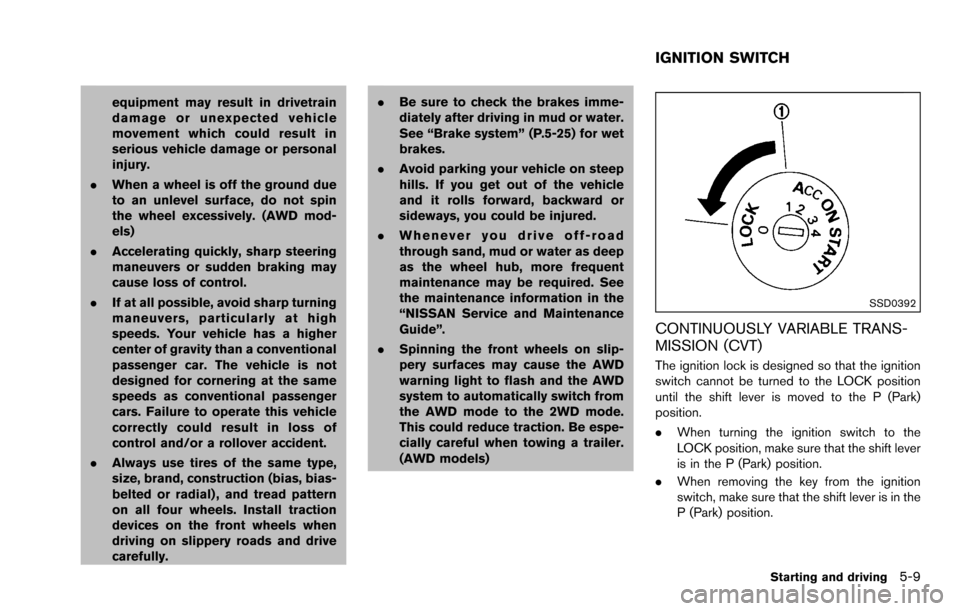
The ignition lock is designed so that the ignition
switch cannot be turned to the LOCK position
until the shift lever is moved to the P (Park)
position.
.When turning the ignition switch to the
LOCK position, make sure that the shift lever
is in the P (Park) position.
. When removing the key from the ignition
switch, make sure that the shift lever is in the
P (Park) position.
Starting and driving5-9
IGNITION SWITCH
Page 197 of 322
5-10Starting and driving
When the ignition switch cannot be turned to
the LOCK position:
1. Move the shift lever to the P (Park) position.
2. Turn the ignition switch slightly in the ONdirection.
3. Turn the ignition switch to the LOCK position.
4. Remove the key.
If the ignition switch is turned to the LOCK
position, the shift lever cannot be moved from
the P (Park) position. The shift lever can be
moved if the ignition switch is in the ON position
with the foot brake pedal depressed.
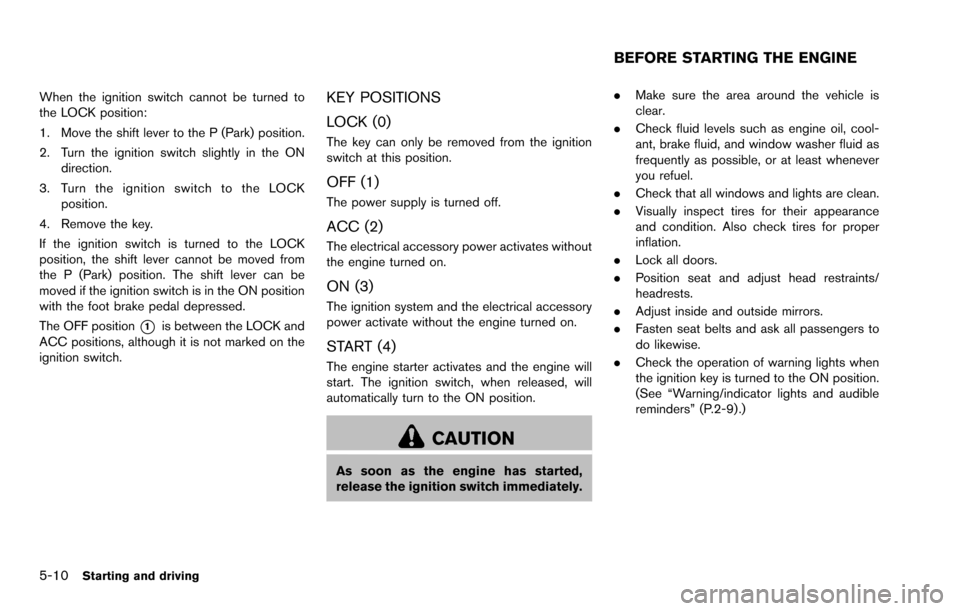
The OFF position
*1is between the LOCK and
ACC positions, although it is not marked on the
ignition switch.
KEY POSITIONS
LOCK (0)
The key can only be removed from the ignition
switch at this position.
OFF (1)
The power supply is turned off.
ACC (2)
The electrical accessory power activates without
the engine turned on.
ON (3)
The ignition system and the electrical accessory
power activate without the engine turned on.
START (4)
The engine starter activates and the engine will
start. The ignition switch, when released, will
automatically turn to the ON position.
CAUTION
As soon as the engine has started,
release the ignition switch immediately. .
Make sure the area around the vehicle is
clear.
. Check fluid levels such as engine oil, cool-
ant, brake fluid, and window washer fluid as
frequently as possible, or at least whenever
you refuel.
. Check that all windows and lights are clean.
. Visually inspect tires for their appearance
and condition. Also check tires for proper
inflation.
. Lock all doors.
. Position seat and adjust head restraints/
headrests.
. Adjust inside and outside mirrors.
. Fasten seat belts and ask all passengers to
do likewise.
. Check the operation of warning lights when
the ignition key is turned to the ON position.
(See “Warning/indicator lights and audible
reminders” (P.2-9).)
BEFORE STARTING THE ENGINE
Page 199 of 322
5-12Starting and driving
CONTINUOUSLY VARIABLE TRANS-
MISSION (CVT)
The Continuously Variable Transmission (CVT)
in your vehicle is electronically controlled to
produce maximum power and smooth operation.
The recommended operating procedures for this
transmission are shown on the following pages.
Follow these procedures for maximum vehicle
performance and driving enjoyment.
Engine power may be automatically re-
duced to protect the CVT if the engine
speed increases quickly when driving on
slippery roads or while being tested on
some dynamometers.
Starting the vehicle
1. After starting the engine, fully depress thefoot brake pedal before moving the shift
lever out of the P (Park) position.
This CVT is designed so that the foot
brake pedal must be depressed before
shifting from P (Park) to any driving
position while the ignition switch is in
the ON position.
The shift lever cannot be moved out of
the P (Park) position and into any of
the other positions if the ignition
switch is turned to the LOCK, OFF or
ACC position or if the key is removed. 2. Keep the foot brake pedal depressed, push
the shift lever button and move the shift lever
to a driving position.
3. Release the parking brake and foot brake pedal, and then gradually start the vehicle in
motion.
WARNING
.Do not depress the accelerator
pedal while shifting from P (Park)
or N (Neutral) to R (Reverse) , D
(Drive) , L (Low) . Always depress
the brake pedal until shifting is
completed. Failure to do so could
cause you to lose control and have
an accident.
. Cold engine idle speed is high, so
use caution when shifting into a
forward or reverse gear before the
engine has warmed up.
. Never shift to P (Park) or R (Re-
verse) while vehicle is moving. Fail-
ure to do so could cause you to lose
control and have an accident.
CAUTION
.Except in an emergency, do not shift
to the N (Neutral) position while
driving. Coasting with the transmis-
sion in the N (Neutral) position may
cause serious damage to the trans-
mission.
. When stopping the vehicle on an
uphill grade, do not hold the vehicle
by depressing the accelerator pedal.
The foot brake should be used for
this purpose.
. Do not downshift abruptly on slip-
pery roads. This may cause a loss of
control.
DRIVING THE VEHICLE