2015 NISSAN PATHFINDER HYBRID navigation system
[x] Cancel search: navigation systemPage 105 of 524

1. Vent (P. 4-41)
2. Headlight/fog light/turn signal switch
(P. 2-36)
3. Control panel and Vehicle Information
Display switches (P. 2-19)4. Instrument brightness control (P. 2-39)
5. Driver supplemental air bag/Horn
(P.1-47, P. 2-41)
6. Meters, gauges, warning/indicator
lights and Vehicle Information Display
(P. 2-3, 2-9, 2-19)7. Twin trip odometer reset switch (P. 2-4)
8. Windshield wiper/washer switch and
rear window wiper/washer switch
(P. 2-33, P. 2-35)
9. Control panel with Navigation System/
Control panel without Navigation
System (P. 4-10, 4-4)
10. Display screen (P. 4-10)
11. Front passenger supplemental air bag
(P. 1-47)
12. Glove box (P. 2-49)
13. Audio system controls (P. 4-47)/
Automatic heater and air conditioning
controls (P. 4-42)
14. Hazard warning flasher switch (P. 6-2)
15. Push-button ignition switch (P. 5-10)
16. Cruise control main/set switches
(P. 5-31)
17. Tilt steering wheel control (P. 3-31)
18. Bluetooth® Hands-free Phone System
(P. 4-109, 4-124)
19. Hood release (P. 3-22)
LIC2383
INSTRUMENT PANEL
2-2Instruments and controls
Page 106 of 524

20. Vehicle Dynamic Control (VDC) OFF
switch (P. 2-45)
Tow mode switch (P. 2-46)
Liftgate release switch (if so equipped)
(P. 3-23)
Heated steering wheel switch
(if so equipped) (P. 2-44)
Power inverter switch (if so equipped)
(P. 2-45)
Power liftgate main switch
(if so equipped) (P. 3-23)
Blind Spot Warning (if so equipped)/
Rear Cross Traffic Alert (if so
equipped) switch (P. 5-19, 5-25)
*: Refer to the separate Navigation System Own-
er’s Manual (if so equipped) .
For additional information, refer to the
page number indicated in parentheses for
operating details.
1. Tachometer
2. Warning/indicator lights
3. Vehicle Information Display
4. Speedometer5. Fuel gauge
6. Odometer/Twin trip odometer
7. Assist Charge Gauge
LIC2537
METERS AND GAUGES
Instruments and controls2-3
Page 127 of 524

3. To change the timer amount, use thebutton and the ENTER button to save the
selected time amount.
Language
The language of the vehicle information display
can be changed to:
●US English
●French
●Spanish
Use the
,, and the ENTER buttons to
select and change the language of the vehicle
information display. The language of the center
display/navigation can be changed indepen-
dently of the vehicle information display. For ve-
hicles not equipped with Navigation refer to
“How to use the SETTING button” for vehicles
equipped with Navigation in the “System” in the
“Monitor, climate, audio, phone and voice recog-
nition systems” section of this manual.
Units
The units that are shown in the vehicle informa-
tion display can be changed:
●Mileage
●Tire pressures●Temperature
Use the
,, and the ENTER buttons to
select and change the units of the vehicle infor-
mation display. The units of the navigation screen
can be changed independently of the vehicle
information display. For vehicles equipped with
Navigation, refer to “System” in the “Monitor,
climate, audio, phone and voice recognition sys-
tems” section of this manual.
Mileage
The unit for the mileage that displays in the ve-
hicle information display can be changed to:
●miles, MPG, Inch
●km/h, l/100km, cm
●km/h, km/l, cm
Use the
and the ENTER buttons to select
and change the unit.
Tire Pressures
The unit for tire pressure that displays in the
vehicle information display can be changed to:
●psi
●kPa
●bar
●Kgf/cm
2
Use theand the ENTER buttons to select
and change the unit.
Temperature
The temperature that displays in the vehicle infor-
mation display can be changed from:
●°F (Fahrenheit)
●°C (Celsius)
Use the ENTER button to toggle choices.
Welcome Effects
The welcome screen display can be turned
ON/OFF to display when the ignition switch is
placed in the ACC or ON position. To
enable/disable the welcome screen:
1. Press the
button.
2. Use the
buttons to select “Settings”,
and press ENTER.
3. Select “Welcome Effects” using the
buttons and press ENTER to turn this func-
tion ON or OFF.
2-24Instruments and controls
Page 178 of 524

4. When activated, the hazard indicator will
flash twice. When deactivated, the hazard
indicator will flash once.
5. The ignition switch must be placed in the
OFF and ON position again between each
setting change.
When the automatic door unlock system is deac-
tivated, the doors do not unlock when the ignition
switch is placed in the OFF position. To unlock
the door manually, use the inside lock knob or the
power door lock switch (driver’s or front passen-
ger’s side) .
NOTE:
The automatic door unlock function can be
changed using the Vehicle Settings in the
vehicle information display. The “Auto
Door Unlock” choices are:
●Off
●IGN OFF
●Shift into P
CHILD SAFETY REAR DOOR LOCK
Child safety locks help prevent the rear doors
from being opened accidentally, especially when
small children are in the vehicle.
The child safety lock levers are located on the
edge of the rear doors.
When the lever is in the LOCK position, the
door can be opened only from the outside.
WARNING
●Radio waves could adversely affect
electric medical equipment. Those who
use a pacemaker should contact the
electric medical equipment manufac-
turer for the possible influences before
use.
●The Intelligent Key transmits radio
waves when the buttons are pressed.
The FAA advises the radio waves may
affect aircraft navigation and communi-
cation systems. Do not operate the In-
telligent Key while on an airplane. Make
sure the buttons are not operated unin-
tentionally when the unit is stored for a
flight.
The Intelligent Key system can operate all the
door locks using the remote control function or
pushing the request switch on the vehicle without
taking the key out from a pocket or purse. The
operating environment and/or conditions may af-
fect the Intelligent Key system operation.
Be sure to read the following before using the
Intelligent Key system.
LPD2049
NISSAN INTELLIGENT KEY®
Pre-driving checks and adjustments3-7
Page 210 of 524

The driver’s seat and steering wheel will return to
the previous position:
●When the driver’s door is closed with the
ignition switch placed in the LOCK position.
●When the ignition switch is turned from
ACC to ON while the shift lever is in the P
(Park) position.
The entry/exit function can be adjusted or can-
celed through the Vehicle Settings in the vehicle
information display by performing the following:
●Switch the Exit Seat Slide from ON to OFF.
●Switch the Exit Steering UP from ON to
OFF.
Restarting the entry/exit function
If the battery cable is disconnected or if the fuse
opens, the entry/exit function will be disabled.
Drive the vehicle over 25 MPH (40 km/h) to
restart the entry/exit function. You can also restart
the entry/exit function using the following proce-
dure.
1. Connect the battery cable or replace the
fuse.
2. Open and close the driver’s door more than
two times with the ignition switch in the
LOCK position.
The entry/exit function should now work properly.
SETTING MEMORY FUNCTION
The position of the following settings can be
linked to the Intelligent Key and the memorized
settings can be available for each Intelligent Key.
●Climate control system
●Navigation system (if so equipped)
●Audio system
To use the memory function, set the climate,
navigation and audio systems to the driver’s pre-
ferred settings. Lock the doors with the Intelligent
Key. Each Intelligent Key may be set with the
driver’s individual preferences. When a new In-
telligent Key is used, “Connection with the key
has been done” will be displayed on the screen
and the memorized settings are available.
To engage the memorized settings, perform the
following:
1. Carry the Intelligent Key that is linked to the
memorized settings.
2. Unlock the doors by pushing the driver’s
door handle request switch or the
UNLOCK
button on the Intelligent
Key.
3. Place the ignition switch in the “ON” posi-
tion. The settings linked to the Intelligent Key
will start.For additional information on using the Climate
control system refer to “Heater and air condi-
tioner (automatic)” in the “Monitor, climate, audio,
phone and voice recognition systems” section of
this manual.
For additional information on using the Naviga-
tion System, refer to the separate Navigation
System Owner’s Manual.
For additional information on using the Audio
system, refer to “Audio system” in the “Monitor,
climate, audio, phone and voice recognition sys-
tems” section of this manual.
SYSTEM OPERATION
The automatic drive positioner system will not
work or will stop operating under the following
conditions:
●When the vehicle speed is above 4 MPH
(7 km/h).
●When any of the memory switches are
pushed while the automatic drive positioner
is operating.
●When the adjusting switch for the driver’s
seat and steering column is turned on while
the automatic drive positioner is operating.
●When the seat has already been moved to
the memorized position.
Pre-driving checks and adjustments3-39
Page 212 of 524

4 Monitor, climate, audio, phone and voice
recognition systems
Control panel buttons — color screen without
Navigation System (if so equipped)..................4-4
How to use the NISSAN controller...............4-5
How to select menus on the screen..............4-6
How to use the STATUS button..................4-6
How to use the INFO button.....................4-6
How to use the SETTING button.................4-8
OFF button..............................4-9
Control panel buttons — color screen with
Navigation System (if so equipped).................4-10
How to use the NISSAN controller..............4-11
How to use the touch-screen . ..................4-11
How to select menus on the screen.............4-13
How to use the STATUS button.................4-13
How to use the INFO button....................4-14
How to use the SETTING button................4-16
OFF button.............................4-18
Image viewer (if so equipped)......................4-19
Using the image viewer........................4-19
RearView Monitor (if so equipped)..................4-21
How to read the displayed lines.................4-22
How to park with predicted course lines..........4-22Difference between predicted and actual
distances.....................................4-23
Predicted course line settings...................4-26
How to adjust the screen.......................4-26
Parking Sensor / Rear Center Sonar.............4-26
Operating tips.................................4-28
Around View® Monitor (if so equipped).............4-28
Available views................................4-30
Difference between predictive and actual
distances.....................................4-35
How to switch the display......................4-37
Parking Sensor / Rear Center Sonar.............4-38
How to adjust the screen view..................4-40
View malfunction..............................4-40
Operating tips.................................4-40
Vents...........................................4-41
Heater and air conditioner (automatic)..............4-42
Automatic operation...........................4-43
Manual operation..............................4-44
Operating tips.................................4-46
Servicing air conditioner...........................4-47
Audio system....................................4-47
Page 213 of 524
Radio........................................4-47
FM radio reception............................4-47
AM radio reception............................4-48
Satellite radio reception (if so equipped).........4-48
Audio operation precautions....................4-48
FM/AM/SAT radio with compact disc (CD)
player (if so equipped).........................4-63
FM/AM/SAT radio with CD/DVD player
(if so equipped)...............................4-70
Digital Versatile Disc (DVD) Player
Operation (models with Navigation System)......4-76
USB (Universal Serial Bus) Connection Port
(models without Navigation System)
(if so equipped)...............................4-79
USB (Universal Serial Bus) Connection Port
(models with Navigation System)
(if so equipped)...............................4-80
iPod®* player operation without Navigation
System (if so equipped)........................4-84
iPod®* player operation with Navigation
System (if so equipped)........................4-86
Bluetooth® streaming audio (if so equipped).....4-90
CD care and cleaning..........................4-93
Steering wheel switch for audio control..........4-94Antenna......................................4-95
Dual head restraint/headrest DVD system
(if so equipped)..................................4-96
System components...........................4-97
Before operating dual head restraint/
headrest DVD system.........................4-102
Playing a DVD (Digital Versatile Disc)...........4-103
Operating tips................................4-107
Care and maintenance........................4-108
Car phone or CB radio...........................4-108
Bluetooth® Hands-Free Phone System without
Navigation System (if so equipped)................4-109
Regulatory Information........................4-111
Using the system.............................4-111
Control buttons..............................4-114
Getting started...............................4-114
List of voice commands.......................4-116
Voice Adaptation (VA) mode...................4-120
Manual control . ..............................4-121
Troubleshooting guide........................4-123
Bluetooth® Hands-Free Phone System with
Navigation System (if so equipped)................4-124
Regulatory Information........................4-126
Voice commands.............................4-126
Page 215 of 524
WARNING
●Positioning of the heating or air condi-
tioning controls and display controls
should not be done while driving in or-
der that full attention may be given to
the driving operation.
●Do not disassemble or modify this sys-
tem. If you do, it may result in accidents,
fire, or electrical shock.
●Do not use this system if you notice any
abnormality, such as a frozen screen or
lack of sound. Continued use of the
system may result in accident, fire or
electric shock.
●In case you notice any foreign object in
the system hardware, spill liquid on it,
or notice smoke or smell coming from it,
stop using the system immediately and
contact your nearest NISSAN dealer. Ig-
noring such conditions may lead to ac-
cidents, fire or electrical shock.
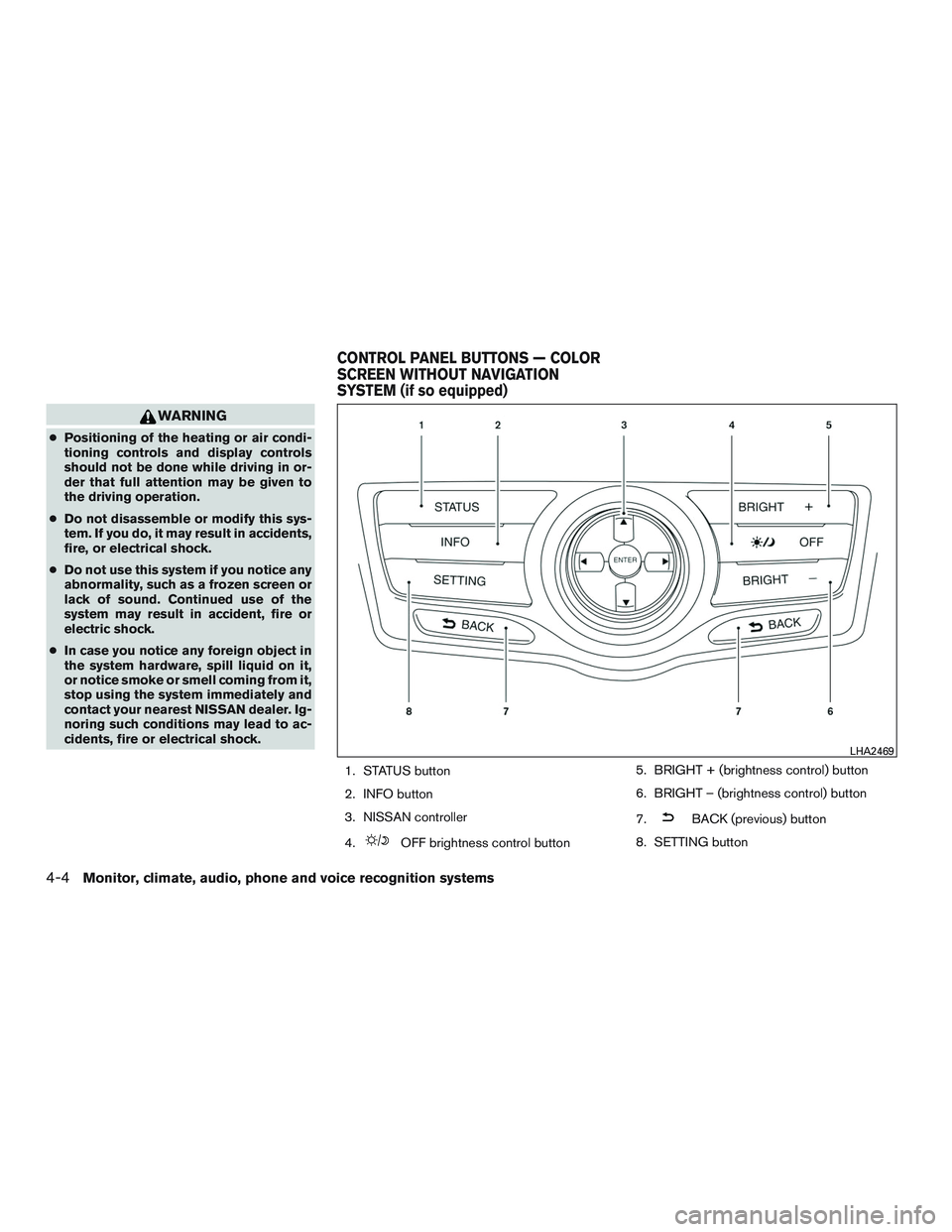
1. STATUS button
2. INFO button
3. NISSAN controller
4.
OFF brightness control button5. BRIGHT + (brightness control) button
6. BRIGHT – (brightness control) button
7.
BACK (previous) button
8. SETTING button
LHA2469
CONTROL PANEL BUTTONS — COLOR
SCREEN WITHOUT NAVIGATION
SYSTEM (if so equipped)
4-4Monitor, climate, audio, phone and voice recognition systems