2015 NISSAN PATHFINDER HYBRID fuel consumption
[x] Cancel search: fuel consumptionPage 11 of 524

The NISSAN PUREDRIVE™ Hybrid System
combines the power of a gasoline engine and an
electric motor to help minimize fuel consumption
and emissions.
Depending on driving conditions, the vehicle runs
on a combination of the gasoline engine and the
electric motor, whichever is best for those condi-
tions.
Because the gasoline engine charges the
Lithium-ion (Li-ion) battery as needed, the battery
does not have to be charged from an outside
source like an all-electric vehicle.WARNING
If you continue to drive the vehicle while
the warning is displayed, the hybrid sys-
tem may become temporarily inoperative
and the system can not provide power to
the wheels. This can result in reduced or
zero vehicle speed. The reduced speed or
zero speed may be lower than other traf-
fic, which could increase the chance of a
collision. If the vehicle cannot maintain a
safe driving speed, pull to the side of the
road in a safe area. If this occurs, place the
shift lever in the “P” position, ignition in
the READY position with the vehicle
stopped until the display turns off. The
Hybrid system overheat warning and the
SHIFT “P” warning messages will be alter-
nately displayed. For additional informa-
tion, refer to “Shift to Park” in the “Instru-
ments and controls” section of this
manual.
WARNING
Your vehicle contains a sealed Lithium ion
(Li-ion) high-voltage battery. If the Li-ion
battery is disposed of improperly, there is
a risk of severe burns and electrical shock
that may result in serious injury or death
and there is also a risk of environmental
damage.
CAUTION
Do not misuse the Li-ion battery (to use
the Li-ion battery for completely another
purpose) .
The Li-ion battery is used to drive the electric
motors in the NISSAN PUREDRIVE™ Hybrid
System.
The Li-ion battery has a limited service life. Con-
tact your NISSAN dealer for information about
recycling or disposal of the battery.
NISSAN PUREDRIVE™ HYBRID
SYSTEMLITHIUM-ION (Li-ion) BATTERY
HEV-2HEV Overview
Page 15 of 524

The NISSAN PUREDRIVE™ Hybrid System
monitors the status of power being sent to the
electric motor and the Li-ion battery state of
charge. The status is shown on the assist charge
gauge in the meter and the energy
flow/remaining Li-ion battery charge in the ve-
hicle information display. System status can also
be shown on the navigation system display (if so
equipped) and the meter when the screen is in
the energy flow mode or energy/fuel history
mode.
ASSIST CHARGE GAUGE
This meter displays the actual electric motor
power consumption and the charging power to
the Li-ion battery.
For additional information, refer to “Assist charge
gauge” in the “Instruments and controls” section.
ENERGY FLOW (models with
navigation system)
When you use this system, make sure the hybrid
system is in the READY to drive mode. For addi-
tional information, refer to “Operation of the hy-
brid system” in this section.If you use the system with the hybrid sys-
tem off (ignition switch placed in the ACC
position) for a long time, it will discharge
the 12-volt battery power, and the hybrid
system will not start.
Energy monitor for various operating modes can
be displayed on the navigation system monitor
and the meter.
Push the INFO button on the control panel, high-
light the “Energy Flow” key on the display using
the NISSAN controller, and push the ENTER
button.
LIC2544
ENERGY MONITORS
HEV-6HEV Overview
Page 16 of 524

This is an example of the Energy Flow display.
The Energy Flow display changes, depending on
the following operating conditions. The graphic
indicates the amount of power in the Li-ion bat-
tery.
The following are displayed on the Energy Flow
screen:
●When the vehicle is powered only by the
electric motor or gasoline engine.
●When the vehicle is powered by both the
electric motor and the gasoline engine.●When the vehicle is charging the Li-ion bat-
tery with the regenerative brake and gaso-
line engine.
●When the vehicle is powered by the gaso-
line engine and is charging the Li-ion battery.
●When there is no Energy Flow in the vehicle
The Energy Flow and remaining Li-ion battery
charge can be also shown on the vehicle infor-
mation display. For additional information, refer to
“Trip computer” in the “Instruments and controls”
section.FUEL ECONOMY (models with
navigation system)
Press the INFO button then touch the FUEL
ECONOMY key on the display screen.
This screen displays the rate of fuel consumption
and distance to empty.
NJE0003NJE0013
HEV OverviewHEV-7
Page 17 of 524

FUEL ECONOMY (models without
navigation system)
Press the INFO button. Using the NISSAN con-
troller, select FUEL ECONOMY menu option.
This screen displays the rate of fuel consumption
and distance to empty.
FUEL ECONOMY HISTORY (models
with navigation system)
The Fuel Economy History screen appears in the
display with the navigation system when the
screen is in the Fuel Economy History mode.
1. Push the INFO button on the control panel
and highlight the “Energy Flow” key on the
display using the NISSAN controller. Then
push the ENTER button.
2. Highlight the “History” key, and push the
ENTER button.The Fuel Economy History can be displayed on
the navigation system monitor. This displays the
vehicle’s average fuel consumption and regen-
erative electric power at 2 minute intervals.
The displayed values on the screen indicate gen-
eral driving conditions. Accuracy varies with driv-
ing habits and road conditions.
1. Regenerated energy in the past 12 minutes:
The regenerated energy in the past 12 min-
utes is indicated with symbols. One symbol
indicates 30 watt-hour. The energy of
30 watt-hour illuminates a 30 watt bulb for
an hour.
2. Fuel consumption in the past 12 minutes:
Fuel consumption in the past 12 minutes is
displayed.
3. Current fuel consumption (Latest column):
The current fuel consumption is calculated
and displayed based on distance and fuel
consumption.
NOTE:
Information shown in the yellow column
means current (within 2 minutes) and infor-
mation shown in the blue columns means
past (more than 2 minutes) .
NJE0012NJE0008
HEV-8HEV Overview
Page 18 of 524

FUEL ECONOMY HISTORY (models
without navigation system)
The Fuel Economy History screen appears when
the display screen is in the Fuel Economy History
mode.
1. Press the INFO button on the control panel.
2. Select the FUEL ECONOMY on the vehicle
information display. This will display fuel
economy information.3. The Fuel Eco History can be displayed by
touching the VIEW key on the display
screen. This displays the vehicle’s average
fuel consumption and regenerative electric
power at 2 minute intervals.
The displayed values on the screen indicate gen-
eral driving conditions. Accuracy varies with driv-
ing habits and road conditions.
●Regenerated energy in the past 12 minutes:
The regenerated energy in the past 12 min-
utes is indicated with symbols. One symbol
indicates 30 watt-hour. The energy of
30 watt-hour illuminates a 30 watt bulb for
an hour.●Fuel consumption in the past 12 minutes:
Fuel consumption in the past 12 minutes is
displayed.
●Current fuel consumption (Latest column):
The current fuel consumption is calculated
and displayed based on distance and fuel
consumption.
NOTE:
Information shown in the yellow column
means current (within 2 minutes) and infor-
mation shown in the blue columns means
past (more than 2 minutes) .
NJE0012NJE0010
HEV OverviewHEV-9
Page 217 of 524
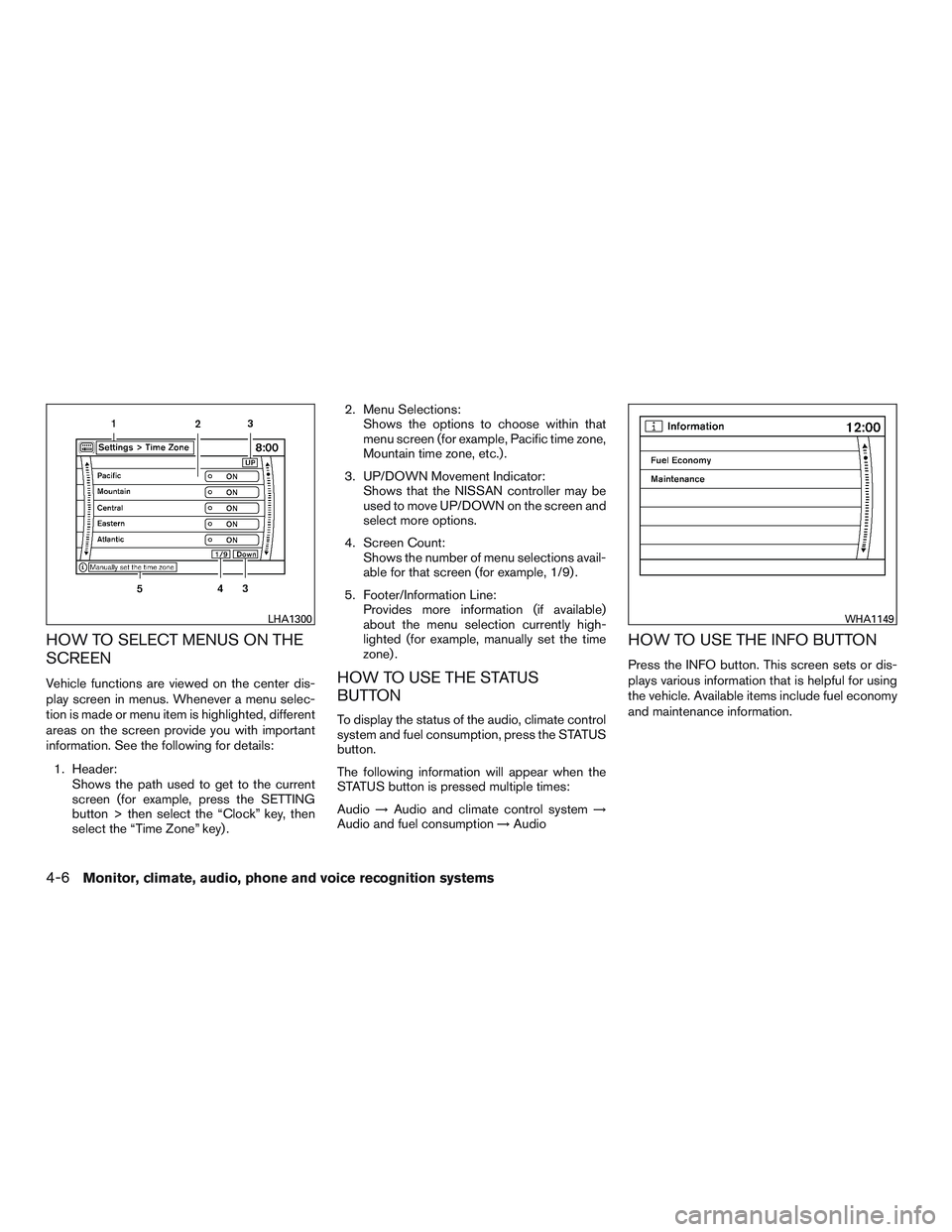
HOW TO SELECT MENUS ON THE
SCREEN
Vehicle functions are viewed on the center dis-
play screen in menus. Whenever a menu selec-
tion is made or menu item is highlighted, different
areas on the screen provide you with important
information. See the following for details:
1. Header:
Shows the path used to get to the current
screen (for example, press the SETTING
button > then select the “Clock” key, then
select the “Time Zone” key) .2. Menu Selections:
Shows the options to choose within that
menu screen (for example, Pacific time zone,
Mountain time zone, etc.) .
3. UP/DOWN Movement Indicator:
Shows that the NISSAN controller may be
used to move UP/DOWN on the screen and
select more options.
4. Screen Count:
Shows the number of menu selections avail-
able for that screen (for example, 1/9) .
5. Footer/Information Line:
Provides more information (if available)
about the menu selection currently high-
lighted (for example, manually set the time
zone) .HOW TO USE THE STATUS
BUTTON
To display the status of the audio, climate control
system and fuel consumption, press the STATUS
button.
The following information will appear when the
STATUS button is pressed multiple times:
Audio→Audio and climate control system→
Audio and fuel consumption→Audio
HOW TO USE THE INFO BUTTON
Press the INFO button. This screen sets or dis-
plays various information that is helpful for using
the vehicle. Available items include fuel economy
and maintenance information.
LHA1300WHA1149
4-6Monitor, climate, audio, phone and voice recognition systems
Page 218 of 524

Menu ItemResult
Fuel Economy Displays Fuel Economy menu.
Distance to Empty (DTE) Displays an estimation of the distance that the vehicle can be driven before refueling. The DTE is constantly calculated basedon the
amount of fuel in the fuel tank and actual fuel consumption. The display is updated every 30 seconds. When the fuel level is low, the DTE
display will change to (*) .
NOTE:If the amount of fuel added while the ignition switch is OFF is small, the display just before the ignition switch is turned off may
continue to be displayed.
NOTE:When driving uphill or rounding curves, the fuel in the tank shifts, which may momentarily change the display.
Average Fuel Economy Displays the average fuel economy since the last reset. The display is updated every 30 seconds and 1/3 mi (500 m) . After a reset or
connecting the battery cables, the display might show (**.*) .
Fuel Economy Record Select the “View” key to display the average fuel consumption history in a graph form.
Maintenance Displays maintenance reminders.
Reminder keys (1–4) Select a key to display that maintenance interval.
Reset Distance Resets the distance for the selected reminder to 0 km (mi) .
Interval Displays the interval for the selected reminder. Select the “+” or “-” keys to adjust the distance up or down.
Interval Re-
minderDisplays status of the selected interval reminder. Select to toggle on or off. If set to “On”, the maintenance notice screen will be displayed
once the interval is met and the ignition switch is placed in the OFF and then ON position.
Monitor, climate, audio, phone and voice recognition systems4-7
Page 225 of 524

HOW TO USE THE INFO BUTTON
Press the INFO button. This screen sets or dis-
plays various information that is helpful for using
the vehicle. Available items include fuel economy,
maintenance, navigation and voice recognition
information.
Menu ItemResult
Fuel Economy Displays Fuel Economy menu.
Distance to Empty (DTE) Displays an estimation of the distance that the vehicle can be driven before refueling. The DTE is constantly calculated basedon the
amount of fuel in the fuel tank and actual fuel consumption. The display is updated every 30 seconds. When the fuel level is low, the DTE
display will change to (*) .
NOTE:If the amount of fuel added while the ignition switch is OFF is small, the display just before the ignition switch is turned off may
continue to be displayed.
NOTE:When driving uphill or rounding curves, the fuel in the tank shifts, which may momentarily change the display.
Average Fuel Economy Displays the average fuel economy since the last reset. The display is updated every 30 seconds and 1/3 mi (500 m) . After a reset or
connecting the battery cables, the display might show (**.*) . Select “Reset Fuel Eco” to reset the fuel economy calculation to 0.
Fuel Economy History Touch the “View” key to display the average fuel consumption history in a graph form.
Maintenance Displays maintenance reminders.
Reminder keys Touch a key to display the maintenance interval for engine oil, oil filter, tire or other reminder.
LHA1231
4-14Monitor, climate, audio, phone and voice recognition systems