Page 65 of 412
8. Connect the charge connector to the chargeport. If it is connected normally, a beep will
sound once.
9. If charging has started, or if the Li-ion battery is waiting for charging timer, a beep will sound
twice and the charging status indicator light
display will change. See “Charging status in-
dicator lights” in this section. 10. When recharging outside such as in your
drive way, use a commercially available pad-
lock attached in position
�Ato prevent theft. To stop trickle charge:
1. Ensure that the charge connector lock is not
engaged. For more information, see “Charge
connector lock switch” in this section.
2. Press the button on the charge connector, release the lock and remove the charge con-
nector from the charge port.
3. Attach the safety cap to the EVSE (Electric Vehicle Supply Equipment) .
4. Remove the electrical plug from the AC 110 - 120 volt, 15A dedicated electrical outlet.
CH-14Charging
Page 68 of 412
CAUTION
• Be sure to insert the charge connector
straight into the quick charge port right
up to the base. Failure to do so may
result in the Li-ion battery not charging
or could cause damage to the charging
equipment. 5. Grasp the lock lever and lock the charge
connector.
6. Follow the instructions on the quick charge equipment to start charging. When the equip-
ment is properly installed and ready to charge
a beep sounds twice and the charging status
indicator light will change. See “Charge sta-
tus indicator lights” in this section
Charging ends in the following situations.
• When charging is complete
• When charging time has exceeded 60 minutes
• When the possible charge time set for the quick charger is exceeded
NOTE:
•Charging may automatically stop even if it
is not completed.
• If charging stops mid-charge, you can re-
start charging by pressing the start button
on the quick charger again.
• The charge connector is locked to the
charge port during charging and cannot
be disconnected. Follow the instructions
on the quick charge equipment to stop
charging. Confirm charging is stopped by
looking at the indicators on the dash. The
charge connector can be disconnected
from the vehicle when charging is
stopped.
• When quick charging, the Li-ion battery
charging rate is slower as the percentage
available battery charge available in-
creases.
ChargingCH-17
Page 77 of 412
4. The hour portion of the time is highlighted onthe screen. Push the
switch to change
the hour field in increments of one hour. Push
the
switch to move to the minutes field.
5. Push the
switch to change the minute
field in increments of ten minutes. Push the
switch to finish setting the charging
timer.
IMMEDIATE CHARGE
When a charging timer is not turned on, charging
automatically starts when a normal or trickle
charge connector is connected to the vehicle.
Use the immediate charge mode anytime you
want to start charging when a charging timer is
turned on by performing the following:
1. Place the power switch in the OFF position.
2. Press the immediate charge switch.
3. Connect the normal or trickle charge cablewhen the charging status indicator light
changes to display immediate charge mode.
See “Charging status indicator lights” in this
section.
CH-26Charging
Page 79 of 412
CHARGING STATUS INDICATOR
LIGHTS
The charging status indicator lights�1to�3
display the charging status, and are visible from
both inside and outside the vehicle.When the normal charge connector lock is
unlocked
All of the indicator lights,
�1to�3, will flash and
beep will sound three times when the normal
charge connector lock switch on the Intelligent
Key or the charge port lid opener switch is
pushed.
When the normal charge connector is con-
nected incorrectly
All of the indicator lights,
�1to�3, will flash and
beep will sound three times within 30 seconds
when the charge connector is connected incor-
rectly to the normal charge port. Ready for charging timer
If charging timer is set, the indicator lights illumi-
nate, in order from
�1to�3. The indicator lights
turn off after approximately 5 minutes.
CHARGING RELATED INDICATOR
LIGHTS
CH-28Charging
Page 80 of 412
Ready for immediate charge
When the power switch is off and if the immedi-
ate charge switch is pressed while the charge
cable is not connected, the indicator light
�2
illuminates.
This indicator light
�2illuminates when the ve-
hicle is ready for immediate charge. You have 15
minutes to connect the charge connector to the
vehicle. If the charge connector is not connected
within 15 minutes, the indicator light
�2turns off
and you must start the immediate charge mode
again to charge the Li-ion battery. When charging
When the Li-ion battery is being charged, the
charging status indicator lights will change de-
pending on the amount the Li-ion battery is
charged.
*: This value is also displayed by the illumination
of segments of the Li-ion battery available charge
gauge on the instrument panel.
When fully charged
All of the indicator lights
�1to�3illuminate when
the Li-ion battery is fully charged.
The indicator lights turn off after approximately 5
minutes or when the charge connector is re-
moved.
ChargingCH-29
Page 81 of 412
When the indicator light�3flashes
The indicator light
�3flashes when the 12-volt
battery is being charged. See “Charging the 12-
volt battery” in the “EV overview” section. The indicator will also flash for up to 5 minutes if
the electrical power to the EVSE is interrupted
during charging. Charging will restart automati-
cally when the electrical power to the EVSE is
restored if the charging connector is connected.
The charge start beep will not sound when
charging restarts.
The indicator will also flash when the following
system are operating:
• Climate Ctrl. Timer
• Remote climate control (if so equipped)
• Li-ion battery heater
When not charging
None of the lights are illuminated when the Li-ion
battery and 12-volt battery are not charging.
CH-30Charging
Page 83 of 412
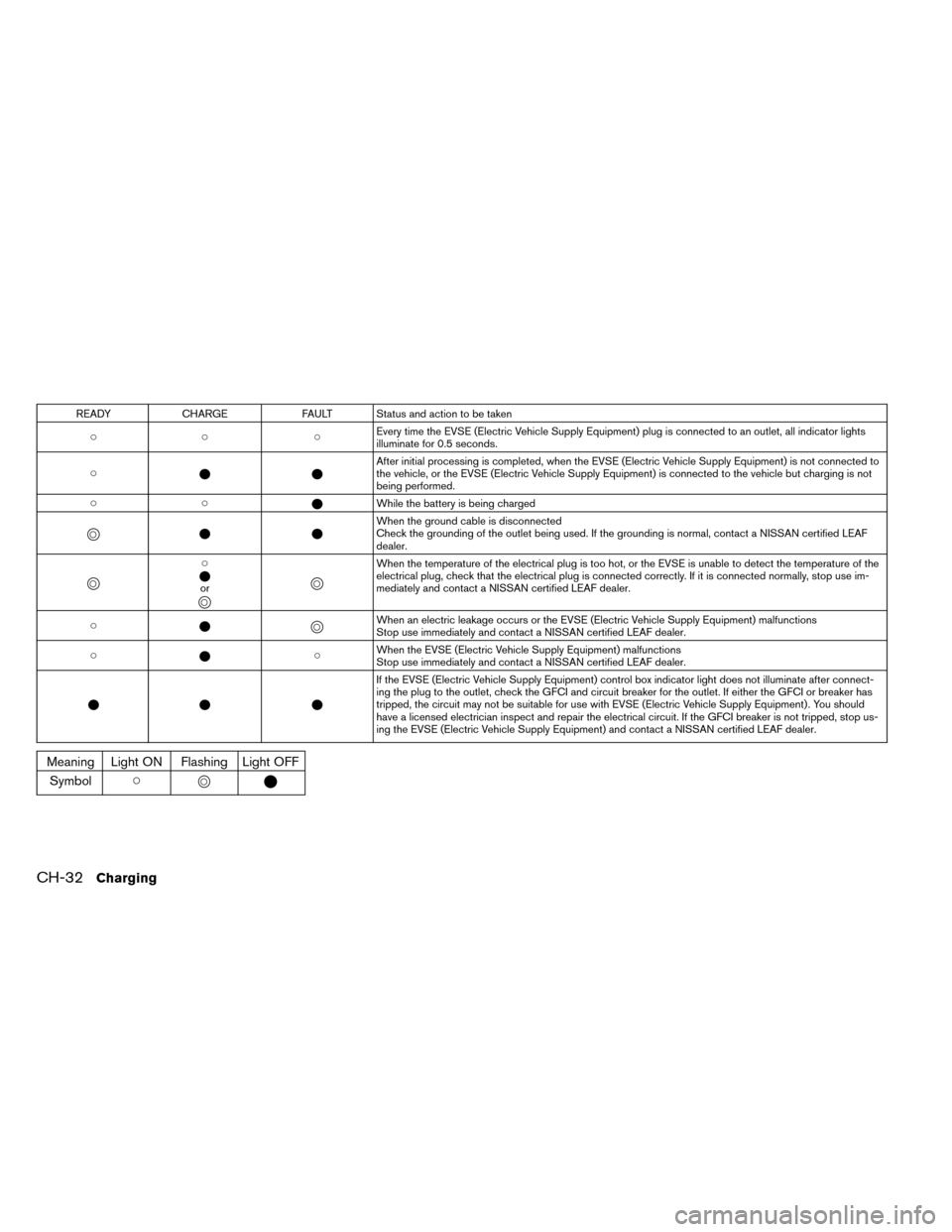
READYCHARGE FAULT Status and action to be taken
�� � Every time the EVSE (Electric Vehicle Supply Equipment) plug is connected to an outlet, all indicator lights
illuminate for 0.5 seconds.
� �� After initial processing is completed, when the EVSE (Electric Vehicle Supply Equipment) is not connected to
the vehicle, or the EVSE (Electric Vehicle Supply Equipment) is connected to the vehicle but charging is not
being performed.
�� �While the battery is being charged
�
��� When the ground cable is disconnected
Check the grounding of the outlet being used. If the grounding is normal, contact a NISSAN certified LEAF
dealer.
�
�
�
� or
� � �
�
When the temperature of the electrical plug is too hot, or the EVSE is unable to detect the temperature of the
electrical plug, check that the electrical plug is connected correctly. If it is connected normally, stop use im-
mediately and contact a NISSAN certified LEAF dealer.
� �
�
�When an electric leakage occurs or the EVSE (Electric Vehicle Supply Equipment) malfunctions
Stop use immediately and contact a NISSAN certified LEAF dealer.
� � �When the EVSE (Electric Vehicle Supply Equipment) malfunctions
Stop use immediately and contact a NISSAN certified LEAF dealer.
�� � If the EVSE (Electric Vehicle Supply Equipment) control box indicator light does not illuminate after connect-
ing the plug to the outlet, check the GFCI and circuit breaker for the outlet. If either the GFCI or breaker has
tripped, the circuit may not be suitable for use with EVSE (Electric Vehicle Supply Equipment) . You should
have a licensed electrician inspect and repair the electrical circuit. If the GFCI breaker is not tripped, stop us-
ing the EVSE (Electric Vehicle Supply Equipment) and contact a NISSAN certified LEAF dealer.
Meaning Light ON Flashing Light OFF
Symbol ��
��
CH-32Charging
Page 140 of 412
2 Instruments and controls
Cockpit............................ .2-3
Instrument panel ....................... .2-4
Meters and gauges ..................... .2-5
Speedometer and odometer ...............2-6
Li-ion battery temperature gauge ............2-7
Power meter ....................... .2-7
Driving range ....................... .2-8
Li-ion battery available charge gauge .........2-9
Li-ion battery capacity level gauge ..........2-10
Outside air temperature ................2-10
ECO indicator ..................... .2-10
Clock .......................... .2-11
Warning/indicator lights and audible reminders .....2-12
Checking bulbs .................... .2-13
Warning lights ..................... .2-13
Indicator lights ..................... .2-19
Audible reminders ................... .2-21
Vehicle information display .................2-22
Indicators for operation ................ .2-23
Trip computer ..................... .2-27
Warning information displays .............2-32
Indicators for maintenance ...............2-34
Indicator for timer ................... .2-35
Security systems ..................... .2-35Vehicle security system
................ .2-35
NISSAN Vehicle Immobilizer System .........2-37
Windshield wiper and washer switch ...........2-38
Washer operation ................... .2-39
Rear window wiper and washer switch .........2-40
Rear window and outside mirror defroster switch . . .2-41
Instrument brightness control ...............2-41
Headlight and turn signal switch .............2-42
Headlight switch .................... .2-42
Turn signal switch ................... .2-44
Fog light switch (if so equipped) .............2-44
Heated steering
wheel switch ...............2-45
Horn ............................. .2-46
ECO switch ........................ .2-46
Heated seat switch .................... .2-46
Vehicle Dynamic Control (VDC) OFF switch ......2-48
Charge port lid switch .................. .2-48
Charge connector lock switch ...............2-49
Charge timer OFF switch .................2-49
Power outlet ........................ .2-49
Storage ........................... .2-50
Cup holders ...................... .2-50
Seatback Pocket ................... .2-51
Sunglasses holder ................... .2-51
Glove box ........................ .2-52