Page 188 of 279
�������
> (GLW� ����� �� �� 0RGHO� 1DYL�(9 @
6-10Viewing technical information
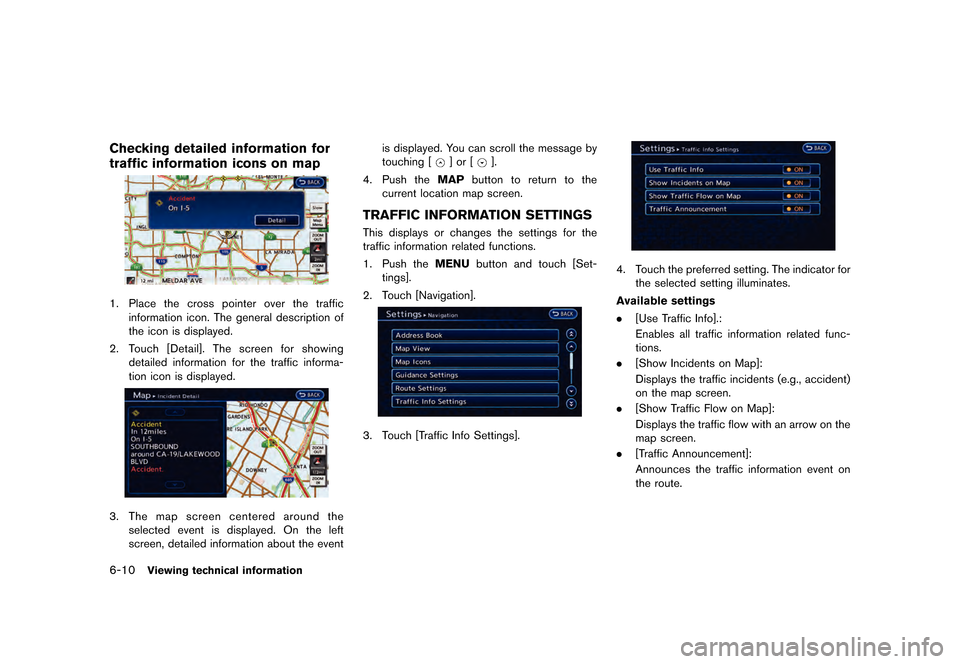
Checking detailed information for
traffic information icons on map
GUID-28EFD838-29AC-45EF-BC9E-086ABE9A3F5B
LNH0020X
1.Place the cross pointer over the traffic
information icon. The general description of
the icon is displayed.
2. Touch [Detail]. The screen for showing
detailed information for the traffic informa-
tion icon is displayed.
LNH0021X
3.The map screen centered around the
selected event is displayed. On the left
screen, detailed information about the event is displayed. You can scroll the message by
touching [
] or [].
4. Push the MAPbutton to return to the
current location map screen.
TRAFFIC INFORMATION SETTINGSGUID-6EFBBA9B-B2DE-4BB5-BA6A-8F97BE784DF6This displays or changes the settings for the
traffic information related functions.
1. Push the MENUbutton and touch [Set-
tings].
2. Touch [Navigation].
LNH0022X
3. Touch [Traffic Info Settings].
LNH0023X
4. Touch the preferred setting. The indicator for the selected setting illuminates.
Available settings
. [Use Traffic Info].:
Enables all traffic information related func-
tions.
. [Show Incidents on Map]:
Displays the traffic incidents (e.g., accident)
on the map screen.
. [Show Traffic Flow on Map]:
Displays the traffic flow with an arrow on the
map screen.
. [Traffic Announcement]:
Announces the traffic information event on
the route.
&RQGLWLRQ� 1$0�
Page 189 of 279
![NISSAN LEAF 2015 1.G Navigation Manual �������
> (GLW� ����� �� �� 0RGHO� 1DYL�(9 @
INFO:
. Even when [Show Traffic Flow on Map] and
[Show Incidents on Map] are set to OFF, the
list display of [Info on R](/manual-img/5/430/w960_430-188.png "NISSAN LEAF 2015 1.G Navigation Manual �������
> (GLW� ����� �� �� 0RGHO� 1DYL�(9 @
INFO:
. Even when [Show Traffic Flow on Map] and
[Show Incidents on Map] are set to OFF, the
list display of [Info on R")
�������
> (GLW� ����� �� �� 0RGHO� 1DYL�(9 @
INFO:
. Even when [Show Traffic Flow on Map] and
[Show Incidents on Map] are set to OFF, the
list display of [Info on Route] and [Nearby
Traffic Info] will not be affected.
. Even when [Traffic Announcement] is set to
OFF, the route guidance will not be affected.
Also, the announcement of emergency
information will not be turned off.
GUID-E776263C-893E-44F9-BD26-9CE6B875D04DThis displays GPS information, such as the
positioning status, latitude/longitude, altitude
and satellite locations.
LNH0029X
1. Push the MENUbutton and touch [Info.].
2. Touch [GPS Position].
3. Push the MAPbutton to return to the
current location map screen.
Contents of GPS information
*1The number of satellites:
(green): Satellites are available.
(gray): Satellites are being searched for.
*2Calculation:
Displays the GPS positioning method.
3 dimension:
Calculates the latitude, longitude and altitude by
four or more satellites.
2 dimension:
Calculates the latitude, longitude and altitude by
three or more satellites.
Out of range: Cannot calculate because no GPS satellites can
be located.
*3Latitude:
Displays the latitude.
*4Longitude:
Displays the longitude.
*5Approx Altitude:
Displays the approximate altitude.
Viewing technical information6-11
VIEWING GPS CURRENT LOCATION
INFORMATION
&RQGLWLRQ� 1$0�
Page 190 of 279
�������
> (GLW� ����� �� �� 0RGHO� 1DYL�(9 @
6-12Viewing technical information
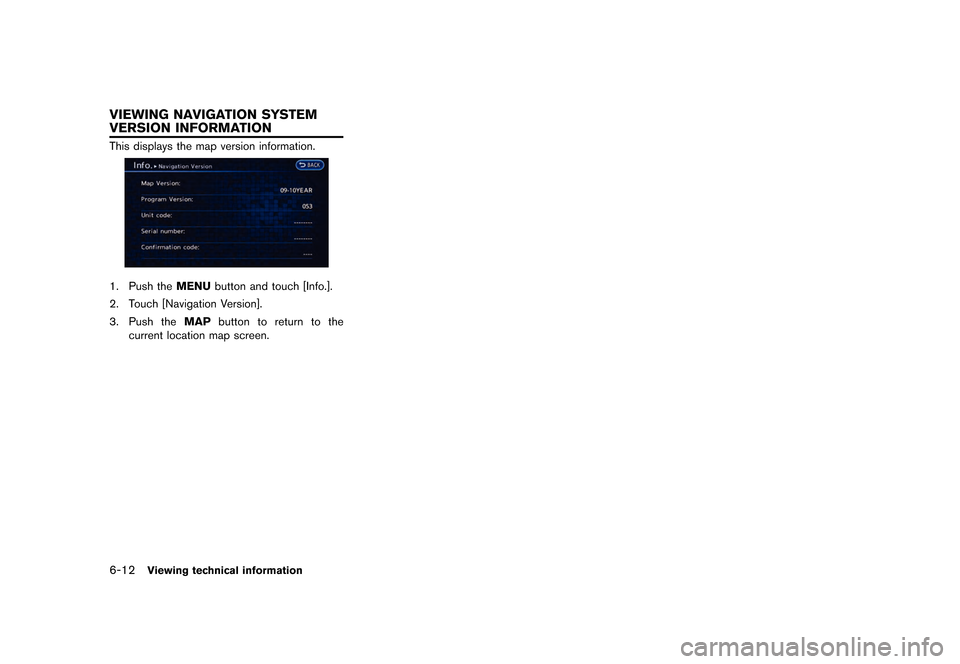
GUID-2286BD91-8259-4719-BA17-5CC144BF2D35This displays the map version information.
LNH0024X
1. Push theMENUbutton and touch [Info.].
2. Touch [Navigation Version].
3. Push the MAPbutton to return to the
current location map screen.
VIEWING NAVIGATION SYSTEM
VERSION INFORMATION
&RQGLWLRQ� 1$0�
Page 197 of 279
�������
> (GLW� ����� �� �� 0RGHO� 1DYL�(9 @
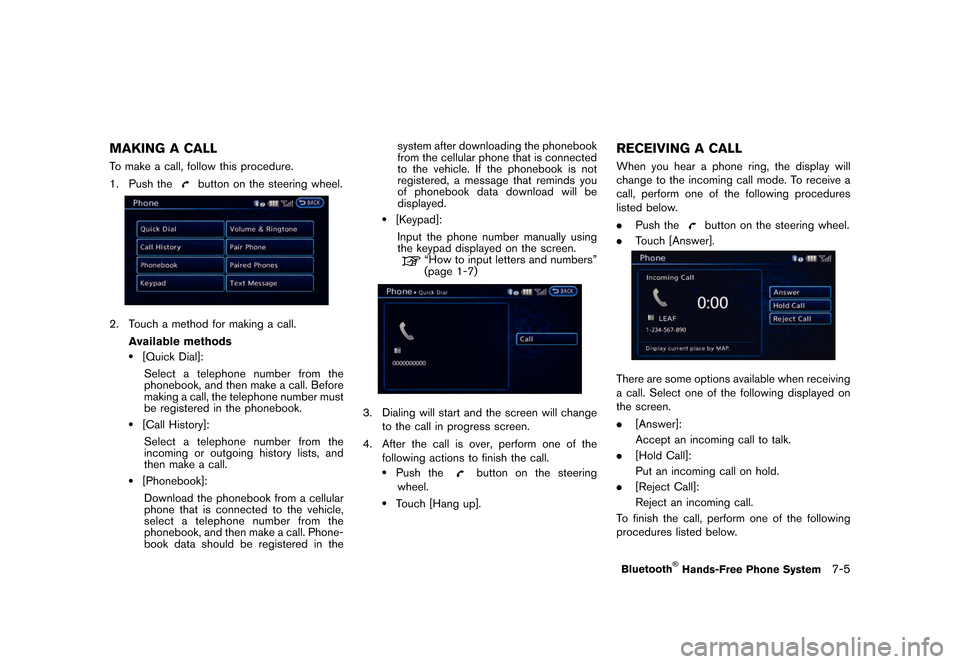
MAKING A CALLGUID-A10664E4-4636-4046-949D-803558D90AF1To make a call, follow this procedure.
1. Push the
button on the steering wheel.
LNI0135X
2. Touch a method for making a call.Available methods
.[Quick Dial]:Select a telephone number from the
phonebook, and then make a call. Before
making a call, the telephone number must
be registered in the phonebook.
.[Call History]:
Select a telephone number from the
incoming or outgoing history lists, and
then make a call.
.[Phonebook]:Download the phonebook from a cellular
phone that is connected to the vehicle,
select a telephone number from the
phonebook, and then make a call. Phone-
book data should be registered in the system after downloading the phonebook
from the cellular phone that is connected
to the vehicle. If the phonebook is not
registered, a message that reminds you
of phonebook data download will be
displayed.
.[Keypad]:
Input the phone number manually using
the keypad displayed on the screen.
ªHow to input letters and numbersº
(page 1-7)
LNI0144X
3. Dialing will start and the screen will change to the call in progress screen.
4. After the call is over, perform one of the following actions to finish the call.
.Push thebutton on the steering
wheel.
.Touch [Hang up].
RECEIVING A CALLGUID-309AF505-32BC-4C5C-80D1-0E512251C11BWhen you hear a phone ring, the display will
change to the incoming call mode. To receive a
call, perform one of the following procedures
listed below.
. Push the
button on the steering wheel.
. Touch [Answer].
LNI0011X
There are some options available when receiving
a call. Select one of the following displayed on
the screen.
.[Answer]:
Accept an incoming call to talk.
. [Hold Call]:
Put an incoming call on hold.
. [Reject Call]:
Reject an incoming call.
To finish the call, perform one of the following
procedures listed below.
Bluetooth
Page 199 of 279
�������
> (GLW� ����� �� �� 0RGHO� 1DYL�(9 @
compatibility) . Select one of these entries
to save in the Quick Dial.
.[Enter Number by Keypad]:Input the phone number to save in the
Quick Dial.
LNI0147X
5. Touch [OK] at the top of the screen.
LNI0148X
6. After the phonebook entry is saved, it will show a screen to indicate that is ready to
call the number. Touch [BACK] to return to
the Quick Dial.
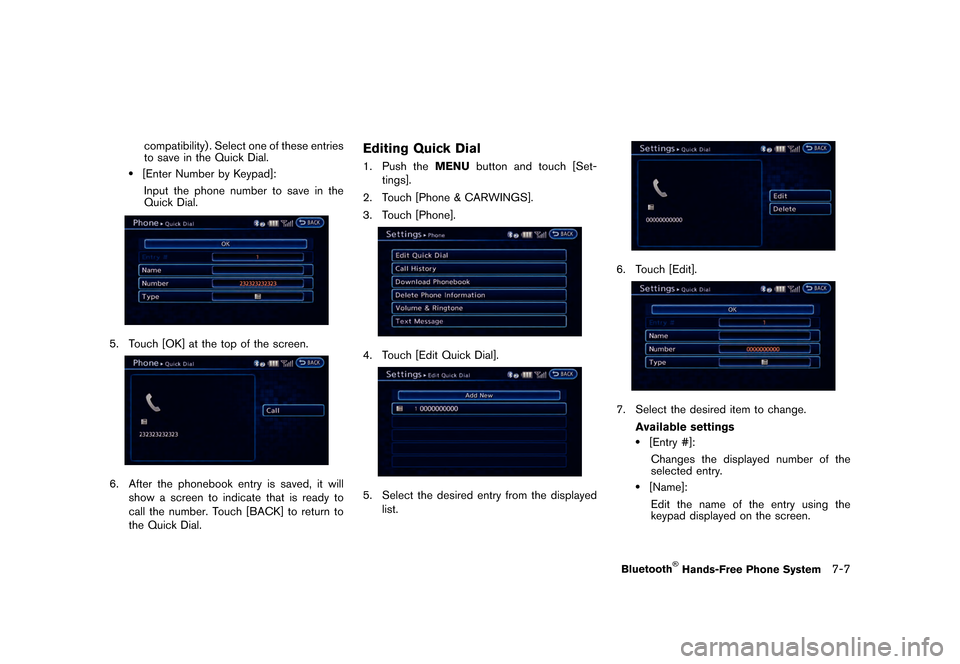
Editing Quick DialGUID-50D9B6E9-FE77-4AAA-8905-FB0A241C7DCE1. Push the MENUbutton and touch [Set-
tings].
2. Touch [Phone & CARWINGS].
3. Touch [Phone].
LNI0136X
4. Touch [Edit Quick Dial].
LNI0149X
5. Select the desired entry from the displayed list.
LNI0150X
6. Touch [Edit].
LNI0151X
7. Select the desired item to change.
Available settings
.[Entry #]:Changes the displayed number of the
selected entry.
.[Name]:Edit the name of the entry using the
keypad displayed on the screen.
Bluetooth
Page 201 of 279
![NISSAN LEAF 2015 1.G Navigation Manual �������
> (GLW� ����� �� �� 0RGHO� 1DYL�(9 @
4. Enter the address and message..[Address]:Enter the address where you would like
to send a message.
Choose an input m](/manual-img/5/430/w960_430-200.png "NISSAN LEAF 2015 1.G Navigation Manual �������
> (GLW� ����� �� �� 0RGHO� 1DYL�(9 @
4. Enter the address and message..[Address]:Enter the address where you would like
to send a message.
Choose an input m")
�������
> (GLW� ����� �� �� 0RGHO� 1DYL�(9 @
4. Enter the address and message..[Address]:Enter the address where you would like
to send a message.
Choose an input method from [Quick
Dial]/[Phonebook]/[Call History]/[Enter
Number by keypad].
.[Message]:Enter the message.
Select [Fixed Text] or [Custom Text] and
choose a message from the displayed
list.
LNI0137X
5. Confirm the contents of the message then touch [Send].
Reading a received text messageGUID-6E8733FE-E012-43E9-9801-EF19066E89CC
When a new text message is received:
1.When a text message is received, the
screen will switch to the incoming message
screen. 2. To have a received message read aloud,
touch [Read], or push the
button on
the steering wheel.
After checking a received message, touch
[Ignore], or push the
button on the
steering wheel.
3. To end operation, touch [Exit] or push the
button on the steering wheel.
To reply to a received message, touch
[Reply] or push the
on the steering
wheel.
From the history list:
1. Press the phone
button on the steering
wheel.
2. Touch [Text Message] and then select a text message from the list.
LNI0140X
3. The text message is displayed. Followingitems are available from the text message
screen:
.[Prev.]:
Returns to the previous message.
.[Next]:Displays to the next message.
.[Play]:Reads a text message.
.[Call]:
Makes a call.
.[Reply]:Creates a reply message.
.[Exit]:
Exits the text message.
PHONE SETTINGSGUID-113ACEB2-74B1-46EA-92C5-7C0462E956E7The Bluetooth
Page 203 of 279
![NISSAN LEAF 2015 1.G Navigation Manual �������
> (GLW� ����� �� �� 0RGHO� 1DYL�(9 @
LNI0153X
6. Touch [Yes].
LNI0154X
7. When a PIN code appears on the screen,operate the connected cellular phone to
ente](/manual-img/5/430/w960_430-202.png "NISSAN LEAF 2015 1.G Navigation Manual �������
> (GLW� ����� �� �� 0RGHO� 1DYL�(9 @
LNI0153X
6. Touch [Yes].
LNI0154X
7. When a PIN code appears on the screen,operate the connected cellular phone to
ente")
�������
> (GLW� ����� �� �� 0RGHO� 1DYL�(9 @
LNI0153X
6. Touch [Yes].
LNI0154X
7. When a PIN code appears on the screen,operate the connected cellular phone to
enter the PIN code. The downloading
procedure of the cellular phone varies
according to each cellular phone. See the
cellular phone Owner's Manual for the
details.
Deleting phone informationGUID-57D24F70-D43C-45C8-97D0-A5CAA19DCE2D1. Push the MENUbutton and touch [Set-
tings].
2. Touch [Phone & CARWINGS].
3. Touch [Phone].
LNI0136X
4. Touch [Delete Phone Information].
LNI0155X
5. Touch the preferred item for deletion. A confirmation message is displayed. Items that can be deleted
.[Quick Dial]:
Deletes all or one of the phone number in
the Quick Dial.
.[Call History]:All or each of the calls listed in the
outgoing and incoming call history will be
deleted. Additionally, the calls can be
deleted after sorting by outgoing or
incoming call history.
.[Phonebook]:Deletes all or one of the phone numbers
in the downloaded Phonebook.
.[All Phone Information]:
Deletes all stored phone information
(Quick Dials, call logs and downloaded
phonebooks) .
LNI0026X
6. Confirm the contents of the message, then touch [Yes].
Bluetooth
Page 207 of 279
�������
> (GLW� ����� �� �� 0RGHO� 1DYL�(9 @
8 Voice recognition
NISSAN voice recognition...
...................................................... 8-2
Using Voice Recognition System ...
.................................... 8-2
Before starting ...
...................................................................... 8-2
Giving voice commands ...
..................................................... 8-2 Voice command examples
...
............................................... 8-3
Displaying command list ...
.................................................. 8-6
Voice recognition settings ...
............................................... 8-9
&RQGLWLRQ� 1$0�