Page 116 of 279
![NISSAN LEAF 2015 1.G Navigation Manual �������
> (GLW� ����� �� �� 0RGHO� 1DYL�(9 @
3-60Navigation
LNE0933X
3.Touch [Store Location]. A message is
displayed, and the current vehicle location
is stored in](/manual-img/5/430/w960_430-115.png "NISSAN LEAF 2015 1.G Navigation Manual �������
> (GLW� ����� �� �� 0RGHO� 1DYL�(9 @
3-60Navigation
LNE0933X
3.Touch [Store Location]. A message is
displayed, and the current vehicle location
is stored in")
�������
> (GLW� ����� �� �� 0RGHO� 1DYL�(9 @
3-60Navigation
LNE0933X
3.Touch [Store Location]. A message is
displayed, and the current vehicle location
is stored in the Address Book.
LNE0934X
4. The icon representing the stored location is
displayed on the map.
Push the MAPbutton to return to the
current location map screen.
INFO:
The location is stored in the first available
position number in the Address Book list.
Storing location by moving mapGUID-F725F4DF-5CDD-4070-ADB6-D4BF2474895F1. Move to the preferred location on the map and touch [Map Menu].
LNE0173X
2.Touch [Store Location]. A message is
displayed, and the address of the location
is stored in the Address Book.
LNE0174X
3. The icon representing the stored location is
displayed on the map. Push the MAPbutton
to return to the current location map screen.
INFO:
The address is stored in the first available
position number in the Address Book list.
STORING ROUTEGUID-B3907DCE-924F-48C0-BAC8-A06712252587A maximum of 5 calculated routes can be
stored. Stored routes can be easily retrieved
and set as the suggested route.
INFO:
Stored route includes only locations (destination
and waypoints) and route calculation conditions,
not the route itself.
1. Push the MENUbutton and touch [Route].
LNE0175X
&RQGLWLRQ� 1$0�
Page 117 of 279
![NISSAN LEAF 2015 1.G Navigation Manual �������
> (GLW� ����� �� �� 0RGHO� 1DYL�(9 @
2. Touch [Route Info].
LNE0176X
3. Touch [Store Route]. A confirmation mes-sage is displayed.
LNE0177X
4. Confirm the c](/manual-img/5/430/w960_430-116.png "NISSAN LEAF 2015 1.G Navigation Manual �������
> (GLW� ����� �� �� 0RGHO� 1DYL�(9 @
2. Touch [Route Info].
LNE0176X
3. Touch [Store Route]. A confirmation mes-sage is displayed.
LNE0177X
4. Confirm the c")
�������
> (GLW� ����� �� �� 0RGHO� 1DYL�(9 @
2. Touch [Route Info].
LNE0176X
3. Touch [Store Route]. A confirmation mes-sage is displayed.
LNE0177X
4. Confirm the contents of the message thentouch [Yes]. The current route is stored.
Other settings
A route can also be stored using the following
procedure.
1. Push the MENUbutton and touch [Set-
tings]. 2. Touch [Navigation].
3. Touch [Address Book].
4. Touch [Stored Routes].
5. Touch [Store Current Route]. A confirmation
message is displayed.
6. Confirm the contents of the message then touch [Yes]. The current route is stored.
INFO:
. The route is stored in the first available
position number in the store current route
list.
. A maximum of 5 routes can be stored. When
5 routes are stored in the Address Book, a
new route cannot be stored until a route is
deleted.
ªDeleting stored itemº (page 3-68)
. If any waypoints are not set on the route, the
route cannot be stored.
STORING AVOID AREAGUID-495A7589-BA25-41EF-82F6-33DEBDE7742EAn Avoid Area can be stored. The Avoid Area is
an area that can be excluded from a route, such
as a road that is always congested. Once Avoid
Areas are stored, the system avoids those areas
when calculating a route. Up to 10 Avoid Areas
can be stored. 1. Push the
MENUand touch [Settings].
2. Touch [Navigation].
LNE0178X
3. Touch [Address Book].
LNE0179X
4. Touch [Avoid Area].
Navigation3-61
&RQGLWLRQ� 1$0�
Page 119 of 279
�������
> (GLW� ����� �� �� 0RGHO� 1DYL�(9 @
dress bookº (page 3-70)
Editing stored home and addressGUID-D9E4FAC6-0EAD-4C1E-9D3C-A1EBC19926E11. Touch [Home Location] or [Stored Location].
LNE0184X
2. Touch the preferred stored address from thelist.
INFO:
.When [Home Location] is touched, it isnot necessary to be perform "step 2".
.Touching [Sort] displays a list of various
sort functions. To use the sort functions,
stored addresses must be set in ad-
vance.
ªMinor adjustment of home or
stored addressº (page 3-63)
LNE0185X
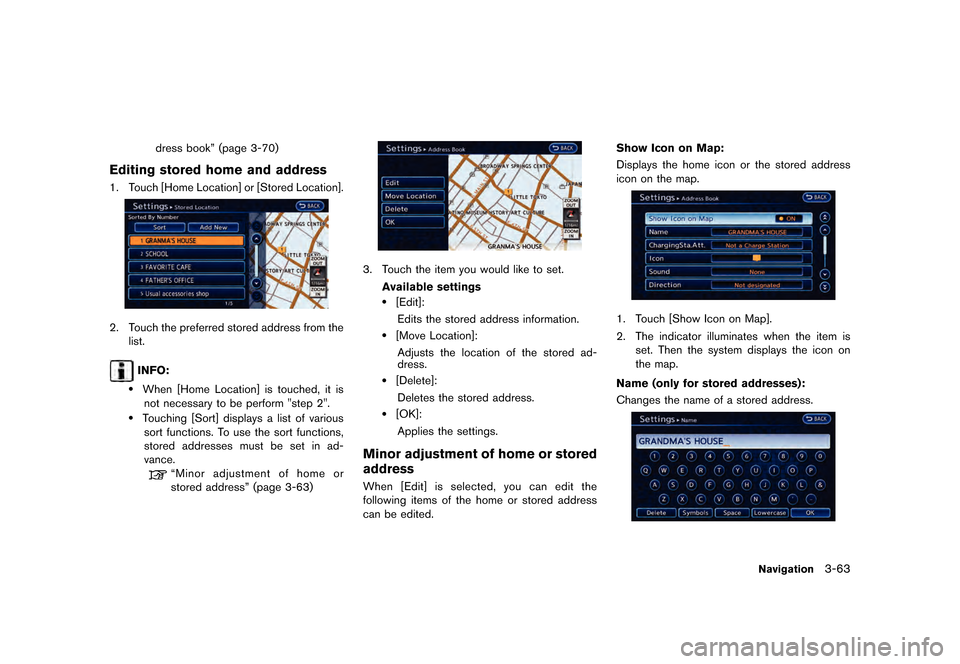
3. Touch the item you would like to set.
Available settings
.[Edit]:Edits the stored address information.
.[Move Location]:Adjusts the location of the stored ad-
dress.
.[Delete]:Deletes the stored address.
.[OK]:
Applies the settings.
Minor adjustment of home or stored
address
GUID-EFC94F68-9CBF-4857-9316-88B5EE1BD9F4When [Edit] is selected, you can edit the
following items of the home or stored address
can be edited. Show Icon on Map:
Displays the home icon or the stored address
icon on the map.
LNE0186X
1. Touch [Show Icon on Map].
2. The indicator illuminates when the item is
set. Then the system displays the icon on
the map.
Name (only for stored addresses):
Changes the name of a stored address.
LNE0187X
Navigation3-63
&RQGLWLRQ� 1$0�
Page 120 of 279
![NISSAN LEAF 2015 1.G Navigation Manual �������
> (GLW� ����� �� �� 0RGHO� 1DYL�(9 @
3-64Navigation
1. Touch [Name]. A character input screen isdisplayed.
2. Enter the preferred name for the stored addres](/manual-img/5/430/w960_430-119.png "NISSAN LEAF 2015 1.G Navigation Manual �������
> (GLW� ����� �� �� 0RGHO� 1DYL�(9 @
3-64Navigation
1. Touch [Name]. A character input screen isdisplayed.
2. Enter the preferred name for the stored addres")
�������
> (GLW� ����� �� �� 0RGHO� 1DYL�(9 @
3-64Navigation
1. Touch [Name]. A character input screen isdisplayed.
2. Enter the preferred name for the stored address.
ªCharacter (letters and numbers) input
screenº (page 1-7)
3. After finishing the entry, Touch [OK]. The name is stored.
Charging Sta. Att. (only for stored ad-
dresses):
The attributes for the charging station located in
the area that is registered can be set.
LNE0243X
1. Touch [ChargingSta.Att.].
2. Touch the item you would like to set. The indicator illuminates when the item is set.
Available settings
.[Quick Charge Station]:
The location is a charging station that is
equipped with quick charging equipment.
.[Normal Charge Station]:The location is a charging station that is
equipped with normal charging equip-
ment.
.[Not a Charge Station]:
The location is not charging station.
Icon:
Changes the icon of the home or stored address
to the preferred one. By changing the icons, the
usage of the [Sorted By Icon] option of the sort
function can be optimized more effectively
([Sort] menu situation) .
LNE0189X
1. Touch [Icon]. A list of icons is displayed.
2. Touch the preferred icon from the list. The icon is changed.
Sound:
Sets the tone of the alarm that sounds when the
vehicle approaches the home or a stored
address.
LNE0190X
1. Touch [Sound]. A sound list is displayed.
2. Touch the preferred alarm tone. The indica- tor of the selected alarm tone illuminates.
Direction:
Sets the alarm to sound when approaching from
a specific direction.
LNE0191X
1. Touch [Direction]. A map screen with the home or stored address located on the map
center is displayed.
&RQGLWLRQ� 1$0�
Page 121 of 279
![NISSAN LEAF 2015 1.G Navigation Manual �������
> (GLW� ����� �� �� 0RGHO� 1DYL�(9 @
2. Set the direction that sounds the alarm bytouching [
] or [].
3. Touch [OK]. The selected direction is set.
INFO:
Af](/manual-img/5/430/w960_430-120.png "NISSAN LEAF 2015 1.G Navigation Manual �������
> (GLW� ����� �� �� 0RGHO� 1DYL�(9 @
2. Set the direction that sounds the alarm bytouching [
] or [].
3. Touch [OK]. The selected direction is set.
INFO:
Af")
�������
> (GLW� ����� �� �� 0RGHO� 1DYL�(9 @
2. Set the direction that sounds the alarm bytouching [
] or [].
3. Touch [OK]. The selected direction is set.
INFO:
After the direction is set and [Direction] is
selected and set again, a confirmation message
is displayed. Confirm the contents of the
message then touch [Yes]. The set direction is
overwritten.
Distance:
Sets the alarm to sound when reaching a
specific distance to the home or stored address.
LNE0192X
1. Touch [Distance].
2. Touch the preferred distance option. The indicator of the selected distance illumi-
nates. Available distance options:
.
150 feet (50 m)
. 300 feet (100 m)
. 1000 feet (300 m)
. 1500 feet (500 m)
INFO:
Once the direction and the distance to sound an
alarm are set, the system will sound the alarm
when the vehicle enters the triggering zone.
Phone number:
Stores the telephone number of the home or a
stored address.
LNE0193X
1. Touch [Phone No.]. The telephone number entry screen is displayed.
2. Enter the telephone number of the home or stored address.
ªPhone number input screenº
(page 1-8) 3.
Touch [OK]. The telephone number is
stored.
Group (only for stored addresses):
This groups the stored addresses. By grouping
the stored addresses, the [Sorted By Group]
option of the sort function can be used more
effectively in the [Sort] mode.
LNE0194X
1. Touch [Group].
2. Touch the preferred group. When the
indicator of the selected group illuminates,
the stored address is classified into the
applicable group.
Entry Numbers (only for stored addresses):
Index the position numbers of any two stored
addresses in the list.
Navigation3-65
&RQGLWLRQ� 1$0�
Page 122 of 279
![NISSAN LEAF 2015 1.G Navigation Manual �������
> (GLW� ����� �� �� 0RGHO� 1DYL�(9 @
3-66Navigation
LNE0195X
1. Touch [Entry Numbers]. A list of storedaddresses is displayed.
2. Touch the stored addresses](/manual-img/5/430/w960_430-121.png "NISSAN LEAF 2015 1.G Navigation Manual �������
> (GLW� ����� �� �� 0RGHO� 1DYL�(9 @
3-66Navigation
LNE0195X
1. Touch [Entry Numbers]. A list of storedaddresses is displayed.
2. Touch the stored addresses")
�������
> (GLW� ����� �� �� 0RGHO� 1DYL�(9 @
3-66Navigation
LNE0195X
1. Touch [Entry Numbers]. A list of storedaddresses is displayed.
2. Touch the stored addresses that you want to change. The position numbers of the se-
lected stored addresses are changed.
Editing stored routeGUID-FA819EB7-2462-4CCA-9FCA-6945BF4DA07F1.Touch [Stored Routes]. A list screen is
displayed.
LNE0196X
2. Touch the preferred stored route from the
list. The edit screen of the selected route is
displayed.
LNE0197X
3. Touch the preferred item to edit from the liston the right side of the screen.
4. After finishing the editing, touch [OK].
INFO:
If [Store Current Route] is selected, the system
stores the current route.
Available settings
. [Rename]:
Changes the name.
ªCharacter (letters and numbers) input
screenº (page 1-7)
. [Replace]:
Overwrites the stored route to the current
route.
. [Delete]:
Deletes the stored route. .
[OK]:
Applies the settings.
Editing avoid areaGUID-7741D32C-748E-4BE2-9BE8-E72FF75E70C61. Touch [Avoid Area]. A list screen is dis-
played.
LNE0198X
2. Touch the preferred Avoid Area from the list.The edit screen of the selected Avoid Area is
displayed.
LNE0199X
3. Touch the item you would like to set.
&RQGLWLRQ� 1$0�
Page 123 of 279
�������
> (GLW� ����� �� �� 0RGHO� 1DYL�(9 @
Available settings.[Rename]:Changes the name of an Avoid Area.
.[Move Location]:
Adjusts the location of the Avoid Area.
.[Resize Area]:Adjusts the range of the Avoid Area.
.[FWY]:Sets the route to avoid freeways.
.[Delete]:Deletes the Avoid Area.
.[OK]:Applies the setting.
4. After finishing the setting, touch [OK].
INFO:
An Avoid Area can be added by selecting [Add
New].
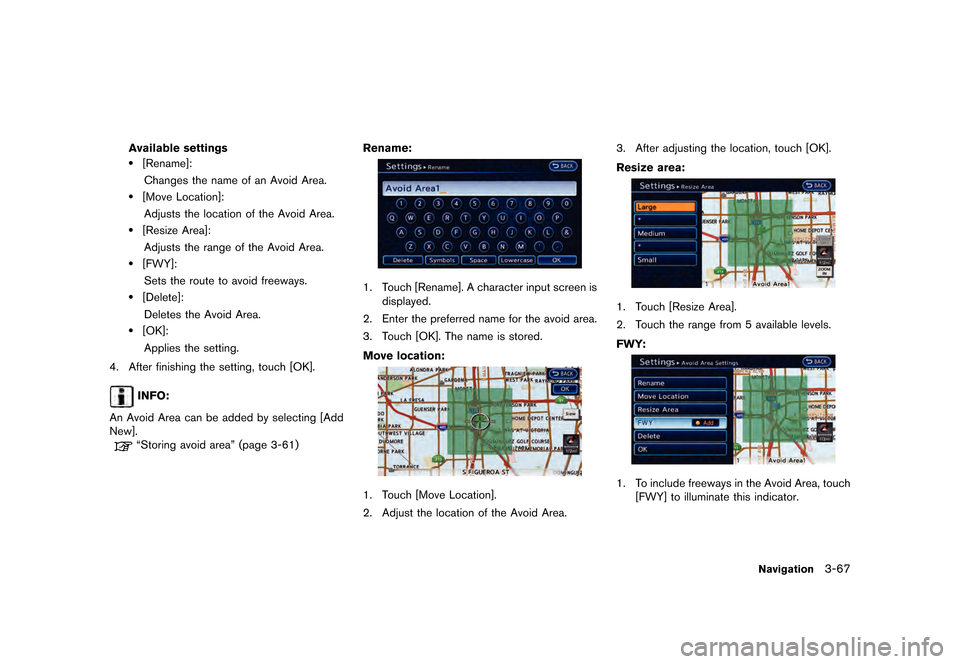
ªStoring avoid areaº (page 3-61) Rename:
LNE0200X
1. Touch [Rename]. A character input screen is
displayed.
2. Enter the preferred name for the avoid area.
3. Touch [OK]. The name is stored.
Move location:
LNE0201X
1. Touch [Move Location].
2. Adjust the location of the Avoid Area. 3. After adjusting the location, touch [OK].
Resize area:
LNE0202X
1. Touch [Resize Area].
2. Touch the range from 5 available levels.
FWY:
LNE0203X
1. To include freeways in the Avoid Area, touch
[FWY] to illuminate this indicator.
Navigation3-67
&RQGLWLRQ� 1$0�
Page 124 of 279
�������
> (GLW� ����� �� �� 0RGHO� 1DYL�(9 @
3-68Navigation
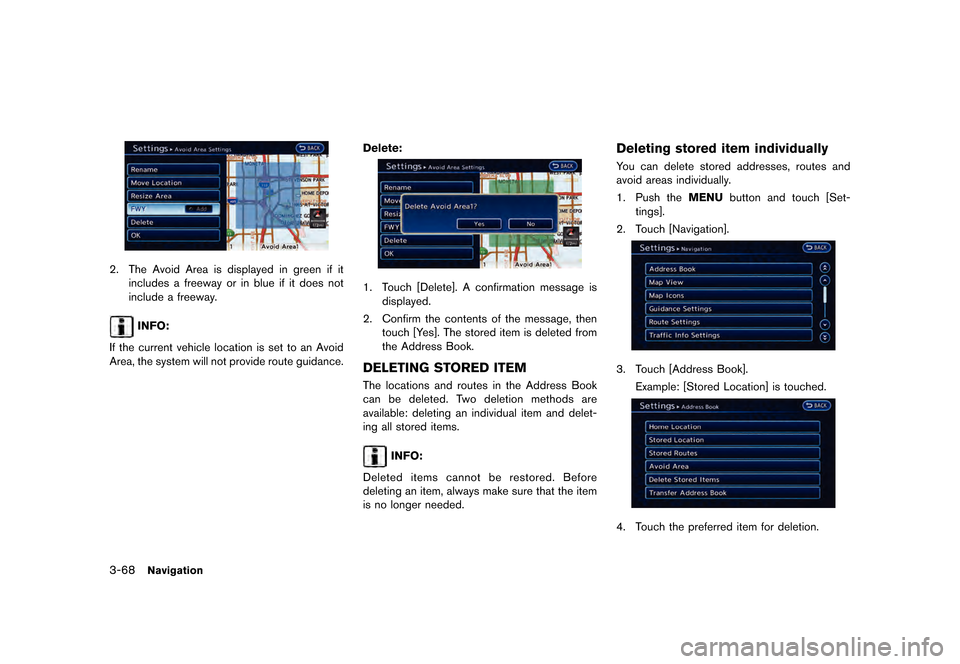
LNE0204X
2. The Avoid Area is displayed in green if itincludes a freeway or in blue if it does not
include a freeway.
INFO:
If the current vehicle location is set to an Avoid
Area, the system will not provide route guidance. Delete:
LNE0205X
1. Touch [Delete]. A confirmation message is
displayed.
2. Confirm the contents of the message, then touch [Yes]. The stored item is deleted from
the Address Book.
DELETING STORED ITEMGUID-A49F7444-AEBA-437D-B1BF-DA7457A3F577The locations and routes in the Address Book
can be deleted. Two deletion methods are
available: deleting an individual item and delet-
ing all stored items.
INFO:
Deleted items cannot be restored. Before
deleting an item, always make sure that the item
is no longer needed.
Deleting stored item individuallyGUID-B68C2A81-E5C0-4DB2-A740-FC904C09AB2AYou can delete stored addresses, routes and
avoid areas individually.
1. Push the MENUbutton and touch [Set-
tings].
2. Touch [Navigation].
LNE0206X
3. Touch [Address Book]. Example: [Stored Location] is touched.
LNE0207X
4. Touch the preferred item for deletion.
&RQGLWLRQ� 1$0�