2015 MITSUBISHI OUTLANDER SPORT radio controls
[x] Cancel search: radio controlsPage 70 of 384
Keyless entry system (if so equipped)
Features and controls 5-7
5
N0056230
1111
Your electronic immobilizer operates on a radio frequency subject to Federal Communi-cations Commission (FCC) Rules (For vehi- cles sold in U.S.A.) and Industry Canada Rules (For vehicles sold in Canada). Thisdevice complies with part 15 of FCC Rules and Industry Canada licence-exempt RSS standard(s).Operation is subject to the following two con-ditions. This device may not cause harmful inter- ference. This device must accept any interference received, including interference that may cause undesired operation.
N00509001933
Press the remote control transmitter buttonsto lock or unlock the doors and the liftgate.
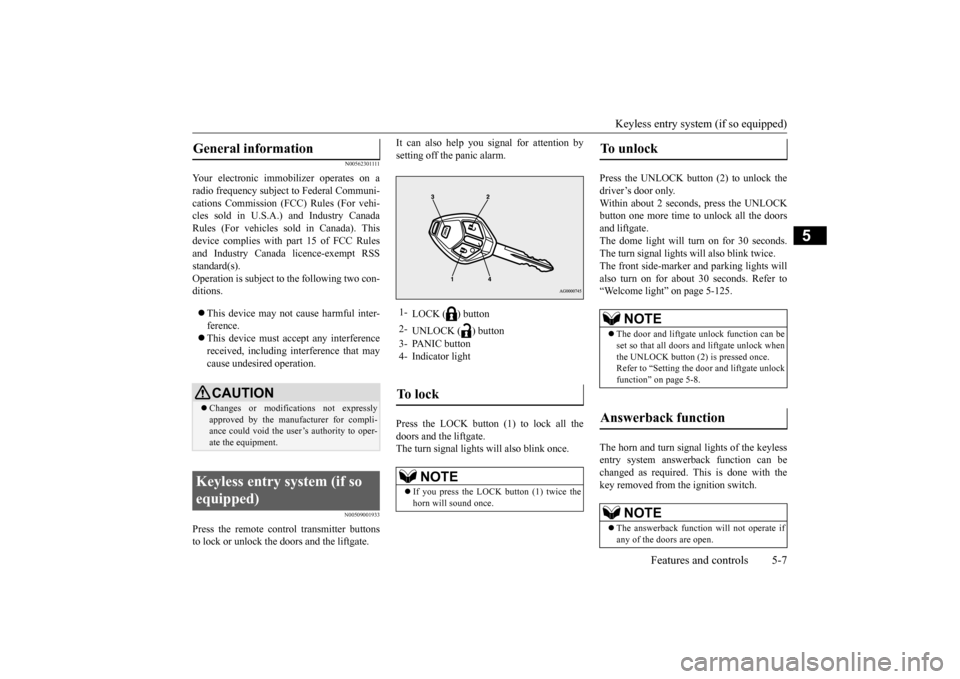
It can also help you signal for attention by setting off the panic alarm. Press the LOCK button (1) to lock all the doors and the liftgate. The turn signal lights will also blink once.
Press the UNLOCK button (2) to unlock the driver’s door only.Within about 2 seconds, press the UNLOCK button one more time to unlock all the doors and liftgate.The dome light will turn on for 30 seconds. The turn signal lights will also blink twice. The front side-marker and parking lights willalso turn on for about 30 seconds. Refer to“Welcome light” on page 5-125. The horn and turn signal lights of the keyless entry system answerback function can bechanged as required. This is done with the key removed from the ignition switch.
General information
CAUTION Changes or modifications not expressly approved by the manufacturer for compli-ance could void the user’s authority to oper- ate the equipment.
Keyless entry system (if so equipped)
1-
LOCK ( ) button
2-
UNLOCK ( ) button
3- PANIC button 4- Indicator lightTo l o c k
NOTE
If you press the LOCK button (1) twice the horn will sound once.
To u n l o c k
NOTE
The door and liftgate unlock function can be set so that all doors and liftgate unlock when the UNLOCK button (2) is pressed once. Refer to “Setting the door and liftgate unlockfunction” on page 5-8.
Answerback function
NOTE
The answerback function will not operate if any of the doors are open.
BK0206700US.bo
ok 7 ページ 2014年3月25日 火曜日 午後4時42分
Page 73 of 384
Keyless entry system (if so equipped) 5-10 Features and controls
5
5. To register the ID codes of additional remote control transmitters, repeat step 4 within 60 seconds after step 4. 6. If no ID code of a remote control trans-mitter is registered within 60 seconds after step 4, the registration mode is can- celed and the normal mode returns.
N00546101137
Your keyless entry system operates on a radiofrequency subject to Federal Communica- tions Commission (FCC) Rules (For vehicles sold in U.S.A.) and Industry Canada Rules(For vehicles sold in Canada). This device complies with part 15 of FCC Rules and Industry Canada licence-exempt RSS stan-dard(s).
Operation is subject to the following two con- ditions. This device may not cause harmful inter- ference. This device must accept any interference received, including interference that may cause undesired operation.
N00544100080
1. Before replacing the battery, remove static electricity from your body by touching ametal grounded object.
NOTE
For verification purposes, try to lock and unlock the doors with the re-coded remotecontrol transmitters after the registration is completed. The indicator light (4) comes on each time a button is pressed. The keyless entry system does not work if the key is in the ignition switch. The remote control transmitter can be used from about 40 feet (12 m) away. However, this distance may change if your vehicle isnear a TV transmitting tower, a power sta- tion, or a radio station. If the UNLOCK button (2) is pressed when all doors and the liftgate are locked and no doors or the liftgate are opened within about30 seconds, the doors and the liftgate will automatically re-lock. If the following conditions are observed after pressing the LOCK (1) or UNLOCK (2) but-ton on the remote control transmitter, the battery in the remote control transmitter may need to be replaced.
• The doors and the liftgate cannot be locked or unlocked. • The panic alarm cannot be operated. • The indicator light (4) is dim or does not come on.
If you lose your remote control transmitter, please contact an authorized Mitsubishi Motors dealer for a replacement. If you wish to obtain an additional remote control transmitter, please contact an autho-rized Mitsubishi Motors dealer. A maximum of 8 remote control transmitters can be pro- grammed for your vehicle. To use the new remote control transmitters, it is necessary to register the key with both theelectronic immobilizer and keyless entry sys- tem. Also refer to “Electr
onic immobilizer (Anti-
theft starting system): Customer key pro- gramming” on page 5-6.
General information
NOTE
CAUTION Changes or modifications not expressly approved by the manufacturer for compli- ance could void the user’s authority to oper- ate the equipment.
Procedure for replacing the remote control transmitter bat- tery
BK0206700US.bo
ok 10 ページ 2014年3月25日 火曜日 午後4時42分
Page 75 of 384
Free-hand Advanced Security Transmitte
r (F.A.S.T.-key) (if so equipped)
5-12 Features and controls
5
The F.A.S.T.-key can also be used as the remote control transmitter of the keyless entry system. Refer to “Free-hand Advanced SecurityTransmitter (F.A.S.T.-key): Keyless entry system” on page 5-24.
The operations possible with the F.A.S.T.- key can be modified as stated below. (Keyless entry operations are possible.) For details, contact an authorizedMitsubishi Motors dealer. • Enabling only the locking and unlocking of the doors and the liftgate• Enabling only the starting of the engine • Deactivating the F.A.S.T.-key
The F.A.S.T.-key must be carried by the driver. The F.A.S.T.-key is required for vehicle operations such as locking and unlocking the doors and the liftgate, starting the engine, and changing the operation mode. When leaving the vehi- cle, make sure you are carrying the F.A.S.T.-key and then lock the vehicle.
WA R N I N G Individuals who use implantable pace- makers or implantable cardiovascular- defibrillators should keep away from the external and internal
transmitters. The
electromagnetic waves used in the F.A.S.T.-key may affect the operation of implantable pacemakers and implantablecardiovascular-defibrillators.
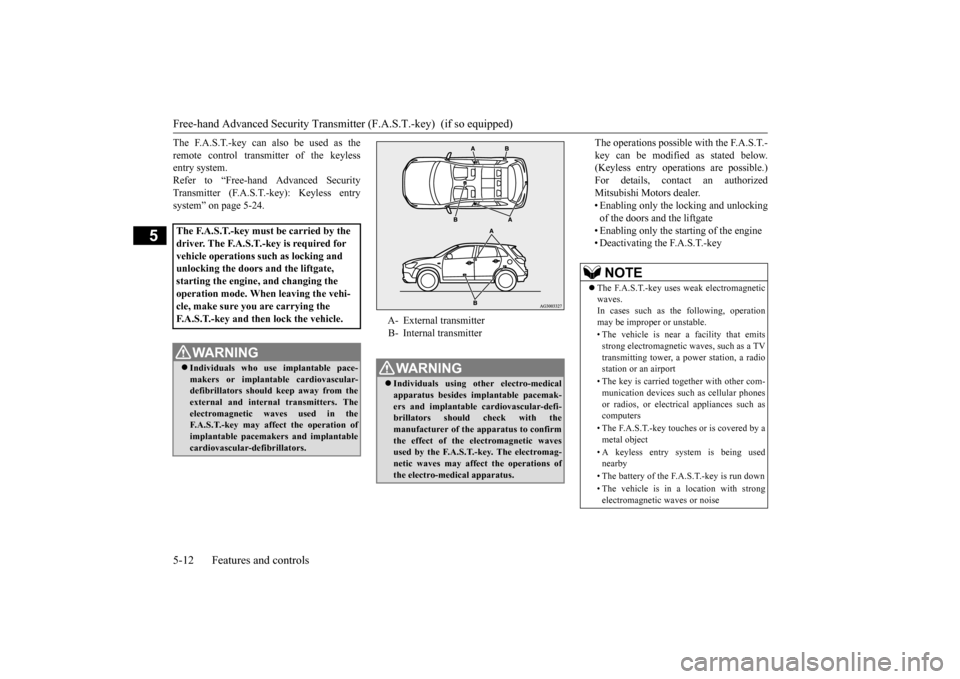
A- External transmitter B- Internal transmitterWA R N I N G Individuals using other electro-medical apparatus besides implantable pacemak- ers and implantable cardiovascular-defi- brillators should check with the manufacturer of the apparatus to confirm the effect of the electromagnetic wavesused by the F.A.S.T.-key. The electromag- netic waves may affect the operations of the electro-medical apparatus.
NOTE
The F.A.S.T.-key uses weak electromagnetic waves. In cases such as the following, operation may be improper or unstable. • The vehicle is near a facility that emits strong electromagnetic waves, such as a TVtransmitting tower, a power station, a radio station or an airport • The key is carried together with other com- munication devices such as cellular phones or radios, or electrical appliances such ascomputers • The F.A.S.T.-key touches or is covered by a metal object • A keyless entry system is being used nearby • The battery of the F.A.S.T.-key is run down • The vehicle is in a location with strong electromagnetic waves or noise
BK0206700US.bo
ok 12 ページ 2014年3月25日 火曜日 午後4時42分
Page 89 of 384
Free-hand Advanced Security Transmitte
r (F.A.S.T.-key) (if so equipped)
5-26 Features and controls
5
3. Press and hold the UNLOCK button (2) for 4 to 10 seconds and then press and hold the LOCK button (1) during this time.4. Within 10 seconds of pressing the LOCK button in step 3, release the UNLOCK button first, and then release the LOCKbutton.
The buzzer answerback function can be turned ON or OFF as required.
N00544601109
The door and liftgate unlock function can be set to the following two conditions. Each time the door and liftgate unlock func-tion is set, a chime will sound to tell you the condition of the door and liftgate unlock function. 1. Put the operation mode in OFF. 2. Open the driver’s door and turn the com- bination headlights and dimmer switch tothe “OFF” position. 3. Press and hold the LOCK button (1) for 4 to 10 seconds and then press and hold theUNLOCK button (2) during this time. 4. Within 10 seconds of pressing the UNLOCK button in step 3, release theLOCK button first, and then release the UNLOCK button.
N00544701070
If you are near your vehicle and feel threat- ened, you can acti-vate the alarm to call atten-tion as follows: 1. Press the PANIC button (3) for more than 1 second. 2. The headlights will blink on and off andthe horn will sound intermittently for about 3 minutes. 3. To turn off the alarm, press any button onthe remote control transmitter.
Number of chimes
To l o c k
To u n l o c k
One chime One flash Two flashes Two chimes One flash No flashThree chimes No flash Two flashesFour chimes Two flashes One flashFive chimes No flash One flashSix chimes Two flashes No flashSeven chimes
No flash No flash
Buzzer deactivation/reactivation
Setting the door and liftgate unlock function
Number of chimes
Condition
One chime
All doors and the liftgate unlock
Tw o chimes
Driver’s door unlock only
Using the panic alarm
NOTE
The indicator light (4) comes on each time a button is pressed. The F.A.S.T.-key can be used from about 40 feet (12 m) away. However, this distance may change if your vehicle is near a TVtransmitting tower, a power station, or a radio station. If the UNLOCK button (2) is pressed when all doors and the liftgate are locked and no doors or the liftgate are opened within about 30 seconds, the doors and the liftgate will automatically re-lock. If the following conditions are observed after pressing the LOCK (1) or UNLOCK (2) but-ton on the remote control transmitter, the buttery in the F.A.S.T.-key may need to be replaced.
BK0206700US.bo
ok 26 ページ 2014年3月25日 火曜日 午後4時42分
Page 90 of 384
Free-hand Advanced Security Transmitt
er (F.A.S.T.-key) (if so equipped)
Features and controls 5-27
5
N00562001088
N00562100066
1. Before replacing the battery, remove static electricity from your body by touching a metal grounded object.
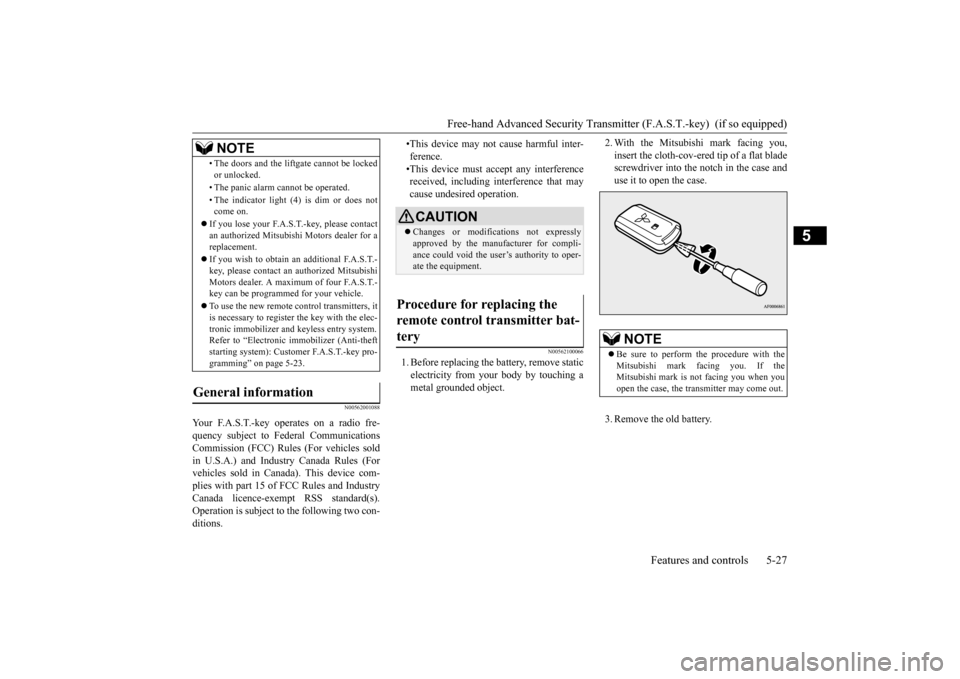
2. With the Mitsubishi mark facing you, insert the cloth-cov-ered tip of a flat blade screwdriver into the notch in the case and use it to open the case. 3. Remove the old battery.
• The doors and the liftgate cannot be locked or unlocked. • The panic alarm cannot be operated. • The indicator light (4) is dim or does not come on.
If you lose your F.A.S.T.-key, please contact an authorized Mitsubish
i Motors dealer for a
replacement. If you wish to obtain an
additional F.A.S.T.-
key, please contact an authorized MitsubishiMotors dealer. A maximum of four F.A.S.T.- key can be programmed for your vehicle. To use the new remote control transmitters, it is necessary to register the key with the elec- tronic immobilizer and keyless entry system.Refer to “Electronic immobilizer (Anti-theft starting system): Customer F.A.S.T.-key pro- gramming” on page 5-23.
General information
Your F.A.S.T.-key operates on a radio fre- quency subject to Federal Communications Commission (FCC) Rules (For vehicles soldin U.S.A.) and Industry Canada Rules (For vehicles sold in Canada). This device com- plies with part 15 of FCC Rules and IndustryCanada licence-exempt RSS standard(s). Operation is subject to the following two con- ditions.
NOTE
•This device may not cause harmful inter-ference.•This device must accept any interference received, including interference that may cause undesired operation.CAUTION Changes or modifications not expressly approved by the manufacturer for compli-ance could void the user’s authority to oper- ate the equipment.
Procedure for replacing the remote control transmitter bat-tery
NOTE
Be sure to perform the procedure with the Mitsubishi mark facing you. If theMitsubishi mark is not facing you when you open the case, the transmitter may come out.
BK0206700US.bo
ok 27 ページ 2014年3月25日 火曜日 午後4時42分
Page 142 of 384
Rear-view camera (if so equipped)
Features and controls 5-79
5
Wheels other than Mitsubishi genuine wheels are being used. Wheels that are not fitted with tire infla- tion pressure sensors are being used. Wheels whose ID codes are not memo- rized by the vehicle are used. Compact spare tire is fitted on a road wheel. A window tint that affects the radio wave signals is installed.
N00532901192
If new wheels with new tire inflation pressure sensors are installed, their ID codes must be programmed into the tire pressure monitoringsystem. Have the tire and wheel replacement performed by an authorized Mitsubishi Motors dealer to avoid the risk of damagingthe tire inflation pressure sensors. If the
wheel replacement is not done by an autho- rized Mitsubishi Motors dealer, it is not cov- ered by your warranty.
N00533001246
Your tire pressure monitoring system oper- ates on a radio frequency subject to Federal Communications Commission (FCC) Rules (For vehicles sold in U.S.A.) and IndustryCanada Rules (For vehicles sold in Canada). This device complies with part 15 of FCC Rules and Industry Canada licence-exemptRSS standard(s). Operation is subject to
the following two con-
ditions. This device may not cause harmful inter- ference. This device must accept any interference received, including interference that maycause undesired operation.
N00546201183
When the gearshift lever or the selector lever is in the “R” position with the ignition switch or the operation mode is in ON, the rear-viewimage will be displayed on the screen of the Mitsubishi Multi-Communication System or the DISPLAY AUDIO in the center panel.When the gearshift lever or the selector lever is shifted out of the “R” position, the rear- view image will go off.
NOTE
Tire inflation pressures vary with the ambi- ent temperature. If the
vehicle is subjected to
large variations in ambient temperature, the tire inflation pressures may be under-inflated (causing the warning light/display to comeon) when the ambient temperature is rela- tively low. If the warning light/display comes on, adjust the tire inflation pressure.
Whenever the tires and wheels are replaced with new ones
CAUTION The use of non-genuine wheels will prevent the proper fit of the tire inflation pressure sensors, resulting air leakage or damage of the sensors.
General information
CAUTION Changes or modifications not expressly approved by the manufacturer for compli- ance could void the user’s authority to oper- ate the equipment.
Rear-view camera (if so equipped)
WA R N I N G Never rely solely on the rear-view camera to clear the area behind your vehicle. Always check visually behind and all around your vehicle for persons, animals, obstructions or other vehicles. Failure todo so can result in vehicle damage, serious injury or death. The rear-view camera is an aid system for backing up, but it is not a substitute for your visual confirmation.
BK0206700US.bo
ok 79 ページ 2014年3月25日 火曜日 午後4時42分
Page 169 of 384
Indicator light, warning light, an
d information screen display list
5-106 Features and controls
5
N00557900082
When there is information to be announced,
such as light reminder, the tone sounds an
d the screen switches to the displays show
n below. Refer to
the appropriate page and take the necessary measures. When the cause of the warning display is eliminated, the warning display goes out automatically.Refer to “Warning display list (With ignition switch or operation mode is in OFF)” on page 5-107. Refer to “Warning display list (With ignition switch or operation mode is in ON)” on page 5-109. Refer to “Other interrupt displays” on page 5-115. 1- Position indicator
P.5-118
2- High beam indicator
P.5-118
3- Charging system warning light
P. 5 - 1 1 9
4- Turn signal indicator/hazard warning
light
P.5-117
5- Front fog light indicator (if so
equipped)
P.5-118
6- Anti-lock braking system warning light
P.5-65
7- Tire pressure monitoring system warn-
ing light
P.5-76
8- Brake warning light
P. 5 - 1 1 8
9- Cruise control indicator (if so
equipped)
P.5-72
10- Seat belt reminder/warning light
P. 4 - 1 5
11- Supplemental Restraint System (SRS)
warning light P.4-32
12- ECO mode indicator (if so equipped)
P.5-118
13- Engine malfunction indicator (“SER-
VICE ENGINE SOON” or “Checkengine light”)
P.5-118
14- Active stability control (ASC) OFF
indicator (if so equipped)
P.5-69
15- Active stability control (ASC) indicator
P.5-69
16- Information screen display list
P.5-106
Information screen display list
NOTE
In the following cases, a warning may be displayed on the inform
ation screen and the buzzer may
sound for a few seconds, at tim
es.
This is caused by the system picking up interference such as stro
ng electromagnetic waves or nois
e, and is not a functional pro
blem.
• An extremely strong electromagnetic wave is received from a source
such as an illegal radio set,
a spark from a wire, or a rad
ar station.
• Abnormal voltage or a static electricity discharge is genera
ted by the operation of your vehicle’s electronics (including afte
r-market parts).
BK0206700US.book
106 ページ 2014年3月25日 火曜日 午後4時42分
Page 212 of 384
Bluetooth® 2.0 interface (if so equipped)
Features and controls 5-149
5
“
N00565801058
If an incoming phone call is received whilethe ignition switch is in the “ACC” or “ON”position, the audio system will be automati- cally turned on and switched to the incoming call, even when the audio system was origi-nally off. The voice guide announcement for the incoming call will be emitted from the frontpassenger’s seat speaker. If the CD player or radio was playing when the incoming call was received, the audio sys-tem will mute the sound from the CD player or radio and emit only the incoming call. To receive the call, press the PICK-UP buttonon the steering wheel control switch. When the call is over,
the audio system will
return to its previous state.
N00565900010
At any time during a call, you can mute thevehicle microphone. Pressing the SPEECH button and then saying “Mute” during a call will turn ON the mute function and mute the microphone.Saying “Mute off” in the same way will turn off the mute function and cancel the mute on the microphone.
N00566600014
The Bluetooth
® 2.0 interface can switch
between hands-free mode (hands-free calls) and private mode (calls using cellular phone). If you press the SPEECH button and say“Transfer call” during a hands-free call, you can stop the hands-free mode and talk in pri- vate mode. To return to hands-free mode, press the SPEECH button again and say “Transfer call.”
N00566000018
The Bluetooth
® 2.0 interface has 2 types of
unique phonebooks that are different from thephonebook stored in the cellular phone. They
are the vehicle phonebook and the mobile phonebook. These phonebooks are used to register tele- phone numbers and make calls to desirednumbers via voice recognition function.
N00566101146
This phonebook is us
ed when making calls
with the voice recognition function. Up to 32 names can be registered in the vehi- cle phonebook per language.Also, each entry has 4 locations associated with: home, work, mobile and other. You can register one telephone number for each loca-tion. You can register a desired name as a name for any phonebook entry registered in the vehicle phonebook.Names and telephone numbers can be changed later on. The vehicle phonebook can be used with all paired cellular phones.
Receiving calls
Mute function Switching between hands-free mode and private mode Phonebook function
NOTE
Disconnecting the battery cable will not delete information registered in the phone- book.
Vehicle phonebook
BK0206700US.book
149 ページ 2014年3月25日 火曜日 午後4時42分