2015 MITSUBISHI OUTLANDER SPORT check engine light
[x] Cancel search: check engine lightPage 124 of 384
Inspection and maintenance fo
llowing rough road operation Features and controls 5-61
5
N00530700098
After operating the vehicle in rough road con- ditions, be sure to perform the following inspection and maintenance procedures: Check that the vehicle has not been dam- aged by rocks, gravel, etc. Carefully wash the vehicle with water. Drive the vehicle slowly while lightlydepressing the brake pedal in order to dry out the brakes. If the brakes still do not function properly, co
ntact an authorized
Mitsubishi Motors dealer or a repair facil- ity of your choice as soon as possible to have the brakes checked. Remove the insects, dried grass, etc. clog- ging the radiator core.
After driving through water, check the engine, transaxle and differential oil. If the oil or grease is milky or cloudy because of water contamination, it mustbe replaced with new oil. Check the inside of the vehicle. If water entry is found, dry the carpet etc. Inspect the headlights. If water is in the headlight housing, have it drained at an authorized Mitsubishi Motors dealer or arepair facility of your choice. Have an authorized Mitsubishi Motors dealer replace grease in the wheel bear- ings.
N00530800187
Since the driving torque can be applied to thefour wheels, the driving performance of thevehicle when operating in 4-wheel drive is greatly affected by the condition of the tires. Pay close attention to the tires. Install only the specified tires on all wheels. Refer to “Tires and wheels” onpage 11-5.
Be sure all four tires and wheels are the same size and type. When it is necessary to replace any of the tires or wheels, replace all four. All tires should be rotated before the wear difference between the front and rear tires is recognizable.
Good vehicle performance cannot be expected if there is a difference in wear between tires. Refer to “Tire rotation” on page 9-19. Check the tire inflation pressure regularly.
After driving through water, apply the brakes to be sure they are functioning properly. If the brakes are wet and not functioning prop- erly, dry them out by driving slowly while lightly depressing the brake pedal. Inspecteach part of the vehicle carefully.
Inspection and maintenance following rough road opera-tion
CAUTION
Cautions on the handling of 4-wheel drive vehicles Tires and wheels
CAUTION Always use tires of the same size, type, and brand that have no wear differences. Usingtires of different size, type, brands or degree of wear, will increase the differential oil tem- perature and result in possible damage to thedriving system. Further, the drive train will be subject to excessive loading, possibly leading to oil leakage, component seizure, orother serious failures.
BK0206700US.bo
ok 61 ページ 2014年3月25日 火曜日 午後4時42分
Page 128 of 384
Anti-lock braking system
Features and controls 5-65
5
N00517900240
The anti-lock braking system helps prevent the wheels from lockin
g up when braking.
This helps maintain vehicle drivability and steering wheel handling.
When using the anti-lock brakes (sudden braking), steering is slightly different from normal driving conditions. Use thesteering wheel carefully. Always keep a safe distance from the vehicle in front of you. Even if your vehi-cle is equipped with the anti-lock braking system, leave a greater braking distance when:• Driving on gravel or snow-coveredroads. • Driving on uneven road surfaces. Operation of anti-lock braking system is not restricted situations where brakes are applied suddenly. This system may also prevent the wheels from locking whenyou drive over manholes, steel roadwork plates, road markings, or any uneven road surface. When the anti-lock braking system is in use, you may feel the brake pedal vibrat- ing and hear a unique sound. It may alsofeel as if the pedal resists being pressed. In this situation, si
mply hold the brake
pedal down firmly. Do not pump thebrake, which will result in reduced braking performance.
N00531600645
Warning light
NOTE
Once the brake assist system is operational, it maintains great braking force even if the brake pedal is lightly released. To stop its operation, completely remove your foot from the brake pedal. When the brake assist system is in use while driving, you may feel as if the depressedbrake pedal is soft, the pedal moves in small motions in conjunction with the operation noise, or the vehicle body and the steeringwheel vibrate. This occurs when the brake assist system is operating normally and does not indicate faulty operation. Continue todepress the brake pedal. You may hear an operation noise when the brake pedal is suddenly or fully depressed while stationary. This does not indicate a malfunction and the brake assist system isoperating normally. When the anti-lock brake system warning light/display or only ASC warning display illuminate, the brake assist system in not functioning.
Anti-lock braking system
Driving hints
CAUTION The anti-lock braking system cannot prevent accidents. It is your responsibility to take safety precautions and to drive carefully. To prevent failure of the anti-lock braking system, be sure all 4 wheels and tires are the same size and the same type.NOTE
A whining sound is emitted from the engine compartment when driving immediately after starting the engine. These are the nor- mal sounds the anti-lock braking systemmakes when performing a self-check. It does not indicate a malfunction. The anti-lock braking system can be used after the vehicle has reached a speed over approximately 6 mph (10 km/h). It stopsworking when the vehicle slows below 3 mph (5 km/h).
Anti-lock braking system warn- ing light/display
BK0206700US.bo
ok 65 ページ 2014年3月25日 火曜日 午後4時42分
Page 129 of 384
Anti-lock braking system 5-66 Features and controls
5
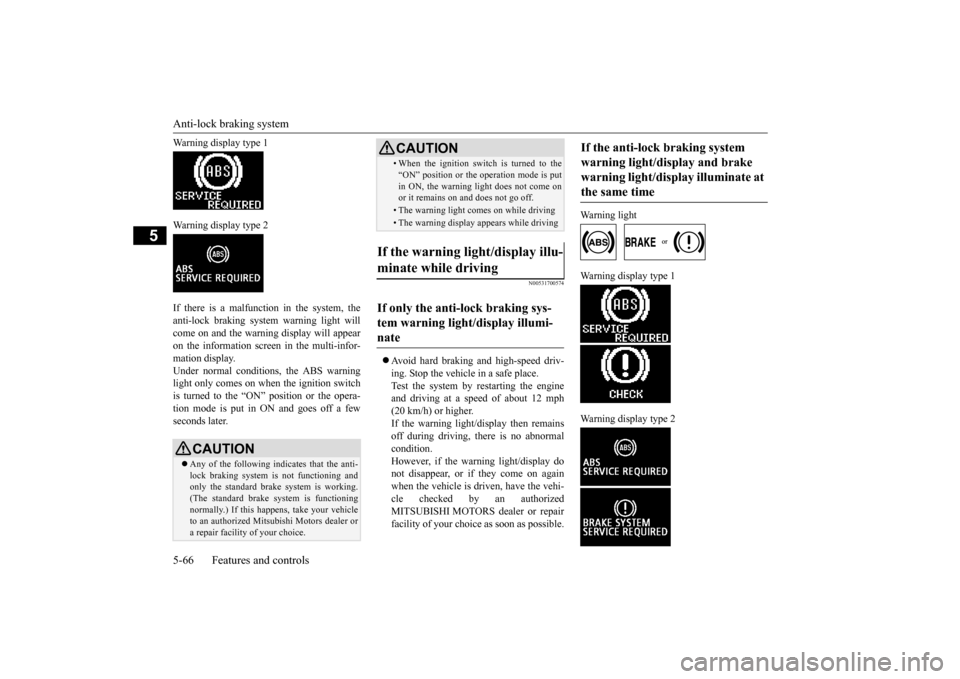
Warning display type 1 Warning display type 2 If there is a malfunction in the system, the anti-lock braking system warning light willcome on and the warning display will appear on the information screen in the multi-infor- mation display.Under normal conditions, the ABS warning light only comes on when the ignition switch is turned to the “ON” position or the opera-tion mode is put in ON and goes off a few seconds later.
N00531700574
Avoid hard braking and high-speed driv- ing. Stop the vehicle in a safe place. Test the system by restarting the engine and driving at a speed
of about 12 mph
(20 km/h) or higher. If the warning light/display then remains off during driving, there is no abnormalcondition. However, if the warning light/display do not disappear, or if they come on againwhen the vehicle is driven, have the vehi- cle checked by an authorized MITSUBISHI MOTORS dealer or repairfacility of your choice as soon as possible.
Warning light
Warning display type 1 Warning display type 2
CAUTION Any of the following indicates that the anti- lock braking system is not functioning and only the standard brake system is working. (The standard brake system is functioningnormally.) If this happens, take your vehicle to an authorized Mitsubishi Motors dealer or a repair facility of your choice.
• When the ignition switch is turned to the “ON” position or the operation mode is put in ON, the warning light does not come on or it remains on and does not go off.• The warning light comes on while driving• The warning display appears while driving
If the warning light/display illu- minate while driving If only the anti-lock braking sys- tem warning light/display illumi-nate
CAUTION
If the anti-lock braking system warning light/display and brake warning light/display illuminate at the same time
BK0206700US.bo
ok 66 ページ 2014年3月25日 火曜日 午後4時42分
Page 131 of 384
Active stability control (ASC) 5-68 Features and controls
5
Ty p e 1 Ty p e 2 If there is a malfunction in the system, the warning display will appear on the informa-tion screen in the multi-information display.
N00559100134
The Active stability control (ASC) takesoverall control of the anti-lock braking sys-tem, traction control function and skid control function to help maintain the vehicle’s control and traction. Please read
this section in con-
junction with the page on the anti-lock brak- ing system, traction control function and skid control function. Anti-lock braking system
P.5-65
Traction control function
P.5-68
Skid control function
P.5-69
N00559200076
On slippery surfaces, the traction control function prevents the dr
ive wheels from spin-
ning excessive, thus helping the vehicle to
Electric power steering system warning display
CAUTION If the warning display appears while the engine is running, have the vehicle inspected by an authorized Mitsubishi Motors dealer ora repair facility of
your choice as soon as
possible. It may become harder to turn the steering wheel.
Active stability control (ASC)
CAUTION Do not over-rely on the ASC. Even the ASC cannot prevent the natural laws of physics from acting on the vehicle. This system, like any other system, has limits and cannot helpyou to maintain traction and control of the vehicle in all circumstances. Reckless driv- ing can lead to accidents. It is the driver’sresponsibillty to drive carefully, This means taking into account the traffic, road and envi- ronmental conditions. Be sure to use the same specified type and size of tire on all four wheels. Otherwise, the ASC may not work properly.
Do not install any aftermarket limited slip differential (LSD) on your vehicle. The ASC may stop functioning properly.NOTE
An operation noise may be emitted from the engine compartment in the following situa- tions. The sound is associated with checkingthe operations of the ASC. At this time, you may feel a shock from the brake pedal if you depress it. These do not indicate a malfunc-tion. • When the ignition switch is turned to the “ON” position or the operation mode is put in ON. • When the vehicle is driven for a while after the engine is turned on.
When the ASC is activated, you may feel a vibration in the vehicle body or hear a whin- ing sound from the engine compartment.This indicates that the system is operating normally. It does not indicate a malfunction. When the anti-lock braking system warning light is illuminated, the ASC is not active.
Traction control function
CAUTION
BK0206700US.bo
ok 68 ページ 2014年3月25日 火曜日 午後4時42分
Page 140 of 384
Tire pressure monitoring system
Features and controls 5-77
5
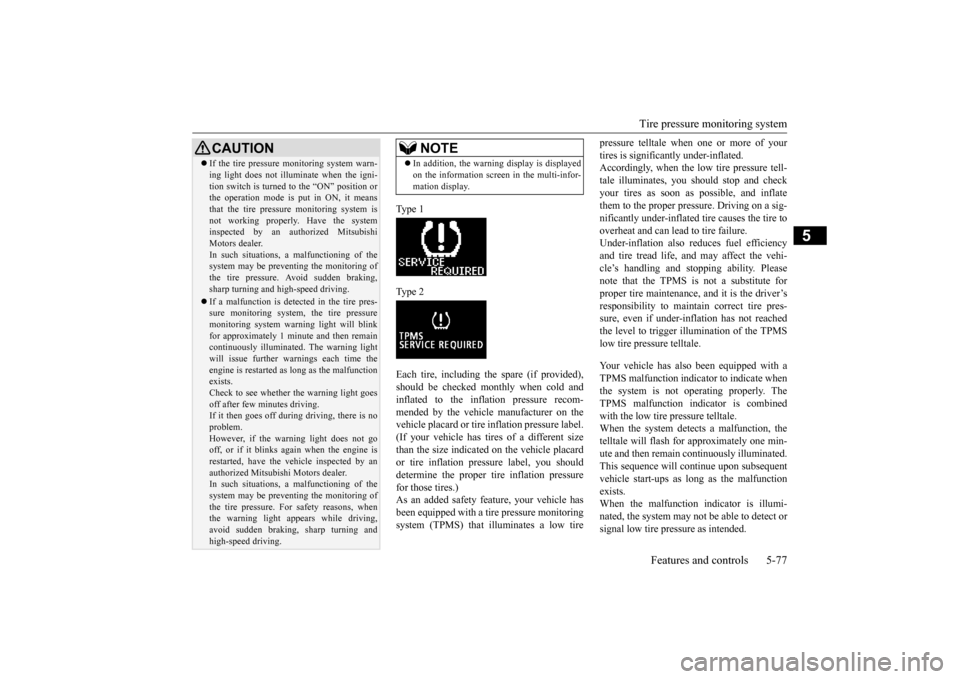
Type 1 Type 2Each tire, including the spare (if provided), should be checked monthly when cold and inflated to the inflation pressure recom-mended by the vehicle manufacturer on the vehicle placard or tire inflation pressure label. (If your vehicle has tires of a different sizethan the size indicated on the vehicle placard or tire inflation pressure label, you should determine the proper tire inflation pressurefor those tires.) As an added safety feature, your vehicle has been equipped with a ti
re pressure monitoring
system (TPMS) that illuminates a low tire
pressure telltale when one or more of your tires is significantly under-inflated. Accordingly, when the low tire pressure tell- tale illuminates, you should stop and checkyour tires as soon as possible, and inflate them to the proper pres
sure. Driving on a sig-
nificantly under-inflated tire causes the tire tooverheat and can lead to tire failure. Under-inflation also reduces fuel efficiency and tire tread life, and may affect the vehi-cle’s handling and stopping ability. Pleasenote that the TPMS is not a substitute for proper tire maintenance, and it is the driver’s responsibility to maintain correct tire pres-sure, even if under-inflation has not reached the level to trigger illumination of the TPMS low tire pressure telltale. Your vehicle has also been equipped with a TPMS malfunction indicator to indicate when the system is not operating properly. The TPMS malfunction indicator is combinedwith the low tire pressure telltale. When the system detects a malfunction, the telltale will flash for approximately one min-ute and then remain continuously illuminated. This sequence will continue upon subsequent vehicle start-ups as long as the malfunctionexists. When the malfunction indicator is illumi- nated, the system may not be able to detect orsignal low tire pressure as intended.
CAUTION If the tire pressure monitoring system warn- ing light does not illuminate when the igni- tion switch is turned to the “ON” position or the operation mode is put in ON, it means that the tire pressure monitoring system isnot working properly. Have the system inspected by an authorized Mitsubishi Motors dealer.In such situations,
a malfunctioning of the
system may be preventing the monitoring of the tire pressure. Avoid sudden braking,sharp turning and high-speed driving. If a malfunction is detected in the tire pres- sure monitoring system, the tire pressure monitoring system warning light will blink for approximately 1 minute and then remaincontinuously illuminated. The warning light will issue further warnings each time the engine is restarted as long as the malfunctionexists. Check to see whether the warning light goes off after few minutes driving.If it then goes off during driving, there is no problem. However, if the warning light does not gooff, or if it blinks again when the engine is restarted, have the vehicle inspected by an authorized Mitsubishi Motors dealer. In such situations,
a malfunctioning of the
system may be preventing the monitoring ofthe tire pressure. For safety reasons, when the warning light appears while driving, avoid sudden braking, sharp turning andhigh-speed driving.
NOTE
In addition, the warning display is displayed on the information screen in the multi-infor- mation display.
BK0206700US.bo
ok 77 ページ 2014年3月25日 火曜日 午後4時42分
Page 169 of 384
Indicator light, warning light, an
d information screen display list
5-106 Features and controls
5
N00557900082
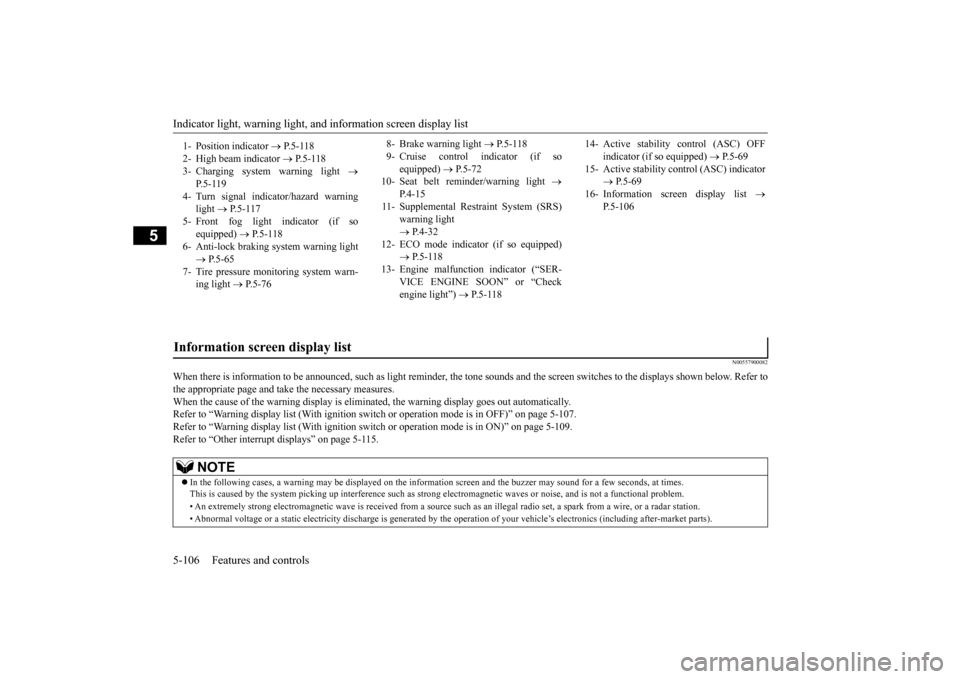
When there is information to be announced,
such as light reminder, the tone sounds an
d the screen switches to the displays show
n below. Refer to
the appropriate page and take the necessary measures. When the cause of the warning display is eliminated, the warning display goes out automatically.Refer to “Warning display list (With ignition switch or operation mode is in OFF)” on page 5-107. Refer to “Warning display list (With ignition switch or operation mode is in ON)” on page 5-109. Refer to “Other interrupt displays” on page 5-115. 1- Position indicator
P.5-118
2- High beam indicator
P.5-118
3- Charging system warning light
P. 5 - 1 1 9
4- Turn signal indicator/hazard warning
light
P.5-117
5- Front fog light indicator (if so
equipped)
P.5-118
6- Anti-lock braking system warning light
P.5-65
7- Tire pressure monitoring system warn-
ing light
P.5-76
8- Brake warning light
P. 5 - 1 1 8
9- Cruise control indicator (if so
equipped)
P.5-72
10- Seat belt reminder/warning light
P. 4 - 1 5
11- Supplemental Restraint System (SRS)
warning light P.4-32
12- ECO mode indicator (if so equipped)
P.5-118
13- Engine malfunction indicator (“SER-
VICE ENGINE SOON” or “Checkengine light”)
P.5-118
14- Active stability control (ASC) OFF
indicator (if so equipped)
P.5-69
15- Active stability control (ASC) indicator
P.5-69
16- Information screen display list
P.5-106
Information screen display list
NOTE
In the following cases, a warning may be displayed on the inform
ation screen and the buzzer may
sound for a few seconds, at tim
es.
This is caused by the system picking up interference such as stro
ng electromagnetic waves or nois
e, and is not a functional pro
blem.
• An extremely strong electromagnetic wave is received from a source
such as an illegal radio set,
a spark from a wire, or a rad
ar station.
• Abnormal voltage or a static electricity discharge is genera
ted by the operation of your vehicle’s electronics (including afte
r-market parts).
BK0206700US.book
106 ページ 2014年3月25日 火曜日 午後4時42分
Page 172 of 384
Indicator light, warning light, an
d information screen display list Features and controls 5-109
5
N00558101310
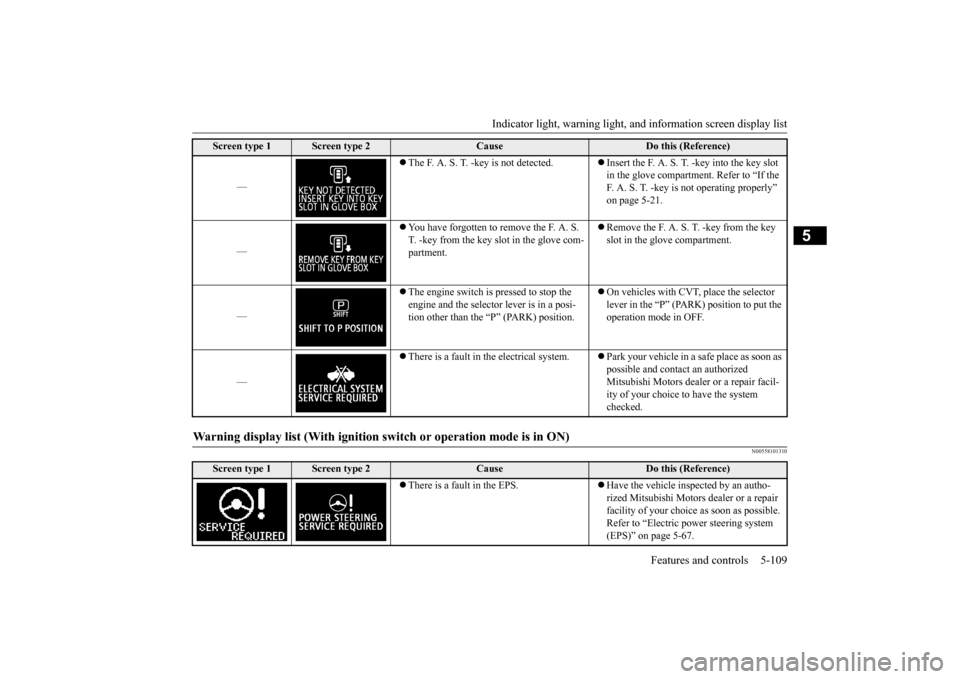
—
The F. A. S. T. -key is not detected.
Insert the F. A. S. T. -key into the key slot in the glove compartment. Refer to “If the F. A. S. T. -key is not operating properly” on page 5-21.
—
You have forgotten to remove the F. A. S. T. -key from the key slot in the glove com-partment.
Remove the F. A. S. T. -key from the key slot in the glove compartment.
—
The engine switch is pressed to stop the engine and the selector lever is in a posi-tion other than the “P” (PARK) position.
On vehicles with CVT, place the selector lever in the “P” (PARK) position to put the operation mode in OFF.
—
There is a fault in the electrical system.
Park your vehicle in a safe place as soon as possible and contact an authorized Mitsubishi Motors dealer or a repair facil- ity of your choice to have the system checked.
Warning display list (With ignition sw
itch or operation mode is in ON)
Screen type 1
Screen type 2
Cause
Do this (Reference)
There is a fault in the EPS.
Have the vehicle inspected by an autho- rized Mitsubishi Motors dealer or a repair facility of your choice as soon as possible. Refer to “Electric power steering system (EPS)” on page 5-67.
Screen type 1
Screen type 2
Cause
Do this (Reference)
BK0206700US.book
109 ページ 2014年3月25日 火曜日 午後4時42分
Page 175 of 384
Indicator light, warning light, an
d information screen display list
5-112 Features and controls
5
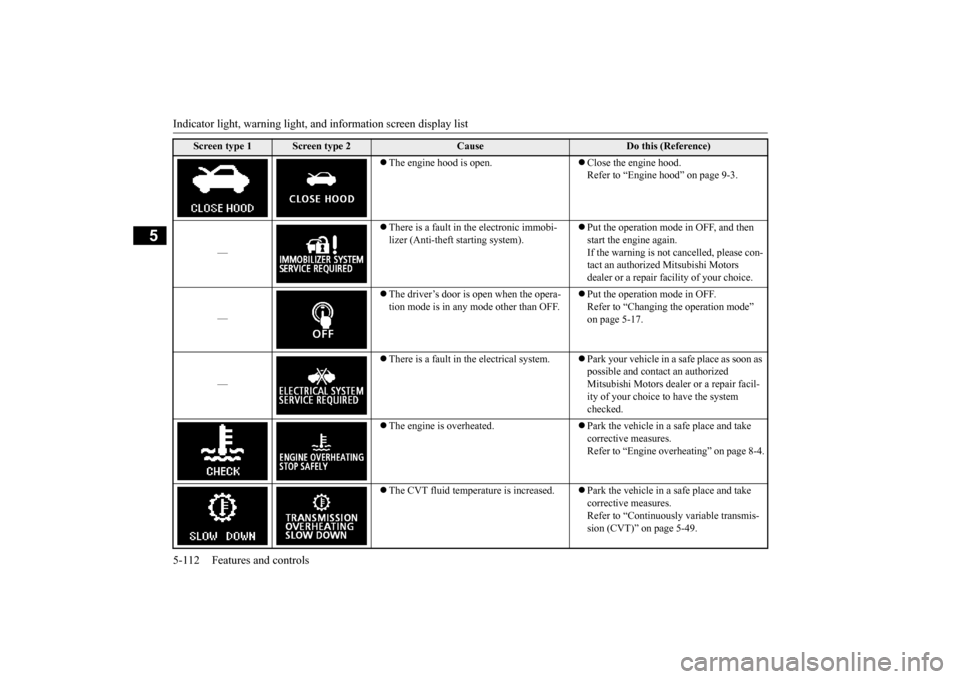
The engine hood is open.
Close the engine hood. Refer to “Engine hood” on page 9-3.
—
There is a fault in the electronic immobi- lizer (Anti-theft starting system).
Put the operation mode in OFF, and then start the engine again.If the warning is not cancelled, please con- tact an authorized Mitsubishi Motors dealer or a repair facility of your choice.
—
The driver’s door is open when the opera- tion mode is in any mode other than OFF.
Put the operation mode in OFF. Refer to “Changing the operation mode” on page 5-17.
—
There is a fault in the electrical system.
Park your vehicle in a safe place as soon as possible and contact an authorized Mitsubishi Motors dealer or a repair facil- ity of your choice to have the system checked.
The engine is overheated.
Park the vehicle in a safe place and take corrective measures. Refer to “Engine overheating” on page 8-4.
The CVT fluid temperature is increased.
Park the vehicle in a safe place and take corrective measures.Refer to “Continuously variable transmis- sion (CVT)” on page 5-49.
Screen type 1
Screen type 2
Cause
Do this (Reference)
BK0206700US.book
112 ページ 2014年3月25日 火曜日 午後4時42分