2015 MITSUBISHI LANCER ECO mode
[x] Cancel search: ECO modePage 300 of 434
Automatic air conditioning with
Celsius scale (if so equipped)
Comfort controls 7-25
7
N00760000050
You can change the following functions to match your preference. Enable automatic air control: When the mode selection dial or theblower speed selection dial is set to the “AUTO” position, the air selection switch will also be automatically controlled. Disable automatic air control: Even when the mode selection dial or theblower speed selection dial is set to the “AUTO” position, the air selection switch will not be automatically controlled. Changing the settings Press the air selection switch for about 10 seconds or longer. When the setting has changed, the systemwill beep and the indicator light will flash. • When the setting has changed from enabled to disabled,the system will beep three times and the indicator will flash three times. • When the setting has changed from dis-abled to enabled, the system will beep two times and the indicator light will flash three times.
N00737300301
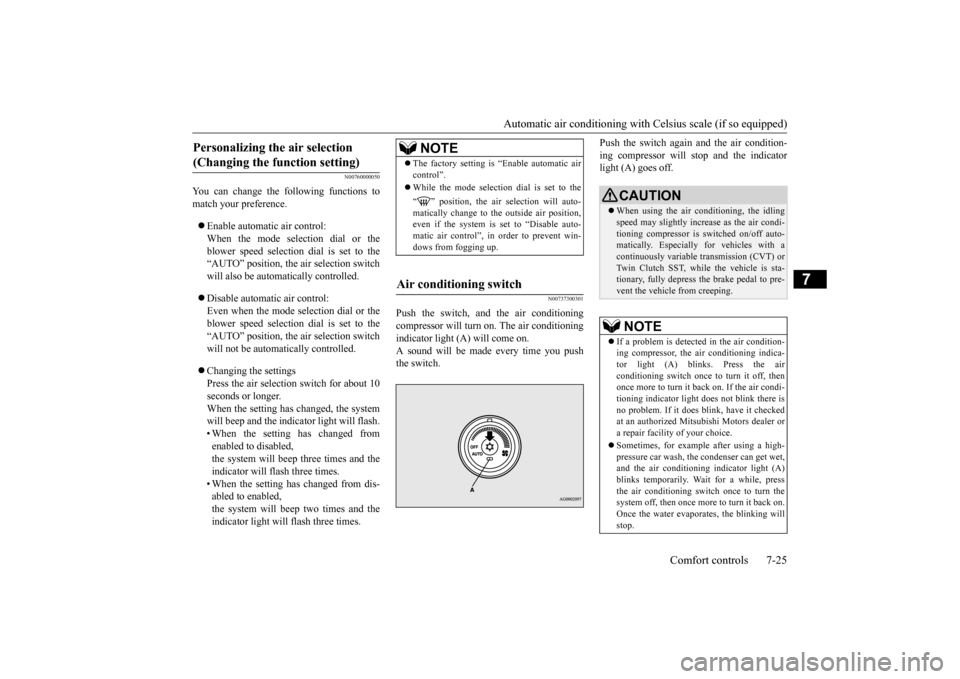
Push the switch, and the air conditioning compressor will turn
on. The air conditioning
indicator light (A) will come on.A sound will be made every time you push the switch.
Push the switch again and the air condition- ing compressor will stop and the indicator light (A) goes off.
Personalizing the air selection (Changing the function setting)
NOTE
The factory setting is “Enable automatic air control”. While the mode selection dial is set to the “ ” position, the air selection will auto- matically change to the outside air position, even if the system is set to “Disable auto-matic air control”, in order to prevent win- dows from fogging up.
Air conditioning switch
CAUTION When using the air conditioning, the idling speed may slightly increase as the air condi- tioning compressor is switched on/off auto- matically. Especially for vehicles with acontinuously variable transmission (CVT) or Twin Clutch SST, while the vehicle is sta- tionary, fully depress the brake pedal to pre-vent the vehicle from creeping.NOTE
If a problem is detect
ed in the air condition-
ing compressor, the air conditioning indica-tor light (A) blinks. Press the air conditioning switch once to turn it off, then once more to turn it back on. If the air condi-tioning indicator light
does not blink there is
no problem. If it does blink, have it checked at an authorized Mitsubishi Motors dealer ora repair facility of your choice. Sometimes, for example after using a high- pressure car wash, the condenser can get wet, and the air conditioning indicator light (A)blinks temporarily. Wait for a while, press the air conditioning switch once to turn the system off, then once more to turn it back on.Once the water evaporates, the blinking will stop.
BK0210300US.bo
ok 25 ページ 2014年4月8日 火曜日 午前10時46分
Page 301 of 434

Automatic air conditioning with
Celsius scale (if so equipped)
7-26 Comfort controls
7
N00759800029
You can change the following functions to match your preference. Enable automatic air conditioning control: When the mode selection dial or blower speed selection dial has been set to the“AUTO” position or when the tempera-ture control dial has been set to the mini- mum temperature, the air conditioning switch is automatically controlled. Disable automatic air conditioning con- trol: The air conditioning switch is not auto- matically controlled, unless the air condi-tioning switch is used. Changing the settings Press the air conditioning switch for about 10 seconds or longer.When the setting has changed, the system will beep and the indicator light will flash. • When the setting has changed fromenabled to disabled, the system will beep three times and the indicator will flash three times.• When the setting has changed from dis- abled to enabled,
the system will beep two times and the indicator light will flash three times.
N00731701427
In normal conditions, use the system in the AUTO mode and follow these procedures:
1. Set the blower speed selection dial to the “AUTO” position. 2. Select the temperature control dial to the desired temperature. The temperature canbe set within a range of around 18 to 32. The temperature will increase as the dial is turned to the right.3. Set the mode selection dial to the “AUTO” position.
The vents, recirculation/outside air, blower speed, and ON/OFF of air conditioning willbe controlled automatically.
N00731800098
Blower speed and vent mode may be con-trolled manually by setting the blower speed
Personalizing the air conditioning switch (Changing the function set- ting)
NOTE
The factory setting is “Enable automatic air conditioning control”. While the mode selection dial is set to the “ ” position, the air conditioning will run automatically, even if the system is set to “Disable automatic air conditioning control”, in order to prevent windows from foggingup.
Operating the air conditioning system (automatic mode)
NOTE
Set the temperature at about 25 under normal conditions. While the engine coolant temperature is low, the temperature of the air from the heater will be cool/cold until the engine warms up,even if you have selected warm air with the dial. To prevent the windshield and windows from fogging up, the vent mode will be changed to “ ” or “ ” and the blower speed will be reduced.
Operating the air conditioning system (manual mode)
BK0210300US.bo
ok 26 ページ 2014年4月8日 火曜日 午前10時46分
Page 303 of 434

Important air conditioning operating tips 7-28 Comfort controls
7
N00733700280
1. Park the vehicle in the shade whenever possible. Parking in the hot sun makes the vehicle interior extremely hot which then requires more time to cool. If it is neces-sary to park in the sun, open the windows for the first few minutes of air condition- ing to expel the hot air.2. Afterwards, keep the windows closed when the air conditioning is in use. The entry of outside air through open windowswill reduce cooling efficiency. 3. When running the air conditioning, make sure the air intake, which is located infront of the windshield, is free of obstruc- tions such as leaves. Leaves collected in the air-intake chamber may reduce airflow and plug the water drains.
If the air conditioning seems less effective than usual, the cause might be a refrigerant leak.Have the system inspected by your authorized Mitsubishi Motors dealer or a repair facility of your choice.
The air conditioning should be operated for at least five minutes each week, even in coldweather. This includes the quick defrosting mode. Operating the air condition system weekly maintains lubrication of the compres-sor internal parts to keep the air conditioning in the best operating condition.
N00733800151
The air conditioning system is equipped with an air filter to remove pollen and dust. The air filter’s ability to collect pollen and dirt is reduced as it becomes dirty, so replaceit periodically. For the maintenance interval, refer to the “WARRANTY AND MAINTE- NANCE MANUAL”.
When defrosting, do not set the temperature control dial to the maximum cool position. This will blow cool air on the window glass and fog it up.
Important air conditioning operating tips
NOTE
Air conditioning system refrig- erant and lubricant recommen- dations
CAUTION The air conditioning system in your vehicle must be charged with the refrigerant HFC-134a and the lubricant SUN-PAG56. Use of any other refrigerant or lubricant will cause severe damage and may require replac-ing your vehicle’s entire air conditioning system. The release of refrigerant into the atmo-sphere is not recommended. The new refrigerant HFC-134a in your vehi- cle is designed not to harm the earth’s ozonelayer. However, it may contribute slightly to global warming. It is recommended that the old refrigerant be saved and recycled for future use.
During a long period of disuse Air purifier
NOTE
Operation in certain conditions such as driv- ing on a dusty road and
frequent use of the
air conditioning can lead to reduction of ser- vice life of the filter.
When you feel that the
air flow is lower than normal or when thewindshield or windows start to fog up easily, replace the air filter. Contact your Mitsubishi Motors dealer or arepair facility of your choice for assistance.
BK0210300US.bo
ok 28 ページ 2014年4月8日 火曜日 午前10時46分
Page 304 of 434

AM/FM radio/CD player (if so equipped)
Comfort controls 7-29
7
N00734302098
The audio system can only be used when the ignition switch is in the “ON” or “ACC” position.
N00715000021
This product supports audio playback from iPod/iPhone devices, however dif- fering versions mean that playback cannot be guaranteed.
Please be aware that depending on the iPod/iPhone model or version, operation may differ.
N00715200023
If the product becomes dirty, wipe with a soft cloth. If very dirty, use a soft cloth dipped in neutral detergent diluted in water, andthen wrung out. Do not use benzene, thin- ners, or other chemical wipes. This may harm the surface.
N00715300066
Product names and other proper names are the trademarks or registered trade-marks of their respective owners. Furthermore, even if there is no specific denotation of trademarks or registeredtrademarks, these are to be observed in their entirety.
AM/FM radio/CD player
(if
so equipped)
NOTE
To listen to the audio system while the engine is not running, turn the ignition switch to the “ACC” position. If the ignition switch is left in the “ACC”position, the accessory power will automati- cally turn off after a
certain period of time
and you will no longer be able to use theaudio system. The accessory power comes on again if the ignition switch is turned from the “ACC” position. Refer to “ACC powerauto-cutout function” on page 5-54. If a cellular phone is used inside the vehicle, it may create noise in the audio equipment. This does not mean that anything is wrong with your audio equipment. In such a case,use the cellular phone at a place as far away as possible from the audio equipment.
If foreign objects or water get into the audio equipment, or if smoke or a strange odor comes from it, immediately turn off the audio system and have it checked at an authorized Mitsubishi Motors dealer or arepair facility of your choice. Never try to repair it yourself. Avoid using the audio sys- tem until it is inspected by a qualified per-son. If the audio system is damaged by foreign objects, water, or fire, have the system checked by a qualified Mitsubishi Motors technician. The audio amplifier (if so equipped) is located under the front left seat.Do not subject the amplifier to a strong impact. It could damage the amplifier or malfunc-tioning could result.
Important Points on Usage
iPod/iPhone Playback Function
(if
so equipped)
NOTE
How to Clean
Tr a d e m a r k s
BK0210300US.bo
ok 29 ページ 2014年4月8日 火曜日 午前10時46分
Page 311 of 434

Audio Files (MP3/WMA/AAC) 7-36 Comfort controls
7
N00715900020
MP3 is an abbreviation of “MPEG-1 Audio Layer 3”. MPEG is an abbreviation of“Motion Picture Experts Group”, and this is a video compression standard used in video CDs, etc.MP3 is one of the audio compression meth- ods contained in the MPEG audio standard, and reduces the quality of sounds that arebeyond the auditory resolution of the humanear and that are hidden by louder sounds, thus creating high-quality data with a lower data size.Because this can compress CD audio to approximately 1/10 its original data size with- out perceptible loss, approximately 10 CDscan be written to a single CD-R/RW disc. Specifications for MP3 files that can be played are as below.
Maxi- mum file num- ber
*1
65,535 files (total number on media. Other than MP3, WMA, and AAC files not included)
File
name and folder name restric- tions
Maximum 64 bytes (for Uni- code, 32 characters), files/ fold- ers with file/ folder names longer than this will not be dis-played or played back.
USB sup- ported formats
The recommended file system is FAT32.1 partition only
*1: Do not include other than MP3/WMA/AAC files. However, if stor- ing many tracks within the same folder, these may not be recognized even if lessthan the maximum number of tracks. In these cases, divide the tracks up into mul- tiple folders.
NOTE
The order in which folders and audio files are displayed on this product may be differ-ent to how they are displayed on a computer.Name
Speci- fica- tion
Explanation
What Is MP3?
CAUTION MP3 files different to the standards at right may not play back correctly, or file/folder names may not be displayed correctly.
Standards for MP3 Files That Can Be Played Back
Item
Details
Specification MPEG-1 AUDIO LAYER3
MPEG-2 AUDIO LAYER3
Sampling frequency [kHz]
MPEG-1: 32/44.1/48 MPEG-2: 16/22.05/24
Bit rate [kbps]
MPEG-1: 32 to 320 MPEG-2: 8 to 160
VBR (vari- able bit rate)
Support
Channel mode
Stereo/ Joint stereo/ Dual channel/ Monaural
File exten-
sion
mp3
Supported tag informa-
tion
ID3 tag Ver. 1.0, Ver. 1.1, Ver. 2.2, Ver. 2.3, Ver. 2.4 (ISO-8859-1, UTF-16 (Uni- code)), Titles, Artist name, Album name
Maximum number of characters that can be indicated on the display
64 characters
BK0210300US.bo
ok 36 ページ 2014年4月8日 火曜日 午前10時46分
Page 317 of 434

Listen to Radio 7-42 Comfort controls
7
N00716900027
This explains how to listen to AM and FM radio broadcasts. Press the RADIO key to switch the band. Switch between AM and FM bands. The selected band is indicated on the display. *: When a satellite tuner is connected Turn the /SEL key to the frequency to lis- ten to.
Collective search for stations that can be received. Press the SCAN key.When a station is received, this is played for 5 seconds, then the product searches for the next station.
Register the broadcast station in advance, and select this at a later time. 1. Tune in to the frequency to register. 2. Hold down any of the keys from the 1RPT key to the 6 key. A “Beep” sounds, and the preset key is registered.
During RBDS broadcast reception, select PTY (program content), and automatically scan for stations. 1. During FM reception, press the PTY key. This switches to the PTY selection mode. 2. Press the PTY key to select PTY.
*2: Requires a separately-purchased Blue- tooth-capable audio device (vehicles with a Bluetooth
® 2.0 interface).
*3: Requires a satellite tuner connection.
Listen to Radio To Listen to the Radio
NOTE
Bands switch in the order AM, FM1, FM2, SIR1*, SIR2*, SIR3*, and SIR4*. If no signal is received, bands will not be switched to SIR2, SIR3, or SIR4.
Manual/Seek Station Selection
/SEL key (counter- clockwise)
Reduces the frequency being received.
/SEL key (clockwise)
Increases the frequency being received.
key
(hold down)
Release the button to start seek station selection, and when a station is received, scanning stops.
key
(hold down)Scan Station Selection
NOTE
Press this button again while receiving the station to return to normal reception.
Preset Memory
NOTE
The preset memory can register a maximum of 6 stations for each band. If a preset key that already has a station reg- istered is selected, then this is overwritten with the new preset. Pressing the preset key will select the previ- ously registered frequency.
PTY Search
BK0210300US.bo
ok 42 ページ 2014年4月8日 火曜日 午前10時46分
Page 318 of 434

Listen to Satellite Radio (if so equipped)
Comfort controls 7-43
7
3. Press the key or key. The PTY (program content) indicator willflash, and station selection will automati- cally start. When a station is received, the frequencyis displayed.
During RBDS broadcast reception, select PTY (program content) to perform a collec-tive search for stations. 1. During FM reception, press the PTY key. This switches to the PTY selection mode. 2. Press the PTY key to select PTY.3. Press the SCAN key. When a broadcast station is received, this is played for 5 seconds, then the productsearches for the next station.
N00717000025
This section explains ho
w to listen to satellite
radio. Press the RADIO key to switch the band. Switches between SIR1, SIR2, SIR3, and SIR4 bands. The selected band is indicated on the display.
Press the key or key to select the sta- tion.
NOTE
This receives the station detected first. 10 seconds after reception, PTY search mode will be cancelled. To receive a different station, press the key or key again.
PTY Scan
NOTE
Press this key again while receiving the sta- tion to return to normal reception.
Listen to Satellite Radio
(if so
equipped)
NOTE
A subscription is required to listen to satel- lite radio. Satellite radio cannot be receivedafter the free trial period has expired. If no subscription has been made when the free trial period expires, the display will alternate between “CALL” and “888-539- SIRI”.
To listen to Satellite Radio
NOTE
Bands switch in the order AM, FM1, FM2, SIR1, SIR2*, SIR3*, and SIR4*. Switch satellite radio bands by holding down the key or key on the steering remote control switch.*:If no signal is received, bands will not be switched.
Select a Station
key
Go down one step from the channel being received.
key
Go up one step from the channel being received.
key
(Hold down)
While the key is held down, it will cycle down through the channels being received.
key
(Hold down)
While the key is held down, it will cycle up through the channels being received.
BK0210300US.bo
ok 43 ページ 2014年4月8日 火曜日 午前10時46分
Page 319 of 434

Listen to Satellite Radio (if so equipped) 7-44 Comfort controls
7
Channels are received in order and take 10 seconds each. Press the SCAN key. All of the channels are scanned. 1. Press the PTY key. Switches to the category search mode, and the category name is indicated on the display.
2. Turn the /SEL key to select the cate- gory. 3. Press the SCAN key.The channels in the selected category are scanned.
Register the channel in advance, and select this at a later time. 1. Tune in to the channel to register. 2. Hold down any of the keys from the 1RPT key to the 6 key. A “Beep” sounds, and the preset key is registered.
Other channels can be selected while listen- ing to a channel. 1. Press the PTY key. Switches to the category search mode, and the category name is indicated on thedisplay. 2. Turn the /SEL key to select the cate- gory. 3. Press the /SEL key. Switches to channel search mode. 4. Turn the /SEL key to select the chan- nel. 5. Press the /SEL key. A “Beep” sounds, and the selected chan-nel is received. (Channel preliminary set-ting mode) The channel name shown on the display flashes. Press the /SEL key again to cancel the search mode and return to normal recep- tion.
NOTE
When cycling up/down through channels, the channel number display in the upper level of the display changes. When channel number “000” is selected, the SIRIUS ID (12 digits) is displayed.
Scan Station Selection
Scan All Channels
NOTE
Press this key again while receiving the channel to return to normal reception. Selecting a channel will cancel this.
Scan Category Channels
NOTE
Press the SCAN key or PTY key again while receiving the channel to return to normalreception. Turning the /SET key will cancel.
Preset Memory
NOTE
The preset memory can register a maximum of 6 stations per band. If a preset key that already has a channel reg- istered is selected, then this is overwritten with the new preset.
Pressing the preset key will select the previ- ously registered channel. The preset channels on the display are shown as “P1” though “P6”.
Channel Search
NOTE
BK0210300US.bo
ok 44 ページ 2014年4月8日 火曜日 午前10時46分