2015 MITSUBISHI LANCER warning
[x] Cancel search: warningPage 216 of 434

Combination headlights and dimmer switch
Features and controls 5-147
5
Type 2 If the engine oil pressure drops while the engine is running, the warning display is dis- played on the information screen in the multi-information display.
N00522501762
Rotate the switch to operate the lights.
If your vehicle is equipped with daytime run- ning lights, the combinations of switch opera- tions and illuminated lights differ inaccordance with the following conditions. [When the engine is started, and the parking brake is released] The daytime running lights will be illumi- nated:
CAUTION If the vehicle is driven while the engine oil is low, or the oil level is normal but the warn- ing is displayed, the engine may overheat and damage may result. If the warning is displayed while the engine is running, park your vehicle in a safe place as soon as possible and check the engine oil level. If this warning display comes on when the engine oil level is proper, have your vehiclechecked at an authorized Mitsubishi Motors dealer or a repair facility of your choice.NOTE
The oil pressure warning display does not show the amount of oil. The oil level must be checked using the dipstick.
Combination headlights and dimmer switch Headlights
NOTE
Do not leave the headlights and other lights on for a long period of time when the engine is not running. The battery will run down. When it rains, or when the vehicle has been washed, the inside of the lens sometimes becomes foggy. This is the same as whenwindow glass mists up on a humid day, and does not indicate a problem. When the light is switched on, the heat will dry out the fog.However, if water collects inside the light, have it checked by an authorized Mitsubishi Motors dealer or a repair facility of yourchoice.
Ty p e 1
OFF All lights off
Parking, tail, front and rear side- marker lights, license plate and instrument panel lights on Headlights and other lights on
OFF
The daytime running lights illumi- nated
BK0210300US.book
147 ページ 2014年4月8日 火曜日 午前10時46分
Page 219 of 434

Combination headlights and dimmer switch 5-150 Features and controls
5
N00549800196
If the driver’s door is opened with the key in the “LOCK” or “ACC” position or removed
from the ignition switch while the lights are on, the buzzer will sound to remind you to turn off the lights. If the driver’s door is opened with the ignition switch in the “LOCK” or “ACC” position, or if the ignition switch is moved to the “LOCK” position while the lights are on, thebuzzer will sound to remind you to turn offthe lights. In either case, the lights and buzzer will turn off automatically. Or you can turn the combination headlightsand dimmer switch to the “OFF” position to stop the buzzer.
N00549900155
To change the headlights from high beam to low beam and vice versa, pull the turn signallever to fully toward you (1). Switch the headlights to low beam as a courtesy when- ever there are oncoming vehicles, or whenthere is traffic moving ahead of you. An illu- minated blue light in the instrument cluster
indicates when the headlights are on high beam.
N00550000198
You can flash the high beams by pulling thelever gently toward you (2). The lights will go back to normal when you let go. While the high beam is on, you will see a blue light onthe instrument panel.
NOTE
When the engine is started using the key, if the driver’s door is opened and the key is removed, the headlight reminder buzzer intermittently emits a high-pitched sound. If the key is still in the ignition the keyreminder buzzer intermittently emits a low- pitched sound. The buzzer stops when the driver’s door isclosed. (A warning is also displayed in the multi-information display.) operation function, if the driver’s door is opened and the ignition switch is in the“LOCK” position, the headlight reminder buzzer intermittently emits a high-pitched sound. If the ignition sw
itch is in any posi-
tion other than “LOCK”, the ignition switch on reminder buzzer intermittently emits a low-pitched sound.The buzzer stops when the driver’s door is closed. (A warning is also displayed in the multi-information display.)
When using a key to start the engine
When using the F.A.S.T.-key to start the engine Dimmer (high/low beam change)
Headlight flasher
NOTE
You can flash the high beams by pulling the lever toward you, even if the combination headlights and dimmer switch is off.
BK0210300US.book
150 ページ 2014年4月8日 火曜日 午前10時46分
Page 222 of 434

Hazard warning flasher switch Features and controls 5-153
5
does not return to the neutral position. This usually happens when the steering wheel is turned only slightly. You can easily return the lever by hand.Also, when you move the lever to (1) slightly then release it, the turn signal lights and indi- cator light in the instrument cluster will flashthree times.
N00522700217
If you press the flasher switch, the front andrear turn signals will flash intermittently, andso will the hazard warning lights. This is an emergency warning system and should not be
used when the vehicle is in motion, except for emergencies. If you need to leave your vehicle, the flashers will keep working afte
r the ignition key is
removed.
N00522800377
The front fog lights illuminate only when the headlights are on low beam. Turning the knob in the direction of the “ON”position turns on the front fog lights as well as the indicator in the instrument cluster. To turn them off, turn the knob in the direction ofthe “OFF” position. The knob will return to the neutral position when it is released.
NOTE
A light in the instrument panel flashes to show when the front and rear turn signal lights are working properly. If this light flashes faster than usual, checkfor a burned out light bulb or malfunctioning connection. If the panel light does not come on when thelever is moved, check for a blown fuse or a burned out bulb in the panel. Have the vehicle inspected by an authorizedMitsubishi Motors dealer or a repair facility of your choice.
The turn signal light 3-flash function for lane changes can be deactivated. See your authorized Mitsubishi Motors dealer for details. You can adjust the time required to operate the lever for the 3-flash function. See your authorized Mitsubishi Motorsdealer for details.
Hazard warning flasher switch
NOTE
NOTE
If you keep the flashers on for several hours with the engine turned off, the battery will run down.
Front fog light switch
(if so
equipped)
BK0210300US.book
153 ページ 2014年4月8日 火曜日 午前10時46分
Page 229 of 434

Bluetooth® 2.0 interface (if so equipped) 5-160 Features and controls
5
The system is equipped with a voice recogni- tion function, which allows you to make hands-free calls by simple switch operations and voice command operations using adefined voice tree. The Bluetooth
® 2.0 interface can be used
when the ignition switch is in the “ON” or “ACC” position. Before you can use the Bluetooth
® 2.0 inter-
face, you must pair the Bluetooth
® device
and Bluetooth
® 2.0 interface. Refer to “Con-
necting the Bluetooth
® 2.0 interface and
Bluetooth
® device” on page 5-166.
Bluetooth
® is a registered trademark of
BLUETOOTH SIG, INC.
Steering control switch and microphone
P.5-161 Voice recognition function
P.5-163
Useful voice commands
P.5-163
Speaker enrollment function
P.5-165
Connecting the Bluetooth
® 2.0 interface and
the Bluetooth
® device
P.5-166
Operating a music player connected via Blue- tooth
® P.5-170
How to make or receive hands-free calls
P.5-171 Phonebook function
P.5-173
WA R N I N GAlthough the Bluetooth
® 2.0 interface
allows you to make hands-free calls, if you choose to use the cellular phone whiledriving, you must not allow yourself to be distracted from the safe operation of your vehicle. Anything, including cellularphone usage, that di
stracts you from the
safe operation of your vehicle increases your risk of an accident. Refer to and comply with all state and local laws in your area regarding cellularphone usage while driving.
NOTE
If the ignition switch is left in the “ACC” position, the accessory power will automati- cally turn off after a
certain period of time
and you will no longer be able to use the Bluetooth
® 2.0 interface. The accessory
power comes on again if the ignition switch is turned from the “ACC” position. Refer to “ACC power auto-cutout function” on page5-54. The Bluetooth
® 2.0 interface cannot be used
if the Bluetooth
® device has a dead battery
or the device power is turned off. Hands-free calls will not be possible if your phone does not have service available. Some Bluetooth
® devices are not compatible
with the Bluetooth
® 2.0 interface.
You can confirm the Link System software version by pressing the HANG-UP button 3 times (press and hold 2 times and then press briefly) within 10 seconds.
For detail of the Bluetooth
® 2.0 interface,
refer to the following website:[For vehicles sold in U.S.A.] You can access the Mitsubishi Motors North America website.[For vehicles sold in Canada and Mexico] You can access the Mitsubishi Motors web- site.Please read and agree to the “Warning about Links to the Web Sites of Other Companies”, the websites mentioned above may connectyou to websites other
than the Mitsubishi
Motors website. http://www.mitsubishi-motors.com/en/prod-ucts/index.html Software updates by cellular phone/digital audio device manufacturers may change/alter device connectivity.NOTE
BK0210300US.book
160 ページ 2014年4月8日 火曜日 午前10時46分
Page 252 of 434

USB input terminal (if so equipped)
Features and controls 5-183
5
Refer to “Listen to an iPod” on page 7-47, “Listen to Audio Files on a USB Device” on page 7-49 and “Audio Files(MP3/WMA/AAC)” on page 7-34. Refer to the separate owner’s manual. Refer to the separate owner’s manual.
N00583300029
For details about the types of connectable devices and supported file specifications, refer to the following section.
N00583400020
Devices of the following types can be con- nected.
For these connectable device types, “iPod*,” “iPod classic*,” “iPod nano*,” “iPod touch*”and “iPhone*,” refer to the following web- site: [For vehicles sold in U.S.A.]You can access the Mitsubishi Motors North America website. [For vehicles sold in Canada and Mexico]You can access the Mitsubishi Motors web-site. Please read and agree to the “Warning about Links to the Web Sites of Other Com- panies”. The websites mentioned above mayconnect you to websites other than the Mitsubishi Motors website. http://www.mitsubishi-motors.com/en/prod-ucts/index.html
N00583500021
You can play music files of the followingspecifications that are saved in a USB mem-ory device or other device supporting mass storage class. When you connect your iPod, playable file specifications depend on theconnected iPod.
For vehicles equipped with the AM/FM radio/CD player For vehicles equipped with the DISPLAY AUDIO For vehicles equipped with the Mitsubishi Multi-Communication Sys-temFor vehicles equipped with the Bluetooth
® 2.0 interface
Device types
Model name
Condition
USB memory device
Storage capacity of 256 Mbytes or more
Models other than USB memory devices and iPods
Digital audio player supporting mass storage class
* : “iPod,” “iPod classic,” “iPod nano,” “iPod touch,” and “iPhone” are regis- tered trademarks of Apple Inc. in the United States and other countries.
NOTE
Depending on the type of the USB memory device or other device connected, the con- nected device may not function properly or the available functions may be limited. It is recommended to us
e an iPod with firm-
ware updated to the latest version. You can charge your iPod by connecting it to the USB input terminal when the ignition switch is in the “ACC” or “ON” position. Do not keep your USB memory device or iPod in your vehicle. It is recommended that
you back up the files
in case of data damage. Do not connect to the USB input terminal any device (hard disk, card reader, memoryreader, etc.) other than the connectable devices specified in
the previous section.
The device and/or data may be damaged. Ifany of these devices was connected by mis- take, remove it after turning the ignition switch to the “LOCK” position.
File specifications
BK0210300US.book
183 ページ 2014年4月8日 火曜日 午前10時46分
Page 343 of 434

If the vehicle breaks down 8-2 For emergencies
8
N00836300161
If your vehicle breaks down on the road, move to the shoulder and turn on the hazardwarning flashers. If there is no shoulder, or the shoulder is not safe, drive in the right lane slowly, with the hazard lights flashing, untilyou come to a safe stopping place. Keep the flashers flashing. If the engine stops, there will be no power assist to the steering and brakes, making these difficult to use. The brake booster will not work, so the brakes will not grip well. The brake pedalwill be harder to press than usual. Since there is no power steering assist, the steering wheel will be hard to turn.
Get help from your passengers, bystanders, etc. to push the vehicl
e and move it to a safe
zone.
N00836400713
If the engine cannot be started because the battery is weak or dead, you can start it withthe battery from another vehicle using jumper cables. 1. Take off any metal jewelry such as watch bands or bracelets that might make an accidental electrical contact. 2. Position the vehicles close enough together so that the jumper cables can reach, but be sure the vehicles aren’ttouching each other.
3. You could be injured if the vehicles move. Set the parking brake firmly on each vehi-cle. Put an automatic transaxle, CVT or Twin Clutch SST in “P” (PARK) or a manual transaxle in “N” (Neutral). Turnthe ignition key to the “LOCK” position. 4. Make sure your battery electrolyte is at the proper level. (Refer to “Checking bat- tery electrolyte level” on page 9-15.)
If the vehicle breaks down If the engine stops/fails When the engine fails at the intersection
Jump-starting the engine
WA R N I N G When using jumper cables to start a vehi- cle, follow the procedures and be very cau- tious. CAUTION Do not try to start your vehicle by pushing or towing. Vehicles with continuously variable transmission (CVT) or Twin Clutch SST cannot be started this way. Pushing or towinga vehicle that has a manual transaxle may overheat and damage the catalytic converter. Also, there is more ri
sk of an accident when
a vehicle is being pushed or towed.
CAUTION Check the other vehicle. It must have a 12- volt battery. If the other system isn’t 12-volt, both systems can be damaged.WA R N I N G Turn the ignition key to the “LOCK” posi- tion on both vehicles. Make sure that thecables or your clothes cannot be caught by the fan or drive belt. Personal injury could result. NOTE
Turn off all lights, heater, and other electrical loads. This will avoid sparks and help save both batteries.
BK0210300US.bo
ok 2 ページ 2014年4月8日 火曜日 午前10時46分
Page 345 of 434

Engine overheating 8-4 For emergencies
8
If you drive your vehicle with a low battery charge, after the engine has been started by
using jumper cables, the engine may misfire. This can cause the anti-lock braking system warning light to blink on and off. This is only due to the low battery voltage. It is not aproblem with the brake system. If this hap- pens, fully charge the battery and ensure the charging system is operating properly.
N00836500323
When the engine has overheated, the infor- mation screen in the multi-information dis- play will be interrupted and the enginecoolant temperature warning display will appear. The screen will then change to the engine coolant temperature display screen and “ ” will flash. If this happens: 1. Stop the vehicle in a safe place. Turn on the hazard warning flashers. 2. With the engine still running, carefullyraise the engine hood to vent the engine compartment. 3. Check that the cooling fan is running. Ifthe fan is not turning, stop the engine immediately and contact an authorized Mitsubishi Motors dealer or a repair facil-ity of your choice for assistance.
4. If you see steam or spray coming from under the hood, turn off the engine.5. If you do not see steam or spray coming from under the hood, leave the engine on until the bar graph for the engine coolanttemperature warning display on the multi-information display goes down. When it is in the middle of the normal zone, you can start driving again. If the bar graphstays in the red zone, turn off the engine. 6. When you do not see any more steam or spray, open the hood. Look for obvious leaks, such as a split radiator hose. Becareful as components will be hot. Any leak source must be repaired.
WA R N I N G Charging your battery while it is still in your vehicle might cause the battery to catch fire and explode. If you have to charge it while in the vehicle, disconnect the negative terminal. Keep sparks, cigarettes and flames away from the battery because the battery mayexplode. Keep your work area well vented when charging or using the battery in an enclosed space. Remove all the caps before charging the battery. Electrolyte (battery acid) is corrosive diluted sulphuric acid. If electrolyte comes in contact with your hands, eyes, clothes,or the painted surface of your vehicle, thoroughly flush with water. If electrolyte gets in your eyes, flush them immediatelyand thoroughly with water, and get prompt medical attention. Always wear protective clothing and gog- gles when working near the battery. Keep the battery out of the reach of chil- dren.
As your vehicle has anti-lock brakes
Engine overheating
WA R N I N G To avoid personal injury, keep hands, hair, jewelry and clothes away from the cooling fan. The cooling fan can start at any time.WA R N I N G Before raising the engine hood, check to see if there is steam or spray coming from under the hood. Steam or spray comingfrom an overheated engine could seriously scald you. Do not open the hood until there is nosteam or spray.
BK0210300US.bo
ok 4 ページ 2014年4月8日 火曜日 午前10時46分
Page 347 of 434
How to change a tire 8-6 For emergencies
8
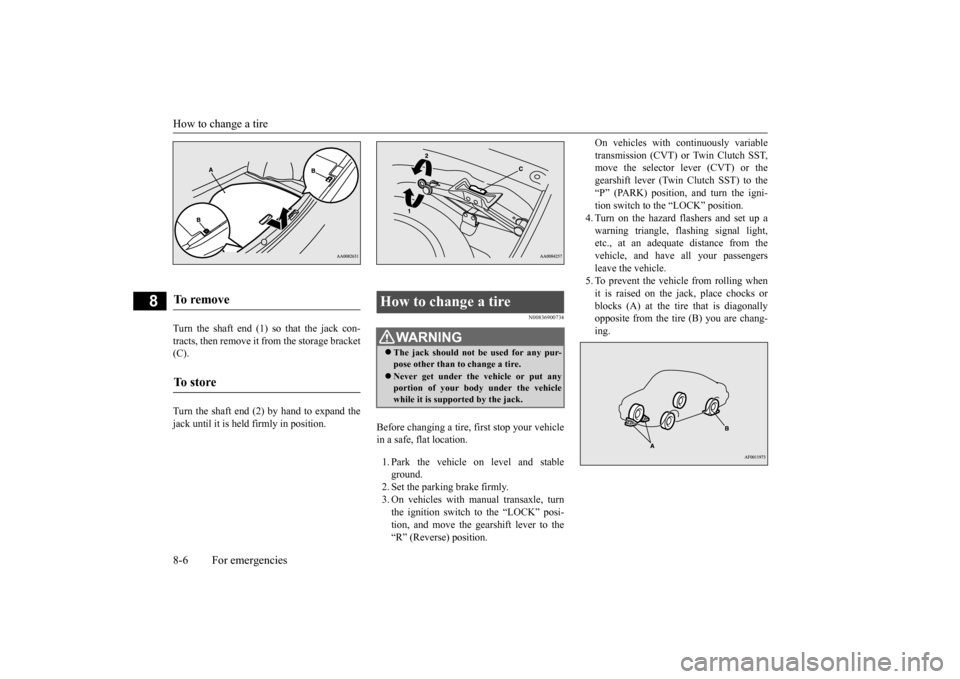
Turn the shaft end (1) so that the jack con- tracts, then remove it from the storage bracket (C). Turn the shaft end (2) by hand to expand the jack until it is held firmly in position.
N00836900734
Before changing a tire, first stop your vehicle in a safe, flat location. 1. Park the vehicle on level and stable ground.2. Set the parking brake firmly. 3. On vehicles with manual transaxle, turn the ignition switch to the “LOCK” posi-tion, and move the gearshift lever to the “R” (Reverse) position.
On vehicles with continuously variable transmission (CVT) or Twin Clutch SST, move the selector lever (CVT) or the gearshift lever (Twin Clutch SST) to the“P” (PARK) position, and turn the igni- tion switch to the “LOCK” position. 4. Turn on the hazard flashers and set up awarning triangle, flashing signal light, etc., at an adequate distance from the vehicle, and have all your passengersleave the vehicle.5. To prevent the vehicle from rolling when it is raised on the jack, place chocks or blocks (A) at the tire that is diagonallyopposite from the tire (B) you are chang- ing.
To remove To s t o r e
How to change a tire
WA R N I N G The jack should not be used for any pur- pose other than to change a tire. Never get under the vehicle or put any portion of your body under the vehiclewhile it is supported by the jack.
BK0210300US.bo
ok 6 ページ 2014年4月8日 火曜日 午前10時46分