2015 MITSUBISHI LANCER EVOLUTION warning
[x] Cancel search: warningPage 149 of 338
Tire pressure monitoring system 5-88 Features and controls
5
The tire pressure monitoring system may not work normally in the following circum- stances: A wireless facility or device using the same frequency is near the vehicle. Snow or ice is stuck inside the fenders and/or on the wheels. The tire inflation pressure sensor’s battery is dead. Wheels other than Mitsubishi genuine wheels are being used. Wheels that are not fi
tted with tire infla-
tion pressure sensors are being used. Wheels whose ID codes are not memo- rized by the vehicle are used. Compact spare tire is fitted on a road wheel.
A window tint that affects the radio wave signals is installed.
N00532900179
If new wheels with new tire inflation pressuresensors are installed, their ID codes must beprogrammed into the tire pressure monitoring system. Have tire and wheel replacement per- formed by an authorized Mitsubishi Motorsdealer to avoid the risk of damaging the tire inflation pressure sensors. If the wheel replacement is not done by an authorizedMitsubishi Motors dealer, it is not covered by your warranty.
N00533001259
Your tire pressure monitoring system oper-ates on a radio frequency subject to Federal Communications Commission (FCC) Rules(For vehicles sold in U.S.A.) and Industry Canada Rules (For vehicles sold in Canada). This device complies with Part 15 of FCCRules and Industry Canada licence-exempt RSS standard(s). Operation is subject to the following two con-ditions. This device may not cause harmful inter- ference. This device must accept any interference received, including interference that may cause undesired operation.
NOTE
To avoid the risk of damage to the tire infla- tion pressure sensors, have any punctured tire repaired by an authorized Mitsubishi Motors dealer. If the tire repair is not done by an authorized Mitsubishi Motors dealer, it isnot covered by your warranty. Do not use an aerosol puncture-repair prod- uct on any tire. Such a spray could damage the tire inflation pressure sensors. Have any puncture repaired by an authorized Mitsubi-shi Motors dealer.
NOTE
Tire inflation pressures vary with the ambi- ent temperature. If the
vehicle is subjected to
large variations in ambient temperature, thetire inflation pressures may be under-inflated (causing the warning light/display to come on) when the ambient temperature is rela-tively low. If the warning light/display comes on, adjust the tire inflation pressure.
Whenever the tires and wheels are replaced with new ones
CAUTION The use of non-genuine wheels will prevent the proper fit of the tire inflation pressure sensors, resulting in air leakage or damage to the sensors.
General information
CAUTION Changes or modifications not expressly approved by the manufacturer for compli- ance could void the user’s authority to oper- ate the equipment.
BK0210800US.bo
ok 88 ページ 2014年4月8日 火曜日 午前11時28分
Page 152 of 338

Multi-information display
Features and controls 5-91
5
With ignition switch in the “OFF” position
With ignition switch in the “ON” position (Twin Clutch SST)
With ignition switch in the “ON” position (manual transaxle)
1- “!” Warning display screen (With igni-
tion switch in the “OFF” position)
P.5-92
2- Information screen (With ignition
switch in the “OFF” position)
P.5-92
Interrupt display screen (With ignition switch in the “OFF” position)
P.5-94
3- Door ajar warning display screen (With
ignition switch in the “OFF” position) P.5-94
4- S-AWC control mode display screen
P.5-96
5- Outside temperature display screen
P.5-100
6- “!” Warning display screen (With igni-
tion switch in the “ON” position)
P.5-96
7- Information screen (With ignition
switch in the “ON” position)
P.5-96
Interrupt display screen (With ignition switch in the “ON” position)
P.5-99
8- Fuel remaining display screen
P.5-100
9- Twin Clutch SST control mode display
screen (if so equipped)
P.5-100
10- Gearshift lever position display screen
(if so equipped) P.5-100
11- Active stability control (ASC) OFF dis-
play screen P.5-78
12- Engine coolant temperature display
P.5-96
NOTE
The trip computer function fuel units, tem- perature units, display language, and other settings can be changed. Refer to “Changing the function settings(With ignition switch in the “ON” position)” on page 5-103.
BK0210800US.bo
ok 91 ページ 2014年4月8日 火曜日 午前11時28分
Page 153 of 338
Multi-information display 5-92 Features and controls
5
N00555100165
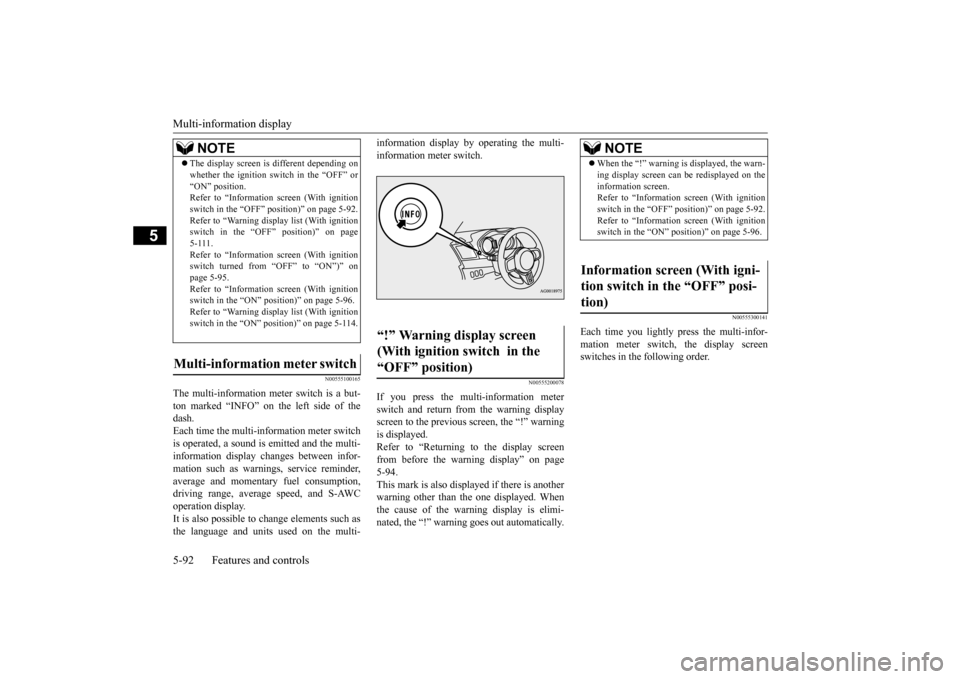
The multi-information meter switch is a but- ton marked “INFO” on the left side of the dash. Each time the multi-information meter switchis operated, a sound is emitted and the multi- information display changes between infor- mation such as warnings, service reminder,average and momentary fuel consumption, driving range, average speed, and S-AWC operation display.It is also possible to change elements such as the language and units used on the multi-
information display by operating the multi- information meter switch.
N00555200078
If you press the multi-information meter switch and return from the warning display screen to the previous screen, the “!” warningis displayed. Refer to “Returning to the display screen from before the warning display” on page5-94. This mark is also displayed if there is another warning other than the one displayed. Whenthe cause of the warning display is elimi- nated, the “!” warning goes out automatically.
N00555300141
Each time you lightly press the multi-infor- mation meter switch, the display screen switches in the following order.
The display screen is different depending on whether the ignition switch in the “OFF” or “ON” position. Refer to “Information screen (With ignition switch in the “OFF” position)” on page 5-92.Refer to “Warning displa
y list (With ignition
switch in the “OFF” position)” on page 5-111.Refer to “Information screen (With ignition switch turned from “OFF” to “ON”)” on page 5-95.Refer to “Information screen (With ignition switch in the “ON” position)” on page 5-96. Refer to “Warning displa
y list (With ignition
switch in the “ON” position)” on page 5-114.
Multi-information meter switch
NOTE
“!” Warning display screen (With ignition switch in the “OFF” position)
NOTE
When the “!” warning is displayed, the warn- ing display screen can be redisplayed on the information screen. Refer to “Information screen (With ignition switch in the “OFF” position)” on page 5-92.Refer to “Information screen (With ignition switch in the “ON” position)” on page 5-96.
Information screen (With igni- tion switch in the “OFF” posi-tion)
BK0210800US.bo
ok 92 ページ 2014年4月8日 火曜日 午前11時28分
Page 154 of 338

Multi-information display
Features and controls 5-93
5
N00555400139
Each time you lightly press the multi-infor- mation meter switch, the display screen switches. Odometer/Trip odometer
Odome-
ter/Trip odometer
Service reminder
Redisplay of a warning display screen
Odometer/Trip odometer .
Shows the total distance traveled. Shows the distance traveled between two points. To reset the trip odometer
To return the display to 0, hold down the multi-information meter switch for about 2 seconds or more. Only the currently dis-played value will be reset. If trip odometer is displayed, only trip odometer will be reset.
N00555500013
Shows the distance and number of months until the next periodic inspection.
1-
Trip odometer
2-
Trip odometer
3- Service reminder 4- Redisplay of a warning display screenOdometer/Trip odometer
Odometer Trip odometer Usage examples for trip odometer , trip odometer It is possible to measure two currently trav- eled distances, from home using trip odom- eter and from a particular point on the way using trip odometer . Example
NOTE
If there is no warning display, the switching sequence is: odometer/trip odometer
odometer/trip odometer
service
reminder
odometer/trip odometer .
Both tripmeters and can count up to 9999.9 miles/kilometers.When a tripmeter goes past 9999.9 miles/kilometers, it returns to 0.0 miles/kilo- meters. When disconnecting the battery terminal, the memories of tripmeter displays and are cleared, and their displays return to “0.0miles/kilometers”.
Service reminder
BK0210800US.bo
ok 93 ページ 2014年4月8日 火曜日 午前11時28分
Page 155 of 338

Multi-information display 5-94 Features and controls
5
Refer to “Service reminder” on page 5-101.
N00559600139
When there is information to be announced, such as a key reminder, the buzzer sounds and switches to the warning display screen. Referto the appropriate page and take the necessarymeasures. When the cause of the warning display is eliminated, the warning display goes outautomatically. Refer to “Warning display list (With ignition switch in the “OFF” position)” on page5-111.
Even if the cause of the warning display is not eliminated, you can return to the screen that was displayed before the warning dis-play. If you press the multi-information meter switch, the display screen switches to thescreen display from before the warning andthe “!” warning is displayed.
When the “!” warning is displayed, if you lightly press the multi-information meter switch a few times, the warning display screen you switched from is redisplayed.Refer to “Information screen (With ignition switch in the “OFF” position)” on page 5-92.
N00559700114
If any of the doors or the trunk lid is not com- pletely closed, this displays the open door or trunk lid.
Interrupt display screen (With ignition switch in the “OFF” position) 1- Information generated 2- Cause eliminated
Returning to the display screen from before the warning display A- “!” warning
NOTE
Warning display screens with a “ ” or “ ” mark displayed in the upper right of the screen can be switched. If you want to switch the display, press the multi-information meter switch as follows. “ ” : Press lightly. “ ” : Press for about 2 seconds or more.
Redisplay of a warning display screenDoor ajar warning display screen (With ignition switch in the “OFF” position)
BK0210800US.bo
ok 94 ページ 2014年4月8日 火曜日 午前11時28分
Page 156 of 338
Multi-information display
Features and controls 5-95
5
N00555800162
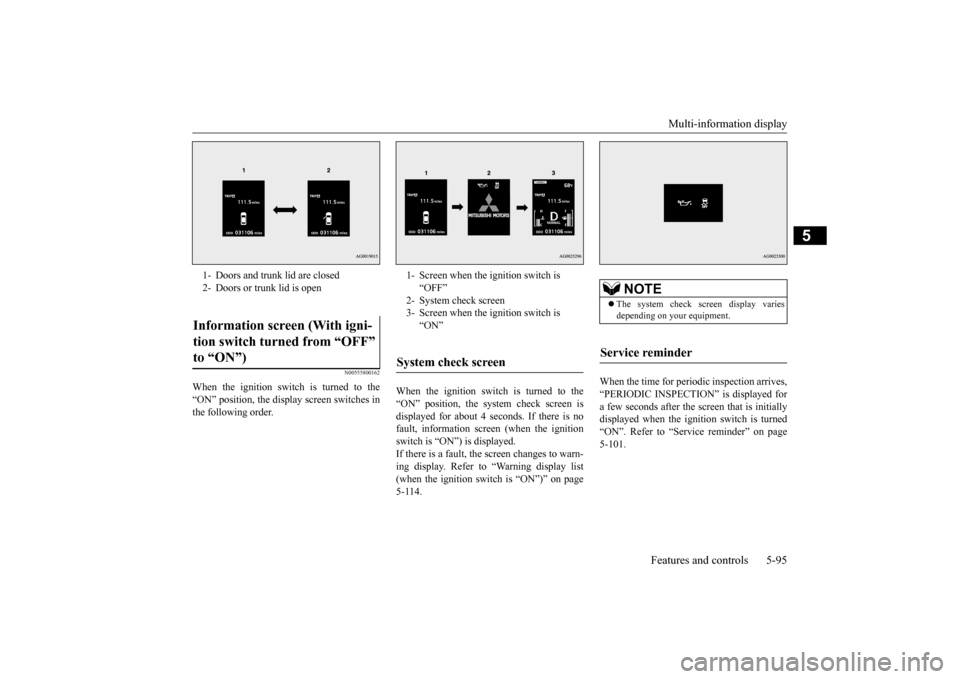
When the ignition switch is turned to the “ON” position, the display screen switches inthe following order.
When the ignition switch is turned to the “ON” position, the system check screen is displayed for about 4 seconds. If there is no fault, information screen (when the ignitionswitch is “ON”) is displayed. If there is a fault, the screen changes to warn- ing display. Refer to “Warning display list(when the ignition switch is “ON”)” on page 5-114.
When the time for periodic inspection arrives, “PERIODIC INSPECTION” is displayed for a few seconds after the screen that is initiallydisplayed when the ignition switch is turned “ON”. Refer to “Service reminder” on page 5-101.
1- Doors and trunk lid are closed 2- Doors or trunk lid is openInformation screen (With igni- tion switch turned from “OFF” to “ON”)
1- Screen when the ignition switch is
“OFF”
2- System check screen 3- Screen when the ignition switch is
“ON”
System check screen
NOTE
The system check screen display varies depending on your equipment.
Service reminder
BK0210800US.bo
ok 95 ページ 2014年4月8日 火曜日 午前11時28分
Page 157 of 338

Multi-information display 5-96 Features and controls
5
N00561900012
The S-AWC operation status is displayed. Refer to “S-AWC control mode” on page 5-72.
N00556000015
This is displayed when you press the multi- information meter switch and switch thewarning display screen. This mark is also displayed if there is another warning other than the one displayed.
When the cause of the warning display is eliminated, the “!” warning goes out automat- ically.
N00556100104
This is displayed when the Active stabilitycontrol (ASC) is turned “OFF” with the “ASC OFF” switch.Also, if an abnormal condition is occurred in the ASC while driving, the “ASC OFF” dis- play illuminates.Refer to “ASC OFF switch” on page 5-77.
N00556200206
Each time you lightly press the multi-infor- mation meter switch, the display screen switches in the following order.
S-AWC control mode display screen “!” Warning display screen (With ignition switch in the “ON” position)
NOTE
When the “!” warning is displayed, the warn- ing display screen can be redisplayed on the information screen. Refer to “Information screen (With ignitionswitch in the “OFF” position)” on page 5-92. Refer to “Information screen (With ignition switch in the “ON” position)” on page 5-96.
“Active stability control (ASC) OFF” display screen
Information screen (With igni- tion switch in the “ON” posi- tion) 1-
Trip odometer
2-
Trip odometer
3- Service reminder 4- Driving range display, momentary fuel
consumption display
5- Average fuel consumption display,
momentary fuel consumption display
6- Average speed display, momentary fuel
consumption displayWhen there is no warning display
When there is a warning display
BK0210800US.bo
ok 96 ページ 2014年4月8日 火曜日 午前11時28分
Page 158 of 338

Multi-information display
Features and controls 5-97
5
The operation method is the same as when the ignition switch is in the “OFF” position. For further details, refer to “Odometer/Tripodometer” on page 5-93. Shows the distance and number of months until the next periodic inspection. Refer to “Service reminder” on page 5-101.
Shows the engine coolant temperature. If the coolant becomes hot, “ ” will blink. Pay careful attention to the engine coolant temperature display while you are driving. Shows the approximate driving range (how many more miles or kilometers you can drive). When this driving range falls below 30 miles (50 km), “---” is displayed.Refuel as soon as possible.
This displays the average speed from the last reset to the present.There are 2 types of mode settings as follows. For details on how to change the average speed display setting, refer to “Changing thefunction settings (With ignition switch in the “ON” position)” on page 5-103.
7- S-AWC operation display 8- Function setting screen9- Redisplay of a warning display screen
NOTE
While driving, the function setting screen is not displayed even if you operate the multi- information meter switch. Always park thevehicle in a safe place before operating. Refer to “Changing the function settings (With ignition switch in the “ON” position)”on page 5-103. When there is information to be announced, such as a system fault, the tone sounds and the screen display is switched. Refer to “Interrupt display screen (With igni-tion switch in the “ON” position)” on page 5-99.
Odometer/Trip odometer Service reminder
Engine coolant temperature dis- play
CAUTION If the engine is overheating, “ ” will blink. In this case, the bar graph is on the red zone. Immediately park the vehicle in a safe place and take the required measures. Refer to “Engine overheating” on page 8-4.
Driving range display
NOTE
The driving range is determined based on the fuel consumption data. This may vary depending on the driving conditions and hab-its. Treat the distance displayed as just a rough guideline.
When you refuel, the driving range display is updated. However, if you only add a small amount of fuel, the correct value will not be displayed. Fill to a full tank whenever possible. When your vehicle is stopped on an extremely steep hill, the driving range valuemay, change. This is due to the movement of fuel in the tank and does not indicate any breakdown. The display setting can be changed to the preferred units (miles or km).Refer to “Changing the function settings (With ignition switch in the “ON” position)” on page 5-103.
Average speed display
NOTE
BK0210800US.bo
ok 97 ページ 2014年4月8日 火曜日 午前11時28分