2015 MITSUBISHI LANCER EVOLUTION battery
[x] Cancel search: batteryPage 196 of 338

Electric rear window defogger switch
Features and controls 5-135
5
N00523500212
N00523701442
The rear window defogger can be used when the engine is running.The indicator light (A) will come on when you press the electric rear window defogger switch. Electric current will flow through theheating wires on the rear window to help clear away moisture or frost.
After about 20 minutes of operation, the sys- tem will shut off automatically. To switch the defogger OFF before 20 min-utes have passed, press the switch again. The indicator light will go out and the defogger will turn off.If you need the defogger for more than20 minutes, press the switch again. This will add 20 more minutes.
• Intelligent washer can be deactivated. • The wipers can be set to operate again after about 6 seconds. For details, consult a Mitsubishi Motors dealer.
Precautions to observe when using wipers and washers
CAUTION If the washer is used in cold weather, the washer fluid sprayed onto the glass might freeze, blocking your view. Heat the glass with the defroster before using the washer.NOTE
Do not use the wipers when the windshield is dry. This could scratch the glass and wear the wiper blades prematurely. Before using the wipers in cold weather, check to be sure that the wiper blades are not frozen to the windshield. Using the wipers while the blades are frozen could cause thewiper motor to burn out.NOTE
If the wipers become blocked by ice or other deposits on the glass, the motor may still burn out even if the wiper switch is OFF. If deposits form on the windshield, park your vehicle in a safe place, turn off the engine,and clean the glass so that the wipers can operate smoothly. Avoid using the washer for more than 20 sec- onds at a time. Do not operate the washer when the washer fluid reservoir is empty orthe pump may fail. During cold weather, add a recommended washer solution that will not freeze in the washer fluid reservoir. Otherwise the washer may not work or may be damaged. Replace the wiper blades when they are worn. Use the proper size replacementblades. For further information, please con- tact your authorized Mitsubishi Motors dealer.
Electric rear window defog- ger switch
NOTE
CAUTION The rear window defogger is not designed to melt snow. Remove any snow manuallybefore using the rear window defogger. Use the rear window defogger only after the engine has started and is running. Be sure to turn the defogger switch off immediately after the window is clear to save on batterypower.
BK0210800US.book
135 ページ 2014年4月8日 火曜日 午前11時28分
Page 198 of 338

Bluetooth® 2.0 interface
Features and controls 5-137
5
Bluetooth
® is a registered trademark of
BLUETOOTH SIG, INC.
Steering control switch and microphone P.5-137 Voice recognition function
P.5-139
Useful voice commands
P.5-139
Speaker enrollment function
P.5-141
Connecting the Bluetooth
® 2.0 interface and
the Bluetooth
® device
P.5-142
Operating a music player connected via Blue- tooth
® P.5-147
How to make or receive hands-free calls P.5-147 Phonebook function
P.5-149
N00564001141
WA R N I N GAlthough the Bluetooth
® 2.0 interface
allows you to make hands-free calls, if you choose to use the cellular phone whiledriving, you must not allow yourself to be distracted from the safe operation of your vehicle. Anything, including cellularphone usage, that distracts you from the safe operation of your vehicle increases your risk of an accident. Refer to and comply with all state and local laws in your area regarding cellularphone usage while driving.NOTE
If the ignition switch is left in the “ACC” position, the accessory power will automati- cally turn off after a
certain period of time
and you will no longer be able to use the Bluetooth
® 2.0 interface. The accessory
power comes on again if the ignition switch is turned from the “ACC” position. Refer to“ACC power auto-cutout function” on page 5-51. The Bluetooth
® 2.0 interface cannot be used
if the Bluetooth
® device has a dead battery
or the device power is turned off. Hands-free calls will not be possible if your phone does not have service available.
Some Bluetooth
® devices are not compatible
with the Bluetooth
® 2.0 interface.
You can confirm the Link System software version by pressing the HANG-UP button3 times (press and hold 2 times and then press briefly) within 10 seconds. For detail of the Bluetooth
® 2.0 interface,
refer to the following website:[For vehicles sold in U.S.A.] You can access the Mitsubishi Motors North America website.[For vehicles sold in Canada] You can access the Mitsubishi Motors web- site.Please read and agree to the “Warning about Links to the Web Sites of Other Companies”, the websites mentioned above may connectyou to websites other than the Mitsubishi Motors website. http://www.mitsubishi-motors.com/en/prod-ucts/index.html Software updates by cellular phone/digital audio device manufacturers may change/alter device connectivity.NOTE
Steering control switch and microphone 1- Volume up button 2- Volume down button 3- SPEECH button 4- PICK-UP button5- HANG-UP button 6- Microphone
BK0210800US.book
137 ページ 2014年4月8日 火曜日 午前11時28分
Page 211 of 338

Bluetooth® 2.0 interface 5-150 Features and controls
5
are the vehicle phonebook and the mobile phonebook. These phonebooks are used to register tele- phone numbers and make calls to desirednumbers via voice recognition function.
N00566101117
This phonebook is used when making callswith the voice recognition function. Up to 32 names can be registered in the vehi- cle phonebook per language.Also, each entry has 4 locations associated with: home, work, mobile and other. You can register one telephone number for each loca-tion. You can register a desired name as a name for any phonebook entry registered in the vehicle phonebook.Names and telephone numbers can be changed later on. The vehicle phonebook can be used with all paired cellular phones.
N00580500033
You can register a telephone number in the vehicle phonebook in the following 2 ways: Reading out a telephone number, and select-ing and transferring 1 phonebook entry from the phonebook of the cellular phone.
N00580600047
1. Press the SPEECH button (except for vehicles with Mitsubishi Multi-Commu-nication System) or PICK-UP button (for vehicles with Mitsubishi Multi-Commu- nication System).2. Say “Phonebook.” 3. The voice guide will say “Select one of the following: new entry, edit number,edit name, list names, delete, erase all, or import contact.” Say “New entry.” 4. The voice guide will say “Name please.”Say your preferred name to register it.
5. When the name has been registered, the voice guide will say “home, work, mobile, or other?” Say the location for which you want to register a telephonenumber. 6. The voice guide will say “Number please.” Say the telephone number to reg- ister it.
NOTE
Disconnecting the battery cable will not delete information registered in the phone- book.
Vehicle phonebook
To register a telephone number in the vehicle phonebook
To register by reading out a tele- phone number
NOTE
If the maximum number of entries are already registered, the voice guide will say “The phonebook is full. Would you like to delete a name?” Say “Yes” if you want to delete a registered name.If you say “No,” the system will return to the main menu.NOTE
When the confirmation function is on, the voice guide will say “
BK0210800US.book
150 ページ 2014年4月8日 火曜日 午前11時28分
Page 222 of 338

Interior lights
Features and controls 5-161
5
N00525300429
N00525801274
The dome light can be turned on by sliding the dome light switch.
CAUTION Be aware that using electronic equipment with the engine off may run the battery down. When the 12 V power outlet is not in use, be sure that the plug is installed. This will pre- vent the 12 V power outlet from becoming dirty and possibly short-circuiting. Be sure to use a “plug-in” type accessory operating at 12 V and 120 W or less.
Interior lights 1- Dome light (Rear) (if so equipped)
P.5-162
2- Dome light (Front)/Reading lights
P.5-161
Dome light (Front)/Reading lights Dome light (Front) 1- (DOOR)
The dome light comes on when any door is opened. After all doors are closed, the dome light will stay on for approximately 30 seconds and then go off.
However, the light goes off immedi- ately if: The door is closed while the igni- tion switch is in the “ON” position. The driver’s door is closed after all the other doors are closed while the lock knob of the driver’s door is in the lock position. The door is closed and the power door lock switch is used to lock the doors. The keyless entry system remote control transmitter is used to lock the doors. In vehicles equipped with the F.A.S.T.-key, the doors are locked using the F.A.S.T.-key.
NOTE
When the engine is started using the key while the doors are closed, if you remove thekey, the dome light will illuminate for approximately 30 seconds then go off. When the engine is started using the F.A.S.T.-key while the doors are closed, if the ignition switch is moved to the “LOCK” position, the dome light will illuminate for approximately 30 seconds and then go off. The time until the light goes off can be adjusted. See your authorized MitsubishiMotors dealer for details.
BK0210800US.book
161 ページ 2014年4月8日 火曜日 午前11時28分
Page 233 of 338

Safe driving techniques 6-4 Driving safety
6
Replace your tires before they are heavily worn out. As your vehicle is equipped with a tire pres- sure monitoring system, there is a risk ofdamage to the tire inflation pressure sensors when the tire is replaced on the rim. Tire replacement should, therefore, be performedonly by an authorized Mitsubishi Motors dealer. Have someone watch while you turn all the exterior lights on and off. Also check the turn signal indicators and high-beam indicators on the instrument panel. Check the ground under the vehicle after parking overnight, for fuel, water, oil, orother leaks. Make sure all the fluid levels are correct. Also, if you can smell fuel, you need to find out why immediately and have itfixed.
N00629200108
Even this vehicle’s safety equipment, andyour safest driving, cannot guarantee that you
can avoid an accident or injury. However, if you give extra attention to the following areas, you can better protect yourself and your passengers: Drive defensively. Be aware of traffic, road and weather conditions. Leave plenty of stopping distance between your vehicle and the vehicle ahead. Before changing lanes, check your mir- rors and use your turn signal light. While driving, keep a tight grip on the steering wheel. While driving, watch the behavior of other drivers, bicyclists, and pedestrians. Always obey applicable laws and regula- tions. Be a polite and alert driver. Always leave room for unexpected events, such as sudden braking. If you plan to drive in another country, obey their vehicle registration laws and make sure you will be able to get the rightfuel.
N00629400432
Check the battery, including terminals and cables. During extremely cold weather, the battery will not be as strong. Also, the battery power level may drop becausemore power is used for cold starting and driving.
Before driving the vehicle, check to see if the engine runs at the proper speed and if the headlights are as bright as normally. Charge or replace the battery if necessary.During extreme cold weather, it is possi- ble that a very low battery could freeze. Warm the engine sufficiently. After start- ing the engine, allow a short warm-up time to distribute oil
to all cylinders and
turbocharger. Then drive your vehicle slowly. Stay at low speeds at first so that the transaxle, transfer case and rear axle oil have time to spread to all the lubrication points. Manual transaxle can be harder to shift in cold weather conditions. This is normal and shifting will get easier as the transaxlewarms up. Check the engine antifreeze.
Lights Fluid leaks Safe driving techniques
Driving during cold weather
WA R N I N G The battery gives off explosive hydrogen gas. Any spark or flame can cause the bat- tery to explode, which could cause seriousinjury or death. Always wear protective clothes and a face mask when working with your battery, orlet a skilled mechanic do it.
BK0210800US.bo
ok 4 ページ 2014年4月8日 火曜日 午前11時28分
Page 236 of 338

Loading information Driving safety 6-7
6
Curb weight: the weight of a motor vehi- cle with standard equipment including the maximum capacity of fuel, oil, and cool- ant. Accessory weight: the combined weight (in excess of those standard items which may be replaced) of automatic transmis-sion, power steering, power brakes, power windows, power seats, radio, and heater, to the extent that these items are availableas factory- installed equipment (whetherinstalled or not). Vehicle capacity weight: the rated cargo and luggage load plus 150 lbs (68 kg)
*
times the vehicle’s designated seating capacity. Production options weight: the combined weight of those installed regular produc- tion options weighing over 5 lbs (2.3 kg) in excess of those standard items whichthey replace, not previously considered in curb weight or accessory weight, includ- ing heavy duty brakes, ride levelers, roofrack, heavy duty battery, and special trim. Normal occupant weight: 150 lbs (68 kg)
*
times the number of specified occupants.(In your vehicle the number is 3) Occupant distribution: distribution of occupants in a vehicle as specified. (Inyour vehicle the distribution is 2 in front, 1 in second row seat)
N00630100338
The tire and loading information placard islocated on the driver’s door sill. This placard shows the maximum number of occupants permitted to ride in your vehicle as well as “the combined weight of occupants and cargo” (A), which is called the vehiclecapacity weight. The weight of roof road is included in the definition of “cargo” when determining the vehicle capacity weight. Thisplacard also tells you the size and recom- mended inflation pressure for the original
equipment tires on your vehicle. For more information, refer to “Tires” on page 9-12. Ty p e 1 Ty p e 2
* :150 lbs (68 kg) is the weight of one person as defined by U.S.A. and Canadian regulations.
Tire and loading information placard
BK0210800US.bo
ok 7 ページ 2014年4月8日 火曜日 午前11時28分
Page 259 of 338

If the vehicle breaks down 8-2 For emergencies
8
N00836300190
If your vehicle breaks down on the road, move to the shoulder and turn on the hazardwarning flashers. If there is no shoulder, or the shoulder is not safe, drive in the right lane slowly, with the hazard lights flashing, untilyou come to a safe stopping place. Keep the flashers flashing. If the engine stops, there will be no power assist to the steering and brakes, making these difficult to use. The brake booster will not work, so the brakes will not grip well. The brake pedalwill be harder to press than usual. Since there is no power steering assist, the steering wheel will be hard to turn.
Get help from your passengers, bystanders, etc. to push the vehicl
e and move it to a safe
zone.
N00836400670
If the engine cannot be started because the battery is weak or dead, you can start it withthe battery from another vehicle using jumper cables.
1. Take off any metal jewelry such as watch bands or bracelets that might make an accidental electrical contact. 2. Position the vehicles close enoughtogether so that the jumper cables can reach, but be sure the vehicles aren’t touching each other. 3. You could be injured if the vehicles move. Set the parking brake firmly on each vehi- cle. Put an automatic transaxle, Twin Clutch SST or CVT in “P” (PARK) or amanual transaxle in “N” (Neutral). Turn the ignition switch to the “LOCK” posi- tion.
If the vehicle breaks down If the engine stops/fails When the engine fails at the intersection
Jump-starting the engine
WA R N I N G Follow the procedure described in this sec- tion when using the jump cable to start the engine. Failure to follow these instructions can cause serious injury or death.CAUTION Do not try to start your vehicle by pushing or towing. Vehicles with Twin Clutch SST can- not be started this way. Pushing or towing avehicle that has a manual transaxle may overheat and damage the catalytic converter. Also, there is more ri
sk of an accident when
a vehicle is being pushed or towed.NOTE
Although the battery in your vehicle is located in the trunk (refer to page 9-11), use the joint terminal in the engine compartment to jump start the engine.
CAUTION Check the other vehicle. It must have a 12- volt battery. If the other system isn’t 12-volt, both systems can be damaged.WA R N I N G Turn the ignition switch to the “LOCK” position on both vehicles. Make sure that the cables or your clothes cannot be caught by the fan or drive belt. Personalinjury could result. NOTE
Turn off all lights, heater, and other electrical loads. This will avoid sparks and help saveboth batteries.
BK0210800US.bo
ok 2 ページ 2014年4月8日 火曜日 午前11時28分
Page 260 of 338
Jump-starting the engine For emergencies 8-3
8
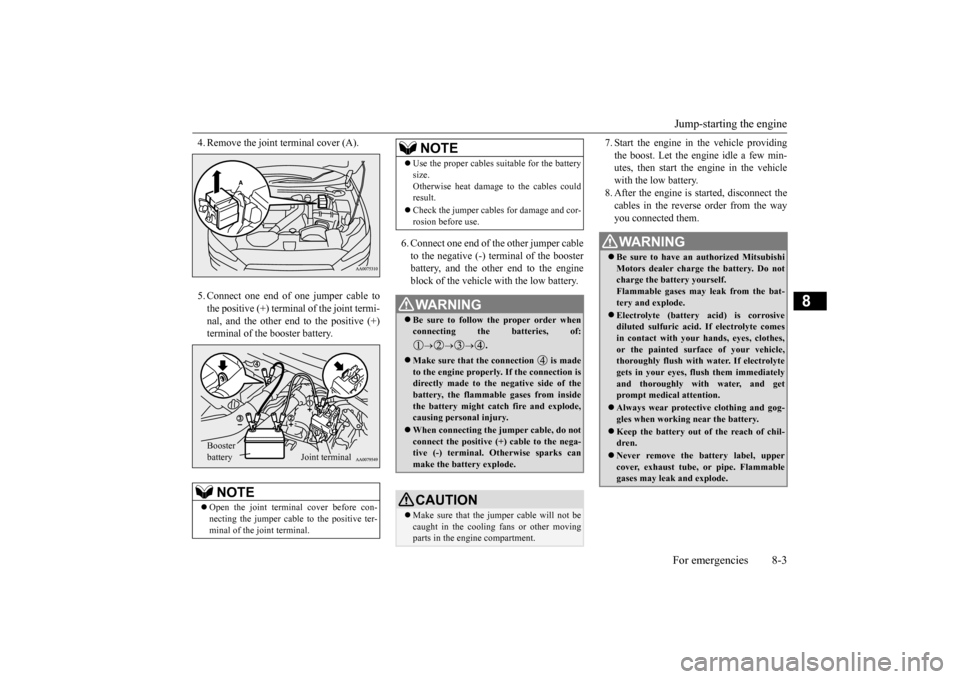
4. Remove the joint terminal cover (A). 5. Connect one end of one jumper cable to the positive (+) terminal of the joint termi-nal, and the other end to the positive (+) terminal of the booster battery.
6. Connect one end of the other jumper cable to the negative (-) terminal of the boosterbattery, and the other end to the engineblock of the vehicle with the low battery.
7. Start the engine in the vehicle providing the boost. Let the engine idle a few min- utes, then start the engine in the vehicle with the low battery.8. After the engine is started, disconnect the cables in the reverse order from the way you connected them.
NOTE
Open the joint terminal cover before con- necting the jumper cable to the positive ter- minal of the joint terminal. Booster battery
Joint terminal
Use the proper cables suitable for the battery size. Otherwise heat damage to the cables could result. Check the jumper cables for damage and cor- rosion before use.WA R N I N G Be sure to follow the proper order when connecting the batteries, of:
.
Make sure that the connection is made to the engine properly. If the connection isdirectly made to the negative side of the battery, the flammable gases from inside the battery might catch fire and explode,causing personal injury. When connecting the jumper cable, do not connect the positive (+) cable to the nega- tive (-) terminal. Otherwise sparks can make the battery explode.CAUTION Make sure that the jumper cable will not be caught in the cooling fans or other movingparts in the engine compartment.NOTE
WA R N I N G Be sure to have an authorized Mitsubishi Motors dealer charge the battery. Do not charge the battery yourself. Flammable gases may leak from the bat-tery and explode. Electrolyte (battery acid) is corrosive diluted sulfuric acid. If electrolyte comes in contact with your hands, eyes, clothes, or the painted surface of your vehicle,thoroughly flush with water. If electrolyte gets in your eyes, flush them immediately and thoroughly with water, and getprompt medical attention. Always wear protective clothing and gog- gles when working near the battery. Keep the battery out of the reach of chil- dren. Never remove the battery label, upper cover, exhaust tube, or pipe. Flammable gases may leak and explode.
BK0210800US.bo
ok 3 ページ 2014年4月8日 火曜日 午前11時28分