2015 MINI COOPER warning
[x] Cancel search: warningPage 145 of 248

Interior equipmentVehicle features and op‐
tions
This chapter describes all standard, country-
specific and optional features offered with the
series. It also describes features that are not
necessarily available in your car, e. g., due to
the selected options or country versions. This
also applies to safety-related functions and sys‐
tems. The respectively applicable country provi‐
sions must be observed when using the respec‐
tive features and systems.
Universal Integrated Re‐
mote Control
The concept
The Universal Integrated Remote Control can
operate up to 3 functions of remote-controlled
systems such as garage door drives or lighting
systems. The Universal Integrated Remote Con‐
trol replaces up to 3 different hand-held trans‐
mitters. To operate the remote control, the but‐
tons on the interior rearview mirror must be
programmed with the desired functions. The
hand-held transmitter for the particular system
is required in order to program the remote con‐
trol.
Before selling the vehicle, delete the stored
functions for the sake of security.
Information WARNING
Body parts can be jammed when operat‐
ing remote-controlled systems, for example the
garage door, using the integrated universal re‐
mote control. There is risk of injuries or risk of
property damage. Make sure that the area of
movement of the respective system is clearduring programming and operation. Also follow
the safety instructions of the hand-held trans‐
mitter. ◀
Compatibility If this symbol is printed on the packag‐
ing or in the instructions of the system
to be controlled, the system is generally
compatible with the Universal Integrated Re‐
mote Control.
If you have any questions, please contact:▷A dealer’s service center or another quali‐
fied service center or repair shop.▷www.homelink.com on the Internet.
HomeLink is a registered trademark of Gentex
Corporation.
Overview
1LED2Programmable keys3Hand-held transmitters of the system
Programming
General information
1.Switch on the ignition.2.Initial setup:
Press and hold the left and right button on
the interior rearview mirror simultaneouslySeite 145Interior equipmentCONTROLS145
Online Edition for Part no. 01 40 2 964 625 - X/15
Page 147 of 248

4.Likewise, press and hold the button of the
desired function on the hand-held trans‐
mitter.5.Release both buttons as soon as the interior
rearview mirror LED flashes more rapidly.
The LED flashing faster indicates that the
button on the interior rearview mirror has
been programmed. The system can then be
controlled by the button on the interior
rearview mirror.
If the LED does not flash faster after at least
60 seconds, change the distance and re‐
peat the step. Several more attempts at dif‐
ferent distances may be necessary. Wait at
least 15 seconds between attempts.
Canada: if programming with the hand-
held transmitter was interrupted, hold
down the interior rearview mirror button
and repeatedly press and release the hand-
held transmitter button for 2 seconds.
Controls
WARNING
Body parts can be jammed when operat‐
ing remote-controlled systems, for example the
garage door, using the integrated universal re‐
mote control. There is risk of injuries or risk of
property damage. Make sure that the area of
movement of the respective system is clear
during programming and operation. Also follow
the safety instructions of the hand-held trans‐
mitter. ◀
The system, such as the garage door, can be
operated using the button on the interior rear‐
view mirror while the engine is running or
when the ignition is started. To do this, hold
down the button within receiving range of the
system until the function is activated. The inte‐
rior rearview mirror LED stays lit while the wire‐
less signal is being transmitted.
Deleting stored functions
Press and hold the left and right button on the
interior rearview mirror simultaneously for ap‐
proximately 20 seconds until the LED flashes
rapidly. All stored functions will be deleted. The
functions cannot be deleted individually.
Digital compass
Overview1Control button2Mirror display
Mirror display The point of the compass is displayed in the
mirror when driving straight.
Operating concept Various functions can be called up by pressing
the control button with a pointed object, such
as the tip of a ballpoint pen or similar object.
The following setting options are displayed in
succession, depending on how long the control
button is pressed:
▷Pressed briefly: turns display on/off.▷3 to 6 seconds: compass zone setting.▷6 to 9 seconds: compass calibration.▷9 to 12 seconds: left/right-hand steering
setting.▷12 to 15 seconds: language setting.
Setting the compass zones
Sets the particular compass zones on the vehi‐
cle so that the compass operates correctly; re‐
fer to World map with compass zones.
Seite 147Interior equipmentCONTROLS147
Online Edition for Part no. 01 40 2 964 625 - X/15
Page 149 of 248

Settings are stored automatically after approxi‐
mately 10 seconds.
Sun visor
Glare shield
Fold the sun visor down or up.
Vanity mirror
A vanity mirror is located in the sun visor be‐
hind a cover.
When the cover is opened, the mirror lighting
switches on.
Ashtray/cigarette
lighter
Overview
The ashtray is located in one of the frontal cup
holders, the cigarette lighter above it in the
center console.
Ashtray In order to empty the ashtray, remove the ash‐
tray from the cupholder.
Lighter WARNING
Contact with hot heating elements or the
hot socket of the cigarette lighter can cause
burns. Flammable materials can ignite if the
cigarette lighter falls down or is held against
the respective objects. There is risk of fire and
injuries. Hold the cigarette lighter on its handle.
Make sure that children do not use the ciga‐
rette lighter and do not burn themselves, for
example by carrying the remote control along
when exiting the vehicle. ◀
CAUTION
If metal objects fall into the socket, they
can cause a short circuit. There is risk of prop‐
erty damage. Replace the cigarette lighter or
socket cover again after using the socket. ◀
Push in the lighter.
The lighter can be removed as
soon as it pops back out.
Connecting electrical de‐
vices
Information WARNING
Devices and cables in the unfolding area
of the airbags, for example portable navigation
devices, etc., can hinder the unfolding of the
airbag or be thrown around in the car's interior
when unfolding. There is risk of injuries. make
sure that devices and cables are not in the air‐
bag's area of unfolding. ◀
CAUTION
Battery chargers for the vehicle battery
can work with high voltages and currents,
which means that the 12 volt on-board net‐
work can be overloaded or damaged. There is
risk of property damage. Only connect battery
chargers for the vehicle battery to the starting
aid terminals in the engine compartment. ◀Seite 149Interior equipmentCONTROLS149
Online Edition for Part no. 01 40 2 964 625 - X/15
Page 151 of 248
InformationWARNING
Loose objects or devices with a cable
connection to the vehicle, for example mobile
phones, can be thrown into the car's interior
while driving, for example in the event of an
accident or during braking and evasive maneu‐
vers. There is risk of injuries. Secure loose ob‐ jects or devices with a cable connection to the
vehicle in the car's interior. ◀
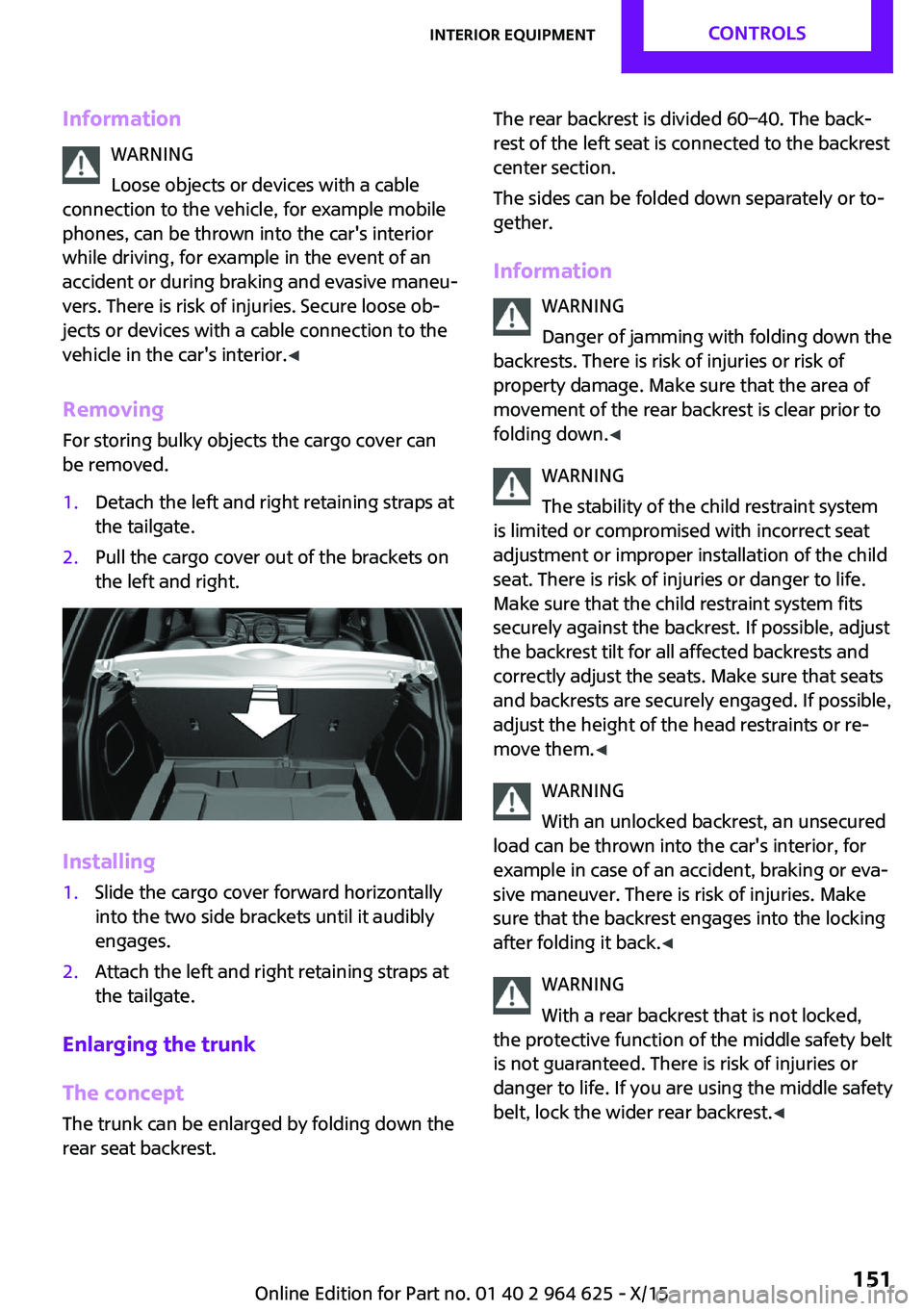
Removing
For storing bulky objects the cargo cover can
be removed.1.Detach the left and right retaining straps at
the tailgate.2.Pull the cargo cover out of the brackets on
the left and right.
Installing
1.Slide the cargo cover forward horizontally
into the two side brackets until it audibly
engages.2.Attach the left and right retaining straps at
the tailgate.
Enlarging the trunk
The concept
The trunk can be enlarged by folding down the
rear seat backrest.
The rear backrest is divided 60–40. The back‐
rest of the left seat is connected to the backrest
center section.
The sides can be folded down separately or to‐
gether.
Information WARNING
Danger of jamming with folding down the
backrests. There is risk of injuries or risk of
property damage. Make sure that the area of
movement of the rear backrest is clear prior to
folding down. ◀
WARNING
The stability of the child restraint system
is limited or compromised with incorrect seat
adjustment or improper installation of the child
seat. There is risk of injuries or danger to life.
Make sure that the child restraint system fits
securely against the backrest. If possible, adjust
the backrest tilt for all affected backrests and
correctly adjust the seats. Make sure that seats
and backrests are securely engaged. If possible,
adjust the height of the head restraints or re‐
move them. ◀
WARNING
With an unlocked backrest, an unsecured
load can be thrown into the car's interior, for
example in case of an accident, braking or eva‐
sive maneuver. There is risk of injuries. Make
sure that the backrest engages into the locking
after folding it back. ◀
WARNING
With a rear backrest that is not locked,
the protective function of the middle safety belt
is not guaranteed. There is risk of injuries or
danger to life. If you are using the middle safety
belt, lock the wider rear backrest. ◀Seite 151Interior equipmentCONTROLS151
Online Edition for Part no. 01 40 2 964 625 - X/15
Page 152 of 248

WARNING
Body parts can be jammed when moving
the head restraint. There is risk of injuries.
Make sure that the area of movement is clear
when moving the head restraint. ◀
Folding down rear seat backrests
The rear seat backrest can be folded down
from the front or from the trunk.
Before the rear seat backrest is folded down,
hook the corresponding safety belt into the belt
buckle on the side.1.Pull the release upward to release the rear
seat backrest.2.Fold the rear seat backrest forward.
Folding back the backrest
WARNING
With an unlocked backrest, an unsecured
load can be thrown into the car's interior, for
example in case of an accident, braking or eva‐
sive maneuver. There is risk of injuries. Make
sure that the backrest engages into the locking
after folding it back. ◀
Fold up the backrest and press it into the latch.
Make sure that the safety belt is not pinched.
Adjusting the backrest tilt WARNING
The stability of the child restraint system
is limited or compromised with incorrect seat
adjustment or improper installation of the child
seat. There is risk of injuries or danger to life.
Make sure that the child restraint system fits
securely against the backrest. If possible, adjust
the backrest tilt for all affected backrests and
correctly adjust the seats. Make sure that seats
and backrests are securely engaged. If possible,
adjust the height of the head restraints or re‐
move them. ◀
To transport bulky items, the trunk can be ex‐
panded by setting the backrests at a steeper
angle.1.Release the backrest, and tilt it forward.2.Fold the frame up until it engages.3.Fold back and engage the rear seat back‐
rest.Seite 152CONTROLSInterior equipment152
Online Edition for Part no. 01 40 2 964 625 - X/15
Page 153 of 248

Storage compartmentsVehicle features and op‐
tions
This chapter describes all standard, country-
specific and optional features offered with the
series. It also describes features that are not necessarily available in your car, e. g., due to
the selected options or country versions. This
also applies to safety-related functions and sys‐
tems. The respectively applicable country provi‐
sions must be observed when using the respec‐
tive features and systems.
Information WARNING
Loose objects or devices with a cable
connection to the vehicle, for example mobile
phones, can be thrown into the car's interior
while driving, for example in the event of an
accident or during braking and evasive maneu‐
vers. There is risk of injuries. Secure loose ob‐ jects or devices with a cable connection to the
vehicle in the car's interior. ◀
CAUTION
Anti-slip pads such as anti-slip mats can
damage the dashboard. There is risk of prop‐
erty damage. Do not use anti-slip pads. ◀
Overview
The following storage compartments are avail‐
able in the vehicle interior:▷Storage compartment in front of the cu‐
pholders.▷Storage tray in the center console.▷Glove compartment on the front passenger
side.▷Storage compartment in the center arm‐
rest.▷Compartments in the doors.▷Pockets on the backrests of the front seats.
Glove compartment
Information WARNING
Folded open, the glove compartment
protrudes in the car's interior. Objects in the
glove compartment can be thrown into the
car's interior while driving, for example in the
event of an accident or during braking and eva‐
sive maneuvers. There is risk of injuries. Always
close the glove compartment immediately after
using it. ◀
Opening
Pull the handle.
The light in the glove compartment switches
on.
Closing Fold up the cover.
Seite 153Storage compartmentsCONTROLS153
Online Edition for Part no. 01 40 2 964 625 - X/15
Page 154 of 248

Compartments in the
doors
WARNING
Breakable object, for example glass bot‐
tle, can break in the event of an accident. Bro‐
ken glass can be scattered in the car's interior.
There is risk of injuries. Do not stow any break‐
able objects in the car's interior. ◀
Center armrest
The center armrest contains a storage compart‐
ment.
Opening
Press button, arrow 1, and open center arm
rest upward, arrow 2.
Adjusting the height
Press button, arrow 1, and swing center arm
rest upward or downward into the desired
height, arrow 2.
Cupholders
Information WARNING
Unsuitable containers in the cup holder
and hot beverages can damage the cup holder
and increase the risk of injuries in the event of
an accident. There is risk of injuries or risk of
property damage. Use light-weight, unbreaka‐
ble, and sealable containers. Do not transport
hot beverages. Do not force objects into the
cup holder. ◀
Front
In the center console.
Rear
For 3-door models: in front of the rear seats
and in the side armrests.
Seite 154CONTROLSStorage compartments154
Online Edition for Part no. 01 40 2 964 625 - X/15
Page 155 of 248

For 5-door models: in front of the rear seats.Clothes hooks WARNING
Clothing articles on the clothes hooks can
obstruct the view while driving. There is risk of
an accident. When suspending clothing articles
from the hooks, ensure that they will not ob‐
struct the driver's view. ◀
WARNING
Improper use of the clothes hooks can
lead to a danger of objects flying about during
braking and evasive maneuvers. There is risk of
injuries and risk of property damage. Only hang
lightweight objects, for example clothing arti‐
cles, from the clothes hooks. ◀
The clothes hooks are located above the side
windows in the rear.
The clothes hooks are located above the rear
doors.
Storage space under
cargo floor panel
Located under the cargo floor panel on the
right side is a trough for the onboard vehicle
tool kit.
To remove the onboard vehicle tool kit, fold the
right side of the cargo floor panel upward.
Variable trunk floor
With the variable trunk floor, the trunk can be
configured corresponding to transport require‐
ments. To do this, remove the trunk floor, and
insert it in the desired position.
Follow instructions on securing cargo, refer to
page 163.
Removing the cargo floor panel
On 5-door models: To change the position of
the cargo floor panel, first fold up the rear part
of the cargo floor panel.
Seite 155Storage compartmentsCONTROLS155
Online Edition for Part no. 01 40 2 964 625 - X/15