2015 MINI COOPER CONVERTIBLE warning lamps
[x] Cancel search: warning lampsPage 7 of 231

ContentsThe fastest way to find information on a partic‐
ular topic or item is by using the index, refer to
page 218.6Notes
AT A GLANCE
12Cockpit
CONTROLS
20Opening and closing45Adjusting51Transporting children safely56Driving66Displays75Lamps81Safety91Driving stability control systems96Driving comfort99Climate105Interior equipment109Storage compartments
DRIVING TIPS
114Things to remember when driving118Loading121Saving fuel
ENTERTAINMENT
126Radio MINI Boost CD
COMMUNICATION
140TelephoneMOBILITY152Refueling154Fuel156Wheels and tires170Engine compartment172Engine oil174Coolant175Maintenance177Replacing components189Breakdown assistance194Care199Indicator/warning lamps
REFERENCE
214Technical data218Everything from A to Z
Online Edition for Part no. 01 40 2 961 029 - II/15
Page 24 of 231

▷The welcome lamps, interior lamps, and
ambient lighting are switched on and off.▷The alarm system is armed or disarmed, re‐
fer to page 31.
Operating from the inside
Via the button for the central locking system,
refer to page 26.
In an accident of the necessary severity, the
central locking system unlocks automatically.
The hazard warning system and interior lamps
come on.
Opening and closing:
from the outside
Using the remote control
General information Take the remote control with you
People or animals left unattended in a
parked vehicle can lock the doors from the in‐
side. Always take the remote control with you
when leaving the vehicle so that the vehicle
can then be opened from the outside. ◀
Unlocking
Press the button. The vehicle is un‐
locked.
The welcome lamps and interior lamps are
switched on.
You can set how the vehicle is to be unlocked.
The setting is stored for the remote control cur‐
rently in use.1.Switch on the ignition, refer to page 56.2.Press the button on the turn indicator lever
repeatedly until "SET/INFO" is displayed.3.Press and hold the button in the turn indi‐
cator lever until the display changes.4.Press the button in the turn indicator lever
repeatedly until the symbol and "SET" are
displayed.5.Press and hold the button in the turn indi‐
cator lever until the display changes.6.Press the button in the turn indicator lever
repeatedly until the symbol shown is dis‐
played, arrow.Seite 22CONTROLSOpening and closing22
Online Edition for Part no. 01 40 2 961 029 - II/15
Page 26 of 231

Setting the confirmation signalsHave unlocking or locking of the vehicle con‐
firmed.1.Switch on the ignition, refer to page 56.2.Press the button on the turn indicator lever
repeatedly until "SET/INFO" is displayed.3.Press and hold the button until the display
changes.4.Press the button repeatedly until the sym‐
bol and "SET" are displayed.5.Press and hold the button until the display
changes.6.Press the button to select, arrow:▷ Confirmation signal during unlock‐
ing▷ Confirmation signal during locking7.Press and hold the button until the display
changes.8.Press the button to select:▷
The hazard warning system flashes dur‐
ing unlocking/locking.▷
An acoustic signal sounds during un‐
locking/locking.▷
The hazard warning system lights up
and an acoustic signal sounds during
unlocking/locking.▷
The function is deactivated.9.Press and hold the button until the display
changes. The setting is stored.
Switching on the interior lamps
When the vehicle is locked:
Press the button.
You can also use this function to locate your ve‐
hicle in parking garages, etc.
Unlocking the tailgate
Press the button for approx. 1 second
and then release it.
Seite 24CONTROLSOpening and closing24
Online Edition for Part no. 01 40 2 961 029 - II/15
Page 75 of 231

SymbolFunctionExit the display, refer to
page 69Next setting or information, re‐
fer to page 70
Check Control
The concept
The Check Control monitors vehicle functions
and alerts you to any malfunctions in the sys‐
tems being monitored.
A Check Control message consists of indicator
and warning lamps in the instrument cluster
and, in some circumstances, an acoustic signal.
Indicator/warning lamps
The indicator and warning lamps can light up in
a variety of combinations and colors in display
area 1 or 2.
Several of the lamps are checked for proper
functioning and light up temporarily when the
engine is started or the ignition is switched on.
The symbol indicates that Check Control
messages have been stored. The Check Control
messages can be displayed later.
What to do in case of a malfunction
The meaning of each lamp in the event of a
malfunction and tips on how to respond are
provided in the list, refer to page 199.
Hiding Check Control messages
Press the button on the turn indicator lever.
Some Check Control messages are displayed
continuously and are not cleared until the mal‐
function is eliminated. If several malfunctions
occur at once, the messages are displayed con‐
secutively.
Other Check Control messages are hidden au‐
tomatically after approx. 20 seconds. However,
they are stored and can be displayed again
later.
Seite 73DisplaysCONTROLS73
Online Edition for Part no. 01 40 2 961 029 - II/15
Page 80 of 231
Depending on the steering angle and other pa‐
rameters, the light from the headlight follows
the course of the road.
Activating With the ignition switch on, turn the light switch
to position 3, refer to page 75.
To avoid blinding oncoming traffic, the Adap‐
tive Light Control does not swivel to the driver's
side when the vehicle is at a standstill.
When driving in reverse, Adaptive Light Control
is not active.
Malfunction The warning light lights up. Adaptive
Light Control is malfunctioning or has
failed. Have the system checked as
soon as possible.
More information, refer to page 199.
Fog lights
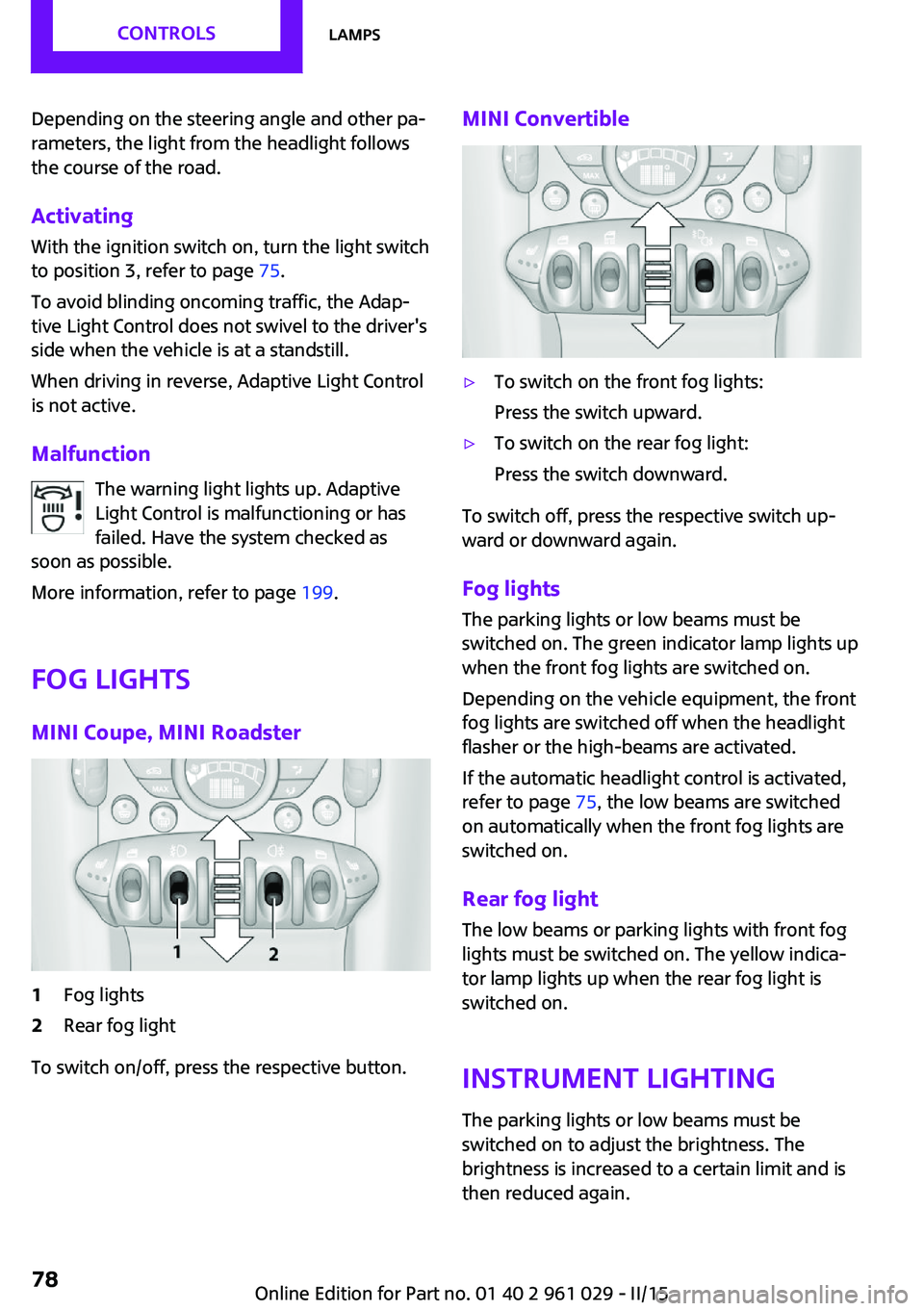
MINI Coupe, MINI Roadster1Fog lights2Rear fog light
To switch on/off, press the respective button.
MINI Convertible▷To switch on the front fog lights:
Press the switch upward.▷To switch on the rear fog light:
Press the switch downward.
To switch off, press the respective switch up‐
ward or downward again.
Fog lights The parking lights or low beams must be
switched on. The green indicator lamp lights up
when the front fog lights are switched on.
Depending on the vehicle equipment, the front
fog lights are switched off when the headlight
flasher or the high-beams are activated.
If the automatic headlight control is activated,
refer to page 75, the low beams are switched
on automatically when the front fog lights are
switched on.
Rear fog light The low beams or parking lights with front fog
lights must be switched on. The yellow indica‐
tor lamp lights up when the rear fog light is
switched on.
Instrument lightingThe parking lights or low beams must be
switched on to adjust the brightness. The
brightness is increased to a certain limit and is
then reduced again.
Seite 78CONTROLSLamps78
Online Edition for Part no. 01 40 2 961 029 - II/15
Page 94 of 231

Press the button until the DSC OFF indi‐
cator lamp lights up in the speedometer
and DSC OFF appears in the tachome‐
ter. DSC is deactivated. Intervening measures to
stabilize the vehicle and give it forward mo‐
mentum are no longer executed.
When driving with snow chains or to rock the
vehicle free of snow, it may be useful to deacti‐
vate DSC temporarily.
To increase vehicle stability, activate DSC again
as soon as possible.
Activating DSC
Press the button again; the DSC indicator lamps
in the display elements go out.
Indicator/warning lights The indicator lamp in the tachometer
flashes: DSC is controlling the drive
forces and brake forces.
The indicator lamp lights up: DSC and DTC has
failed.
The indicator lamp in the speedometer
lights up and DSC OFF appears in the
tachometer.
DSC and DTC deactivated.
Dynamic Traction Con‐
trol DTC
The concept
The DTC system is a version of the DSC in which
forward momentum is optimized.
The system ensures maximum forward mo‐
mentum on special road conditions, e.g., unp‐
lowed snowy roads, but driving stability is lim‐
ited.
It is therefore necessary to drive with appropri‐
ate caution.
You may find it useful to briefly activate DTC
under the following special circumstances:▷When driving in sand, on snowy inclines, in
slush, or on unplowed, snow-covered road
surfaces▷When rocking a vehicle free or starting off
in deep snow, sand, or on loose ground▷When driving with snow chains.
Activating DTC
Press the button; the DSC OFF indicator
lamp lights up in the speedometer and
TRACTION appears in the tachometer.
Dynamic Stability Control DSC is deactivated,
Dynamic Traction Control DTC is activated.
Deactivating DTCPress the button again; the DSC OFF indicator
lamp in the speedometer and TRACTION in the
tachometer go out.
Seite 92CONTROLSDriving stability control systems92
Online Edition for Part no. 01 40 2 961 029 - II/15
Page 95 of 231

In the interest of better forward momentum,
brake intervention is performed in the manner
of a differential lock when the drive wheels spin
unevenly even when DSC/DTC is deactivated.
Indicator/warning lamps The indicator lamp in the tachometer
flashes: DTC is controlling the drive
forces and brake forces.
The indicator lamp lights up: DSC and DTC has
failed.
The indicator lamp in the speedometer
lights up and TRACTION appears in the
tachometer.
DTC is activated.
Hill drive-off assistant This system supports driving away on gradients.
The parking brake is not required.
1.Hold the vehicle in place with the foot
brake.2.Release the foot brake and drive away
without delay.
Driving off without delay
After releasing the foot brake, start driv‐
ing without delay, since the drive-off assistant
will not hold the vehicle in place for more than
approx. 2 seconds and the vehicle will begin
rolling back. ◀
Sport button
When this button is pressed, the vehicle re‐
sponds in an even sportier manner.▷The engine responds more spontaneously
to accelerator movements.▷The steering responds more directly.▷Cooper S, John Cooper Works: the engine
sounds sportier when coasting.▷For Steptronic transmissions: more rapid
gear changes in the Sport program.
Activating the system
Press the button; the LED in the button
lights up and SPORT is displayed briefly
in the tachometer.
Deactivating the system
▷Press the button again.▷Switch the engine off.
MINI Coupe, MINI Road‐
ster: automatic rear
spoiler
General information The automatic rear spoiler increases the driving
stability of the vehicle.
Seite 93Driving stability control systemsCONTROLS93
Online Edition for Part no. 01 40 2 961 029 - II/15
Page 178 of 231

Socket for OBD Onboard
Diagnosis
Socket for Onboard Diagnosis
The socket for Onboard Diagnosis may
only be used by the service center, by work‐
shops that operate according to the specifica‐
tions of the vehicle manufacturer with appro‐
priately trained personnel, and by other
authorized persons. Otherwise, its use may
lead to vehicle malfunctions. ◀
Primary components in the vehicle emissions
can be checked via the OBD socket using a de‐
vice.
Emissions The warning lamps light up. The vehicle
is producing higher emissions. You can
continue your journey, but moderate
your speed and exercise due caution. Have the
vehicle checked as soon as possible.
Under certain circumstances, one of the lamps
flashes or lights up continuously. This indicates
that there is excessive misfiring or a malfunc‐
tion in the engine. If this happens, reduce the
vehicle speed and drive to the next service cen‐
ter promptly. Serious engine misfiring within a
brief period can seriously damage emission
control components, in particular the catalytic
converter. In addition, the mechanical engine
components may become damaged.
If the fuel filler cap is not properly tight‐
ened, the OBD system may conclude
that fuel vapor is escaping; this will cause a dis‐
play to light up. If the filler cap is then tight‐
ened, the display should go out in a few days.Seite 176MOBILITYMaintenance176
Online Edition for Part no. 01 40 2 961 029 - II/15