2015 MERCEDES-BENZ SPRINTER reset
[x] Cancel search: resetPage 139 of 334
Battery isolating switch
Important safety notes !
Make sure that the key is in position
0in
the ignition lock and wait at least 20 sec-
onds before disconnecting or connecting
the battery isolating switch. You could oth-
erwise damage electrical system compo-
nents.
You can use the battery isolating switch to
disconnect the power supply to all your vehi- cle's consumers. This will prevent uncontrol-
led battery discharge caused by off-load cur-
rent consumption.
If your vehicle is equipped with an auxiliary
battery in the engine compartment, you will
need to disconnect both batteries. Only then
is the electrical system fully disconnected
from the power supply.
i Only switch the vehicle to de-energized
using the battery main switch if:
R the vehicle is stationary for a lengthy
period
R it is absolutely necessary
After the power supply has been activated,
you will need to reset the side windows
(Y page 79).
Switching off the power supply !
When you clamp the connector under the
accelerator pedal, make sure that the con- nector does not become damaged or dirty.
It may otherwise not be possible to restore
the electrical connection when the parts
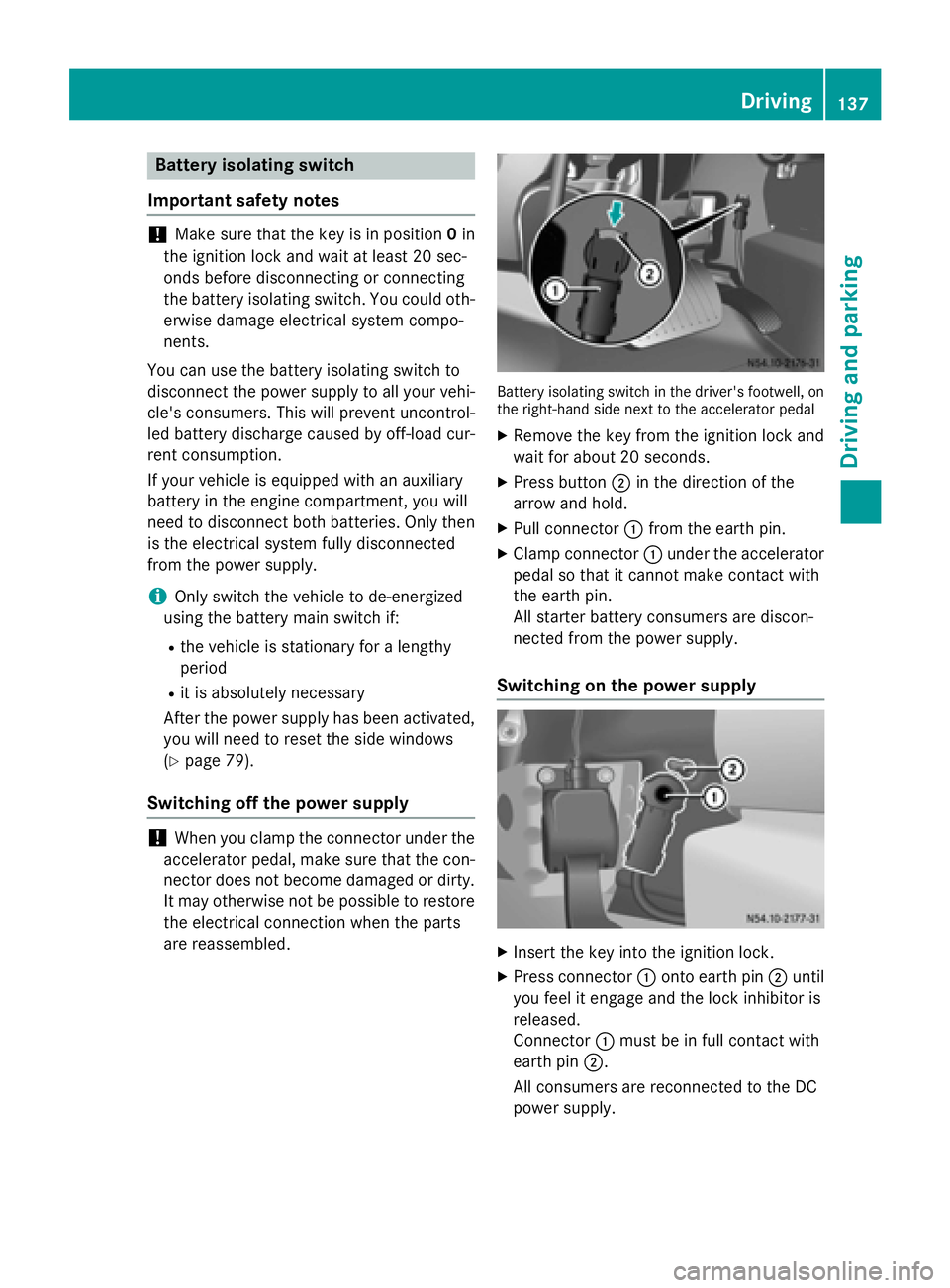
are reassembled. Battery isolating switch in the driver's footwell, on
the right-hand side next to the accelerator pedal
X Remove the key from the ignition lock and
wait for about 20 seconds.
X Press button 0044in the direction of the
arrow and hold.
X Pull connector 0043from the earth pin.
X Clamp connector 0043under the accelerator
pedal so that it cannot make contact with
the earth pin.
All starter battery consumers are discon-
nected from the power supply.
Switching on the power supply X
Insert the key into the ignition lock.
X Press connector 0043onto earth pin 0044until
you feel it engage and the lock inhibitor is
released.
Connector 0043must be in full contact with
earth pin 0044.
All consumers are reconnected to the DC
power supply. Driving
137Driving an d parking Z
Page 156 of 334

When you return from your journey, and as
close to the border as possible, you will need
to:
R remove the adhesive surfaces from your
halogen headlamps and clean the glass of
the headlamps if necessary
R have the Bi-Xenon headlamps reset to
asymmetrical low beam at a qualified spe-
cialist workshop Transport by rail
Transporting your vehicle by rail may be sub-
ject to certain restrictions or require special
measures to be taken in some countries due
to varying tunnel heights and loading stand-
ards.
You can obtain further information from any
authorized Sprinter dealer. Braking
Important safety notes G
WARNING
If you shift down on a slippery road surface in an attempt to increase the engine's braking
effect, the drive wheels could lose their grip.
There is an increased danger of skidding and
accidents.
Do not shift down for additional engine brak-
ing on a slippery road surface. G
WARNING
If you rest your foot on the brake pedal while
driving, the braking system can overheat. This increases the stopping distance and can even
cause the braking system to fail. There is a
risk of an accident.
Never use the brake pedal as a footrest. Never
depress the brake pedal and the accelerator
pedal at the same time.
! Depressing the brake pedal constantly
results in excessive and premature wear to
the brake pads. Downhill gradients !
Depressing the brake pedal constantly
results in excessive and premature wear to
the brake pads.
On long and steep downhill gradients, you
should change down to shift range 0048or0047
in good time. This should be observed in par- ticular when driving with a laden vehicle and
when towing a trailer.
i You must also change the shift range in
good time when cruise control is switched
on.
You thereby make use of the braking effect of the engine and do not have to brake as oftento maintain the speed. This relieves the load
on the service brake and prevents the brakes
from overheating and wearing too quickly.
Heavy and light loads G
WARNING
If you rest your foot on the brake pedal while
driving, the braking system can overheat. This increases the stopping distance and can even
cause the braking system to fail. There is a
risk of an accident.
Never use the brake pedal as a footrest. Never
depress the brake pedal and the accelerator
pedal at the same time.
! Depressing the brake pedal constantly
results in excessive and premature wear to
the brake pads.
If the brakes have been subjected to a heavy load, do not stop the vehicle immediately.
Drive on for a short while. The brakes are
cooled down more quickly in the airflow.
Wet road surfaces If you have been driving for a long time in
heavy rain without braking, there may be a
delayed response when you first apply the
brakes. This may also occur after driving
through a car wash or deep water. 154
Driving tipsDriving and parking
Page 174 of 334

The camera is in the middle of the roof above
the high-mounted brake lamp (Y page 269).
The rear view camera may show obstacles in perspectival distortion, incorrectly or not at
all. The rear view camera cannot display all
objects located very near and/or under the
rear bumper. It does not warn you of a colli-
sion, persons or objects.
The area behind the vehicle is displayed in a
mirrored fashion, as in the rear-view mirror or
the exterior mirrors.
The function of the rear view camera may be
partially or completely impaired in the follow-
ing circumstances:
R it is raining very heavily or snowing, or it is
foggy.
R the parking space is located in a very dark
place.
R the camera is exposed to very strong white
light. White stripes may appear on the dis-
play.
R the surrounding area is illuminated with flu-
orescent light. The display may flicker.
R if the temperature changes very quickly, for
example if you drive into a heated garage in the winter.
R ambient temperatures are very high.
R the camera lens is dirty or obstructed.
R the rear of the vehicle is damaged. In this
case, have the position and setting
checked at a specialist workshop.
The rear view camera is activated when you
engage reverse gear R.
You can find information on cleaning the cam-
era in the "Maintenance and care" section
(Y page 269). Working mode
ADR (working speed governor)
General notes When activated, ADR automatically increases
the engine speed to a preset speed or a speed
you have set.
i After a cold start, the idling speed of the
engine is increased automatically. If the
preset working speed is lower than the
increased idling speed, the working speed
is only reached once the engine has com-
pleted the warm-up phase.
It is only possible to activate ADR with the
vehicle stationary and the parking brake
applied.
The selector lever of the automatic trans-
mission must be in position P.
Activating/deactivating ADR X
To activate: press upper section 0043of the
0091 switch while the engine is running.
The indicator lamp in the switch comes on.
The 004E indicator lamp in the instrument
cluster lights up or the display shows the
following message: Operating speed Operating speed
governor active
governor active.
X To deactivate: press lower section 0044of
the 0091 switch while the engine is run-
ning.
The indicator lamp in the switch goes out. 172
Working modeDriving and parking
Page 182 of 334

Useful information
This Operator's Manual describes all models
as well as standard and optional equipment of your vehicle that were available at the time of going to print. Country-specific variations are
possible. Note that your vehicle may not be
equipped with all of the described functions.
This also applies to systems and functions
relevant to safety.
Read the information on qualified specialist
workshops (Y page 25). Important safety notes
G
WARNING
If you are driving and reach through the steer- ing wheel to operate the adjustment knob,
you could lose control of the vehicle. There is
a risk of an accident and injury.
Only operate the adjustment knobs when the vehicle is stationary. Do not reach through the
steering wheel when driving. G
WARNING
If you operate information systems and com-
munication equipment integrated in the vehi- cle while driving, you will be distracted from
traffic conditions. You could also lose control of the vehicle. There is a risk of an accident.
Only operate the equipment when the traffic
situation permits. If you are not sure that this
is possible, park the vehicle paying attention
to traffic conditions and operate the equip-
ment when the vehicle is stationary. G
WARNING
If the instrument cluster has failed or mal-
functioned, you may not recognize function
restrictions in systems relevant to safety. The operating safety of your vehicle may be
impaired. There is a risk of an accident.
Drive on carefully. Have the vehicle checked
at a qualified specialist workshop immedi-
ately. You must observe the legal requirements for
the country in which you are currently driving
when operating the on-board computer.
The on-board computer display only shows
messages and warnings from certain sys-
tems. You should therefore make sure your
vehicle is operating safely at all times. If the
operating safety of your vehicle is impaired,
stop the vehicle as soon as possible, paying
attention to road and traffic conditions. Then consult a qualified specialist workshop. Instrument cluster
Overview
0043
Instrument cluster on vehicles without
steering wheel buttons
0044 Instrument cluster in vehicles with steer-
ing-wheel buttons
0087 Adjustment buttons 0074/0075
0085 Reset button 0045
0083 Service button 0098(engine oil level check)
0084 Menu button 0079
You will find a full overview of the instrument cluster in the "At a glance" section
(Y page 34). 180
Instrument clusterOn-board computer and displays
Page 183 of 334

The display in the instrument cluster is acti-
vated when you:
R open the driver's door
R turn the key to position 2in the ignition lock
R press the 0045reset button
R switch on the lights
The display switches off automatically after
approximately 30 seconds if:
R the key is in position 0in the ignition lock.
R the vehicle lighting is not switched on. Instrument lighting
When the lights are switched on, you can
adjust the brightness of the instrument clus-
ter lighting using the 0074and 0075buttons.
X To brighten: press the0074button.
X To dim: press the 0075button.
i Vehicles with automatic headlamp mode:
the instrument lighting also adapts to auto-
matic headlamp mode. Tachometer
! Do not drive in the overrevving range, as
this could damage the engine. H
Environmental note
Avoid driving at high engine speeds. This
unnecessarily increases the fuel consumption of your vehicle and harms the environment asa result of increased emissions.
The red band in the tachometer indicates the engine's overrevving range.
To protect the engine, the fuel supply is inter-
rupted when the red band is reached. Outside temperature
You should pay special attention to road con-
ditions when temperatures are around the
freezing point. On vehicles without steering wheel buttons
(Y page 182) and on vehicles with steering
wheel buttons (Y page 187), the outside tem-
perature display is in the display.
Changes in the outside temperature are dis-
played after a short delay. Speedometer
The speed can also be shown in the display.
You can find information on the digital speed-
ometer for vehicles without steering wheel
buttons under (Y page 182) and for vehicles
with steering wheel buttons under
(Y page 187).
i In some countries, a warning sounds
when the vehicle reaches the maximum
speed limit, e.g. at 75 mph (120 km/h). Trip odometer
X To reset: make sure that the display is
showing the trip odometer if you have a
vehicle with steering wheel buttons
(Y page 187).
X Press and hold the 0045reset button until the
trip odometer is reset to 0.0 0.0. Fuel gauge
0043
Fuel gage on vehicles without steering
wheel buttons
0044 Fuel gage on vehicles with steering wheel
buttons Instrument cluster
181On-board computer and displays Z
Page 185 of 334

Menus in the on-board computer
Overview If you wish to exit a menu and go to the stand-
ard display:
X Press the 0079menu button for longer than
1 second.
or
X Do not press any button for 10 seconds.
The display accepts the changed settings.
Using the 0074,0075,0079or0045 adjustment but-
tons, you can select the following functions:
R Calling up the service due date
(Y page 258)
R Checking the oil level (Y page 250)
R Checking the DEF supply (Y page 182)
R Preselecting/setting the auxiliary heating
switch-on time (Y page 124)
R Tire pressure monitor (Y page 291)
R Setting the time (Y page 183)
R Activating/deactivating Highbeam Assist
(Y page 192)
R Setting the daytime running lamps
(Y page 92)
Setting the time X
Turn the key to position 2in the ignition
lock.
X Press the 0079menu button repeatedly until
the hours figure flashes.
X Press the 0074or0075 button to set the hour.
X Press the 0045reset button.
The minute display flashes.
X Press the 0074or0075 button to set the minute.
i If you keep the
0074or0075 button pressed,
the value will change continuously. Activating/deactivating Highbeam
Assist X
Turn the key to position 2in the ignition
lock.
X Press the 0079menu button repeatedly until
the 00CE indicator lamp flashes and the on on
or OFF
OFF message appears in the display.
X Use the 0074or0075 button to switch High-
beam Assist on/off.
Switching the daytime running lamps
on/off If you switch the daytime running lamps
on on,
the daytime running lamps will automatically
light up when the engine is running.
For safety reasons, it is only possible to
change this setting when the vehicle is sta-
tionary. The factory setting is on onin countries
in which daytime running lamp mode or day-
time running lamps are mandatory.
X Turn the key to position 2in the ignition
lock.
X Press the 0079menu button repeatedly until
the 0058 indicator lamp flashes and the on on
or OFF
OFF message appears in the display.
X Press the 0074or0075 button to activate or
deactivate the daytime running lamps.
i USA only:
If you turn the light switch to 0060or0058,
the corresponding light switches on. If you
turn the light switch to 0058, the daytime
running lamps remain switched on.
Canada only:
If you turn the light switch to 0058, the low-
beam headlamps switch on. If you turn the light switch to 0060or0058, the daytime
running lamps remain switched on. On-board computer (vehicles without steering wheel buttons)
183On-board computer and displays Z
Page 190 of 334

Using the steering wheel buttons
X Switch on the audio equipment (see the
separate operating instructions).
X Press the 0080or007F button repeatedly
until the station selected appears in the
display.
X Press the 0063or0064 button to select the
desired station.
i You can only store new stations on the
audio system itself. See the separate oper- ating instructions.
You can also operate the audio equipment
in the same way as usual.
Operating the CD player 0043
Current CD (with CD changer)
0044 Current track
Using the steering wheel buttons X Switch on the audio equipment and select
the CD player (see the separate operating
instructions).
X Press the 0080or007F button repeatedly
until the settings for the current CD appear
in the display.
X Press the 0063or0064 button to select a
CD track. Settings menu
Introduction In the
Settings menu, the following options
and submenus are available:
R Resetting all settings
R Resetting the functions of a submenu R
Instrument cluster (Y page 189)
- Units and language settings
- Status bar settings
R Time(Y page 191)
R Lighting (Y page 192)
- Switching surround lighting on/off
- Switching the daytime running lamps
on/off
- Setting the exterior lighting delayed
switch-off
- Activating/deactivating Highbeam
Assist
R Vehicle
- Setting the radio station selection
- Setting the windshield wiper sensitivity
R Stationary heating or auxiliary heating
(Y page 124)
R Convenience (Y page 194)
- Key-dependent settings
i For safety reasons, it is not possible to
reset all of the functions while the vehicle is
in motion. For example, in the Lighting
Lighting
submenu, the Daytime runn. lamps Daytime runn. lamps
function remains unchanged.
Resetting all settings Settings menu
When the Settings
Settings message is displayed,
you can reset all functions of the submenu to the factory settings. 188
On-board computer (vehicles with steering wheel buttons)On-board computer and displays
Page 191 of 334

Using the steering wheel buttons
X Press the 0080or007F button repeatedly
until the Settings
Settings menu appears in the
display.
X Press and hold the 0045reset button for
approximately 3 seconds.
You will see a message in the display
prompting you to press the 0045reset button
again to confirm.
X Press the 0045reset button again.
The functions in all submenus are reset to
the factory settings.
i If you want to retain the settings, do not
press the 0045reset button a second time.
The Settings
Settings menu appears again after
approximately 5 seconds.
Resetting the functions of a submenu You can individually reset the functions of
each submenu to the factory settings.
Using the steering wheel buttons
X Press the 0080or007F button repeatedly
until the Settings
Settings menu appears in the
display.
X Press the 0063button to switch to the sub-
menu selection.
X Press the 0081or0082 button to select a
submenu.
X Press and hold the 0045reset button for
approximately 3 seconds.
You will see a message in the display
prompting you to press the 0045reset button
again to confirm.
X Press the 0045reset button again.
All functions in the submenu are reset to
the factory settings.
i If you want to retain the settings, do not
press the 0045reset button a second time.
The Settings Settings menu appears again after
approximately 5 seconds. Selecting submenus You will see the collection of submenus.
There are more submenus than can be dis-
played at the same time.
Using the steering wheel buttons
X Press the 0080or007F button repeatedly
until the Settings
Settings menu appears in the
display.
X Press the 0063button to switch to the sub-
menu selection.
X Press the 0081or0082 button to select a
submenu.
The submenu currently selected is high-
lighted.
X Press the 0063button to select the func-
tion within a submenu.
X Change the setting by pressing the 0081or
0082 button.
The changed setting is saved.
Instrument cluster submenu Selecting the unit for temperature
Using the steering wheel buttons
X Press the 0080or007F button repeatedly
until the Settings Settings menu appears in the
display.
X Press the 0063button to switch to the sub-
menu selection. On-board computer (vehicles with steering wheel buttons)
189On-board computer and displays Z