2015 MERCEDES-BENZ SPRINTER engine compartment
[x] Cancel search: engine compartmentPage 101 of 334

Motion detector
G
WARNING
The motion detector sends the invisible infra- red radiation emitted by LEDs (light emitting
diodes).
These LEDs are classified as class 1M lasers
and can damage the retina if you:
R look directly into the unfiltered laser beam
of the motion detector for an extended
period
R look directly into the laser beam of the
motion detector using optical instruments,
e.g. eyeglasses or a magnifying glass.
There is a risk of injury.
Never look directly into the motion detector.
The cargo compartment lighting is also
switched on by the motion detector in the
cargo compartment of Cargo Vans equipped
with this feature.
If the motion detector detects a movement in the cargo compartment when the vehicle is
stationary, the cargo compartment lighting
switches on for approximately two minutes.
The cargo compartment lighting can be
switched on by the motion detector within
four seconds if:
R the rear interior light switch (Y page 98) is
set to automatic control.
R the vehicle is stationary, the parking brake
is applied and the brake pedal is not being
depressed
Or
R the selector lever is in position Pon vehi-
cles with automatic transmission and the
brake pedal is not being depressed and
R the vehicle has not been locked from the
outside using the key
The motion detector switches off automati-
cally if no change is detected in the vehicle for
several hours, e.g. if a door is opened, if the
ignition key is turned, etc. This prevents the
battery from becoming discharged. Changing bulbs
Important safety notes
G
DANGER
Xenon bulbs carry a high voltage. You can get an electric shock if you remove the cover of
the Xenon bulb and touch the electrical con-
tacts. There is a risk of fatal injury.
Never touch the parts or the electrical con-
tacts of the Xenon bulb. Always have work on
the Xenon bulbs carried out at a qualified spe-
cialist workshop. G
WARNING
Bulbs, lamps and connectors can get very hot when operating. If you change a bulb, you
could burn yourself on these components.
There is a risk of injury.
Allow these components to cool down before changing a bulb.
! Make sure the bulbs are always securely
installed.
If your vehicle is equipped with Bi-Xenon
bulbs, you can recognize this by the following: the cone of light from the Xenon bulbs moves
from the top to the bottom and back again
when you start the engine. For this to be
observed, the low-beam headlamps must be
switched on before starting the engine.
The bulbs and lamps are an essential compo- nent of vehicle safety. You must therefore
make sure that these function correctly at all
times. Have the headlamp setting checked
regularly.
R Always switch off the vehicle's lighting sys-
tem before changing a bulb.
This will prevent a short circuit.
R Do not touch the glass tube of new bulbs
with your bare hands. Always use a clean,
lint-free cloth or only touch the base of the bulb when installing.
Even minor contamination can burn into
the glass surface and reduce the service life
of the bulbs. Changing bulbs
99Lights and windshield wipers Z
Page 119 of 334
Activating/deactivating rear-compart-
ment climate control via the control
panel X
Turn the key to position 2in the ignition
lock.
Vehicle with rear-compartment heating/
rear-compartment air conditioning
X To switch on/off: press the0074switch.
If the indicator lamp in the button lights up, the rear-compartment heating/rear-com-
partment air conditioning is switched on. Switching the cooling with air dehu-
midification function on/off
Important information If you switch off the "Cooling with air dehu-
midification" function, the air inside the vehi- cle will not be cooled (in warm weather) or
dehumidified. The windows could fog up morequickly.
The cooling with air dehumidification function
is only available when the engine is running.
The air inside the vehicle is cooled and dehu- midified according to the temperature selec-
ted.
Condensation may appear on the underside
of the vehicle when in cooling mode. This is
normal and not a sign that there is a malfunc- tion.
Switching on/off Vehicle with air conditioning
X Press the 005Abutton.
If the indicator lamp in the button lights up, cooling with air dehumidification is
switched on. Setting the temperature
Increasing/reducing temperature in
the front compartment via the control
panel Only change the temperature in small incre-
ments. Start at the center position, or at 72 ‡
(22 †).
X Switch on climate control (Y page 116).
X Turn temperature control 0043clockwise to
increase or counterclockwise to reduce the temperature (Y page 114).
Increasing/reducing temperature in
the rear compartment via the control
panel Only change the temperature in small incre-
ments.
X Switch on climate control (Y page 116).
X Turn rear-compartment temperature con-
trol 0087(Ypage 115) or rear-compartment
air-conditioning system 0044(Ypage 116)
clockwise to increase or counterclockwise
to reduce the temperature.
i Vehicles with additional air conditioning
and heating in the rear compartment: if you set the temperature control to the center
position, only one of the two climate con-
trol systems works in the rear compart-
ment and in air-recirculation mode
(Y page 120). Setting the air distribution
Air distribution settings The air distribution symbols have the follow-
ing meanings:
0078
Directs air through the center and
side air vents
007E
0085 Directs air to the windshield and the
air vents Operating the climate control system
117Climate control
Page 124 of 334

On vehicles with rear-compartment air con-
ditioning, adjustable air vents are integrated
into the roof duct.
X To adjust the airflow: open or close the
air flap in air vents 0043as needed.
X To adjust the air distribution: turn air
vent 0043to the desired position. Operating the auxiliary heating sys-
tem Important safety notes
G
DANGER
If the exhaust pipe is blocked or adequate
ventilation is not possible, poisonous gases
such as carbon monoxide (CO) may enter the vehicle. This is the case, for example in
enclosed spaces or if the vehicle gets stuck in
snow. There is a risk of fatal injury.
Switch the auxiliary heating off in enclosed
spaces without extraction systems, e.g. in
garages. If the vehicle is stuck in snow and
you have to leave the auxiliary heating run-
ning, keep the exhaust pipe and the area
around the vehicle free of snow. To ensure an adequate supply of fresh air, open a window
on the side of the vehicle that is not facing into
the wind. G
WARNING
When the auxiliary heating is switched on,
parts of the vehicle can become very hot, e.g. the exhaust system.
Flammable materials such as leaves, grass or
twigs may ignite if they come into contact
with:
R hot parts of the exhaust system
R the exhaust gas itself
There is a risk of fire. When the auxiliary heating is switched on,
make sure that:
R no flammable materials come into contact
with hot vehicle components
R the exhaust gas can escape from the
exhaust pipe unhindered
R the exhaust gas does not come into contact
with flammable materials.
! Turn on the auxiliary heating at least once
a month for approximately 10 minutes. The
auxiliary heating could otherwise be dam-
aged.
! Make sure that the flow of hot air is not
blocked. The auxiliary heating will other-
wise overheat and switch off.
Your vehicle may be equipped with either an
auxiliary hot-water heater or an auxiliary
warm-air heater. Adjustment and operation of the:
R hot-water auxiliary heater is done via the
on-board computer and with the auxiliary
heating button in the control panel
(Y page 123) or with the remote control
(Y page 125).
R auxiliary warm-air heater is done via the
timer above the overhead control panel
(Y page 127).
The auxiliary heating works independently of
the engine and supplements the climate con- trol system in the vehicle. The auxiliary heat-
ing heats the air in the vehicle interior to the
temperature set.
If your vehicle is equipped with a hot-water
auxiliary heater, the auxiliary heating also
keeps the coolant warm. This way, the load on
the engine is minimized and fuel is saved.
The heater booster function (Y page 130) of
the auxiliary heating supports the climate
control system when the engine is running
and the outside temperature is low.
You can use the auxiliary heating at an out-
side temperature of up to 39 ‡ (4 †). At an
outside temperature above 39 ‡ (4 †) the 122
Operating the auxiliary heating systemClimate control
Page 139 of 334
Battery isolating switch
Important safety notes !
Make sure that the key is in position
0in
the ignition lock and wait at least 20 sec-
onds before disconnecting or connecting
the battery isolating switch. You could oth-
erwise damage electrical system compo-
nents.
You can use the battery isolating switch to
disconnect the power supply to all your vehi- cle's consumers. This will prevent uncontrol-
led battery discharge caused by off-load cur-
rent consumption.
If your vehicle is equipped with an auxiliary
battery in the engine compartment, you will
need to disconnect both batteries. Only then
is the electrical system fully disconnected
from the power supply.
i Only switch the vehicle to de-energized
using the battery main switch if:
R the vehicle is stationary for a lengthy
period
R it is absolutely necessary
After the power supply has been activated,
you will need to reset the side windows
(Y page 79).
Switching off the power supply !
When you clamp the connector under the
accelerator pedal, make sure that the con- nector does not become damaged or dirty.
It may otherwise not be possible to restore
the electrical connection when the parts
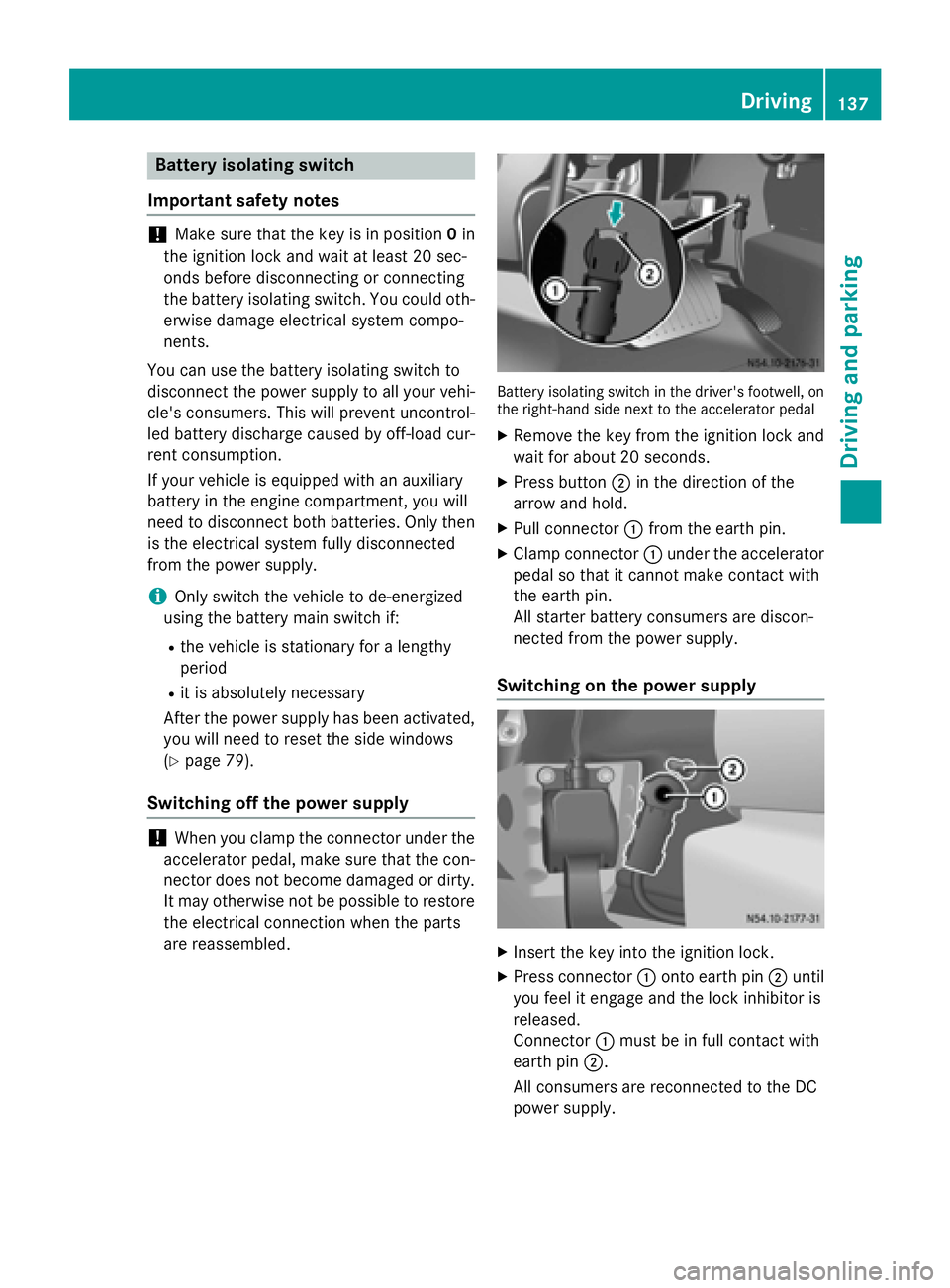
are reassembled. Battery isolating switch in the driver's footwell, on
the right-hand side next to the accelerator pedal
X Remove the key from the ignition lock and
wait for about 20 seconds.
X Press button 0044in the direction of the
arrow and hold.
X Pull connector 0043from the earth pin.
X Clamp connector 0043under the accelerator
pedal so that it cannot make contact with
the earth pin.
All starter battery consumers are discon-
nected from the power supply.
Switching on the power supply X
Insert the key into the ignition lock.
X Press connector 0043onto earth pin 0044until
you feel it engage and the lock inhibitor is
released.
Connector 0043must be in full contact with
earth pin 0044.
All consumers are reconnected to the DC
power supply. Driving
137Driving an d parking Z
Page 150 of 334

Rinse any affected areas off with plenty of
clean water. Consult a doctor if necessary.
i If the DEF level has dropped below the
reserve range, add at least 2.0 US gal
(7.6 l) of DEF at the latest after receiving the second warning message (Y page 182).
i If you switch off the engine at a low out-
side temperature and add DEF, restart the
engine after refueling. If you leave the vehi- cle parked without restarting the engine
and the DEF freezes in the DEF tank, the on-
board computer will only be able to register the new fill level after a defrosting period of
up to 60 minutes. During this time the
engine may only be operated in neutral.
You will find further information on DEF in the "Service products" section (Y page 318).
Refueling procedure DEF filler neck
Non-lockable DEF filler cap
Example: DEF filler cap in the engine compartment
X To open: switch off the ignition.
X Open the hood (Y page 248).
X Turn filler cap 0043counter-clockwise and
remove it.
X To close: replace cap 0043on the filler neck
and turn it clockwise.
You will hear a click when cap 0043is fully
closed.
X Close the hood (Y page 249). Lockable filler cap
Example: DEF filler cap in the engine compartment
X
To open: switch off the ignition.
X Open the hood (Y page 248).
X Remove tool 0085for unlocking tank filler
cap 0043from the footwell on the co-driver's
side (Y page 274).
X Pull cover 0087up, turn 90° and release.
X Insert tool 0085into hole 0044of tank filler
cap 0043.
X Turn filler cap 0043counter-clockwise and
remove it. Make sure that tool 0085remains
in tank filler cap 0043while doing so.
X To close: replace filler cap 0043and turn it
clockwise until closed.
X Pull tool 0085out of tank filler cap 0043and
stow with the vehicle tool kit in the footwell
on the co-driver's side.
X Pull cover 0087up over hole 0044of tank filler
cap 0043, turn and release.
X Turn tank filler cap 0043.
If tank filler cap 0043turns freely, the DEF
tank is closed. 148
RefuelingDriving and pa
rking
Page 157 of 334

You must depress the brake pedal more
firmly. Maintain a longer distance to the vehi- cle in front.
While paying attention to the traffic condi-
tions, you should brake the vehicle firmly
after driving on a wet road surface or through
a car wash. This heats the brake discs, so that they dry more quickly, which protects them
against corrosion.
Limited braking performance on salt-
treated roads When driving on salted roads, salt may start
to build up on the brake disks and brake pads.
This can increase braking distances consid-
erably.
Maintain a greater distance to the vehicle in
front.
To remove any build up of salt that may have
formed:
X Apply the brakes at the start of the journey,
occasionally during journey and at the end
of the journey. Make sure that you do not
endanger other road users when doing so.
Parking brake G
WARNING
If you must brake the vehicle with the parking brake, the braking distance is considerably
longer and the wheels could lock. There is an
increased danger of skidding and accidents.
Only use the parking brake to brake the vehi- cle when the service brake is faulty. Do not
apply the parking brake too firmly. If the
wheels lock, release the parking brake until
the wheels begin turning again.
When driving on wet roads or dirt-covered
surfaces, road salt and/or dirt may get into
the parking brake. This causes corrosion and a reduction of braking force.
In order to prevent this, drive with the parking
brake lightly applied from time to time. When
doing so, drive for a distance of approximately 110 yds (100 m) at a maximum speed of
12 mph (20 km/h).
The brake lamps are not illuminated when you
brake the vehicle using the parking brake. Driving in wet conditions
Hydroplaning G
WARNING
There is a danger of hydroplaning occurring,
even if you are driving slowly and your tires
have sufficient tread depth, depending on the depth of water on the road. There is a risk of
an accident.
For this reason, avoid tire ruts and brake care- fully.
Therefore, in heavy rain or other conditions in which hydroplaning can occur, drive as fol-
lows:
R reduce your speed
R avoid tire ruts
R apply the brakes with care
Driving on flooded roads !
Do not drive through flooded areas.
Check the depth of any water before driving
through it. Drive slowly through standing
water. Otherwise, water may enter the
vehicle interior or the engine compartment.
This can damage the electronic compo-
nents in the engine or the automatic trans- mission. Water can also be drawn in by the engine's air suction nozzles and this can
cause engine damage.
If you have to drive on stretches of road on
which water has collected, please bear in
mind that:
R the water level of standing water should not
be above the lower edge of the front
bumper
R do not drive faster than walking speed Driving tips
155Driving and parking Z
Page 238 of 334

In addition, flammable materials can ignite if:
R the hot cigarette lighter falls
R a child holds the hot cigarette lighter to
objects, for example
There is a risk of fire and injury.
Always hold the cigarette lighter by the knob.
Always make sure that the cigarette lighter is
out of reach of children. Never leave children unsupervised in the vehicle. X
To use the cigarette lighter: turn the key
to position 1in the ignition lock.
X Press in cigarette lighter 0043.
The cigarette lighter will pop out automati- cally when the heating element is red-hot.
X Pull the cigarette lighter out of the socket
by its handle. 12 V socket
Socket on the lower section of the center console
0043 12 V socket (25 A) The 12 V sockets for accessories are:
R
on the lower section of the center console
(12 V, 25 A)
R on the inside of the driver's seat frame
(12 V, 15 A)
R in the respective corner trim next to the
rear doors in the passenger compartment
(12 V, 15 A)
R in the cargo compartment next to the left
rear door (12 V, 15 A)
You can use the 12 V sockets (15 A) for
accessories with a maximum power con-
sumption of 180 W. Youcan connect acces-
sories with a maximum power consumption
of 300 Wto the 12 V socket (25 A) on the
lower section of the center console.
i The sockets are supplied with power even
when the key is removed from the ignition
lock. If accessories, e.g. a coolbox, remain
connected while the engine is not running, the battery will discharge. Mobile phone
Important safety notes
G
WARNING
If you operate information systems and com-
munication equipment integrated in the vehi- cle while driving, you will be distracted from
traffic conditions. You could also lose control of the vehicle. There is a risk of an accident.
Only operate the equipment when the traffic
situation permits. If you are not sure that this
is possible, park the vehicle paying attention
to traffic conditions and operate the equip-
ment when the vehicle is stationary.
You must observe the legal requirements for
the country in which you are currently driving when operating mobile phones.
Bear in mind that at a speed of just 30 mph
(approximately 50 km/h), your vehicle is
covering a distance of 44 fee t(approximately
14 m) every second. 236
Mobile phoneStowing and features
Page 243 of 334

Always observe the operating instructions of
the respective manufacturer when using suit- able load securing aids or tie downs. In par-
ticular, the information on service life.
Load securing aids and tie downs may not be used, for example, if:
R identification marks are missing or illegible
R there are yarn breakages, damage to bear-
ing seams or other signs of tearing
R there are signs of shearing, deformation,
pinching or other damage
R there is damage to clamping or connecting
elements
Such load securing aids and tie downs are
worn; they should not be used and must be
replaced. If you use load securing aids or tie
downs which are worn, the load may not be
sufficiently secured and could cause damage
to property.
After an accident, the following must be
checked at a specialist workshop:
R Cargo compartment floor
R Load surface
R Cargo tie-down rings
R Tie downs
Otherwise, the load may not be correctly
secured the next time anything is stowed.
Even if you follow all loading guidelines, the
load increases the risk of injury in the event of an accident. Observe the tips in the "Securing
luggage/loads" (Y page 242) and "Load dis-
tribution" (Y page 242) sections. Before loading
! The anti-slip mats cannot be used for
securing goods and must be replaced when
they show signs of:
R Permanent deformation and crushing
R Crack formation
R Cuts X
Tire pressure: check the tire pressure and
correct if necessary (Y page 288).
X Cargo compartment floor: clean the
cargo compartment floor.
The cargo compartment floor must be free
from oil and dust, dry and swept clean to
prevent the load from slipping.
X Place non-slip mats (anti-slip mats) on the
cargo compartment floor if necessary. During loading
! On passenger van versions with maxi-
mum seating layout, the permissible rear
axle load would be exceeded if the full pay-
load were to be loaded in the cargo com-
partment.
X Observe the gross axle weight rating and
permissible gross vehicle weight for your
vehicle.
Take into account that your vehicle's curb
weight is increased if accessories or
optional equipment are installed. The max-
imum payload is thus reduced.
X Observe the notes on load distribution
(Y page 242).
The overall center of gravity of the load
should always be as low as possible, cen-
tered and between the axles near the rear
axle.
X Secure the load (Y page 242).
Observe the legal requirements of the
country in which you are currently driving. Checks after loading
G
WARNING
Combustion engines emit poisonous exhaust
gases, such as carbon monoxide. If the sliding door or rear door is open when the engine is
running, exhaust gases can enter the vehicle
interior, especially during the journey. There
is a risk of poisoning. Loading guidelines
241Transporting loads
Z