2015 MERCEDES-BENZ SLK-Class lock
[x] Cancel search: lockPage 90 of 358
R
there is sufficient clearance, as the roof
swings upwards.
R there is sufficient clearance behind the
vehicle, as the trunk lid swings back-
wards beyond the bumper.
R the trunk is only loaded to below the
trunk partition.
R the trunk partition is not pushed up by
the load.
R the trunk partition is closed.
R the trunk lid is closed.
R the outside temperature is above 5 ‡
(00F815 †).
You could otherwise damage the roof,
trunk and other parts of the vehicle.
i Vehicle dimensions when opening/clos-
ing the roof (Y page 353).
i Make sure that the roof and rear window
are clean and dry before opening the roof.
Otherwise, water or dirt could enter the
vehicle interior or trunk. Opening and closing using the roof
switch
Important safety notes G
WARNING
When opening or closing the roof, body parts could be trapped by, for example, the roof
mechanism, trunk lid or side windows. There
is a risk of injury.
When raising or lowering the roof, make sure
that no body parts are in the vicinity of moving
components. If someone becomes trapped,
release the button. Opening and closing X
Secure the vehicle against rolling away
(Y page 161).
X Close the trunk partition (Y page 90).
X Close the trunk lid.
X Turn the SmartKey to position 2in the igni-
tion lock.
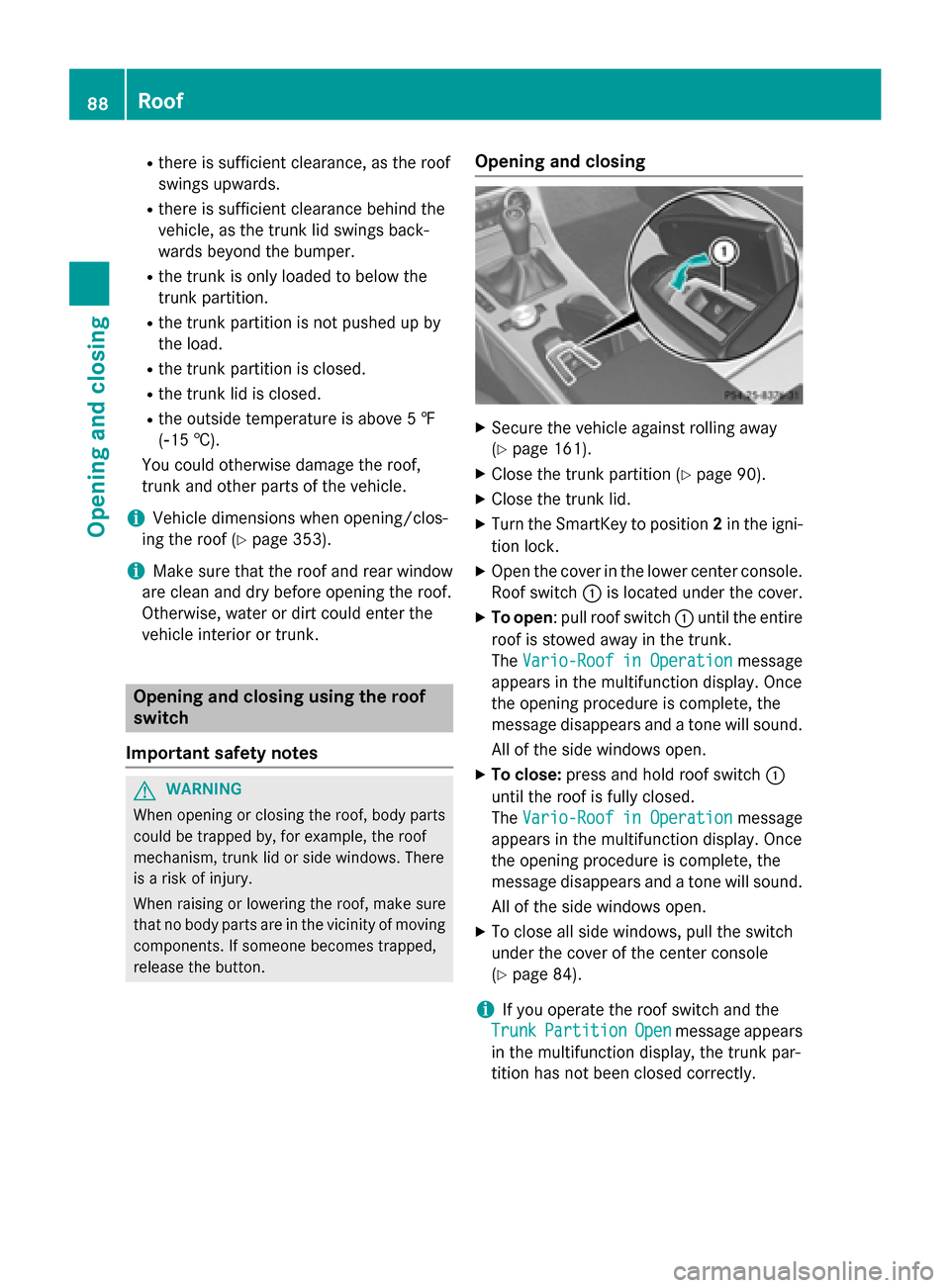
X Open the cover in the lower center console.
Roof switch 0043is located under the cover.
X To open: pull roof switch 0043until the entire
roof is stowed away in the trunk.
The Vario-Roof in Operation
Vario-Roof in Operation message
appears in the multifunction display. Once
the opening procedure is complete, the
message disappears and a tone will sound.
All of the side windows open.
X To close: press and hold roof switch 0043
until the roof is fully closed.
The Vario-Roof in Operation Vario-Roof in Operation message
appears in the multifunction display. Once
the opening procedure is complete, the
message disappears and a tone will sound.
All of the side windows open.
X To close all side windows, pull the switch
under the cover of the center console
(Y page 84).
i If you operate the roof switch and the
Trunk
Trunk Partition Partition Open
Openmessage appears
in the multifunction display, the trunk par-
tition has not been closed correctly. 88
RoofOpening and closing
Page 91 of 358
Opening and closing using the Smart-
Key
Important safety notes G
WARNING
When opening or closing the roof, body parts could be trapped by, for example, the roof
mechanism, trunk lid or side windows. There
is a risk of injury.
When raising or lowering the roof, make sure
that no body parts are in the vicinity of moving
components. If someone becomes trapped,
release the button.
Opening and closing X
Close the trunk partition (Y page 89).
X Close the trunk lid (Y page 80).
X Point the tip of the SmartKey at the driver's
door handle.
X To open: press and hold the 0036button
on the SmartKey until the roof is fully
opened.
The roof and the rear side windows open.
The front side windows close.
X To interrupt the opening procedure:
release the 0036button.
X To open the front side windows: press
and hold the 0036button on the SmartKey
again.
X To close: press and hold the 0037button
on the SmartKey until the roof is fully
closed.
The roof and the side windows close.
X To interrupt the closing procedure:
release the 0037button.
i When the roof is closed and the trunk par-
tition is open, the roof cannot be opened
using the SmartKey functions. Instead, all
of the side windows open or close simulta-
neously (Y page 84). Additionally, the
Trunk
Trunk Partition Partition Open
Openmessage appears
in the multifunction display. Locking the roof again
Important safety notes G
WARNING
If you do not fully open/close the soft top, the soft-top hydraulics depressurize after a short
time. This causes the soft top to lower unex-
pectedly and may cause you or others to be
trapped. There is a risk of injury.
Always open or close the soft top completely.
The roof is not locked if:
R the 0059 symbol and the Vario-Roof
Vario-Roof in in
Operation
Operation message appear in the multi-
function display.
R the 0059 symbol and the Open/Close
Open/Close
Vario-Roof Completely
Vario-Roof Completely message
appear and you hear a warning tone.
R you hear a warning tone for up to 10 sec-
onds when pulling away or while driving.
Locking You can lock the roof again if it is not locked
fully.
X Pull over and stop the vehicle safely as soon
as possible, paying attention to road and
traffic conditions.
X Make sure that the SmartKey is in position
2 in the ignition lock.
X Press the roof switch (Y page 88). Trunk partition
General notes !
To avoid damaging the roof or luggage
when folding back the roof, you should:
R only load the trunk to below the trunk
partition
R not place any objects on or in front of the
trunk partition Roof
89Opening and closing Z
Page 92 of 358
R
not place any objects on the cover
behind the roll bars
R not allow the cargo to push the trunk
partition upwards
The trunk partition can be used to cover lug-
gage and loads in the trunk.
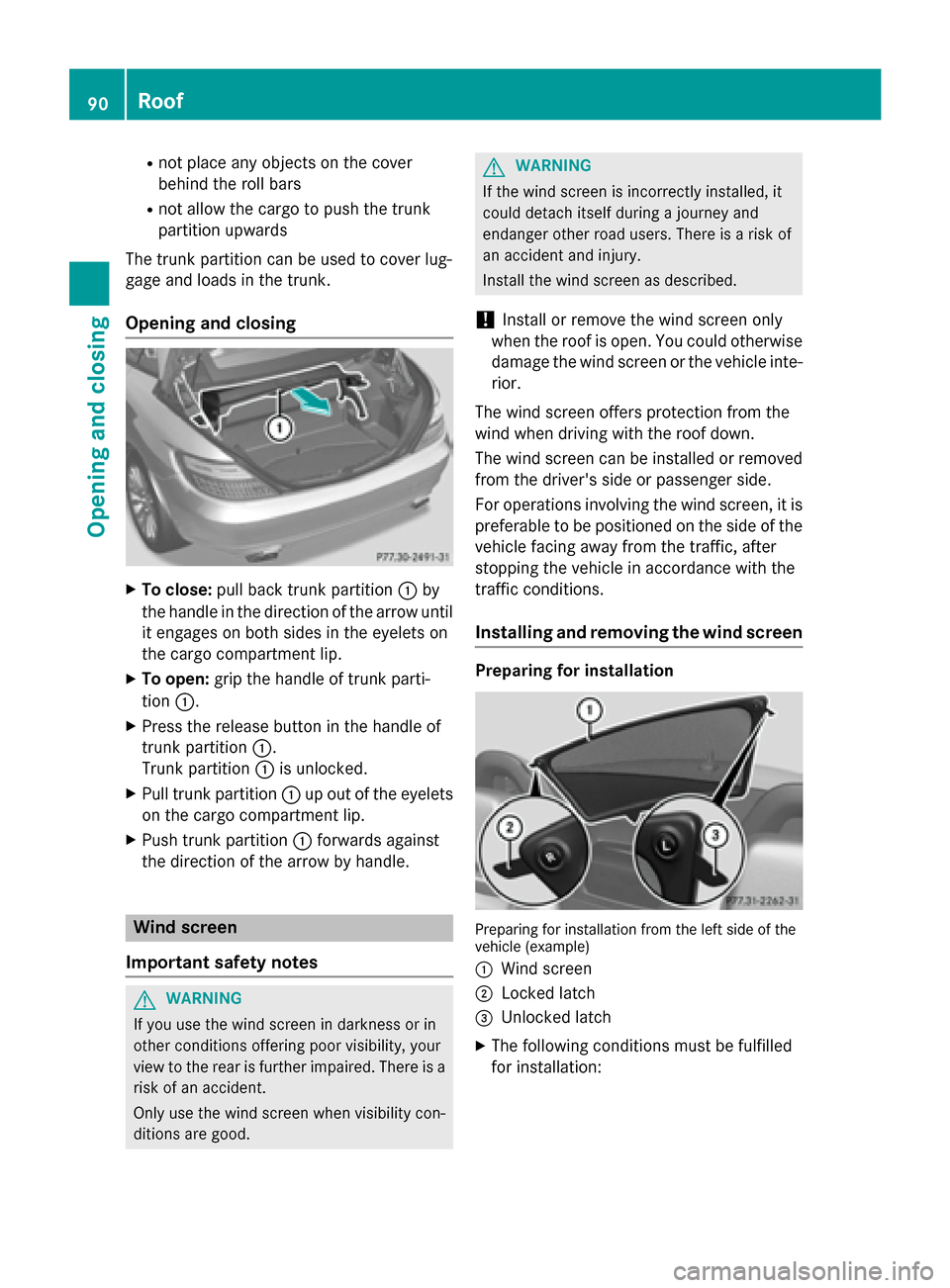
Opening and closing X
To close: pull back trunk partition 0043by
the handle in the direction of the arrow until
it engages on both sides in the eyelets on
the cargo compartment lip.
X To open: grip the handle of trunk parti-
tion 0043.
X Press the release button in the handle of
trunk partition 0043.
Trunk partition 0043is unlocked.
X Pull trunk partition 0043up out of the eyelets
on the cargo compartment lip.
X Push trunk partition 0043forwards against
the direction of the arrow by handle. Wind screen
Important safety notes G
WARNING
If you use the wind screen in darkness or in
other conditions offering poor visibility, your
view to the rear is further impaired. There is a
risk of an accident.
Only use the wind screen when visibility con-
ditions are good. G
WARNING
If the wind screen is incorrectly installed, it
could detach itself during a journey and
endanger other road users. There is a risk of
an accident and injury.
Install the wind screen as described.
! Install or remove the wind screen only
when the roof is open. You could otherwise
damage the wind screen or the vehicle inte-
rior.
The wind screen offers protection from the
wind when driving with the roof down.
The wind screen can be installed or removed from the driver's side or passenger side.
For operations involving the wind screen, it is
preferable to be positioned on the side of the vehicle facing away from the traffic, after
stopping the vehicle in accordance with the
traffic conditions.
Installing and removing the wind screen Preparing for installation
Preparing for installation from the left side of the
vehicle (example)
0043 Wind screen
0044 Locked latch
0087 Unlocked latch
X The following conditions must be fulfilled
for installation: 90
RoofOpening and closing
Page 93 of 358
R
unlocking buttons Rand Lpoint in the
direction of travel.
R latch 0087facing you is unlocked.
R latch 0044facing away from you is locked.
X To unlock the latch: press unlocking but-
ton Ror Lon the locked latch.
X To lock the latch: push the unlocked latch
upwards by hand until it engages.
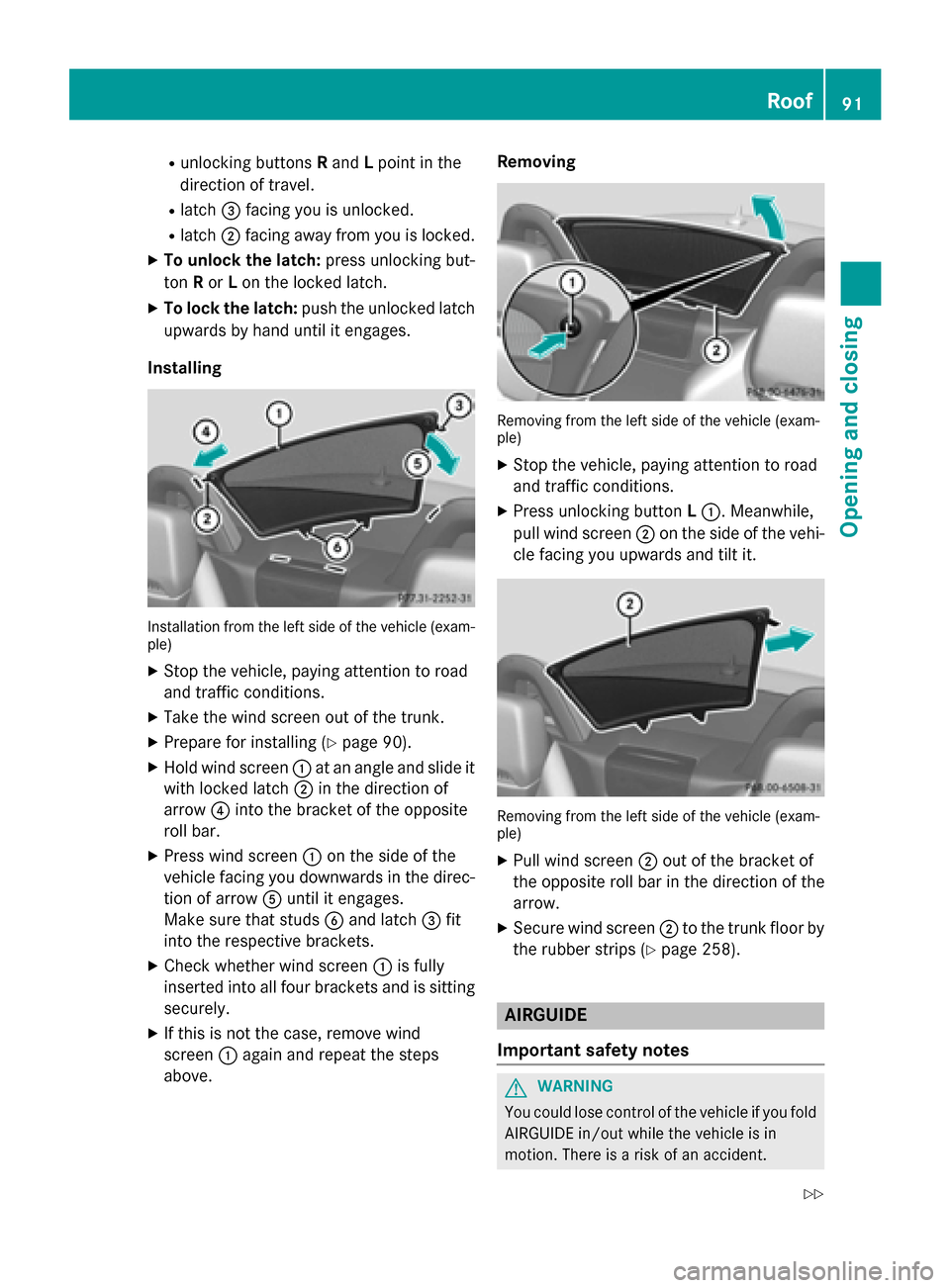
Installing Installation from the left side of the vehicle (exam-
ple)
X Stop the vehicle, paying attention to road
and traffic conditions.
X Take the wind screen out of the trunk.
X Prepare for installing (Y page 90).
X Hold wind screen 0043at an angle and slide it
with locked latch 0044in the direction of
arrow 0085into the bracket of the opposite
roll bar.
X Press wind screen 0043on the side of the
vehicle facing you downwards in the direc-
tion of arrow 0083until it engages.
Make sure that studs 0084and latch 0087fit
into the respective brackets.
X Check whether wind screen 0043is fully
inserted into all four brackets and is sitting
securely.
X If this is not the case, remove wind
screen 0043again and repeat the steps
above. Removing
Removing from the left side of the vehicle (exam-
ple)
X Stop the vehicle, paying attention to road
and traffic conditions.
X Press unlocking button L0043. Meanwhile,
pull wind screen 0044on the side of the vehi-
cle facing you upwards and tilt it. Removing from the left side of the vehicle (exam-
ple)
X Pull wind screen 0044out of the bracket of
the opposite roll bar in the direction of the
arrow.
X Secure wind screen 0044to the trunk floor by
the rubber strips (Y page 258). AIRGUIDE
Important safety notes G
WARNING
You could lose control of the vehicle if you fold AIRGUIDE in/out while the vehicle is in
motion. There is a risk of an accident. Roof
91Opening and closing
Z
Page 94 of 358

Only fold AIRGUIDE in/out while the vehicle is
stationary.
! AIRGUIDE can only be positioned cor-
rectly by folding it in or out. AIRGUIDE can-
not be dismantled. Do not try to remove
AIRGUIDE from its anchorage. Otherwise,
you could damage AIRGUIDE or the vehicle.
AIRGUIDE can be folded out or back in from
the driver's side or passenger side.
When operating AIRGUIDE, preferably stand
on the side of the vehicle away from the traf-
fic, after you have stopped the vehicle in
accordance with road and traffic conditions.
Operating AIRGUIDE Example: folding out from the left side of the vehi-
cle
X Stop the vehicle, paying attention to road
and traffic conditions.
X To fold out AIRGUIDE: turn disc0043in the
direction of the arrow towards the middle of
the vehicle to the stop.
X Repeat with disc 0044.
X To fold in AIRGUIDE: turn discs0043and 0044
back behind the roll bar to the stop.
i Discs
0043and 0044can also be used inde-
pendently of each other, e.g. when you are driving without a passenger. MAGIC SKY CONTROL
General notes MAGIC SKY CONTROL is a glass roof, the
transparency of which can be changed by
applying electrical voltage.
MAGIC SKY CONTROL can be switched
between darkened and transparent states.
i MAGIC SKY CONTROL darkens automat-
ically when you turn the SmartKey to posi-
tion 0in the ignition lock or remove the
SmartKey.
Risk of electric shock G
DANGER
MAGIC SKY CONTROL operates using high
voltage. If the trim behind the overhead con-
trol panel is damaged or removed, electrical
components will be exposed. If you touch
these components, you could get an electric
shock. There is a risk of fatal injury.
R Never remove the trim behind the overhead
control panel.
R If the trim is damaged, never touch the
electrical components behind it.
R Always have work on the MAGIC SKY CON-
TROL carried out at a qualified specialist
workshop.
The electrical components of MAGIC SKY
CONTROL are protected by a paneling behind the overhead control panel.
The MAGIC SKY CONTROL control unit is
marked with a yellow warning sticker that
warns you of high voltage. The electric cables
of the high-voltage section are colored
orange. 92
RoofOpening and closing
Page 95 of 358

Operating MAGIC SKY CONTROL
X
Turn the SmartKey to position 1or 2in the
ignition lock.
MAGIC SKY CONTROL switches to the sta-
tus it was set to before the engine was
switched off.
X To change the degree of transparency:
press button 0043.
i At sub-zero temperatures, the change is
slower and uneven. The entire process may
take some time. Roof
93Opening and closing Z
Page 99 of 358
Seats
Important safety notes
G
WARNING
Children could become trapped if they adjust the seats, particularly when unattended.
There is a risk of injury.
When leaving the vehicle, always take the
SmartKey with you and lock the vehicle. Never leave children unsupervised in the vehicle.
The seats can still be adjusted when there is
no SmartKey in the ignition lock. G
WARNING
When you adjust a seat, you or other vehicle
occupants could become trapped, e.g. on the seat guide rail. There is a risk of injury.
Make sure when adjusting a seat that no one
has any body parts in the sweep of the seat.
Observe the safety notes on "Air bags"
(Y page 46) and "Children in the Vehicle"
(Y page 57). G
WARNING
If the driver's seat is not engaged, it could
move unexpectedly while the vehicle is in
motion. This could cause you to lose control of the vehicle. There is a risk of an accident.
Always make sure that the driver's seat is
engaged before starting the engine. G
WARNING
If you adjust the seat height carelessly, you or other vehicle occupants could be trapped andthereby injured. Children in particular could
accidentally press the electrical seat adjust-
ment buttons and become trapped. There is a
risk of injury.
While moving the seats, make sure that your
hands or other body parts do not get under the
lever assembly of the seat adjustment sys-
tem. G
WARNING
If head restraints are not installed and adjus-
ted correctly, they cannot provide protection
as intended. There is an increased risk of
injury in the head and neck area, e.g. in the
event of an accident or when braking.
Always drive with the head restraints instal-
led. Before driving off, make sure for every
vehicle occupant that the center of the head
restraint supports the back of the head at
about eye level. G
WARNING
You could lose control of your vehicle if you do the following while driving:
R adjust the driver's seat, steering wheel or
mirrors
R fasten the seat belt
There is a risk of an accident.
Adjust the driver's seat, steering wheel or
mirrors and fasten your seat belt before start- ing the engine.
! To avoid damage to the seats and the seat
heating, observe the following information:
R keep liquids from spilling on the seats. If
liquid is spilled on the seats, dry them as soon as possible.
R if the seat covers are damp or wet, do not
switch on the seat heating. The seat
heating should also not be used to dry
the seats.
R clean the seat covers as recommended;
see the "Interior care" section.
R do not transport heavy loads on the
seats. Do not place sharp objects on the
seat cushions, e.g. knives, nails or tools. The seats should only be occupied by
passengers, if possible.
R when the seat heating is in operation, do
not cover the seats with insulating mate- rials, e.g. blankets, coats, bags, seat cov-
ers, child seats or booster seats.
! Make sure that there are no objects in the
footwell under or behind the seats when Seats
97Seats, steering wheel and mirrors Z
Page 101 of 358
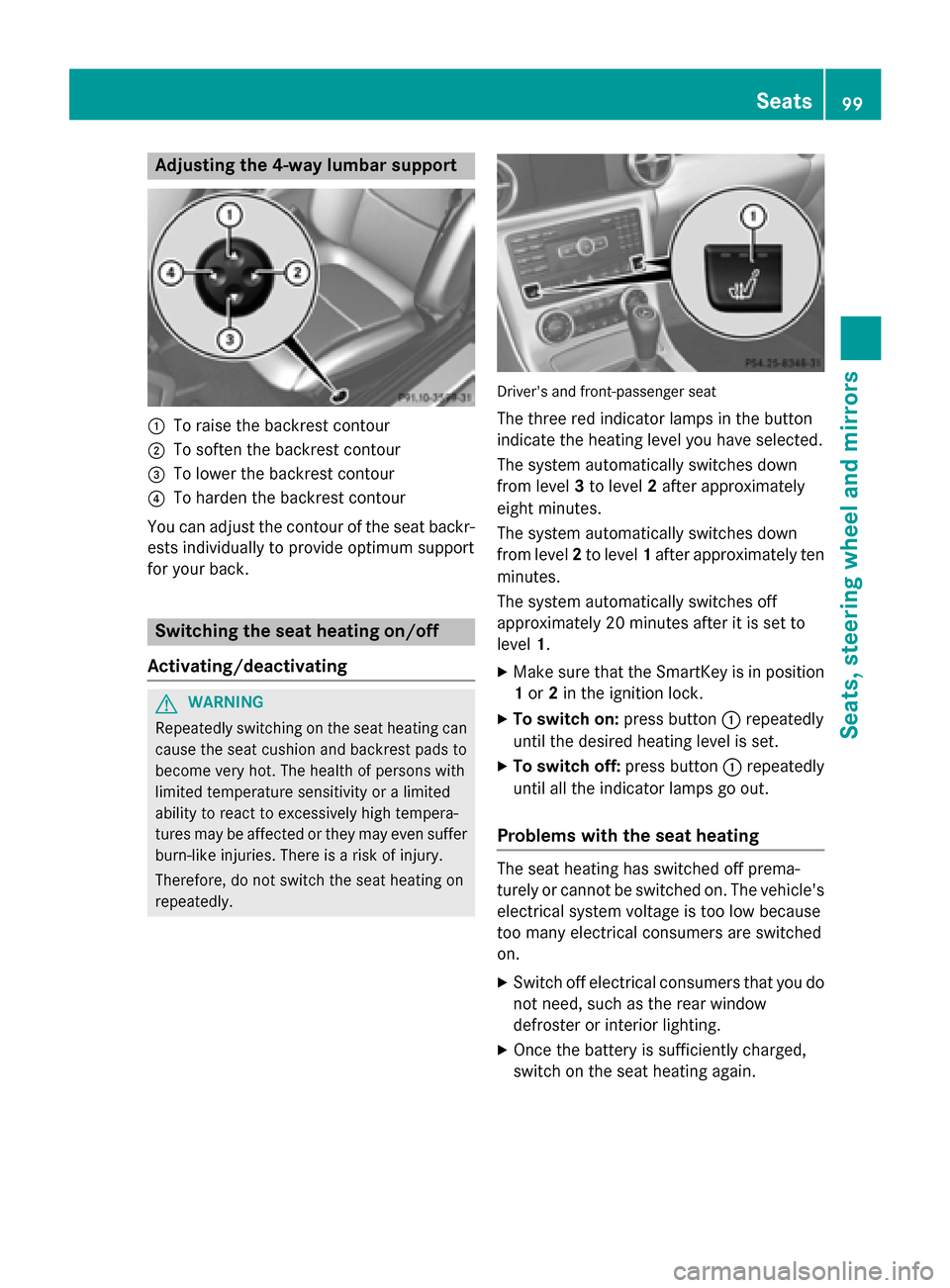
Adjusting the 4-way lumbar support
0043
To raise the backrest contour
0044 To soften the backrest contour
0087 To lower the backrest contour
0085 To harden the backrest contour
You can adjust the contour of the seat backr-
ests individually to provide optimum support
for your back. Switching the seat heating on/off
Activating/deactivating G
WARNING
Repeatedly switching on the seat heating can
cause the seat cushion and backrest pads to
become very hot. The health of persons with
limited temperature sensitivity or a limited
ability to react to excessively high tempera-
tures may be affected or they may even suffer burn-like injuries. There is a risk of injury.
Therefore, do not switch the seat heating on
repeatedly. Driver's and front-passenger seat
The three red indicator lamps in the button
indicate the heating level you have selected.
The system automatically switches down
from level 3to level 2after approximately
eight minutes.
The system automatically switches down
from level 2to level 1after approximately ten
minutes.
The system automatically switches off
approximately 20 minutes after it is set to
level 1.
X Make sure that the SmartKey is in position
1 or 2in the ignition lock.
X To switch on: press button0043repeatedly
until the desired heating level is set.
X To switch off: press button0043repeatedly
until all the indicator lamps go out.
Problems with the seat heating The seat heating has switched off prema-
turely or cannot be switched on. The vehicle's
electrical system voltage is too low because
too many electrical consumers are switched
on.
X Switch off electrical consumers that you do
not need, such as the rear window
defroster or interior lighting.
X Once the battery is sufficiently charged,
switch on the seat heating again. Seats
99Seats, steering wheel and mirrors Z