2015 MERCEDES-BENZ SLK-Class climate control
[x] Cancel search: climate controlPage 131 of 358

Problems with the "Cooling with air dehumidification" function
Problem
Possible causes/consequences and
0050
0050Solutions The indicator lamp in
the
005A/0056 button
flashes three times or
remains off. The "Cool-
ing with air dehumidifi-
cation" function cannot
be switched on. Cooling with air dehumidification has been deactivated due to a
malfunction.
X Visit a qualified specialist workshop. Setting climate control to automatic
General notes Automatic mode is only available with 2-zone
automatic air conditioning.
In automatic mode, the set temperature is
maintained automatically at a constant level. The system automatically regulates the tem-
perature of the dispensed air, the airflow and
the air distribution.
The automatic mode functions optimally
when the "Cooling with air dehumidification"
function is activated. If necessary, cooling
with air dehumidification can be deactivated.
If you deactivate the "Cooling with air-dehu-
midification" function, the air inside the vehi- cle will not be cooled. The air inside the vehi-
cle will also not be dehumidified. The win-
dows can fog up more quickly. Therefore,
deactivate the cooling with air-dehumidifica-
tion function only briefly.
Activating/switching X
Turn the SmartKey to position 2in the igni-
tion lock (Y page 139).
X Set the desired temperature.
X To activate: press the0058button.
The indicator lamp in the 0058button lights
up. Automatic air distribution and airflow
are activated. X
To switch to manual mode: press the
008F button.
or
X Press the 0095or0097 button.
The indicator lamp in the 0058button goes
out. Setting the temperature
Air-conditioning system X
Turn the SmartKey to position 2in the igni-
tion lock (Y page 139).
X To increase/reduce: turn control0043
clockwise or counter-clockwise
(Y page 123).
Only change the temperature setting in
small increments. Start at 72 ‡ (22 †).
i If you turn control
0043counter-clockwise
to the lowest temperature setting, air-recir-
culation mode may activate automatically,
depending on the outside temperature.
Dual-zone automatic climate control Different temperatures can be set for the
driver's and front-passenger sides.
X Turn the SmartKey to position 2in the igni-
tion lock (Y page 139).
X To increase/reduce: turn control0043or0084
clockwise or counter-clockwise
(Y page 125). Operating the climate control systems
129Climate control
Page 132 of 358

Only change the temperature setting in
small increments. Start at 72 ‡ (22 †).
i If you turn controls
0043and 0084counter-
clockwise to the lowest temperature set-
ting, air-recirculation mode may activate
automatically, depending on the outside
temperature. Setting the air distribution
Air-conditioning system X
Turn the SmartKey to position 2in the igni-
tion lock (Y page 139).
X Press one or more of the 009C,009B,0061
buttons.
The corresponding indicator lamp lights up
briefly.
The following air distribution settings can be
selected:
0061 Directs air through the defroster vents
009B Directs air through the footwell air
vents
009C Directs air through the center and side
air vents
i You can also activate several air distribu-
tion settings simultaneously. To do this,
press multiple air distribution buttons. The air is then directed through various vents.
2-zone automatic climate control X
Turn the SmartKey to position 2in the igni-
tion lock (Y page 139).
X Press the 008Fbutton repeatedly until the
desired symbol appears in the display.
The following air distribution settings can be
selected:
009C Directs air through the center and side
air vents
009B Directs air through the footwell air
vents 009F
Directs air through the center, side and
footwell vents
0061 Directs air through the defroster vents
0087 Directs the airflow through the
defroster, center and side air vents 1
0086 Directs air through the defroster and
footwell vents
008F Directs the airflow through the
defroster, center, side and footwell air
vents 2
i Regardless of the air distribution setting,
airflow is always directed through the side
air vents. You can only close the side air
vents, by fully closing the adjuster on the
side air vents (Y page 135). Setting the airflow
Air-conditioning system X
Turn the SmartKey to position 2in the igni-
tion lock (Y page 139).
X To increase/reduce: turn control006B
clockwise or counter-clockwise
(Y page 123).
Dual-zone automatic climate control X
Turn the SmartKey to position 2in the igni-
tion lock (Y page 139).
X To increase/reduce: press the0097or
0095 button. Switching the ZONE function on/off
This function is only available with 2-zone
automatic climate control on vehicles for
Canada.
X To switch on: press the00D6button.
The indicator lamp in the 00D6button lights
up. The temperature setting for the driver's
1 Canada only.
2 Canada only. 130
Operating the climate control systemsClimate control
Page 133 of 358
side is not adopted for the front-passenger
side.
X To switch off: press button00D6.
The indicator lamp in the 00D6button goes
out. The temperature setting for the driv-
er's side is adopted for the front-passenger
side. Defrosting the windshield
General notes You can use this function to defrost the wind-
shield or to defrost the inside of the wind-
shield and the side windows.
Switch off the "Windshield defrosting" func-
tion as soon as the windshield is clear again.
Switching the "Windshield defrosting"
function on/off X
Turn the SmartKey to position 2in the igni-
tion lock (Y page 139).
X To activate: press the0064button.
The indicator lamp in the 0064button lights
up.
The climate control system switches to the
following functions:
R high airflow
R high temperature
R air distribution to the windshield and
front side windows
R air-recirculation mode off
X To deactivate: press the0064button.
The indicator lamp in the 0064button goes
out. The previously selected settings are
restored. Air-recirculation mode remains
deactivated.
or X 2-zone automatic climate control: press
the 0058 button.
The indicator lamp in the 0064button goes
out. Airflow and air distribution are set to
automatic mode. MAX COOL maximum cooling
The MAX COOL function is only available in
vehicles for the USA.
MAX COOL is only operational when the
engine is running. X To activate: press the00C9button.
The indicator lamp in the button lights up.
X To activate: press off-road button 00C9
again.
The indicator lamp goes out. The previously selected settings are restored.
When you activate MAX COOL, climate con-
trol switches to the following functions:
R maximum cooling
R maximum airflow
R air-recirculation mode on Defrosting the windows
Windows fogged up on the inside X
Activate the 005A/0056cooling with air
dehumidification function.
X 2-zone automatic air conditioning: activate
the 0058 mode button.
X If the windows continue to fog up, activate
the 0064 "Windshield defrosting" function.
i You should only select this setting until
the windshield is clear again.
Windows fogged up on the outside X
Activate the windshield wipers.
X Air conditioning: press the 009Cor009B
button.
X 2-zone automatic air conditioning: press
the 008F button until the 009Cor009B
symbol appears in the display.
i You should only select this setting until
the windshield is clear again. Operating the climate control systems
131Climate control
Page 134 of 358
Rear window defroster
General notes The rear window defroster has a high current
draw. You should therefore switch it off as
soon as the rear window is clear. Otherwise,
the rear window defroster switches off auto-
matically after several minutes.
If the battery voltage is too low, the rear win-
dow defroster may switch off.
Activating/deactivating X
Turn the SmartKey to position 2in the igni-
tion lock (Y page 139).
X Press the 006Cbutton.
The indicator lamp in the 006Cbutton lights
up or goes out. 132
Operating the climate control systemsClimate control
Page 135 of 358
Problems with the rear window defroster
Problem
Possible causes/consequences and
0050
0050Solutions The indicator lamp on
the
006C button
flashes. The rear win-
dow defroster has
deactivated prema-
turely or cannot be acti- vated. The on-board voltage is too low because too many electrical con-
sumers are switched on.
X Switch off any consumers that are not required, e.g. reading
lamps, interior lighting or the seat heating.
When the battery is sufficiently charged, the rear window
defroster can be activated again. The roof is open.
X Close the roof.
When the roof is closed, the rear window defroster can be acti-
vated again. Activating/deactivating air-recircula-
tion mode
General notes If you switch on air-recirculation mode, the
windows can fog up more quickly, in particu-
lar at low temperatures. Only use air-recircu-
lation mode briefly to prevent the windows
from fogging up.
Activating/deactivating X
Turn the SmartKey to position 2in the igni-
tion lock (Y page 139).
X To activate: press the0072button.
The indicator lamp in the 0072button lights
up.
i Air-recirculation mode is automatically
activated at high levels of pollution (dual-
zone automatic climate control only) or at
high outside temperatures. When air-recir-
culation mode is activated automatically,
the indicator lamp in the 0072button is not
lit. Outside air is added after about
30 minutes.
X To deactivate: press the0072button.
The indicator lamp in the 0072button goes
out. i
Air-recirculation mode deactivates auto-
matically:
R after approximately five minutes at out-
side temperatures below approximately
41 ‡ (5 †)
R after approximately five minutes if cool-
ing with air dehumidification is deactiva-
ted
R after approximately 30 minutes at out-
side temperatures above approximately
41 ‡ (5 †) if the "Cooling with air dehu-
midification" function is activated Activating/deactivating the residual
heat function
General notes The residual heat function is only available on
vehicles for Canada.
It is possible to make use of the residual heat
of the engine to continue heating the station- ary vehicle for up to 30 minutes after the
engine has been switched off. The heating
time depends on the temperature that has
been set.
Depending on the equipment level, the con-
trol panel has either the 004Bbutton or the
0056 button. Operating the climate control systems
133Climate control
Page 136 of 358

Activating/deactivating
X
Turn the SmartKey to position 0in the igni-
tion lock or remove it (Y page 139).
X To activate: press the004Bor0056 but-
ton.
The indicator lamp in the 004Bor0056
button lights up.
i The blower will run at a low speed regard-
less of the airflow setting.
i If you activate the residual heat function
at high temperatures, only the ventilation
will be activated. The blower runs at
medium speed.
X To deactivate: press the004Bor0056
button.
The indicator lamp in the 004Bor0056
button goes out.
Residual heat is deactivated automatically: R after approximately 30 minutes
R when the ignition is switched on
R if the battery voltage drops Setting the air vents
Important safety notes
G
WARNING
Very hot or very cold air can flow from the air vents. This could result in burns or frostbite in the immediate vicinity of the air vents. There
is a risk of injury.
Make sure that all vehicle occupants always
maintain a sufficient distance to the air out-
lets. If necessary, redirect the airflow to
another area of the vehicle interior. G
WARNING
When AIRSCARF is switched on, very hot air
can flow from the vents in the head restraints. This could result in burns in the immediate
vicinity of the air vents. There is a risk of injury.
Reduce the heater output before it becomes
too hot. In order to ensure the direct flow of fresh air
through the air vents into the vehicle interior, please observe the following notes:
R keep the air inlet grille on the hood and in
the engine compartment on the front-
passenger side free of blockages, such as
ice, snow or leaves.
R never cover the air vents or air intake grilles
in the vehicle interior.
i You can move the adjusters for the air
vents vertically or horizontally to set the
direction of the airflow.
i For optimal climate control in the vehicle,
open the air vents completely and set the
adjusters to the central position. Setting the center air vents
X
To open the center air vent: turn the
adjuster in one of center air vents 0043coun-
ter-clockwise.
X To close the center air vent: turn the
adjuster in one of center air vents 0043clock-
wise until it engages. 134
Setting the air ventsClimate cont
rol
Page 137 of 358

Setting the side air vents
0043
Side window defroster vent
0044 Side air vent
X To open a side air vent: turn the adjuster
in side air vent 0044counter-clockwise.
X To close a side air vent: turn the adjuster
in side air vent 0044clockwise until it
engages. Setting the blower output of the AIR-
SCARF vents G
WARNING
Very hot or very cold air can flow from the air vents. This could result in burns or frostbite in the immediate vicinity of the air vents. There
is a risk of injury.
Make sure that all vehicle occupants always
maintain a sufficient distance to the air out-
lets. If necessary, redirect the airflow to
another area of the vehicle interior. G
WARNING
When AIRSCARF is switched on, very hot air
can flow from the vents in the head restraints. This could result in burns in the immediate
vicinity of the air vents. There is a risk of injury.
Reduce the heater output before it becomes
too hot. You can adjust the blower output of AIR-
SCARF vents
0043using the AIRSCARF button
(Y page 100). Setting the air vents
135Climate control Z
Page 276 of 358
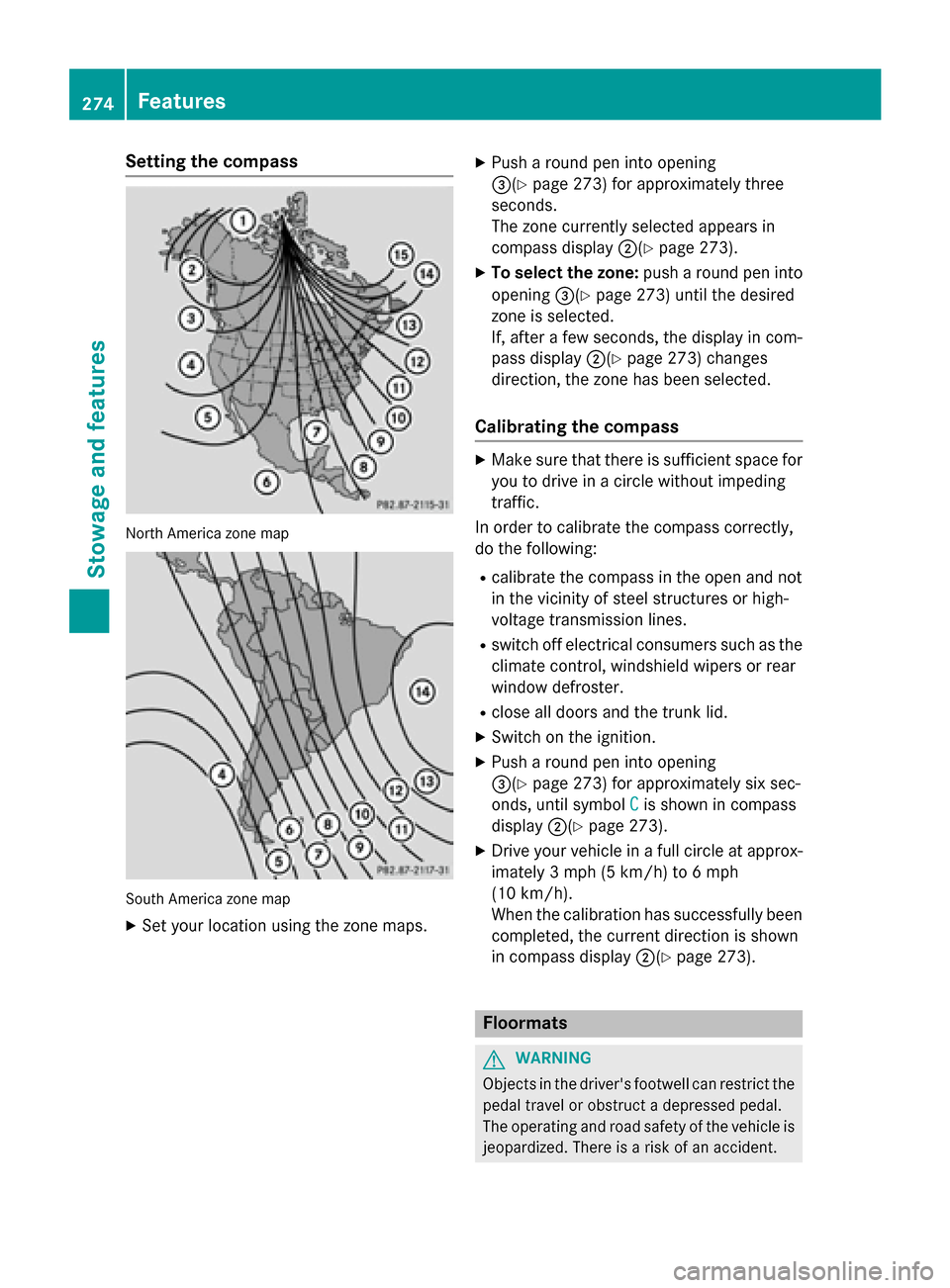
Setting the compass
North America zone map
South America zone map
X Set your location using the zone maps. X
Push a round pen into opening
0087(Y page 273) for approximately three
seconds.
The zone currently selected appears in
compass display 0044(Ypage 273).
X To select the zone: push a round pen into
opening 0087(Ypage 273) until the desired
zone is selected.
If, after a few seconds, the display in com-
pass display 0044(Ypage 273) changes
direction, the zone has been selected.
Calibrating the compass X
Make sure that there is sufficient space for
you to drive in a circle without impeding
traffic.
In order to calibrate the compass correctly,
do the following:
R calibrate the compass in the open and not
in the vicinity of steel structures or high-
voltage transmission lines.
R switch off electrical consumers such as the
climate control, windshield wipers or rear
window defroster.
R close all doors and the trunk lid.
X Switch on the ignition.
X Push a round pen into opening
0087(Y page 273) for approximately six sec-
onds, until symbol C
C is shown in compass
display 0044(Ypage 273).
X Drive your vehicle in a full circle at approx-
imately 3 mph (5 km/h) to 6 mph
(10 km/h).
When the calibration has successfully been completed, the current direction is shown
in compass display 0044(Ypage 273). Floormats
G
WARNING
Objects in the driver's footwell can restrict the pedal travel or obstruct a depressed pedal.
The operating and road safety of the vehicle is
jeopardized. There is a risk of an accident. 274
FeaturesStowage and features