2015 MERCEDES-BENZ SL-Class reset
[x] Cancel search: resetPage 184 of 610

X
To adjust the set speed in 1 mph incre-
ments (1 km/h increments): briefly
press the cruise control lever up 0043to the
pressure point for a higher speed or
down 0044for a lower speed.
Every time the cruise control lever is
pressed up or down, the last speed stored
is increased or reduced.
X To adjust the set speed in 5 mph incre-
ments (10 km/h increments): briefly
press the cruise control lever up 0043past
the pressure point for a higher speed or
down 0044for a lower speed.
Every time the cruise control lever is
pressed up or down, the last speed stored
is increased or reduced.
i Cruise control is not deactivated if you
depress the accelerator pedal. For exam-
ple, if you accelerate briefly to overtake,
cruise control adjusts the vehicle's speed
to the last speed stored after you have fin- ished overtaking.
Deactivating cruise control Cruise control lever
There are several ways to deactivate cruise
control:
X Briefly press the cruise control lever for-
wards 0043.
or X Brake. Cruise control is automatically deactivated if:
R you engage the electric parking brake
R you are driving at less than 20 mph
(30 km/h)
R ESP ®
intervenes or you deactivate ESP ®
R you shift the transmission to position N
while driving
If cruise control is deactivated, you will hear a
warning tone. You will see the Cruise Con‐
Cruise Con‐
trol Off trol Off message in the multifunction dis-
play for approximately five seconds.
i When you switch off the engine, the last
speed stored is cleared. DISTRONIC PLUS
General notes DISTRONIC PLUS regulates the speed and
automatically helps you maintain the dis-
tance to the vehicle detected in front. DIS-
TRONIC PLUS brakes automatically so that
the set speed is not exceeded.
On long and steep downhill gradients, espe-
cially if the vehicle is laden, you must select a lower gear in good time. By doing so, you will make use of the braking effect of the engine.
This relieves the load on the brake system and prevents the brakes from overheating and
wearing too quickly.
If a slower-moving vehicle is detected in front,
DISTRONIC PLUS brakes your vehicle. It
maintains the preset distance to the vehicle in front.
If DISTRONIC PLUS detects that there is a risk of a collision, you will be warned visually and
acoustically. DISTRONIC PLUS cannot pre-
vent a collision without your intervention. An
intermittent warning tone will then sound and
the distance warning lamp will light up in the instrument cluster. Brake immediately in
order to increase the distance to the vehicle
in front or take evasive action provided it is
safe to do so. 182
Driving systemsDriving an
d parking
Page 188 of 610
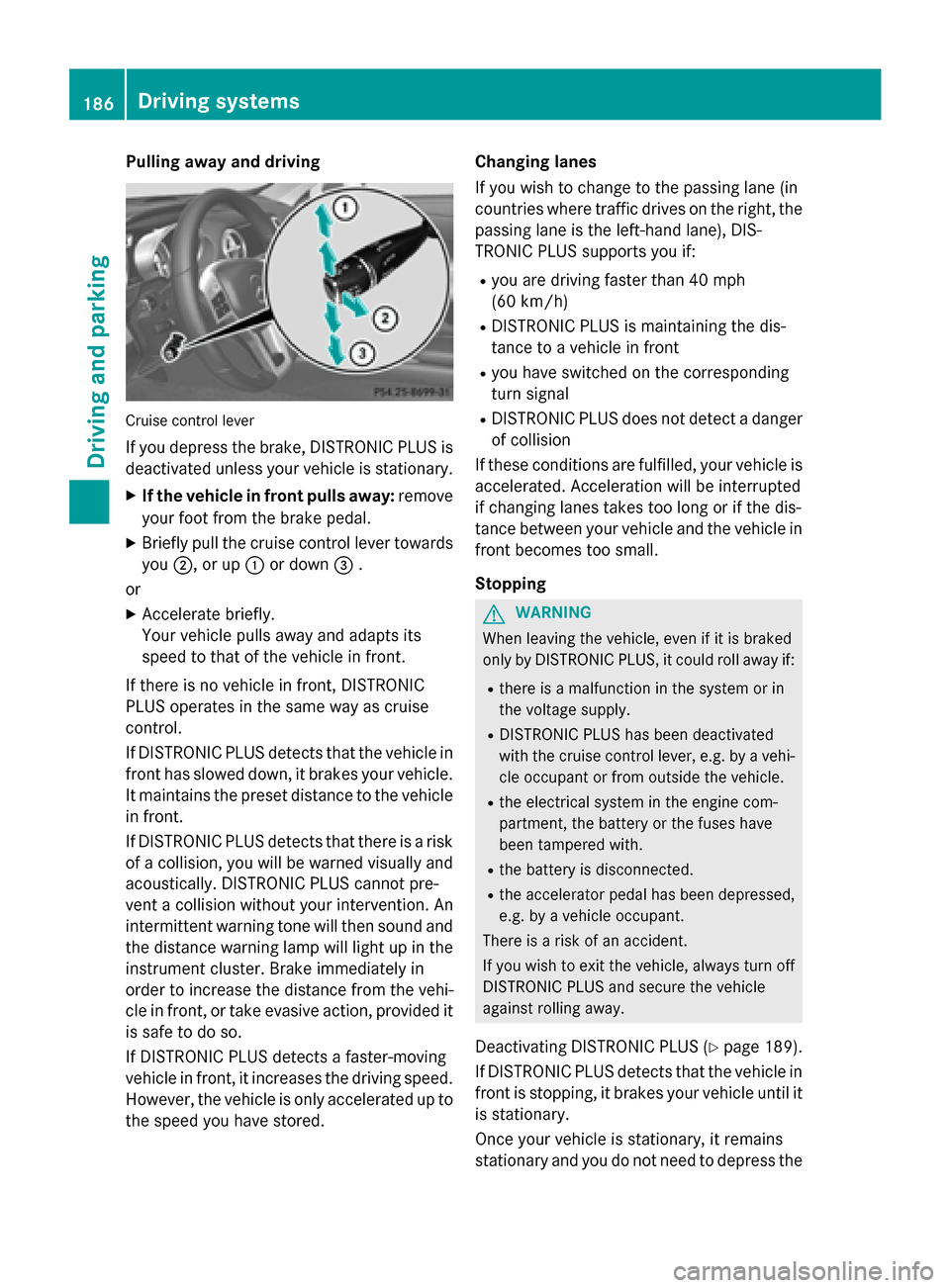
Pulling away and driving
Cruise control lever
If you depress the brake, DISTRONIC PLUS is deactivated unless your vehicle is stationary.
X If the vehicle in front pulls away: remove
your foot from the brake pedal.
X Briefly pull the cruise control lever towards
you 0044, or up 0043or down 0087.
or X Accelerate briefly.
Your vehicle pulls away and adapts its
speed to that of the vehicle in front.
If there is no vehicle in front, DISTRONIC
PLUS operates in the same way as cruise
control.
If DISTRONIC PLUS detects that the vehicle in front has slowed down, it brakes your vehicle.
It maintains the preset distance to the vehicle
in front.
If DISTRONIC PLUS detects that there is a risk of a collision, you will be warned visually and acoustically. DISTRONIC PLUS cannot pre-
vent a collision without your intervention. An
intermittent warning tone will then sound and
the distance warning lamp will light up in the instrument cluster. Brake immediately in
order to increase the distance from the vehi-
cle in front, or take evasive action, provided it
is safe to do so.
If DISTRONIC PLUS detects a faster-moving
vehicle in front, it increases the driving speed.
However, the vehicle is only accelerated up to the speed you have stored. Changing lanes
If you wish to change to the passing lane (in
countries where traffic drives on the right, the passing lane is the left-hand lane), DIS-
TRONIC PLUS supports you if:
R you are driving faster than 40 mph
(60 km/h)
R DISTRONIC PLUS is maintaining the dis-
tance to a vehicle in front
R you have switched on the corresponding
turn signal
R DISTRONIC PLUS does not detect a danger
of collision
If these conditions are fulfilled, your vehicle is
accelerated. Acceleration will be interrupted
if changing lanes takes too long or if the dis-
tance between your vehicle and the vehicle in front becomes too small.
Stopping G
WARNING
When leaving the vehicle, even if it is braked
only by DISTRONIC PLUS, it could roll away if:
R there is a malfunction in the system or in
the voltage supply.
R DISTRONIC PLUS has been deactivated
with the cruise control lever, e.g. by a vehi-
cle occupant or from outside the vehicle.
R the electrical system in the engine com-
partment, the battery or the fuses have
been tampered with.
R the battery is disconnected.
R the accelerator pedal has been depressed,
e.g. by a vehicle occupant.
There is a risk of an accident.
If you wish to exit the vehicle, always turn off
DISTRONIC PLUS and secure the vehicle
against rolling away.
Deactivating DISTRONIC PLUS (Y page 189).
If DISTRONIC PLUS detects that the vehicle in front is stopping, it brakes your vehicle until it
is stationary.
Once your vehicle is stationary, it remains
stationary and you do not need to depress the 186
Driving systemsDriving an
d parking
Page 212 of 610

The functionality of ATTENTION ASSIST is
restricted and warnings may be delayed or
not occur at all:
R if the road condition is poor, e.g. if the sur-
face is uneven or if there are potholes
R if there is a strong side wind
R if you have adopted a sporty driving style
with high cornering speeds or high rates of
acceleration
R if you are predominantly driving slower
than 50 mph (80 km/h) or faster than
112 mph (180 km/h)
R if you are currently using COMAND or mak-
ing a telephone call with it
R if the time has been set incorrectly
R in active driving situations, such as when
you change lanes or change your speed
ATTENTION ASSIST is only an aid to the
driver. It might not always recognize fatigue
or increasing inattentiveness in time or fail to
recognize them at all. The system is not a
substitute for a well-rested and attentive
driver.
Warning and display messages in the
multifunction display X
Activate ATTENTION ASSIST using the on-
board computer (Y page 231).
If ATTENTION ASSIST is active, you will be
warned no sooner than 20 minutes after
your journey has begun. You then hear an
intermittent warning tone twice and the
Attention Assist: Take a Break!
Attention Assist: Take a Break!
message appears in the multifunction dis-
play.
X If necessary, take a break.
X Press the 0076or0038 button to confirm
the message.
On long journeys, take regular breaks in good time to allow yourself to rest properly. If you
do not take a break and ATTENTION ASSIST
still detects increasing lapses in concentra-
tion, you will be warned again after
15 minutes at the earliest. ATTENTION ASSIST is reset when you con-
tinue your journey and starts assessing your
tiredness again if:
R you switch off the engine.
R you take off your seat belt and open the
driver's door, e.g. for a change of drivers or
to take a break.
When ATTENTION ASSIST is deactivated, the 00D7 symbol appears in the multifunction
display in the assistance graphics display. Night View Assist Plus
General notes In addition to the illumination provided by the
normal headlamps, Night View Assist Plus
uses infrared light to illuminate the road.
Camera 0044of Night View Assist Plus picks up
the infrared light and displays a black and
white image in COMAND. The image shown in COMAND corresponds to a road lit up by high-
beam headlamps. This enables you to see the
road's course and any obstacles in good time. When pedestrian recognition is active, pedes-
trians recognized by the system are visually
highlighted in color in the Night View Assist
Plus display with small frame corners.
i Infrared light is not visible to the human
eye and therefore does not glare. Night
View Assist Plus can therefore remain
switched on even if there is oncoming traf- fic. 210
Driving systemsDriving and parking
Page 227 of 610

0083
Time (Y page 307)
0084 Outside temperature or speed
(Ypage 232)
Text field 0087shows the selected menu or
submenu as well as display messages.
X To show menu bar 0085:press the 0059
or 0065 button on the steering wheel.
Menu bar 0085disappears after a few sec-
onds of inactivity.
The following messages may appear in the
multifunction display:
0097 Gearshift recommendation when
shifting manually (Y page 165)
0095005D0096 Active Parking Assist (Y page 202)
CRUISE
CRUISE Cruise control (Y
page 180)
00CE Adaptive Highbeam Assist
(Ypage 128)
00D6 ECO start/stop function
(Ypage 155)
00D9 HOLD function (Y page 191) Menus and submenus
Menu overview
Press the 0059or0065 button on the steer-
ing wheel to call up the menu bar and select a
menu.
Operating the on-board computer
(Y page 223).
Depending on the equipment installed in the
vehicle, you can call up the following menus:
R Trip Trip menu (Y page 225)
R Navi
Navi menu (navigation instructions)
(Y page 227)
R Audio
Audio menu (Y page 228)
R Tel
Tel menu (telephone) (Y page 229)
R DriveAssist
DriveAssist menu (assistance)
(Y page 230)
R Serv
Serv menu (Y page 231)
R Sett
Sett menu (settings) (Y page 232)
R AMG
AMG menu in AMG vehicles (Y page 236) Trip menu
Standard display X
Press and hold the 0038button on the
steering wheel until the Trip
Tripmenu with
trip odometer 0043and odometer 0044is
shown.
Trip computer "From Start" or "From
Reset" Example: trip computer "From Start"
0043 Distance
0044 Time
0087 Average speed
0085 Average fuel consumption
X Press the 0059or0065 button on the steer-
ing wheel to select the Trip Tripmenu.
X Press the 0063or0064 button to select
From Start From Start orFrom Reset
From Reset.
The values in the From Start
From Startsubmenu are
calculated from the start of a journey whilst
the values in the From Reset From Resetsubmenu are
calculated from the last time the submenu
was reset (Y page 226).
The From Start From Start trip computer is automati-
cally reset when:
R the ignition has been switched off for more
than four hours.
R 999 hours have been exceeded.
R 9,999 miles have been exceeded. Menus and submenus
225On-board computer and displays Z
Page 228 of 610

The
From Reset
From Reset trip computer is automati-
cally reset if the value exceeds 9,999 hours or
99,999 miles.
ECO display Example: ECO display
X Press the 0059or0065 button on the steer-
ing wheel to select the Trip Tripmenu.
X Press the 0063or0064 button to select
ECO DISPLAY
ECO DISPLAY.
If the ignition remains switched off for longer than four hours, the ECO display will be auto-
matically reset.
For further information on the ECO display,
see (Y page 175).
Displaying the range and current fuel
consumption X
Press the 0059or0065 button on the steer-
ing wheel to select the Trip Tripmenu.
X Press the 0063or0064 button to select the
current fuel consumption (not for AMG
vehicles) and the approximate range.
The approximate range that can be covered
depends on the fuel level and your current
driving style. If there is only a small amount of fuel left in the fuel tank, the display shows a
vehicle being refueled 00A8instead of the
range. Digital speedometer
0043
Shift recommendation (Y page 165)
0044 Digital speedometer
Gearshift recommendation 0043is not given on
AMG vehicles.
X Press the 0059or0065 button on the steer-
ing wheel to select the Trip Tripmenu.
X Press the 0063or0064 button to select the
digital speedometer.
Resetting values Example: resetting the trip computer "From Start"
X Press the 0059or0065 button on the steer-
ing wheel to select the Trip
Tripmenu.
X Press the 0063or0064 button to select the
function that you wish to reset.
X Press the 0076button.
X Press the 0064button to select Yes
Yesand
press the 0076button to confirm.
You can reset the values of the following func-
tions:
R Trip odometer
R "From Start" trip computer
R "From Reset" trip computer
R ECO display
i If you reset the values in the ECO display,
the values in the "From start" trip computer are also reset. If you reset the values in the 226
Menus and submenusOn-board computer and displays
Page 229 of 610

"From start" trip computer, the values in
the ECO display are also reset. Navigation system menu
Displaying navigation instructions In the
Navi
Navimenu, the multifunction display
shows navigation instructions. For further
information on navigation, see (Y page 318).
X Switch on COMAND (Y page 295).
X Press the 0059or0065 button on the steer-
ing wheel to select the Navi Navimenu.
Route guidance not active 0043
Direction of travel
0044 Current road
Route guidance active No change of direction announced
0043
Distance to the destination
0044 Distance to the next change of direction
0087 Current road
0085 "Follow the road's course" symbol Change of direction announced without a
lane recommendation 0043
Road into which the change of direction
leads
0044 Distance to change of direction and visual
distance display
0087 Change-of-direction symbol
When a change of direction is announced, you
will see symbol 0087for the change of direction
and distance graphic 0044. The distance indi-
cator shortens towards the top of the display
as you approach the point of the announced
change of direction.
Change of direction announced with a
lane recommendation 0043
Road into which the change of direction
leads
0044 Distance to change of direction and visual
distance display
0087 Recommended lane and new lane during a
change of direction
0085 Lanes not recommended
0083 Recommended lane
0084 Change-of-direction symbol
On multilane roads, lane recommendations
can be displayed for the next change of direc-
tion if the digital map supports this data. Dur- ing the change of direction, new lanes may beadded.
Recommended lane and new lane during a
change of direction 0087: in this lane you will be Menus and submenus
227On-board computer and displays Z
Page 238 of 610

displayed in orange in the multifunction
display.
X Press the 0076button to save the setting. 0043
To fold the exterior mirrors in or out
If you have switched the Auto. Mirror
Auto. Mirror
Folding
Folding on and you fold the exterior mirrors
in using button 0043, they will not fold out
automatically (Y page 117).
You can then only fold out the exterior mirrors
using button 0043.
If you have switched the function on and you fold the exterior mirrors in using the button on
the door (Y page 117), they will not fold out
automatically. The exterior mirrors can then
only be folded out using the button on the
door.
Restoring the factory settings X
Press the 0059or0065 button on the steer-
ing wheel to select the Sett. Sett.menu.
X Press the 0064or0063 button to select the
Factory Setting
Factory Setting submenu.
X Press 0076to confirm.
The Reset All Settings?
Reset All Settings? message
appears.
X Press the 0064or0063 button to select No
No
or Yes
Yes.
X Press the 0076button to confirm the selec-
tion.
If you have selected Yes
Yes, the multifunction
display shows a confirmation message.
For safety reasons, the Daytime Running Daytime Running
Lights
Lights function in the Light
Lightsubmenu is only
reset if the vehicle is stationary. AMG menu in AMG vehicles
AMG displays 0043
Digital speedometer
0044 Gear indicator
0087 Upshift indicator
0085 Engine oil temperature
0083 Coolant temperature
0084 Transmission fluid temperature
X Press 0059or0065 on the steering wheel
to select the AMG
AMG menu.
Upshift indicator UP
UP0087 indicates that the
engine has reached the overrevving range
when in the manual gearshift program.
Upshift indicator UP
UP 0087 fades out other
messages until you have shifted up.
If the engine oil temperature is below
160 ‡(71 †), oil temperature 0085is shown
in blue. Avoid driving at full engine output
during this time.
If the transmission fluid temperature is
below 122 ‡ (50 †), oil temperature 0084is
shown in blue. Avoid driving at full engine
output during this time.
SETUP 0043
Drive program (C C/SS+SS+/M M)
0044 ESP ®
mode (ON ON/OFFOFF) or SPORT handling
mode (SPORT SPORT)
0087 Suspension tuning (SPORT SPORT/COMFORT COMFORT) 236
Menus and submenusOn-board computer and displays
Page 239 of 610

SETUP shows the drive program, the ESP
®
(Electronic Stability Program) mode and the
SPORT handling mode.
X Press the 0059or0065 button on the steer-
ing wheel to select the AMG
AMGmenu.
X Press the 0063button repeatedly until
SETUP is displayed.
or X Briefly press the AMG button on the center
console (Y page 163).
RACETIMER Displaying and starting RACETIMER
The RACETIMER is only intended for use on a
closed race circuit. Do not use the function on
public roads. 0043
Lap
0044 RACETIMER
You can start the RACETIMER when the
engine is running or if the SmartKey is in posi-
tion 2in the ignition lock.
X Press 0059or0065 on the steering wheel
to select the AMG
AMG menu.
X Press the 0063button repeatedly until the
RACETIMER is shown.
X To start: press the 0076button to start the
RACETIMER.
Displaying the intermediate time X
Press the 0059or0065 button to select
Interm. Time Interm. Time.
X Press 0076to confirm.
The intermediate time is displayed for five
seconds.
Starting a new lap 0043
RACETIMER
0044 Fastest lap time (best lap)
0087 Lap
X Press 0076to confirm New Lap New Lap.
i It is possible to store a maximum of six-
teen laps. The 16th lap can only be com-
pleted with Finish Lap Finish Lap .
Stopping the RACETIMER X
Press the 0038button on the steering
wheel.
X Press 0076to confirm Yes
Yes.
The RACETIMER interrupts timing when you
stop the vehicle and turn the SmartKey to
position 1in the ignition lock. If you turn the
SmartKey to position 2or 3and then press
0076 to confirm Start
Start, timing is continued.
Resetting the current lap
X Stop the RACETIMER.
X Press the 0059or0065 button to select
Reset Lap
Reset Lap .
X Press 0076to reset the lap time to "0". Menus and submenus
237On-board computer and displays Z